Microsoft SC-401 Practice Exams
Last updated on Nov 16,2026- Exam Code: SC-401
- Exam Name: Administering Information Security in Microsoft 365
- Certification Provider: Microsoft
- Latest update: Nov 16,2026
Note: This question is part of a series of questions that present the same scenario. Each question in the series contains a unique solution that might meet the stated goals. Some question sets might have more than one correct solution, while others might not have a correct solution.
After you answer a question in this section, you will NOT be able to return to it. As a result, these questions will not appear in the review screen.
You recently discovered that the developers at your company emailed Azure Storage Account keys in plain text to third parties.
You need to ensure that when Azure Storage Account keys are emailed, the emails are encrypted.
Solution: You configure a mail flow rule that matches a sensitive info type.
Does this meet the goal?
- A . Yes
- B . No
B
Explanation:
To ensure Azure Storage Account keys are encrypted when sent via email, you need a Data Loss Prevention (DLP) policy that detects Azure Storage Account keys using a sensitive information type and automatically encrypts emails containing these keys.
Mail flow rules (transport rules) can detect sensitive info, but they are limited in encryption capabilities.
DLP policies provide more advanced protection and integration with Microsoft Purview for sensitive info detection.
HOTSPOT
You have a Microsoft SharePoint Online site that contains the following files.

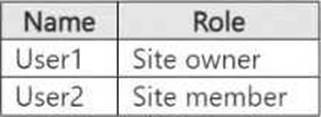
Users are assigned roles for the site as shown in the following table.
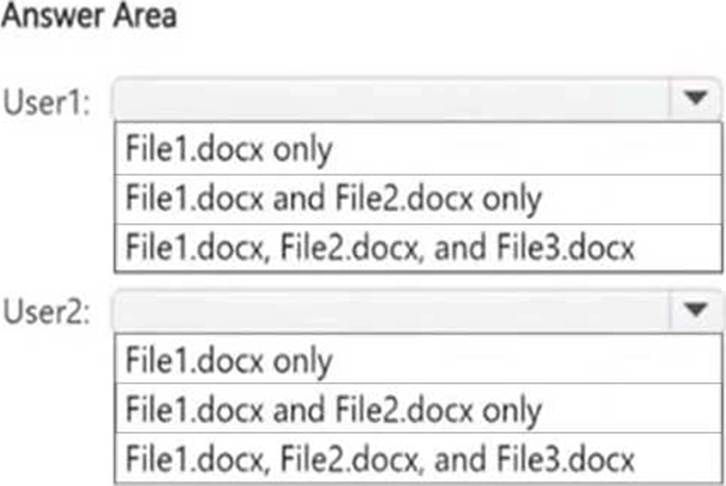
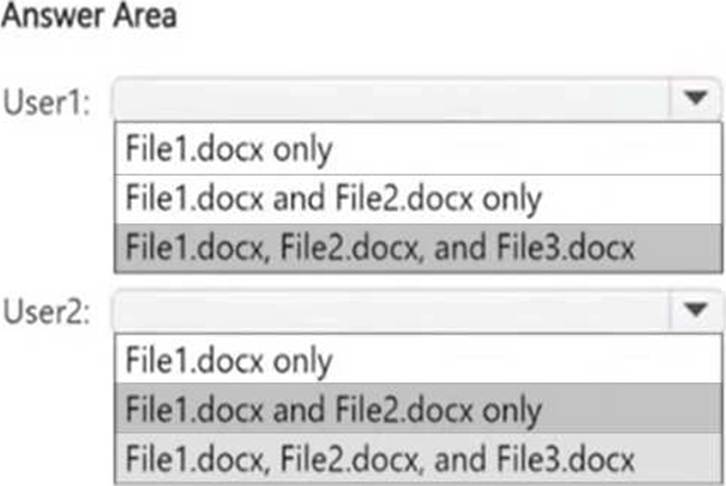
Which files can User1 and User2 open? To answer, select the appropriate options in the answer area. NOTE: Each correct selection is worth one point.
HOTSPOT
You have a Microsoft SharePoint Online site that contains the following files.
Users are assigned roles for the site as shown in the following table.
Which files can User1 and User2 open? To answer, select the appropriate options in the answer area. NOTE: Each correct selection is worth one point.
HOTSPOT
You are reviewing policies for the SharePoint Online environment.
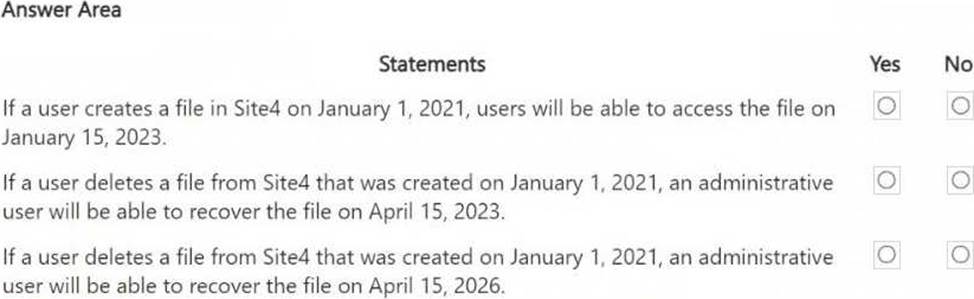
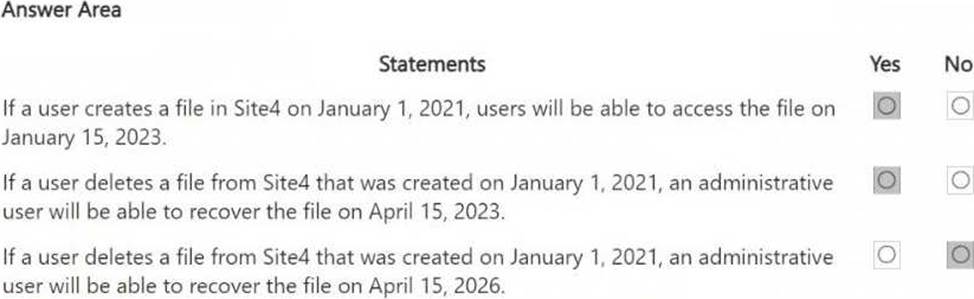
For each of the following statements, select Yes if the statement is true. Otherwise, select No. NOTE: Each correct selection is worth one point.
Explanation:
Understanding Site4’s Retention Policies:
● Site4RetentionPolicy1 deletes items older than 2 years from creation. If a file was created on January 1, 2021, it would be deleted after January 1, 2023.
● Site4RetentionPolicy2 retains files for 4 years from creation. If a file was created on January 1, 2021, it will be kept until January 1, 2025, but not deleted after that (policy states "Do nothing").
Statement 1 – Yes, because Site4RetentionPolicy2 ensures files are retained for 4 years.
Statement 2 – Yes, because Site4RetentionPolicy2 retains the file for 4 years (until January 1, 2025). Statement 3 – No, because retention is only for 4 years (until January 1, 2025). After that, the policy does "nothing," meaning the file is no longer recoverable after that period.
HOTSPOT
You have a Microsoft 365 E5 subscription.
You need to implement a compliance solution that meets the following requirements:
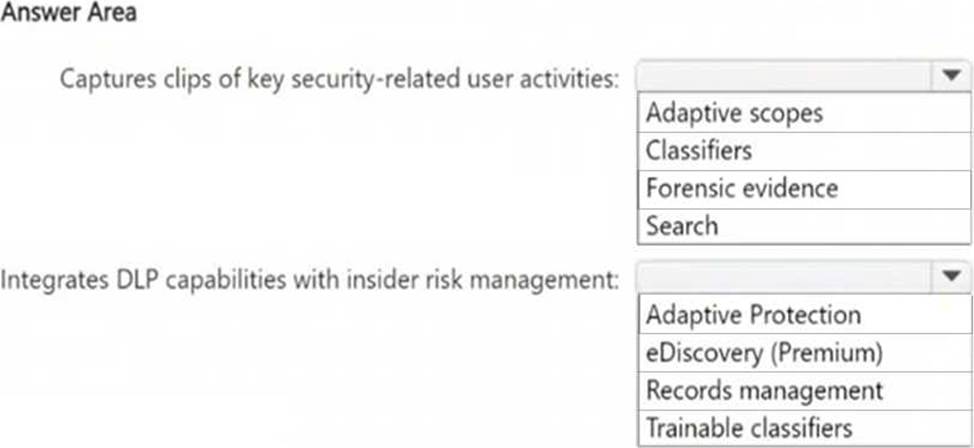
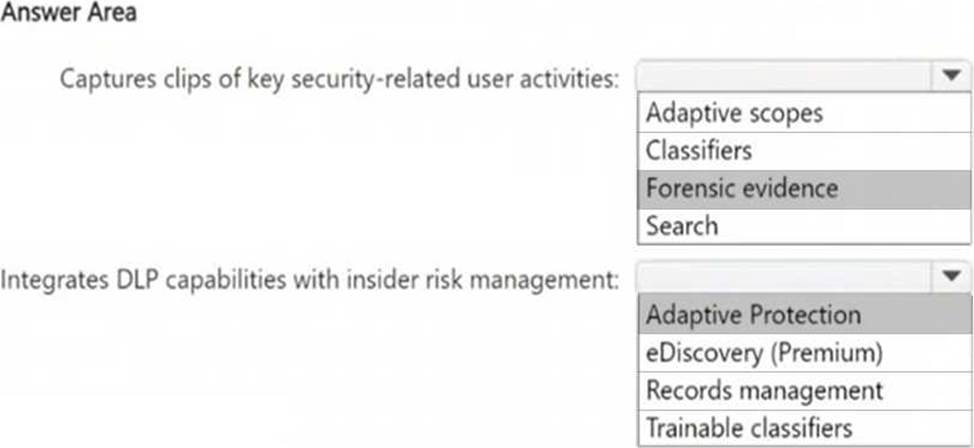
● Captures clips of key security-related user activities, such as the exfiltration of sensitive company data.
● Integrates data loss prevention (DLP) capabilities with insider risk management.
What should you use for each requirement? To answer, select the appropriate options in the answer area. NOTE: Each correct selection is worth one point.
DRAG DROP
You have a Microsoft 365 E5 subscription that uses Microsoft Defender for Cloud Apps.
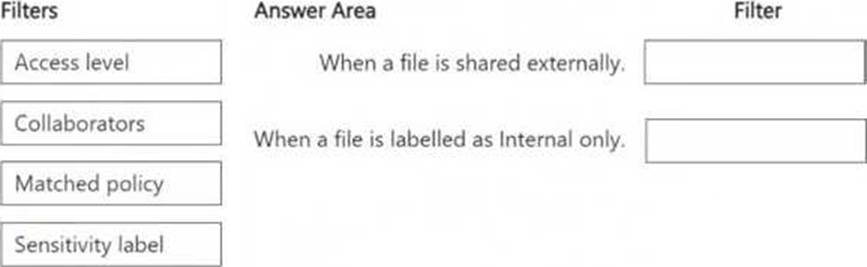
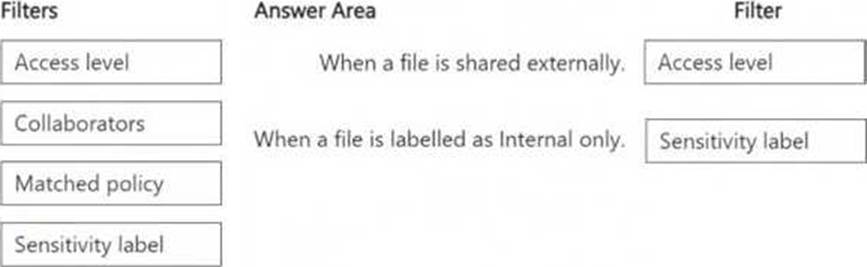
You plan to deploy a Defender for Cloud Apps file policy that will be triggered when the following conditions are met:
● A file is shared externally.
● A file is labeled as internal only.
Which filter should you use for each condition? To answer, drag the appropriate filters to the correct conditions. Each filter may be used once, more than once, or not at all. You may need to drag the split bar between panes or scroll to view content. NOTE: Each correct selection is worth one point.
You are creating a data loss prevention (DLP) policy that will apply to all available locations except Fabric and Power BI workspaces.
You configure an advanced DLP rule in the policy.
Which type of condition can you use in the rule?
- A . Sensitive info type
- B . Content search query
- C . Sensitive label
- D . Keywords
A
Explanation:
When configuring an advanced DLP rule in Microsoft Purview Data Loss Prevention (DLP), you can use a Sensitive Information Type (SIT) condition to detect and classify specific types of sensitive data, such as credit card numbers, Social Security numbers, or custom sensitive data patterns. This allows you to apply protection and trigger actions based on the identified content.
You are planning a data loss prevention (DLP) solution that will apply to Windows Client computers.
You need to ensure that when users attempt to copy a file that contains sensitive information to a USB storage device, the following requirements are met:
● If the users are members of a group named Group1, the users must be allowed to copy the file, and an event must be recorded in the audit log.
● All other users must be blocked from copying the file.
What should you create?
- A . one DLP policy that contains one DLP rule
- B . one DLP policy that contains two DLP rules
- C . two DLP policies that each contains one DLP rule
B
Explanation:
To meet the requirements, you need one DLP policy with two separate DLP rules to handle the different conditions:
You have a Microsoft 365 subscription.
You need to ensure that users can apply retention labels to individual documents in their Microsoft SharePoint libraries.
Which two actions should you perform? Each correct answer presents part of the solution. NOTE: Each correct selection is worth one point.
- A . From Microsoft Defender for Cloud Apps, create a file policy.
- B . From the SharePoint admin center, modify the Site Settings.
- C . From the SharePoint ad min center, modify the records management settings.
- D . From the Microsoft Purview portal, publish a label.
- E . From the Microsoft Purview portal, create a label.
D, E
Explanation:
To allow users to apply retention labels to individual documents in Microsoft SharePoint libraries, you need to create a retention label and publish the label.
In Microsoft Purview, retention labels define how long content should be retained or deleted. You must first create a label that specifies the retention rules. After creating the label, you must publish it so that it becomes available for users in SharePoint document libraries. Once published, users can manually apply the retention label to individual documents.
DRAG DROP
You have a Microsoft 365 E5 subscription that has data loss prevention (DLP) implemented.
You need to create a custom sensitive info type.
The solution must meet the following requirements:
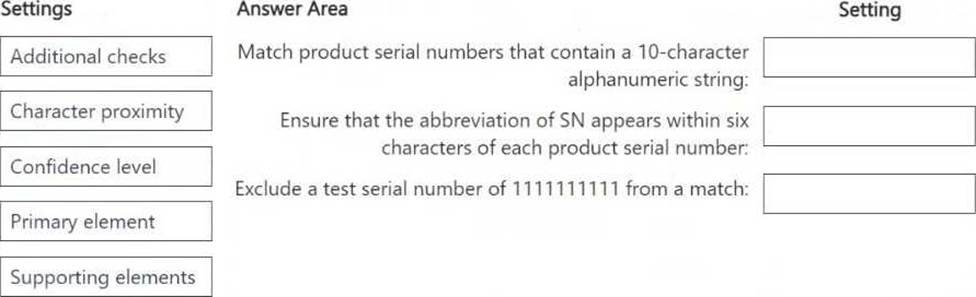
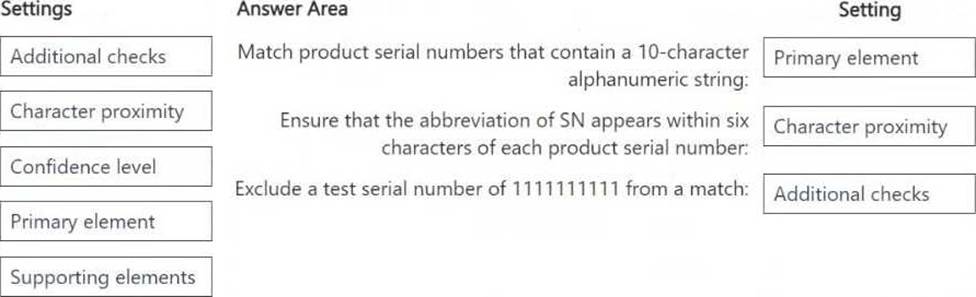
● Match product serial numbers that contain a 10-character alphanumeric string.
● Ensure that the abbreviation of SN appears within six characters of each product serial number.
● Exclude a test serial number of 1111111111 from a match.
Which pattern settings should you configure for each requirement? To answer, drag the appropriate settings to the correct requirements. Each setting may be used once, more than once, or not at all. You may need to drag the split bar between panes or scroll to view content. NOTE: Each correct selection is worth one point.