
Microsoft SC-401 Practice Exams
Last updated on Nov 16,2026- Exam Code: SC-401
- Exam Name: Administering Information Security in Microsoft 365
- Certification Provider: Microsoft
- Latest update: Nov 16,2026
You have a Microsoft 365 E5 subscription that contains a retention policy named RP1 as shown in the following table.
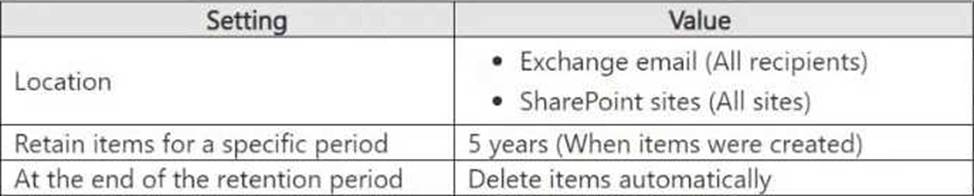
You place a preservation lock on RP1.
You need to modify RP1.
Which two modifications can you perform? Each correct answer presents part of the solution. NOTE: Each correct selection is worth one point.
- A . Add locations to the policy.
- B . Delete the policy.
- C . Remove locations from the policy.
- D . Decrease the retention period of the policy.
- E . Disable the policy.
- F . Increase the retention period of the policy.
A, F
Explanation:
A Preservation Lock in Microsoft Purview Retention Policies enforces strict compliance and prevents certain modifications to ensure data is retained according to compliance requirements.
When a Preservation Lock is applied:
HOTSPOT
You have a Microsoft 365 E5 subscription that contains three DOCX files named File1, File2, and File3.
You create the sensitivity labels shown in the following table.

You apply the labels to the files as shown in the following table.
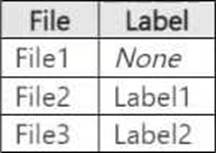
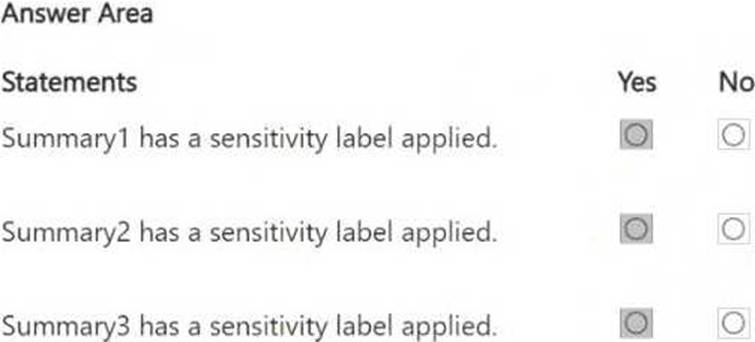
You ask Microsoft 365 Copilot to summarize the files, and you receive the results shown in the following table.
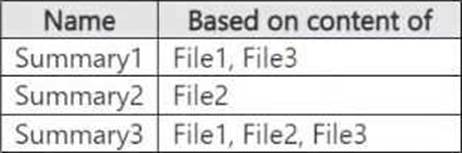
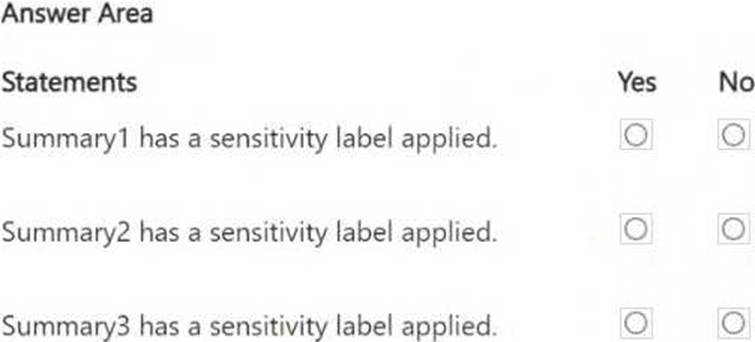
For each of the following statements, select Yes if the statement is true. Otherwise, select No. NOTE: Each correct selection is worth one point.
HOTSPOT
You have a Microsoft 365 E5 subscription that contains three DOCX files named File1, File2, and File3.
You create the sensitivity labels shown in the following table.
You apply the labels to the files as shown in the following table.
You ask Microsoft 365 Copilot to summarize the files, and you receive the results shown in the following table.
For each of the following statements, select Yes if the statement is true. Otherwise, select No. NOTE: Each correct selection is worth one point.
HOTSPOT
You have a Microsoft 365 E5 subscription that contains three DOCX files named File1, File2, and File3.
You create the sensitivity labels shown in the following table.
You apply the labels to the files as shown in the following table.
You ask Microsoft 365 Copilot to summarize the files, and you receive the results shown in the following table.
For each of the following statements, select Yes if the statement is true. Otherwise, select No. NOTE: Each correct selection is worth one point.
Note: This question is part of a series of questions that present the same scenario. Each question in the series contains a unique solution that might meet the stated goals. Some question sets might have more than one correct solution, while others might not have a correct solution.
After you answer a question in this section, you will NOT be able to return to it. As a result, these questions will not appear in the review screen.
You have a Microsoft 365 tenant and 500 computers that run Windows 11. The computers are onboarded to Microsoft Purview.
You discover that a third-party application named Tailspin_scanner.exe accessed protected sensitive information on multiple computers. Tailspin_scanner.exe is installed locally on the computers.
You need to block Tailspin_scanner.exe from accessing sensitive documents without preventing the application from accessing other documents.
Solution: From the Microsoft Defender for Cloud Apps, you mark the application as Unsanctioned.
Does this meet the goal?
- A . Yes
- B . No
B
Explanation:
Marking Tailspin_scanner.exe as "Unsanctioned" in Microsoft Defender for Cloud Apps only blocks its usage in cloud-based activities (such as accessing SharePoint, OneDrive, or Exchange Online). However, it does not prevent a locally installed application on Windows 11 devices from accessing sensitive files.
To block Tailspin_scanner.exe from accessing sensitive documents while allowing it to access other files, the correct solution is to use Microsoft Purview Endpoint Data Loss Prevention (Endpoint DLP) and add Tailspin_scanner.exe to the Restricted Apps list.
Endpoint DLP allows you to block specific applications from accessing sensitive files while keeping general access available. Restricted Apps List in Endpoint DLP ensures that Tailspin_scanner.exe cannot open, copy, or process protected documents, but it can still function normally for non-sensitive content.
HOTSPOT
You have a Microsoft 365 E5 subscription that contains the users shown in the following table.
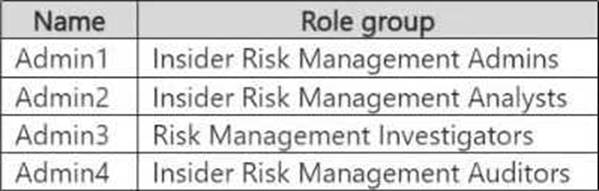
You plan to create a Microsoft Purview insider risk management case named Case1.
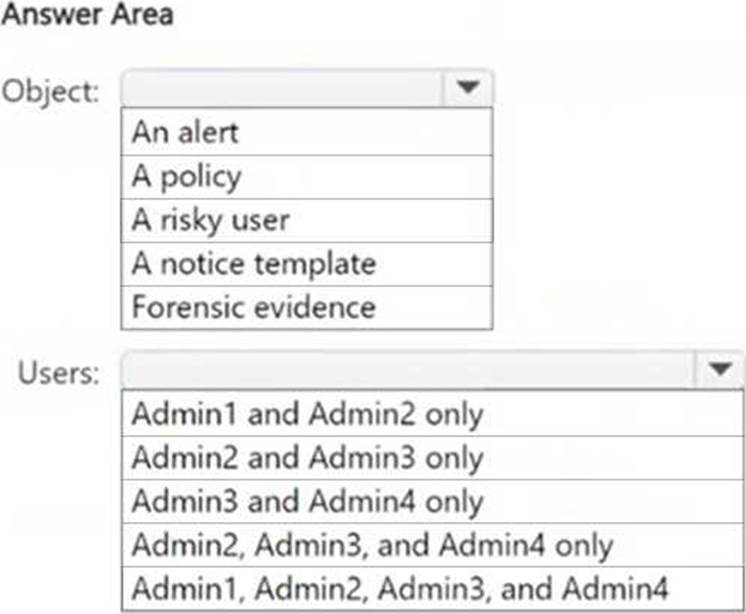
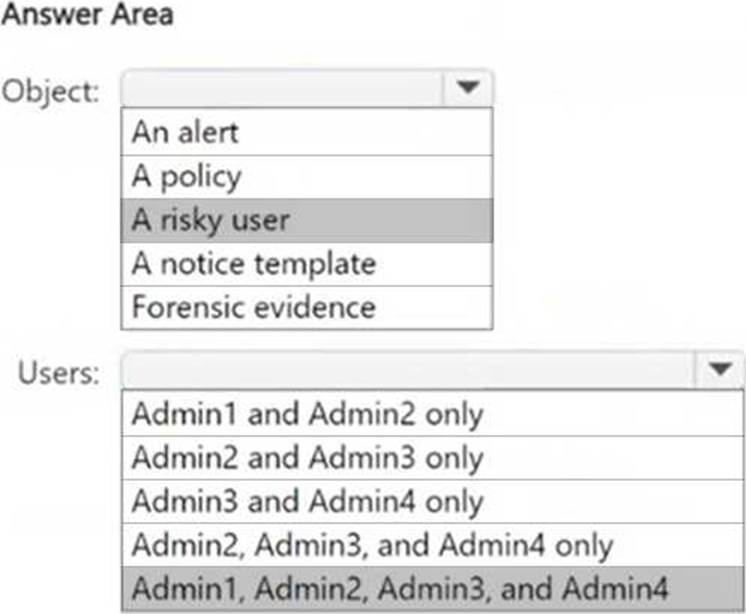
Which insider risk management object should you select first, and which users will be added as contributors for Case1 by default? To answer, select the appropriate options in the answer area. NOTE: Each correct selection is worth one point.
Explanation:
Box 1: When creating a Microsoft Purview Insider Risk Management case, you must first select a risky user to investigate. The case will be built around this specific user’s activities, linking alerts and risk signals to the investigation.
Box 2: The Insider Risk Management role groups determine who can access and contribute to cases:
● Admin1 (Insider Risk Management Admins) → Full admin access.
● Admin2 (Insider Risk Management Analysts) → Analysts who review cases.
● Admin3 (Risk Management Investigators) → Investigators who work on cases.
● Admin4 (Insider Risk Management Auditors) → Auditors who oversee cases.
All these roles have default access to insider risk cases in Microsoft Purview, so all four admins are added as contributors.
You have a Microsoft 365 E5 subscription.
You need to review a Microsoft 365 Copilot usage report.
From where should you review the report?
- A . Information Protection in the Microsoft Purview portal
- B . the Microsoft 365 admin center
- C . DSPM for Al in the Microsoft Purview portal
- D . the Microsoft Defender portal
C
Explanation:
To review a Microsoft 365 Copilot usage report, you need to use Data Security Posture Management for AI (DSPM for AI) in the Microsoft Purview portal. DSPM for AI provides insights into AI-related activities, including Copilot usage, risk assessments, and data security posture related to AI interactions within Microsoft 365.
You have a Microsoft 365 E5 subscription.
You need to prevent users from uploading data loss prevention (DLP)-protected documents to the following third-party websites:
● web1.contoso.com
● web2.contoso.com
The solution must minimize administrative effort.
To what should you set the Service domains setting for Endpoint DLP?
- A . *.contoso.com
- B . contoso.com
- C . web1.contoso.com and web2.contoso.com
- D . web*.contoso.com
C
Explanation:
The Service domains setting in Microsoft 365 Endpoint Data Loss Prevention (Endpoint DLP) allows administrators to block or allow specific domains for file uploads. The goal is to prevent users from uploading DLP-protected documents to web1.contoso.com and web2.contoso.com.
Setting the Service domains to "web1.contoso.com and web2.contoso.com" precisely targets the two specific third-party websites, minimizing administrative effort while ensuring strict control.
Your company has offices in multiple countries.
The company has a Microsoft 365 E5 subscription that uses Microsoft Purview insider risk management.
You plan to perform the following actions:
● In a new country, open an office named Office1.
● Create a new user named User1.
● Deploy insider risk management to Office1.
● Add User1 to the Insider Risk Management Admins role group.
You need to ensure that User1 can perform insider risk management tasks for only the users and the devices in Office1.
What should you create first?
- A . a dynamic device group
- B . a dynamic user group
- C . an administrative unit
- D . a management group
C
Explanation:
To ensure User1 can perform insider risk management tasks only for the users and devices in Office1, the first step is to create an administrative unit in Microsoft Entra ID (formerly Azure AD).
Administrative units allow you to scope permissions to specific users, devices, and locations. By creating an administrative unit for Office1 and assigning User1 to the Insider Risk Management Admins role group within that unit, User1 will only have access to users and devices in Office1.
You need to meet the technical requirements for the creation of the sensitivity labels.
To which user or users must you assign the Sensitivity Label Administrator role?
- A . Admin1 only
- B . Admin1 and Admin4 only
- C . Admin1 and Admin5 only
- D . Admin1, Admin2, and Admin3 only
- E . Admin1, Admin2, Admin4, and Admin5 only
D
Explanation:
To meet the requirement that all administrative users must be able to create Microsoft 365 sensitivity labels, we need to assign the Sensitivity Label Administrator role to the correct users.
Sensitivity Label Administrator Role Responsibilities
This role allows users to:
● Create and manage sensitivity labels in Microsoft Purview.
● Publish and configure auto-labeling policies.
● Modify label encryption and content marking settings.
Review of Admin Roles from the Table:
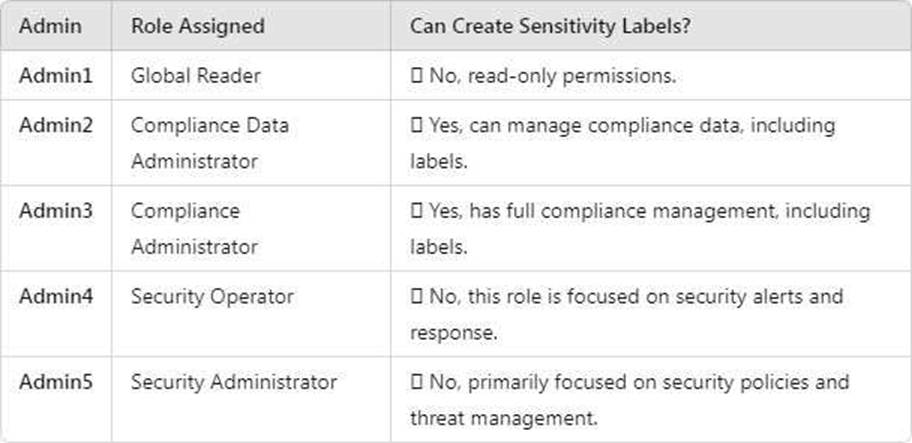
Users that must be assigned the Sensitivity Label Administrator role:
● Admin2 (Compliance Data Administrator)
● Admin3 (Compliance Administrator)
● Admin1 (Global Reader) (should be assigned this role to fulfill the requirement that all admins can create labels).