
Microsoft SC-401 Practice Exams
Last updated on Nov 16,2026- Exam Code: SC-401
- Exam Name: Administering Information Security in Microsoft 365
- Certification Provider: Microsoft
- Latest update: Nov 16,2026
You have a Microsoft 365 E5 subscription that contains a trainable classifier named Trainable1.
You plan to create the items shown in the following table.
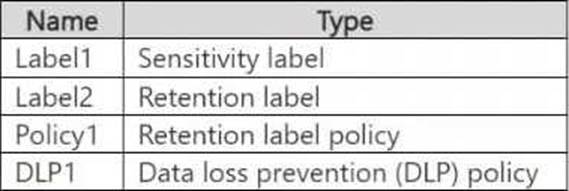
Which items can use Trainable 1?
- A . Label2 only
- B . Label1 and Label2 only
- C . Label1 and Policy1 only
- D . Label2, Policy1, and DLP1 only
- E . Label1, Label2, Policy1, and DLP1
D
Explanation:
A trainable classifier in Microsoft Purview is used to automatically identify and classify unstructured data based on content patterns.
The classifier can be used in:
You have a Microsoft 365 E5 subscription. The subscription contains 500 devices that are onboarded to Microsoft Purview.
You select Activate Microsoft Purview Audit.
You need to ensure that you can track interactions between users and generative AI websites.
What should you deploy to the devices?
- A . the Microsoft Purview extension
- B . the Microsoft Purview Information Protection client
- C . the Microsoft Defender Browser Protection extension
- D . Endpoint analytics
A
Explanation:
To track interactions between users and generative AI websites in Microsoft Purview Audit, you need to deploy the Microsoft Purview browser extension to the devices. This extension enables tracking of user activities on web-based applications, including AI-related tools like ChatGPT, Microsoft Copilot, and other generative AI platforms.
Microsoft Purview extension provides visibility into browser-based activities, including AI tool usage, ensuring compliance and risk management within Microsoft Purview. This extension works with Microsoft Edge and Google Chrome to track and log user interactions.
You have a Microsoft 365 E5 subscription that contains a Microsoft SharePoint Online site named Site1.
You need to implement Microsoft Purview data lifecycle management.
What should you create first?
- A . a sensitivity label policy
- B . a data loss prevention (DLP) policy
- C . an auto-labeling policy
- D . a retention label
D
Explanation:
To implement Microsoft Purview Data Lifecycle Management for SharePoint Online (Site1), you need to create a retention label first. Retention labels define how long content should be retained or deleted based on compliance requirements. Once a retention label is created, it can be manually or automatically applied to content in SharePoint Online, Exchange, OneDrive, and Teams. After creating a retention label, you can configure label policies to apply them to Site1 and other locations.
Note: This question is part of a series of questions that present the same scenario. Each question in the series contains a unique solution that might meet the stated goals. Some question sets might have more than one correct solution, while others might not have a correct solution.
After you answer a question in this section, you will NOT be able to return to it. As a result, these questions will not appear in the review screen.
You recently discovered that the developers at your company emailed Azure Storage Account keys in plain text to third parties.
You need to ensure that when Azure Storage Account keys are emailed, the emails are encrypted.
Solution: You create a data loss prevention (DLP) policy that has only the Exchange email location selected.
Does this meet the goal?
- A . Yes
- B . No
A
Explanation:
To ensure Azure Storage Account keys are encrypted when sent via email, you need a Data Loss Prevention (DLP) policy that detects Azure Storage Account keys using a sensitive information type and automatically encrypts emails containing these keys.
A DLP policy with Exchange email as the only location meets this requirement because it identifies sensitive data in email messages and it applies protection actions, such as encryption, blocking, or alerts.
You have a Microsoft 365 E5 subscription.
You plan to implement insider risk management for users that manage sensitive data associated with a project.
You need to create a protection policy for the users.
The solution must meet the following requirements:
● Minimize the impact on users who are NOT part of the project.
● Minimize administrative effort.
What should you do first?
- A . From the Microsoft Purview portal, create an insider risk management policy.
- B . From the Microsoft Entra admin center, create a security group.
C From the Microsoft Entra admin center create a User risk policy
D From the Microsoft Purview portal create a priority user group
B
Explanation:
To implement insider risk management for users managing sensitive project data while minimizing the impact on other users and reducing administrative effort, you should first create a security group in Microsoft Entra ID (formerly Azure AD).
Security groups allow you to scope insider risk management policies to specific users instead of applying policies to all users, which helps in minimizing unnecessary alerts and reducing administrative overhead. After creating the security group, you can assign this group to a Microsoft Purview Insider Risk Management policy, ensuring that only project-related users are affected.
You have a Microsoft 365 E5 subscription.
You plan to implement insider risk management for users that manage sensitive data associated with a project.
You need to create a protection policy for the users.
The solution must meet the following requirements:
● Minimize the impact on users who are NOT part of the project.
● Minimize administrative effort.
What should you do first?
- A . From the Microsoft Purview portal, create an insider risk management policy.
- B . From the Microsoft Entra admin center, create a security group.
C From the Microsoft Entra admin center create a User risk policy
D From the Microsoft Purview portal create a priority user group
B
Explanation:
To implement insider risk management for users managing sensitive project data while minimizing the impact on other users and reducing administrative effort, you should first create a security group in Microsoft Entra ID (formerly Azure AD).
Security groups allow you to scope insider risk management policies to specific users instead of applying policies to all users, which helps in minimizing unnecessary alerts and reducing administrative overhead. After creating the security group, you can assign this group to a Microsoft Purview Insider Risk Management policy, ensuring that only project-related users are affected.
HOTSPOT
You have a Microsoft 365 E5 subscription that uses Microsoft Purview and just-in-time (JIT) protection.
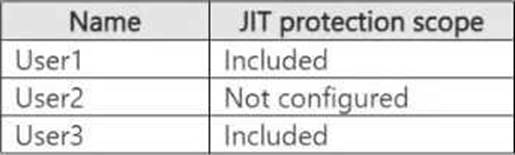
The subscription contains the users shown in the following table.
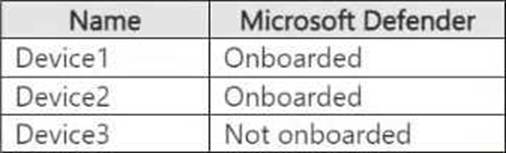
The subscription contains the devices shown in the following table.
The devices contain the files shown in the following table.

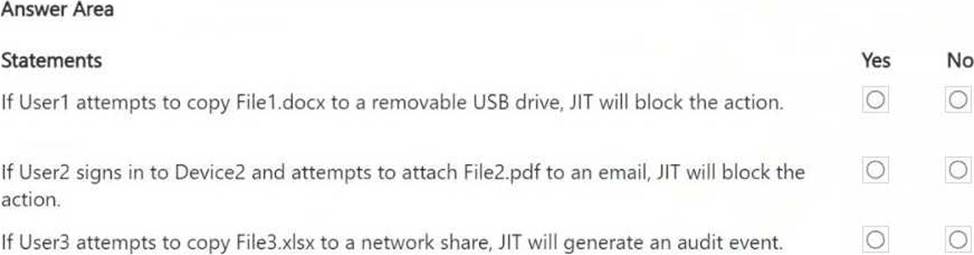
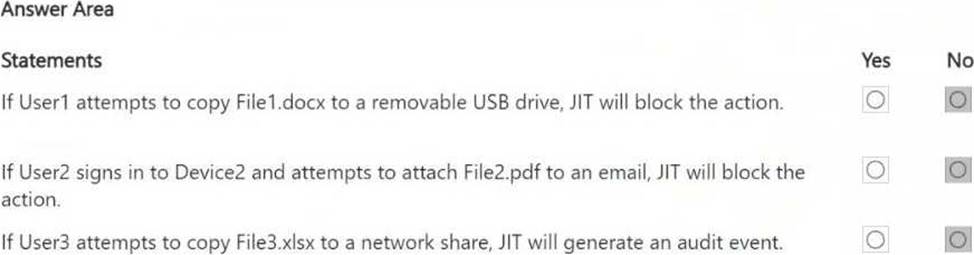
For each of the following statements, select Yes if the statement is true. Otherwise, select No. NOTE: Each correct selection is worth one point.
Explanation:
Statement 1 – No. User1 is included in JIT protection. File1.docx is on Device1, which is onboarded to Microsoft Defender. However, File1.docx has not been evaluated for file classification, meaning JIT cannot enforce protection on it. If User2 signs in to Device2 and attempts to attach File2.pdf to an email, JIT will block the action.
Statement 2 – No. User2 is not configured for JIT protection (JIT does not apply to them). File2.pdf has been evaluated for classification, but since User2 is not included in JIT protection, no blocking occurs. If User3 attempts to copy File3.xlsx to a network share, JIT will generate an audit event.
Statement 3 – No. User3 is included in JIT protection. However, Device3 is not onboarded to Microsoft Defender, meaning JIT protection cannot enforce actions on it. File3.xlsx has not been evaluated, so even if the device were onboarded, JIT would not have classification data to act upon.
Note: This question is part of a series of questions that present the same scenario. Each question in the series contains a unique solution that might meet the stated goals. Some question sets might have more than one correct solution, while others might not have a correct solution.
After you answer a question in this section, you will NOT be able to return to it. As a result, these questions will not appear in the review screen.
You have a Microsoft 365 tenant and 500 computers that run Windows 11. The computers are onboarded to Microsoft Purview.
You discover that a third-party application named Tailspin_scanner.exe accessed protected sensitive information on multiple computers. Tailspin_scanner.exe is installed locally on the computers.
You need to block Tailspin_scanner.exe from accessing sensitive documents without preventing the application from accessing other documents.
Solution: From the Microsoft 365 Endpoint data loss prevention (Endpoint DLP) settings, you add a folder path to the file path exclusions.
Does this meet the goal?
- A . Yes
- B . No
B
Explanation:
Adding a folder path to the file path exclusions in Microsoft 365 Endpoint DLP does not prevent Tailspin_scanner.exe from accessing protected sensitive information. Instead, it would exclude those files from DLP protection, which is not the intended outcome.
To block Tailspin_scanner.exe from accessing sensitive documents while allowing it to access other files, the correct solution is to use Microsoft Purview Endpoint Data Loss Prevention (Endpoint DLP) and add Tailspin_scanner.exe to the Restricted Apps list.
Endpoint DLP allows you to block specific applications from accessing sensitive files while keeping general access available. Restricted Apps List in Endpoint DLP ensures that Tailspin_scanner.exe cannot open, copy, or process protected documents, but it can still function normally for non-sensitive content.
You have a Microsoft SharePoint Online site named Site1 that contains a document library. The library contains more than 1,000 documents. Some of the documents are job applicant resumes. All the documents are in the English language.
You plan to apply a sensitivity label automatically to any document identified as a resume. Only documents that contain work experience, education, and accomplishments must be labeled automatically.
You need to identify and categorize the resumes. The solution must minimize administrative effort.
What should you include in the solution?
- A . a trainable classifier
- B . a keyword dictionary
- C . a function
- D . an exact data match (EDM) classifier
A
Explanation:
Since you need to automatically apply a sensitivity label to resumes based on their content and structure (work experience, education, accomplishments), a trainable classifier is the best choice.
Trainable classifiers use machine learning to identify unstructured data, such as resumes, contracts, or legal documents. Instead of relying on predefined patterns (like keywords or regular expressions), a trainable classifier learns from sample documents and can accurately identify resumes even if they are formatted differently.
Final Approach:
● Train a trainable classifier using sample resumes.
● Deploy the classifier in Microsoft Purview.
● Configure a sensitivity label to be automatically applied when a document matches the classifier.
You have a Microsoft 365 subscription.
You need to customize encrypted email for the subscription. The solution must meet the following requirements.
● Ensure that when an encrypted email is sent, the email includes the company logo.
● Minimize administrative effort.
Which PowerShell cmdlet should you run?
- A . Set-IRMConfiguration
- B . Set-OMEConfiguration
- C . Set-RMSTemplate
- D . New-OMEConfiguration
B
Explanation:
To customize encrypted email in Microsoft 365, including adding a company logo, you need to modify the Office Message Encryption (OME) branding settings.
The Set-OMEConfiguration PowerShell cmdlet allows you to configure branding elements such as:
● Company logo
● Custom text
● Background color
This cmdlet is used to update existing OME branding settings, ensuring that encrypted emails sent from your organization include the required customizations.