
Microsoft SC-401 Practice Exams
Last updated on Nov 16,2026- Exam Code: SC-401
- Exam Name: Administering Information Security in Microsoft 365
- Certification Provider: Microsoft
- Latest update: Nov 16,2026
Note: This question is part of a series of questions that present the same scenario. Each question in the series contains a unique solution that might meet the stated goals. Some question sets might have more than one correct solution, while others might not have a correct solution.
After you answer a question in this section, you will NOT be able to return to it. As a result, these questions will not appear in the review screen.
You have a Microsoft 365 subscription.
You have a user named User1. Several users have full access to the mailbox of User1.
Some email messages sent to User1 appear to have been read and deleted before the user viewed them.
When you search the audit log in the Microsoft Purview portal to identify who signed in to the mailbox of User1, the results are blank.
You need to ensure that you can view future sign-ins to the mailbox of User1.
Solution: You run the Set-MailboxFolderPermission -Identity "User1" -User [email protected] – AccessRights Owner command.
Does that meet the goal?
- A . Yes
- B . No
B
Explanation:
The Set-MailboxFolderPermission -Identity "User1" -User [email protected] -AccessRights Owner command is incorrect. This assigns folder permissions but does not enable auditing. It does not track who accessed the mailbox or deleted emails.
You have Microsoft 365 E5 subscription that uses data loss prevention (DLP) to protect sensitive information.
You have a document named Form.docx.
You plan to use PowerShell to create a document fingerprint based on Form.docx.
You need to first connect to the subscription.
Which cmdlet should you run?
- A . Connect-IPPSSession
- B . Connect-SPOService
- C . Connect-ExchangeOnline
- D . Connect-MgGraph
A
Explanation:
To create a document fingerprint in Microsoft 365 Data Loss Prevention (DLP), you need to use PowerShell for Microsoft Purview. The correct cmdlet to connect to the Microsoft 365 Security & Compliance Center (where DLP policies are managed) is Connect-IPPS Session. This cmdlet establishes a PowerShell session to manage DLP policies, compliance settings, and document fingerprinting.
You have Microsoft 365 E5 subscription that uses data loss prevention (DLP) to protect sensitive information.
You have a document named Form.docx.
You plan to use PowerShell to create a document fingerprint based on Form.docx.
You need to first connect to the subscription.
Which cmdlet should you run?
- A . Connect-IPPSSession
- B . Connect-SPOService
- C . Connect-ExchangeOnline
- D . Connect-MgGraph
A
Explanation:
To create a document fingerprint in Microsoft 365 Data Loss Prevention (DLP), you need to use PowerShell for Microsoft Purview. The correct cmdlet to connect to the Microsoft 365 Security & Compliance Center (where DLP policies are managed) is Connect-IPPS Session. This cmdlet establishes a PowerShell session to manage DLP policies, compliance settings, and document fingerprinting.
HOTSPOT
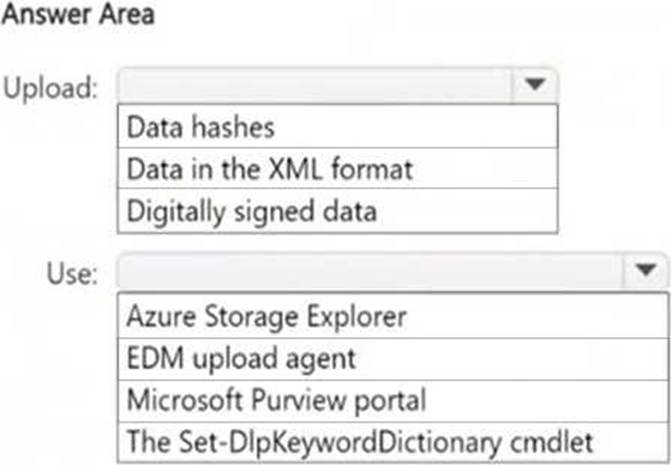
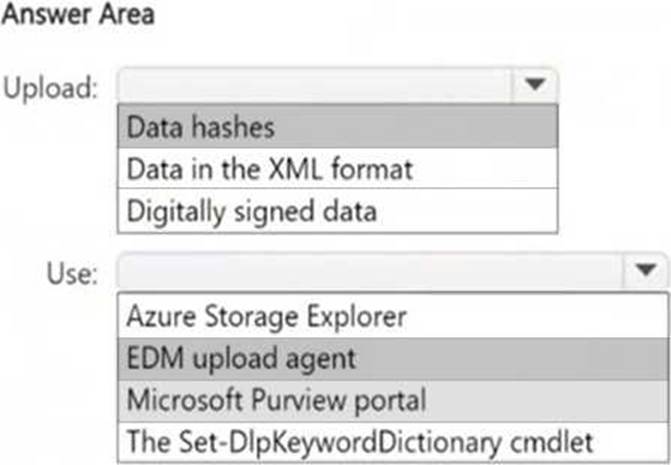
You plan to create a custom sensitive information type that will use Exact Data Match (EDM).
You need to identify what to upload to Microsoft 365, and which tool to use for the upload.
What should you identify? To answer, select the appropriate options in the answer area. NOTE: Each correct selection is worth one point.
Explanation:
EDM does not store raw data; instead, it requires hashed versions of sensitive data for privacy and security. To upload the hashed data, Microsoft provides the EDM upload agent. This ensures that the data is securely processed and recognized by the EDM service in Microsoft 365.
HOTSPOT
You plan to create a custom sensitive information type that will use Exact Data Match (EDM).
You need to identify what to upload to Microsoft 365, and which tool to use for the upload.
What should you identify? To answer, select the appropriate options in the answer area. NOTE: Each correct selection is worth one point.
Explanation:
EDM does not store raw data; instead, it requires hashed versions of sensitive data for privacy and security. To upload the hashed data, Microsoft provides the EDM upload agent. This ensures that the data is securely processed and recognized by the EDM service in Microsoft 365.
You have a Microsoft 365 E5 subscription.
You need to ensure that encrypted email messages sent to an external recipient can be revoked or
will expire within seven days.
What should you configure first?
- A . a custom branding template
- B . a mail flow rule
- C . a sensitivity label
- D . a Conditional Access policy
C
Explanation:
To ensure that encrypted email messages sent to external recipients can be revoked or expire within seven days, you need to configure a sensitivity label with encryption settings in Microsoft Purview Information Protection. A sensitivity label allows you to encrypt emails and documents, set expiration policies (e.g., emails expire after 7 days), and enable email revocation.
How to configure it?
● Go to Microsoft Purview compliance portal → Information Protection
● Create a sensitivity label
● Enable encryption and configure the content expiration policy
● Publish the label to users
HOTSPOT
You have a Microsoft 365 E5 subscription.
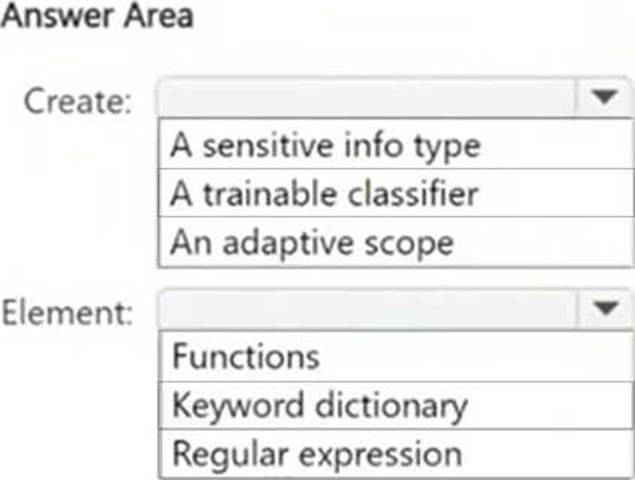
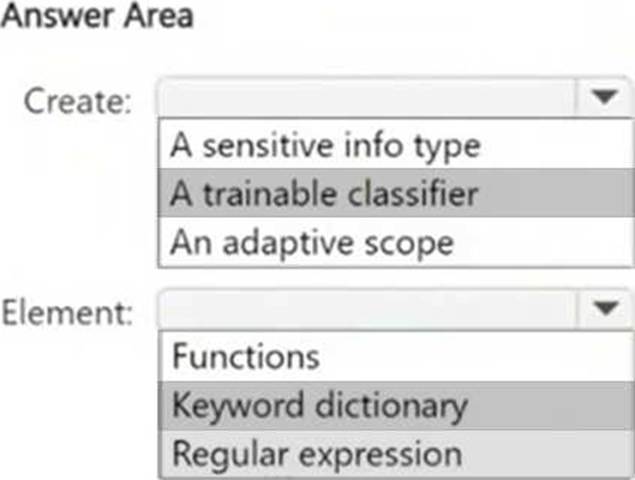
You have a file named Customer.csv that contains a list of 1,000 customer names.
You plan to use Customer.csv to classify documents stored in a Microsoft SharePoint Online library.
What should you create in the Microsoft Purview portal, and which type of element should you select? To answer, select the appropriate options in the answer area. NOTE: Each correct selection is worth one point.
Note: This question is part of a series of questions that present the same scenario. Each question in the series contains a unique solution that might meet the stated goals. Some question sets might have more than one correct solution, while others might not have a correct solution.
After you answer a question in this section, you will NOT be able to return to it. As a result, these questions will not appear in the review screen.
You have a Microsoft 365 subscription.
You have a user named User1. Several users have full access to the mailbox of User1.
Some email messages sent to User1 appear to have been read and deleted before the user viewed them.
When you search the audit log in the Microsoft Purview portal to identify who signed in to the mailbox of User1, the results are blank.
You need to ensure that you can view future sign-ins to the mailbox of User1.
Solution: You run the Set-AdminAuditLogConfig -AdminAuditLogEnabled $true – AdminAuditLogCmdlets *Mailbox* command.
Does that meet the goal?
- A . Yes
- B . No
B
Explanation:
The Set-AdminAuditLogConfig -AdminAuditLogEnabled $true -AdminAuditLogCmdlets *Mailbox* command is incorrect. This enables admin audit logging, which tracks changes to mailbox configurations (e.g., mailbox settings updates), not user activity inside the mailbox.
You have a Microsoft 365 E5 tenant that has devices onboarded to Microsoft Defender for Endpoint as shown in the following table.
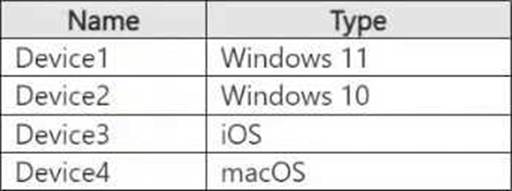
You plan to start using Microsoft 365 Endpoint data loss protection (Endpoint DLP).
Which devices support Endpoint DLP?
- A . Device1 only
- B . Device1 and Device2 only
- C . Device1 and Device4 only
- D . Device1, Device2, and Device4 only
- E . Device1, Device2, Device3, and Device4
B
Explanation:
Microsoft 365 Endpoint data loss prevention (Endpoint DLP) is supported only on Windows 10 and Windows 11 devices. It does not support macOS or iOS at this time.
From the provided table:
● Device1 (Windows 11) – Supported
● Device2 (Windows 10) – Supported
● Device3 (iOS) – Not supported
● Device4 (macOS) – Not supported
Thus, only Device1 and Device2 support Endpoint DLP.
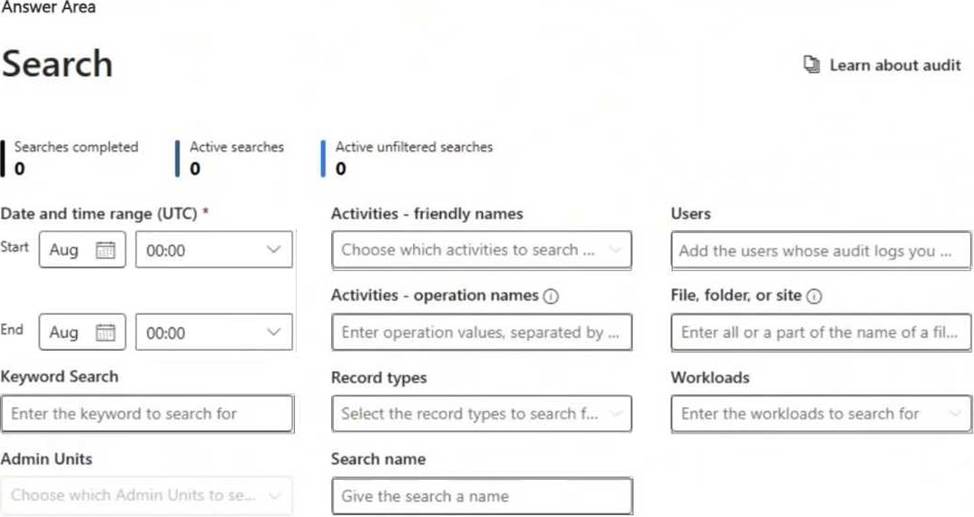
HOTSPOT
You have a Microsoft 365 subscription.
You plan to deploy an audit log retention policy.
You need to perform a search to validate whether the policy will be applied to the intended entries.
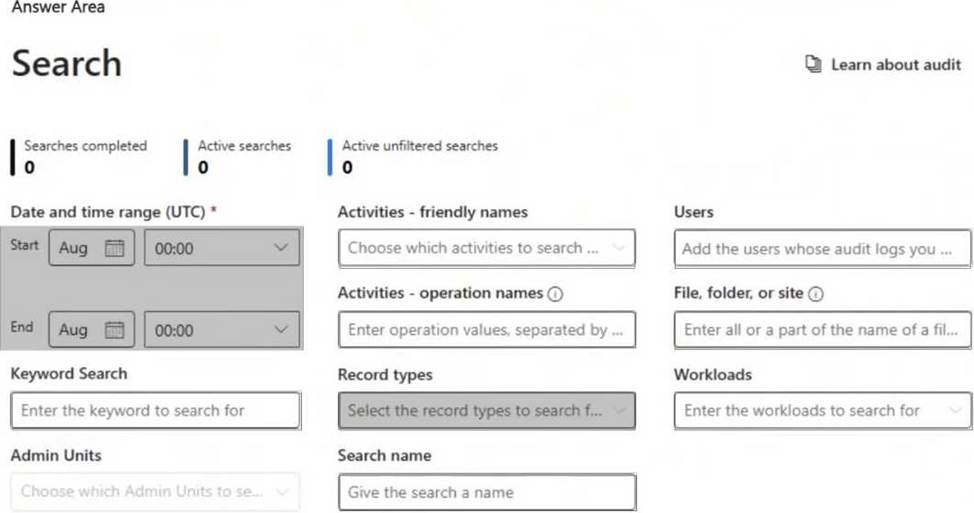
Which two fields should you configure for the search? To answer, select the appropriate fields in the answer area. NOTE: Each correct selection is worth one point.
Explanation:
To validate whether an audit log retention policy will apply to the intended entries, you should configure the following fields:
● Date and time range (UTC) ensures that you are searching for audit logs within the time period when the policy should be applied. Audit logs are time-sensitive, and policies affect logs based on their timestamp.
● Record types allows you to filter and search for specific audit log categories (e.g., Exchange, SharePoint, Teams, etc.) that are affected by the retention policy. Selecting the correct record type ensures that the policy is evaluated against the relevant data.