
Microsoft SC-401 Practice Exams
Last updated on Nov 16,2026- Exam Code: SC-401
- Exam Name: Administering Information Security in Microsoft 365
- Certification Provider: Microsoft
- Latest update: Nov 16,2026
HOTSPOT
You have a Microsoft 365 E5 subscription.
You need to identify documents that contain patent application numbers containing the letters PA followed by eight digits, for example, PA 12345678. The solution must minimize administrative effort.
What should you do? To answer, select the appropriate options in the answer area. NOTE: Each correct selection is worth one point.
Explanation:
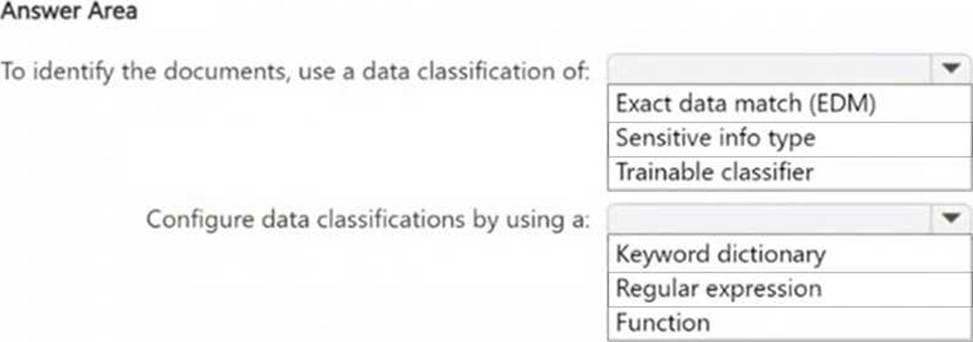
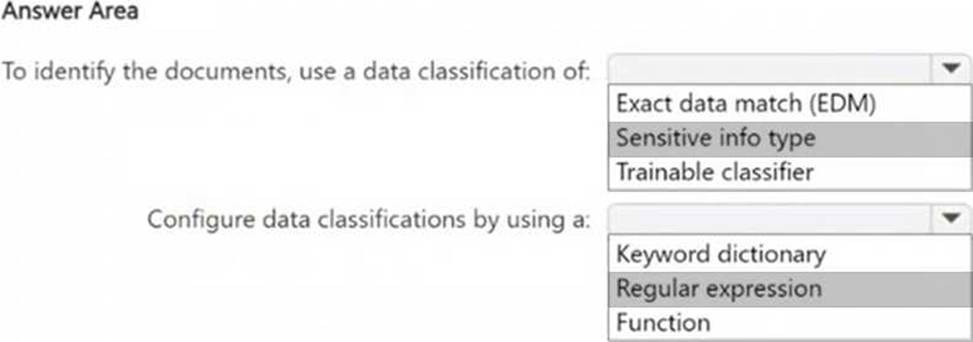
Box 1: Since you are looking for a specific pattern (PA followed by eight digits, e.g., PA 12345678), the best classification method is Sensitive Info Type. Sensitive Info Types allow pattern-based matching to identify structured data. Exact Data Match (EDM) is not needed because you’re not comparing against a fixed dataset. Trainable classifier is not appropriate because this is a structured pattern, not an unstructured document classification.
Box 2: Since PA 12345678 follows a structured pattern, the most effective method is Regular Expression (Regex). A Regular Expression (Regex) can be written to match "PA" followed by exactly eight digits (e.g., PAsd{8}). Keyword dictionary is not ideal because it works for predefined words, not number patterns. Function is unnecessary because there is no need for checksum validation or predefined validation rules.
HOTSPOT
You have a Microsoft 365 E5 subscription.
You need to identify documents that contain patent application numbers containing the letters PA followed by eight digits, for example, PA 12345678. The solution must minimize administrative effort.
What should you do? To answer, select the appropriate options in the answer area. NOTE: Each correct selection is worth one point.
Explanation:
Box 1: Since you are looking for a specific pattern (PA followed by eight digits, e.g., PA 12345678), the best classification method is Sensitive Info Type. Sensitive Info Types allow pattern-based matching to identify structured data. Exact Data Match (EDM) is not needed because you’re not comparing against a fixed dataset. Trainable classifier is not appropriate because this is a structured pattern, not an unstructured document classification.
Box 2: Since PA 12345678 follows a structured pattern, the most effective method is Regular Expression (Regex). A Regular Expression (Regex) can be written to match "PA" followed by exactly eight digits (e.g., PAsd{8}). Keyword dictionary is not ideal because it works for predefined words, not number patterns. Function is unnecessary because there is no need for checksum validation or predefined validation rules.
You have a Microsoft 365 subscription.
Users have devices that run Windows 11.
You plan to create a Microsoft Purview insider risk management policy that will detect when a user performs the following actions:
● Deletes files that contain a sensitive information type (SIT) from their device
● Copies files that contain a SIT to a USB drive
● Prints files that contain a SIT
You need to prepare the environment to support the policy.
What should you do?
- A . Configure the physical badging connector.
- B . Configure the HR data connector.
- C . Create a Microsoft Purview communication compliance policy.
- D . Onboard the devices to Microsoft Purview.
D
Explanation:
To ensure that Microsoft Purview Insider Risk Management can detect file deletions, USB copies, and print actions on sensitive information, you must onboard the Windows 11 devices to Microsoft Purview.
Device onboarding enables endpoint activity monitoring, allowing Purview to track and log user activities such as file deletions, USB transfers, and printing of sensitive files. Once onboarded, the Insider Risk Management policy can analyze these activities and generate risk alerts when sensitive information types (SITs) are involved.
HOTSPOT
You have a new Microsoft 365 E5 tenant.
You need to create a custom trainable classifier that will detect product order forms. The solution must use the principle of least privilege.
What should you do first? To answer, select the appropriate options in the answer area. NOTE: Each correct selection is worth one point.
Explanation:
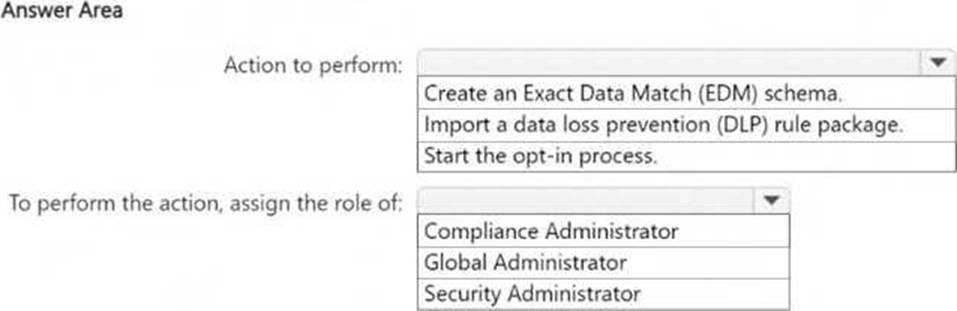
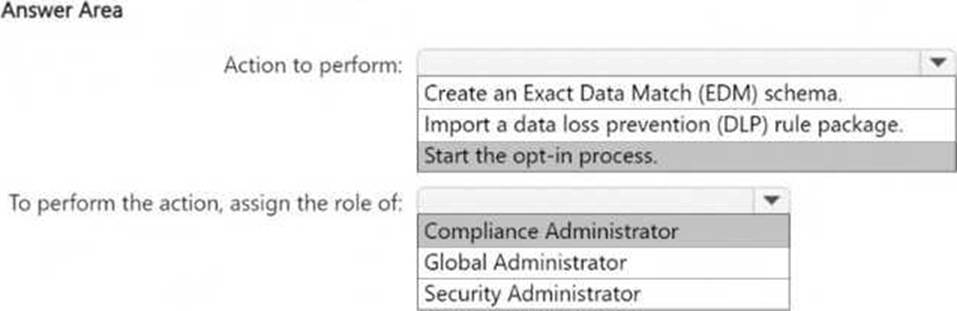
To create a custom trainable classifier in Microsoft Purview (formerly Microsoft Compliance Center), you must first opt into the trainable classifier feature.
Before using custom trainable classifiers, Microsoft requires manual opt-in through the Microsoft Purview compliance portal. Without this step, you cannot create a new classifier.
The Compliance Administrator role has the necessary permissions to configure data classification, DLP policies, and trainable classifiers. Global Administrator has higher privileges but is not required for this task, violating the principle of least privilege. Security Administrator is focused on security-related settings but does not manage compliance features like classifiers.
You have a Microsoft 365 E5 subscription.
You plan to implement Microsoft Purview insider risk management.
You implement the HR data connector.
You need to prepare the data that will be imported by the data connector.
In which format should you prepare the data?
- A . JSON
- B . CSV
- C . TSV
- D . XML
- E . PRN
B
Explanation:
When implementing Microsoft Purview Insider Risk Management and using the HR data connector, you must prepare HR data in CSV (Comma-Separated Values) format. This format is required because Microsoft Purview supports CSV files for importing user employment details, termination dates, role changes, and other HR-related attributes.
HOTSPOT
You have a Microsoft 365 E5 subscription that has data loss prevention (DLP) implemented.
You plan to export DLP activity by using Activity explorer.
The exported file needs to display the sensitive info type detected for each DLP rule match.
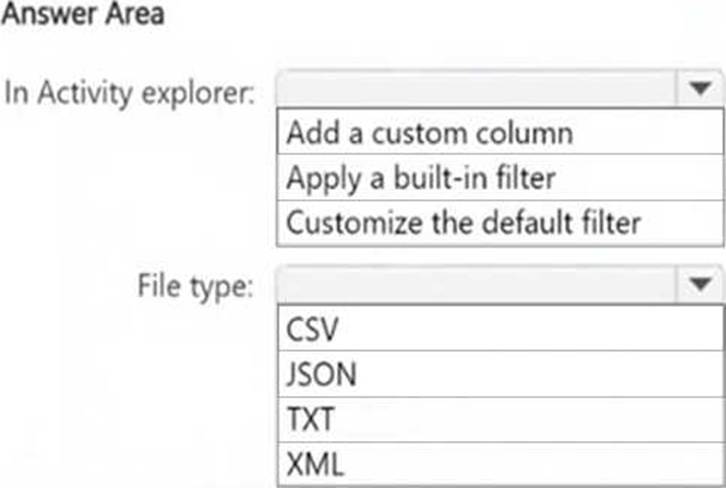
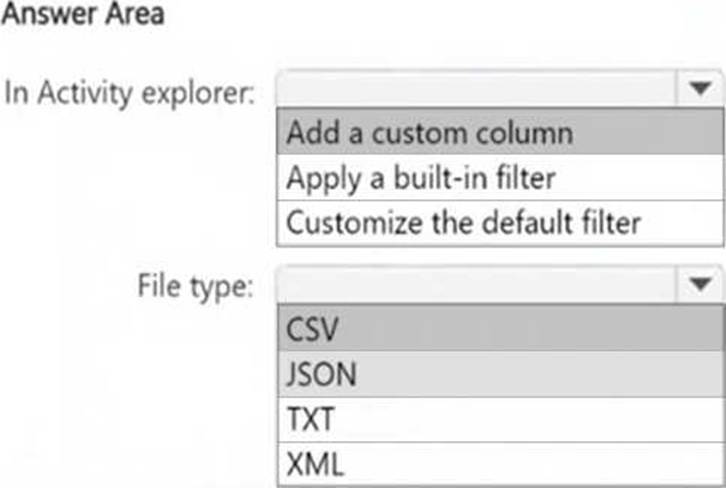
What should you do in Activity explorer before exporting the data, and in which file format is the file exported? To answer, select the appropriate options in the answer area. NOTE: Each correct selection is worth one point.
Explanation:
Box 1: To include the sensitive info type detected for each DLP rule match, you need to add a custom column in Activity Explorer. This ensures that the exported file contains specific details about the detected sensitive information types.
Box 2: DLP activity exports from Activity Explorer are always in CSV (Comma-Separated Values) format. This format allows for easy data analysis and reporting in Excel or other data-processing tools.
You have a Microsoft 365 E5 subscription.
You need to create a sensitivity label named Label1. The solution must ensure that users can use Microsoft 365 Copilot to summarize files that have Label1 applied.
Which permission should you select for Label1?
- A . Export content (EXPORT)
- B . Copy and extract content (EXTRACT)
- C . Edit content (DOCEDIT)
- D . View rights (VIEW)
B
Explanation:
To allow Microsoft 365 Copilot to summarize files that have Label1 applied, the label must grant permission to extract content from the document. The correct permission for this is Copy and extract content (EXTRACT).
Microsoft 365 Copilot requires access to read and process content in documents to generate summaries. The EXTRACT permission allows users (and AI tools like Copilot) to copy and extract content for processing while still maintaining the protection applied by the sensitivity label.
DRAG DROP
You have a Microsoft 365 subscription that contains 20 data loss prevention (DLP) policies.
You need to identify the following:
● Rules that are applied without triggering a policy alert
● The top 10 files that have matched DLP policies
● Alerts that are miscategorized
Which report should you use for each requirement? To answer, drag the appropriate reports to the correct requirements. Each report may be used once, more than once, or not at all. You may need to drag the split bar between panes or scroll to view content. NOTE: Each correct selection is worth one point.


Explanation:
The False positive and override report helps identify rules that were applied but did not generate an actual policy alert, which means they were overridden or deemed false positives.
The DLP policy matches report provides details on files that matched DLP policies, including the top 10 files.
The Incident reports report helps analyze and review alerts, including those that may have been miscategorized.
You have Microsoft 365 E5 subscription.
You create two alert policies named Policy1 and Policy2 that will be triggered at the times shown in the following table.
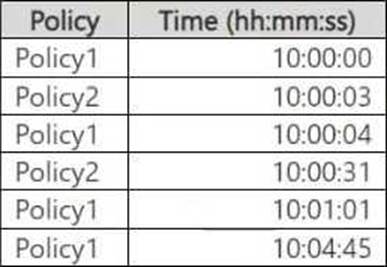
How many alerts will be added to the Microsoft Purview portal?
- A . 2
- B . 3
- C . 4
- D . 5
- E . 6
D
Explanation:
In Microsoft Purview, when multiple alert policies trigger alerts, duplicate alerts within a short period (typically 5 minutes) may be suppressed to avoid redundancy.
Step-by-step Analysis:
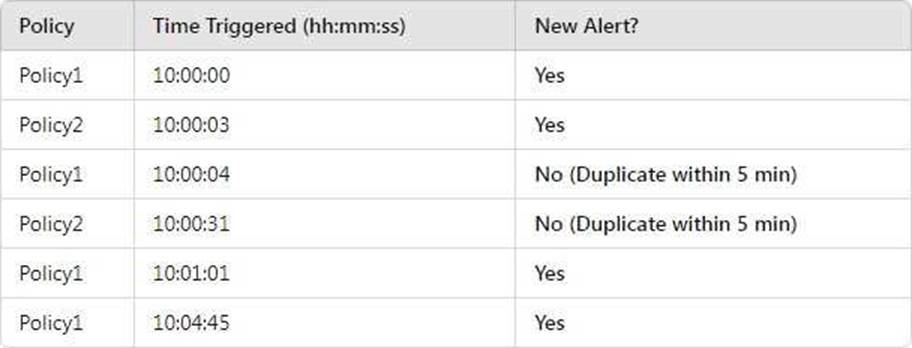
● Policy1 at 10:00:04 is ignored because Policy1 already triggered at 10:00:00, and it’s within 5 minutes.
● Policy2 at 10:00:31 is ignored because Policy2 already triggered at 10:00:03, and it’s within 5 minutes.
● Policy1 at 10:01:01 is a new alert because it’s over 1 minute after the previous Policy1 alert.
● Policy1 at 10:04:45 is a new alert because it’s over 3 minutes after the previous Policy1 alert.
You have a Microsoft 365 E5 subscription that contains the users shown in the following table.
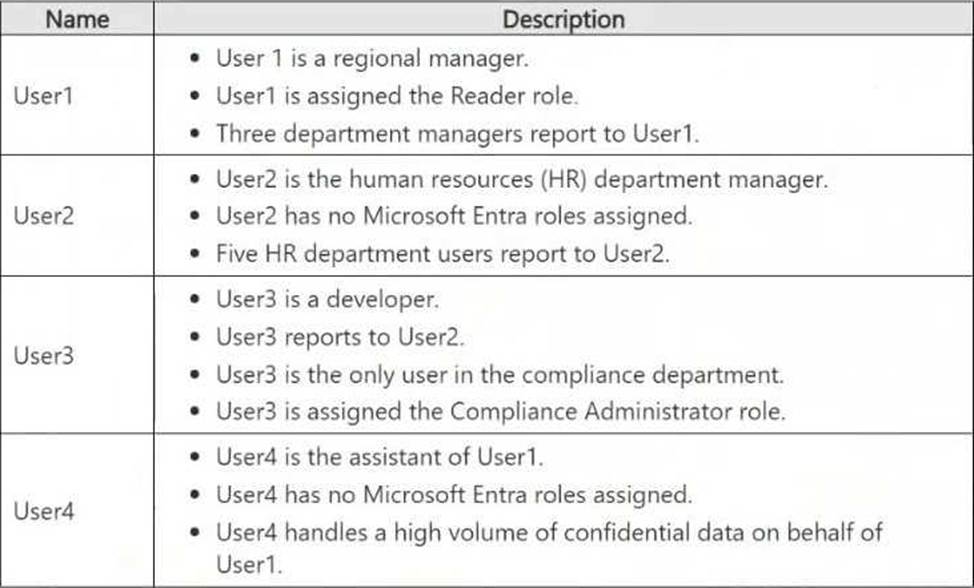
Which users will Microsoft Purview insider risk management flag as potential high-impact users?
- A . User1 and User2 only
- B . User2 and User3 only
- C . User1, User2, and User3 only
- D . User1, User2, User3, and User4
D
Explanation:
Microsoft Purview Insider Risk Management flags high-impact users based on various risk factors, including role, access to confidential data, and influence within an organization.
Let’s analyze each user:
User1 (Regional Manager, assigned Reader role, manages department managers)
Risk Factors:
● Holds a managerial position (regional manager).
● Manages multiple department managers, indicating organizational influence.
● Access to critical business information.
Flagged? -Yes (Managerial role and access to confidential data).
User2 (HR department manager, no Microsoft Entra roles, manages HR department users)
Risk Factors:
● Manages HR department users, meaning they likely handle sensitive employee data.
● HR roles are often considered high-risk due to access to personal and payroll data.
Flagged? -Yes (HR role and access to sensitive employee data).
User3 (Developer, reports to User2, only user in compliance, assigned Compliance Administrator role)
Risk Factors:
● Compliance Administrator role grants access to sensitive security and regulatory data.
● Only person in the compliance department, meaning they hold a critical role.
● Potentially high impact on compliance and security settings.
Flagged? -Yes (Privileged Compliance Administrator role).
User4 (Assistant to User1, no Entra roles, handles confidential data on behalf of User1)
Risk Factors:
● Handles a high volume of confidential data on behalf of a regional manager.
● Assistants with access to sensitive data are considered insider risk candidates.
Flagged? -Yes (High access to sensitive information).
Since all four users fit high-impact criteria (managerial roles, privileged compliance access, handling sensitive data), Microsoft Purview Insider Risk Management will flag all of them.