
Microsoft SC-401 Practice Exams
Last updated on Oct 01,2026- Exam Code: SC-401
- Exam Name: Administering Information Security in Microsoft 365
- Certification Provider: Microsoft
- Latest update: Oct 01,2026
HOTSPOT
You have a Microsoft 365 E5 subscription that contains the device configurations shown in the following table.
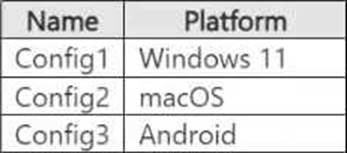
Each configuration uses either Google Chrome or Firefox as a default browser.
You need to implement Microsoft Purview and deploy the Microsoft Purview browser extension to the configurations.
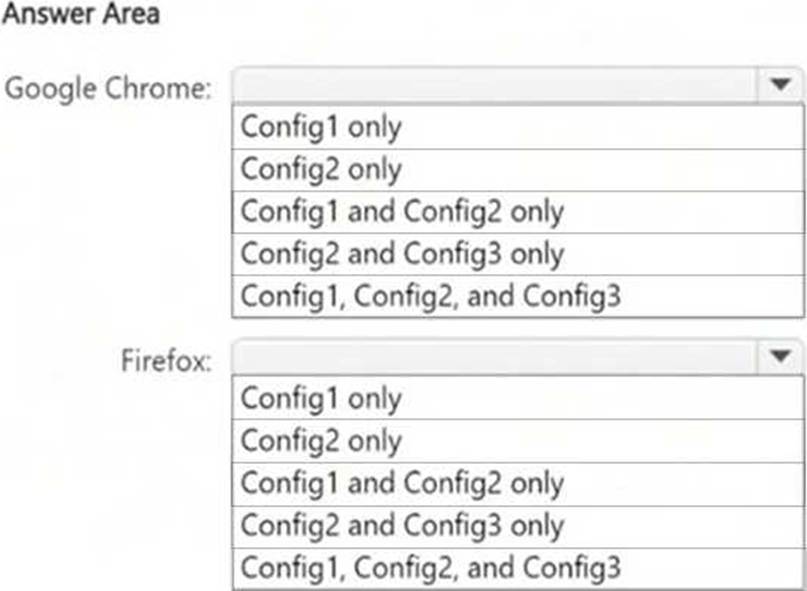
To which configuration can each extension be deployed? To answer, select the appropriate options in the answer area. NOTE: Each correct selection is worth one point.
Explanation:
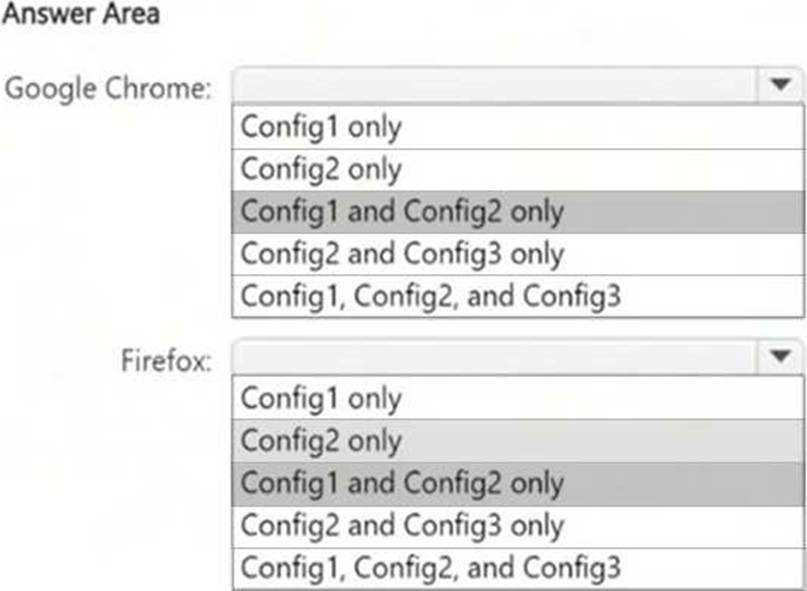
Microsoft Purview browser extensions for Endpoint DLP are supported on:
● Windows 10/11 (Config1)
● macOS (Config2)
● Not supported on Android (Config3)
Since Microsoft Purview does not support browser extensions on Android, Config3 is excluded from both Google Chrome and Firefox.
You have a Microsoft 365 E5 subscription.
You need to create static retention policies for the following locations:
● Teams chats
● Exchange email
● SharePoint sites
● Microsoft 365 Groups
● Teams channel messages
What is the minimum number of retention policies required?
- A . 1
- B . 2
- C . 3
- D . 4
- E . 5
C
Explanation:
In Microsoft Purview Data Lifecycle Management, different Microsoft 365 locations require separate retention policies because they fall under different storage and compliance models.
Teams Chats & Teams Channel Messages (1 Policy) require a separate retention policy because Teams messages are stored differently than Exchange and SharePoint content. One policy can cover both Teams chats and Teams channel messages. Exchange Email (1 Policy) requires its own separate policy since emails are managed differently than Teams or SharePoint content. SharePoint Sites & Microsoft 365 Groups (1 Policy) are both stored in SharePoint Online, so they can be managed under one policy.
You have a Microsoft 365 E5 subscription.
You need to create static retention policies for the following locations:
● Teams chats
● Exchange email
● SharePoint sites
● Microsoft 365 Groups
● Teams channel messages
What is the minimum number of retention policies required?
- A . 1
- B . 2
- C . 3
- D . 4
- E . 5
C
Explanation:
In Microsoft Purview Data Lifecycle Management, different Microsoft 365 locations require separate retention policies because they fall under different storage and compliance models.
Teams Chats & Teams Channel Messages (1 Policy) require a separate retention policy because Teams messages are stored differently than Exchange and SharePoint content. One policy can cover both Teams chats and Teams channel messages. Exchange Email (1 Policy) requires its own separate policy since emails are managed differently than Teams or SharePoint content. SharePoint Sites & Microsoft 365 Groups (1 Policy) are both stored in SharePoint Online, so they can be managed under one policy.
You have a Microsoft 365 E5 subscription.
You need to create static retention policies for the following locations:
● Teams chats
● Exchange email
● SharePoint sites
● Microsoft 365 Groups
● Teams channel messages
What is the minimum number of retention policies required?
- A . 1
- B . 2
- C . 3
- D . 4
- E . 5
C
Explanation:
In Microsoft Purview Data Lifecycle Management, different Microsoft 365 locations require separate retention policies because they fall under different storage and compliance models.
Teams Chats & Teams Channel Messages (1 Policy) require a separate retention policy because Teams messages are stored differently than Exchange and SharePoint content. One policy can cover both Teams chats and Teams channel messages. Exchange Email (1 Policy) requires its own separate policy since emails are managed differently than Teams or SharePoint content. SharePoint Sites & Microsoft 365 Groups (1 Policy) are both stored in SharePoint Online, so they can be managed under one policy.
HOTSPOT
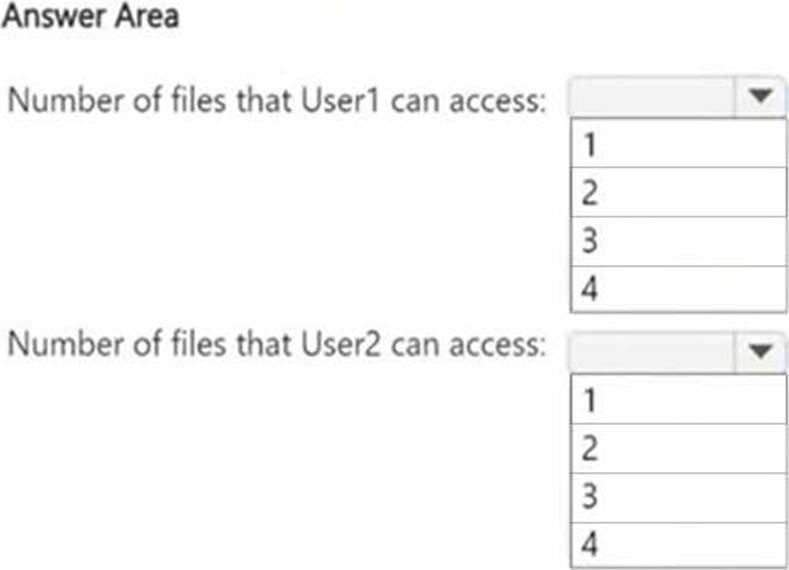
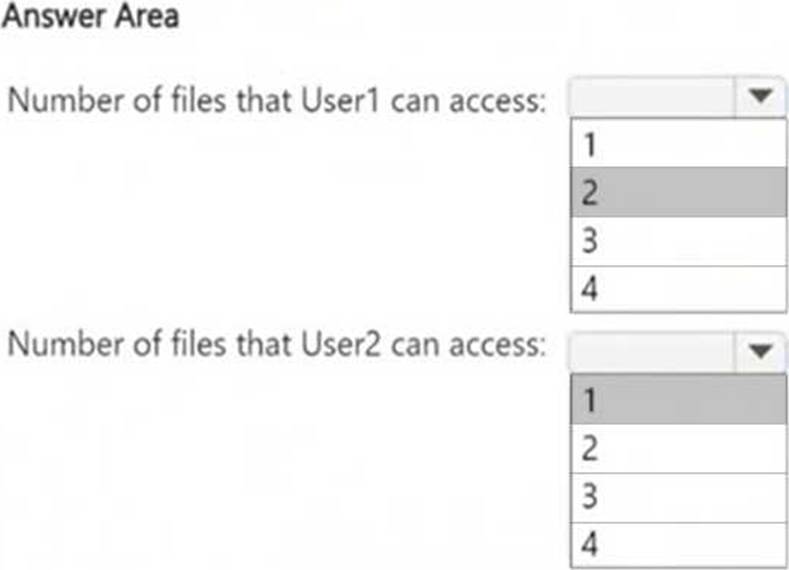
How many files in Site2 can User1 and User2 access after you turn on DLPpolicy1? To answer, select the appropriate options in the answer area. NOTE: Each correct selection is worth one point.
Explanation:
Understanding DLP Policy Impact on File Access
The DLP policy (DLPpolicy1) applies to Site2 and restricts access when:
● Content contains SWIFT Codes.
● Instance count is 2 or more.
File Analysis (Based on SWIFT Codes Count)
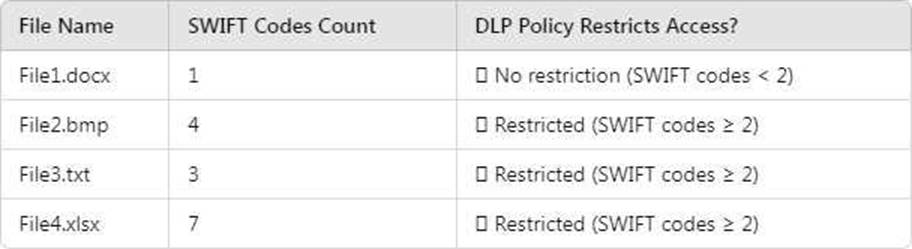
Files that remain accessible (not restricted by DLP):
● File1.docx (Contains only 1 SWIFT Code → Below restriction threshold) User access after DLP policy is applied:

User1 (Site Owner):
● Has higher privileges and can override DLP restrictions (through admin intervention).
● Can access 2 files (File1.docx + override access to another file).
User2 (Site Visitor):
● Has read-only access but DLP blocks access to restricted files.
● Can only access 1 file (File1.docx), since all others are restricted.
You have a Microsoft 365 E5 subscription that uses Microsoft Purview.
You create a communication compliance policy named Policy1 and select Detect Microsoft Copilot interactions.
Which two trainable classifiers will be added to Policy1 automatically? Each correct answer presents part of the solution. NOTE: Each correct selection is worth one point.
- A . Unauthorized disclosure
- B . Prompt Shields
- C . Threat
- D . Corporate Sabotage
- E . Protected Materials
A, E
Explanation:
When you create a communication compliance policy in Microsoft Purview and select "Detect Microsoft Copilot interactions," certain trainable classifiers are automatically added to help detect sensitive or inappropriate AI usage.
The "Unauthorized disclosure" classifier helps detect cases where users might share confidential or sensitive information via Copilot interactions, preventing unintended data leaks. The "Protected Materials" classifier is used to identify sensitive or restricted content that should not be shared through Copilot, ensuring compliance with organizational policies.
HOTSPOT
You have a Microsoft 365 E5 subscription that contains two Microsoft 365 groups named Group1 and
Group2.
Both groups use the following resources:
● A group mailbox
● Microsoft Teams channel messages
● A Microsoft SharePoint Online teams site
You create the objects shown in the following table.

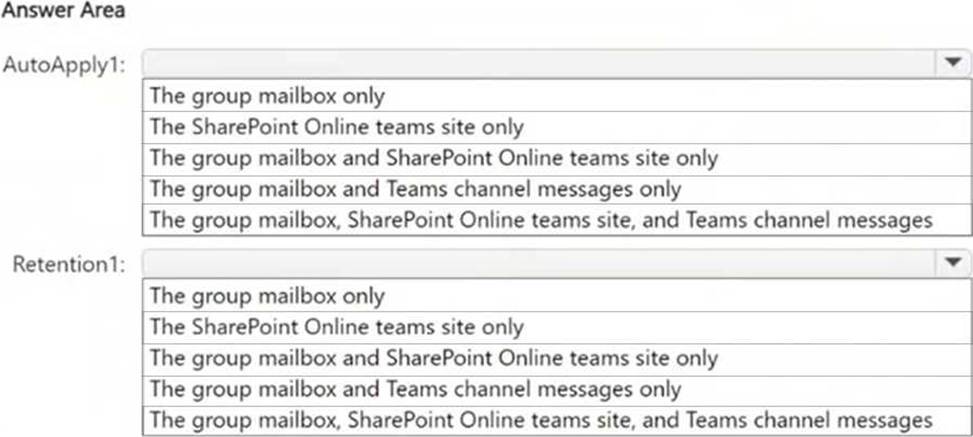
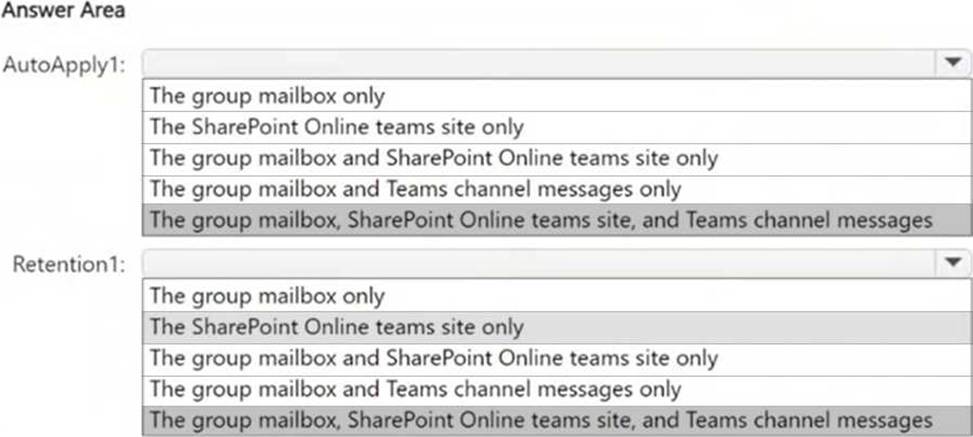
To which resources will AutoApply1 and Retention1 be applied? To answer, select the appropriate options in the answer area. NOTE: Each correct selection is worth one point.
Explanation:
AutoApply1 is an auto-labeling policy that applies RLabel1 to Group1. Auto-labeling policies can apply retention labels across group mailboxes, SharePoint Online sites, and Teams channel messages if they are configured for group resources.
Retention1 is a retention policy applied to Group2. Retention policies for Microsoft 365 groups apply to all group resources, including group mailboxes, SharePoint Online teams sites, and Teams channel messages.
Since both AutoApply1 and Retention1 affect entire groups, they apply to all associated resources:
group mailbox, SharePoint Online teams site, and Teams channel messages.
Note: This question is part of a series of questions that present the same scenario. Each question in the series contains a unique solution that might meet the stated goals. Some question sets might have more than one correct solution, while others might not have a correct solution.
After you answer a question in this section, you will NOT be able to return to it. As a result, these questions will not appear in the review screen.
You recently discovered that the developers at your company emailed Azure Storage Account keys in plain text to third parties.
You need to ensure that when Azure Storage Account keys are emailed, the emails are encrypted.
Solution: You configure a mail flow rule that matches the text patterns.
Does this meet the goal?
- A . Yes
- B . No
B
Explanation:
To ensure Azure Storage Account keys are encrypted when sent via email, you need a Data Loss Prevention (DLP) policy that detects Azure Storage Account keys using a sensitive information type and automatically encrypts emails containing these keys.
Text patterns in mail flow rules are not as reliable as sensitive information types in DLP.
Mail flow rules lack advanced content detection and machine learning-based classification, making them less effective than DLP.
HOTSPOT
You have a Microsoft 365 E5 subscription.
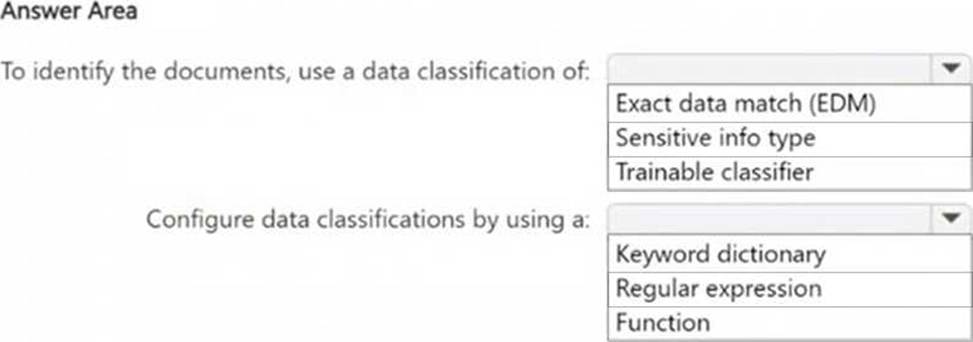
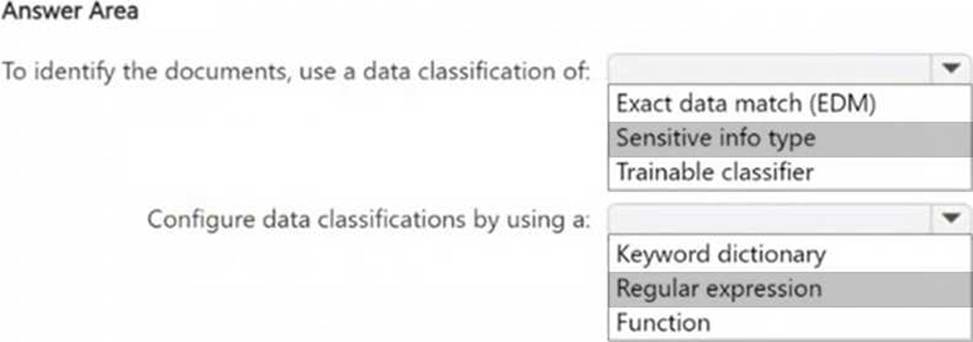
You need to identify documents that contain patent application numbers containing the letters PA followed by eight digits, for example, PA 12345678. The solution must minimize administrative effort.
What should you do? To answer, select the appropriate options in the answer area. NOTE: Each correct selection is worth one point.
Explanation:
Box 1: Since you are looking for a specific pattern (PA followed by eight digits, e.g., PA 12345678), the best classification method is Sensitive Info Type. Sensitive Info Types allow pattern-based matching to identify structured data. Exact Data Match (EDM) is not needed because you’re not comparing against a fixed dataset. Trainable classifier is not appropriate because this is a structured pattern, not an unstructured document classification.
Box 2: Since PA 12345678 follows a structured pattern, the most effective method is Regular Expression (Regex). A Regular Expression (Regex) can be written to match "PA" followed by exactly eight digits (e.g., PAsd{8}). Keyword dictionary is not ideal because it works for predefined words, not number patterns. Function is unnecessary because there is no need for checksum validation or predefined validation rules.
HOTSPOT
You have a Microsoft 365 E5 subscription.
You need to identify documents that contain patent application numbers containing the letters PA followed by eight digits, for example, PA 12345678. The solution must minimize administrative effort.
What should you do? To answer, select the appropriate options in the answer area. NOTE: Each correct selection is worth one point.
Explanation:
Box 1: Since you are looking for a specific pattern (PA followed by eight digits, e.g., PA 12345678), the best classification method is Sensitive Info Type. Sensitive Info Types allow pattern-based matching to identify structured data. Exact Data Match (EDM) is not needed because you’re not comparing against a fixed dataset. Trainable classifier is not appropriate because this is a structured pattern, not an unstructured document classification.
Box 2: Since PA 12345678 follows a structured pattern, the most effective method is Regular Expression (Regex). A Regular Expression (Regex) can be written to match "PA" followed by exactly eight digits (e.g., PAsd{8}). Keyword dictionary is not ideal because it works for predefined words, not number patterns. Function is unnecessary because there is no need for checksum validation or predefined validation rules.