
Microsoft MD-102 Practice Exams
Last updated on Nov 16,2026- Exam Code: MD-102
- Exam Name: Endpoint Administrator
- Certification Provider: Microsoft
- Latest update: Nov 16,2026
HOTSPOT
You have a Microsoft 365 subscription.
All computers are enrolled in Microsoft Intune.
You have business requirements for securing your Windows 11 environment as shown in the following table.
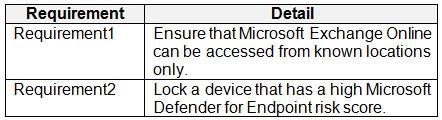
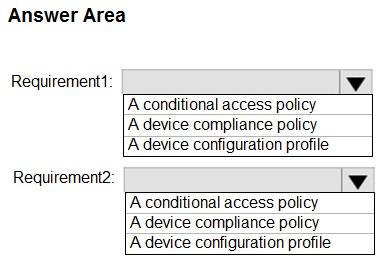
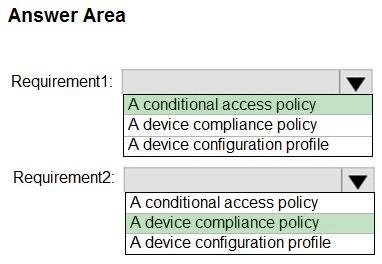
What should you implement to meet each requirement? To answer, select the appropriate options in the answer area. NOTE: Each correct selection is worth one point.
Hot Area:
You have a Microsoft 365 tenant that contains the objects shown in the following table.
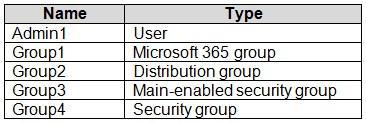
You are creating a compliance policy named Compliance1.
Which objects can you specify in Compliance1 as additional recipients of noncompliance notifications?
- A . Group3 and Group4 only
- B . Group3, Group4, and Admin1 only
- C . Group1, Group2, and Group3 only
- D . Group1, Group2, Group3, and Group4 only
- E . Group1, Group2, Group3, Group4, and Admin1
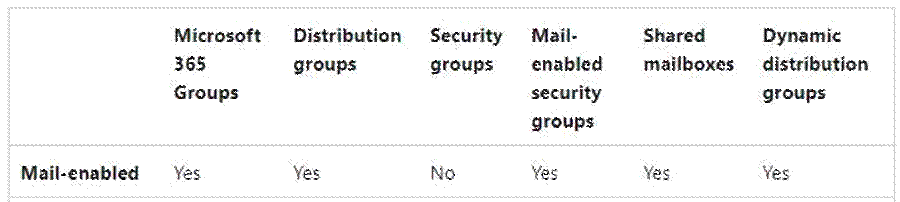
You have a Microsoft 365 tenant that contains the objects shown in the following table.
You are creating a compliance policy named Compliance1.
Which objects can you specify in Compliance1 as additional recipients of noncompliance notifications?
- A . Group3 and Group4 only
- B . Group3, Group4, and Admin1 only
- C . Group1, Group2, and Group3 only
- D . Group1, Group2, Group3, and Group4 only
- E . Group1, Group2, Group3, Group4, and Admin1
DRAG DROP
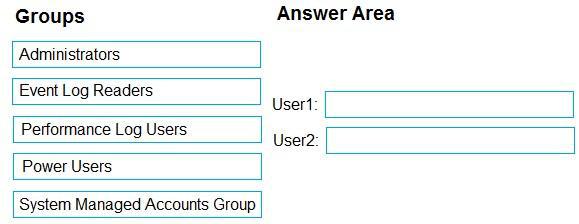
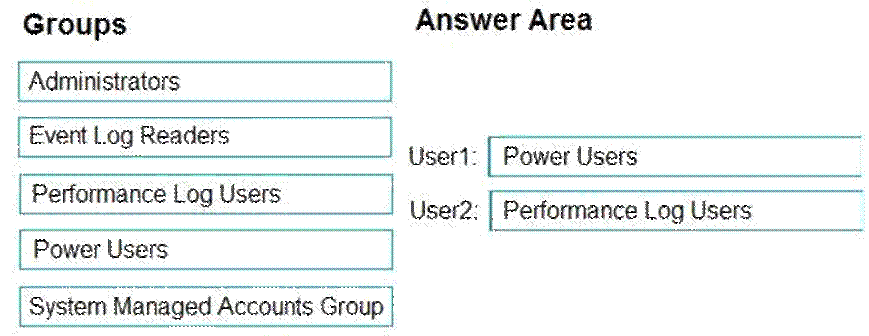
You have a computer that runs Windows 10 and contains two local users named User1 and User2.
You need to ensure that the users can perform the following actions:
User1 must be able to adjust the date and time.

User2 must be able to clear Windows logs.
The solution must use the principle of least privilege.
To which group should you add each user? To answer, drag the appropriate groups to the correct users. Each group may be used once, more than once, or not at all. You may need to drag the split bar between panes or scroll to view content. NOTE: Each correct selection is worth one point.
Select and Place:
You have a Microsoft 365 subscription.
You have 10 computers that run Windows 10 and are enrolled in Microsoft Intune. You need to deploy the Microsoft 365 Apps for enterprise suite to all the computers.
What should you do?
- A . From the Microsoft Intune admin center, add an app.
- B . From the Microsoft Intune admin center, create a Windows 10 and later device profile.
- C . From the Microsoft Entra admin center, add an enterprise application.
- D . From the Microsoft Entra admin center, add an app registration.
You have a Microsoft 365 subscription.
You have 10 computers that run Windows 10 and are enrolled in Microsoft Intune. You need to deploy the Microsoft 365 Apps for enterprise suite to all the computers.
What should you do?
- A . From the Microsoft Intune admin center, add an app.
- B . From the Microsoft Intune admin center, create a Windows 10 and later device profile.
- C . From the Microsoft Entra admin center, add an enterprise application.
- D . From the Microsoft Entra admin center, add an app registration.
You have a Microsoft 365 subscription.
You have 10 computers that run Windows 10 and are enrolled in Microsoft Intune. You need to deploy the Microsoft 365 Apps for enterprise suite to all the computers.
What should you do?
- A . From the Microsoft Intune admin center, add an app.
- B . From the Microsoft Intune admin center, create a Windows 10 and later device profile.
- C . From the Microsoft Entra admin center, add an enterprise application.
- D . From the Microsoft Entra admin center, add an app registration.
You have a Microsoft 365 subscription.
You have 10 computers that run Windows 10 and are enrolled in Microsoft Intune. You need to deploy the Microsoft 365 Apps for enterprise suite to all the computers.
What should you do?
- A . From the Microsoft Intune admin center, add an app.
- B . From the Microsoft Intune admin center, create a Windows 10 and later device profile.
- C . From the Microsoft Entra admin center, add an enterprise application.
- D . From the Microsoft Entra admin center, add an app registration.
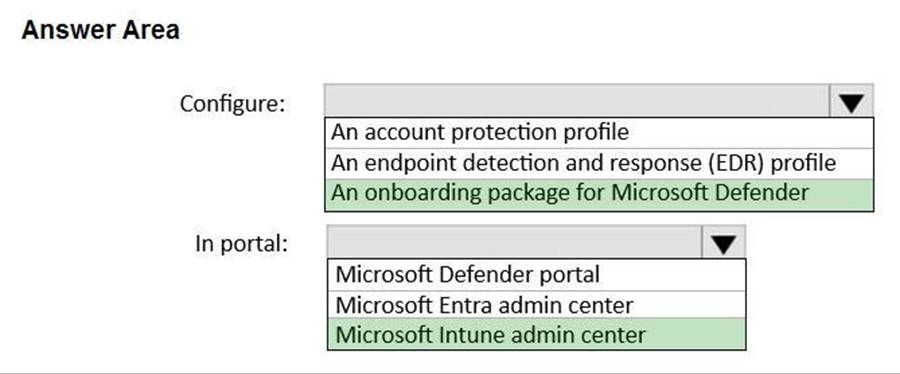
HOTSPOT
You have a Microsoft 365 subscription that includes Microsoft Intune and Microsoft Defender for Endpoint.
Users have devices that run Windows 11.
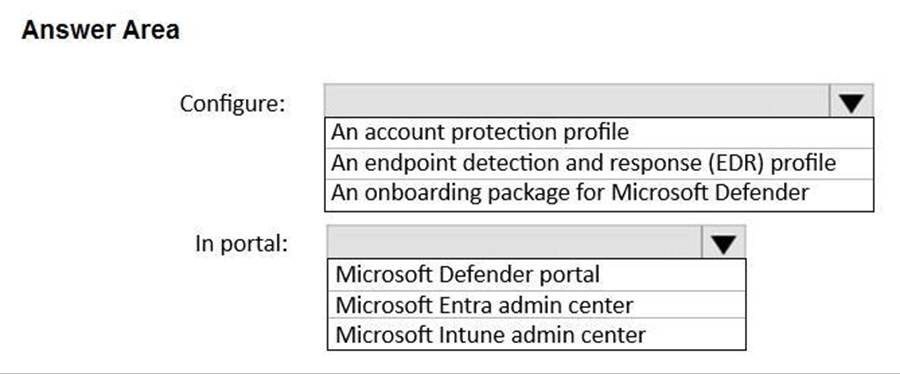
You deploy a connection from Defender for Endpoint to Intune.
You need to ensure that when a device is enrolled in Intune, the device is onboarded automatically to Defender for Endpoint.
What should you configure, and which portal should you use? To answer, select the appropriate options in the answer area. NOTE: Each correct selection is worth one point.
Hot Area:
You have a Microsoft 365 subscription that contains 500 Android Enterprise devices.
All the devices are enrolled in Microsoft Intune.
You need to deliver bookmarks to the Chrome browser on the devices.
What should you create?
C. a compliance policy
D. a configuration profile
E. an app protection policy
F. an app configuration policy