
Microsoft MD-102 Practice Exams
Last updated on Nov 16,2026- Exam Code: MD-102
- Exam Name: Endpoint Administrator
- Certification Provider: Microsoft
- Latest update: Nov 16,2026
Your company implements Microsoft Entra ID, Microsoft 365, Microsoft Intune.
The company’s security policy states the following:
Personal devices do not need to be enrolled in Intune.

Users must authenticate by using a PIN before they can access corporate email data.
Users can use their personal iOS and Android devices to access corporate cloud services.
Users must be prevented from copying corporate email data to a cloud storage service other than Microsoft OneDrive for Business.
You need to configure a solution to enforce the security policy.
What should you create?
E. a device configuration profile from the Microsoft Intune admin center
F. a data loss prevention (DLP) policy from the Microsoft Purview compliance portal
G. an insider risk management policy from the Microsoft Purview compliance portal
H. an app protection policy from the Microsoft Intune admin center
You have a Microsoft 365 E5 subscription that contains 10 Android Enterprise devices. Each device has a corporate-owned work profile and is enrolled in Microsoft Intune.
You need to configure the devices to run a single app in kiosk mode.
Which Configuration settings should you modify in the device restrictions profile?
E. Users and Accounts
F. General
G. System security
H. Device experience
HOTSPOT
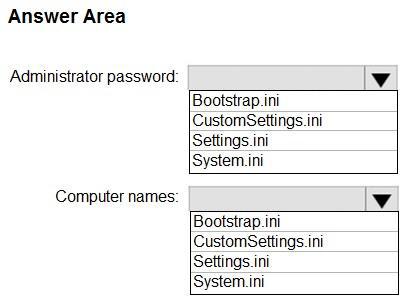
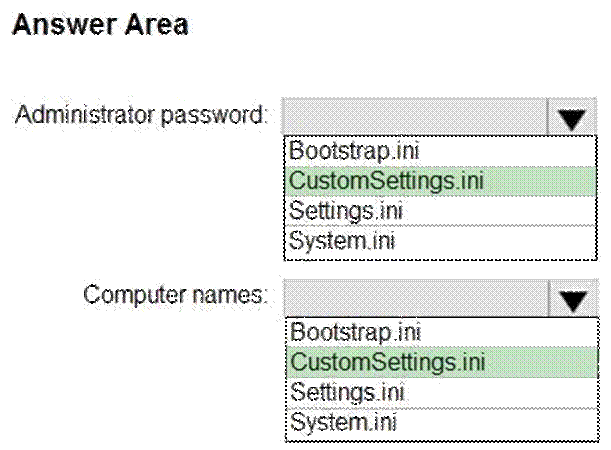
You use the Microsoft Deployment Toolkit (MDT) to deploy Windows 11.
You need to modify the deployment share to meet the following requirements:
Ensure that the user who performs the installation is prompted to set the local Administrator password Define a rule for how to name computers during the deployment.

The solution must NOT replace the existing WinPE image.
Which file should you modify for each requirement? To answer, select the appropriate options in the answer area,
NOTE: Each correct selection is worth one point.
Hot Area:
HOTSPOT
You use the Microsoft Deployment Toolkit (MDT) to deploy Windows 11.
You need to modify the deployment share to meet the following requirements:
Ensure that the user who performs the installation is prompted to set the local Administrator password Define a rule for how to name computers during the deployment.
The solution must NOT replace the existing WinPE image.
Which file should you modify for each requirement? To answer, select the appropriate options in the answer area,
NOTE: Each correct selection is worth one point.
Hot Area:
DRAG DROP
You have 500 Windows 10 devices enrolled in Microsoft Intune.
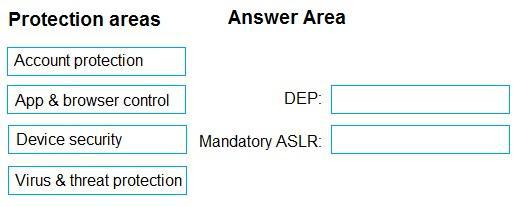
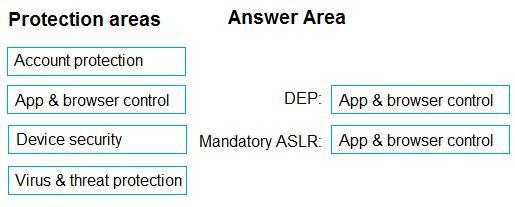
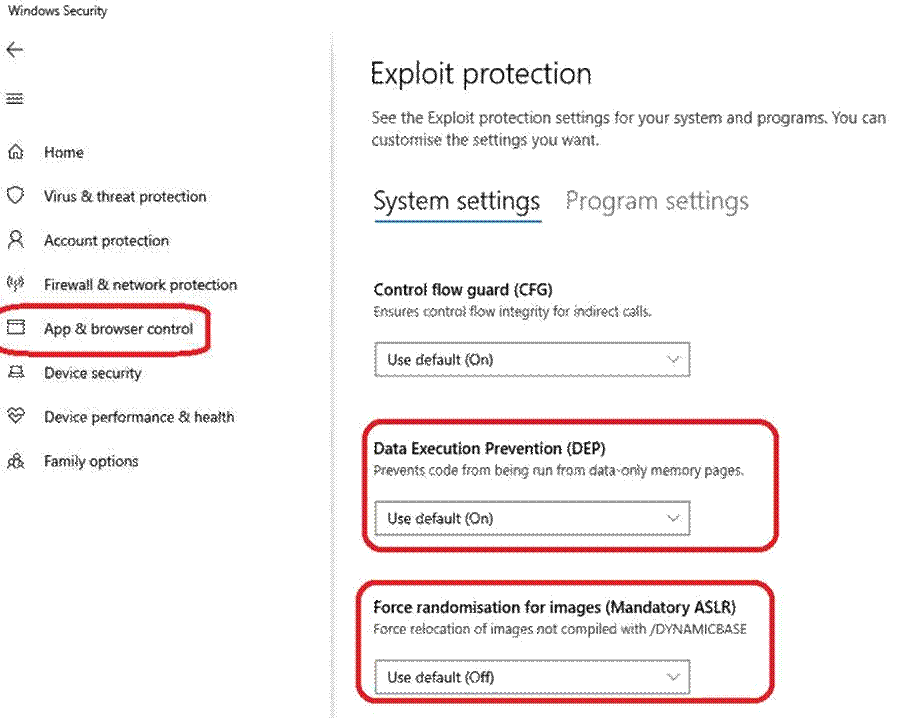
You plan to use Exploit protection in Microsoft Intune to enable the following system settings on the devices:
Data Execution Prevention (DEP)
Force randomization for images (Mandatory ASLR)
You need to configure a Windows 10 device that will be used to create a template file.
Which protection areas on the device should you configure in the Windows Security app before you create the template file? To answer, drag the appropriate protection areas to the correct settings. Each protection area may be used once, more than once, or not at all. You may need to drag the split bar between panes or scroll to view content. NOTE: Each correct selection is worth one point.
Select and Place:
DRAG DROP
You have 500 Windows 10 devices enrolled in Microsoft Intune.
You plan to use Exploit protection in Microsoft Intune to enable the following system settings on the devices:
Data Execution Prevention (DEP)
Force randomization for images (Mandatory ASLR)
You need to configure a Windows 10 device that will be used to create a template file.
Which protection areas on the device should you configure in the Windows Security app before you create the template file? To answer, drag the appropriate protection areas to the correct settings. Each protection area may be used once, more than once, or not at all. You may need to drag the split bar between panes or scroll to view content. NOTE: Each correct selection is worth one point.
Select and Place:
DRAG DROP
You have 500 Windows 10 devices enrolled in Microsoft Intune.
You plan to use Exploit protection in Microsoft Intune to enable the following system settings on the devices:
Data Execution Prevention (DEP)
Force randomization for images (Mandatory ASLR)
You need to configure a Windows 10 device that will be used to create a template file.
Which protection areas on the device should you configure in the Windows Security app before you create the template file? To answer, drag the appropriate protection areas to the correct settings. Each protection area may be used once, more than once, or not at all. You may need to drag the split bar between panes or scroll to view content. NOTE: Each correct selection is worth one point.
Select and Place:
DRAG DROP
You have 500 Windows 10 devices enrolled in Microsoft Intune.
You plan to use Exploit protection in Microsoft Intune to enable the following system settings on the devices:
Data Execution Prevention (DEP)
Force randomization for images (Mandatory ASLR)
You need to configure a Windows 10 device that will be used to create a template file.
Which protection areas on the device should you configure in the Windows Security app before you create the template file? To answer, drag the appropriate protection areas to the correct settings. Each protection area may be used once, more than once, or not at all. You may need to drag the split bar between panes or scroll to view content. NOTE: Each correct selection is worth one point.
Select and Place:
DRAG DROP
You have 500 Windows 10 devices enrolled in Microsoft Intune.
You plan to use Exploit protection in Microsoft Intune to enable the following system settings on the devices:
Data Execution Prevention (DEP)
Force randomization for images (Mandatory ASLR)
You need to configure a Windows 10 device that will be used to create a template file.
Which protection areas on the device should you configure in the Windows Security app before you create the template file? To answer, drag the appropriate protection areas to the correct settings. Each protection area may be used once, more than once, or not at all. You may need to drag the split bar between panes or scroll to view content. NOTE: Each correct selection is worth one point.
Select and Place:
DRAG DROP
You have 500 Windows 10 devices enrolled in Microsoft Intune.
You plan to use Exploit protection in Microsoft Intune to enable the following system settings on the devices:
Data Execution Prevention (DEP)
Force randomization for images (Mandatory ASLR)
You need to configure a Windows 10 device that will be used to create a template file.
Which protection areas on the device should you configure in the Windows Security app before you create the template file? To answer, drag the appropriate protection areas to the correct settings. Each protection area may be used once, more than once, or not at all. You may need to drag the split bar between panes or scroll to view content. NOTE: Each correct selection is worth one point.
Select and Place: