
Microsoft DP-700 Practice Exams
Last updated on Nov 16,2026- Exam Code: DP-700
- Exam Name: Microsoft Fabric Data Engineer
- Certification Provider: Microsoft
- Latest update: Nov 16,2026
You have a Fabric workspace named Workspace1 that contains an Apache Spark job definition named Job1.
You have an Azure SQL database named Source1 that has public internet access disabled.
You need to ensure that Job1 can access the data in Source1.
What should you create?
- A . an on-premises data gateway
- B . a managed private endpoint
- C . an integration runtime
- D . a data management gateway
B
Explanation:
To allow Job1 in Workspace1 to access an Azure SQL database (Source1) with public internet access disabled, you need to create a managed private endpoint. A managed private endpoint is a secure, private connection that enables services like Fabric (or other Azure services) to access resources such as databases, storage accounts, or other services within a virtual network (VNet) without requiring public internet access. This approach maintains the security and integrity of your data while enabling access to the Azure SQL database.
You have a Fabric workspace named Workspace1 that contains a data pipeline named Pipeline1 and a lakehouse named Lakehouse1.
You have a deployment pipeline named deployPipeline1 that deploys Workspace1 to Workspace2.
You restructure Workspace1 by adding a folder named Folder1 and moving Pipeline1 to Folder1.
You use deployPipeline1 to deploy Workspace1 to Workspace2.
What occurs to Workspace2?
- A . Folder1 is created, Pipeline1 moves to Folder1, and Lakehouse1 is deployed.
- B . Only Pipeline1 and Lakehouse1 are deployed.
- C . Folder1 is created, and Pipeline1 and Lakehouse1 move to Folder1.
- D . Only Folder1 is created and Pipeline1 moves to Folder1.
A
Explanation:
When you restructure Workspace1 by adding a new folder (Folder1) and moving Pipeline1 into it, deployPipeline1 will deploy the entire structure of Workspace1 to Workspace2, preserving the changes made in Workspace1. This includes:
Folder1 will be created in Workspace2, mirroring the structure in Workspace1.
Pipeline1 will be moved into Folder1 in Workspace2, maintaining the same folder structure.
Lakehouse1 will be deployed to Workspace2 as it exists in Workspace1.
You have a Fabric capacity that contains a workspace named Workspace1. Workspace1 contains a lakehouse named Lakehouse1, a data pipeline, a notebook, and several Microsoft Power BI reports.
A user named User1 wants to use SQL to analyze the data in Lakehouse1.
You need to configure access for User1.
The solution must meet the following requirements:
– Provide User1 with read access to the table data in Lakehouse1.
– Prevent User1 from using Apache Spark to query the underlying files in Lakehouse1.
– Prevent User1 from accessing other items in Workspace1.
What should you do?
- A . Share Lakehouse1 with User1 directly and select Read all SQL endpoint data.
- B . Assign User1 the Viewer role for Workspace1. Share Lakehouse1 with User1 and select Read all SQL endpoint data.
- C . Share Lakehouse1 with User1 directly and select Build reports on the default semantic model.
- D . Assign User1 the Member role for Workspace1. Share Lakehouse1 with User1 and select Read all
SQL endpoint data.
B
Explanation:
To meet the specified requirements for User1, the solution must ensure:
Read access to the table data in Lakehouse1: User1 needs permission to access the data within Lakehouse1. By sharing Lakehouse1 with User1 and selecting the Read all SQL endpoint data option, User1 will be able to query the data via SQL endpoints.
Prevent Apache Spark usage: By sharing the lakehouse directly and selecting the SQL endpoint data option, you specifically enable SQL-based access to the data, preventing User1 from using Apache Spark to query the data.
Prevent access to other items in Workspace1: Assigning User1 the Viewer role for Workspace1 ensures that User1 can only view the shared items (in this case, Lakehouse1), without accessing other resources such as notebooks, pipelines, or Power BI reports within Workspace1.
This approach provides the appropriate level of access while restricting User1 to only the required resources and preventing access to other workspace assets.
You have a Fabric capacity that contains a workspace named Workspace1. Workspace1 contains a lakehouse named Lakehouse1, a data pipeline, a notebook, and several Microsoft Power BI reports.
A user named User1 wants to use SQL to analyze the data in Lakehouse1.
You need to configure access for User1.
The solution must meet the following requirements:
– Provide User1 with read access to the table data in Lakehouse1.
– Prevent User1 from using Apache Spark to query the underlying files in Lakehouse1.
– Prevent User1 from accessing other items in Workspace1.
What should you do?
- A . Share Lakehouse1 with User1 directly and select Read all SQL endpoint data.
- B . Assign User1 the Viewer role for Workspace1. Share Lakehouse1 with User1 and select Read all SQL endpoint data.
- C . Share Lakehouse1 with User1 directly and select Build reports on the default semantic model.
- D . Assign User1 the Member role for Workspace1. Share Lakehouse1 with User1 and select Read all
SQL endpoint data.
B
Explanation:
To meet the specified requirements for User1, the solution must ensure:
Read access to the table data in Lakehouse1: User1 needs permission to access the data within Lakehouse1. By sharing Lakehouse1 with User1 and selecting the Read all SQL endpoint data option, User1 will be able to query the data via SQL endpoints.
Prevent Apache Spark usage: By sharing the lakehouse directly and selecting the SQL endpoint data option, you specifically enable SQL-based access to the data, preventing User1 from using Apache Spark to query the data.
Prevent access to other items in Workspace1: Assigning User1 the Viewer role for Workspace1 ensures that User1 can only view the shared items (in this case, Lakehouse1), without accessing other resources such as notebooks, pipelines, or Power BI reports within Workspace1.
This approach provides the appropriate level of access while restricting User1 to only the required resources and preventing access to other workspace assets.
HOTSPOT
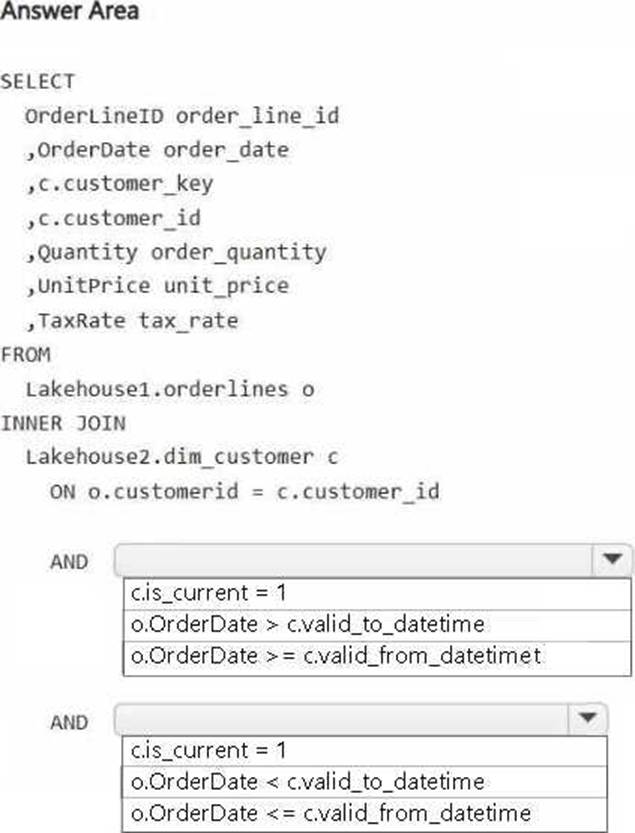
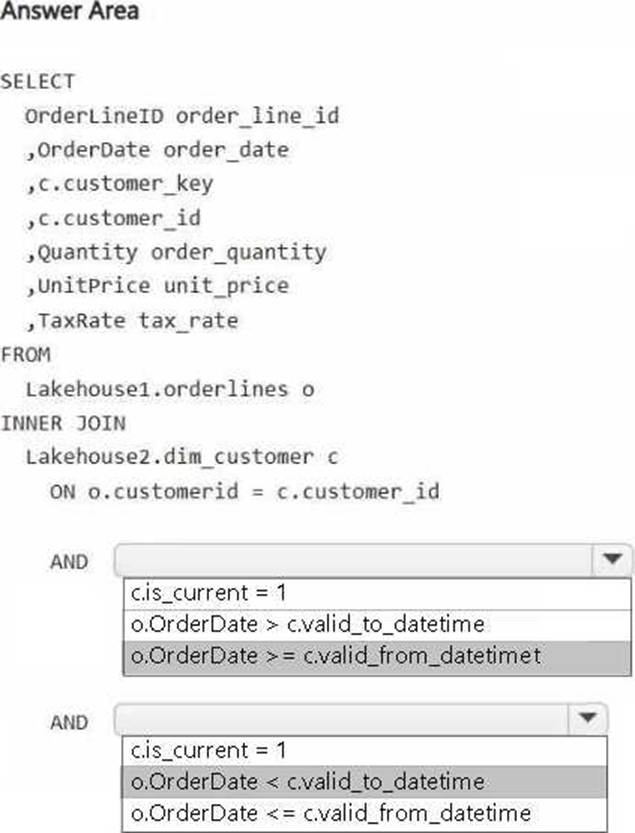
You have a Fabric workspace that contains two lakehouses named Lakehouse1 and Lakehouse2. Lakehouse1 contains staging data in a Delta table named Orderlines. Lakehouse2 contains a Type 2 slowly changing dimension (SCD) dimension table named Dim_Customer.
You need to build a query that will combine data from Orderlines and Dim_Customer to create a new fact table named Fact_Orders. The new table must meet the following requirements: Enable the analysis of customer orders based on historical attributes.
Enable the analysis of customer orders based on the current attributes.
How should you complete the statement? To answer, select the appropriate options in the answer area. NOTE: Each correct selection is worth one point.
HOTSPOT
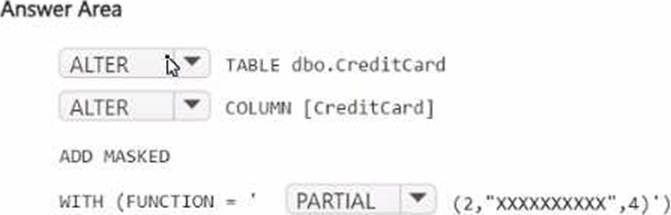
You have a Fabric workspace named Workspace1 that contains a warehouse named Warehouse2. A team of data analysts has Viewer role access to Workspace1. You create a table by running the following statement.
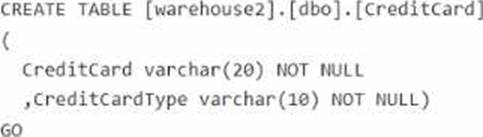
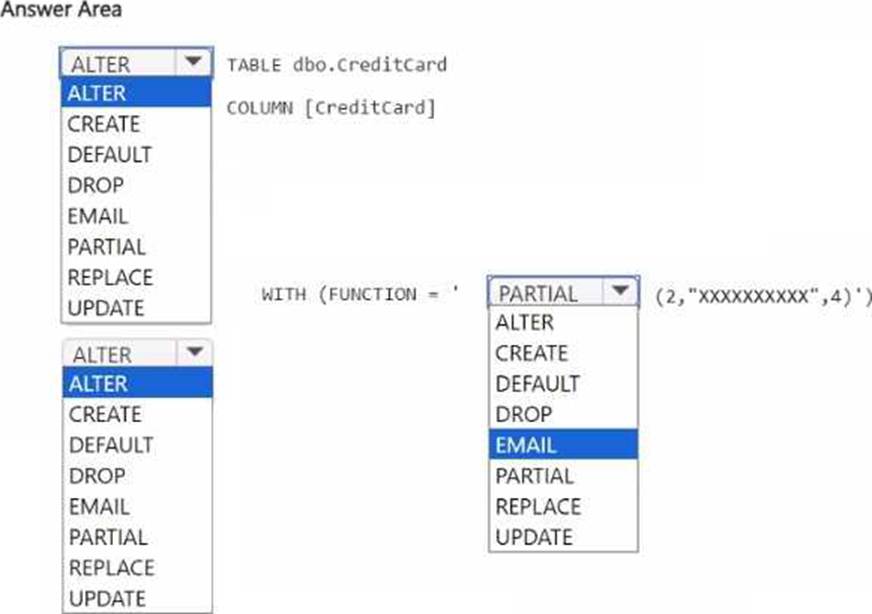
You need to ensure that the team can view only the first two characters and the last four characters of the Creditcard attribute.
How should you complete the statement? To answer, select the appropriate options in the answer area. NOTE: Each correct selection is worth one point.
You have a Fabric workspace named Workspacel that contains the following items:
• A Microsoft Power Bl report named Reportl
• A Power Bl dashboard named Dashboardl
• A semantic model named Modell
• A lakehouse name Lakehouse1
Your company requires that specific governance processes be implemented for the items.
Which items can you endorse in Fabric?
- A . Lakehouse1, Modell, and Dashboard1 only
- B . Lakehouse1, Modell, Report1 and Dashboard1
- C . Report1 and Dashboard1 only
- D . Model1, Report1, and Dashboard1 only
- E . Lakehouse1, Model1, and Report1 only
You have a Fabric workspace named Workspace1. Your company acquires GitHub licenses.
You need to configure source control for Workpace1 to use GitHub. The solution must follow the principle of least privilege.
Which permissions do you require to ensure that you can commit code to GitHub?
- A . Actions (Read and write) and Contents (Read and write)
- B . Actions (Read and write) only
- C . Contents (Read and write) only
- D . Contents (Read) and Commit statuses (Read and write)
You have a Fabric deployment pipeline that uses three workspaces named Dev, Test, and Prod.
You need to deploy an eventhouse as part of the deployment process.
What should you use to add the eventhouse to the deployment process?
- A . GitHub Actions
- B . a deployment pipeline
- C . an Azure DevOps pipeline
B
Explanation:
A deployment pipeline in Fabric is designed to automate the process of deploying assets (such as reports, datasets, eventhouses, and other objects) between environments like Dev, Test, and Prod. Since you need to deploy an eventhouse as part of the deployment process, a deployment pipeline is the appropriate tool to move this asset through the different stages of your environment.
You need to ensure that usage of the data in the Amazon S3 bucket meets the technical requirements.
What should you do?
- A . Create a workspace identity and enable high concurrency for the notebooks.
- B . Create a shortcut and ensure that caching is disabled for the workspace.
- C . Create a workspace identity and use the identity in a data pipeline.
- D . Create a shortcut and ensure that caching is enabled for the workspace.
B
Explanation:
To ensure that the usage of the data in the Amazon S3 bucket meets the technical requirements, we must address two key points:
Minimize egress costs associated with cross-cloud data access: Using a shortcut ensures that Fabric does not replicate the data from the S3 bucket into the lakehouse but rather provides direct access to the data in its original location. This minimizes cross-cloud data transfer and avoids additional egress costs.
Prevent saving a copy of the raw data in the lakehouses: Disabling caching ensures that the raw data is not copied or persisted in the Fabric workspace. The data is accessed on-demand directly from the Amazon S3 bucket.