
Microsoft DP-600 Practice Exams
Last updated on Oct 21,2026- Exam Code: DP-600
- Exam Name: Implementing Analytics Solutions Using Microsoft Fabric
- Certification Provider: Microsoft
- Latest update: Oct 21,2026
DRAG DROP
You have a Fabric workspace named Workspace1.
You have three groups named Group1, Group2, and Group3.
You need to assign a workspace role to each group.
The solution must follow the principle of least privilege and meet the following requirements:
– Group1 must be able to write data to Workspace1, but be unable to add members to Workspace1.
– Group2 must be able to configure and maintain the settings of Workspace1.
– Group3 must be able to write data and add members to Workspace1, but be unable to delete Workspace1.
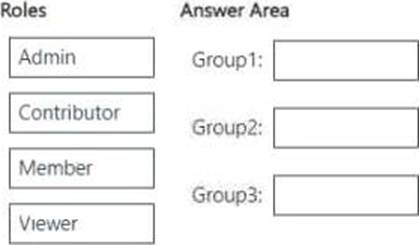
Which workspace role should you assign to each group? To answer, drag the appropriate roles to the correct groups. Each role may be used once, more than once, or not at all. You may need to drag the split bar between panes or scroll to view content. NOTE: Each correct selection is worth one point.
Explanation:
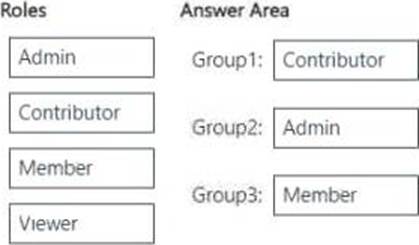
Group1 (Can write data but cannot add members) → Contributor
Contributors can write, edit, and manage data, but cannot manage workspace settings or add/ remove users.
Group2 (Can configure and maintain workspace settings) → Admin
Admins have full control over the workspace, including configuring settings, managing permissions, and maintaining security policies.
Group3 (Can write data and add members but cannot delete the workspace) → Member Members can add/remove members and write data, but they cannot delete the workspace or configure settings at the admin level.
Note: This section contains one or more sets of questions with the same scenario and problem. Each question presents a unique solution to the problem. You must determine whether the solution meets the stated goals. More than one solution in the set might solve the problem. It is also possible that none of the solutions in the set solve the problem.
After you answer a question in this section, you will NOT be able to return. As a result, these questions do not appear on the Review Screen.
Your network contains an on-premises Active Directory Domain Services (AD DS) domain named contoso.com that syncs with a Microsoft Entra tenant by using Microsoft Entra Connect.
You have a Fabric tenant that contains a semantic model.
You enable dynamic row-level security (RLS) for the model and deploy the model to the Fabric service.
You query a measure that includes the USERNAME() function, and the query returns a blank result.
You need to ensure that the measure returns the user principal name (UPN) of a user.
Solution: You create a role in the model.
Does this meet the goal?
- A . Yes
- B . No
B
Explanation:
No, creating a role in the model alone does not ensure that the USERNAME() function returns the user’s
User Principal Name (UPN). To achieve this, you should use the USERPRINCIPALNAME() function in your measure, as it consistently returns the user’s UPN across different environments.
HOTSPOT
You have a Fabric warehouse that contains a table named Table1.
Table1 contains the following data.
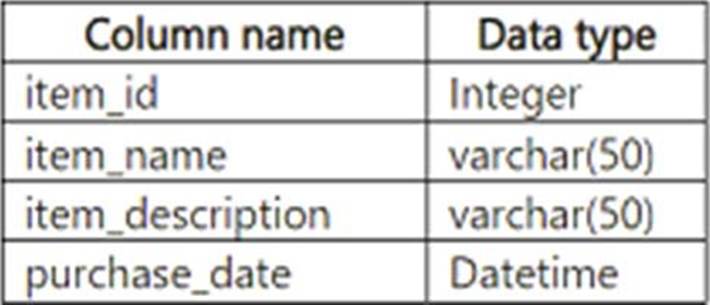
You need to create a T-SQL statement that meets the following requirements:
– Outputs the item name of each item and returns a null value if the item name is longer than 20 characters
– Outputs the PurchaseDate value in the format of МММ dd, yy
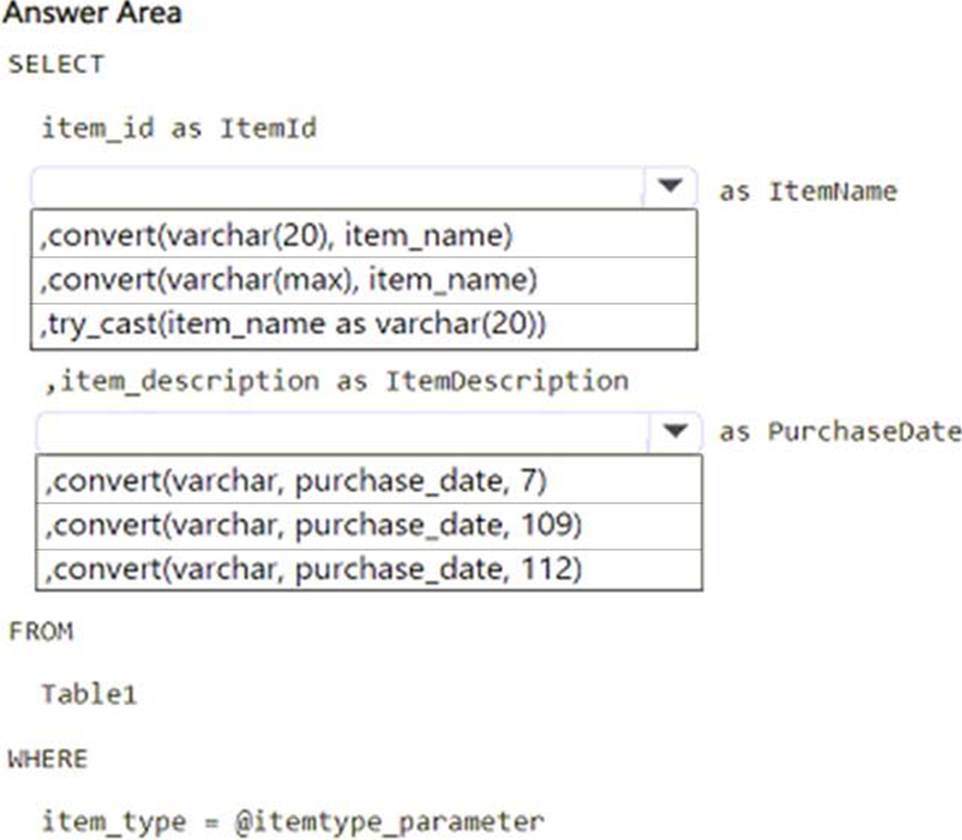
How should you complete the statement? To answer, select the appropriate options in the answer area. NOTE: Each correct selection is worth one point.
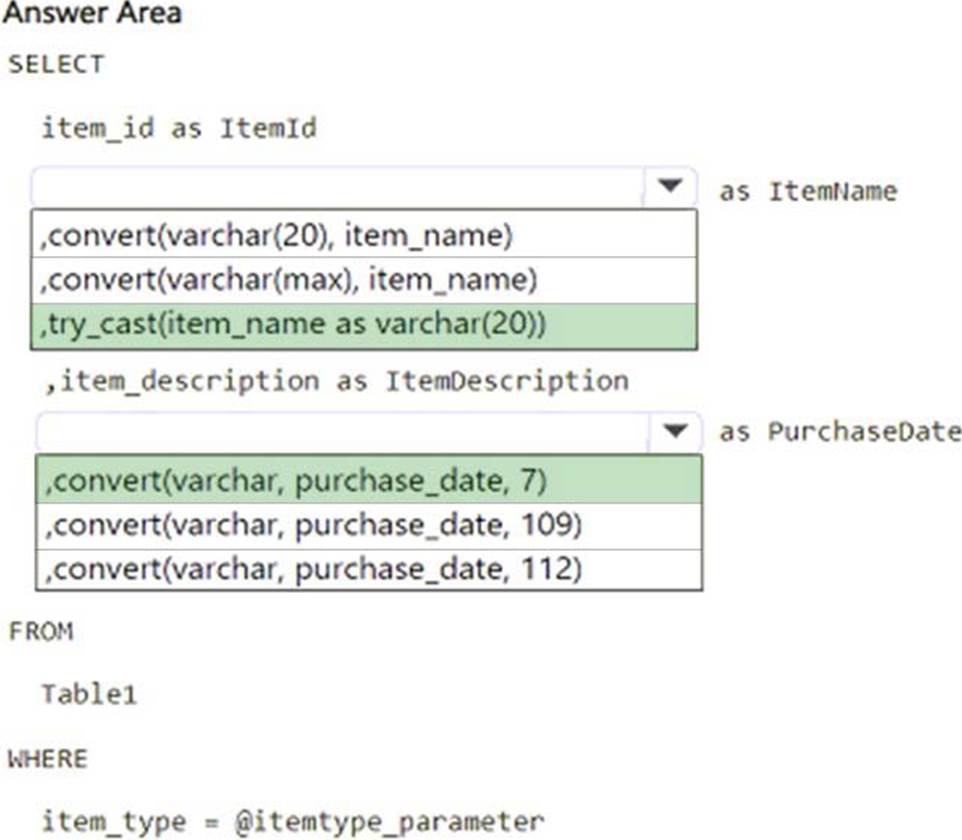
Explanation:
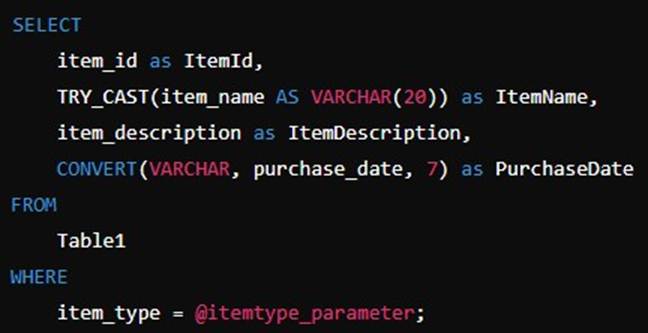
Handling Item Name (Null if > 20 characters)
– The correct choice is TRY_CAST(item_name AS VARCHAR(20)).
– TRY_CAST attempts to cast item_name to VARCHAR(20).
– If item_name is longer than 20 characters, it returns NULL instead of truncating or causing an error.
Formatting PurchaseDate (MMM dd, yy)
– The correct choice is CONVERT(VARCHAR, purchase_date, 7).
– The format style 7 in SQL Server returns dates in the MMM dd, yy format (e.g., "Feb 20, 25").
HOTSPOT
You have a Fabric tenant that contains a workspace named Workspace1 and a user named DBUser.
Workspace1 contains a lakehouse named Lakehouse1. DBUser does NOT have access to the tenant.
You grant DBUser access to Lakehouse1 as shown in the following exhibit.
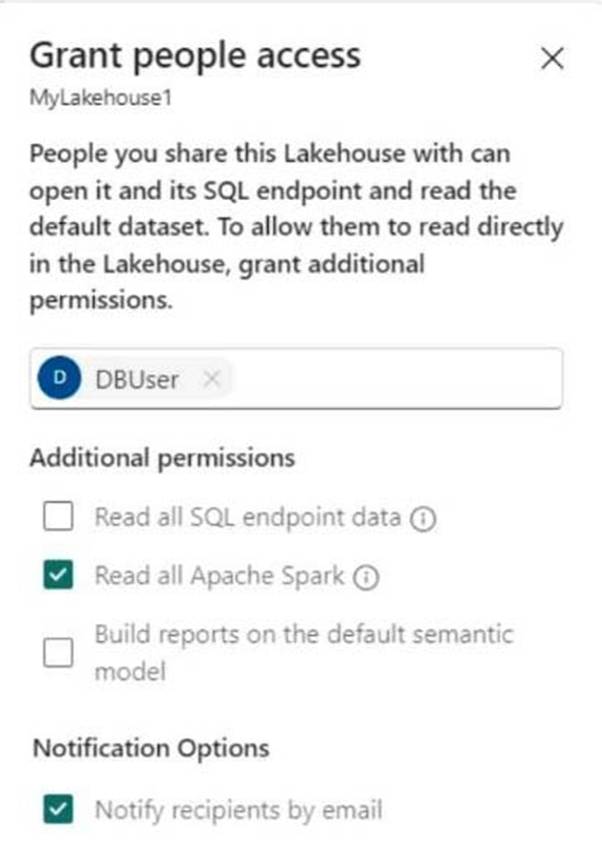
Use the drop-down menus to select the answer choice that completes each statement based on the information presented in the graphic. NOTE: Each correct selection is worth one point.
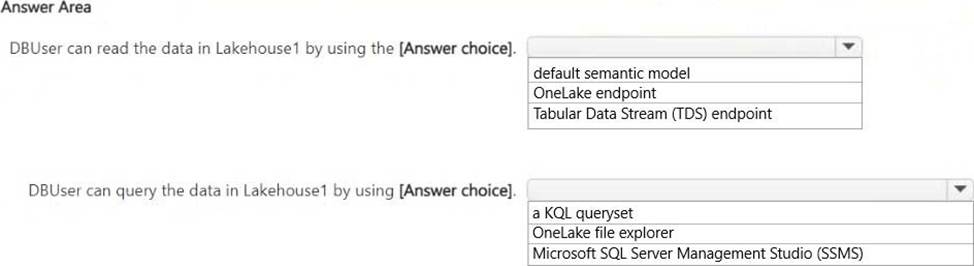
Explanation:
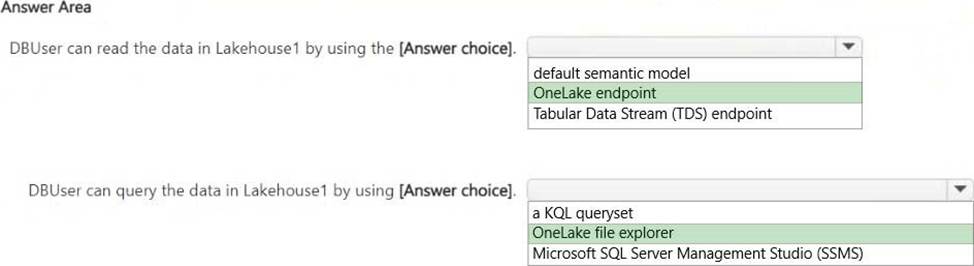
DBUser can read the data in Lakehouse1 by using the OneLake endpoint.
DBUser can query the data in Lakehouse1 by using the OneLake file explorer.
DBUser has been granted permission to "Read all Apache Spark" data but not permission to read SQL endpoint data or build reports using the default semantic model.
Since SQL endpoint access is not granted, DBUser cannot use TDS (Tabular Data Stream) or SSMS (SQL Server Management Studio) for querying.
DBUser can still access OneLake data directly, which is why OneLake endpoint and OneLake file explorer are the correct choices.
You have a Microsoft Fabric tenant that contains a dataflow.
You are exploring a new semantic model.
From Power Query, you need to view column information as shown in the following exhibit.
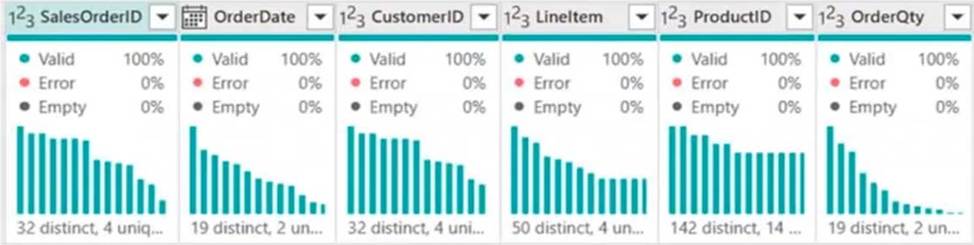
Which three Data view options should you select? Each correct answer presents part of the solution.
- A . Show column value distribution
- B . Enable details pane
- C . Enable column profile
- D . Show column quality details
- E . Show column profile in details pane
DRAG DROP
You have a Fabric workspace that contains a Dataflow Gen2 query. The query returns the following data.

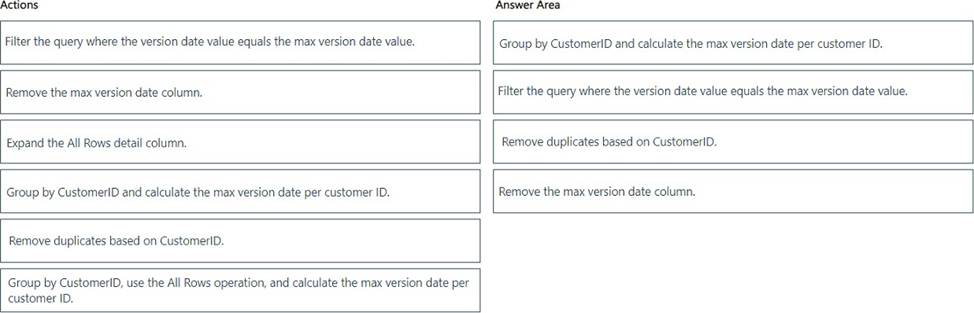
You need to filter the results to ensure that only the latest version of each customer’s record is retained.
The solution must ensure that no new columns are loaded to the semantic model.
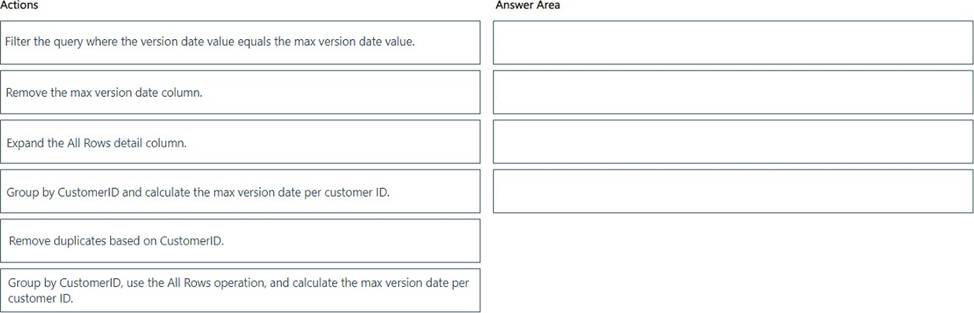
Which four actions should you perform in sequence in Power Query Editor? To answer, move the appropriate actions from the list of actions to the answer area and arrange them in the correct order.
Explanation:
HOTSPOT
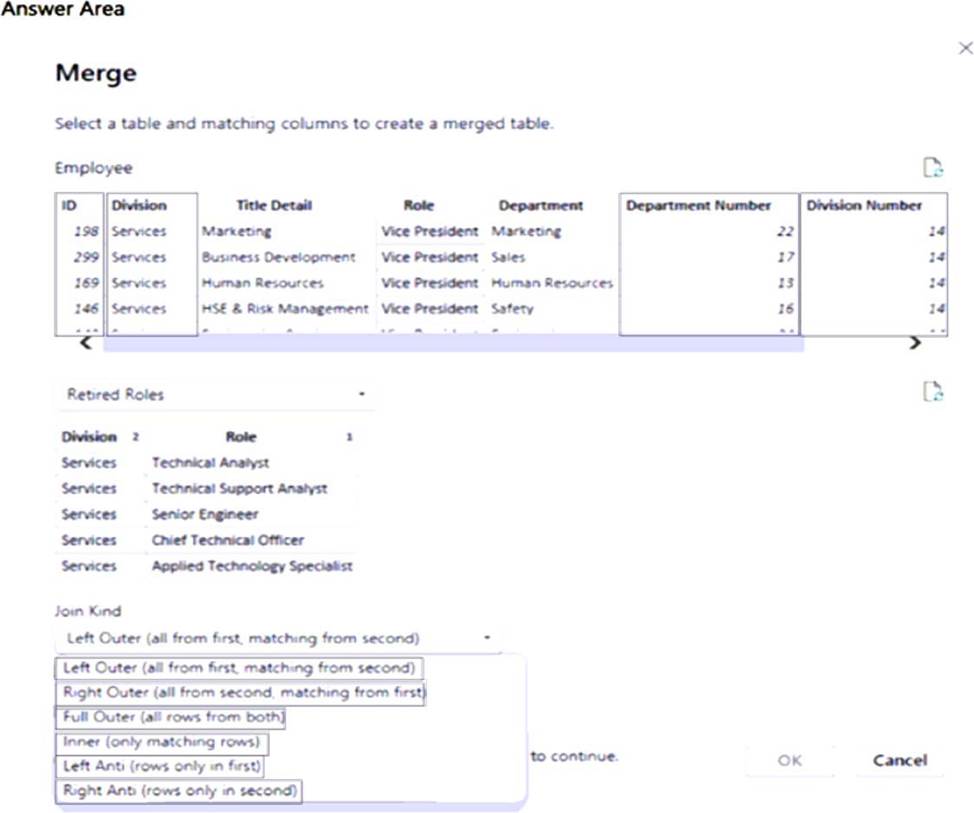
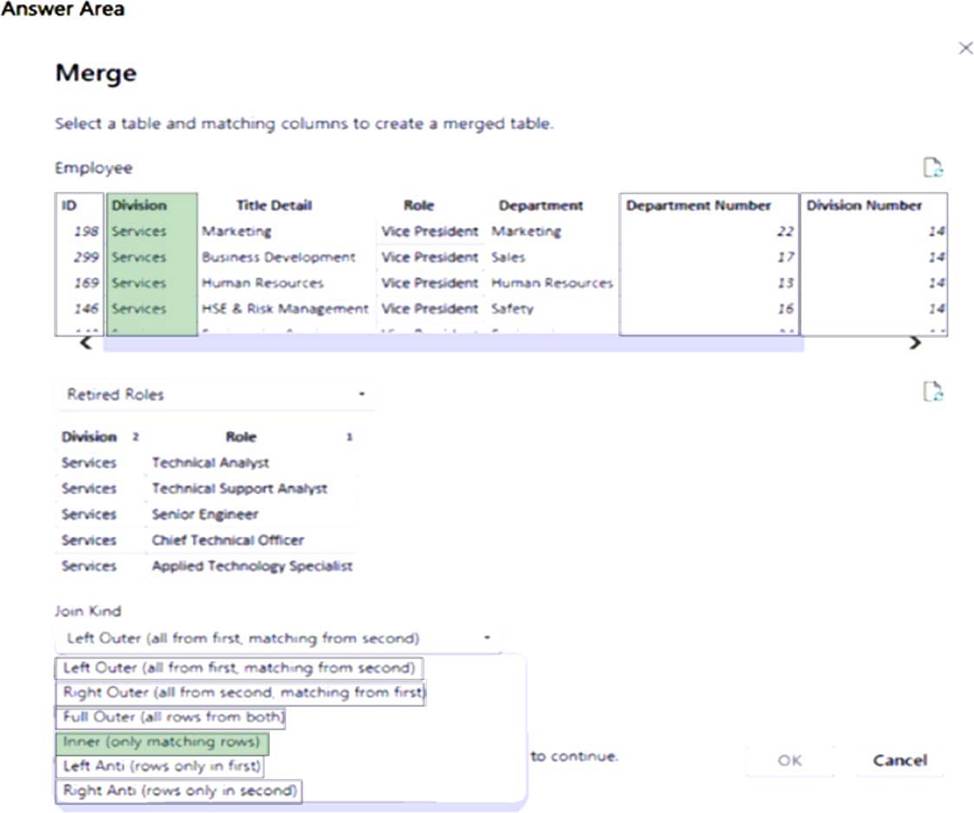
You have two Microsoft Power BI queries named Employee and Retired Roles.
You need to merge the Employee query with the Retired Roles query. The solution must ensure that duplicate rows in each query are removed.
Which column and Join Kind should you use in Power Query Editor? To answer, select the appropriate options in the answer area. NOTE: Each correct answer is worth one point.
Explanation:
Box 1: Division
Power Query, Merge queries overview
The Division column and the Role column appear in both tables.
Box 2: Inner Join
Inner join as duplicate rows in each query must be removed.
Reference: https://learn.microsoft.com/en-us/power-query/merge-queries-overview
HOTSPOT
You have two Microsoft Power BI queries named Employee and Retired Roles.
You need to merge the Employee query with the Retired Roles query. The solution must ensure that duplicate rows in each query are removed.
Which column and Join Kind should you use in Power Query Editor? To answer, select the appropriate options in the answer area. NOTE: Each correct answer is worth one point.
Explanation:
Box 1: Division
Power Query, Merge queries overview
The Division column and the Role column appear in both tables.
Box 2: Inner Join
Inner join as duplicate rows in each query must be removed.
Reference: https://learn.microsoft.com/en-us/power-query/merge-queries-overview
You have a Fabric tenant that contains the workspaces shown in the following table.
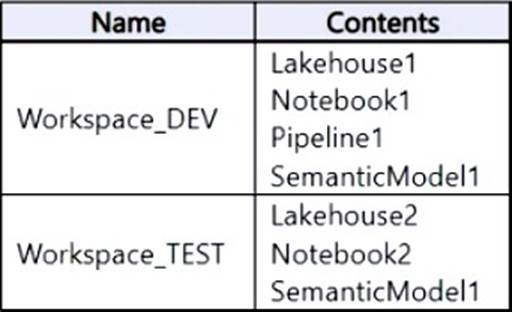
You have a deployment pipeline named Pipeline1 that deploys items from Workspace_DEV to Workspace_TEST. In Pipeline1, all items that have matching names are paired.
You deploy the contents of Workspace_DEV to Workspace_TEST by using Pipeline1.
What will the contents of Workspace_TEST be once the deployment is complete?
- A . Lakehouse1
Lakehouse2
Notebook1
Notebook2
Pipeline1
SemanticModel1 - B . Lakehouse1
Notebook1
Pipeline1
SemanticModel1 - C . Lakehouse2
Notebook2
SemanticModel1 - D . Lakehouse2
Notebook2
Pipeline1
SemanticModel1
A
Explanation:
The items in Workspace_DEV is added to Workspace_TEST. The items already in Workspace_TEST are kept.
Note: Microsoft Fabric, The deployment pipelines process
The deployment process lets you clone content from one stage in the deployment pipeline to another, typically from development to test, and from test to production.
During deployment, Microsoft Fabric copies the content from the source stage to the target stage. The connections between the copied items are kept during the copy process.
Deploying content from a working production pipeline to a stage that has an existing workspace, includes the following steps:
Deploying new content as an addition to the content already there.
Deploying updated content to replace some of the content already there.
Reference: https://learn.microsoft.com/en-us/fabric/cicd/deployment-pipelines/understand-the-deployment-process
You have a Fabric tenant that contains a lakehouse named Lakehouse1. Lakehouse1 contains a Delta table that has one million Parquet files.
You need to remove files that were NOT referenced by the table during the past 30 days. The solution must ensure that the transaction log remains consistent, and the ACID properties of the table are maintained.
What should you do?
- A . From OneLake file explorer, delete the files.
- B . Run the OPTIMIZE command and specify the Z-order parameter.
- C . Run the OPTIMIZE command and specify the V-order parameter.
- D . Run the VACUUM command.
D
Explanation:
VACUUM
Applies to: check marked yes Databricks SQL check marked yes Databricks Runtime Remove unused files from a table directory.
VACUUM removes all files from the table directory that are not managed by Delta, as well as data files that are no longer in the latest state of the transaction log for the table and are older than a retention threshold.
Incorrect:
Not B: What is Z order optimization?
Z-ordering is a technique to colocate related information in the same set of files. This co-locality is
automatically used by Delta Lake on Azure Databricks data-skipping algorithms. This behavior dramatically
reduces the amount of data that Delta Lake on Azure Databricks needs to read.
Not C: Delta Lake table optimization and V-Order
V-Order is a write time optimization to the parquet file format that enables lightning-fast reads under the
Microsoft Fabric compute engines, such as Power BI, SQL, Spark, and others.
Power BI and SQL engines make use of Microsoft Verti-Scan technology and V-Ordered parquet files to achieve in-memory like data access times. Spark and other non-Verti-Scan compute engines also benefit from the V-Ordered files with an average of 10% faster read times, with some scenarios up to 50%.
V-Order works by applying special sorting, row group distribution, dictionary encoding and compression on parquet files, thus requiring less network, disk, and CPU resources in compute engines to read it, providing cost efficiency and performance. V-Order sorting has a 15% impact on average write times but provides up to 50% more compression.
Reference:
https://docs.databricks.com/en/sql/language-manual/delta-vacuum.html
https://learn.microsoft.com/en-us/fabric/data-engineering/delta-optimization-and-v-order?