
Microsoft DP-600 Practice Exams
Last updated on Oct 21,2026- Exam Code: DP-600
- Exam Name: Implementing Analytics Solutions Using Microsoft Fabric
- Certification Provider: Microsoft
- Latest update: Oct 21,2026
You have a Fabric tenant that contains a semantic model named Model1. Model1 uses Import mode.
Model1 contains a table named Orders.
Orders has 100 million rows and the following fields.
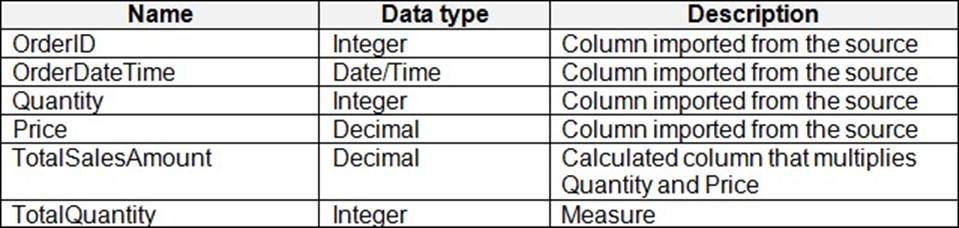
You need to reduce the memory used by Model1 and the time it takes to refresh the model.
Which two actions should you perform? Each correct answer presents part of the solution. NOTE: Each correct answer is worth one point.
- A . Split OrderDateTime into separate date and time columns.
- B . Replace TotalQuantity with a calculated column.
- C . Convert Quantity into the Text data type.
- D . Replace TotalSalesAmount with a measure.
You have a Fabric tenant that contains a workspace named Workspace1. Workspace1 contains a single semantic model that has two Microsoft Power BI reports.
You have a Microsoft 365 subscription that contains a data loss prevention (DLP) policy named DLP1.
You need to apply DLP1 to the items in Workspace1.
What should you do?
- A . Create a workspace identity.
- B . Apply a certified endorsement to the semantic model.
- C . Apply sensitivity labels to the semantic model and reports.
- D . Apply a master data endorsement to the semantic model.
C
Explanation:
Data loss prevention for Power BI
Microsoft Purview DLP policies for Power BI
A DLP policy for Power BI is set up in the Microsoft Purview compliance portal. It can detect sensitive data in a semantic model that’s been published to a Premium workspace in the Power BI service.
Type of sensitive data
A DLP policy for Power BI that’s set up in the Microsoft Purview compliance portal can be based on either a sensitivity label or a sensitive information type.
Sensitivity label
You can use sensitivity labels to classify content, ranging from less sensitive to more sensitive.
When a DLP policy for Power BI is invoked, a sensitivity label rule checks semantic models (that are published to the Power BI service) for the presence of a certain sensitivity label.
Reference: https://learn.microsoft.com/en-us/power-bi/guidance/powerbi-implementation-planning-data-loss-prevention
HOTSPOT
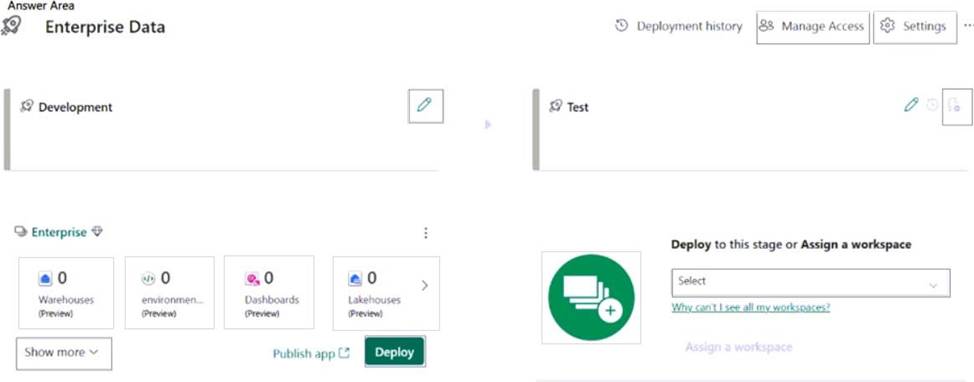
You have a Fabric tenant that contains a workspace named Enterprise. Enterprise contains a semantic model named Model1. Model1 contains a date parameter named Date1 that was created in Power Query.
You build a deployment pipeline named Enterprise Data that includes two stages named Development and Test. You assign the Enterprise workspace to the Development stage.
You need to perform the following actions:
– Create a workspace named Enterprise [Test] and assign the workspace to the Test stage.
– Configure a rule that will modify the value of Date1 when changes are deployed to the Test stage.
Which two settings should you use? To answer, select the appropriate settings in the answer area. NOTE: Each correct answer is worth one point.
Explanation:
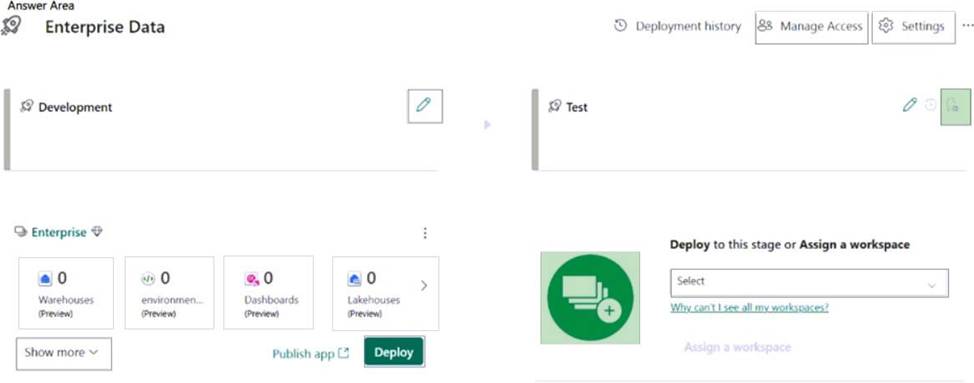
Box 1: Add workspace button (with a +sign)
Create a workspace named Enterprise [Test] and assign the workspace to the Test stage.
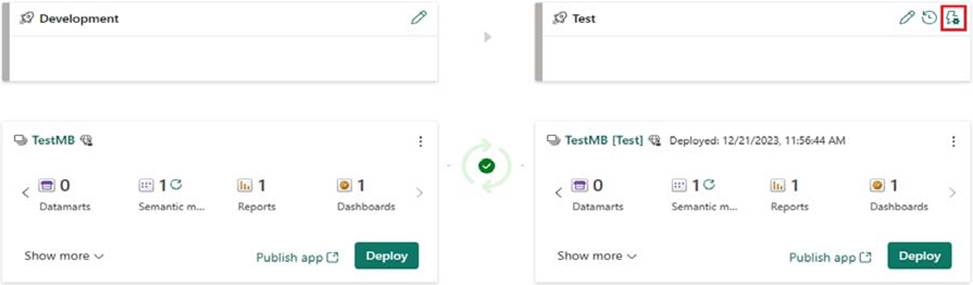
Box 2: Deployment rule [Upper right corner]
Configure a rule that will modify the value of Date1 when changes are deployed to the Test stage.
In the pipeline stage you want to create a deployment rule for, select Deployment rules
Reference: https://learn.microsoft.com/en-us/fabric/cicd/deployment-pipelines/create-rules
HOTSPOT
You have a Fabric tenant that contains a workspace named Enterprise. Enterprise contains a semantic model named Model1. Model1 contains a date parameter named Date1 that was created in Power Query.
You build a deployment pipeline named Enterprise Data that includes two stages named Development and Test. You assign the Enterprise workspace to the Development stage.
You need to perform the following actions:
– Create a workspace named Enterprise [Test] and assign the workspace to the Test stage.
– Configure a rule that will modify the value of Date1 when changes are deployed to the Test stage.
Which two settings should you use? To answer, select the appropriate settings in the answer area. NOTE: Each correct answer is worth one point.
Explanation:
Box 1: Add workspace button (with a +sign)
Create a workspace named Enterprise [Test] and assign the workspace to the Test stage.
Box 2: Deployment rule [Upper right corner]
Configure a rule that will modify the value of Date1 when changes are deployed to the Test stage.
In the pipeline stage you want to create a deployment rule for, select Deployment rules
Reference: https://learn.microsoft.com/en-us/fabric/cicd/deployment-pipelines/create-rules
HOTSPOT
You have a Fabric lakehouse named Lakehouse1 that contains the following data.
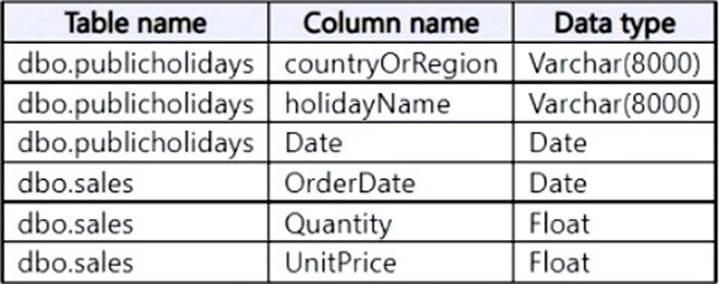
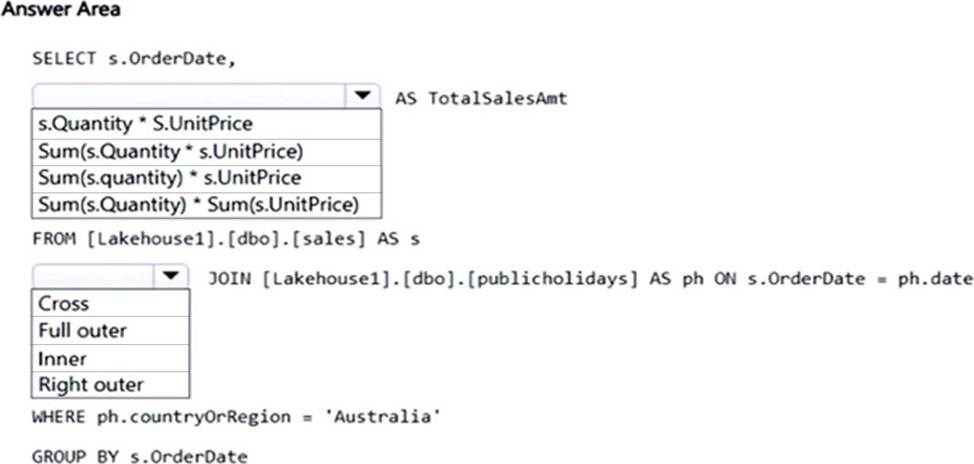
You need build a T-SQL statement that will return the total sales amount by OrderDate only for the days that are holidays in Australia. The total sales amount must sum the quantity multiplied by the price on each row in the dbo.sales table.
How should you complete the statement? To answer, select the appropriate options in the answer area. NOTE: Each correct selection is worth one point.
Explanation:
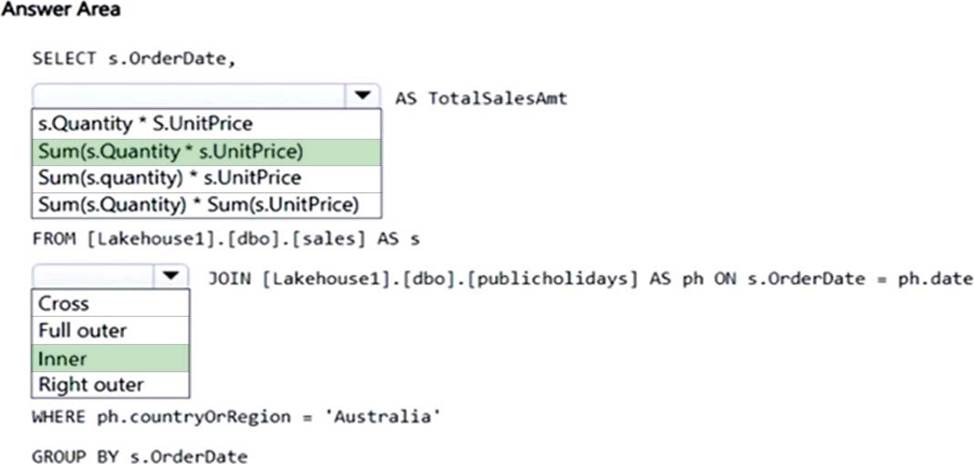
Box 1: Sum(s.Quantity * s.UnitPrice)
Calculate the sum of Quantity * Unitprice.
Incorrect:
* s.Quantity * S.UnitPrice Need to use the SUM function.
* Sum (s.Quantity) * S.UnitPrice) Incorrect parenthesis.
* Sum (s.Quantity) * S.UnitPrice Not the sum of the Quantity.
* Sum (s.Quantity) * SUM(S.UnitPrice)
Not separate sums of the Quantity and the UnitPrice.
Box 2: Inner
Standard inner join
HOTSPOT
You need to migrate the Research division data for Productline2. The solution must meet the data preparation requirements.
How should you complete the code? To answer, select the appropriate options in the answer area. NOTE: Each correct selection is worth one point.


Explanation:
Box 1: delta
Delta Lake uses versioned Parquet files to store your data in your cloud storage.
Box 2: Tables/productline2
Note: Apache Spark
Apache Spark notebooks and Apache Spark jobs can use shortcuts that you create in OneLake. Relative file paths can be used to directly read data from shortcuts. Additionally, if you create a shortcut in the Tables section of the lakehouse and it is in the Delta format, you can read it as a managed table using Apache Spark SQL syntax.
df = spark.read.format("delta").load("Tables/MyShortcut")
display(df)
df = spark.sql("SELECT * FROM MyLakehouse.MyShortcut LIMIT 1000")
display(df)
Scenario:
A Data Lake Storage Gen2 storage account named storage2 contains Research division data for a product line named Productline2. The data is in the CSV format.
Requirements, Planned Changes
For the Research division, create two Fabric workspaces named Productline1ws and Productline2ws.
Data Preparation Requirements
Contoso identifies the following data preparation requirements:
* The Research division data for Productline1 must be retrieved from Lakehouse1 by using Fabric notebooks.
*-> All the Research division data in the lakehouses must be presented as managed tables in Lakehouse explorer.
Note:
Spark provides two types of tables that Azure Synapse exposes in SQL automatically:
* Managed tables
Spark provides many options for how to store data in managed tables, such as TEXT, CSV, JSON, JDBC, PARQUET, ORC, HIVE, DELTA, and LIBSVM. These files are normally stored in the warehouse directory where managed table data is stored.
* External tables
Reference:
https://learn.microsoft.com/en-us/azure/synapse-analytics/metadata/table
https://learn.microsoft.com/en-us/fabric/onelake/onelake-shortcuts
Note: This section contains one or more sets of questions with the same scenario and problem. Each question presents a unique solution to the problem. You must determine whether the solution meets the stated goals. More than one solution in the set might solve the problem. It is also possible that none of the solutions in the set solve the problem.
After you answer a question in this section, you will NOT be able to return. As a result, these questions do not appear on the Review Screen.
Your network contains an on-premises Active Directory Domain Services (AD DS) domain named contoso.com that syncs with a Microsoft Entra tenant by using Microsoft Entra Connect.
You have a Fabric tenant that contains a semantic model.
You enable dynamic row-level security (RLS) for the model and deploy the model to the Fabric service.
You query a measure that includes the USERNAME() function, and the query returns a blank result.
You need to ensure that the measure returns the user principal name (UPN) of a user.
Solution: You update the measure to use the USERPRINCIPALNAME() function.
Does this meet the goal?
- A . Yes
- B . No
A
Explanation:
The USERPRINCIPALNAME () function directly retrieves the UPN of the user querying the measure. This is the most appropriate function to use if your goal is to obtain the UPN, which is the format typically used in environments that integrate with Microsoft Entra.
HOTSPOT
You have a Fabric tenant that contains a semantic model. The model contains data about retail stores.
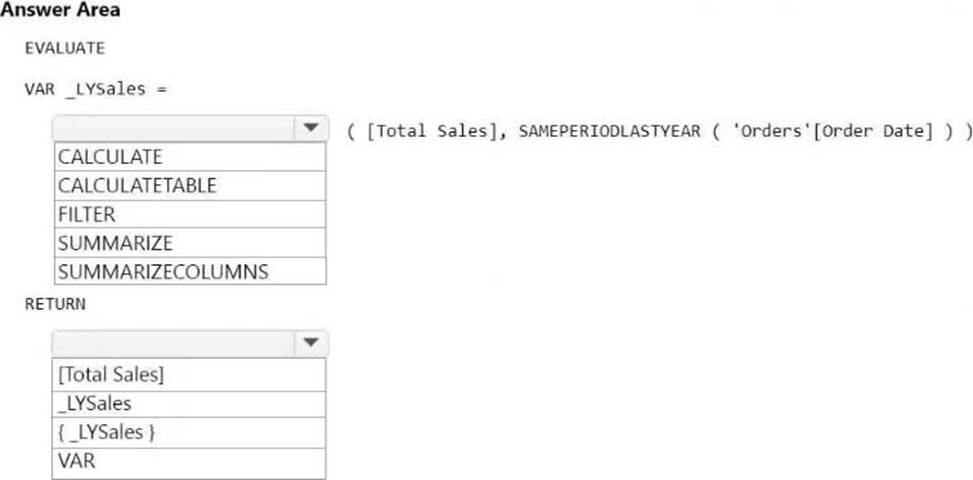
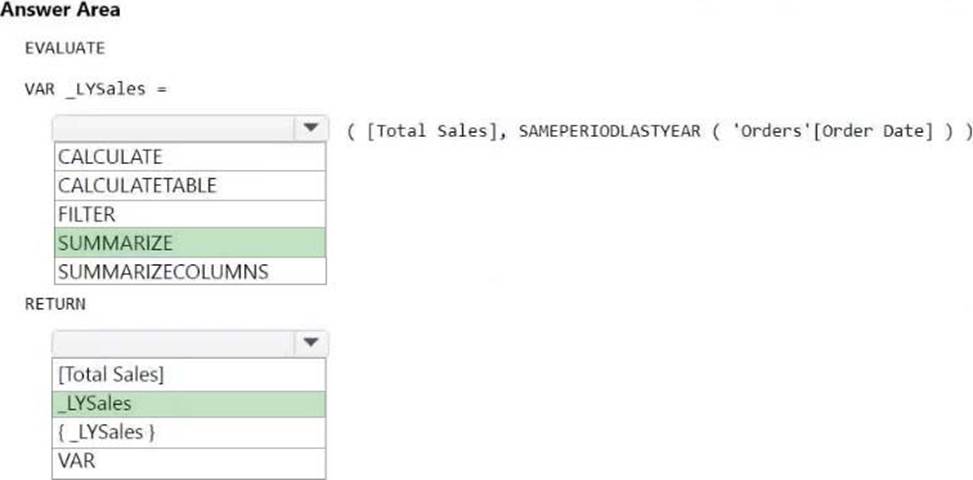
You need to write a DAX query that will be executed by using the XMLA endpoint. The query must return the total amount of sales from the same period last year.
How should you complete the DAX expression? To answer, select the appropriate options in the answer area. NOTE: Each correct selection is worth one point.
Explanation:
Box 1: SUMMARIZE
SUMMARIZE
Returns a summary table for the requested totals over a set of groups.
Syntax
SUMMARIZE (<table>, <groupBy_columnName>[, <groupBy_columnName>]…[, <name>, <expression>] …)
Note: EVALUATE is a DAX statement that is needed to execute a query. EVALUATE followed by any table expression returns the result of the table expression. Moreover, one or more EVALUATE statements can be preceded by special definitions like local tables, columns, measures, and variables that have the scope of the entire batch of EVALUATE statements executed together.
— Definition section
[DEFINE { MEASURE <tableName>[<name>] = <expression> }
{ COLUMN <tableName>[<name>] = <expression> } { TABLE <tableName> = <expression> }
{ VAR <name> = <expression>}]
— Query expression
EVALUATE <table>
— Result modifiers
[ORDER BY {<expression> [{ASC | DESC}]}[, …]
[START AT {<value>|<parameter>} [, …]]]
Note 2: Example
SAMEPERIODLASTYEAR
Returns a table that contains a column of dates shifted one year back in time from the dates in the specified dates column, in the current context.
Syntax
SAMEPERIODLASTYEAR(<dates>)
Parameters
dates
A column containing dates.
Return value
A single-column table of date values.
The following sample formula creates a measure that calculates the previous year sales of Reseller sales.
= CALCULATE(SUM(ResellerSales_USD[SalesAmount_USD]), SAMEPERIODLASTYEAR(DateTime [DateKey]))
Box 2: _LYSales
Just return the variable.
Note: You can define a variable in any DAX expression by using VAR followed by RETURN. In one or several VAR sections, you individually declare the variables needed to compute the expression; in the RETURN part you provide the expression itself.
Incorrect:
* FILTER
Returns a table that represents a subset of another table or expression.
Syntax
FILTER(<table>,<filter>)
table
The table to be filtered. The table can also be an expression that results in a table.
Filter
A Boolean expression that is to be evaluated for each row of the table. For example, [Amount] > 0 or [Region] = "France"
* SUMMARIZECOLUMNS
Returns a summary table over a set of groups.
Syntax
SUMMARIZECOLUMNS( <groupBy_columnName> [, < groupBy_columnName >]…, [<filterTable>]…[, <name>, <expression>]…)
* CALCULATETABLE
Evaluates a table expression in a modified filter context.
Note
There’s also the CALCULATE function. It performs exactly the same functionality, except it modifies the filter context applied to an expression that returns a scalar value.
Syntax
CALCULATETABLE(<expression>[, <filter1> [, <filter2> [, …]]])
Reference: https://www.sqlbi.com/articles/variables-in-dax
https://dax.guide/st/evaluate/
https://learn.microsoft.com/en-us/dax/summarize-function-dax
HOTSPOT
You have a KQL database that contains a table named Readings.
You need to query Readings and return the results shown in the following table.
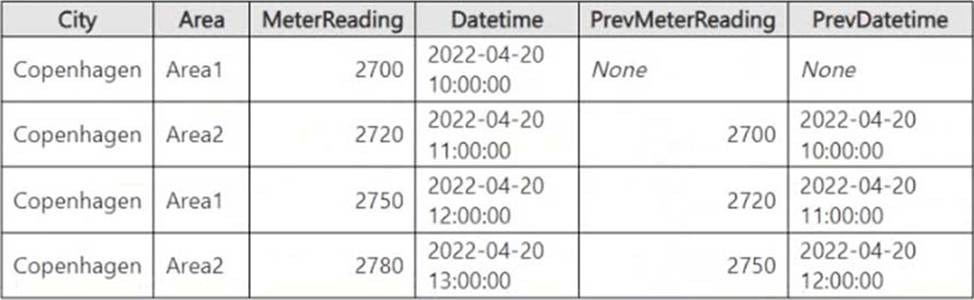
How should you complete the query? To answer, select the appropriate options in the answer area. NOTE: Each correct selection is worth one point.
Explanation:
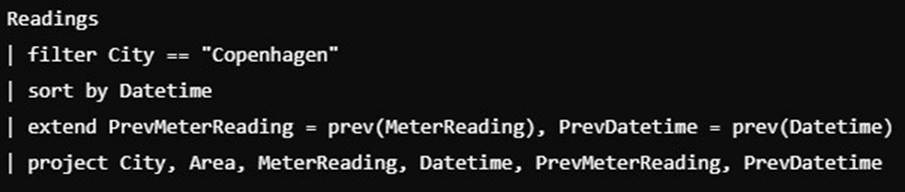
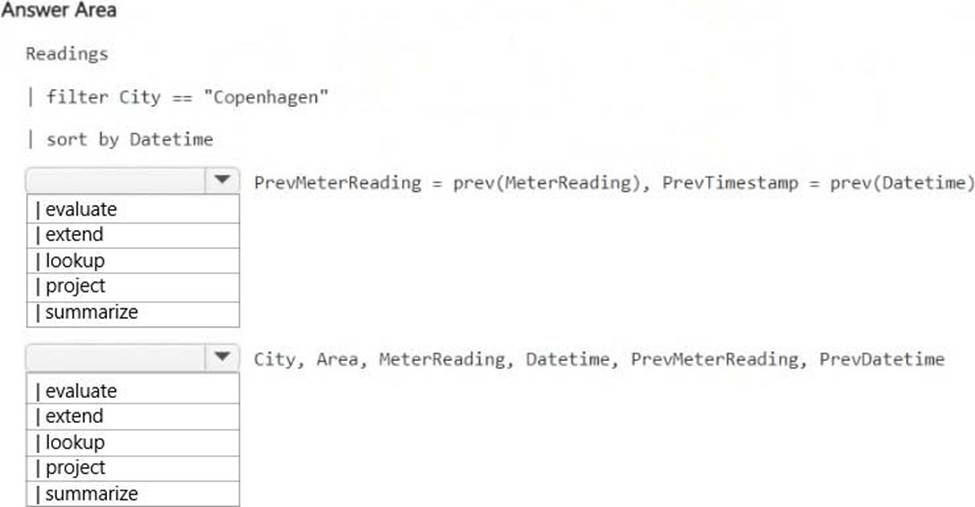
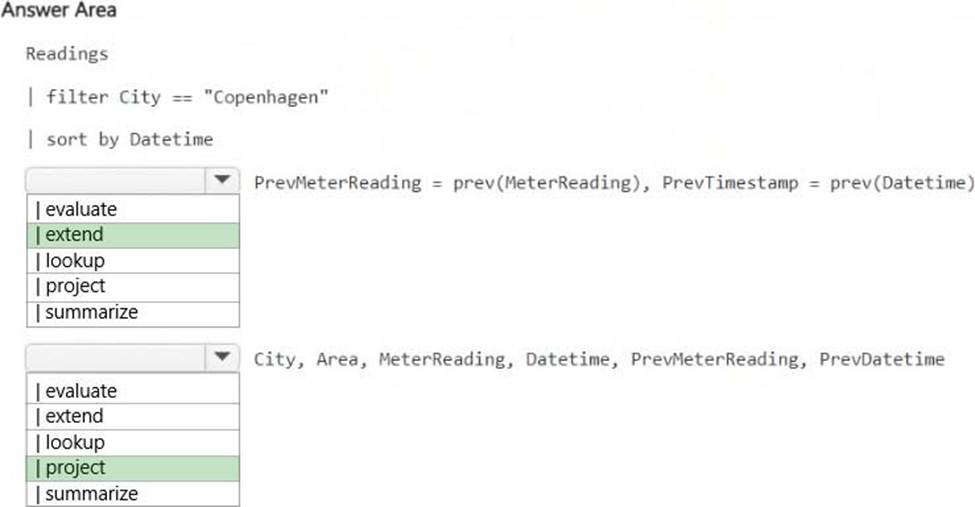
| extend
The prev() function retrieves the previous row’s value based on the sorted order.
extend PrevMeterReading = prev(MeterReading), PrevDatetime = prev(Datetime)
assigns these previous values.
| project
Used to select specific columns for the final result set. Ensures that City, Area, MeterReading, Datetime, PrevMeterReading, and PrevDatetime are included in the output.
HOTSPOT
You have a KQL database that contains a table named Readings.
You need to query Readings and return the results shown in the following table.
How should you complete the query? To answer, select the appropriate options in the answer area. NOTE: Each correct selection is worth one point.
Explanation:
| extend
The prev() function retrieves the previous row’s value based on the sorted order.
extend PrevMeterReading = prev(MeterReading), PrevDatetime = prev(Datetime)
assigns these previous values.
| project
Used to select specific columns for the final result set. Ensures that City, Area, MeterReading, Datetime, PrevMeterReading, and PrevDatetime are included in the output.