
Microsoft DP-600 Practice Exams
Last updated on Oct 21,2026- Exam Code: DP-600
- Exam Name: Implementing Analytics Solutions Using Microsoft Fabric
- Certification Provider: Microsoft
- Latest update: Oct 21,2026
HOTSPOT
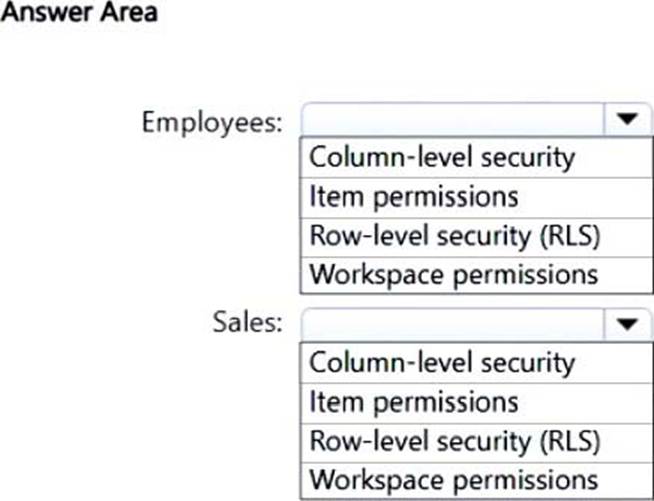
You have a Fabric tenant that contains a workspace named Workspace1. Workspace1 contains a warehouse named DW1. DW1 contains two tables named Employees and Sales. All users have read access to Dw1.
You need to implement access controls to meet the following requirements:
– For the Sales table, ensure that the users can see only the sales data from their respective region.
– For the Employees table, restrict access to all Personally Identifiable Information (PII).
– Maintain access to unrestricted data for all the users.
What should you use for each table? To answer, select the appropriate options in the answer area. NOTE: Each correct selection is worth one point.
Explanation:
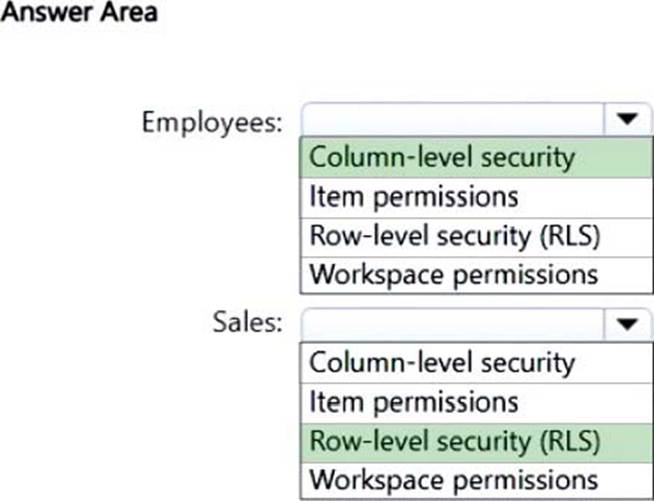
Box 1: Column-level security
For the Employees table, restrict access to all Personally Identifiable Information (PII).
Synapse Analytics, Column-level security
Column-Level security allows customers to control access to table columns based on the user’s execution context or group membership.
Column-level security simplifies the design and coding of security in your application, allowing you to restrict column access to protect sensitive data. For example, ensuring that specific users can access only certain columns of a table pertinent to their department.
Use cases
Some examples of how column-level security is being used today:
A financial services firm allows only account managers to have access to customer social security numbers (SSN), phone numbers, and other personal data.
A health care provider allows only doctors and nurses to have access to sensitive medical records while preventing members of the billing department from viewing this data.
Box 2: Row-level security (RLS)
For the Sales table, ensure that the users can see only the sales data from their respective region.
SQL Server, Row-level security
Row-level security (RLS) enables you to use group membership or execution context to control access to rows in a database table.
Row-level security simplifies the design and coding of security in your application. RLS helps you implement restrictions on data row access. For example, you can ensure that workers access only those data rows that are pertinent to their department. Another example is to restrict customers’ data access to only the data relevant to their company.
Use cases
Here are design examples of how row-level security (RLS) can be used:
A hospital can create a security policy that allows nurses to view data rows for their patients only.
A bank can create a policy to restrict access to financial data rows based on an employee’s business division or role in the company.
A multitenant application can create a policy to enforce a logical separation of each tenant’s data rows from every other tenant’s rows. Efficiencies are achieved by the storage of data for many tenants in a single table. Each tenant can see only its data rows.
Reference:
https://learn.microsoft.com/en-us/azure/synapse-analytics/sql-data-warehouse/column-level-security
https://learn.microsoft.com/en-us/sql/relational-databases/security/row-level-security
Note: This section contains one or more sets of questions with the same scenario and problem. Each question presents a unique solution to the problem. You must determine whether the solution meets the stated goals. More than one solution in the set might solve the problem. It is also possible that none of the solutions in the set solve the problem.
After you answer a question in this section, you will NOT be able to return. As a result, these questions do not appear on the Review Screen.
Your network contains an on-premises Active Directory Domain Services (AD DS) domain named contoso.com that syncs with a Microsoft Entra tenant by using Microsoft Entra Connect.
You have a Fabric tenant that contains a semantic model.
You enable dynamic row-level security (RLS) for the model and deploy the model to the Fabric service.
You query a measure that includes the USERNAME() function, and the query returns a blank result.
You need to ensure that the measure returns the user principal name (UPN) of a user.
Solution: You add user objects to the list of synced objects in Microsoft Entra Connect.
Does this meet the goal?
- A . Yes
- B . No
You have a Fabric workspace named Workspace1 that contains a dataflow named Dataflow1. Dataflow1 returns 500 rows of data.
You need to identify the min and max values for each column in the query results.
Which three Data view options should you select? Each correct answer presents part of the solution. NOTE: Each correct answer is worth one point.
- A . Show column value distribution
- B . Enable column profile
- C . Show column profile in details pane
- D . Show column quality details
- E . Enable details pane
You have a Fabric workspace named Workspace1 that contains a dataflow named Dataflow1. Dataflow1 returns 500 rows of data.
You need to identify the min and max values for each column in the query results.
Which three Data view options should you select? Each correct answer presents part of the solution. NOTE: Each correct answer is worth one point.
- A . Show column value distribution
- B . Enable column profile
- C . Show column profile in details pane
- D . Show column quality details
- E . Enable details pane
HOTSPOT
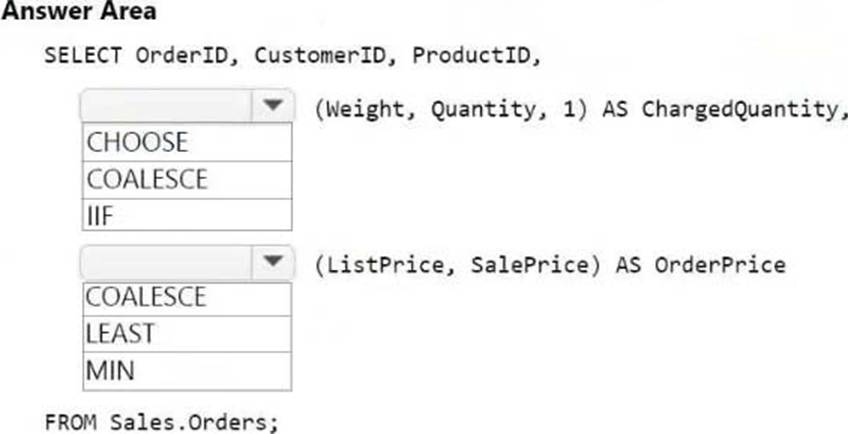
You have a Fabric warehouse that contains a table named Sales.Orders. Sales.Orders contains the following columns.
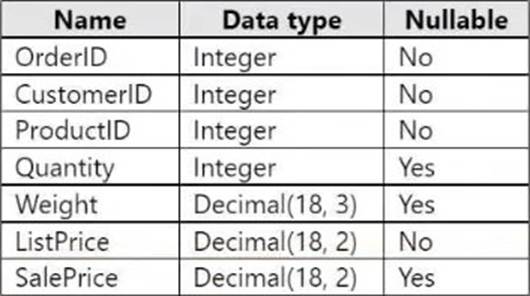
You need to write a T-SQL query that will return the following columns.
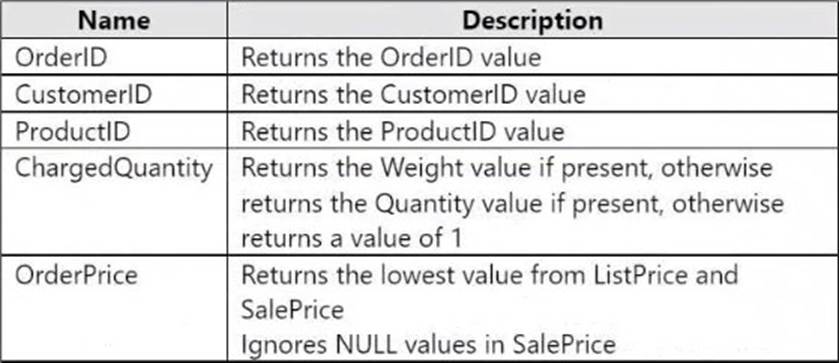
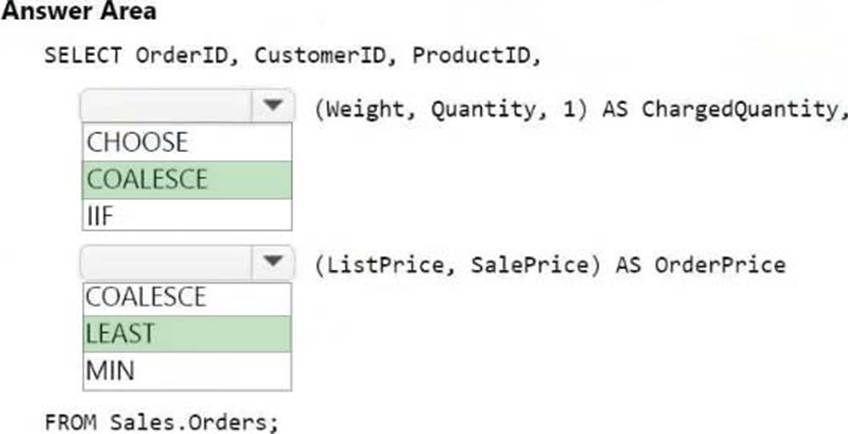
How should you complete the code? To answer, select the appropriate options in the answer area. NOTE: Each correct selection is worth one point.
Explanation:
Box 1: COALESCE
COALESCE (Transact-SQL)
Evaluates the arguments in order and returns the current value of the first expression that initially doesn’t evaluate to NULL. For example, SELECT COALESCE (NULL, NULL, ‘third_value’, ‘fourth_value’); returns the third value because the third value is the first value that isn’t null.
Box 2: LEAST
Logical functions – LEAST (Transact-SQL)
This function returns the minimum value from a list of one or more expressions.
If one or more arguments aren’t NULL, then NULL arguments are ignored during comparison. If all arguments are NULL, then LEAST returns NULL.
Syntax
LEAST (expression1 [ , …expressionN ] )
Incorrect:
* MIN (Transact-SQL)
Returns the minimum value in the expression. May be followed by the OVER clause.
Syntax
MIN ([ ALL | DISTINCT] expression)
Reference:
https://learn.microsoft.com/en-us/sql/t-sql/language-elements/coalesce-transact-sql
https://learn.microsoft.com/en-us/sql/t-sql/functions/logical-functions-least-transact-sql
You have a Microsoft Power BI semantic model that contains a measure named TotalSalesAmount.
TotalSalesAmount returns a sales revenue amount that is translated into a selected currency.
You need to ensure that the value returned by TotalSalesAmount is formatted to use the correct currency symbol.
What should you include in the solution?
- A . a field parameter
- B . a linguistic schema
- C . a dynamic format string
- D . the WINDOW DAX function
C
Explanation:
Power BI, Create dynamic format strings for measures
With dynamic format strings for measures, you can determine how measures appear in visuals by conditionally applying a format string with a separate DAX expression.
A common scenario with financial reports is showing the currency converted to other country currencies by multiplying the base currency by an exchange rate. This also takes advantage of the dynamic format strings of calculation items to show the converted currency also in the correct currency format. Calculation items can have the conversion DAX expression defined once that can be applied to the many measures in the model showing currency values, without the need to edit or duplicate many measures.
Reference:
https://learn.microsoft.com/en-us/power-bi/create-reports/desktop-dynamic-format-strings
https://powerbi.microsoft.com/en-us/blog/deep-dive-into-the-model-explorer-with-calculation-group-authoring-and-creating-relationships-in-the-properties-pane/
DRAG DROP
You have a Fabric workspace named Workspace1.
You have three groups named Group1, Group2, and Group3.
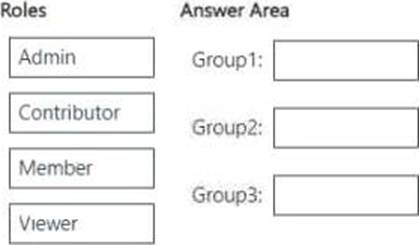
You need to assign a workspace role to each group.
The solution must follow the principle of least privilege and meet the following requirements:
– Group1 must be able to write data to Workspace1, but be unable to add members to Workspace1.
– Group2 must be able to configure and maintain the settings of Workspace1.
– Group3 must be able to write data and add members to Workspace1, but be unable to delete Workspace1.
Which workspace role should you assign to each group? To answer, drag the appropriate roles to the correct groups. Each role may be used once, more than once, or not at all. You may need to drag the split bar between panes or scroll to view content. NOTE: Each correct selection is worth one point.
Explanation:
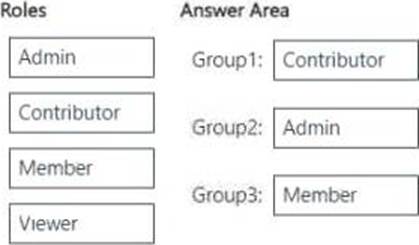
Group1 (Can write data but cannot add members) → Contributor
Contributors can write, edit, and manage data, but cannot manage workspace settings or add/ remove users.
Group2 (Can configure and maintain workspace settings) → Admin
Admins have full control over the workspace, including configuring settings, managing permissions, and maintaining security policies.
Group3 (Can write data and add members but cannot delete the workspace) → Member Members can add/remove members and write data, but they cannot delete the workspace or configure settings at the admin level.
DRAG DROP
You have a Fabric workspace named Workspace1.
You have three groups named Group1, Group2, and Group3.
You need to assign a workspace role to each group.
The solution must follow the principle of least privilege and meet the following requirements:
– Group1 must be able to write data to Workspace1, but be unable to add members to Workspace1.
– Group2 must be able to configure and maintain the settings of Workspace1.
– Group3 must be able to write data and add members to Workspace1, but be unable to delete Workspace1.
Which workspace role should you assign to each group? To answer, drag the appropriate roles to the correct groups. Each role may be used once, more than once, or not at all. You may need to drag the split bar between panes or scroll to view content. NOTE: Each correct selection is worth one point.
Explanation:
Group1 (Can write data but cannot add members) → Contributor
Contributors can write, edit, and manage data, but cannot manage workspace settings or add/ remove users.
Group2 (Can configure and maintain workspace settings) → Admin
Admins have full control over the workspace, including configuring settings, managing permissions, and maintaining security policies.
Group3 (Can write data and add members but cannot delete the workspace) → Member Members can add/remove members and write data, but they cannot delete the workspace or configure settings at the admin level.
DRAG DROP
You have a Fabric workspace named Workspace1.
You have three groups named Group1, Group2, and Group3.
You need to assign a workspace role to each group.
The solution must follow the principle of least privilege and meet the following requirements:
– Group1 must be able to write data to Workspace1, but be unable to add members to Workspace1.
– Group2 must be able to configure and maintain the settings of Workspace1.
– Group3 must be able to write data and add members to Workspace1, but be unable to delete Workspace1.
Which workspace role should you assign to each group? To answer, drag the appropriate roles to the correct groups. Each role may be used once, more than once, or not at all. You may need to drag the split bar between panes or scroll to view content. NOTE: Each correct selection is worth one point.
Explanation:
Group1 (Can write data but cannot add members) → Contributor
Contributors can write, edit, and manage data, but cannot manage workspace settings or add/ remove users.
Group2 (Can configure and maintain workspace settings) → Admin
Admins have full control over the workspace, including configuring settings, managing permissions, and maintaining security policies.
Group3 (Can write data and add members but cannot delete the workspace) → Member Members can add/remove members and write data, but they cannot delete the workspace or configure settings at the admin level.
DRAG DROP
You have a Fabric workspace named Workspace1.
You have three groups named Group1, Group2, and Group3.
You need to assign a workspace role to each group.
The solution must follow the principle of least privilege and meet the following requirements:
– Group1 must be able to write data to Workspace1, but be unable to add members to Workspace1.
– Group2 must be able to configure and maintain the settings of Workspace1.
– Group3 must be able to write data and add members to Workspace1, but be unable to delete Workspace1.
Which workspace role should you assign to each group? To answer, drag the appropriate roles to the correct groups. Each role may be used once, more than once, or not at all. You may need to drag the split bar between panes or scroll to view content. NOTE: Each correct selection is worth one point.
Explanation:
Group1 (Can write data but cannot add members) → Contributor
Contributors can write, edit, and manage data, but cannot manage workspace settings or add/ remove users.
Group2 (Can configure and maintain workspace settings) → Admin
Admins have full control over the workspace, including configuring settings, managing permissions, and maintaining security policies.
Group3 (Can write data and add members but cannot delete the workspace) → Member Members can add/remove members and write data, but they cannot delete the workspace or configure settings at the admin level.