
Microsoft DP-600 Practice Exams
Last updated on Oct 01,2026- Exam Code: DP-600
- Exam Name: Implementing Analytics Solutions Using Microsoft Fabric
- Certification Provider: Microsoft
- Latest update: Oct 01,2026
DRAG DROP
You have a Fabric tenant that contains a lakehouse named Lakehouse1.
Readings from 100 IoT devices are appended to a Delta table in Lakehouse1. Each set of readings is approximately 25 KB. Approximately 10 GB of data is received daily.
All the table and SparkSession settings are set to the default.
You discover that queries are slow to execute. In addition, the lakehouse storage contains data and log files that are no longer used.
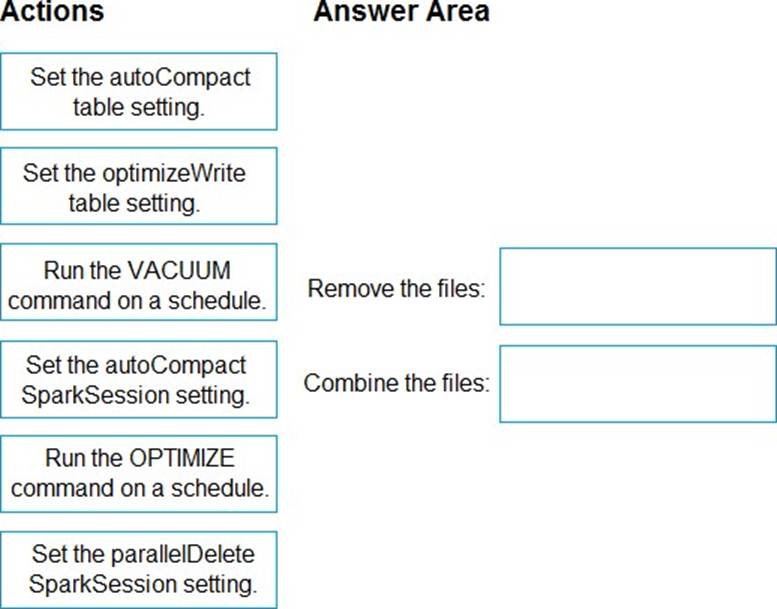
You need to remove the files that are no longer used and combine small files into larger files with a target size of 1 GB per file.
What should you do? To answer, drag the appropriate actions to the correct requirements. Each action may be used once, more than once, or not at all. You may need to drag the split bar between panes or scroll to view content. NOTE: Each correct selection is worth one point.
Explanation:
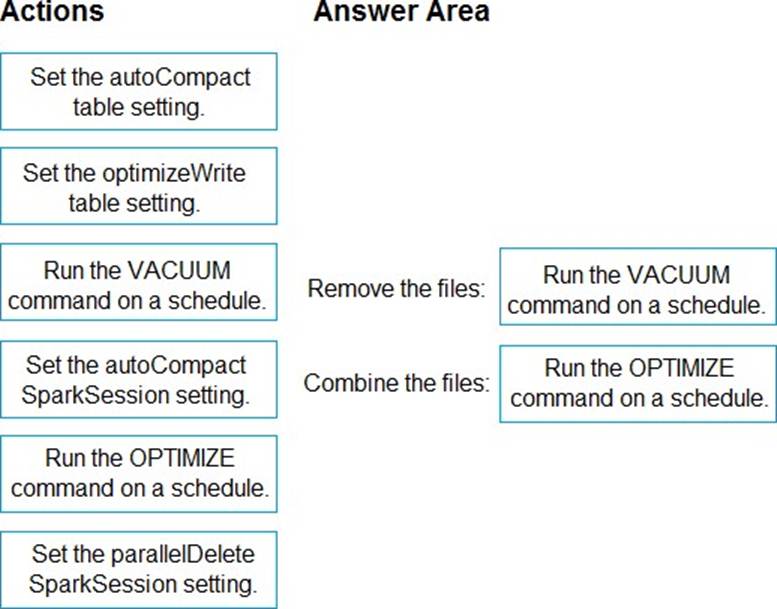
Box 1: Run the VACUUM command on a schedule.
Remove the files.
Remove old files with the Delta Lake Vacuum Command
You can remove files marked for deletion (aka “tombstoned files”) from storage with the Delta Lake vacuum command. Delta Lake doesn’t physically remove files from storage for operations that logically delete the files. You need to use the vacuum command to physically remove files from storage that have been marked for deletion and are older than the retention period.
The main benefit of vacuuming is to save on storage costs. Vacuuming does not make your queries run any faster and can limit your ability to time travel to earlier Delta table versions. You need to weigh the costs/benefits for each of your tables to develop an optimal vacuum strategy. Some tables should be vacuumed frequently. Other tables should never be vacuumed.
Box 2: Run the OPTIMIZE command on a schedule.
Combine the files.
Best practices: Delta Lake
Compact files
If you continuously write data to a Delta table, it will over time accumulate a large number of files, especially if you add data in small batches. This can have an adverse effect on the efficiency of table reads, and it can also affect the performance of your file system. Ideally, a large number of small files should be rewritten into a smaller number of larger files on a regular basis. This is known as compaction.
You can compact a table using the OPTIMIZE command.
Reference:
https://delta.io/blog/remove-files-delta-lake-vacuum-command/
https://docs.databricks.com/en/delta/best-practices.html
HOTSPOT
You have a Fabric lakehouse named Lakehouse1 that contains the following data.
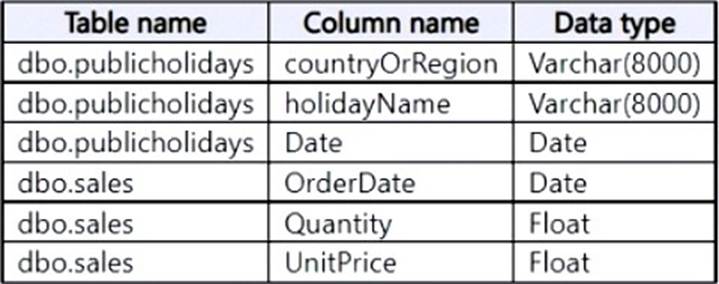
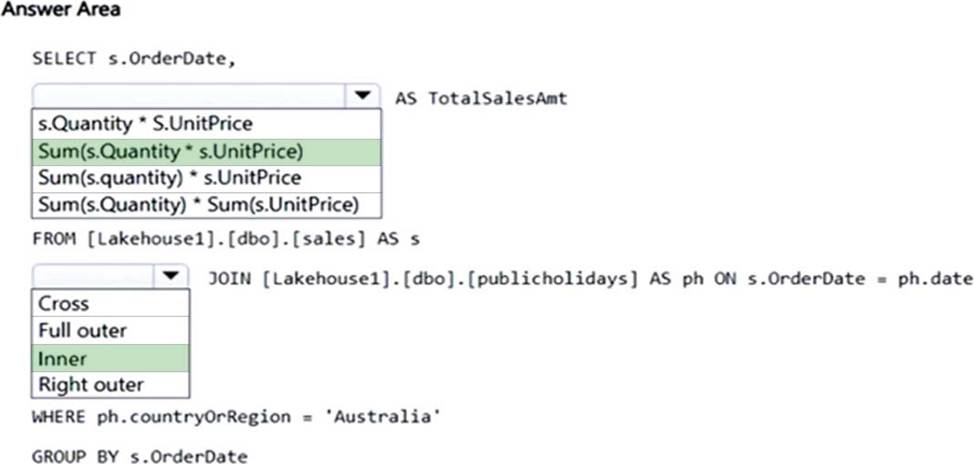
You need build a T-SQL statement that will return the total sales amount by OrderDate only for the days that are holidays in Australia. The total sales amount must sum the quantity multiplied by the price on each row in the dbo.sales table.
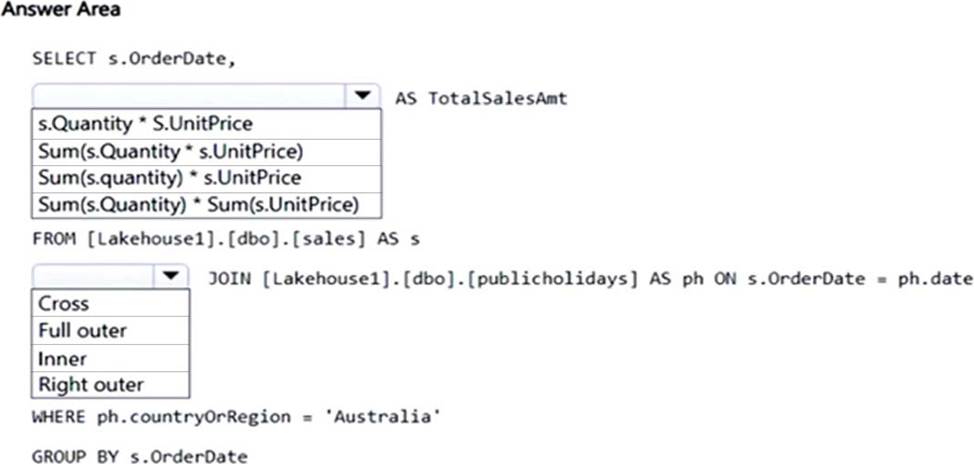
How should you complete the statement? To answer, select the appropriate options in the answer area. NOTE: Each correct selection is worth one point.
Explanation:
Box 1: Sum(s.Quantity * s.UnitPrice)
Calculate the sum of Quantity * Unitprice.
Incorrect:
* s.Quantity * S.UnitPrice Need to use the SUM function.
* Sum (s.Quantity) * S.UnitPrice) Incorrect parenthesis.
* Sum (s.Quantity) * S.UnitPrice Not the sum of the Quantity.
* Sum (s.Quantity) * SUM(S.UnitPrice)
Not separate sums of the Quantity and the UnitPrice.
Box 2: Inner
Standard inner join
You have a Fabric tenant that contains a warehouse.
You are designing a star schema model that will contain a customer dimension. The customer dimension table will be a Type 2 slowly changing dimension (SCD).
You need to recommend which columns to add to the table. The columns must NOT already exist in the source.
Which three types of columns should you recommend? Each correct answer presents part of the solution. NOTE: Each correct answer is worth one point.
- A . a foreign key
- B . a natural key
- C . an effective end date and time
- D . a surrogate key
- E . an effective start date and time
CDE
Explanation:
Type 2 SCD
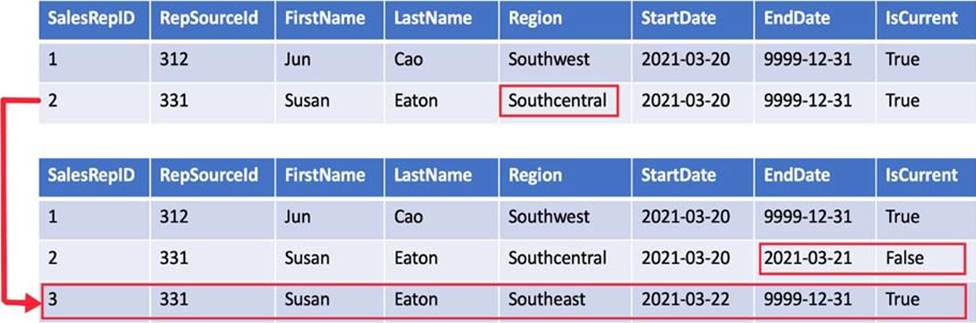
A Type 2 SCD supports versioning of dimension members. Often the source system doesn’t store versions, so the data warehouse load process detects and manages changes in a dimension table. In this case, the dimension table must use a *surrogate key* to provide a unique reference to a version of the dimension member. It also includes columns that define the date range validity of the version (for example, StartDate and EndDate) and possibly a flag column (for example, IsCurrent) to easily filter by current dimension members.
For example, Adventure Works assigns salespeople to a sales region. When a salesperson relocates region, a new version of the salesperson must be created to ensure that historical facts remain associated with the former region. To support accurate historic analysis of sales by salesperson, the dimension table must store versions of salespeople and their associated region(s). The table should also include *start and end date* values to define the time validity. Current versions may define an empty end date (or 12/31/9999), which indicates that the row is the current version. The table must also define a surrogate key because the business key (in this instance, employee ID) won’t be unique.
Reference: https://learn.microsoft.com/en-us/training/modules/populate-slowly-changing-dimensions-azure-synapse-analytics-pipelines/3-choose-between-dimension-types
You have a Fabric tenant.
You are creating a Fabric Data Factory pipeline.
You have a stored procedure that returns the number of active customers and their average sales for the current month.
You need to add an activity that will execute the stored procedure in a warehouse. The returned values must be available to the downstream activities of the pipeline.
Which type of activity should you add?
- A . Switch
- B . Copy data
- C . Append variable
- D . Lookup
D
Explanation:
Lookup Activity
Lookup Activity can be used to read or look up a record/ table name/ value from any external source. This output can further be referenced by succeeding activities.
Note: Lookup activity can retrieve a dataset from any of the data sources supported by data factory and Synapse pipelines. You can use it to dynamically determine which objects to operate on in a subsequent activity, instead of hard coding the object name. Some object examples are files and tables.
Lookup activity reads and returns the content of a configuration file or table. It also returns the result of executing a query or stored procedure. The output can be a singleton value or an array of attributes, which can be consumed in a subsequent copy, transformation, or control flow activities like ForEach activity.
Incorrect:
* Append variable
Append Variable activity in Azure Data Factory and Synapse Analytics
Use the Append Variable activity to add a value to an existing array variable defined in a Data Factory or Synapse Analytics pipeline
Reference:
https://learn.microsoft.com/en-us/azure/data-factory/control-flow-lookup-activity
https://learn.microsoft.com/en-us/azure/data-factory/control-flow-append-variable-activity
You have a Fabric tenant that contains a warehouse named Warehouse1. Warehouse1 contains two schemas name schema1 and schema2 and a table named schema1.city.
You need to make a copy of schema1.city in schema2. The solution must minimize the copying of data.
Which T-SQL statement should you run?
- A . INSERT INTO schema2.city SELECT * FROM schema1.city;
- B . SELECT * INTO schema2.city FROM schema1.city;
- C . CREATE TABLE schema2.city AS CLONE OF schema1.city;
- D . CREATE TABLE schema2.city AS SELECT * FROM schema1.city;
C
Explanation:
CREATE TABLE AS CLONE OF
Applies to: Warehouse in Microsoft Fabric
Creates a new table as a zero-copy clone of another table in Warehouse in Microsoft Fabric. Only the metadata of the table is copied. The underlying data of the table, stored as parquet files, is not copied.
Reference: https://learn.microsoft.com/en-us/sql/t-sql/statements/create-table-as-clone-of-transact-sql
HOTSPOT
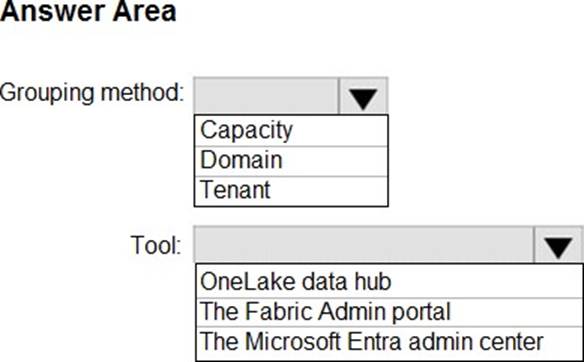
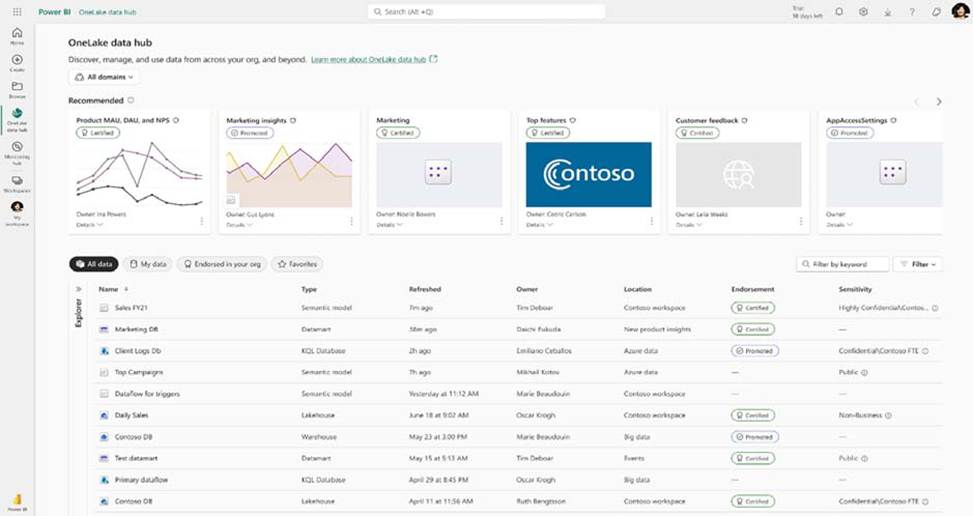
You need to recommend a solution to group the Research division workspaces.
What should you include in the recommendation? To answer, select the appropriate options in the answer area. NOTE: Each correct selection is worth one point.
Explanation:
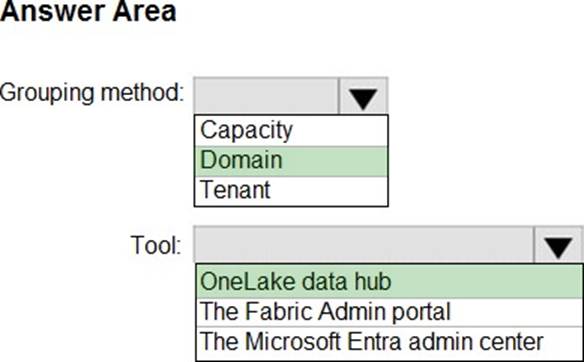
Box 1: Domain
Grouping method
With the OneLake data hub users can see data across their business domains and filter to see a specific domain that they are interested in, see all authoritative endorsed data in one place and see all the data owned by users to make data management easy as possible in one central location.
Box 2: OneLake data hub
Tool
The OneLake data hub is integrated into multiple experiences within both Fabric service and Power BI Desktop. This integration ensures that users can quickly and easily find necessary data in any context and in a consistent manner. For instance, in Power BI Desktop, users may access the OneLake data hub experience to browse available items and connect with them, thus avoiding the need to create new data
sources. This approach fosters a culture of data reusability and helps organizations meet their goals more effectively.
Scenario:
Data Analytics Requirements
Contoso identifies the following data analytics requirements:
*-> The Research division workspaces must be grouped together logically to support OneLake data hub filtering based on the department name.
Identity Environment
Contoso has a Microsoft Entra tenant named contoso.com. The tenant contains two groups named ResearchReviewersGroup1 and ResearchReviewersGroup2.
Reference: https://blog.fabric.microsoft.com/en-us/blog/microsoft-onelake-in-fabric-the-onedrive-for-data/
https://learn.microsoft.com/en-us/fabric/get-started/onelake-data-hub
HOTSPOT
You need to recommend a solution to group the Research division workspaces.
What should you include in the recommendation? To answer, select the appropriate options in the answer area. NOTE: Each correct selection is worth one point.
Explanation:
Box 1: Domain
Grouping method
With the OneLake data hub users can see data across their business domains and filter to see a specific domain that they are interested in, see all authoritative endorsed data in one place and see all the data owned by users to make data management easy as possible in one central location.
Box 2: OneLake data hub
Tool
The OneLake data hub is integrated into multiple experiences within both Fabric service and Power BI Desktop. This integration ensures that users can quickly and easily find necessary data in any context and in a consistent manner. For instance, in Power BI Desktop, users may access the OneLake data hub experience to browse available items and connect with them, thus avoiding the need to create new data
sources. This approach fosters a culture of data reusability and helps organizations meet their goals more effectively.
Scenario:
Data Analytics Requirements
Contoso identifies the following data analytics requirements:
*-> The Research division workspaces must be grouped together logically to support OneLake data hub filtering based on the department name.
Identity Environment
Contoso has a Microsoft Entra tenant named contoso.com. The tenant contains two groups named ResearchReviewersGroup1 and ResearchReviewersGroup2.
Reference: https://blog.fabric.microsoft.com/en-us/blog/microsoft-onelake-in-fabric-the-onedrive-for-data/
https://learn.microsoft.com/en-us/fabric/get-started/onelake-data-hub
DRAG DROP
You create a semantic model by using Microsoft Power BI Desktop.
The model contains one security role named SalesRegionManager and the following tables:
– Sales
– SalesRegion
– SalesAddress
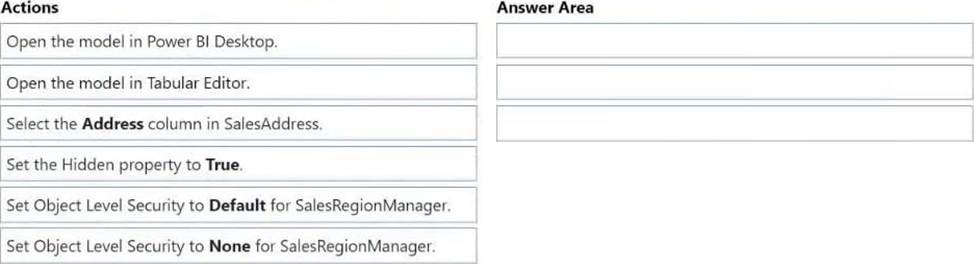
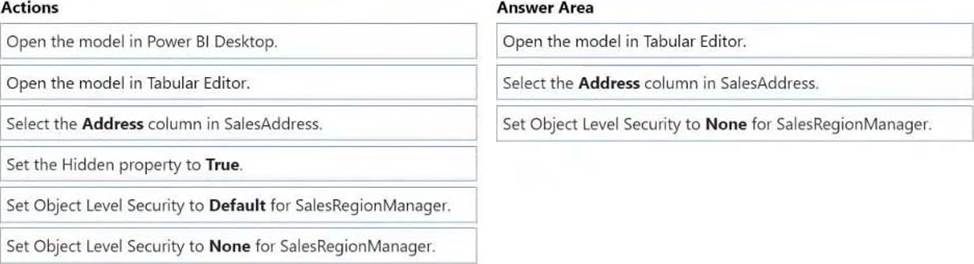
You need to modify the model to ensure that users assigned the SalesRegionManager role cannot see a column named Address in SalesAddress.
Which three actions should you perform in sequence? To answer, move the appropriate actions from the list of actions to the answer area and arrange them in the correct order.
Explanation:
Note: Power Platform, Power BI, Object level security (OLS) Object-level security (OLS) enables model authors to secure specific tables or columns from report viewers. For example, a column that includes personal data can be restricted so that only certain viewers can see and interact with it. In addition, you can also restrict object names and metadata. This added layer of security prevents users without the appropriate access levels from discovering business critical or sensitive personal information like employee or financial records. For viewers that don’t have the required permission, it’s as if the secured tables or columns don’t exist.
Step 1: Open the model in Tabular Editor
Configure object level security using tabular editor
HOTSPOT
You have a Fabric warehouse that contains a table named Sales.Orders. Sales.Orders contains the following columns.
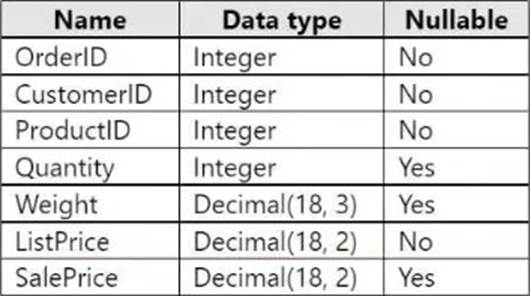
You need to write a T-SQL query that will return the following columns.
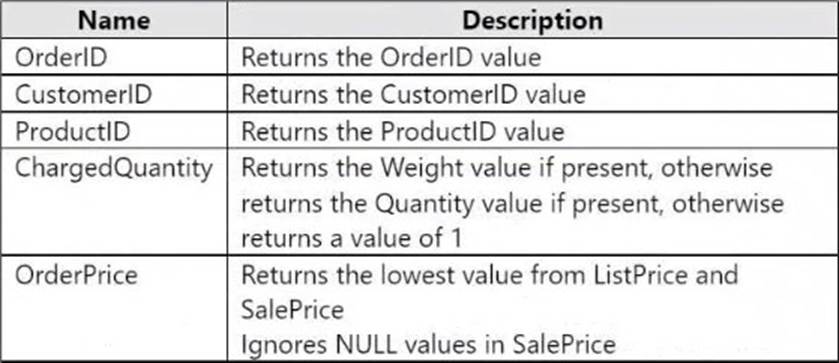
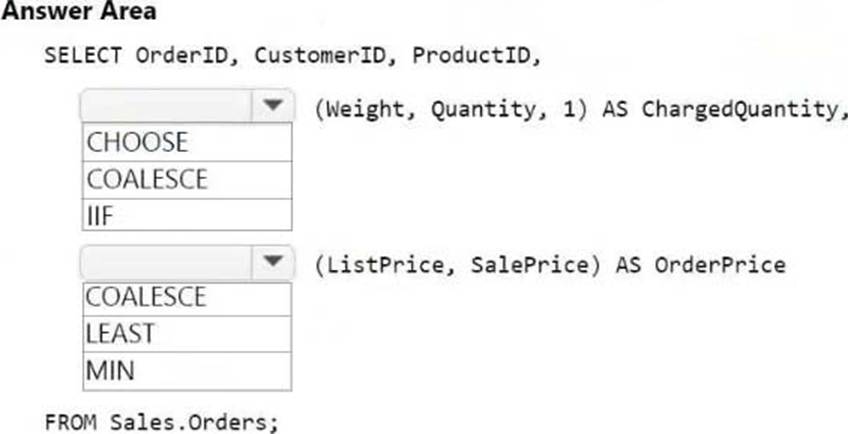
How should you complete the code? To answer, select the appropriate options in the answer area. NOTE: Each correct selection is worth one point.
Explanation:
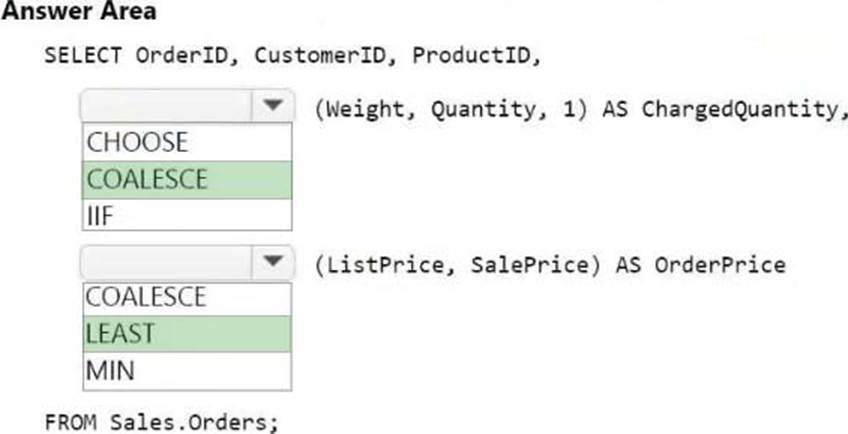
Box 1: COALESCE
COALESCE (Transact-SQL)
Evaluates the arguments in order and returns the current value of the first expression that initially doesn’t evaluate to NULL. For example, SELECT COALESCE (NULL, NULL, ‘third_value’, ‘fourth_value’); returns the third value because the third value is the first value that isn’t null.
Box 2: LEAST
Logical functions – LEAST (Transact-SQL)
This function returns the minimum value from a list of one or more expressions.
If one or more arguments aren’t NULL, then NULL arguments are ignored during comparison. If all arguments are NULL, then LEAST returns NULL.
Syntax
LEAST (expression1 [ , …expressionN ] )
Incorrect:
* MIN (Transact-SQL)
Returns the minimum value in the expression. May be followed by the OVER clause.
Syntax
MIN ([ ALL | DISTINCT] expression)
Reference:
https://learn.microsoft.com/en-us/sql/t-sql/language-elements/coalesce-transact-sql
https://learn.microsoft.com/en-us/sql/t-sql/functions/logical-functions-least-transact-sql
DRAG DROP
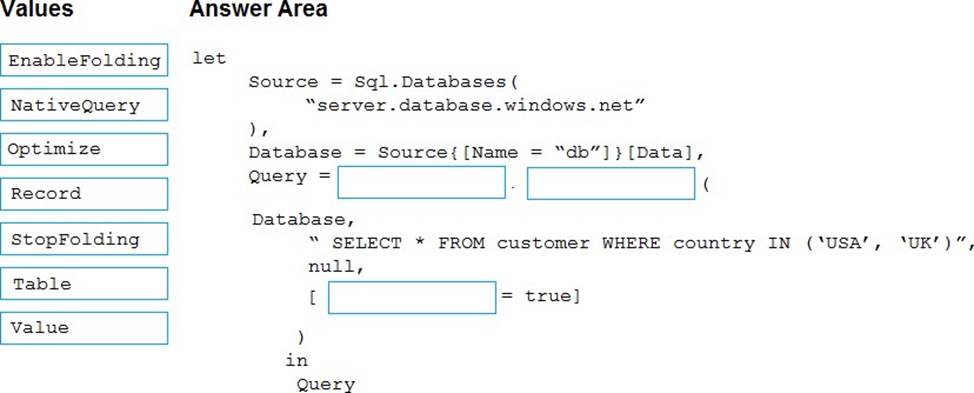
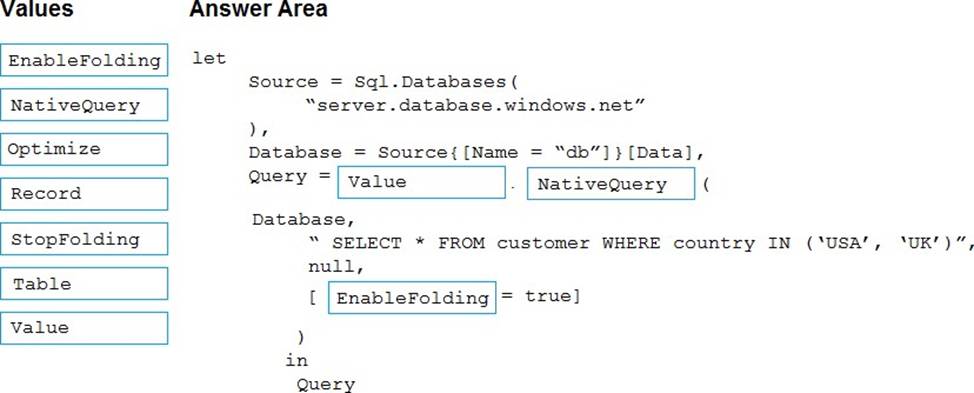
You are creating a data flow in Fabric to ingest data from an Azure SQL database by using a T-SQL statement.
You need to ensure that any foldable Power Query transformation steps are processed by the Microsoft SQL Server engine.
How should you complete the code? To answer, drag the appropriate values to the correct targets. Each value may be used once, more than once, or not at all. You may need to drag the split bar between panes or scroll to view content. NOTE: Each correct selection is worth one point.
Explanation:
Box 1: Value
Query folding on native queries
Use Value.NativeQuery function
The goal of this process is to execute the following SQL code, and to apply more transformations with
Power Query that can be folded back to the source.
SELECT DepartmentID, Name FROM HumanResources.Department WHERE GroupName = ‘Research and Development’
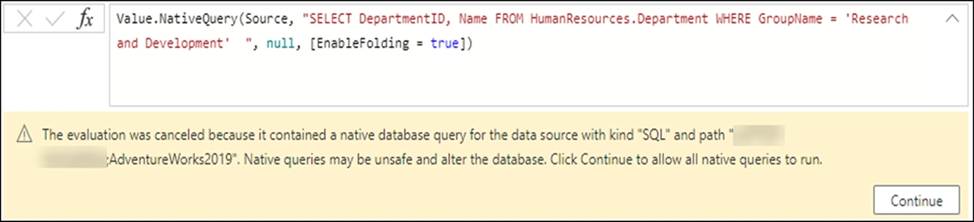
The first step was to define the correct target, which in this case is the database where the SQL code will be run. Once a step has the correct target, you can select that step―in this case, Source in Applied Steps ―and then select the fx button in the formula bar to add a custom step. In this example, replace the Source formula with the following formula:
Value.NativeQuery(Source, "SELECT DepartmentID, Name FROM HumanResources.Department WHERE GroupName = ‘Research and Development’
Box 2: NativeQuery
Box 3: EnableFolding
The most important component of this formula is the use of the optional record for the forth parameter of the function that has the EnableFolding record field set to true.
Reference: https://learn.microsoft.com/en-us/power-query/native-query-folding