
Microsoft DP-600 Practice Exams
Last updated on Oct 02,2026- Exam Code: DP-600
- Exam Name: Implementing Analytics Solutions Using Microsoft Fabric
- Certification Provider: Microsoft
- Latest update: Oct 02,2026
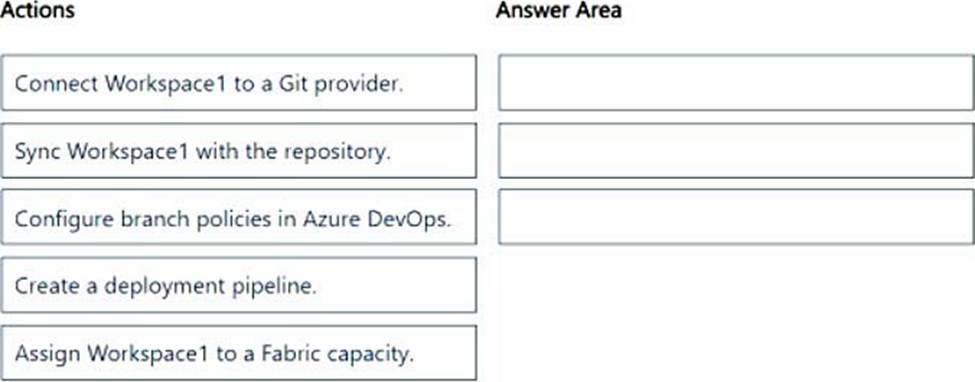
DRAG DROP
You have a Fabric tenant that contains a workspace named Workspace1. Workspace1 uses the Pro license mode and contains a semantic model named Model1.
You have an Azure DevOps organization.
You need to enable version control for Workspace1. The solution must ensure that Model1 is added to the repository.
Which three actions should you perform in sequence? To answer, move the appropriate actions from the list of actions to the answer area and arrange them in the correct order.
Explanation:
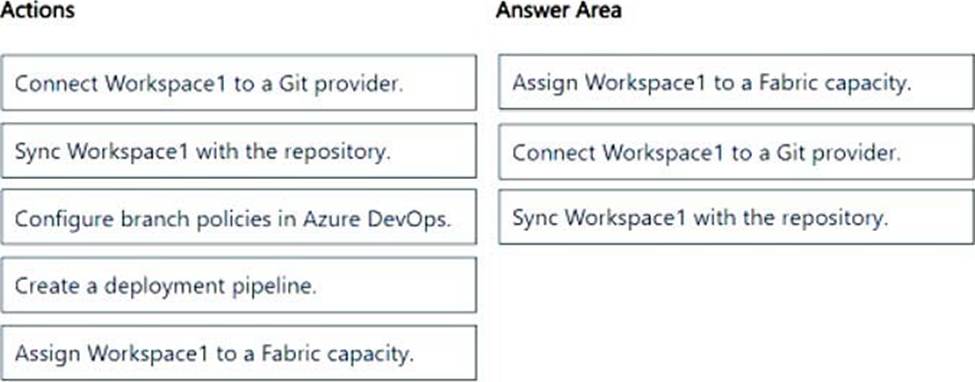
Step 1: Assign Workspace1 to a Fabric capacity
Fabric prerequisites
To access the Git integration feature, you need a Fabric capacity.
Step 2: Connect Workspace1 to a Git provider.
Connect a workspace to a Git repo
Connect to a Git repo
Only a workspace admin can connect a workspace to a repository, but once connected, anyone with permission can work in the workspace. If you’re not an admin, ask your admin for help with connecting. To connect a workspace to an Azure or GitHub Repo, follow these steps:
You have a Fabric workspace named Workspace1 that is assigned to a newly created Fabric capacity named Capacity1.
You create a semantic model named Model1 and deploy Model1 to Workspace1. You need to publish changes to Model1 directly from Tabular Editor.
What should you do?
- A . For Workspace1, enable Git integration.
- B . For Model1, enable external sharing.
- C . For Workspace1, create a managed private endpoint.
- D . For Capacity1, set XMLA Endpoint to Read Write.
D
Explanation:
To publish changes to Model1 directly from Tabular Editor, the XMLA Endpoint must be set to Read Write in Fabric Capacity settings. This allows external tools like Tabular Editor, SSMS, and Power BI ALM Toolkit to connect, modify, and publish changes to the semantic model.
You need to ensure that Contoso can use version control to meet the data analytics requirements and the general requirements.
What should you do?
- A . Store all the semantic models and reports in Data Lake Gen2 storage.
- B . Modify the settings of the Research workspaces to use a GitHub repository.
- C . Modify the settings of the Research division workspaces to use an Azure Repos repository.
- D . Store all the semantic models and reports in Microsoft OneDrive.
Which syntax should you use in a notebook to access the Research division data for Productline1?
- A . spark.sql("SELECT * FROM Lakehouse1.Tables.ResearchProduct")
- B . spark.read.format("delta").load("Tables/productline1/ResearchProduct")
- C . external_table(ResearchProduct)
- D . spark.read.format("delta").load("Tables/ResearchProduct")
D
Explanation:
The spark.read.format("delta").load(…) method is specifically designed for reading data stored in Delta format, which is what the Research division data for Productline1 is based on.
The path "Tables/ResearchProduct" correctly refers to the shortcut created in Lakehouse1, allowing you to access the data efficiently.
Which syntax should you use in a notebook to access the Research division data for Productline1?
- A . spark.sql("SELECT * FROM Lakehouse1.Tables.ResearchProduct")
- B . spark.read.format("delta").load("Tables/productline1/ResearchProduct")
- C . external_table(ResearchProduct)
- D . spark.read.format("delta").load("Tables/ResearchProduct")
D
Explanation:
The spark.read.format("delta").load(…) method is specifically designed for reading data stored in Delta format, which is what the Research division data for Productline1 is based on.
The path "Tables/ResearchProduct" correctly refers to the shortcut created in Lakehouse1, allowing you to access the data efficiently.
Maintain a data analytics solution
Testlet 1
Case study
This is a case study. Case studies are not timed separately. You can use as much exam time as you would like to complete each case. However, there may be additional case studies and sections on this exam. You must manage your time to ensure that you are able to complete all questions included on this exam in the time provided.
To answer the questions included in a case study, you will need to reference information that is provided in the case study. Case studies might contain exhibits and other resources that provide more information about the scenario that is described in the case study. Each question is independent of the other questions in this case study.
At the end of this case study, a review screen will appear. This screen allows you to review your answers and to make changes before you move to the next section of the exam. After you begin a new section, you cannot return to this section.
To start the case study
To display the first question in this case study, click the Next button. Use the buttons in the left pane to explore the content of the case study before you answer the questions. Clicking these buttons displays information such as business requirements, existing environment, and problem statements. If the case study has an All Information tab, note that the information displayed is identical to the information displayed on the subsequent tabs. When you are ready to answer a question, click the Question button to return to the question.
Overview
Contoso, Ltd. is a US-based health supplements company. Contoso has two divisions named Sales and Research. The Sales division contains two departments named Online Sales and Retail Sales. The Research division assigns internally developed product lines to individual teams of researchers and analysts.
Existing Environment
Identity Environment
Contoso has a Microsoft Entra tenant named contoso.com. The tenant contains two groups named ResearchReviewersGroup1 and ResearchReviewersGroup2.
Data Environment
Contoso has the following data environment:
The Sales division uses a Microsoft Power BI Premium capacity.
– The semantic model of the Online Sales department includes a fact table named Orders that uses Import made. In the system of origin, the OrderID value represents the sequence in which orders are created.
– The Research department uses an on-premises, third-party data warehousing product.
– Fabric is enabled for contoso.com.
– An Azure Data Lake Storage Gen2 storage account named storage1 contains Research division data for a product line named Productline1. The data is in the delta format.
– A Data Lake Storage Gen2 storage account named storage2 contains Research division data for a product line named Productline2. The data is in the CSV format.
Requirements
Planned Changes
Contoso plans to make the following changes:
– Enable support for Fabric in the Power BI Premium capacity used by the Sales division.
– Make all the data for the Sales division and the Research division available in Fabric.
– For the Research division, create two Fabric workspaces named Productline1ws and Productline2ws.
– In Productline1ws, create a lakehouse named Lakehouse1.
– In Lakehouse1, create a shortcut to storage1 named ResearchProduct.
Data Analytics Requirements
Contoso identifies the following data analytics requirements:
– All the workspaces for the Sales division and the Research division must support all Fabric experiences.
– The Research division workspaces must use a dedicated, on-demand capacity that has per-minute billing.
– The Research division workspaces must be grouped together logically to support OneLake data hub filtering based on the department name.
– For the Research division workspaces, the members of ResearchReviewersGroup1 must be able to read lakehouse and warehouse data and shortcuts by using SQL endpoints.
– For the Research division workspaces, the members of ResearchReviewersGroup2 must be able to read lakehouse data by using Lakehouse explorer.
– All the semantic models and reports for the Research division must use version control that supports branching.
Data Preparation Requirements
Contoso identifies the following data preparation requirements:
– The Research division data for Productline1 must be retrieved from Lakehouse1 by using Fabric notebooks.
– All the Research division data in the lakehouses must be presented as managed tables in Lakehouse explorer.
Semantic Model Requirements
Contoso identifies the following requirements for implementing and managing semantic models:
– The number of rows added to the Orders table during refreshes must be minimized.
– The semantic models in the Research division workspaces must use Direct Lake mode.
General Requirements
Contoso identifies the following high-level requirements that must be considered for all solutions:
– Follow the principle of least privilege when applicable.
– Minimize implementation and maintenance effort when possible.
You need to recommend which type of Fabric capacity SKU meets the data analytics requirements for the Research division.
What should you recommend?
- A . A
- B . EM
- C . P
- D . F
D
Explanation:
Use F SKU for Fabric.
Note: Power BI embedded analytics requires a capacity (A, EM, P, or F SKU) in order to publish embedded Power BI content.
Microsoft Fabric
Microsoft Fabric is an Azure offering that brings together new and existing components from Power BI, Azure Synapse, and Azure Data Explorer into a single integrated environment. Fabric uses F SKUs and supports embedding Power BI items.
Scenario:
Data Analytics Requirements
Contoso identifies the following data analytics requirements:
*-> All the workspaces for the Sales division and the Research division must support all Fabric experiences.
The Research division workspaces must use a dedicated, on-demand capacity that has per-minute billing.
– The Research division workspaces must be grouped together logically to support OneLake data hub filtering based on the department name.
– For the Research division workspaces, the members of ResearchReviewersGroup1 must be able to read lakehouse and warehouse data and shortcuts by using SQL endpoints.
– For the Research division workspaces, the members of ResearchReviewersGroup2 must be able to read lakehouse data by using Lakehouse explorer.
– All the semantic models and reports for the Research division must use version control that supports branching.
– Reference: https://learn.microsoft.com/en-us/power-bi/developer/embedded/embedded-capacity
Maintain a data analytics solution
Testlet 1
Case study
This is a case study. Case studies are not timed separately. You can use as much exam time as you would like to complete each case. However, there may be additional case studies and sections on this exam. You must manage your time to ensure that you are able to complete all questions included on this exam in the time provided.
To answer the questions included in a case study, you will need to reference information that is provided in the case study. Case studies might contain exhibits and other resources that provide more information about the scenario that is described in the case study. Each question is independent of the other questions in this case study.
At the end of this case study, a review screen will appear. This screen allows you to review your answers and to make changes before you move to the next section of the exam. After you begin a new section, you cannot return to this section.
To start the case study
To display the first question in this case study, click the Next button. Use the buttons in the left pane to explore the content of the case study before you answer the questions. Clicking these buttons displays information such as business requirements, existing environment, and problem statements. If the case study has an All Information tab, note that the information displayed is identical to the information displayed on the subsequent tabs. When you are ready to answer a question, click the Question button to return to the question.
Overview
Contoso, Ltd. is a US-based health supplements company. Contoso has two divisions named Sales and Research. The Sales division contains two departments named Online Sales and Retail Sales. The Research division assigns internally developed product lines to individual teams of researchers and analysts.
Existing Environment
Identity Environment
Contoso has a Microsoft Entra tenant named contoso.com. The tenant contains two groups named ResearchReviewersGroup1 and ResearchReviewersGroup2.
Data Environment
Contoso has the following data environment:
The Sales division uses a Microsoft Power BI Premium capacity.
– The semantic model of the Online Sales department includes a fact table named Orders that uses Import made. In the system of origin, the OrderID value represents the sequence in which orders are created.
– The Research department uses an on-premises, third-party data warehousing product.
– Fabric is enabled for contoso.com.
– An Azure Data Lake Storage Gen2 storage account named storage1 contains Research division data for a product line named Productline1. The data is in the delta format.
– A Data Lake Storage Gen2 storage account named storage2 contains Research division data for a product line named Productline2. The data is in the CSV format.
Requirements
Planned Changes
Contoso plans to make the following changes:
– Enable support for Fabric in the Power BI Premium capacity used by the Sales division.
– Make all the data for the Sales division and the Research division available in Fabric.
– For the Research division, create two Fabric workspaces named Productline1ws and Productline2ws.
– In Productline1ws, create a lakehouse named Lakehouse1.
– In Lakehouse1, create a shortcut to storage1 named ResearchProduct.
Data Analytics Requirements
Contoso identifies the following data analytics requirements:
– All the workspaces for the Sales division and the Research division must support all Fabric experiences.
– The Research division workspaces must use a dedicated, on-demand capacity that has per-minute billing.
– The Research division workspaces must be grouped together logically to support OneLake data hub filtering based on the department name.
– For the Research division workspaces, the members of ResearchReviewersGroup1 must be able to read lakehouse and warehouse data and shortcuts by using SQL endpoints.
– For the Research division workspaces, the members of ResearchReviewersGroup2 must be able to read lakehouse data by using Lakehouse explorer.
– All the semantic models and reports for the Research division must use version control that supports branching.
Data Preparation Requirements
Contoso identifies the following data preparation requirements:
– The Research division data for Productline1 must be retrieved from Lakehouse1 by using Fabric notebooks.
– All the Research division data in the lakehouses must be presented as managed tables in Lakehouse explorer.
Semantic Model Requirements
Contoso identifies the following requirements for implementing and managing semantic models:
– The number of rows added to the Orders table during refreshes must be minimized.
– The semantic models in the Research division workspaces must use Direct Lake mode.
General Requirements
Contoso identifies the following high-level requirements that must be considered for all solutions:
– Follow the principle of least privilege when applicable.
– Minimize implementation and maintenance effort when possible.
You need to recommend which type of Fabric capacity SKU meets the data analytics requirements for the Research division.
What should you recommend?
- A . A
- B . EM
- C . P
- D . F
D
Explanation:
Use F SKU for Fabric.
Note: Power BI embedded analytics requires a capacity (A, EM, P, or F SKU) in order to publish embedded Power BI content.
Microsoft Fabric
Microsoft Fabric is an Azure offering that brings together new and existing components from Power BI, Azure Synapse, and Azure Data Explorer into a single integrated environment. Fabric uses F SKUs and supports embedding Power BI items.
Scenario:
Data Analytics Requirements
Contoso identifies the following data analytics requirements:
*-> All the workspaces for the Sales division and the Research division must support all Fabric experiences.
The Research division workspaces must use a dedicated, on-demand capacity that has per-minute billing.
– The Research division workspaces must be grouped together logically to support OneLake data hub filtering based on the department name.
– For the Research division workspaces, the members of ResearchReviewersGroup1 must be able to read lakehouse and warehouse data and shortcuts by using SQL endpoints.
– For the Research division workspaces, the members of ResearchReviewersGroup2 must be able to read lakehouse data by using Lakehouse explorer.
– All the semantic models and reports for the Research division must use version control that supports branching.
– Reference: https://learn.microsoft.com/en-us/power-bi/developer/embedded/embedded-capacity
Maintain a data analytics solution
Testlet 1
Case study
This is a case study. Case studies are not timed separately. You can use as much exam time as you would like to complete each case. However, there may be additional case studies and sections on this exam. You must manage your time to ensure that you are able to complete all questions included on this exam in the time provided.
To answer the questions included in a case study, you will need to reference information that is provided in the case study. Case studies might contain exhibits and other resources that provide more information about the scenario that is described in the case study. Each question is independent of the other questions in this case study.
At the end of this case study, a review screen will appear. This screen allows you to review your answers and to make changes before you move to the next section of the exam. After you begin a new section, you cannot return to this section.
To start the case study
To display the first question in this case study, click the Next button. Use the buttons in the left pane to explore the content of the case study before you answer the questions. Clicking these buttons displays information such as business requirements, existing environment, and problem statements. If the case study has an All Information tab, note that the information displayed is identical to the information displayed on the subsequent tabs. When you are ready to answer a question, click the Question button to return to the question.
Overview
Contoso, Ltd. is a US-based health supplements company. Contoso has two divisions named Sales and Research. The Sales division contains two departments named Online Sales and Retail Sales. The Research division assigns internally developed product lines to individual teams of researchers and analysts.
Existing Environment
Identity Environment
Contoso has a Microsoft Entra tenant named contoso.com. The tenant contains two groups named ResearchReviewersGroup1 and ResearchReviewersGroup2.
Data Environment
Contoso has the following data environment:
The Sales division uses a Microsoft Power BI Premium capacity.
– The semantic model of the Online Sales department includes a fact table named Orders that uses Import made. In the system of origin, the OrderID value represents the sequence in which orders are created.
– The Research department uses an on-premises, third-party data warehousing product.
– Fabric is enabled for contoso.com.
– An Azure Data Lake Storage Gen2 storage account named storage1 contains Research division data for a product line named Productline1. The data is in the delta format.
– A Data Lake Storage Gen2 storage account named storage2 contains Research division data for a product line named Productline2. The data is in the CSV format.
Requirements
Planned Changes
Contoso plans to make the following changes:
– Enable support for Fabric in the Power BI Premium capacity used by the Sales division.
– Make all the data for the Sales division and the Research division available in Fabric.
– For the Research division, create two Fabric workspaces named Productline1ws and Productline2ws.
– In Productline1ws, create a lakehouse named Lakehouse1.
– In Lakehouse1, create a shortcut to storage1 named ResearchProduct.
Data Analytics Requirements
Contoso identifies the following data analytics requirements:
– All the workspaces for the Sales division and the Research division must support all Fabric experiences.
– The Research division workspaces must use a dedicated, on-demand capacity that has per-minute billing.
– The Research division workspaces must be grouped together logically to support OneLake data hub filtering based on the department name.
– For the Research division workspaces, the members of ResearchReviewersGroup1 must be able to read lakehouse and warehouse data and shortcuts by using SQL endpoints.
– For the Research division workspaces, the members of ResearchReviewersGroup2 must be able to read lakehouse data by using Lakehouse explorer.
– All the semantic models and reports for the Research division must use version control that supports branching.
Data Preparation Requirements
Contoso identifies the following data preparation requirements:
– The Research division data for Productline1 must be retrieved from Lakehouse1 by using Fabric notebooks.
– All the Research division data in the lakehouses must be presented as managed tables in Lakehouse explorer.
Semantic Model Requirements
Contoso identifies the following requirements for implementing and managing semantic models:
– The number of rows added to the Orders table during refreshes must be minimized.
– The semantic models in the Research division workspaces must use Direct Lake mode.
General Requirements
Contoso identifies the following high-level requirements that must be considered for all solutions:
– Follow the principle of least privilege when applicable.
– Minimize implementation and maintenance effort when possible.
You need to recommend which type of Fabric capacity SKU meets the data analytics requirements for the Research division.
What should you recommend?
- A . A
- B . EM
- C . P
- D . F
D
Explanation:
Use F SKU for Fabric.
Note: Power BI embedded analytics requires a capacity (A, EM, P, or F SKU) in order to publish embedded Power BI content.
Microsoft Fabric
Microsoft Fabric is an Azure offering that brings together new and existing components from Power BI, Azure Synapse, and Azure Data Explorer into a single integrated environment. Fabric uses F SKUs and supports embedding Power BI items.
Scenario:
Data Analytics Requirements
Contoso identifies the following data analytics requirements:
*-> All the workspaces for the Sales division and the Research division must support all Fabric experiences.
The Research division workspaces must use a dedicated, on-demand capacity that has per-minute billing.
– The Research division workspaces must be grouped together logically to support OneLake data hub filtering based on the department name.
– For the Research division workspaces, the members of ResearchReviewersGroup1 must be able to read lakehouse and warehouse data and shortcuts by using SQL endpoints.
– For the Research division workspaces, the members of ResearchReviewersGroup2 must be able to read lakehouse data by using Lakehouse explorer.
– All the semantic models and reports for the Research division must use version control that supports branching.
– Reference: https://learn.microsoft.com/en-us/power-bi/developer/embedded/embedded-capacity
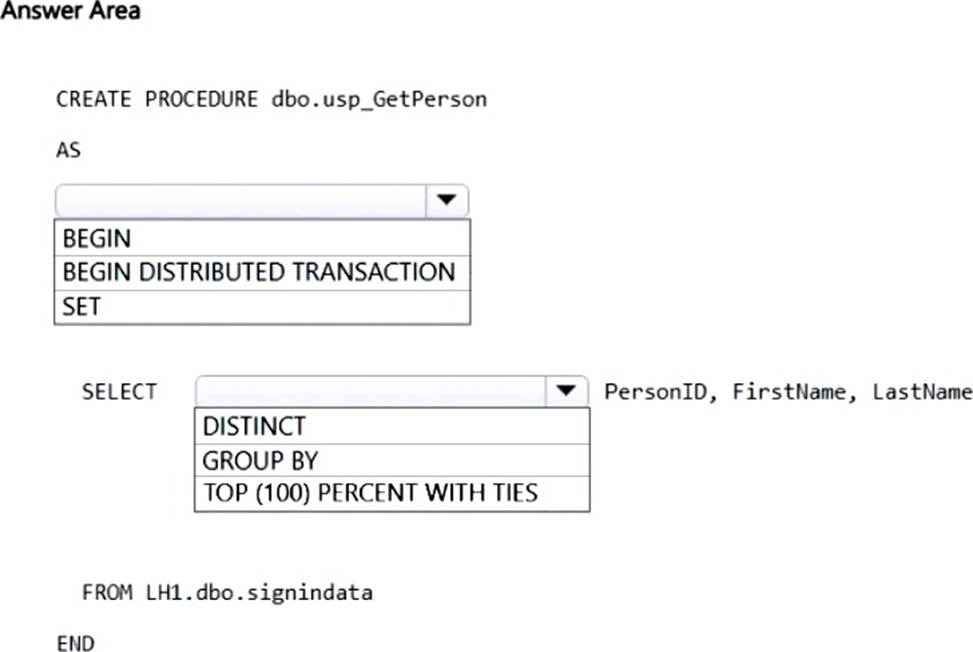
HOTSPOT
You have a Fabric tenant that contains a workspace named Workspace1. Workspace1 contains a lakehouse named LH1 and a warehouse named DW1. LH1 contains a table named signindata that is in the dbo schema.
You need to create a stored procedure in DW1 that deduplicates the data in the signindata table.
How should you complete the T-SQL statement? To answer, select the appropriate options in the answer area. NOTE: Each correct selection is worth one point.
Explanation:
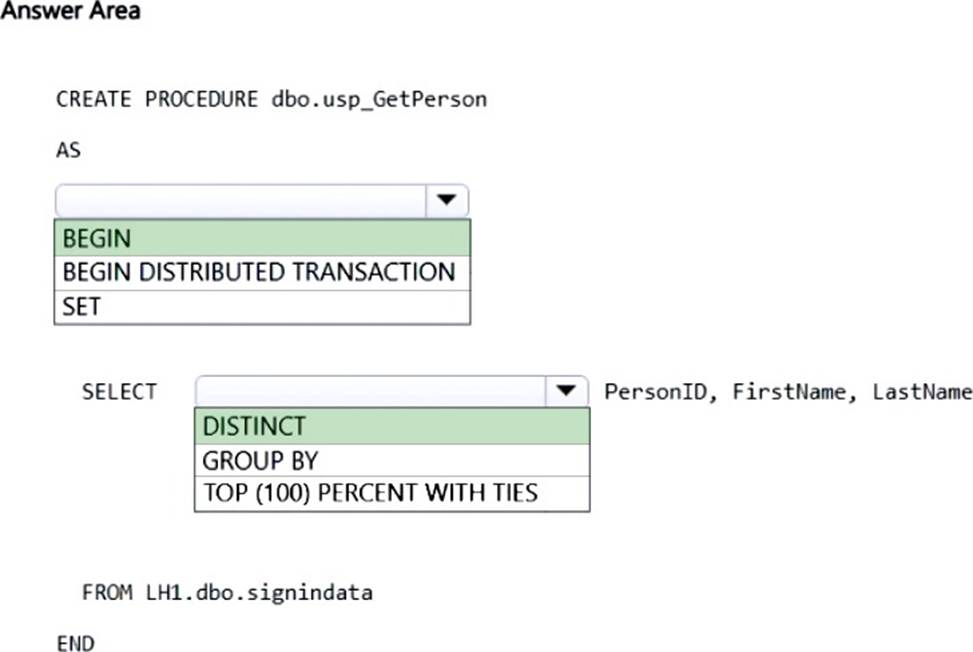
Box 1: BEGIN
Matching the END clause.
Box 2: DISTINCT
Distinct SQL: How to Eliminate Duplicate Data
The SQL Distinct Keyword serves as the bedrock for eradicating duplicate records in SQL databases.
When employed in a query, it acts as a filter that ensures the result set contains only unique records.
SELECT DISTINCT column_name
FROM table_name;
Reference:
https://www.ituonline.com/blogs/distinct-sql/
https://learn.microsoft.com/en-us/sql/t-sql/statements/create-procedure-transact-sql
You are creating a semantic model in Microsoft Power BI Desktop.
You plan to make bulk changes to the model by using the Tabular Model Definition Language (TMDL) extension for Microsoft Visual Studio Code.
You need to save the semantic model to a file.
Which file format should you use?
- A . PBIP
- B . PBIX
- C . PBIT
- D . PBIDS