
Microsoft DP-600 Practice Exams
Last updated on Oct 02,2026- Exam Code: DP-600
- Exam Name: Implementing Analytics Solutions Using Microsoft Fabric
- Certification Provider: Microsoft
- Latest update: Oct 02,2026
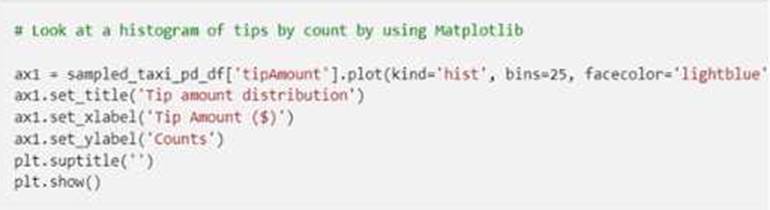
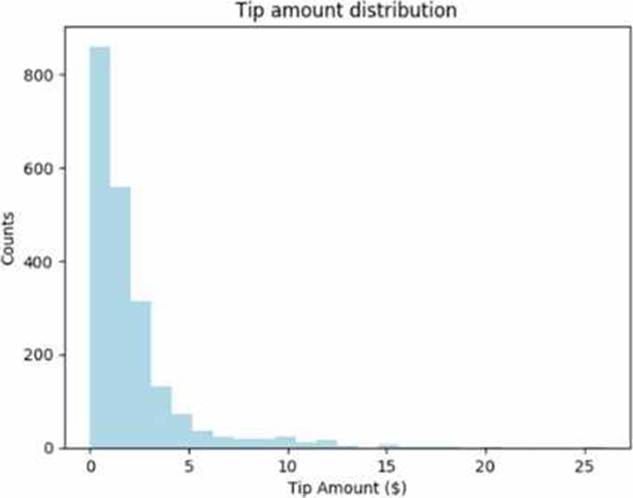
You have a Fabric notebook that has the Python code and output shown in the following exhibit.
Which type of analytics are you performing?
- A . descriptive
- B . diagnostic
- C . prescriptive
- D . predictive
A
Explanation:
This is a histogram. Histogram are used in relation to descriptive statistics calculations.
Reference: https://www.advantive.com/solutions/spc-software/quality-advisor/data-analysis-tools/histogram-calculate-descriptive-statistics/
DRAG DROP
You are implementing a medallion architecture in a single Fabric workspace.
You have a lakehouse that contains the Bronze and Silver layers and a warehouse that contains the Gold layer.
You create the items required to populate the layers as shown in the following table.
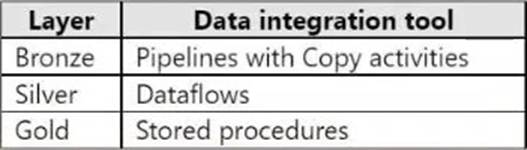
You need to ensure that the layers are populated daily in sequential order such that Silver is populated only after Bronze is complete, and Gold is populated only after Silver is complete. The solution must minimize development effort and complexity.
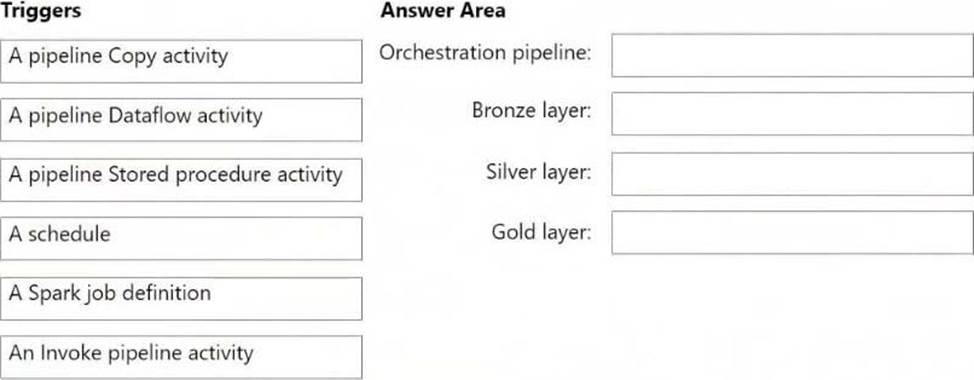
What should you use to execute each set of items? To answer, drag the appropriate options to the correct items. Each option may be used once, more than once, or not at all. You may need to drag the split bar between panes or scroll to view content. NOTE: Each correct selection is worth one point.
Explanation:
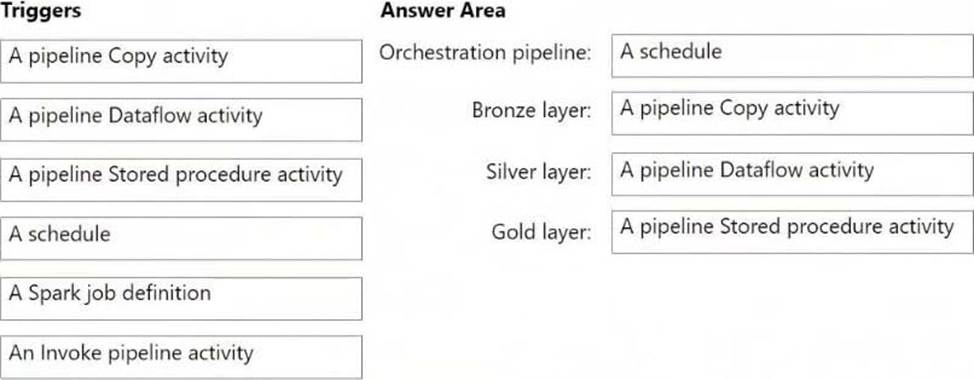
Box 1: A schedule
Orchestration pipeline
Run and schedule the data pipeline
Box 2: A pipeline Copy activity
Bronze layer, pipelines with Copy activities (Lakehouse)
Configure Lakehouse in a copy activity
Use the copy activity in a data pipeline to copy data from and to the Fabric Lakehouse.
Box 3: A pipeline Dataflow activity
Silver layer, dataflows (Lakehouse)
Microsoft Fabric, Data Factory, Use a dataflow in a pipeline
A dataflow is a reusable data transformation that can be used in a pipeline.
Box 4: A pipeline Stored procedure actvitity
Gold layer, stored procedures (warehouse)
Azure Data Factory, Transform data by using the SQL Server Stored Procedure activity in Azure Data Factory or Synapse Analytics
Reference:
https://learn.microsoft.com/en-us/fabric/data-factory/connector-lakehouse-copy-activity
https://learn.microsoft.com/en-us/fabric/data-factory/tutorial-dataflows-gen2-pipeline-activity
https://learn.microsoft.com/en-us/azure/data-factory/transform-data-using-stored-procedure
DRAG DROP
You are implementing a medallion architecture in a single Fabric workspace.
You have a lakehouse that contains the Bronze and Silver layers and a warehouse that contains the Gold layer.
You create the items required to populate the layers as shown in the following table.
You need to ensure that the layers are populated daily in sequential order such that Silver is populated only after Bronze is complete, and Gold is populated only after Silver is complete. The solution must minimize development effort and complexity.
What should you use to execute each set of items? To answer, drag the appropriate options to the correct items. Each option may be used once, more than once, or not at all. You may need to drag the split bar between panes or scroll to view content. NOTE: Each correct selection is worth one point.
Explanation:
Box 1: A schedule
Orchestration pipeline
Run and schedule the data pipeline
Box 2: A pipeline Copy activity
Bronze layer, pipelines with Copy activities (Lakehouse)
Configure Lakehouse in a copy activity
Use the copy activity in a data pipeline to copy data from and to the Fabric Lakehouse.
Box 3: A pipeline Dataflow activity
Silver layer, dataflows (Lakehouse)
Microsoft Fabric, Data Factory, Use a dataflow in a pipeline
A dataflow is a reusable data transformation that can be used in a pipeline.
Box 4: A pipeline Stored procedure actvitity
Gold layer, stored procedures (warehouse)
Azure Data Factory, Transform data by using the SQL Server Stored Procedure activity in Azure Data Factory or Synapse Analytics
Reference:
https://learn.microsoft.com/en-us/fabric/data-factory/connector-lakehouse-copy-activity
https://learn.microsoft.com/en-us/fabric/data-factory/tutorial-dataflows-gen2-pipeline-activity
https://learn.microsoft.com/en-us/azure/data-factory/transform-data-using-stored-procedure
You have a Microsoft Fabric tenant that contains a dataflow.
You are exploring a new semantic model.
From Power Query, you need to view column information as shown in the following exhibit.
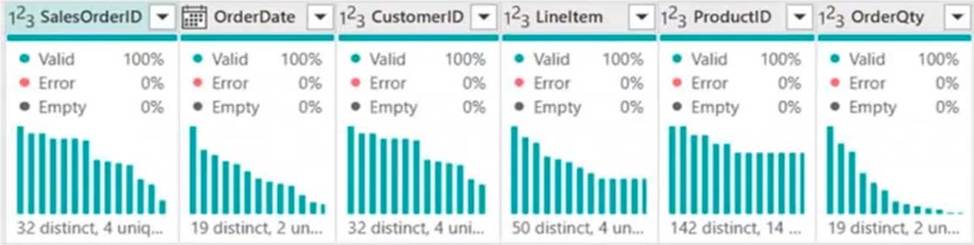
Which three Data view options should you select? Each correct answer presents part of the solution.
- A . Show column value distribution
- B . Enable details pane
- C . Enable column profile
- D . Show column quality details
- E . Show column profile in details pane
Note: This question is part of a series of questions that present the same scenario. Each question in the series contains a unique solution that might meet the stated goals. Some question sets might have more than one correct solution, while others might not have a correct solution.
After you answer a question in this section, you will NOT be able to return to it. As a result, these questions will not appear in the review screen.
You have a Fabric tenant that contains a lakehouse named Lakehouse1. Lakehouse1 contains a Delta table named Customer.
When you query Customer, you discover that the query is slow to execute. You suspect that maintenance was NOT performed on the table.
You need to identify whether maintenance tasks were performed on Customer.
Solution: You run the following Spark SQL statement:
DESCRIBE HISTORY customer
Does this meet the goal?
- A . Yes
- B . No
A
Explanation:
Correct Solution: You run the following Spark SQL statement:
DESCRIBE HISTORY customer
DESCRIBE HISTORY
Applies to: Databricks SQL, Databricks Runtime
Returns provenance information, including the operation, user, and so on, for each write to a table. Table history is retained for 30 days.
Syntax
DESCRIBE HISTORY table_name
Note: Work with Delta Lake table history
Each operation that modifies a Delta Lake table creates a new table version. You can use history information to audit operations, rollback a table, or query a table at a specific point in time using time travel.
Retrieve Delta table history
You can retrieve information including the operations, user, and timestamp for each write to a Delta table by running the history command. The operations are returned in reverse chronological order.
DESCRIBE HISTORY ‘/data/events/’ — get the full history of the table
DESCRIBE HISTORY delta.`/data/events/`
DESCRIBE HISTORY ‘/data/events/’ LIMIT 1 — get the last operation only
DESCRIBE HISTORY eventsTable
Incorrect:
* DESCRIBE DETAIL customer
DESCRIBE TABLE statement returns the basic metadata information of a table. The metadata information includes column name, column type and column comment. Optionally a partition spec or column name may be specified to return the metadata pertaining to a partition or column respectively.
* EXPLAIN TABLE customer
* REFRESH TABLE
REFRESH TABLE statement invalidates the cached entries, which include data and metadata of the given table or view. The invalidated cache is populated in lazy manner when the cached table or the query associated with it is executed again.
Syntax
REFRESH [TABLE] tableIdentifier
Reference:
https://learn.microsoft.com/en-us/azure/databricks/sql/language-manual/delta-describe-history
https://docs.gcp.databricks.com/en/delta/history.html
https://spark.apache.org/docs/3.0.0-preview/sql-ref-syntax-aux-refresh-table.html
HOTSPOT
You have a Fabric tenant that contains lakehouse named Lakehouse1. Lakehouse1 contains a Delta table with eight columns.
You receive new data that contains the same eight columns and two additional columns.
You create a Spark DataFrame and assign the DataFrame to a variable named df. The DataFrame contains the new data.
You need to add the new data to the Delta table to meet the following requirements:
– Keep all the existing rows.
– Ensure that all the new data is added to the table.
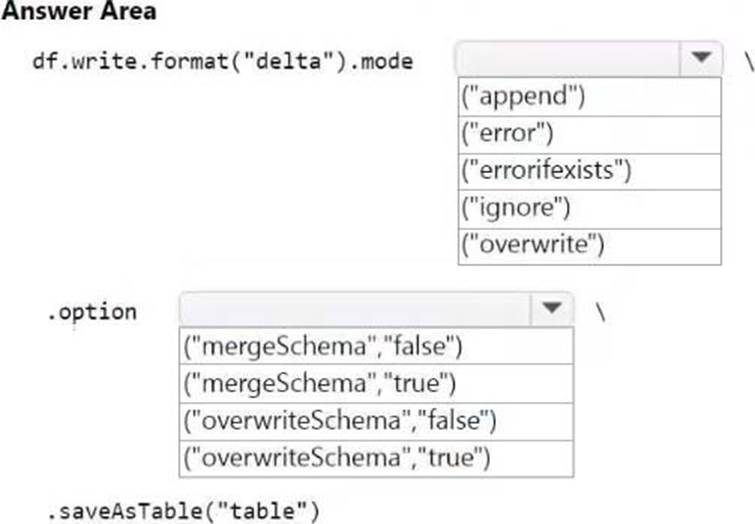
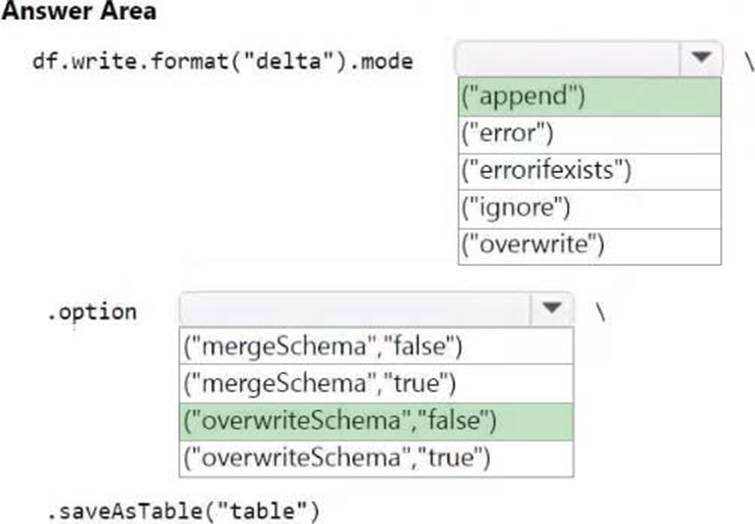
How should you complete the code? To answer, select the appropriate options in the answer area. NOTE: Each correct selection is worth one point.
Explanation:
Box 1: append
Mode "append" atomically adds new data to an existing Delta table and "overwrite" atomically replaces all of the data in a table.
Box 2: overwriteSchema false
Explicitly update schema to change column type or name
You can change a column’s type or name or drop a column by rewriting the table. To do this, use the overwriteSchema option.
The following example shows changing a column type:
(spark.read.table(…)
.withColumn("birthDate", col("birthDate").cast("date"))
.write
.mode("overwrite")
.option("overwriteSchema", "true")
.saveAsTable(…)
), when performing an Overwrite, the data will be deleted before writing out the new data.
Reference: https://learn.microsoft.com/en-us/azure/databricks/delta/update-schema
You have a Fabric tenant.
You are creating a Fabric Data Factory pipeline.
You have a stored procedure that returns the number of active customers and their average sales for the current month.
You need to add an activity that will execute the stored procedure in a warehouse. The returned values must be available to the downstream activities of the pipeline.
Which type of activity should you add?
- A . Get metadata
- B . Copy data
- C . Lookup
- D . Append variable
C
Explanation:
The Lookup activity is specifically designed to execute a query or stored procedure and retrieve data from a data source, such as a warehouse. It allows you to capture the output, which can then be used in subsequent activities in the pipeline.
By using the Lookup activity, you can access the returned values (number of active customers and their
average sales) and pass them on to other activities for further processing.
HOTSPOT
You have a Fabric tenant that contains three users named User1, User2, and User3. The tenant contains a security group named Group1. User1 and User3 are members of Group1.
The tenant contains the workspaces shown in the following table.

The tenant contains the domains shown in the following table.
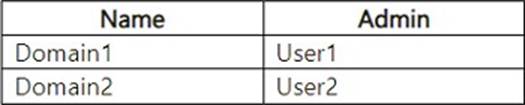
User1 creates a new workspace named Workspace3.
You assign Domain1 as the default domain of Group1.
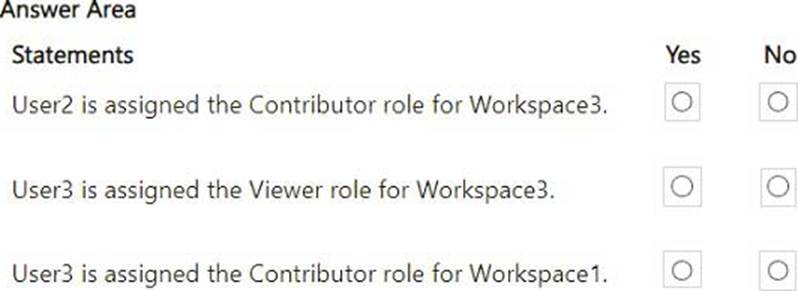
For each of the following statements, select Yes if the statement is true. Otherwise, select No. NOTE: Each correct selection is worth one point.
Explanation:
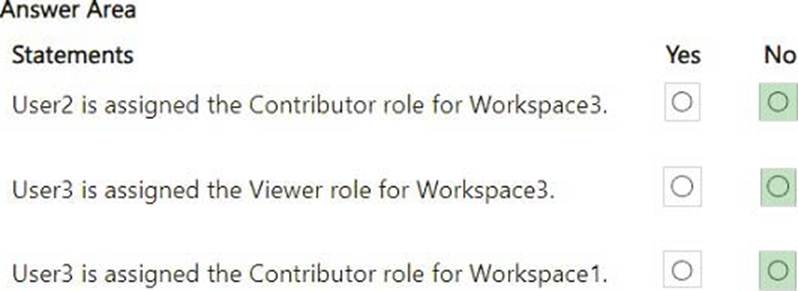
User2 is assigned the Contributor role for Workspace3 – No
User2 is not a member of Group1, and Workspace3 is created by User1. Since Workspace3 is assigned to Domain1 (default domain of Group1), only members of Group1 will have permissions based on their role in the domain. User2 is not part of Group1, so they have no role in Workspace3.
User3 is assigned the Viewer role for Workspace3 – No
User3 is a member of Group1, and the default domain (Domain1) is assigned to Group1. However, there is no indication that User3 has been explicitly granted the Viewer role in Workspace3. If permissions were inherited, User3 would have the default role for Domain1, but the problem does not specify this explicitly, so we assume no Viewer role is assigned.
User3 is assigned the Contributor role for Workspace1 – No
Workspace1 is explicitly assigned to User1 as the admin. There is no indication that User3 has any permissions for Workspace1. Being a member of Group1 does not grant automatic Contributor access to a workspace unless explicitly configured.
HOTSPOT
You have a Fabric tenant that contains a workspace named Workspace1 and a user named DBUser.
Workspace1 contains a lakehouse named Lakehouse1. DBUser does NOT have access to the tenant.
You grant DBUser access to Lakehouse1 as shown in the following exhibit.
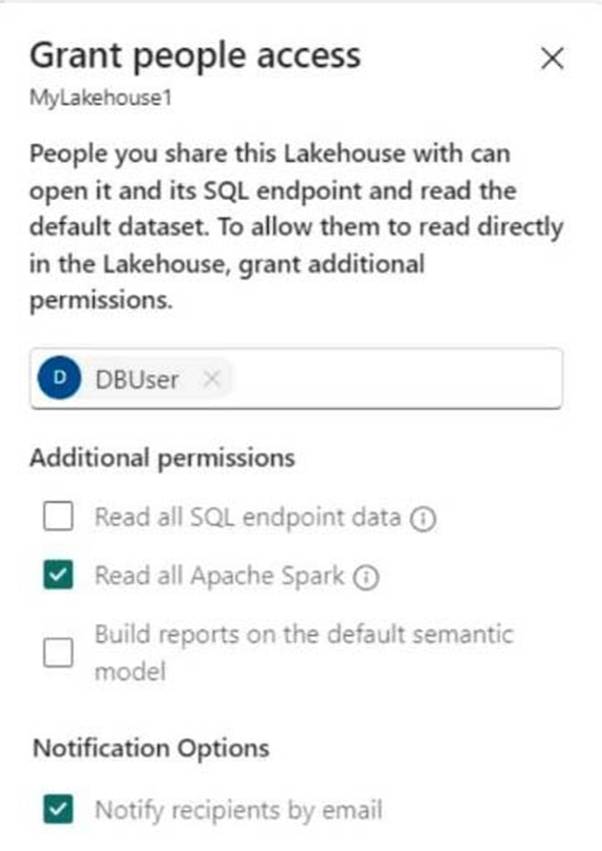
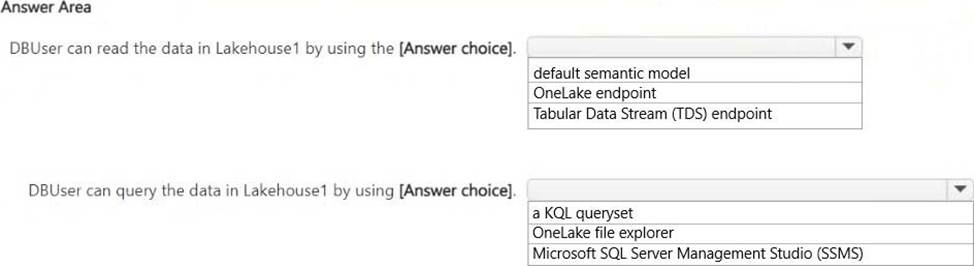
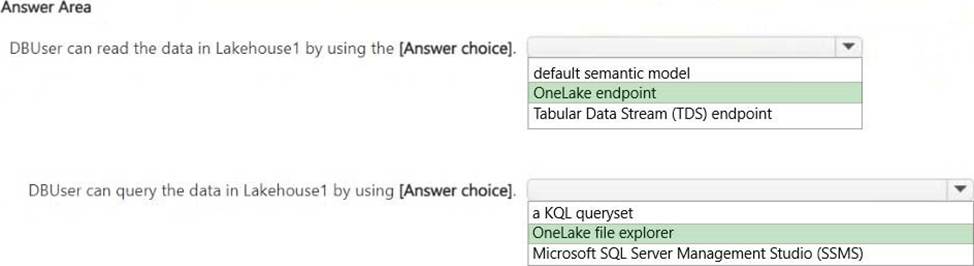
Use the drop-down menus to select the answer choice that completes each statement based on the information presented in the graphic. NOTE: Each correct selection is worth one point.
Explanation:
DBUser can read the data in Lakehouse1 by using the OneLake endpoint.
DBUser can query the data in Lakehouse1 by using the OneLake file explorer.
DBUser has been granted permission to "Read all Apache Spark" data but not permission to read SQL endpoint data or build reports using the default semantic model.
Since SQL endpoint access is not granted, DBUser cannot use TDS (Tabular Data Stream) or SSMS (SQL Server Management Studio) for querying.
DBUser can still access OneLake data directly, which is why OneLake endpoint and OneLake file explorer are the correct choices.
You have a Fabric tenant that contains a data warehouse.
You need to load rows into a large Type 2 slowly changing dimension (SCD). The solution must minimize resource usage.
Which T-SQL statement should you use?
- A . UPDATE AND INSERT
- B . MERGE
- C . TRUNCATE TABLE and INSERT
- D . CREATE TABLE AS SELECT
B
Explanation:
The MERGE statement is designed to perform insert and update operations in a single statement. It allows you to efficiently manage Type 2 SCDs by:
Inserting new records for new customers or changes in attributes.
Updating existing records to mark old versions as inactive while adding new versions.
This approach minimizes resource usage compared to separate update and insert statements, as it reduces the need for multiple passes over the data.