
Microsoft DP-600 Practice Exams
Last updated on Oct 02,2026- Exam Code: DP-600
- Exam Name: Implementing Analytics Solutions Using Microsoft Fabric
- Certification Provider: Microsoft
- Latest update: Oct 02,2026
HOTSPOT
You have a Fabric tenant that contains a workspace named Enterprise. Enterprise contains a semantic model named Model1. Model1 contains a date parameter named Date1 that was created in Power Query.
You build a deployment pipeline named Enterprise Data that includes two stages named Development and Test. You assign the Enterprise workspace to the Development stage.
You need to perform the following actions:
– Create a workspace named Enterprise [Test] and assign the workspace to the Test stage.
– Configure a rule that will modify the value of Date1 when changes are deployed to the Test stage.
Which two settings should you use? To answer, select the appropriate settings in the answer area. NOTE: Each correct answer is worth one point.
Explanation:
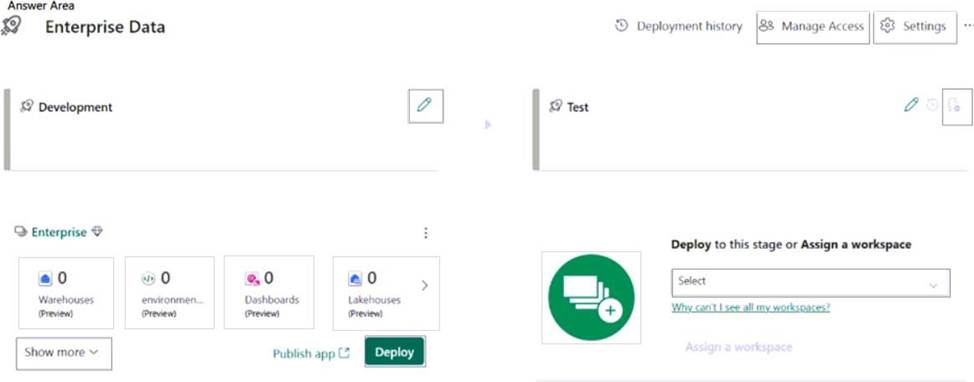
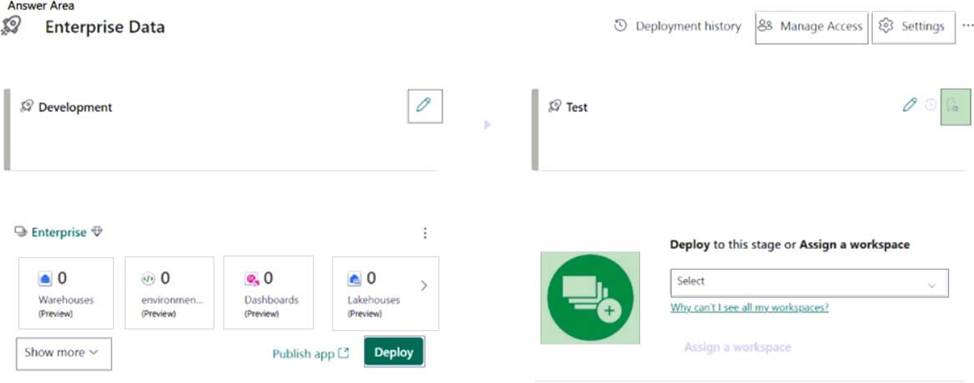
Box 1: Add workspace button (with a +sign)
Create a workspace named Enterprise [Test] and assign the workspace to the Test stage.
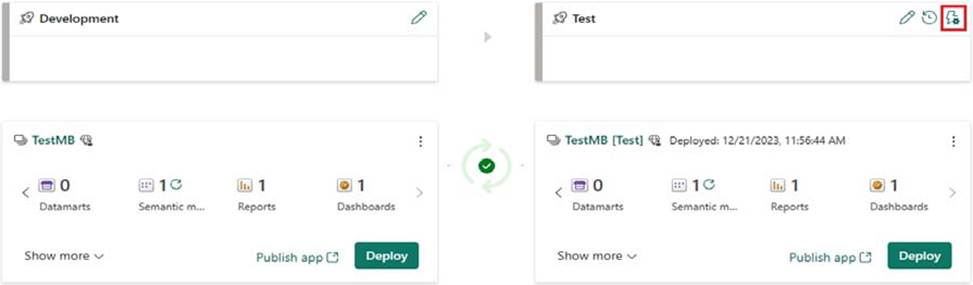
Box 2: Deployment rule [Upper right corner]
Configure a rule that will modify the value of Date1 when changes are deployed to the Test stage.
In the pipeline stage you want to create a deployment rule for, select Deployment rules
Reference: https://learn.microsoft.com/en-us/fabric/cicd/deployment-pipelines/create-rules
Which syntax should you use in a notebook to access the Research division data for Productline1?
- A . spark.read.format(“delta”).load(“Tables/ResearchProduct”)
- B . spark.read.format(“delta”).load(“Files/ResearchProduct”)
- C . external_table(‘Tables/ResearchProduct)
- D . external_table(ResearchProduct)
A
Explanation:
Correct:
* spark.read.format(“delta”).load(“Tables/ResearchProduct”)
* spark.sql(“SELECT * FROM Lakehouse1.ResearchProduct ”)
Incorrect:
* external_table(‘Tables/ResearchProduct)
* external_table(ResearchProduct)
* spark.read.format(“delta”).load(“Files/ResearchProduct”)
* spark.read.format(“delta”).load(“Tables/productline1/ResearchProduct”)
* spark.sql(“SELECT * FROM Lakehouse1.Tables.ResearchProduct ”)
Note: Apache Spark
Apache Spark notebooks and Apache Spark jobs can use shortcuts that you create in OneLake. Relative file paths can be used to directly read data from shortcuts. Additionally, if you create a shortcut in the Tables section of the lakehouse and it is in the Delta format, you can read it as a managed table using Apache Spark SQL syntax.
Can use either:
df = spark.read.format("delta").load("Tables/MyShortcut")
display(df)
OR
df = spark.sql("SELECT * FROM MyLakehouse.MyShortcut LIMIT 1000")
display(df)
Reference: https://learn.microsoft.com/en-us/fabric/onelake/onelake-shortcuts
HOTSPOT
You have an Azure Data Lake Storage Gen2 account named storage1 that contains a Parquet file named sales.parquet.
You have a Fabric tenant that contains a workspace named Workspace1.
Using a notebook in Workspace1, you need to load the content of the file to the default lakehouse. The solution must ensure that the content will display automatically as a table named Sales in Lakehouse explorer.
How should you complete the code? To answer, select the appropriate options in the answer area. NOTE: Each correct selection is worth one point.


Explanation:
Box 1: delta
Use a notebook to load data into your Lakehouse
Saving data in the Lakehouse using capabilities such as Load to Tables or methods described in Options to get data into the Fabric Lakehouse, all data is saved in Delta format.
# Keep it if you want to save dataframe as a delta lake, parquet table to Tables section of the default Lakehouse
df.write.mode("overwrite").format("delta").saveAsTable(delta_table_name)
# Keep it if you want to save the dataframe as a delta lake, appending the data to an existing table df.write.mode("append").format("delta").saveAsTable(delta_table_name)
QUESTION NO: NO: The solution must ensure that the content will display automatically as a table named Sales in Lakehouse explorer.
Box 2: files/sales
Reference:
https://learn.microsoft.com/en-us/fabric/data-engineering/lakehouse-notebook-load-data
https://learn.microsoft.com/en-us/fabric/data-engineering/lakehouse-and-delta-tables
You have a Fabric tenant.
You are creating a Fabric Data Factory pipeline.
You have a stored procedure that returns the number of active customers and their average sales for the current month.
You need to add an activity that will execute the stored procedure in a warehouse. The returned values must be available to the downstream activities of the pipeline.
Which type of activity should you add?
- A . Get metadata
- B . Switch
- C . Lookup
- D . Append variable
C
Explanation:
The Fabric Lookup activity can retrieve a dataset from any of the data sources supported by Microsoft Fabric. You can use it to dynamically determine which objects to operate on in a subsequent activity, instead of hard coding the object name. Some object examples are files and tables.
Lookup activity reads and returns the content of a configuration file or table. It also returns the result of executing a query or stored procedure. The output can be a singleton value or an array of attributes, which can be consumed in a subsequent copy, transformation, or control flow activities like ForEach activity.
Reference: https://learn.microsoft.com/en-us/fabric/data-factory/lookup-activity
HOTSPOT
You have a data warehouse that contains a table named Stage.Customers. Stage.Customers contains all the customer record updates from a customer relationship management (CRM) system. There can be multiple updates per customer.
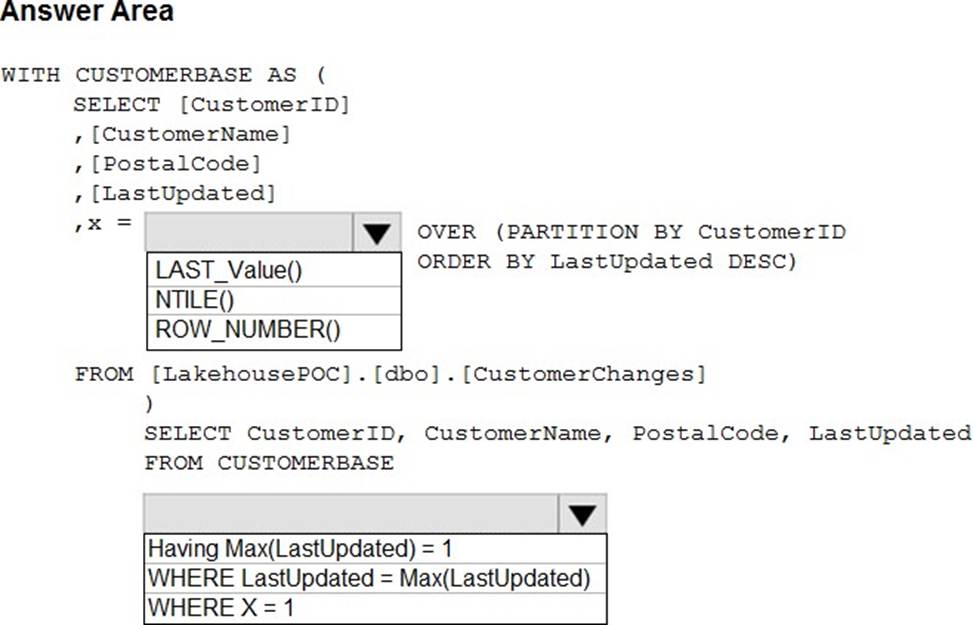
You need to write a T-SQL query that will return the customer ID, name, postal code, and the last updated time of the most recent row for each customer ID.
How should you complete the code? To answer, select the appropriate options in the answer area. NOTE: Each correct selection is worth one point.
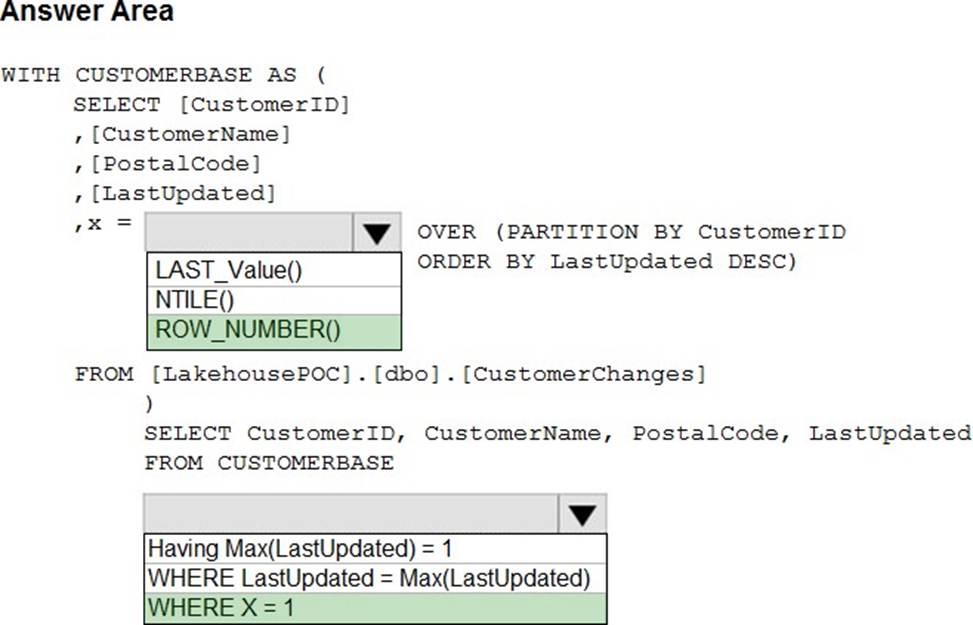
Explanation:
Transact SQL LAST_Value
Transact NTILE
Box 1: ROW_NUMBER() ()
* ROW_NUMBER()
Numbers the output of a result set. More specifically, returns the sequential number of a row within a partition of a result set, starting at 1 for the first row in each partition.
Syntax: ROW_NUMBER ()
OVER ([ PARTITION BY value_expression , … [ n ] ] order_by_clause )
Incorrect:
* LAST_VALUE() Incorrect syntax.
Note: LAST_VALUE (Transact-SQL)
Returns the last value in an ordered set of values.
Syntax
LAST_VALUE ([ scalar_expression ])[ IGNORE NULLS | RESPECT NULLS ] OVER ([ partition_by_clause ] order_by_clause [ rows_range_clause ] )
* LAST_Value()
* NTILE()
Incorrect syntax used.
Note: NTILE (Transact-SQL)
Distributes the rows in an ordered partition into a specified number of groups. The groups are numbered, starting at one. For each row, NTILE returns the number of the group to which the row belongs.
NTILE (integer_expression) OVER ([ <partition_by_clause> ] < order_by_clause > )
Box 2: WHERE X = 1
Reference:
https://learn.microsoft.com/en-us/sql/t-sql/functions/row-number-transact-sql
https://learn.microsoft.com/en-us/sql/t-sql/functions/ntile-transact-sql
https://learn.microsoft.com/en-us/sql/t-sql/functions/last-value-transact-sql
HOTSPOT
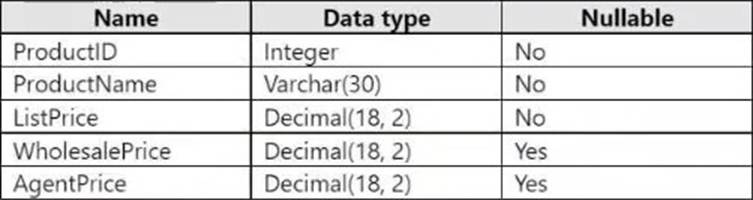
You have a Fabric warehouse that contains a table named Sales.Products.
Sales.Products contains the following columns.
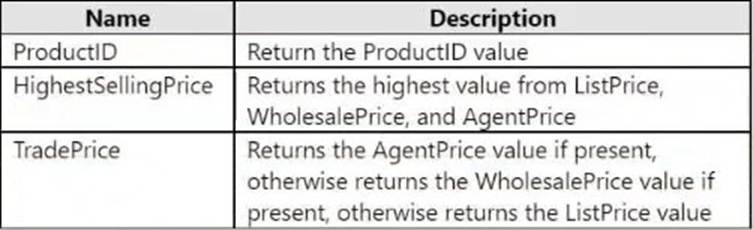
You need to write a T-SQL query that will return the following columns.
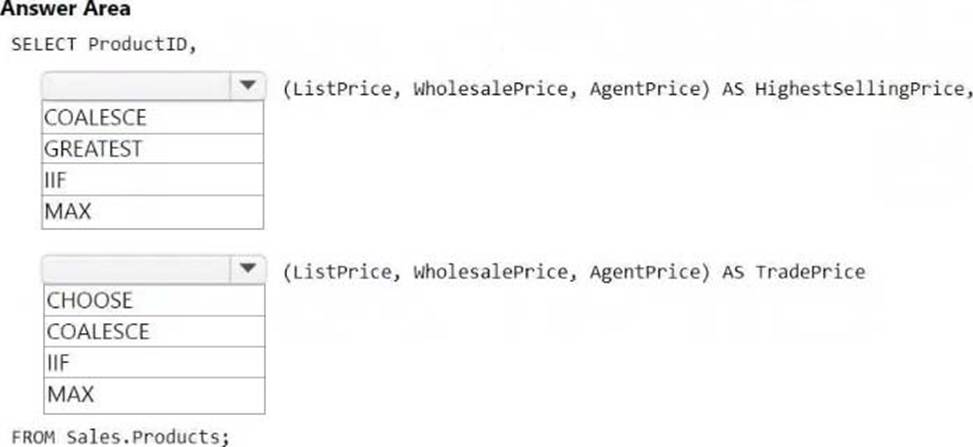
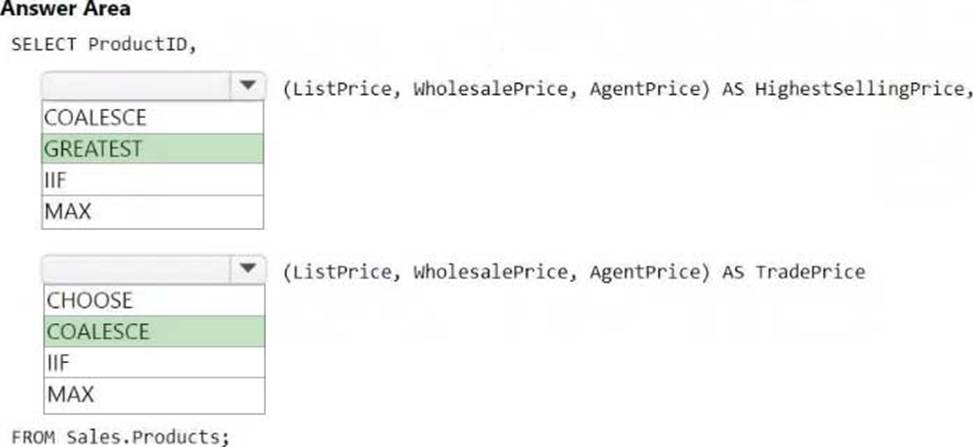
How should you complete the code? To answer, select the appropriate options in the answer area. NOTE: Each correct answer is worth one point.
Explanation:
Box 1: GREATEST
Logical functions – GREATEST (Transact-SQL)
This function returns the maximum value from a list of one or more expressions.
Transact-SQL syntax conventions
Syntax
GREATEST (expression1 [ , …expressionN ] )
Arguments
expression1, expressionN
A list of comma-separated expressions of any comparable data type. The GREATEST function requires at least one argument and supports no more than 254 arguments.
Each expression can be a constant, variable, column name or function, and any combination of arithmetic, bitwise, and string operators. Aggregate functions and scalar subqueries are permitted.
Incorrect:
* MAX (Transact-SQL)
Returns the maximum value in the expression.
Box 2: COALESCE
COALESCE (Transact-SQL)
Evaluates the arguments in order and returns the current value of the first expression that initially doesn’t evaluate to NULL. For example, SELECT COALESCE(NULL, NULL, ‘third_value’, ‘fourth_value’); returns the third value because the third value is the first value that isn’t null.
Note: The order of the arguments seems incorrect though. Should be COALESCE(AgentPrice, WholesalePrice, ListPrice)
Incorrect:
* CHOOSE
Logical Functions – CHOOSE (Transact-SQL)
Returns the item at the specified index from a list of values in SQL Server.
Transact-SQL syntax conventions
Syntax
CHOOSE (index, val_1, val_2 [, val_n ] )
*IIF
Logical Functions – IIF (Transact-SQL)
Returns one of two values, depending on whether the Boolean expression evaluates to true or false in SQL Server.
Transact-SQL syntax conventions
Syntax
IIF( boolean_expression, true_value, false_value )
Reference:
https://learn.microsoft.com/en-us/sql/t-sql/functions/logical-functions-greatest-transact-sql
https://learn.microsoft.com/en-us/sql/t-sql/language-elements/coalesce-transact-sql
HOTSPOT
You have a Fabric tenant that contains a lakehouse named LH1.
You need to deploy a new semantic model.
The solution must meet the following requirements:
– Support complex calculated columns that include aggregate functions, calculated tables, and Multidimensional Expressions (MDX) user hierarchies.
– Minimize page rendering times.
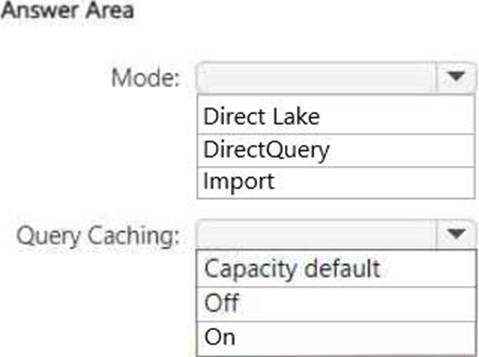
How should you configure the model? To answer, select the appropriate options in the answer area. NOTE: Each correct selection is worth one point.
Explanation:
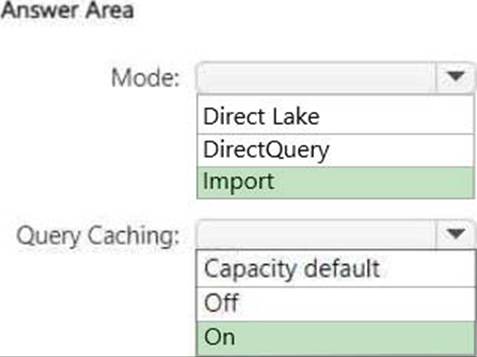
Mode C Import
The Import mode allows for complex calculated columns, calculated tables, and MDX user hierarchies. This mode loads the data into memory, enabling fast query performance and minimizing page rendering times.
Query Caching C On
Enabling query caching improves performance by caching the results of queries, reducing the time it takes to render pages.
You have a Fabric tenant that contains the workspaces shown in the following table.
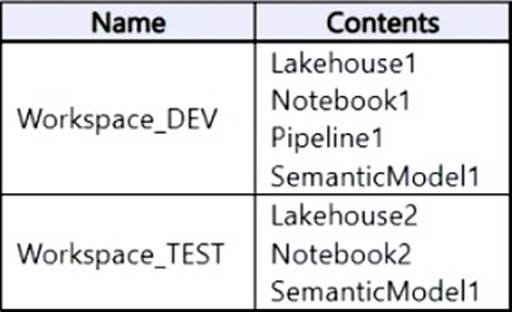
You have a deployment pipeline named Pipeline1 that deploys items from Workspace_DEV to Workspace_TEST. In Pipeline1, all items that have matching names are paired.
You deploy the contents of Workspace_DEV to Workspace_TEST by using Pipeline1.
What will the contents of Workspace_TEST be once the deployment is complete?
- A . Lakehouse1
Lakehouse2
Notebook1
Notebook2
Pipeline1
SemanticModel1 - B . Lakehouse1
Notebook1
Pipeline1
SemanticModel1 - C . Lakehouse2
Notebook2
SemanticModel1 - D . Lakehouse2
Notebook2
Pipeline1
SemanticModel1
A
Explanation:
The items in Workspace_DEV is added to Workspace_TEST. The items already in Workspace_TEST are kept.
Note: Microsoft Fabric, The deployment pipelines process
The deployment process lets you clone content from one stage in the deployment pipeline to another, typically from development to test, and from test to production.
During deployment, Microsoft Fabric copies the content from the source stage to the target stage. The connections between the copied items are kept during the copy process.
Deploying content from a working production pipeline to a stage that has an existing workspace, includes the following steps:
Deploying new content as an addition to the content already there.
Deploying updated content to replace some of the content already there.
Reference: https://learn.microsoft.com/en-us/fabric/cicd/deployment-pipelines/understand-the-deployment-process
You have a Fabric tenant.
You are creating a Fabric Data Factory pipeline.
You have a stored procedure that returns the number of active customers and their average sales for the current month.
You need to add an activity that will execute the stored procedure in a warehouse. The returned values must be available to the downstream activities of the pipeline.
Which type of activity should you add?
- A . Append variable
- B . Script
- C . Stored procedure
- D . Get metadata
C
Explanation:
The Stored procedure activity in Fabric Data Factory is used to execute a stored procedure in a warehouse and capture the returned values. Since the requirement specifies that the output (active customers and average sales) must be available for downstream activities, this activity ensures the values are accessible for subsequent steps in the pipeline.
HOTSPOT
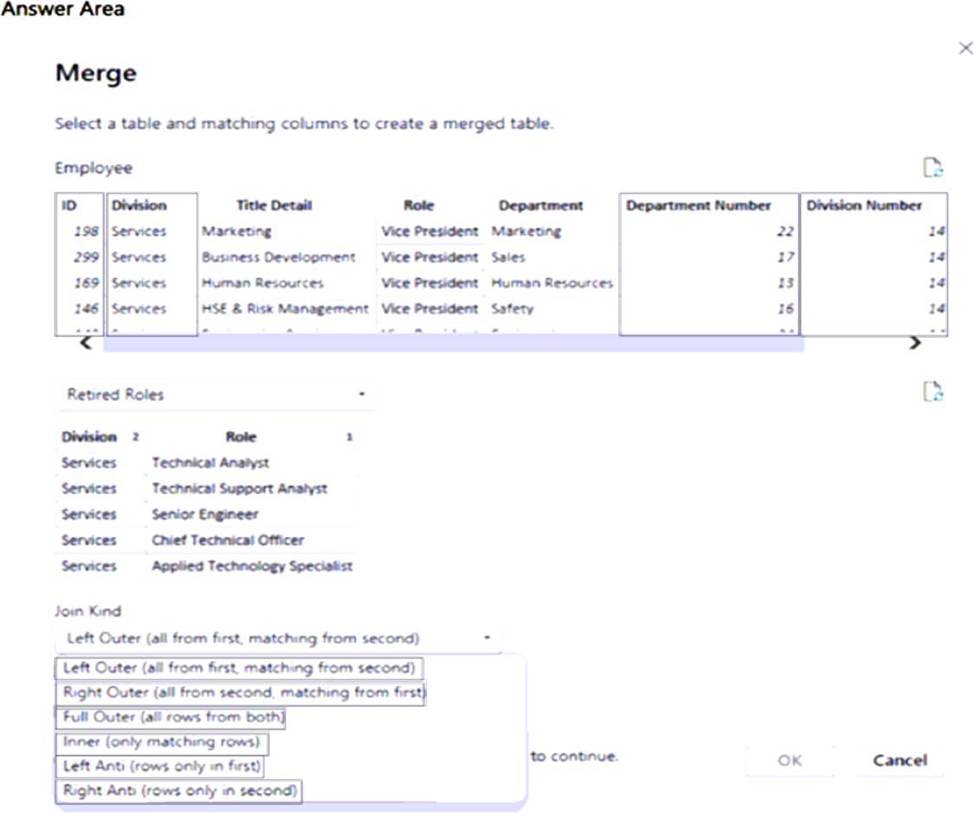
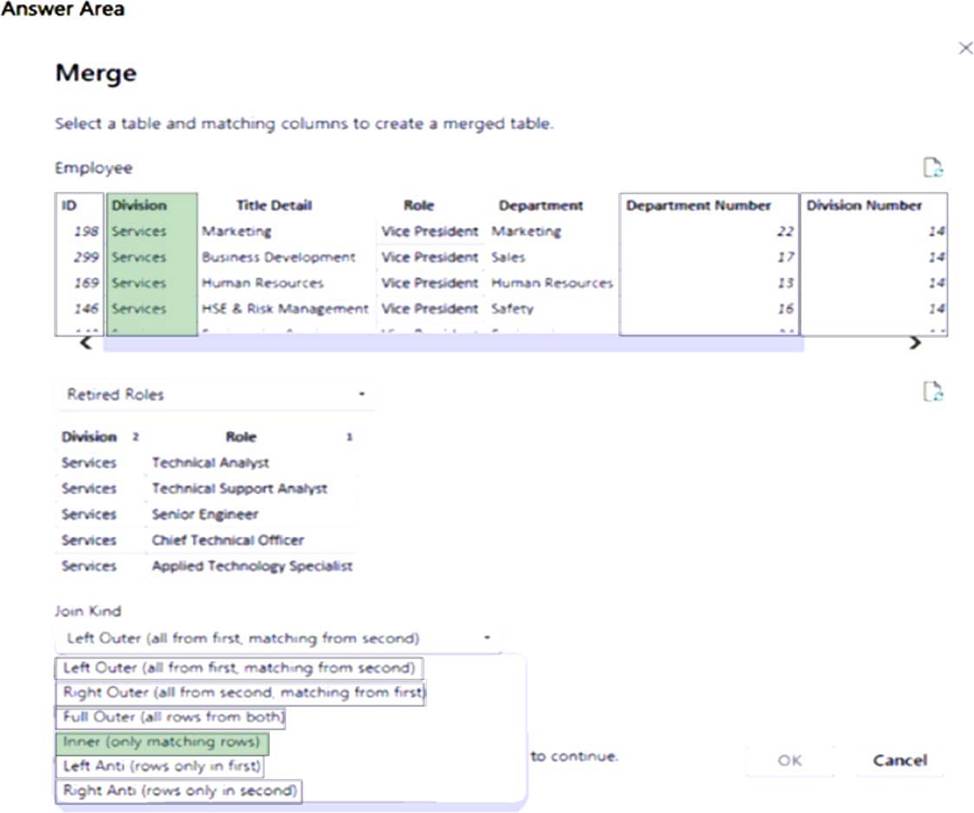
You have two Microsoft Power BI queries named Employee and Retired Roles.
You need to merge the Employee query with the Retired Roles query. The solution must ensure that duplicate rows in each query are removed.
Which column and Join Kind should you use in Power Query Editor? To answer, select the appropriate options in the answer area. NOTE: Each correct answer is worth one point.
Explanation:
Box 1: Division
Power Query, Merge queries overview
The Division column and the Role column appear in both tables.
Box 2: Inner Join
Inner join as duplicate rows in each query must be removed.
Reference: https://learn.microsoft.com/en-us/power-query/merge-queries-overview