
Microsoft DP-600 Practice Exams
Last updated on Oct 02,2026- Exam Code: DP-600
- Exam Name: Implementing Analytics Solutions Using Microsoft Fabric
- Certification Provider: Microsoft
- Latest update: Oct 02,2026
Question Set 3
You have a Fabric tenant named Tenant1 that contains a workspace named WS1. WS1 uses a capacity named C1 and contains a dataset named DS1.
You need to ensure read-write access to DS1 is available by using XMLA endpoint.
What should be modified first?
- A . the DS1 settings
- B . the WS1 settings
- C . the C1 settings
- D . the Tenant1 settings
C
Explanation:
Semantic model connectivity with the XMLA endpoint Read-write operations using the endpoint can be enabled. Read-write provides more semantic model management, governance, advanced semantic modeling, debugging, and monitoring. When enabled, semantic models have more parity with Azure Analysis Services and SQL Server Analysis Services enterprise grade tabular modeling tools and processes.
Enable XMLA read-write
By default, Premium capacity or Premium Per User semantic model workloads have the XMLA endpoint property setting enabled for read-only. This means applications can only query a semantic model. For applications to perform write operations, the XMLA Endpoint property must be enabled for read-write.
To enable read-write for a Premium capacity
HOTSPOT
You have the source data model shown in the following exhibit.
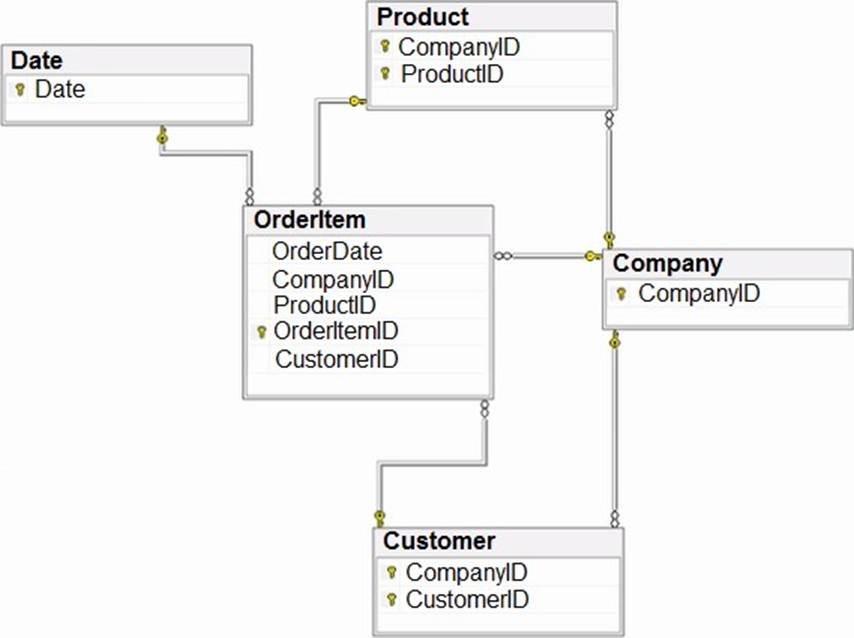
The primary keys of the tables are indicated by a key symbol beside the columns involved in each key.
You need to create a dimensional data model that will enable the analysis of order items by date, product, and customer.
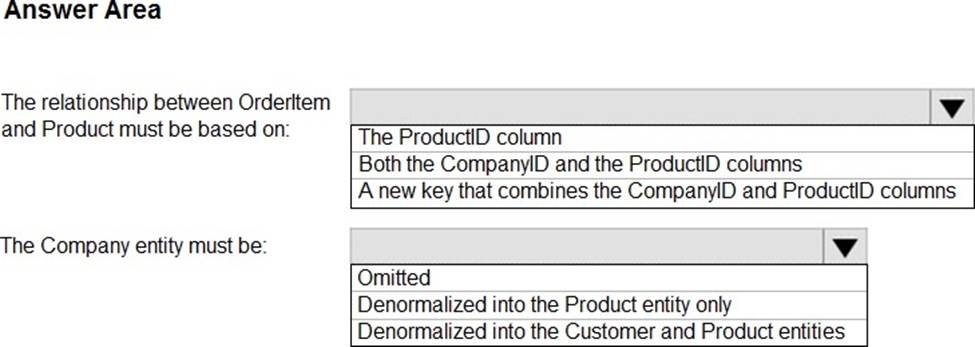
What should you include in the solution? To answer, select the appropriate options in the answer area. NOTE: Each correct selection is worth one point.
Explanation:
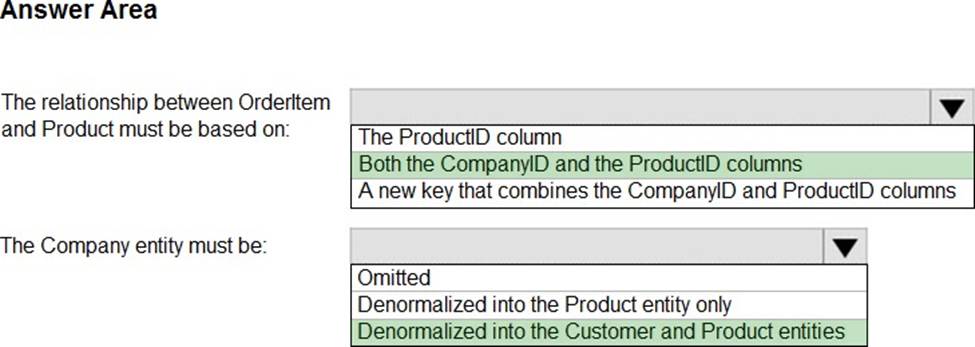
Box 1: Both the CompanyID and the productID columns.
The relationship between OrderItem and Product must be based on:
Need to enable the analysis of order items by date, product, and customer.
Incorrect:
* The productID column.
Need the CompanyID column as well.
Box 2: Denormalized in the Customer and Product entities
The Company entity must be:
Both the Customer and the Product tables use CompanyID as part of their primary key.
Which syntax should you use in a notebook to access the Research division data for Productline1?
- A . spark.read.format(“delta”).load(“Files/ResearchProduct”)
- B . spark.sql(“SELECT * FROM Lakehouse1.ResearchProduct ”)
- C . spark.sql(“SELECT * FROM Lakehouse1.Tables.ResearchProduct ”)
- D . external_table(ResearchProduct)
B
Explanation:
Correct:
* spark.read.format(“delta”).load(“Tables/ResearchProduct”)
* spark.sql(“SELECT * FROM Lakehouse1.ResearchProduct ”)
Incorrect:
* external_table(‘Tables/ResearchProduct)
* external_table(ResearchProduct)
* spark.read.format(“delta”).load(“Files/ResearchProduct”)
* spark.read.format(“delta”).load(“Tables/productline1/ResearchProduct”)
* spark.sql(“SELECT * FROM Lakehouse1.Tables.ResearchProduct ”)
Note: Apache Spark
Apache Spark notebooks and Apache Spark jobs can use shortcuts that you create in OneLake. Relative file paths can be used to directly read data from shortcuts. Additionally, if you create a shortcut in the Tables section of the lakehouse and it is in the Delta format, you can read it as a managed table using Apache Spark SQL syntax.
Can use either:
df = spark.read.format("delta").load("Tables/MyShortcut")
display(df)
OR
df = spark.sql("SELECT * FROM MyLakehouse.MyShortcut LIMIT 1000")
display(df)
Reference: https://learn.microsoft.com/en-us/fabric/onelake/onelake-shortcuts
Question Set 3
You have a Fabric tenant that contains a workspace named Workspace1. Workspace1 is assigned to a Fabric capacity.
You need to recommend a solution to provide users with the ability to create and publish custom Direct Lake semantic models by using external tools. The solution must follow the principle of least privilege.
Which three actions in the Fabric Admin portal should you include in the recommendation? Each correct answer presents part of the solution. NOTE: Each correct answer is worth one point.
- A . From the Tenant settings, set Allow XMLA Endpoints and Analyze in Excel with on-premises datasets to Enabled.
- B . From the Tenant settings, set Allow Azure Active Directory guest users to access Microsoft Fabric to Enabled.
- C . From the Tenant settings, select Users can edit data model in the Power BI service.
- D . From the Capacity settings, set XMLA Endpoint to Read Write.
- E . From the Tenant settings, set Users can create Fabric items to Enabled.
- F . From the Tenant settings, enable Publish to Web.
You have a Fabric tenant that contains a lakehouse named Lakehouse1. Lakehouse1 contains a table named Table1.
You are creating a new data pipeline.
You plan to copy external data to Table1. The schema of the external data changes regularly.
You need the copy operation to meet the following requirements:
– Replace Table1 with the schema of the external data.
– Replace all the data in Table1 with the rows in the external data.
You add a Copy data activity to the pipeline.
What should you do for the Copy data activity?
- A . From the Source tab, add additional columns.
- B . From the Destination tab, set Table action to Overwrite.
- C . From the Settings tab, select Enable staging.
- D . From the Source tab, select Enable partition discovery.
- E . From the Source tab, select Recursively.
B
Explanation:
Ingest data into the lakehouse
B: Destination
The following properties are supported for Lakehouse under the Destination tab of a copy activity.
* Overwrite: Overwrite the existing data and schema in the table using the new values.
* Etc.
Incorrect:
Not D: The following tables contain more information about a copy activity in Lakehouse.
Source information
* Enable partition discovery
Whether to parse the partitions from the file path and add them as extra source columns.
Not E:
* Recursively
Process all files in the input folder and its subfolders recursively or just the ones in the selected folder. This setting is disabled when a single file is selected.
* Etc.
Reference: https://learn.microsoft.com/en-us/fabric/data-factory/connector-lakehouse-copy-activity
You have a custom Direct Lake semantic model named Model1 that has one billion rows of data.
You use Tabular Editor to connect to Model1 by using the XMLA endpoint.
You need to ensure that when users interact with reports based on Model1, their queries always use Direct Lake mode.
What should you do?
- A . From Model, configure the Default Mode option.
- B . From Partitions, configure the Mode option.
- C . From Model, configure the Storage Location option.
- D . From Model, configure the Direct Lake Behavior option.
D
Explanation:
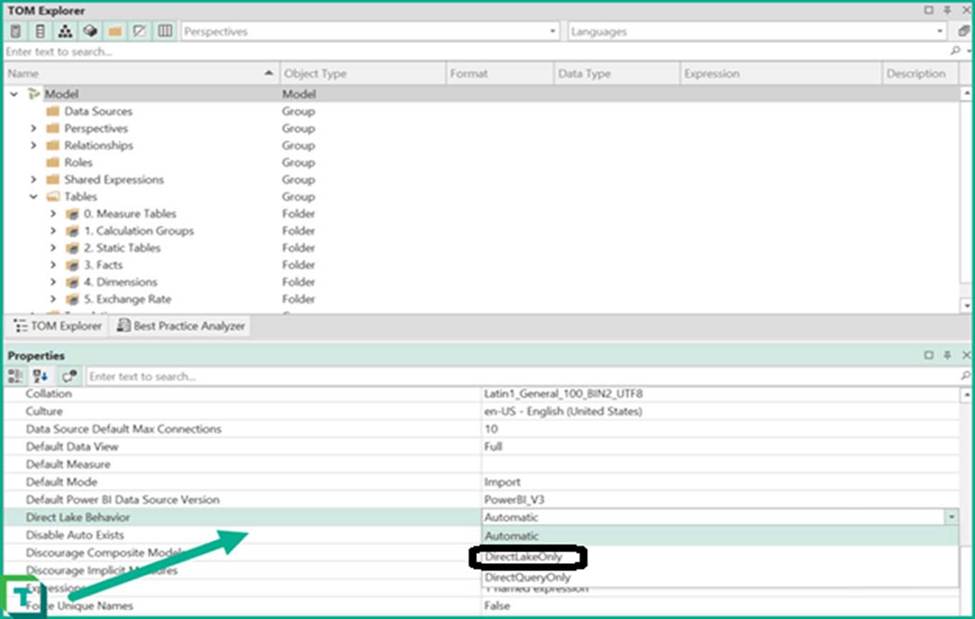
New Behavior Property
With the update to the latest TOM library a new Fabric-only property is available in model properties. Direct Lake Behavior allows control over whether the model should fallback to DirectQuery or not.
Note: Power BI Service:
As of Feb 21, 2024, Web modeling experience in Power BI service has the UI option to change the Direct Lake fallback behavior. Default is Automatic.
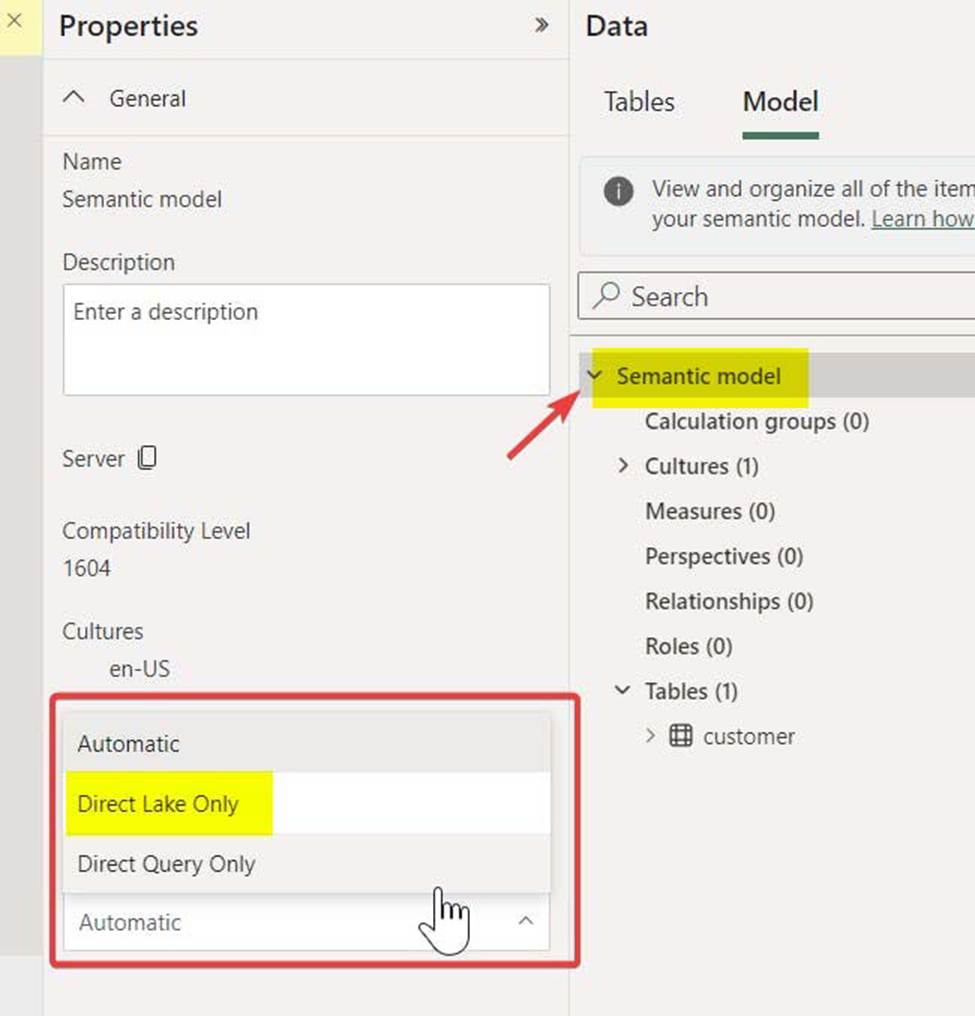
Tabular Editor:
Upgrade to the latest version of Tabular Editor 2 (v2.21.1) which has the latest AMO/TOM properties. Link to Tabular Editor.
Connect to the Direct Lake semantic model using XMLA endpoint
Select Model > Under Options > Direct Lake Behaviour > Change from Automatic to DirectLakeOnly
Save the model
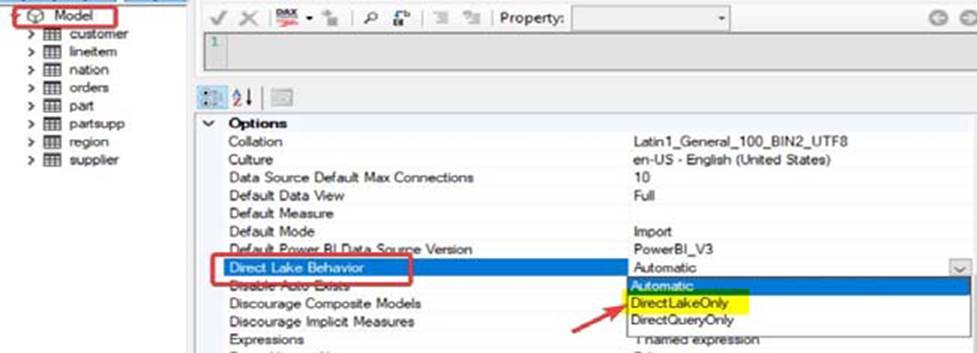
Reference:
https://blog.tabulareditor.com/2023/11/27/tabular-editor-3-november-2023-release/
https://fabric.guru/controlling-direct-lake-fallback-behavior
HOTSPOT
You have a Fabric tenant that contains the semantic model shown in the following exhibit.
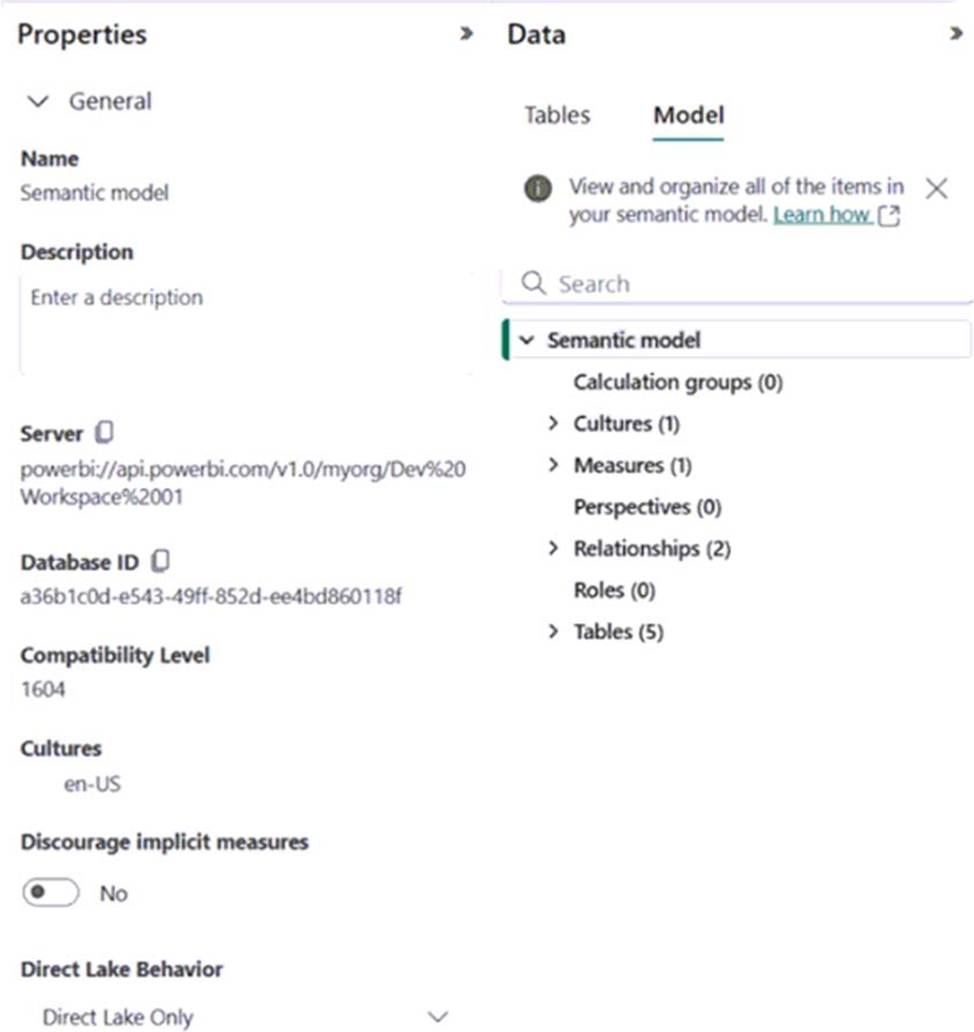
Use the drop-down menus to select the answer choice that completes each statement based on the information presented in the graphic. NOTE: Each correct selection is worth one point.
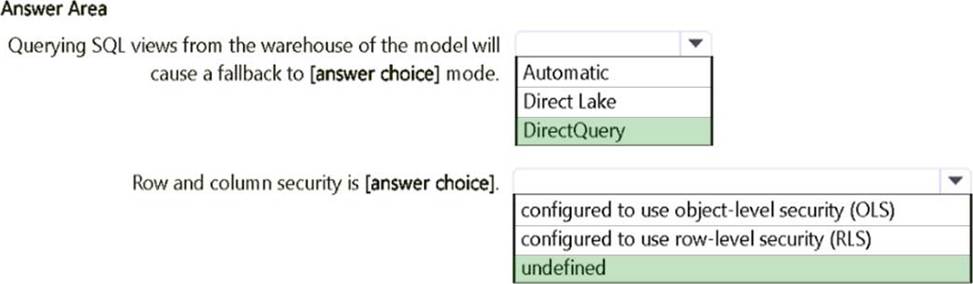
Explanation:
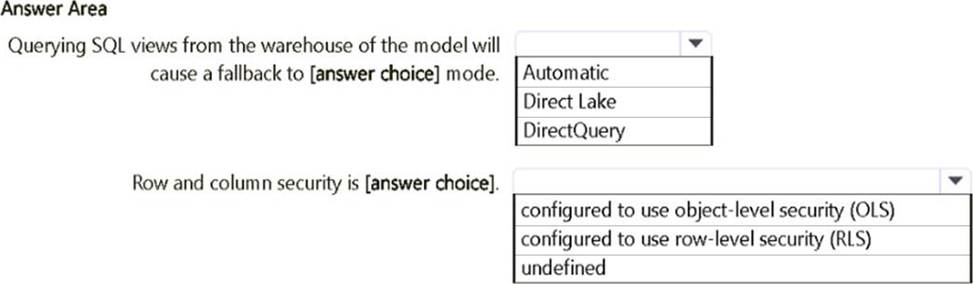
Querying SQL views from the warehouse of the model will cause a fallback to: DirectQuery
In Microsoft Fabric, when a semantic model is set to "Direct Lake Only" mode, it means it can use the Direct Lake connection mode to query the data directly from the lake storage. However, querying SQL views typically requires a DirectQuery fallback because views are not directly accessible through the Direct Lake mode.
Row and column security is: undefined
The exhibit does not show any configuration related to Row-Level Security (RLS) or Object-Level Security (OLS). Since there’s no indication of security settings, we assume that row and column security is undefined.
You have a Microsoft Power BI project that contains a semantic model.
You plan to use Azure DevOps for version control.
You need to modify the .gitignore file to prevent the data values from the data sources from being pushed to the repository.
Which file should you reference?
- A . unappliedChanges.json
- B . cache.abf
- C . localSettings.json
- D . model.bim
C
Explanation:
In Power BI projects, the localSettings.json file contains information specific to the local environment, such as credentials, connections, or other settings that should not be pushed to a version control system for security reasons.
When using Azure DevOps (or any Git-based version control), sensitive information like data values, credentials, and configuration settings should be excluded from the repository by referencing these files in the .gitignore file. The localSettings.json file is designed to hold environment-specific configurations, which often include sensitive data.
You have a Microsoft Power BI Premium Per User (PPU) workspace that contains a semantic model.
You have an Azure App Service app named App1 that modifies row-level security (RLS) for the model by using the XMLA endpoint.
App1 requires users to sign in by using their Microsoft Entra credentials to access the XMLA endpoint.
You need to configure App1 to use a service account to access the model.
What should you do first?
- A . Add a managed identity to the workspace.
- B . Modify the XMLA Endpoint setting.
- C . Upgrade the workspace to Premium capacity.
- D . Add a managed identity to App1.
D
Explanation:
Adding a managed identity to App1 allows the app to authenticate and access Azure resources securely without needing to manage credentials. This is particularly useful for service accounts accessing the XMLA endpoint.
Once the managed identity is set up for App1, you can then configure permissions in your Power BI workspace to allow the managed identity access to the semantic model, facilitating row-level security modifications as needed.
You have a Microsoft Power BI Premium Per User (PPU) workspace that contains a semantic model.
You have an Azure App Service app named App1 that modifies row-level security (RLS) for the model by using the XMLA endpoint.
App1 requires users to sign in by using their Microsoft Entra credentials to access the XMLA endpoint.
You need to configure App1 to use a service account to access the model.
What should you do first?
- A . Add a managed identity to the workspace.
- B . Modify the XMLA Endpoint setting.
- C . Upgrade the workspace to Premium capacity.
- D . Add a managed identity to App1.
D
Explanation:
Adding a managed identity to App1 allows the app to authenticate and access Azure resources securely without needing to manage credentials. This is particularly useful for service accounts accessing the XMLA endpoint.
Once the managed identity is set up for App1, you can then configure permissions in your Power BI workspace to allow the managed identity access to the semantic model, facilitating row-level security modifications as needed.