
Microsoft DP-600 Practice Exams
Last updated on Oct 01,2026- Exam Code: DP-600
- Exam Name: Implementing Analytics Solutions Using Microsoft Fabric
- Certification Provider: Microsoft
- Latest update: Oct 01,2026
Note: This question is part of a series of questions that present the same scenario. Each question in the series contains a unique solution that might meet the stated goals. Some question sets might have more than one correct solution, while others might not have a correct solution.
After you answer a question in this section, you will NOT be able to return to it. As a result, these questions will not appear in the review screen.
You have a Fabric tenant that contains a lakehouse named Lakehouse1. Lakehouse1 contains a Delta table named Customer.
When you query Customer, you discover that the query is slow to execute. You suspect that maintenance was NOT performed on the table.
You need to identify whether maintenance tasks were performed on Customer.
Solution: You run the following Spark SQL statement:
DESCRIBE DETAIL customer
Does this meet the goal?
- A . Yes
- B . No
B
Explanation:
Correct Solution: You run the following Spark SQL statement:
DESCRIBE HISTORY customer
DESCRIBE HISTORY
Applies to: Databricks SQL, Databricks Runtime
Returns provenance information, including the operation, user, and so on, for each write to a table. Table history is retained for 30 days.
Syntax
DESCRIBE HISTORY table_name
Note: Work with Delta Lake table history
Each operation that modifies a Delta Lake table creates a new table version. You can use history information to audit operations, rollback a table, or query a table at a specific point in time using time travel.
Retrieve Delta table history
You can retrieve information including the operations, user, and timestamp for each write to a Delta table by running the history command. The operations are returned in reverse chronological order.
DESCRIBE HISTORY ‘/data/events/’ — get the full history of the table
DESCRIBE HISTORY delta.`/data/events/`
DESCRIBE HISTORY ‘/data/events/’ LIMIT 1 — get the last operation only
DESCRIBE HISTORY eventsTable
Incorrect:
* DESCRIBE DETAIL customer
DESCRIBE TABLE statement returns the basic metadata information of a table. The metadata information includes column name, column type and column comment. Optionally a partition spec or column name may be specified to return the metadata pertaining to a partition or column respectively.
* EXPLAIN TABLE customer
* REFRESH TABLE
REFRESH TABLE statement invalidates the cached entries, which include data and metadata of the given table or view. The invalidated cache is populated in lazy manner when the cached table or the query associated with it is executed again.
Syntax
REFRESH [TABLE] tableIdentifier
Reference: https://learn.microsoft.com/en-us/azure/databricks/sql/language-manual/delta-describe-history
https://docs.gcp.databricks.com/en/delta/history.html
https://spark.apache.org/docs/3.0.0-preview/sql-ref-syntax-aux-refresh-table.html
Note: This question is part of a series of questions that present the same scenario. Each question in the series contains a unique solution that might meet the stated goals. Some question sets might have more than one correct solution, while others might not have a correct solution. After you answer a question in this section, you will NOT be able to return to it. As a result, these questions will not appear in the review screen.
You have a Fabric tenant that contains a semantic model named Model1.
You discover that the following query performs slowly against Model1.
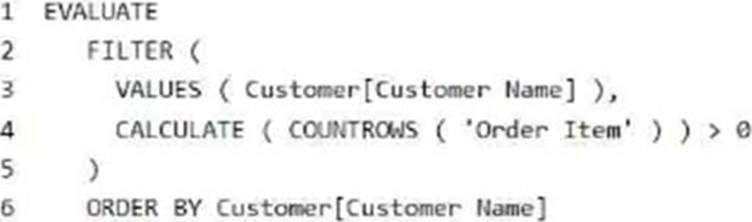
You need to reduce the execution time of the query.
Solution: You replace line 4 by using the following code:
NOT (ISEMPTY (CALCULATETABLE (‘Order Item ‘)))
Does this meet the goal?
- A . Yes
- B . No
A
Explanation:
Correct: NOT ISEMPTY (CALCULATETABLE (‘Order Item ‘))
Just check if it is empty or not.
Note: ISEMPTY
Checks if a table is empty.
Syntax
ISEMPTY(<table_expression>)
Parameters
table_expression – A table reference or a DAX expression that returns a table.
Return value – True if the table is empty (has no rows), if else, False.
Incorrect:
* CALCULATE (COUNTROWS (‘Order Item’)) >= 0
* ISEMPTY (RELATEDTABLE (‘Order Item’))
Reference: https://learn.microsoft.com/en-us/dax/isempty-function-dax
Note: This question is part of a series of questions that present the same scenario. Each question in the series contains a unique solution that might meet the stated goals. Some question sets might have more than one correct solution, while others might not have a correct solution. After you answer a question in this section, you will NOT be able to return to it. As a result, these questions will not appear in the review screen.
You have a Fabric tenant that contains a semantic model named Model1.
You discover that the following query performs slowly against Model1.
You need to reduce the execution time of the query.
Solution: You replace line 4 by using the following code:
NOT (ISEMPTY (CALCULATETABLE (‘Order Item ‘)))
Does this meet the goal?
- A . Yes
- B . No
A
Explanation:
Correct: NOT ISEMPTY (CALCULATETABLE (‘Order Item ‘))
Just check if it is empty or not.
Note: ISEMPTY
Checks if a table is empty.
Syntax
ISEMPTY(<table_expression>)
Parameters
table_expression – A table reference or a DAX expression that returns a table.
Return value – True if the table is empty (has no rows), if else, False.
Incorrect:
* CALCULATE (COUNTROWS (‘Order Item’)) >= 0
* ISEMPTY (RELATEDTABLE (‘Order Item’))
Reference: https://learn.microsoft.com/en-us/dax/isempty-function-dax
Note: This question is part of a series of questions that present the same scenario. Each question in the series contains a unique solution that might meet the stated goals. Some question sets might have more than one correct solution, while others might not have a correct solution. After you answer a question in this section, you will NOT be able to return to it. As a result, these questions will not appear in the review screen.
You have a Fabric tenant that contains a semantic model named Model1.
You discover that the following query performs slowly against Model1.
You need to reduce the execution time of the query.
Solution: You replace line 4 by using the following code:
NOT (ISEMPTY (CALCULATETABLE (‘Order Item ‘)))
Does this meet the goal?
- A . Yes
- B . No
A
Explanation:
Correct: NOT ISEMPTY (CALCULATETABLE (‘Order Item ‘))
Just check if it is empty or not.
Note: ISEMPTY
Checks if a table is empty.
Syntax
ISEMPTY(<table_expression>)
Parameters
table_expression – A table reference or a DAX expression that returns a table.
Return value – True if the table is empty (has no rows), if else, False.
Incorrect:
* CALCULATE (COUNTROWS (‘Order Item’)) >= 0
* ISEMPTY (RELATEDTABLE (‘Order Item’))
Reference: https://learn.microsoft.com/en-us/dax/isempty-function-dax
You have an Azure Repos Git repository named Repo1 and a Fabric-enabled Microsoft Power BI Premium capacity. The capacity contains two workspaces named Workspace1 and Workspace2. Git integration is enabled at the workspace level.
You plan to use Microsoft Power BI Desktop and Workspace1 to make version-controlled changes to a semantic model stored in Repo1. The changes will be built and deployed to Workspace2 by using Azure Pipelines.
You need to ensure that report and semantic model definitions are saved as individual text files in a folder hierarchy. The solution must minimize development and maintenance effort.
In which file format should you save the changes?
- A . PBIP
- B . PBIDS
- C . PBIT
- D . PBIX
A
Explanation:
Power BI Desktop projects (PREVIEW)
Power BI Desktop introduces a new way to author, collaborate, and save your projects. You can now save your work as a Power BI Project (PBIP). As a project, report and semantic model item definitions are saved as individual plain text files in a simple, intuitive folder structure.
Reference: https://learn.microsoft.com/en-us/power-bi/developer/projects/projects-overview
You have an Azure Repos Git repository named Repo1 and a Fabric-enabled Microsoft Power BI Premium capacity. The capacity contains two workspaces named Workspace1 and Workspace2. Git integration is enabled at the workspace level.
You plan to use Microsoft Power BI Desktop and Workspace1 to make version-controlled changes to a semantic model stored in Repo1. The changes will be built and deployed to Workspace2 by using Azure Pipelines.
You need to ensure that report and semantic model definitions are saved as individual text files in a folder hierarchy. The solution must minimize development and maintenance effort.
In which file format should you save the changes?
- A . PBIP
- B . PBIDS
- C . PBIT
- D . PBIX
A
Explanation:
Power BI Desktop projects (PREVIEW)
Power BI Desktop introduces a new way to author, collaborate, and save your projects. You can now save your work as a Power BI Project (PBIP). As a project, report and semantic model item definitions are saved as individual plain text files in a simple, intuitive folder structure.
Reference: https://learn.microsoft.com/en-us/power-bi/developer/projects/projects-overview
You have a Fabric tenant that contains 30 CSV files in OneLake. The files are updated daily.
You create a Microsoft Power BI semantic model named Model1 that uses the CSV files as a data source. You configure incremental refresh for Model1 and publish the model to a Premium capacity in the Fabric tenant.
When you initiate a refresh of Model1, the refresh fails after running out of resources.
What is a possible cause of the failure?
- A . Query folding is occurring.
- B . Only refresh complete days is selected.
- C . XMLA Endpoint is set to Read Only.
- D . Query folding is NOT occurring.
- E . The data type of the column used to partition the data has changed.
D
Explanation:
Incremental refresh and real-time data for semantic models, Troubleshoot incremental refresh and real-time data
D (not A): Most problems that occur when configuring incremental refresh and real-time data have to do with query folding. Your data source must support query folding.
If the incremental refresh policy includes getting real-time data with DirectQuery, non-folding transformations can’t be used.
Because support for query folding is different for different types of data sources, verification should be performed to ensure the filter logic is included in the queries being run against the data source.
Note: Cause: Data type mismatch
This issue can be caused by a data type mismatch where Date/Time is the required data type for the RangeStart and RangeEnd parameters, but the table date column on which the filters are applied aren’t Date/Time data type, or vice-versa. Both the parameters data type and the filtered data column must be Date/Time data type and the format must be the same. If not, the query can’t be folded.
Incorrect:
Not B: The Only refresh complete days setting ensures all rows for the entire day are included in the refresh operation.
Reference:
https://learn.microsoft.com/en-us/power-bi/connect-data/incremental-refresh-troubleshoot
https://learn.microsoft.com/en-us/power-bi/connect-data/incremental-refresh-overview
HOTSPOT
You have a Fabric tenant.
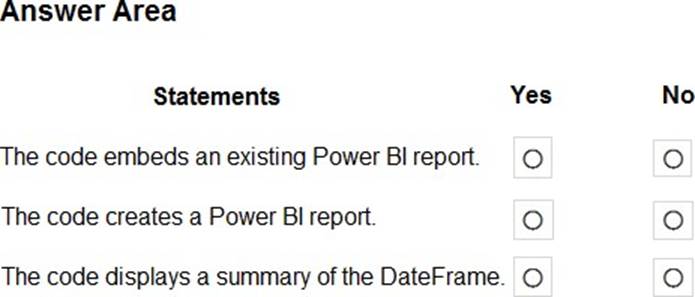
You plan to create a Fabric notebook that will use Spark DataFrames to generate Microsoft Power BI visuals.
You run the following code.

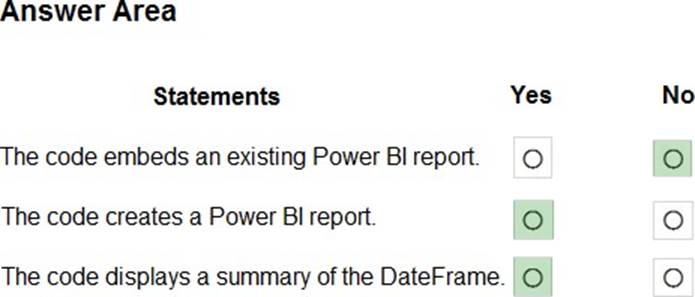
For each of the following statements, select Yes if the statement is true. Otherwise, select No. NOTE: Each correct selection is worth one point.
Explanation:
Box 1: No
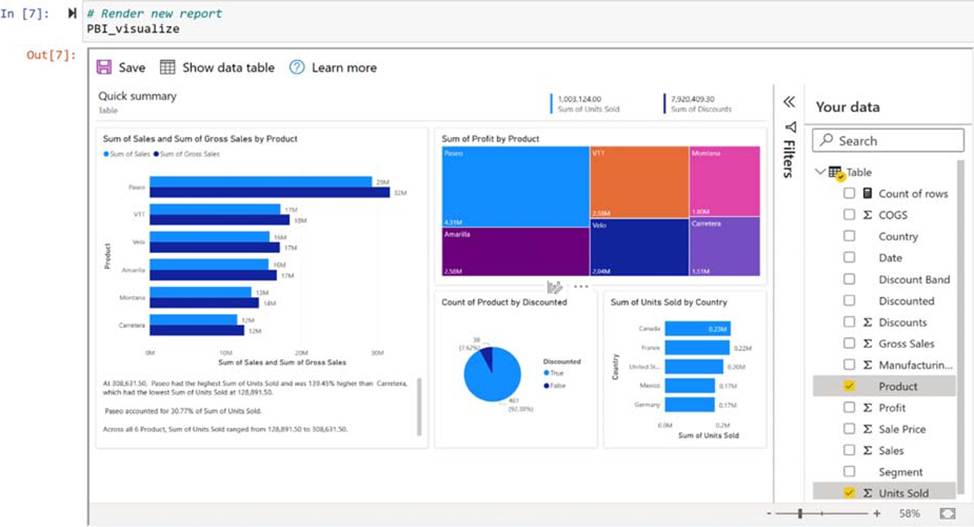
Create and render a quick visualize instance
Create a QuickVisualize instance from the DataFrame you created. If you’re using a pandas DataFrame, you can use our utility function as shown in the following code snippet to create the report. If you’re using a DataFrame other than pandas, parse the data yourself.
# Create a Power BI report from your data
PBI_visualize = QuickVisualize(get_dataset_config(df), auth=device_auth)
# Render new report PBI_visualize
Box 2: Yes
Box 3: Yes
Reference: https://learn.microsoft.com/en-us/power-bi/create-reports/jupyter-quick-report
You have a query in Microsoft Power BI Desktop that contains two columns named Order_Date and Shipping_Date.
You need to create a column that will calculate the number of days between Order_Date and Shipping_Date for each row.
Which Power Query function should you use?
- A . DateTime.LocalNow
- B . Duration.Days
- C . Duration.From
- D . Date.AddDays
B
Explanation:
Power Query M, Duration.Days
Syntax
Duration.Days(duration as nullable duration) as nullable number
About
Returns the days portion of duration.
Example 1
Extract the number of days between two dates.
Usage
Duration.Days(#date(2022, 3, 4) – #date(2022, 2, 25))
Output
7
Reference: https://learn.microsoft.com/en-us/powerquery-m/duration-days
You have a query in Microsoft Power BI Desktop that contains two columns named Order_Date and Shipping_Date.
You need to create a column that will calculate the number of days between Order_Date and Shipping_Date for each row.
Which Power Query function should you use?
- A . DateTime.LocalNow
- B . Duration.Days
- C . Duration.From
- D . Date.AddDays
B
Explanation:
Power Query M, Duration.Days
Syntax
Duration.Days(duration as nullable duration) as nullable number
About
Returns the days portion of duration.
Example 1
Extract the number of days between two dates.
Usage
Duration.Days(#date(2022, 3, 4) – #date(2022, 2, 25))
Output
7
Reference: https://learn.microsoft.com/en-us/powerquery-m/duration-days