
Microsoft AZ-801 Practice Exams
Last updated on Nov 16,2026- Exam Code: AZ-801
- Exam Name: Configuring Windows Server Hybrid Advanced Services
- Certification Provider: Microsoft
- Latest update: Nov 16,2026
DRAG DROP
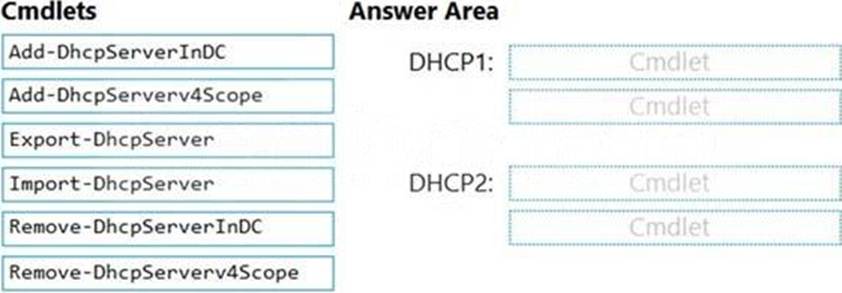
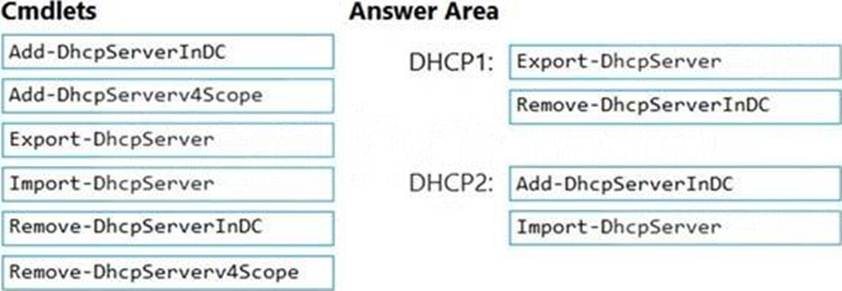
You are planning the DHCP1 migration to support the DHCP migration plan.
Which two PowerShell cmdlets should you run on DHCP1, and which two PowerShell cmdlets should you run on DHCP2? To answer, drag the appropriate cmdlets to the correct servers. Each cmdlet may be used once, more than once, or not at all. You may need to drag the split bar between panes or scroll to view content. NOTE: Each correct selection is worth one point.
Explanation:
Reference: https://theitbros.com/how-to-migrate-dhcp-to-windows-server-2016/
You need to use a comma-separated value (CSV) file to import server inventory to Azure Migrate.
Which fields are mandatory for each entry in the CSV file?
- A . Server name. Cores, OS Name, and Memory (in MB)
- B . Server name, IP addresses. Disk 1 size (in GB), and CPU utilization percentage
- C . Server name, IP addresses, OS version, and Number of disks
HOTSPOT
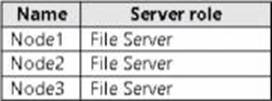
You have a failover cluster named Cluster1 that contains the nodes shown in the following table.
A File Server for general use cluster role named HAFS is configured as shown in the General exhibit (Click the General tab.)


Topic 3, Misc. Questions
Note: This question is part of a series of questions that present the same scenario. Each question in the series contains a unique solution that might meet the stated goals. Some question sets might have more than one correct solution, while others might not have a correct solution.
After you answer a question in this section, you will NOT be able to return to it. As a result, these questions will not appear in the review screen.
You have a server named Server1 that runs Windows Server.
You need to ensure that only specific applications can modify the data in protected folders on Server1.
Solution: From Virus & threat protection, you configure Controlled folder access.
Does this meet the goal?
- A . Yes
- B . No
A
Explanation:
Reference: https://docs.microsoft.com/en-us/microsoft-365/security/defender-endpoint/customize-controlled-folders?view=o365-worldwide
Note: This question is part of a series of questions that present the same scenario. Each question in the series contains a unique solution that might meet the stated goals. Some question sets might have more than one correct solution, while others might not have a correct solution.
After you answer a question in this section, you will NOT be able to return to it. As a result, these questions will not appear in the review screen.
You have a server named Server1 that runs Windows Server.
You need to ensure that only specific applications can modify the data in protected folders on Server1.
Solution: From App & browser control, you configure the Exploit protection settings.
Does this meet the goal?
- A . Yes
- B . No
B
Explanation:
Reference: https://docs.microsoft.com/en-us/microsoft-365/security/defender-endpoint/customize-controlled-folders?view=o365-worldwide
HOTSPOT
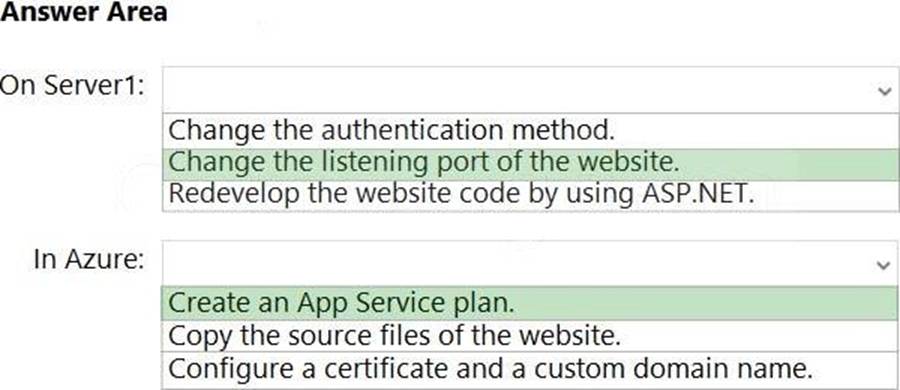
You have a server that runs Windows Server and has the Web Server (IIS) server role installed.
Server1 hosts a single website that has the following configurations:
✑ Is accessible by using a URL of https://www.contoso.com:8443 and has an SSL certificate that was issued by a third-party certification authority (CA) in the Microsoft Trusted Root Program
✑ Uses anonymous authentication
✑ Was developed by using PHP
You plan to use APP Service Migration Assistant to migrate the website to Azure App Service.
You need to migrate the website. The solution must minimize the number of changes made to the existing website.
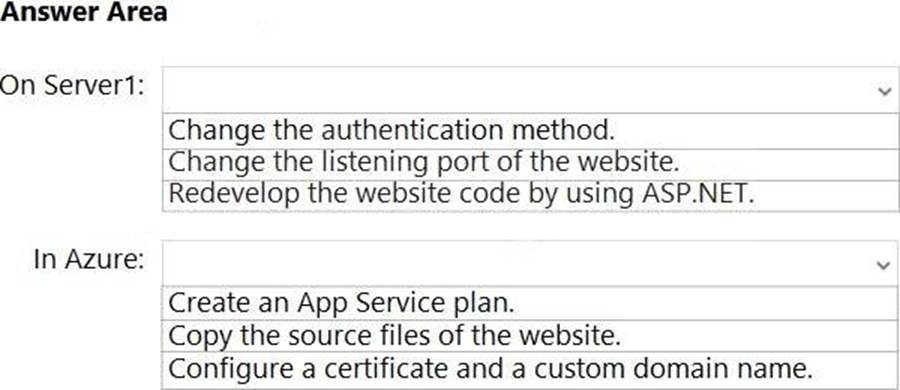
What should you do manually to ensure that the website migration is successful? To answer, select the appropriate options in the answer area. NOTE: Each correct selection is worth one point.
Explanation:
Reference:
https://docs.microsoft.com/en-us/learn/modules/migrate-app-service-migration-assistant/3-understand-assessment
https://docs.microsoft.com/en-us/learn/modules/migrate-app-service-migration-assistant/5-understand-migration
You have a server named Server1 that runs Windows Server and has the Hyper-V server role installed. You have a Hyper-V failover cluster named Cluster1. All servers are members of the same domain.
You need to ensure that you use Hyper-V Replica with Kerberos authentication on the default port to replicate virtual machines from Cluster1 to Server1.
What should you do on Server1?
- A . Add primary servers to the Hyper-V Replica Broker configuration.
- B . From Hyper-V Settings, select Enable incoming and outgoing live migrations
- C . From Windows Defender Firewall with Advanced Security, enable the Hyper-V Replica HTTPS Listener (TCP-ln) rule.
- D . From Windows Defender Firewall with Advanced Security, enable the Hyper-V Replica HTTP Listener (TCP-ln) rule.
D
Explanation:
Reference: https://docs.microsoft.com/en-us/windows-server/virtualization/hyper-v/manage/set-up-hyper-v-replica
You plan to deploy the Azure Monitor agent to 100 on-premises servers that run Windows Server.
Which parameters should you provide when you install the agent?
- A . the client ID and the secret of an Azure service principal
- B . the name and the access key of an Azure Storage account
- C . a connection string for an Azure SQL database
- D . the ID and the key of an Azure Log Analytics workspace
D
Explanation:
Reference: https://docs.microsoft.com/en-us/windows-server/storage/storage-spaces/configure-azure-monitor
You are remediating the firewall security risks to meet the security requirements.
What should you configure to reduce the risks?
- A . a Group Policy Object (GPO)
- B . adaptive network hardening in Microsoft Defender for Cloud
- C . a network security group (NSG) in Sub1
- D . an Azure Firewall policy
A
Explanation:
Firewall rules configured in a Group Policy Object cannot be modified by local server administrators.
Reference: https://docs.microsoft.com/en-us/windows/security/threat-protection/windows-firewall/create-an-inbound-port-rule
You have 50 on-premises servers that run Windows Server. You have an Azure subscription that contains 50 virtual machines that run Windows Server.
You need to create an Azure Monitor alert that will be triggered if one of the servers or virtual machines has less than 10 percent available disk space.
What should you do first?
- A . Create an Alert Rule
- B . Install the Azure Monitor agent on each server.
- C . Enable System Insights on each server.
- D . Create a Log Analytics workspace and configure the Agent management settings.
A
Explanation:
https://learn.microsoft.com/en-us/answers/questions/165893/help-to-set-up-azure-alert-for-disk-space-alert-wh.html