
Microsoft AZ-204 Practice Exams
Last updated on Oct 21,2026- Exam Code: AZ-204
- Exam Name: Developing Solutions for Microsoft Azure
- Certification Provider: Microsoft
- Latest update: Oct 21,2026
Your company is developing an Azure API.
You need to implement authentication for the Azure API.
You have the following requirements:
✑ All API calls must be secure.
✑ Callers to the API must not send credentials to the API.
Which authentication mechanism should you use?
- A . Basic
- B . Anonymous
- C . Managed identity
- D . Client certificate
C
Explanation:
Use the authentication-managed-identity policy to authenticate with a backend service using the managed identity of the API Management service. This policy essentially uses the managed identity to obtain an access token from Azure Active Directory for accessing the specified resource. After successfully obtaining the token, the policy will set the value of the token in the Authorization header using the Bearer scheme.
Reference: https://docs.microsoft.com/bs-cyrl-ba/azure/api-management/api-management-authentication-policies
You are designing a multi-tiered application that will be hosted on Azure virtual machines. The virtual machines will run Windows Server. Front-end servers will be accessible from the Internet over port 443. The other servers will NOT be directly accessible over the internet
You need to recommend a solution to manage the virtual machines that meets the following requirement
• Allows the virtual machine to be administered by using Remote Desktop.
• Minimizes the exposure of the virtual machines on the Internet
Which Azure service should you recommend?
- A . Azure Bastion
- B . Service Endpoint
- C . Azure Private Link
- D . Azure Front Door
You are developing an ASP.NET Core Web API web service. The web service uses Azure Application Insights for all telemetry and dependency tracking. The web service reads and writes data to a database other than Microsoft SQL Server.
You need to ensure that dependency tracking works for calls to the third-party database.
Which two Dependency Telemetry properties should you store in the database? Each correct answer presents part of the solution. NOTE: Each correct selection is worth one point.
- A . Telemetry.Context.Operation.Id
- B . Tetemetry.Context.Cloud.Rolelnstance
- C . Telemetry.Id
- D . Telemetry.ContextSession.Id
- E . Telemetry.Name
AC
Explanation:
Reference: https://docs.microsoft.com/en-us/azure/azure-monitor/app/custom-operations-tracking
Example:
public async Task Enqueue(string payload)
{
// StartOperation is a helper method that initializes the telemetry item
// and allows correlation of this operation with its parent and children.
var operation = telemetryClient.StartOperation<DependencyTelemetry>("enqueue " + queueName);
operation.Telemetry.Type = "Azure Service Bus";
operation.Telemetry.Data = "Enqueue " + queueName;
var message = new BrokeredMessage(payload);
// Service Bus queue allows the property bag to pass along with the message.
// We will use them to pass our correlation identifiers (and other context)
// to the consumer.
message.Properties.Add("ParentId", operation.Telemetry.Id); message.Properties.Add("RootId", operation.Telemetry.Context.Operation.Id);
Reference: https://docs.microsoft.com/en-us/azure/azure-monitor/app/custom-operations-tracking
You develop and add several functions to an Azure Function app that uses the latest runtime host. The functions contain several REST API endpoints secured by using SSL. The Azure Function app runs in a Consumption plan.
You must send an alert when any of the function endpoints are unavailable or responding too slowly.
You need to monitor the availability and responsiveness of the functions.
What should you do?
- A . Create a URL ping test.
- B . Create a timer triggered function that calls TrackAvailability() and send the results to Application Insights.
- C . Create a timer triggered function that calls GetMetric("Request Size") and send the results to Application Insights.
- D . Add a new diagnostic setting to the Azure Function app. Enable the FunctionAppLogs and Send to Log Analytics options.
B
Explanation:
You can create an Azure Function with TrackAvailability() that will run periodically according to the configuration given in TimerTrigger function with your own business logic. The results of this test will be sent to your Application Insights resource, where you will be able to query for and alert on the availability results data. This allows you to create customized tests similar to what you can do via Availability Monitoring in the portal.
Customized tests will allow you to write more complex availability tests than is possible using the portal UI, monitor an app inside of your Azure VNET, change the endpoint address, or create an availability test even if this feature is not available in your region.
Reference: https://docs.microsoft.com/en-us/azure/azure-monitor/app/availability-azure-functions
Set the DataSource property of the SearchServiceCIient
Does the solution meet the goal?
- A . Yes
- B . No
B
Explanation:
Use the following method:
Note: This question is part of a series of questions that present the same scenario. Each question in the series contains a unique solution that might meet the stated goals. Some question sets might have more than one correct solution, while others might not have a correct solution.
After you answer a question in this question, you will NOT be able to return to it. As a result, these questions will not appear in the review screen.
You are developing a website that will run as an Azure Web App. Users will authenticate by using their Azure Active Directory (Azure AD) credentials.
You plan to assign users one of the following permission levels for the website: admin, normal, and reader. A user’s Azure AD group membership must be used to determine the permission level. You need to configure authorization.
Solution: Configure the Azure Web App for the website to allow only authenticated requests and require Azure AD log on.
Does the solution meet the goal?
- A . Yes
- B . No
B
Explanation:
Instead in the Azure AD application’s manifest, set value of the groupMembershipClaims option to All.
Reference: https://blogs.msdn.microsoft.com/waws/2017/03/13/azure-app-service-authentication-aad-groups/
Note: This question is part of a series of questions that present the same scenario. Each question in the series contains a unique solution that might meet the stated goals. Some question sets might have more than one correct solution, while others might not have a correct solution.
After you answer a question in this question, you will NOT be able to return to it. As a result, these questions will not appear in the review screen.
You are developing a website that will run as an Azure Web App. Users will authenticate by using their Azure Active Directory (Azure AD) credentials.
You plan to assign users one of the following permission levels for the website: admin, normal, and reader. A user’s Azure AD group membership must be used to determine the permission level. You need to configure authorization.
Solution: Configure the Azure Web App for the website to allow only authenticated requests and require Azure AD log on.
Does the solution meet the goal?
- A . Yes
- B . No
B
Explanation:
Instead in the Azure AD application’s manifest, set value of the groupMembershipClaims option to All.
Reference: https://blogs.msdn.microsoft.com/waws/2017/03/13/azure-app-service-authentication-aad-groups/
DRAG DROP
You are developing an application. You have an Azure user account that has access to two subscriptions.
You need to retrieve a storage account key secret from Azure Key Vault.
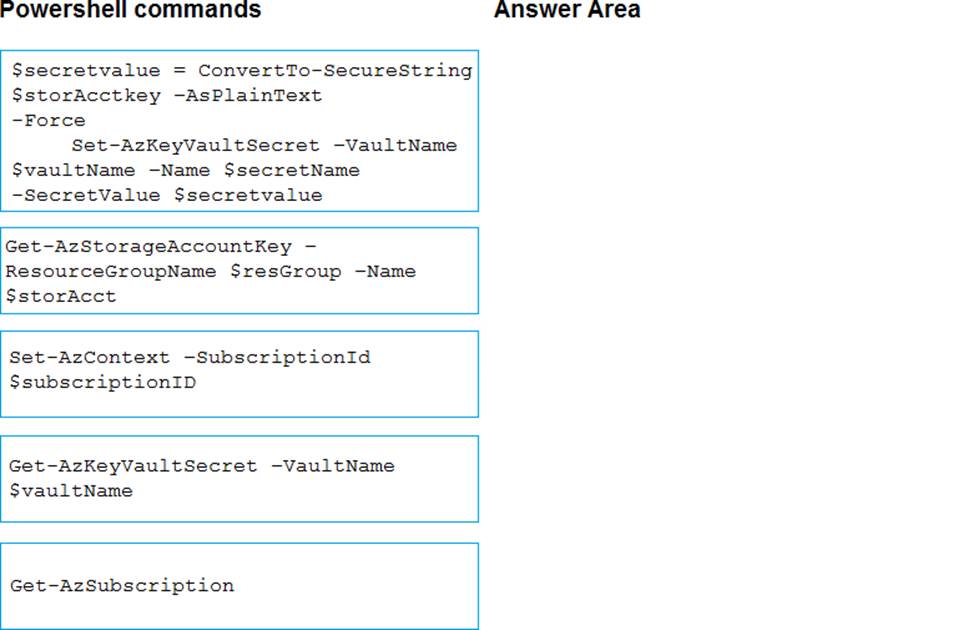
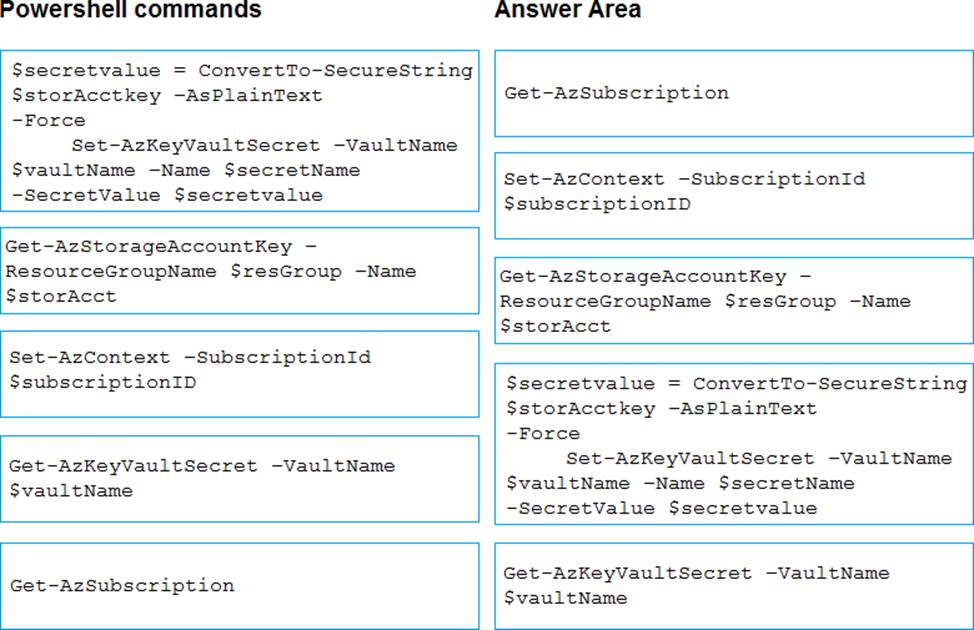
In which order should you arrange the PowerShell commands to develop the solution? To answer, move all commands from the list of commands to the answer area and arrange them in the correct order.
Explanation:
Step 1: Get-AzSubscription
If you have multiple subscriptions, you might have to specify the one that was used to create your key vault. Enter the following to see the subscriptions for your account:
Get-AzSubscription
Step 2: Set-AzContext -SubscriptionId
To specify the subscription that’s associated with the key vault you’ll be logging, enter:
Set-AzContext -SubscriptionId <subscriptionID>
Step 3: Get-AzStorageAccountKey
You must get that storage account key.
Step 4: $secretvalue = ConvertTo-SecureString <storageAccountKey> -AsPlainText -Force Set-AzKeyVaultSecret -VaultName <vaultName> -Name <secretName> -SecretValue $secretvalue
After retrieving your secret (in this case, your storage account key), you must convert that key to a secure string, and then create a secret with that value in your key vault.
Step 5: Get-AzKeyVaultSecret
Next, get the URI for the secret you created. You’ll need this URI in a later step to call the key vault and retrieve your secret. Run the following PowerShell command and make note of the ID value, which is the secret’s URI:
Get-AzKeyVaultSecret CVaultName <vaultName>
Reference: https://docs.microsoft.com/bs-latn-ba/Azure/key-vault/key-vault-key-rotation-log-monitoring
You need to authenticate the user to the corporate website as indicated by the architectural diagram.
Which two values should you use? Each correct answer presents part of the solution. NOTE: Each correct selection is worth one point.
- A . ID token signature
- B . ID token claims
- C . HTTP response code
- D . Azure AD endpoint URI
- E . Azure AD tenant ID
A, D
Explanation:
Claims in access tokens
JWTs (JSON Web Tokens) are split into three pieces:
✑ Header – Provides information about how to validate the token including information about the type of token and how it was signed.
✑ Payload – Contains all of the important data about the user or app that is attempting to call your service.
✑ Signature – Is the raw material used to validate the token.
Your client can get an access token from either the v1.0 endpoint or the v2.0 endpoint using a variety of protocols.
Scenario: User authentication (see step 5 below)
The following steps detail the user authentication process:
✑ The user selects Sign in in the website.
✑ The browser redirects the user to the Azure Active Directory (Azure AD) sign in page.
✑ The user signs in.
✑ Azure AD redirects the user’s session back to the web application. The URL
includes an access token.
✑ The web application calls an API and includes the access token in the authentication header. The application ID is sent as the audience (‘aud’) claim in the access token.
✑ The back-end API validates the access token.
Reference: https://docs.microsoft.com/en-us/azure/api-management/api-management-access-restriction-policies
DRAG DROP
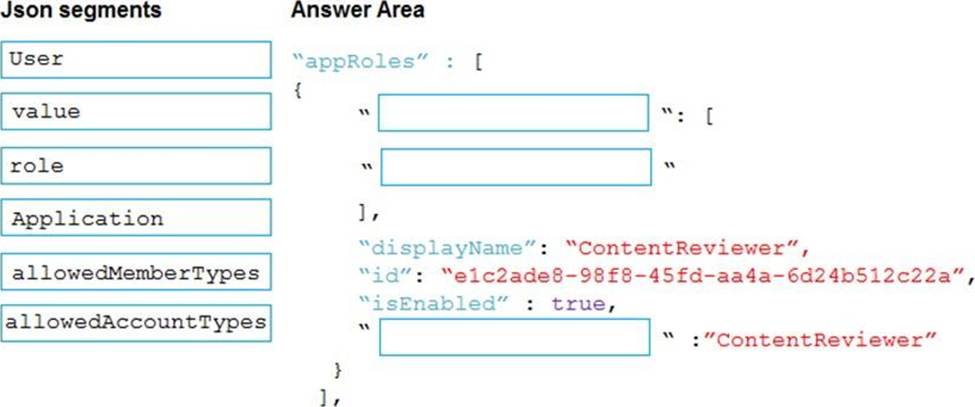
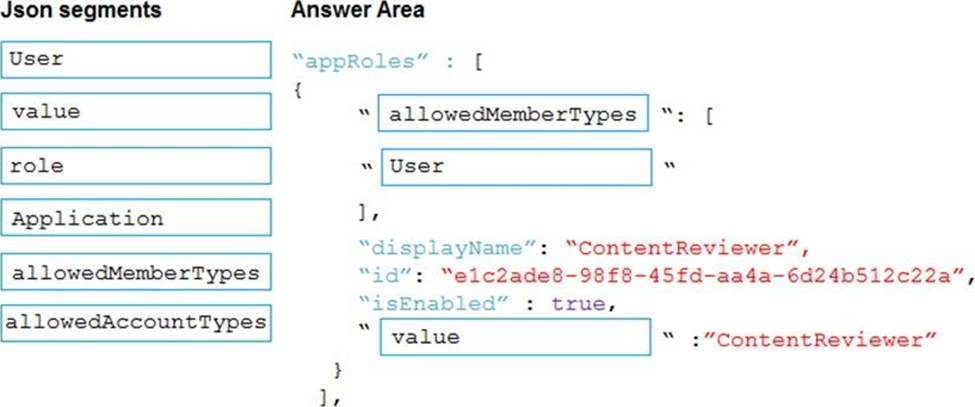
You need to add markup at line AM04 to implement the ContentReview role.
How should you complete the markup? To answer, drag the appropriate json segments to the correct locations. Each json segment may be used once, more than once, or not at all. You may need to drag the split bar between panes or scroll to view content. NOTE: Each correct selection is worth one point.
Explanation:
Box 1: allowedMemberTypes
allowedMemberTypes specifies whether this app role definition can be assigned to users and groups by setting to "User", or to other applications (that are accessing this application in daemon service scenarios) by setting to "Application", or to both.
Note: The following example shows the appRoles that you can assign to users.
"appId": "8763f1c4-f988-489c-a51e-158e9ef97d6a",
"appRoles": [
{
"allowedMemberTypes": [
"User"
],
"displayName": "Writer",
"id": "d1c2ade8-98f8-45fd-aa4a-6d06b947c66f",
"isEnabled": true,
"description": "Writers Have the ability to create tasks.",
"value": "Writer"
}
],
"availableToOtherTenants": false,
Box 2: User
Scenario: In order to review content a user must be part of a ContentReviewer role.
Box 3: value
value specifies the value which will be included in the roles claim in authentication and access tokens.
Reference: https://docs.microsoft.com/en-us/graph/api/resources/approle