
Microsoft AZ-204 Practice Exams
Last updated on Nov 16,2026- Exam Code: AZ-204
- Exam Name: Developing Solutions for Microsoft Azure
- Certification Provider: Microsoft
- Latest update: Nov 16,2026
You are developing a Java application to be deployed in Azure. The application stores sensitive data in Azure Cosmos DB. You need to configure Always Encrypted to encrypt the sensitive data inside the application.
What should you do first?
- A . Create a customer-managed key (CMK) and store the key in a new Azure Key Vault instance.
- B . Create an Azure AD managed identity and assign the identity to a new Azure Key Vault instance.
- C . Create a data encryption key (DEK) by using the Azure Cosmos DB SDK and store the key in Azure Cosmos DB.
- D . Create a new container to include an encryption policy with the JSON properties to be encrypted.
HOTSPOT
You are developing an application that uses Azure Storage Queues.
You have the following code:
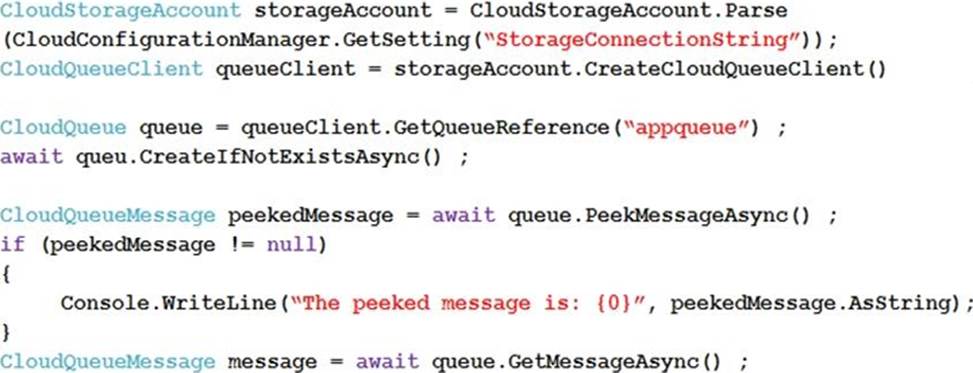
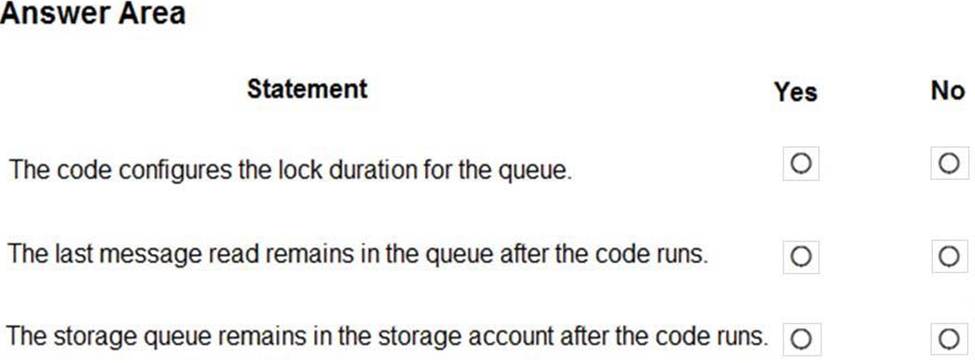
For each of the following statements, select Yes if the statement is true. Otherwise, select No. NOTE: Each correct selection is worth one point.
Explanation:
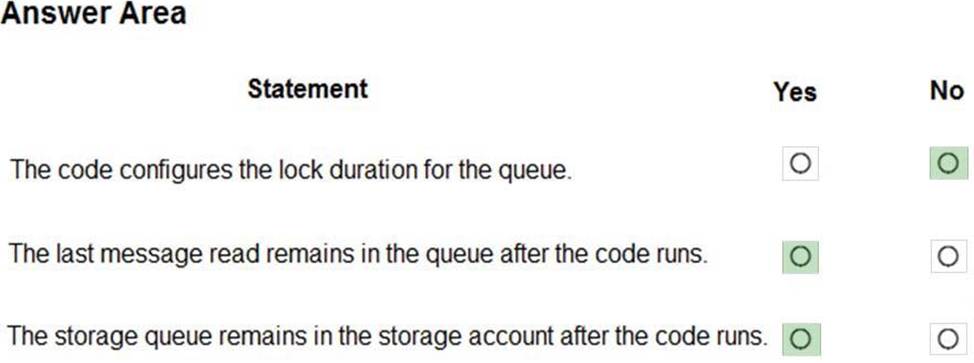
Box 1: No
The QueueDescription.LockDuration property gets or sets the duration of a peek lock; that is, the amount of time that the message is locked for other receivers. The maximum value for LockDuration is 5 minutes; the default value is 1 minute.
Box 2: Yes
You can peek at the message in the front of a queue without removing it from the queue by calling the PeekMessage method.
Box 3: Yes
Reference:
https://docs.microsoft.com/en-us/azure/storage/queues/storage-dotnet-how-to-use-queues
https://docs.microsoft.com/en-us/dotnet/api/microsoft.servicebus.messaging.queuedescription.lockduration
You are developing a Java application that uses Cassandra to store key and value data. You plan to use a new Azure Cosmos DB resource and the Cassandra API in the application. You create an Azure Active Directory (Azure AD) group named Cosmos DB Creators to enable provisioning of Azure Cosmos accounts, databases, and containers.
The Azure AD group must not be able to access the keys that are required to access the data.
You need to restrict access to the Azure AD group.
Which role-based access control should you use?
- A . Document DB Accounts Contributor
- B . Cosmos Backup Operator
- C . Cosmos DB Operator
- D . Cosmos DB Account Reader
C
Explanation:
Azure Cosmos DB now provides a new RBAC role, Cosmos DB Operator. This new role lets you provision Azure Cosmos accounts, databases, and containers, but can’t access the keys that are required to access the data. This role is intended for use in scenarios where the ability to grant access to Azure Active Directory service principals to manage deployment operations for Cosmos DB is needed, including the account, database, and containers.
Reference: https://azure.microsoft.com/en-us/updates/azure-cosmos-db-operator-role-for-role-based-access-control-rbac-is-now-available/
You deploy an API to API Management
You must secure all operations on the API by using a client certificate.
You need to secure access to the backend service of the API by using client certificates.
Which two security features can you use?
- A . Azure AD token
- B . Self-signed certificate
- C . Certificate Authority (CA) certificate
- D . Triple DES (3DES) cipher
- E . Subscription key
HOTSPOT
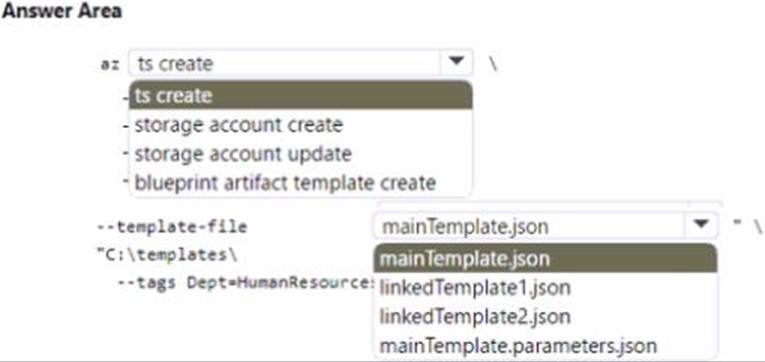
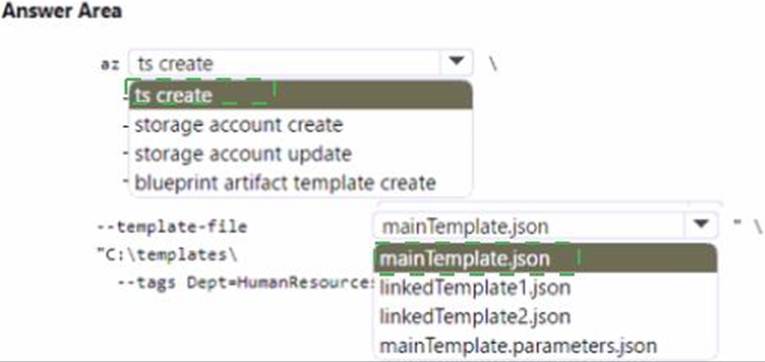
You are authoring a set of nested Azure Resource Manager templates to deploy Azure resources. You author an Azure Resource Manager template named mainTempIate.json that contains the following linked templates: linkedTemplatel.json, linkedTemplate2json.
You add parameters to a parameters template file named mainTemplate.parameters.json. You save all templates on a local device in the C:templates folder.
You have the following requirements:
• Store the templates in Azure for later deployment.
• Enable versioning of the templates.
• Manage access to the templates by using Azure RBAC You need to store the templates in Azure.
How should you complete the command? To answer, select the appropriate options in the answer area. NOTE: Each correct selection is worth one point.
Note: This question is part of a series of questions that present the same scenario. Each question in the series contains a unique solution that might meet the stated goals. Some question sets might have more than one correct solution, while others might not have a correct solution.
After you answer a question in this section, you will NOT be able to return to it. As a result, these questions will not appear in the review screen.
You develop Azure solutions.
You must grant a virtual machine (VM) access to specific resource groups in Azure Resource Manager.
You need to obtain an Azure Resource Manager access token.
Solution: Use an X.509 certificate to authenticate the VM with Azure Resource Manager.
Does the solution meet the goal?
- A . Yes
- B . No
B
Explanation:
Instead run the Invoke-RestMethod cmdlet to make a request to the local managed identity for Azure resources endpoint.
Reference: https://docs.microsoft.com/en-us/azure/active-directory/managed-identities-azure-resources/tutorial-windows-vm-access-arm
Note: This question is part of a series of questions that present the same scenario. Each question in the series contains a unique solution that might meet the stated goals. Some question sets might have more than one correct solution, while others might not have a correct solution.
After you answer a question in this section, you will NOT be able to return to it. As a result, these questions will not appear in the review screen.
You develop and deploy an Azure App Service API app to a Windows-hosted deployment slot named Development. You create additional deployment slots named Testing and Production. You enable auto swap on the Production deployment slot.
You need to ensure that scripts run and resources are available before a swap operation occurs.
Solution: Enable auto swap for the Testing slot. Deploy the app to the Testing slot.
Does the solution meet the goal?
- A . Yes
- B . No
B
Explanation:
Instead update the web.config file to include the applicationInitialization configuration element.
Specify custom initialization actions to run the scripts.
Note: Some apps might require custom warm-up actions before the swap. The applicationInitialization configuration element in web.config lets you specify custom initialization actions. The swap operation waits for this custom warm-up to finish before swapping with the target slot. Here’s a sample web.config fragment.
<system.webServer>
<applicationInitialization>
<add initializationPage="/" hostName="[app hostname]" />
<add initializationPage="/Home/About" hostName="[app hostname]" />
</applicationInitialization>
</system.webServer>
Reference: https://docs.microsoft.com/en-us/azure/app-service/deploy-staging-slots#troubleshoot-swaps
Note: This question is part of a series of questions that present the same scenario. Each question in the series contains a unique solution that might meet the stated goals. Some question sets might have more than one correct solution, while others might not have a correct solution.
After you answer a question in this section, you will NOT be able to return to it. As a result, these questions will not appear in the review screen.
You develop and deploy an Azure App Service API app to a Windows-hosted deployment slot named Development. You create additional deployment slots named Testing and Production. You enable auto swap on the Production deployment slot.
You need to ensure that scripts run and resources are available before a swap operation occurs.
Solution: Enable auto swap for the Testing slot. Deploy the app to the Testing slot.
Does the solution meet the goal?
- A . Yes
- B . No
B
Explanation:
Instead update the web.config file to include the applicationInitialization configuration element.
Specify custom initialization actions to run the scripts.
Note: Some apps might require custom warm-up actions before the swap. The applicationInitialization configuration element in web.config lets you specify custom initialization actions. The swap operation waits for this custom warm-up to finish before swapping with the target slot. Here’s a sample web.config fragment.
<system.webServer>
<applicationInitialization>
<add initializationPage="/" hostName="[app hostname]" />
<add initializationPage="/Home/About" hostName="[app hostname]" />
</applicationInitialization>
</system.webServer>
Reference: https://docs.microsoft.com/en-us/azure/app-service/deploy-staging-slots#troubleshoot-swaps
You are writing code to create and run an Azure Batch job.
You have created a pool of compute nodes.
You need to choose the right class and its method to submit a batch job to the Batch service.
Which method should you use?
- A . JobOperations.CreateJobO
- B . CloudJob.Enable(IEnumerable<BatchClientBehavior>)
- C . CloudJob.CommitAsync(IEnumerable<BatchClientBehavior>, CancellationToken)
- D . JobOperations.EnableJob(String, IEnumerable<BatchClientBehavior>)
- E . JobOperations.EnableJobAsync(String. IEnumerable<BatchClientBehavior>. CancellationToken)
C
Explanation:
A Batch job is a logical grouping of one or more tasks. A job includes settings common to the tasks, such as priority and the pool to run tasks on. The app uses the BatchClient.JobOperations.CreateJob method to create a job on your pool.
The Commit method submits the job to the Batch service. Initially the job has no tasks.
{
CloudJob job = batchClient.JobOperations.CreateJob();
job.Id = JobId;
job.PoolInformation = new PoolInformation { PoolId = PoolId };
job.Commit();
}
…
Reference: https://docs.microsoft.com/en-us/azure/batch/quick-run-dotnet
Note: This question is part of a series of questions that present the same scenario. Each question in the series contains a unique solution that might meet the stated goals. Some question sets might have more than one correct solution, while others might not have a correct solution.
After you answer a question in this section, you will NOT be able to return to it. As a result, these questions will not appear in the review screen.
You deploy an Azure Container Apps app and disable ingress on the container app.
Users report that they are unable to access the container app. You investigate and observe that the app has scaled to 0 instances.
You need to resolve the issue with the container app.
Solution: Enable ingress, create a TCP scale rule, and apply the rule to the container app.
Does the solution meet the goal?
- A . Yes
- B . No