
Microsoft AZ-204 Practice Exams
Last updated on Nov 16,2026- Exam Code: AZ-204
- Exam Name: Developing Solutions for Microsoft Azure
- Certification Provider: Microsoft
- Latest update: Nov 16,2026
HOTSPOT
You plan to implement an Azure function named Function1 that will use the timer trigger.
You plan to use a TimeSpan value to set the schedule of function execution.
You need to select the hosting model and the schedule expression assignment method.
Which hosting model and schedule expression assignment method should you use? To answer, select the appropriate options in the answer area. NOTE: Each correct selection is worth one point.
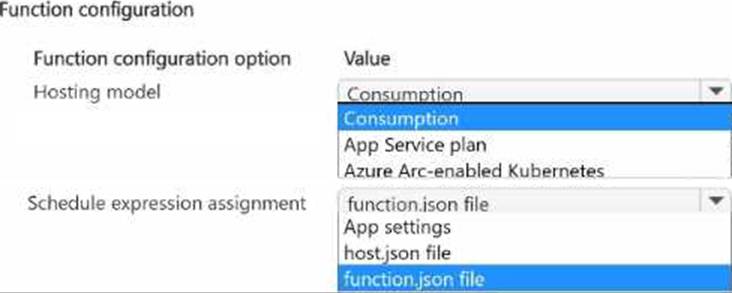
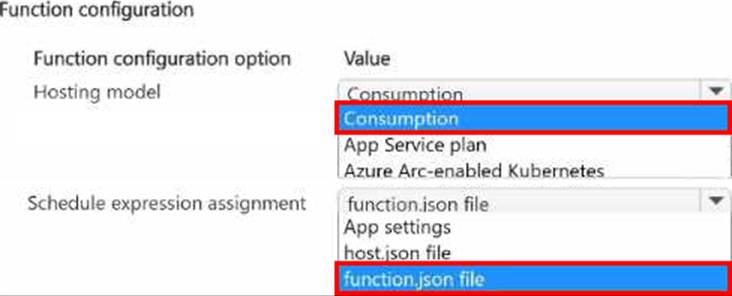
HOTSPOT
You plan to implement an Azure function named Function1 that will use the timer trigger.
You plan to use a TimeSpan value to set the schedule of function execution.
You need to select the hosting model and the schedule expression assignment method.
Which hosting model and schedule expression assignment method should you use? To answer, select the appropriate options in the answer area. NOTE: Each correct selection is worth one point.
You develop a solution that uses Azure Virtual Machines (VMs).
The VMs contain code that must access resources in an Azure resource group. You grant the VM access to the resource group in Resource Manager.
You need to obtain an access token that uses the VMs system-assigned managed identity.
Which two actions should you perform? Each correct answer presents part of the solution.
- A . Use PowerShell on a remote machine to make a request to the local managed identity for Azure resources endpoint.
- B . Use PowerShell on the VM to make a request to the local managed identity for Azure resources endpoint.
- C . From the code on the VM. call Azure Resource Manager using an access token.
- D . From the code on the VM. call Azure Resource Manager using a SAS token.
- E . From the code on the VM. generate a user delegation SAS token.
An organization deploys Azure Cosmos DB.
You need to ensure that the index is updated as items are created, updated, or deleted.
What should you do?
- A . Set the value of the EnableScanlnQuery option to True.
- B . Set the indexing mode to Consistent.
- C . Set the indexing mode to Lazy.
- D . Set the value of the automatic property of the indexing policy to False.
You are developing an Azure Cosmos DB solution by using the Azure Cosmos DB SQL API. The data includes millions of documents. Each document may contain hundreds of properties.
The properties of the documents do not contain distinct values for partitioning. Azure Cosmos DB must scale individual containers in the database to meet the performance needs of the application by spreading the workload evenly across all partitions over time.
You need to select a partition key.
Which two partition keys can you use? Each correct answer presents a complete solution. NOTE: Each correct selection is worth one point.
- A . a concatenation of multiple property values with a random suffix appended
- B . a single property value that does not appear frequently in the documents
- C . a hash suffix appended to a property value
- D . a value containing the collection name
- E . a single property value that appears frequently in the documents
A,C
Explanation:
You can form a partition key by concatenating multiple property values into a single artificial partition Key property. These keys are referred to as synthetic keys.
Another possible strategy to distribute the workload more evenly is to append a random number at the end of the partition key value. When you distribute items in this way, you can perform parallel write operations across partitions.
Note: It’s the best practice to have a partition key with many distinct values, such as hundreds or thousands. The goal is to distribute your data and workload evenly across the items associated with these partition key values. If such a property doesn’t exist in your data, you can construct a synthetic partition key.
Reference: https://docs.microsoft.com/en-us/azure/cosmos-db/synthetic-partition-keys
You are developing an Azure Cosmos DB solution by using the Azure Cosmos DB SQL API. The data includes millions of documents. Each document may contain hundreds of properties.
The properties of the documents do not contain distinct values for partitioning. Azure Cosmos DB must scale individual containers in the database to meet the performance needs of the application by spreading the workload evenly across all partitions over time.
You need to select a partition key.
Which two partition keys can you use? Each correct answer presents a complete solution. NOTE: Each correct selection is worth one point.
- A . a concatenation of multiple property values with a random suffix appended
- B . a single property value that does not appear frequently in the documents
- C . a hash suffix appended to a property value
- D . a value containing the collection name
- E . a single property value that appears frequently in the documents
A,C
Explanation:
You can form a partition key by concatenating multiple property values into a single artificial partition Key property. These keys are referred to as synthetic keys.
Another possible strategy to distribute the workload more evenly is to append a random number at the end of the partition key value. When you distribute items in this way, you can perform parallel write operations across partitions.
Note: It’s the best practice to have a partition key with many distinct values, such as hundreds or thousands. The goal is to distribute your data and workload evenly across the items associated with these partition key values. If such a property doesn’t exist in your data, you can construct a synthetic partition key.
Reference: https://docs.microsoft.com/en-us/azure/cosmos-db/synthetic-partition-keys
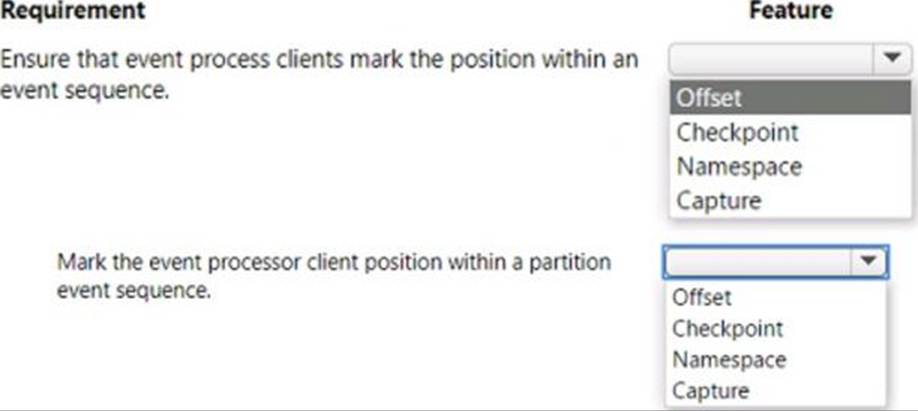
HOTSPOT
You are developing a solution by using the Azure Event Hubs SDK. You create a standard Azure Event Hub with 16 partitions. You implement eight event processor clients.
You must balance the load dynamically when an event processor client fails. When an event processor client fails, another event processor must continue processing from the exact point at which the failure occurred. All events must be aggregate and upload to an Azure Blob storage account
You need to implement event processing recovery for the solution.
Which SDK features should you use? To answer, select the appropriate options in the answer area. Each correct selection is worth one point.
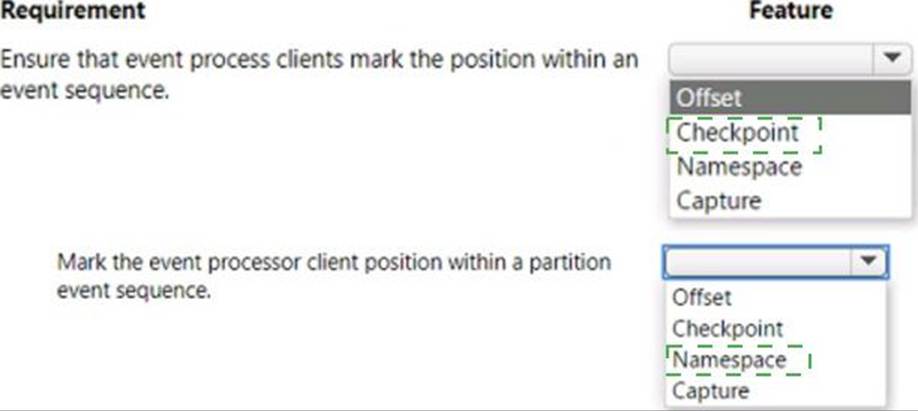
Explanation:
Checkpoint
Namesspace
You are designing a multi-tiered application that will be hosted on Azure virtual machines. The virtual machines will run Windows Server. Front-end servers will be accessible from the Internet over port 443. The other servers will NOT be directly accessible over the internet
You need to recommend a solution to manage the virtual machines that meets the following requirement
• Allows the virtual machine to be administered by using Remote Desktop.
• Minimizes the exposure of the virtual machines on the Internet
Which Azure service should you recommend?
- A . Azure Bastion
- B . Service Endpoint
- C . Azure Private Link
- D . Azure Front Door
Note: This question is part of a series of questions that present the same scenario. Each question in the series contains a unique solution that might meet the stated goals. Some question sets might have more than one correct solution, while others might not have a correct solution.
After you answer a question in this section, you will NOT be able to return to it. As a result, these questions will not appear in the review screen.
You develop and deploy an Azure App Service API app to a Windows-hosted deployment slot named Development. You create additional deployment slots named Testing and Production. You enable auto swap on the Production deployment slot.
You need to ensure that scripts run and resources are available before a swap operation occurs.
Solution: Disable auto swap. Update the app with a method named statuscheck to run the scripts.
Re-enable auto swap and deploy the app to the Production slot.
Does the solution meet the goal?
- A . Yes
- B . No
B
Explanation:
Instead update the web.config file to include the applicationInitialization configuration element.
Specify custom initialization actions to run the scripts.
Note: Some apps might require custom warm-up actions before the swap. The
applicationInitialization configuration element in web.config lets you specify custom initialization actions. The swap operation waits for this custom warm-up to finish before swapping with the target slot. Here’s a sample web.config fragment.
<system.webServer>
<applicationInitialization>
<add initializationPage="/" hostName="[app hostname]" />
<add initializationPage="/Home/About" hostName="[app hostname]" />
</applicationInitialization>
</system.webServer>
Reference: https://docs.microsoft.com/en-us/azure/app-service/deploy-staging-slots#troubleshoot-swaps
You are developing an Azure Function App that generates end of day reports (or retail stores. All stores dose at 11 PM each day. Reports must be run one hour after dosing. You configure the function to use a Timer trigger that runs at midnight Customers in the Western United States Pacific Time zone (UTC – 8) report that the Azure Function runs before the stores dose. You need to ensure that the Azure Function runs at midnight in the Pacific Time zone.
What should you do?
- A . Configure the Azure Function to run in the West US region.
- B . Add an app setting named WEBSITE_TIME_ZONE that uses the value Pacific Standard Time
- C . Change the Timer trigger to run at 7 AM
- D . Update the Azure Function to a Premium plan.