
Microsoft AZ-204 Practice Exams
Last updated on Nov 16,2026- Exam Code: AZ-204
- Exam Name: Developing Solutions for Microsoft Azure
- Certification Provider: Microsoft
- Latest update: Nov 16,2026
DRAG DROP
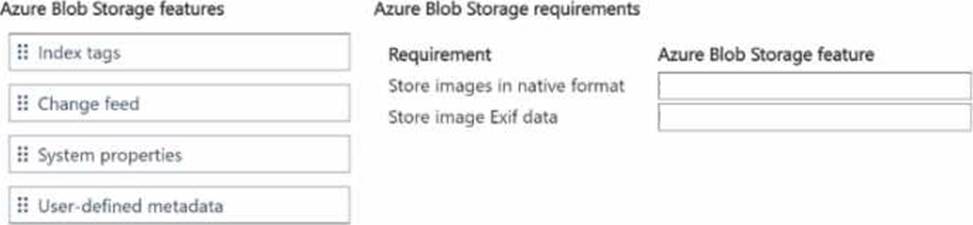
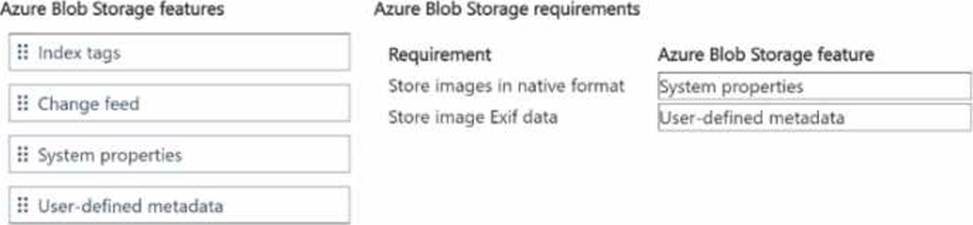
You need to store inventory item images.
Which Azure Blob Storage feature should you use? To answer, move the appropriate Azure Blob Storage features to the correct requirements. You may use each Azure Blob Storage feature once, more than once, or not at all. You may need to move the split bar between panes or scroll to view content. NOTE: Each correct selection is worth one point.
DRAG DROP
You need to store inventory item images.
Which Azure Blob Storage feature should you use? To answer, move the appropriate Azure Blob Storage features to the correct requirements. You may use each Azure Blob Storage feature once, more than once, or not at all. You may need to move the split bar between panes or scroll to view content. NOTE: Each correct selection is worth one point.
HOTSPOT
You are working for Contoso, Ltd.
You define an API Policy object by using the following XML markup:
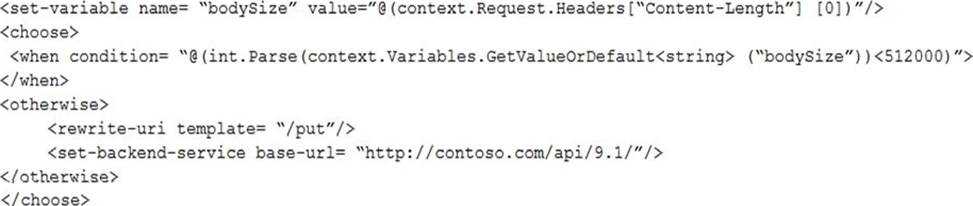
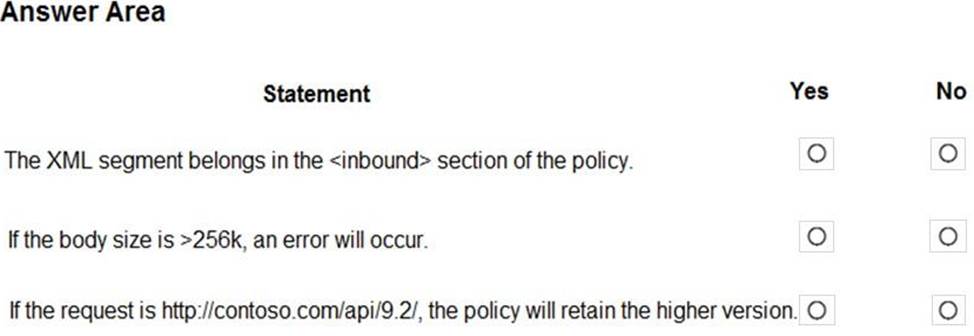
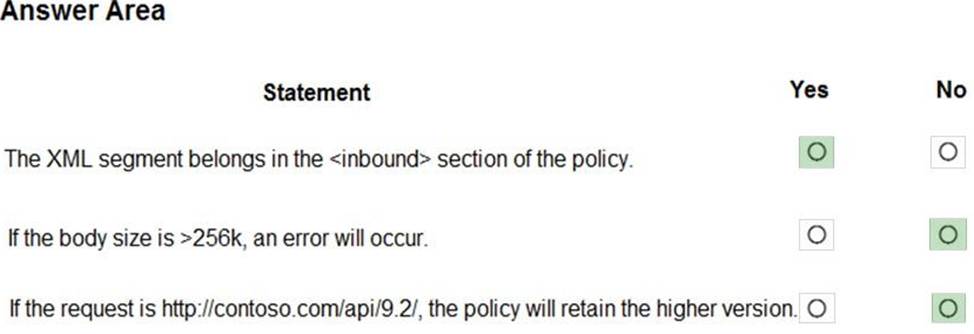
For each of the following statements, select Yes if the statement is true. Otherwise, select No. NOTE: Each correct selection is worth one point.
Explanation:
Box 1: Yes
Use the set-backend-service policy to redirect an incoming request to a different backend than the one specified in the API settings for that operation. Syntax: <set-backend-service base-url="base URL of the backend service" />
Box 2: No
The condition is on 512k, not on 256k.
Box 3: No
The set-backend-service policy changes the backend service base URL of the incoming request to the one specified in the policy.
Reference: https://docs.microsoft.com/en-us/azure/api-management/api-management-transformation-policies
DRAG DROP
You develop a gateway solution for a public facing news API.
The news API back end is implemented as a RESTful sen/ice and hosted in an Azure App Service instance.
You need to configure back-end authentication for the API Management service instance.
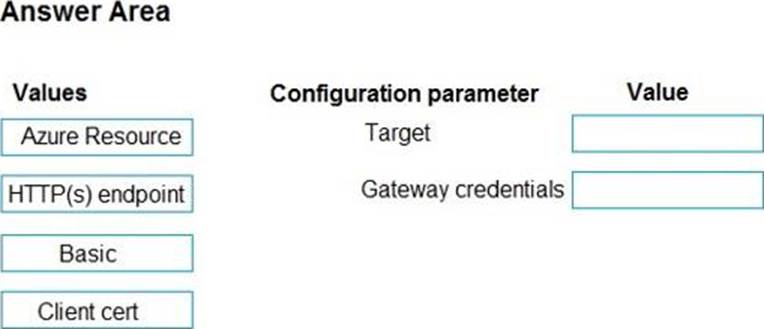
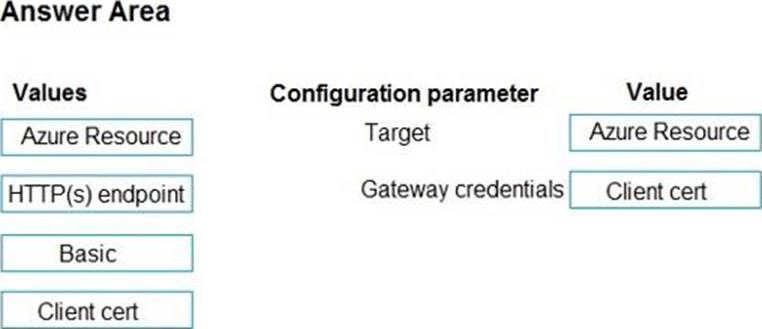
Which target and gateway credential type should you use? To answer, drag the appropriate values to the correct parameters. Each value may be used once, more than once, or not at all. You may need to drag the split bar between panes or scroll to view content. NOTE: Each correct selection is worth one point.
Explanation:
Box 1: Azure Resource
Box 2: Client cert
API Management allows to secure access to the back-end service of an API using client certificates.
Reference: https://docs.microsoft.com/en-us/rest/api/apimanagement/apimanagementrest/azure-api-management-rest-api-backend-entity
HOTSPOT
You are developing an ASP.NET Core web application. You plan to deploy the application to Azure Web App for Containers.
The application needs to store runtime diagnostic data that must be persisted across application restarts.
You have the following code:

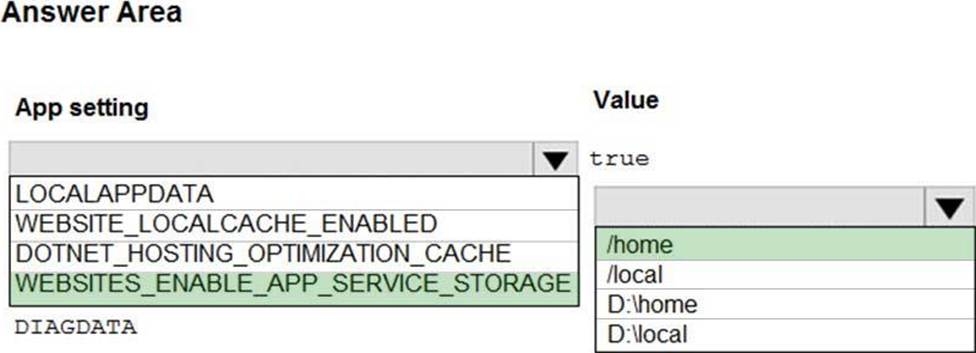
You need to configure the application settings so that diagnostic data is stored as required.
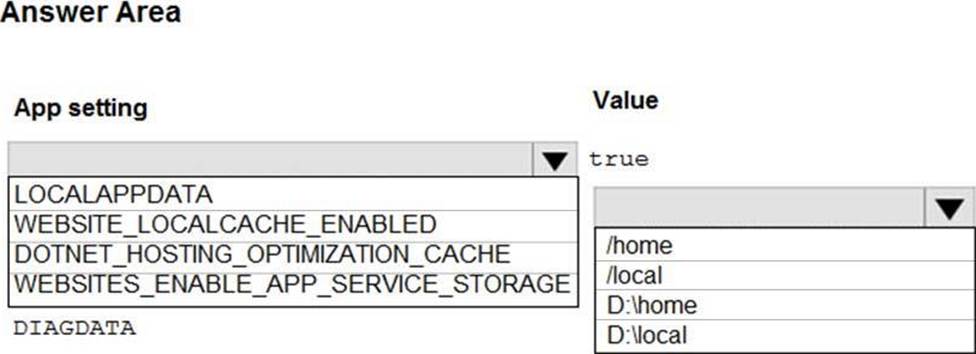
How should you configure the web app’s settings? To answer, select the appropriate options in the answer area. NOTE: Each correct selection is worth one point.
Explanation:
Box 1: If WEBSITES_ENABLE_APP_SERVICE_STORAGE
If WEBSITES_ENABLE_APP_SERVICE_STORAGE setting is unspecified or set to true, the /home/ directory will be shared across scale instances, and files written will persist across restarts
Box 2: /home
Reference: https://docs.microsoft.com/en-us/azure/app-service/containers/app-service-linux-faq
Note: This question is part of a series of questions that present the same scenario. Each question in the series contains a unique solution that might meet the stated goals. Some question sets might have more than one correct solution, while others might not have a correct solution.
After you answer a question in this section, you will NOT be able to return to it. As a result, these questions will not appear in the review screen.
You develop a software as a service (SaaS) offering to manage photographs. Users upload photos to a web service which then stores the photos in Azure Storage Blob storage. The storage account type is General-purpose V2.
When photos are uploaded, they must be processed to produce and save a mobile-friendly version of the image. The process to produce a mobile-friendly version of the image must start in less than one minute.
You need to design the process that starts the photo processing.
Solution: Use the Azure Blob Storage change feed to trigger photo processing.
Does the solution meet the goal?
- A . Yes
- B . No
B
Explanation:
The change feed is a log of changes that are organized into hourly segments but appended to and updated every few minutes. These segments are created only when there are blob change events that occur in that hour.
Instead catch the triggered event, so move the photo processing to an Azure Function triggered from the blob upload.
Reference:
https://docs.microsoft.com/en-us/azure/storage/blobs/storage-blob-change-feed
https://docs.microsoft.com/en-us/azure/storage/blobs/storage-blob-event-overview
DRAG DROP
You are developing a web service that will run on Azure virtual machines that use Azure Storage. You configure all virtual machines to use managed identities.
You have the following requirements:
✑ Secret-based authentication mechanisms are not permitted for accessing an Azure Storage account.
✑ Must use only Azure Instance Metadata Service endpoints.
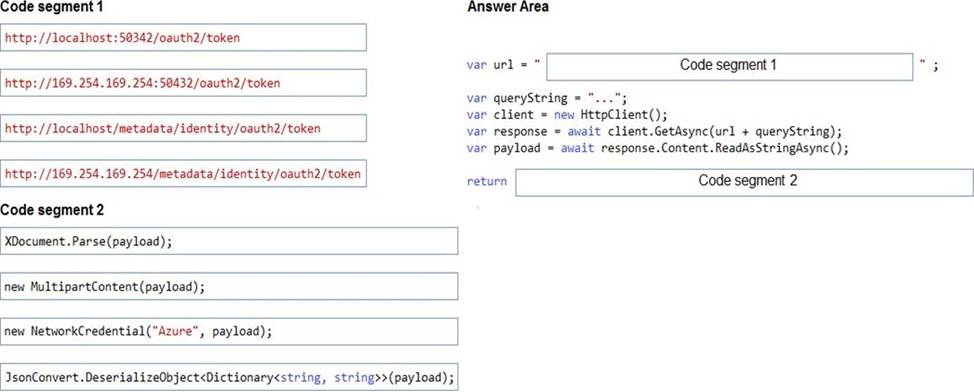
You need to write code to retrieve an access token to access Azure Storage. To answer, drag the appropriate code segments to the correct locations. Each code segment may be used once or not at all. You may need to drag the split bar between panes or scroll to view content. NOTE: Each correct selection is worth one point.
Explanation:
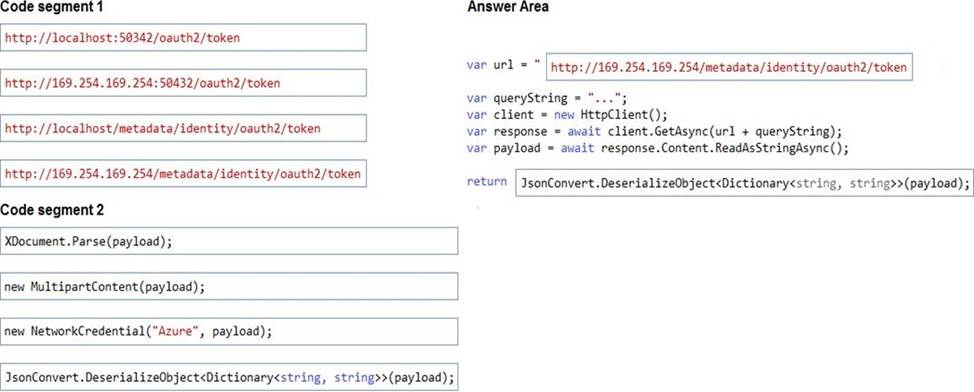
Azure Instance Metadata Service endpoints "/oauth2/token"
Box 1: http://169.254.169.254/metadata/identity/oauth2/token
Sample request using the Azure Instance Metadata Service (IMDS) endpoint (recommended):
GET ‘http://169.254.169.254/metadata/identity/oauth2/token?api-version=2018-02-01&resource=https://management.azure.com/’ HTTP/1.1 Metadata: true
Box 2: JsonConvert.DeserializeObject<Dictionary<string,string>>(payload); Deserialized token response; returning access code.
Reference: https://docs.microsoft.com/en-us/azure/active-directory/managed-identities-azure-resources/how-to-use-vm-token
https://docs.microsoft.com/en-us/azure/service-fabric/how-to-managed-identity-service-fabric-app-code
You need to resolve the capacity issue.
What should you do?
- A . Convert the trigger on the Azure Function to an Azure Blob storage trigger
- B . Ensure that the consumption plan is configured correctly to allow scaling
- C . Move the Azure Function to a dedicated App Service Plan
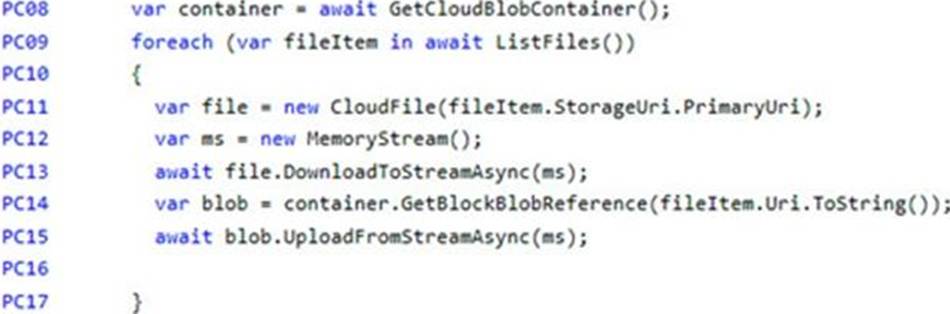
- D . Update the loop starting on line PC09 to process items in parallel
D
Explanation:
If you want to read the files in parallel, you cannot use forEach. Each of the async callback function calls does return a promise. You can await the array of promises that you’ll get with Promise.all.
Scenario: Capacity issue: During busy periods, employees report long delays between the time they upload the receipt and when it appears in the web application.
Reference: https://stackoverflow.com/questions/37576685/using-async-await-with-a-foreach-loop
You need to authenticate the user to the corporate website as indicated by the architectural diagram.
Which two values should you use? Each correct answer presents part of the solution. NOTE: Each correct selection is worth one point.
- A . ID token signature
- B . ID token claims
- C . HTTP response code
- D . Azure AD endpoint URI
- E . Azure AD tenant ID
A, D
Explanation:
Claims in access tokens
JWTs (JSON Web Tokens) are split into three pieces:
✑ Header – Provides information about how to validate the token including information about the type of token and how it was signed.
✑ Payload – Contains all of the important data about the user or app that is attempting to call your service.
✑ Signature – Is the raw material used to validate the token.
Your client can get an access token from either the v1.0 endpoint or the v2.0 endpoint using a variety of protocols.
Scenario: User authentication (see step 5 below)
The following steps detail the user authentication process:
✑ The user selects Sign in in the website.
✑ The browser redirects the user to the Azure Active Directory (Azure AD) sign in page.
✑ The user signs in.
✑ Azure AD redirects the user’s session back to the web application. The URL
includes an access token.
✑ The web application calls an API and includes the access token in the authentication header. The application ID is sent as the audience (‘aud’) claim in the access token.
✑ The back-end API validates the access token.
Reference: https://docs.microsoft.com/en-us/azure/api-management/api-management-access-restriction-policies
Note: This question is part of a series of questions that present the same scenario. Each question in the series contains a unique solution that might meet the stated goals. Some question sets might have more than one correct solution, while others might not have a correct solution.
After you answer a question in this section, you will NOT be able to return to it. As a result, these questions will not appear in the review screen.
You develop an HTTP triggered Azure Function app to process Azure Storage blob data. The app is triggered using an output binding on the blob.
The app continues to time out after four minutes. The app must process the blob data.
You need to ensure the app does not time out and processes the blob data.
Solution: Update the functionTimeout property of the host.json project file to 10 minutes.
Does the solution meet the goal?
- A . Yes
- B . No
B
Explanation:
Instead pass the HTTP trigger payload into an Azure Service Bus queue to be processed by a queue trigger function and return an immediate HTTP success response.
Note: Large, long-running functions can cause unexpected timeout issues.
General best practices include:
Whenever possible, refactor large functions into smaller function sets that work together and return responses fast. For example, a webhook or HTTP trigger function might require an acknowledgment response within a certain time limit; it’s common for webhooks to require an immediate response.
You can pass the HTTP trigger payload into a queue to be processed by a queue trigger function. This approach lets you defer the actual work and return an immediate response.
Reference: https://docs.microsoft.com/en-us/azure/azure-functions/functions-best-practices