
Microsoft AZ-204 Practice Exams
Last updated on Nov 16,2026- Exam Code: AZ-204
- Exam Name: Developing Solutions for Microsoft Azure
- Certification Provider: Microsoft
- Latest update: Nov 16,2026
Your company purchases an Azure subscription and plans to migrate several on-premises virtual machines to Azure. You need to design the infrastructure required (or the Azure virtual machines solution.
What should you include in the design?
- A . the number of Azure Storage accounts
- B . the settings of the Azure virtual networks
- C . the size of the virtual machines
- D . the number of Azure regions
DRAG DROP
You develop and deploy an Azure Logic App that calls an Azure Function app. The Azure Function App includes an OpenAPI (Swagger) definition and uses an Azure Blob storage account. All resources are secured by using Azure Active Directory (Azure AD).
The Logic App must use Azure Monitor logs to record and store information about runtime data and events. The logs must be stored in the Azure Blob storage account.
You need to set up Azure Monitor logs and collect diagnostics data for the Azure Logic App.
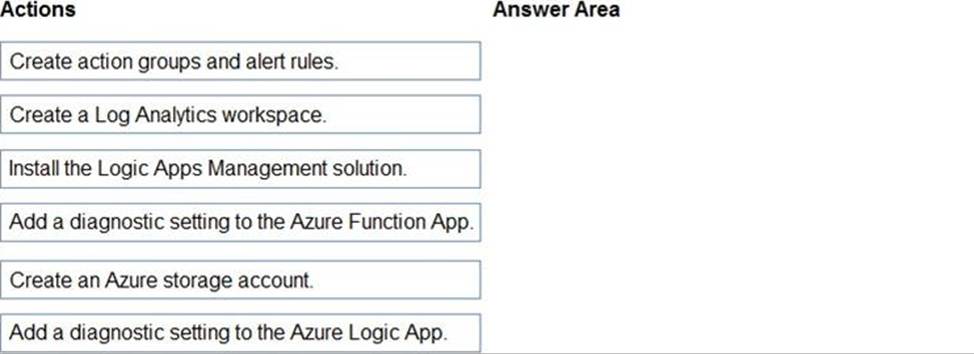
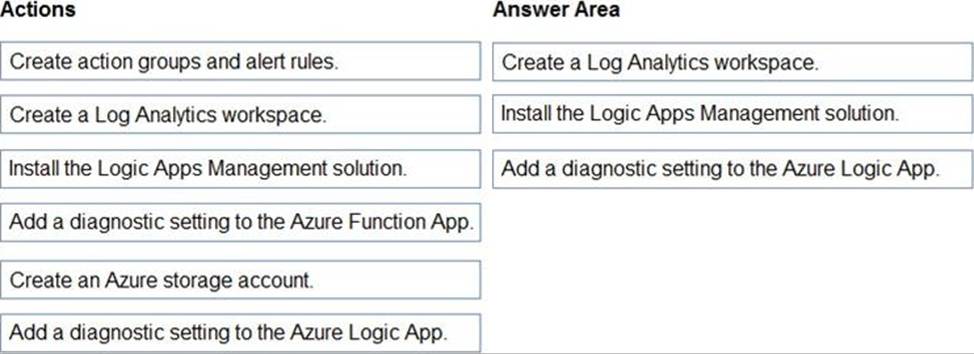
Which three actions should you perform in sequence? To answer, move the appropriate actions from the list of actions to the answer area and arrange them in the correct order.
Explanation:
Step 1: Create a Log Analytics workspace
Before you start, you need a Log Analytics workspace.
Step 2: Install the Logic Apps Management solution
To set up logging for your logic app, you can enable Log Analytics when you create your logic app, or you can install the Logic Apps Management solution in your Log Analytics workspace for existing logic apps.
Step 3: Add a diagnostic setting to the Azure Logic App
Set up Azure Monitor logs
In the Azure portal, find and select your logic app.
On your logic app menu, under Monitoring, select Diagnostic settings > Add diagnostic setting.
Reference: https://docs.microsoft.com/en-us/azure/logic-apps/monitor-logic-apps-log-analytics
HOTSPOT
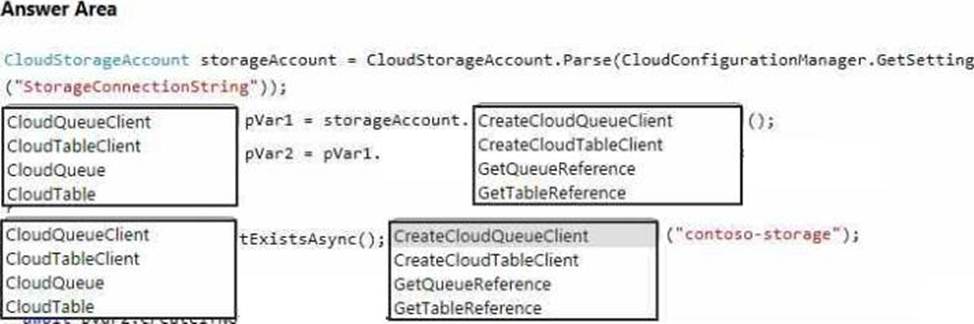
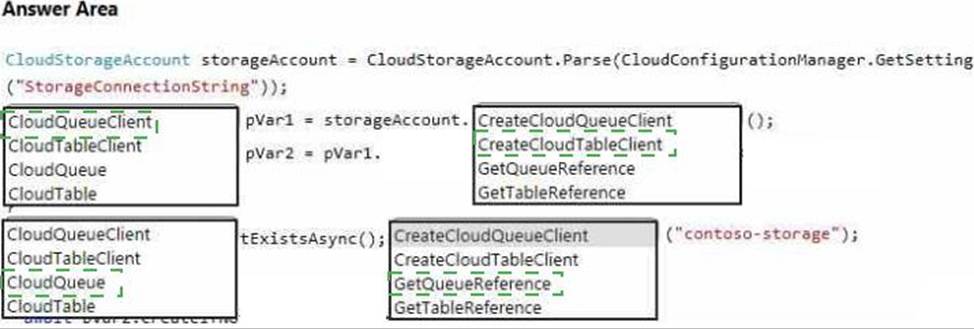
You are developing a .NET application that communicates with Azure Storage.
A message must be stored when the application initializes.
You need to implement the message.
How should you complete the code segment? To answer, select the appropriate options in the answer area. NOTE: Each correct selection is worth one point.
You develop an ASP. Net Core application by integrating the Application Insights SDK into your solution.
The application sends a very high rate of telemetry in a short time interval. You observe a reduced number of events, traces, and metrics being recorded and increased error rates for telemetry ingestion. Telemetry data must synchronize the client and server information to allow HTTP request and response correlation.
You need to reduce telemetry traffic, data costs, and storage costs while preserving a statistically correct analysis of application telemetry data.
What should you do?
- A . Set a daily cap on the Log Analytics workspace. Create an Activity log alert rule
- B . Verify adaptive sampling is enabled Set the maxTelemetrylterns Per Second value.
- C . Set retention and archive policies by table in the Log Analytics workspace. Purge retained data beyond 30 days.
- D . Modify the pricing tier for the Log Analytics workspace.
You develop an ASP. Net Core application by integrating the Application Insights SDK into your solution.
The application sends a very high rate of telemetry in a short time interval. You observe a reduced number of events, traces, and metrics being recorded and increased error rates for telemetry ingestion. Telemetry data must synchronize the client and server information to allow HTTP request and response correlation.
You need to reduce telemetry traffic, data costs, and storage costs while preserving a statistically correct analysis of application telemetry data.
What should you do?
- A . Set a daily cap on the Log Analytics workspace. Create an Activity log alert rule
- B . Verify adaptive sampling is enabled Set the maxTelemetrylterns Per Second value.
- C . Set retention and archive policies by table in the Log Analytics workspace. Purge retained data beyond 30 days.
- D . Modify the pricing tier for the Log Analytics workspace.
Topic 5, Litware Inc
Case study
Overview
This is a case study. Case studies are not timed separately. You can use as much exam time as you would like to complete each case. However, there may be additional case studies and sections on this exam. You must manage your time to ensure that you are able to complete all questions included on this exam in the time provided.
To answer the questions included in a case study, you will need to reference information that is provided in the case study. Case studies might contain exhibits and other resources that provide more information about the scenario that is described in the case study. Each question is independent of the other questions in this case study.
At the end of this case study, a review screen will appear. This screen allows you to review your answers and to make changes before you move to the next section of the exam. After you begin a new section, you cannot return to this section.
To start the case study
To display the first question in this case study, click the Next button. Use the buttons in the left pane to explore the content of the case study before you answer the questions. Clicking these buttons displays information such as business requirements, existing environment, and problem statements. When you are ready to answer a question, click the Question button to return to the question.
Background
You are a developer for Litware Inc., a SaaS company that provides a solution for managing employee expenses. The solution consists of an ASP.NET Core Web API project that is deployed as an Azure Web App.
Overall architecture
Employees upload receipts for the system to process. When processing is complete, the employee receives a summary report email that details the processing results. Employees then use a web application to manage their receipts and perform any additional tasks needed for reimbursement.
Receipt processing
Employees may upload receipts in two ways:
✑ Uploading using an Azure Files mounted folder
✑ Uploading using the web application
Data Storage
Receipt and employee information is stored in an Azure SQL database.
Documentation
Employees are provided with a getting started document when they first use the solution. The documentation includes details on supported operating systems for Azure File upload, and instructions on how to configure the mounted folder.
Solution details
Users table

Web Application
You enable MSI for the Web App and configure the Web App to use the security principal name WebAppIdentity.
Processing
Processing is performed by an Azure Function that uses version 2 of the Azure Function runtime. Once processing is completed, results are stored in Azure Blob Storage and an Azure SQL database. Then, an email summary is sent to the user with a link to the processing report. The link to the report must remain valid if the email is forwarded to another user.
Logging
Azure Application Insights is used for telemetry and logging in both the processor and the web application. The processor also has TraceWriter logging enabled. Application Insights must always contain all log messages.
Requirements
Receipt processing
Concurrent processing of a receipt must be prevented.
Disaster recovery
Regional outage must not impact application availability. All DR operations must not be dependent on application running and must ensure that data in the DR region is up to date.
Security
✑ User’s SecurityPin must be stored in such a way that access to the database does not allow the viewing of SecurityPins. The web application is the only system that should have access to SecurityPins.
✑ All certificates and secrets used to secure data must be stored in Azure Key Vault.
✑ You must adhere to the principle of least privilege and provide privileges which are essential to perform the intended function.
✑ All access to Azure Storage and Azure SQL database must use the application’s Managed Service Identity (MSI).
✑ Receipt data must always be encrypted at rest.
✑ All data must be protected in transit.
✑ User’s expense account number must be visible only to logged in users. All other views of the expense account number should include only the last segment, with the remaining parts obscured.
✑ In the case of a security breach, access to all summary reports must be revoked without impacting other parts of the system.
Issues
Upload format issue
Employees occasionally report an issue with uploading a receipt using the web application. They report that when they upload a receipt using the Azure File Share, the receipt does not appear in their profile. When this occurs, they delete the file in the file share and use the web application, which returns a 500 Internal Server error page.
Capacity issue
During busy periods, employees report long delays between the time they upload the receipt and when it appears in the web application.
Log capacity issue
Developers report that the number of log messages in the trace output for the processor is too high, resulting in lost log messages.
Application code
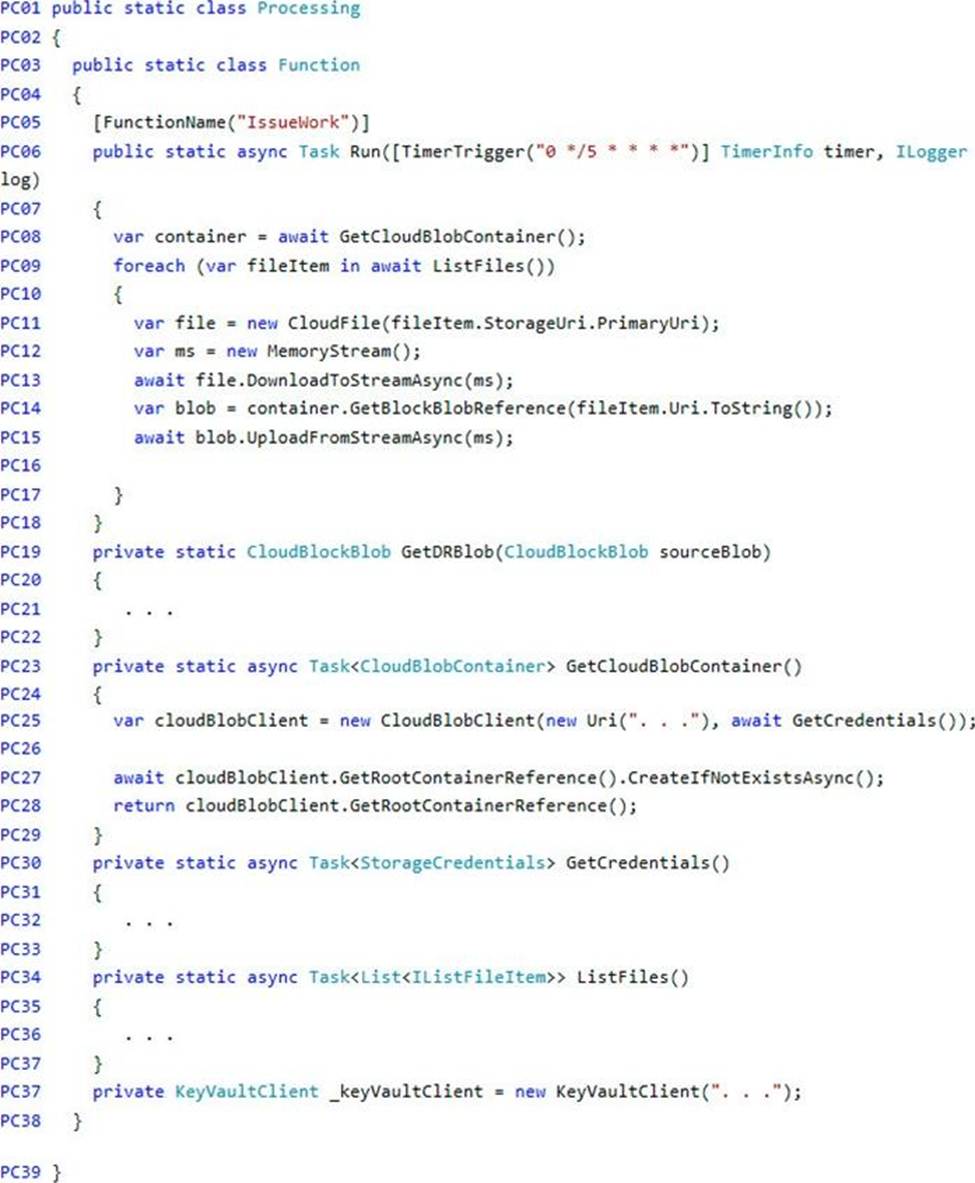
Processing.cs
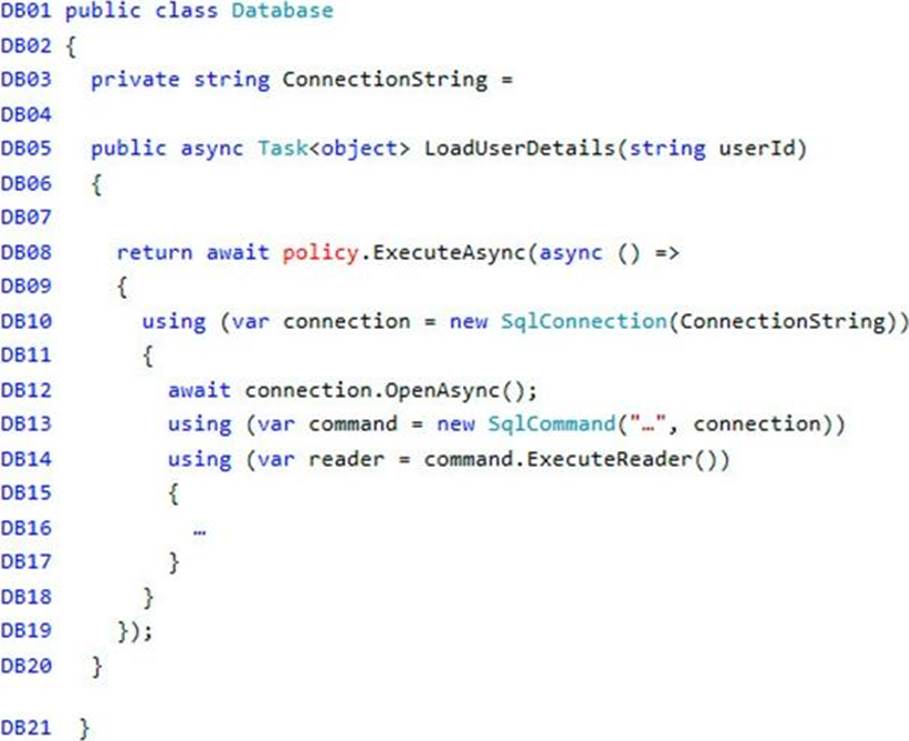
Database.cs
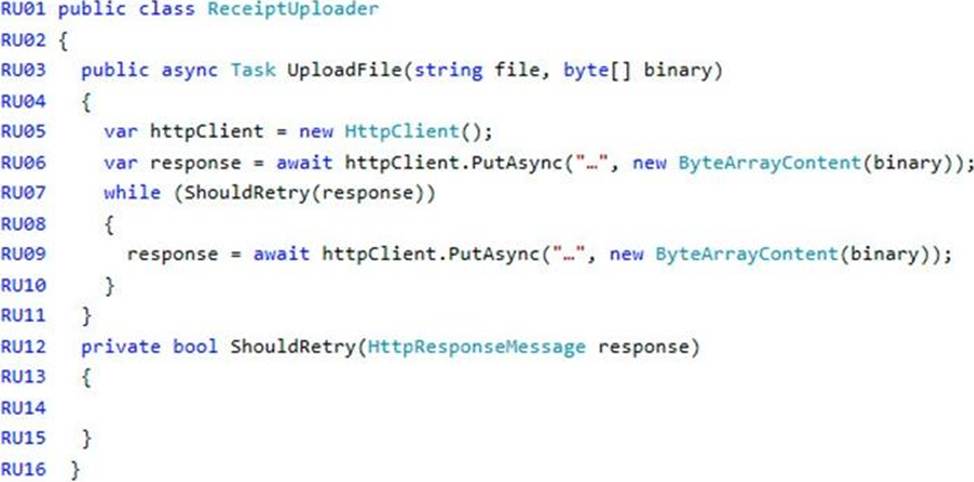
ReceiptUploader.cs
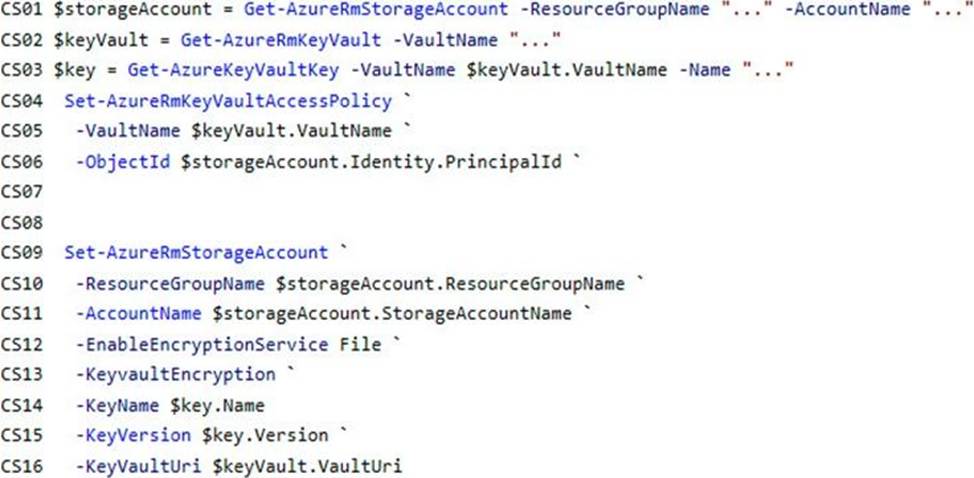
ConfigureSSE.ps1
DRAG DROP
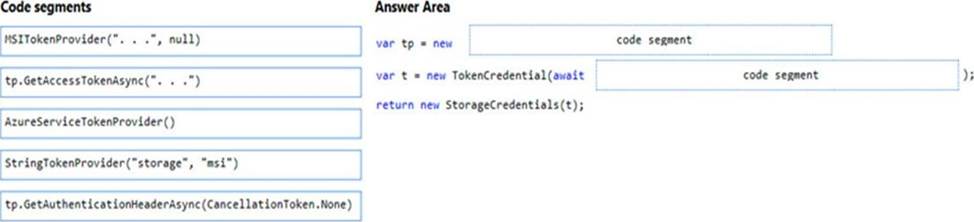
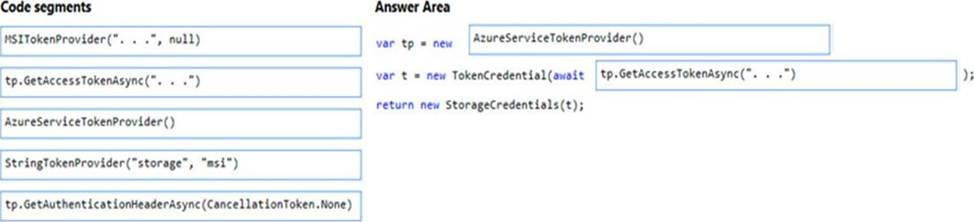
You need to add code at line PC32 in Processing.cs to implement the GetCredentials method in the Processing class.
How should you complete the code? To answer, drag the appropriate code segments to the correct locations. Each code segment may be used once, more than once, or not at all. You may need to drag the split bar between panes or scroll to view content. NOTE: Each correct selection is worth one point.
Explanation:
Box 1: AzureServiceTokenProvider()
Box 2: tp.GetAccessTokenAsync("..")
Acquiring an access token is then quite easy. Example code:
private async Task<string> GetAccessTokenAsync()
{
var tokenProvider = new AzureServiceTokenProvider();
return await tokenProvider.GetAccessTokenAsync("https://storage.azure.com/");
}
Reference: https://joonasw.net/view/azure-ad-authentication-with-azure-storage-and-managed-service-identity
DRAG DROP
Fourth Coffee has an ASP.NET Core web app that runs in Docker. The app is mapped to the www.fourthcoffee.com domain.
Fourth Coffee is migrating this application to Azure.
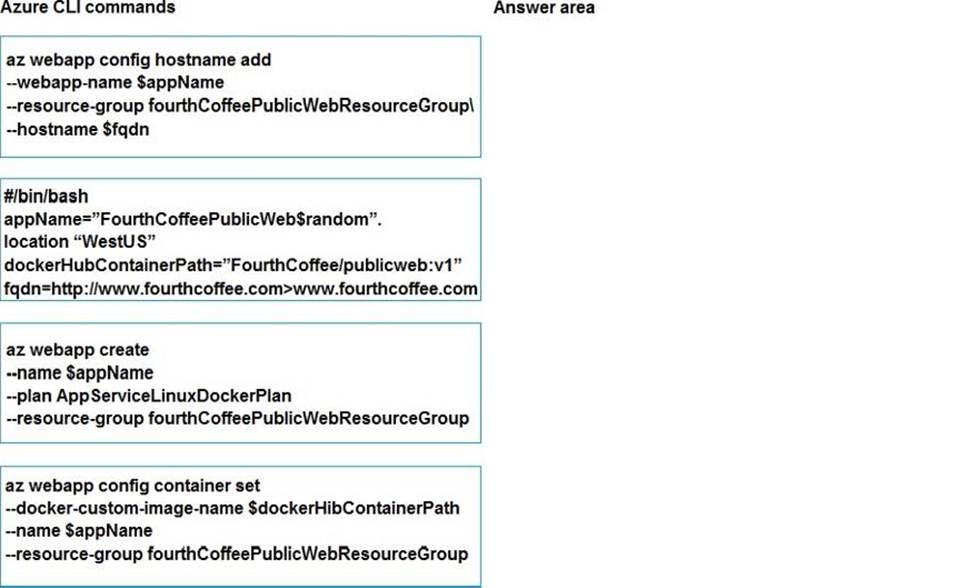
You need to provision an App Service Web App to host this docker image and map the custom domain to the App Service web app.
A resource group named FourthCoffeePublicWebResourceGroup has been created in the WestUS region that contains an App Service Plan named AppServiceLinuxDockerPlan.
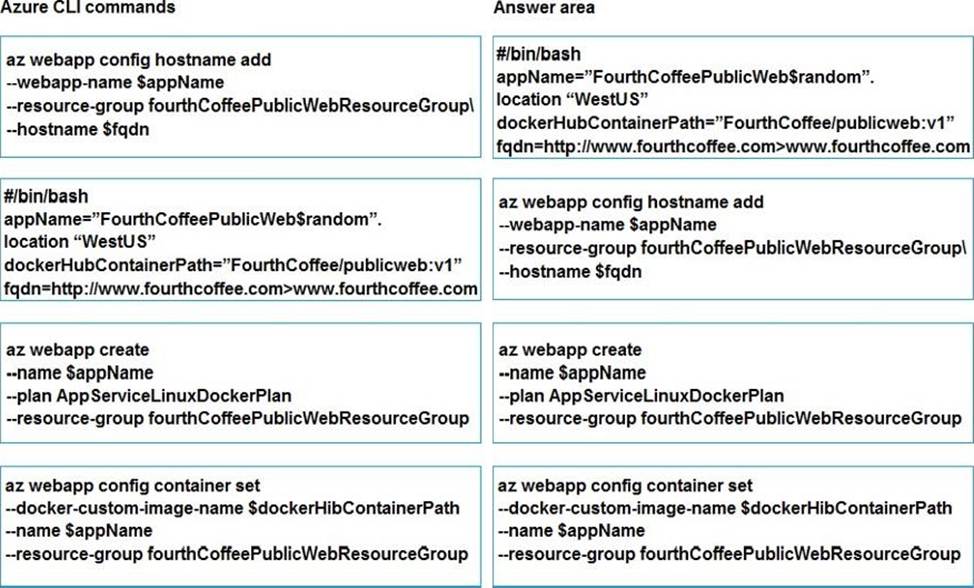
Which order should the CLI commands be used to develop the solution? To answer, move all of the Azure CLI command from the list of commands to the answer area and arrange them in the correct order.
Explanation:
Step 1: #bin/bash
The appName is used when the webapp-name is created in step 2.
Step 2: az webapp config hostname add
The webapp-name is used when the webapp is created in step 3.
Step 3: az webapp create
Create a web app. In the Cloud Shell, create a web app in the myAppServicePlan App Service plan with the az webapp create command.
Step: az webapp confing container set
In Create a web app, you specified an image on Docker Hub in the az webapp create command. This is good enough for a public image. To use a private image, you need to configure your Docker account ID and password in your Azure web app.
In the Cloud Shell, follow the az webapp create command with az webapp config container set.
Reference: https://docs.microsoft.com/en-us/azure/app-service/containers/tutorial-custom-docker-image
HOTSPOT
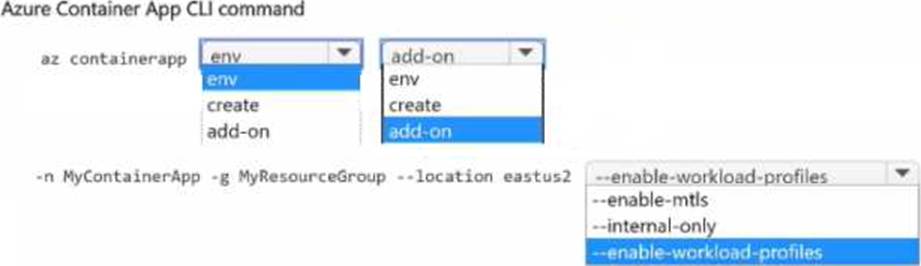
You are developing a microservices-based application that uses Azure Container Apps. The application consists of several containerized services that handle tasks, such as processing orders, managing inventory, and generating reports.
You must secure the container apps All apps must reside in the same virtual network, share the same Dapr configuration, and share the same logging location.
Apps must support the configuration of the amount of memory and compute resources available to containers.
You need to configure the Azure Container App.
How should you complete the CLI command’ To answer, select the appropriate options in the answer area. NOTE: Each correct selection is worth one point.
HOTSPOT
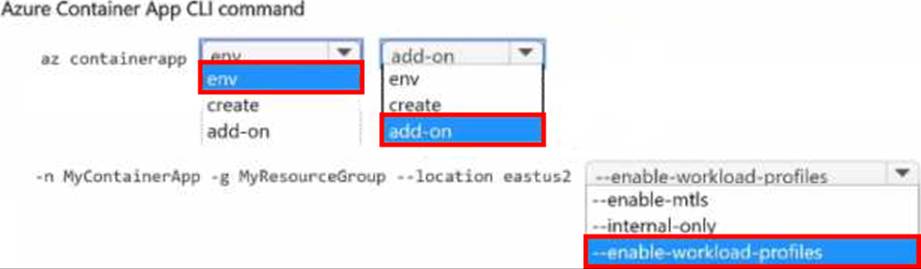
You are developing a microservices-based application that uses Azure Container Apps. The application consists of several containerized services that handle tasks, such as processing orders, managing inventory, and generating reports.
You must secure the container apps All apps must reside in the same virtual network, share the same Dapr configuration, and share the same logging location.
Apps must support the configuration of the amount of memory and compute resources available to containers.
You need to configure the Azure Container App.
How should you complete the CLI command’ To answer, select the appropriate options in the answer area. NOTE: Each correct selection is worth one point.
Note: This question is part of a series of questions that present the same scenario. Each question in the series contains a unique solution that might meet the stated goals. Some question sets might have more than one correct solution, while others might not have a correct solution.
After you answer a question in this section, you will NOT be able to return to it. As a result, these questions will not appear in the review screen.
You develop and deploy an Azure App Service API app to a Windows-hosted deployment slot named Development. You create additional deployment slots named Testing and Production. You enable auto swap on the Production deployment slot.
You need to ensure that scripts run and resources are available before a swap operation occurs.
Solution: Update the app with a method named statuscheck to run the scripts. Update the app
settings for the app. Set the WEBSITE_SWAP_WARMUP_PING_PATH and
WEBSITE_SWAP_WARMUP_PING_STATUSES with a path to the new method and appropriate response codes.
Does the solution meet the goal?
- A . Yes
- B . No
A
Explanation:
These are valid warm-up behavior options, but are not helpful in fixing swap problems.
Instead update the web.config file to include the applicationInitialization configuration element.
Specify custom initialization actions to run the scripts.
Note: Some apps might require custom warm-up actions before the swap. The applicationInitialization configuration element in web.config lets you specify custom initialization actions. The swap operation waits for this custom warm-up to finish before swapping with the target slot. Here’s a sample web.config fragment.
<system.webServer>
<applicationInitialization>
<add initializationPage="/" hostName="[app hostname]" />
<add initializationPage="/Home/About" hostName="[app hostname]" />
</applicationInitialization>
</system.webServer>
Reference: https://docs.microsoft.com/en-us/azure/app-service/deploy-staging-slots#troubleshoot-swaps