
Microsoft AZ-204 Practice Exams
Last updated on Nov 16,2026- Exam Code: AZ-204
- Exam Name: Developing Solutions for Microsoft Azure
- Certification Provider: Microsoft
- Latest update: Nov 16,2026
You develop and deploy an ASP.NET web app to Azure App Service. You use Application Insights telemetry to monitor the app.
You must test the app to ensure that the app is available and responsive from various points around the world and at regular intervals. If the app is not responding, you must send an alert to support staff.
You need to configure a test for the web app.
Which two test types can you use? Each correct answer presents a complete solution. NOTE: Each correct selection is worth one point.
- A . integration
- B . multi-step web
- C . URL ping
- D . unit
- E . load
BC
Explanation:
There are three types of availability tests:
URL ping test: a simple test that you can create in the Azure portal.
Multi-step web test: A recording of a sequence of web requests, which can be played back to test more complex scenarios. Multi-step web tests are created in Visual Studio Enterprise and uploaded to the portal for execution.
Custom Track Availability Tests: If you decide to create a custom application to run availability tests, the TrackAvailability() method can be used to send the results to Application Insights.
Reference: https://docs.microsoft.com/en-us/azure/azure-monitor/app/monitor-web-app-availability
DRAG DROP
You provision virtual machines (VMs) as development environments.
One VM does not have host.
The VM is stuck in a Windows update process. You attach the OS disk for the affected VM to a recovery VM.
You need to correct the issue.
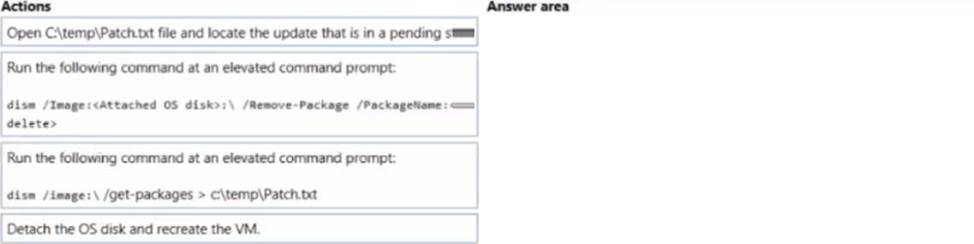
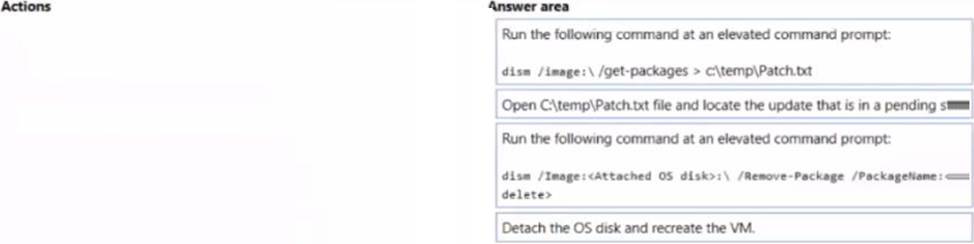
In which order should you perform the actions’ To answer, move the appropriate actions from the list of actions to the answer area and arrange them in the correct order.
Explanation:
Remove the update that causes the problem
✑ Take a snapshot of the OS disk of the affected VM as a backup.
✑ Attach the OS disk to a recovery VM.
✑ Once the OS disk is attached on the recovery VM, run diskmgmt.msc to open Disk Management, and ensure the attached disk is ONLINE.
✑ (Step 1) Open an elevated command prompt instance (Run as administrator). Run the following command to get the list of the update packages that are on the attached OS disk:
dism /image:<Attached OS disk>: /get-packages > c:tempPatch_level
✑ (Step 2) Open the C:tempPatch_level.txt file, and then read it from the bottom up. Locate the update that’s in Install Pending or Uninstall Pending state.
✑ Remove the update that caused the problem:
dism /Image:<Attached OS disk>: /Remove-Package /PackageName:<PACK
✑ (Step 4) Detach the OS disk and recreate the VM. Then check whether the issue is resolved.
Reference: https://docs.microsoft.com/en-us/troubleshoot/azure/virtual-machines/troubleshoot-stuck-updating-boot-error
DRAG DROP
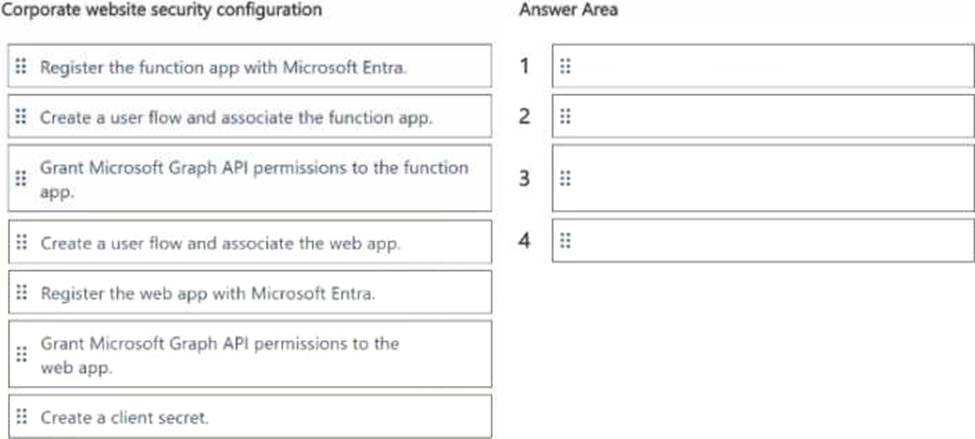
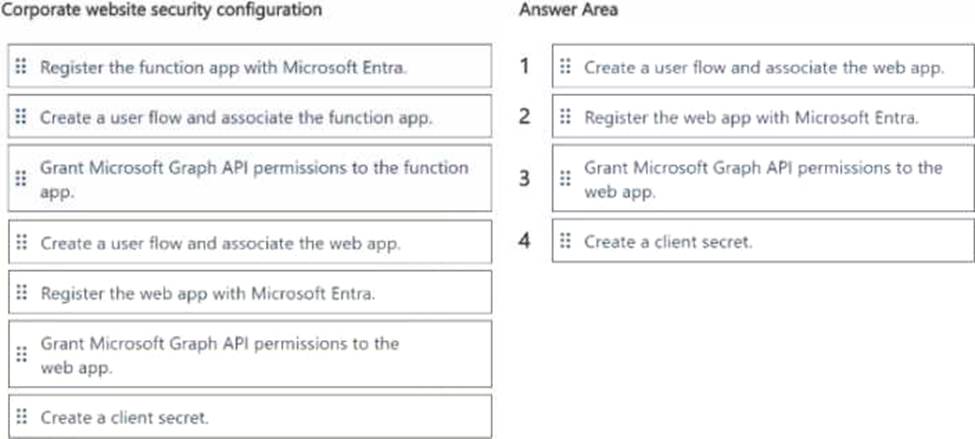
You need to secure the corporate website for users.
Which four actions should you perform in sequence? To answer, move the appropriate actions from the list of actions to the answer area and arrange them in the correct order. NOTE: More than one order of answer choices is correct You will receive credit for any of the correct orders you select.
HOTSPOT
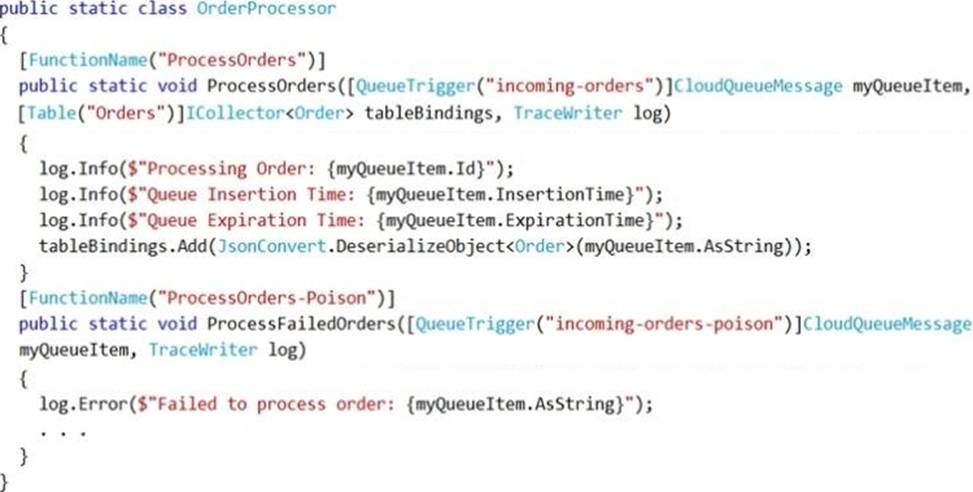
You are developing an Azure Function App by using Visual Studio. The app will process orders input by an Azure Web App. The web app places the order information into Azure Queue Storage.
You need to review the Azure Function App code shown below.
NOTE: Each correct selection is worth one point.
Explanation:
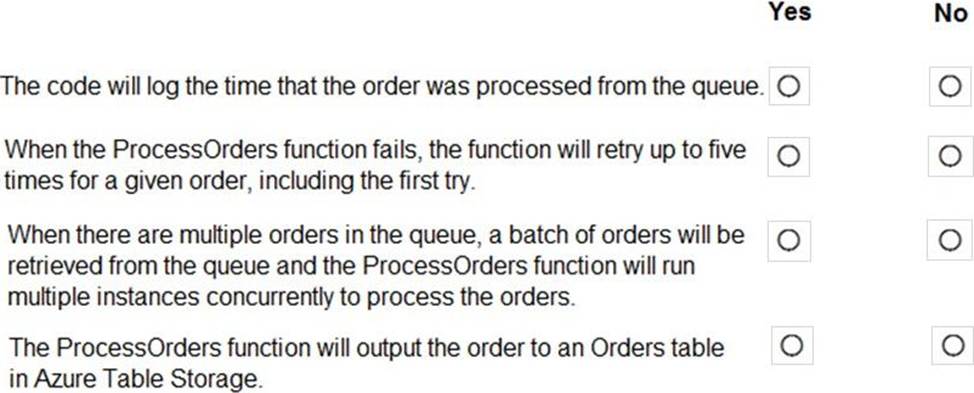
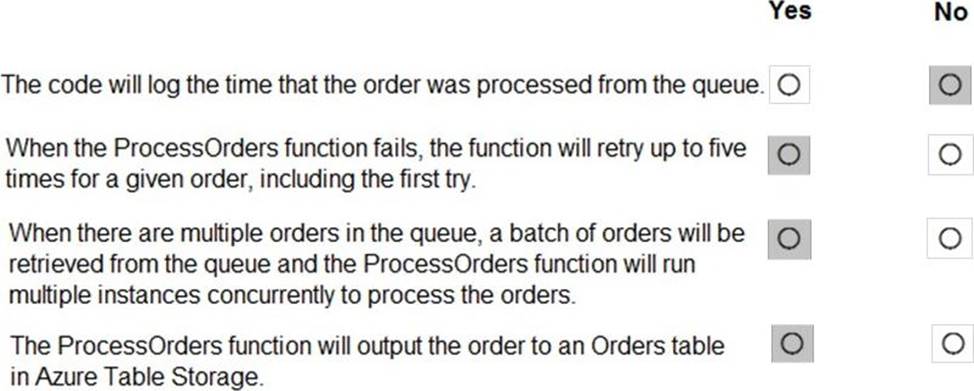
Box 1: No
ExpirationTime – The time that the message expires.
InsertionTime – The time that the message was added to the queue.
Box 2: Yes
maxDequeueCount – The number of times to try processing a message before moving it to the poison queue. Default value is 5.
Box 3: Yes
When there are multiple queue messages waiting, the queue trigger retrieves a batch of messages and invokes function instances concurrently to process them. By default, the batch size is 16. When the number being processed gets down to 8, the runtime gets another batch and starts processing those messages. So the maximum number of concurrent messages being processed per function on one virtual machine (VM) is 24.
Box 4: Yes
Reference: https://docs.microsoft.com/en-us/azure/azure-functions/functions-bindings-storage-queue
HOTSPOT
You are validating the configuration of an Azure Search indexer.
The service has been configured with an indexer that uses the Import Data option.
The index is configured using options as shown in the Index Configuration exhibit. (Click the Index Configuration tab.)
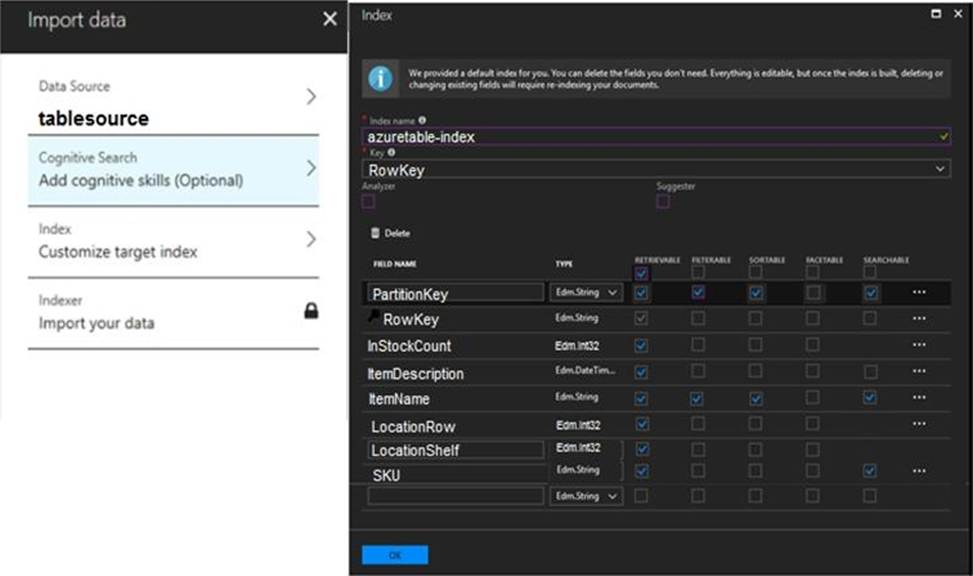
You use an Azure table as the data source for the import operation. The table contains three records with item inventory data that matches the fields in the Storage data exhibit.

These records were imported when the index was created. (Click the Storage Data tab.) When users search with no filter, all three records are displayed.
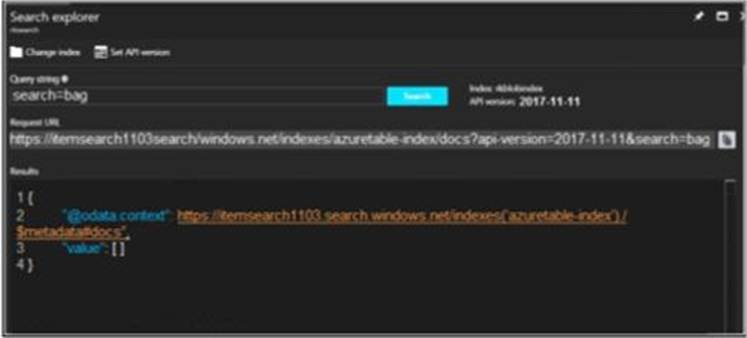
When users search for items by description, Search explorer returns no records. The Search Explorer exhibit shows the query and results for a test. In the test, a user is trying to search for all items in the table that have a description that contains the word bag. (Click the Search Explorer tab.)
You need to resolve the issue.
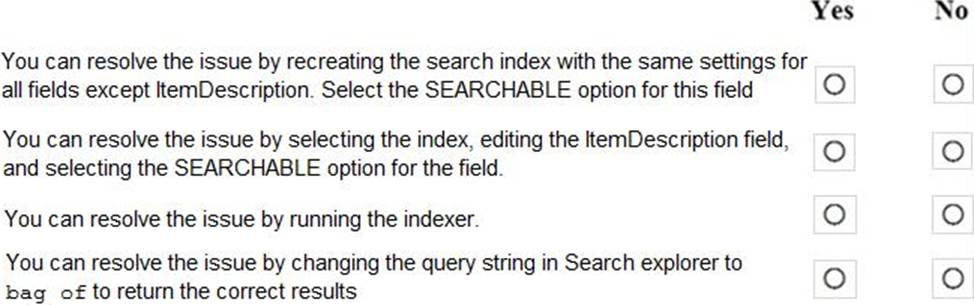
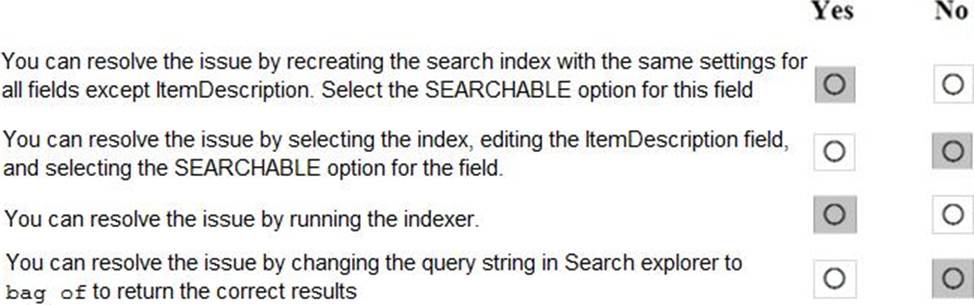
For each of the following statements, select Yes if the statement is true. Otherwise, select No. NOTE: Each correct selection is worth one point.
Explanation:
Box 1: Yes
The ItemDescription field in not searchable.
Box 2: No
The ItemDescription field in not searchable, but we would need to recreate the index.
Box 3: Yes
An indexer in Azure Search is a crawler that extracts searchable data and metadata from an external Azure data source and populates an index based on field-to-field mappings between the index and your data source. This approach is sometimes referred to as a ‘pull model’ because the service pulls data in without you having to write any code that adds data to an index.
Box 4: No
Reference:
https://docs.microsoft.com/en-us/azure/search/search-what-is-an-index
https://docs.microsoft.com/en-us/azure/search/search-indexer-overview
You develop and deploy an Azure App Service web app to a production environment. You enable the Always On setting and the Application Insights site extensions. You deploy a code update and receive multiple failed requests and exceptions in the web app. You need to validate the performance and failure counts of the web app in near real time.
Which Application Insights tool should you use?
- A . Snapshot Debugger
- B . Profiler
- C . Smart Detection
- D . Live Metrics Stream
- E . Application Map
HOTSPOT
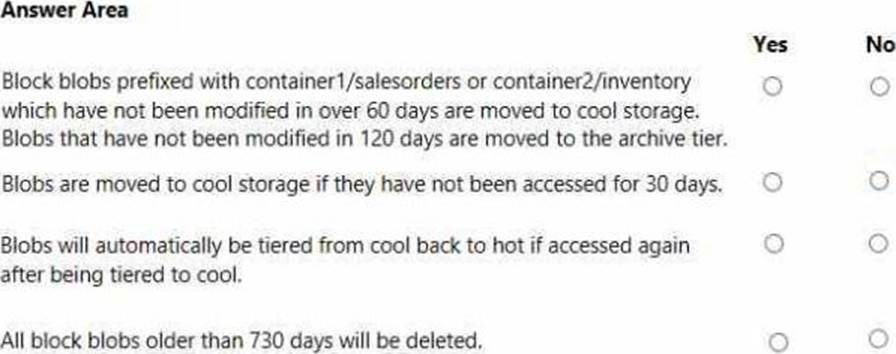
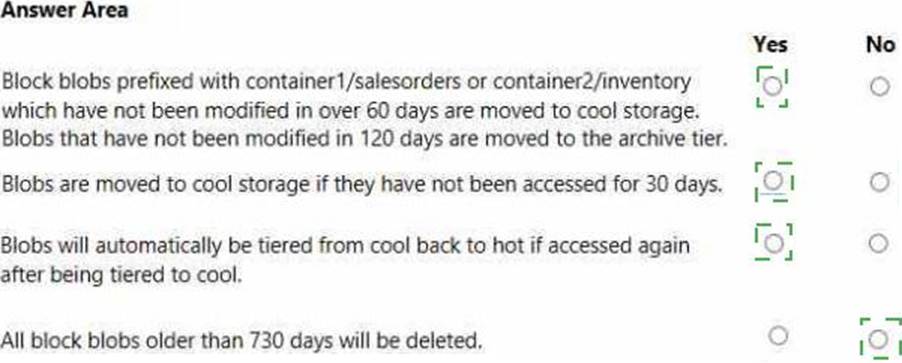
You are developing an application that uses a premium block blob storage account. You are optimizing costs by automating Azure Blob Storage access tiers.
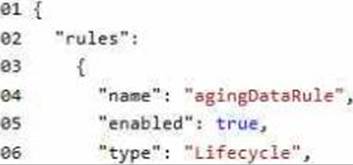
You apply the following policy rules to the storage account. You must determine the implications of applying the rules to the data. (Line numbers are included for reference only.)
Explanation:
You need to ensure the security policies are met.
What code do you add at line CS07 of ConfigureSSE.ps1?
- A . CPermissionsToKeys create, encrypt, decrypt
- B . CPermissionsToCertificates create, encrypt, decrypt
- C . CPermissionsToCertificates wrapkey, unwrapkey, get
- D . CPermissionsToKeys wrapkey, unwrapkey, get
B
Explanation:
Scenario: All certificates and secrets used to secure data must be stored in Azure Key Vault.
You must adhere to the principle of least privilege and provide privileges which are essential to perform the intended function.
The Set-AzureRmKeyValutAccessPolicy parameter -PermissionsToKeys specifies an array of key operation permissions to grant to a user or service principal. The acceptable values for this parameter: decrypt, encrypt, unwrapKey, wrapKey, verify, sign, get, list, update, create, import, delete, backup, restore, recover, purge
Reference: https://docs.microsoft.com/en-us/powershell/module/azurerm.keyvault/set-azurermkeyvaultaccesspolicy
You are developing a solution that will use Azure messaging services.
You need to ensure that the solution uses a publish-subscribe model and eliminates the need for constant polling.
What are two possible ways to achieve the goal? Each correct answer presents a complete solution. NOTE: Each correct selection is worth one point.
- A . Service Bus
- B . Event Hub
- C . Event Grid
- D . Queue
A, C
Explanation:
It is strongly recommended to use available messaging products and services that support a publish-subscribe model, rather than building your own. In Azure, consider using Service Bus or Event Grid. Other technologies that can be used for pub/sub messaging include Redis, RabbitMQ, and Apache Kafka.
Reference: https://docs.microsoft.com/en-us/azure/architecture/patterns/publisher-subscriber
Your company purchases an Azure subscription and plans to migrate several on-premises virtual machines to Azure. You need to design the infrastructure required (or the Azure virtual machines solution.
What should you include in the design?
- A . the number of Azure Storage accounts
- B . the settings of the Azure virtual networks
- C . the size of the virtual machines
- D . the number of Azure regions