
Microsoft AZ-204 Practice Exams
Last updated on Nov 16,2026- Exam Code: AZ-204
- Exam Name: Developing Solutions for Microsoft Azure
- Certification Provider: Microsoft
- Latest update: Nov 16,2026
HOTSPOT
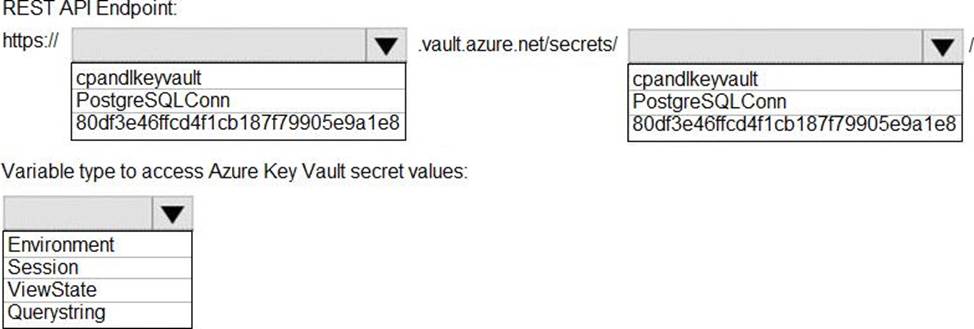
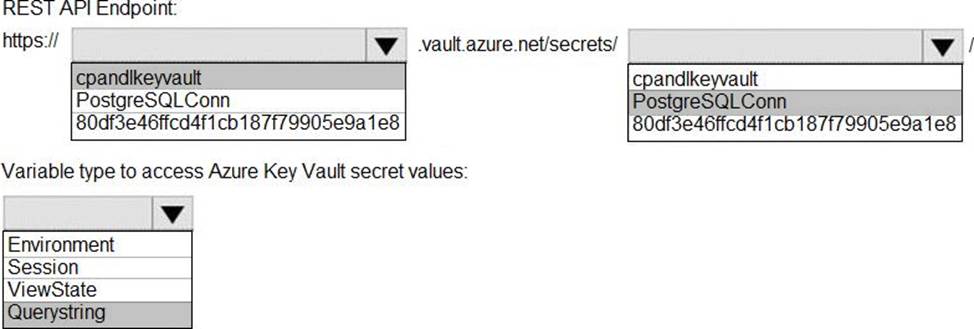
You need to retrieve the database connection string.
Which values should you use? To answer, select the appropriate options in the answer area. NOTE: Each correct selection is worth one point.
Explanation:
Azure database connection string retrieve REST API vault.azure.net/secrets/
Box 1: cpandlkeyvault
We specify the key vault, cpandlkeyvault.
Scenario: The database connection string is stored in Azure Key Vault with the following attributes:
Azure Key Vault name: cpandlkeyvault
Secret name: PostgreSQLConn
Id: 80df3e46ffcd4f1cb187f79905e9a1e8
Box 2: PostgreSQLConn
We specify the secret, PostgreSQLConn
Example, sample request:
https://myvault.vault.azure.net//secrets/mysecretname/4387e9f3d6e14c459867679a90fd0f79?api-version=7.1
Box 3: Querystring
Reference: https://docs.microsoft.com/en-us/rest/api/keyvault/getsecret/getsecret
You are developing a solution that will use a multi-partitioned Azure Cosmos DB database. You plan to use the latest Azure Cosmos DB SDK for development.
The solution must meet the following requirements:
✑ Send insert and update operations to an Azure Blob storage account.
✑ Process changes to all partitions immediately.
✑ Allow parallelization of change processing.
You need to process the Azure Cosmos DB operations.
What are two possible ways to achieve this goal? Each correct answer presents a complete solution. NOTE: Each correct selection is worth one point.
- A . Create an Azure App Service API and implement the change feed estimator of the SDK. Scale the API by using multiple Azure App Service instances.
- B . Create a background job in an Azure Kubernetes Service and implement the change feed feature of the SDK.
- C . Create an Azure Function to use a trigger for Azure Cosmos DB. Configure the trigger to connect to the container.
- D . Create an Azure Function that uses a Feedlterator object that processes the change feed by using the pull model on the container. Use a FeedRange objext to parallelize the processing of the change feed across multiple functions.
CD
Explanation:
Azure Functions is the simplest option if you are just getting started using the change feed. Due to its simplicity, it is also the recommended option for most change feed use cases. When you create an Azure Functions trigger for Azure Cosmos DB, you select the container to connect, and the Azure Function gets triggered whenever there is a change in the container. Because Azure Functions uses the change feed processor behind the scenes, it automatically parallelizes change processing across your container’s partitions.
Note: You can work with change feed using the following options:
✑ Using change feed with Azure Functions
✑ Using change feed with change feed processor
Reference:
https://docs.microsoft.com/en-us/azure/cosmos-db/read-change-feed
https://docs.microsoft.com/en-us/azure/cosmos-db/change-feed-pull-model
https://docs.microsoft.com/en-us/azure/cosmos-db/read-change-feed#azure-functions
https://docs.microsoft.com/en-us/azure/cosmos-db/change-feed-pull-model#using-feedrange-for-parallelization
HOTSPOT
You are building a website that is used to review restaurants. The website will use an Azure CDN to improve performance and add functionality to requests.
You build and deploy a mobile app for Apple iPhones. Whenever a user accesses the website from an iPhone, the user must be redirected to the app store.
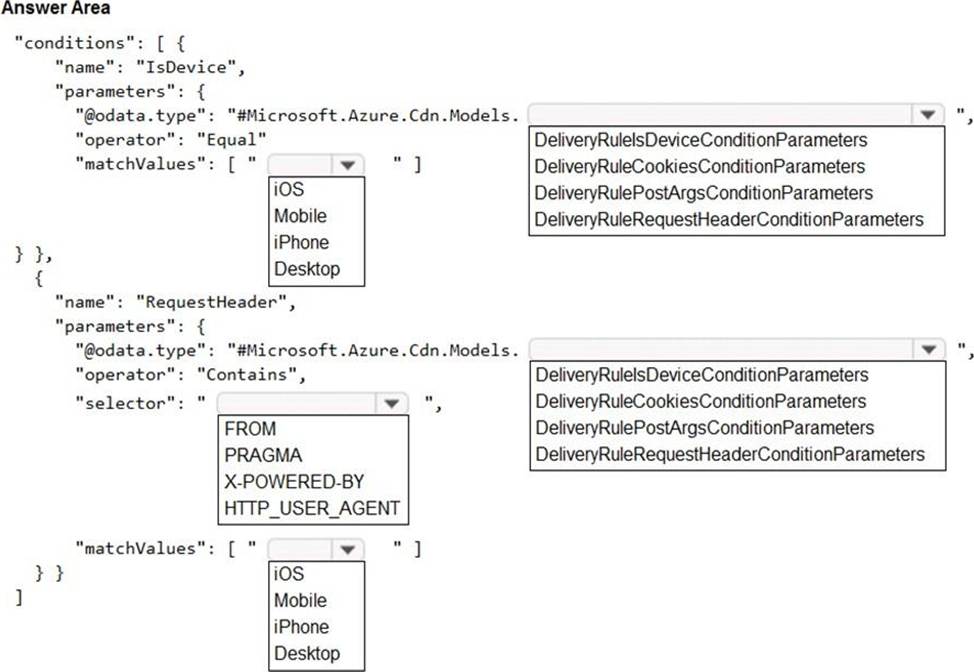
You need to implement an Azure CDN rule that ensures that iPhone users are redirected to the app store.
How should you complete the Azure Resource Manager template? To answer, select the appropriate options in the answer area. NOTE: Each correct selection is worth one point.
Explanation:
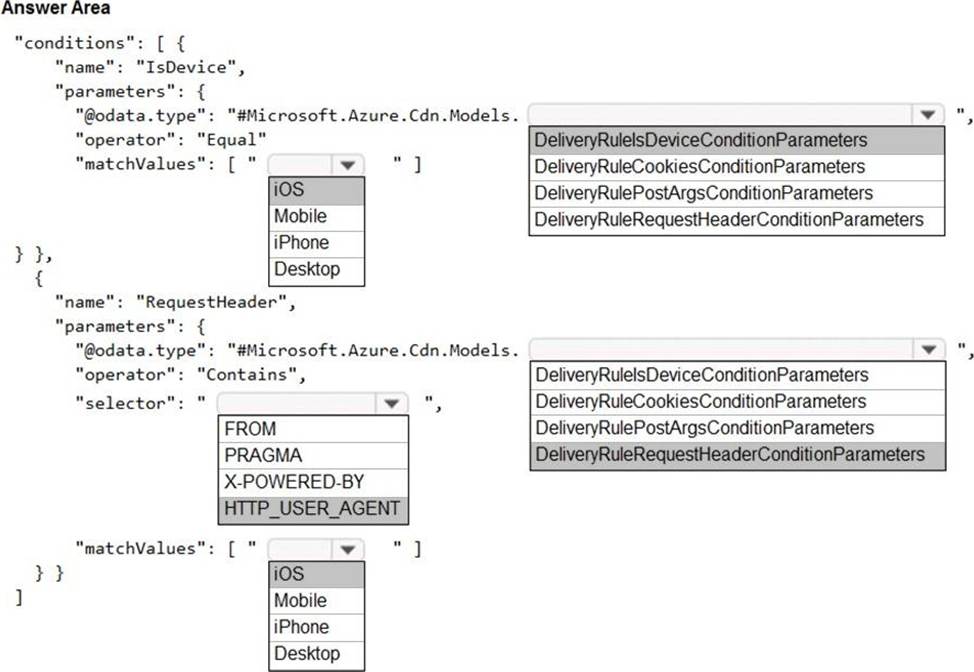
Box 1: iOS
Azure AD Conditional Access supports the following device platforms:
✑ Android
✑ iOS
✑ Windows Phone
✑ Windows
✑ macOS
Box 2: DeliveryRuleIsDeviceConditionParameters
The DeliveryRuleIsDeviceCondition defines the IsDevice condition for the delivery rule.
parameters defines the parameters for the condition.
Box 3: HTTP_USER_AGENT
Box 4: DeliveryRuleRequestHeaderConditionParameters DeliveryRuleRequestHeaderCondition defines the RequestHeader condition for the delivery rule. parameters defines the parameters for the condition.
Box 5: iOS
The Require approved client app requirement only supports the iOS and Android for device platform condition.
Reference:
https://docs.microsoft.com/en-us/azure/active-directory/conditional-access/concept-conditional-access-conditions
https://docs.microsoft.com/en-us/azure/active-directory/conditional-access/concept-conditional-access-grant
DRAG DROP
You need to ensure that PolicyLib requirements are met.
How should you complete the code segment? To answer, drag the appropriate code segments to the correct locations. Each code segment may be used once, more than once, or not at all. You may need to drag the split bar between panes or scroll to view content. NOTE: Each correct selection is worth one point.
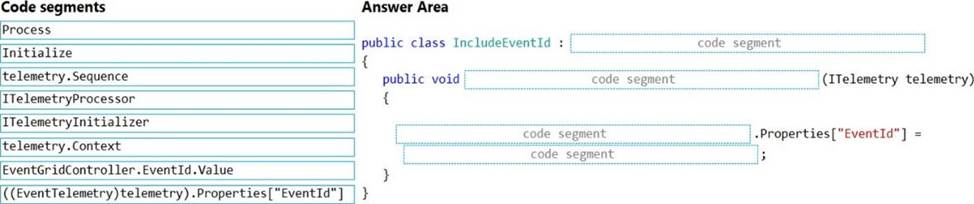
Explanation:
Scenario: You have a shared library named PolicyLib that contains functionality common to all ASP.NET Core web services and applications.
The PolicyLib library must:
✑ Exclude non-user actions from Application Insights telemetry.
✑ Provide methods that allow a web service to scale itself.
✑ Ensure that scaling actions do not disrupt application usage.
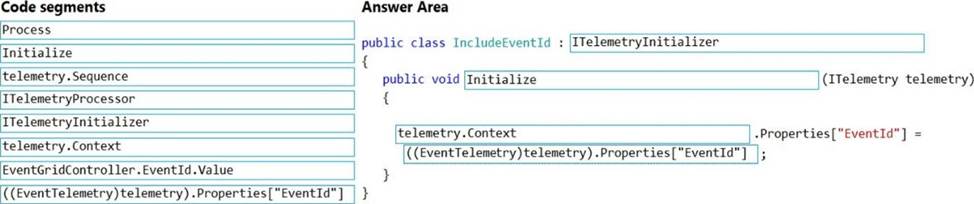
Box 1: ITelemetryInitializer
Use telemetry initializers to define global properties that are sent with all telemetry; and to override selected behavior of the standard telemetry modules.
Box 2: Initialize
Box 3: Telemetry.Context
Box 4: ((EventTelemetry)telemetry).Properties["EventID"]
Reference: https://docs.microsoft.com/en-us/azure/azure-monitor/app/api-filtering-sampling
DRAG DROP
You need to ensure that PolicyLib requirements are met.
How should you complete the code segment? To answer, drag the appropriate code segments to the correct locations. Each code segment may be used once, more than once, or not at all. You may need to drag the split bar between panes or scroll to view content. NOTE: Each correct selection is worth one point.
Explanation:
Scenario: You have a shared library named PolicyLib that contains functionality common to all ASP.NET Core web services and applications.
The PolicyLib library must:
✑ Exclude non-user actions from Application Insights telemetry.
✑ Provide methods that allow a web service to scale itself.
✑ Ensure that scaling actions do not disrupt application usage.
Box 1: ITelemetryInitializer
Use telemetry initializers to define global properties that are sent with all telemetry; and to override selected behavior of the standard telemetry modules.
Box 2: Initialize
Box 3: Telemetry.Context
Box 4: ((EventTelemetry)telemetry).Properties["EventID"]
Reference: https://docs.microsoft.com/en-us/azure/azure-monitor/app/api-filtering-sampling
You have a Standard tier instance of Azure Cache for Radis named redis1 configured with the default settings.
You need to configure a Maxmemory policy to increase the amount of cache available for read operations.
How should you configure the Maxmemory policy?
- A . Decrease the value of maxmemory-reserved.
- B . Increase the value of maxmemory-reserved.
- C . Set the Maxmemory policy to noeviction.
- D . Set the Maxmemory policy to volatile-lru.
HOTSPOT
You deploy an ASP.NET web app to Azure App Service.
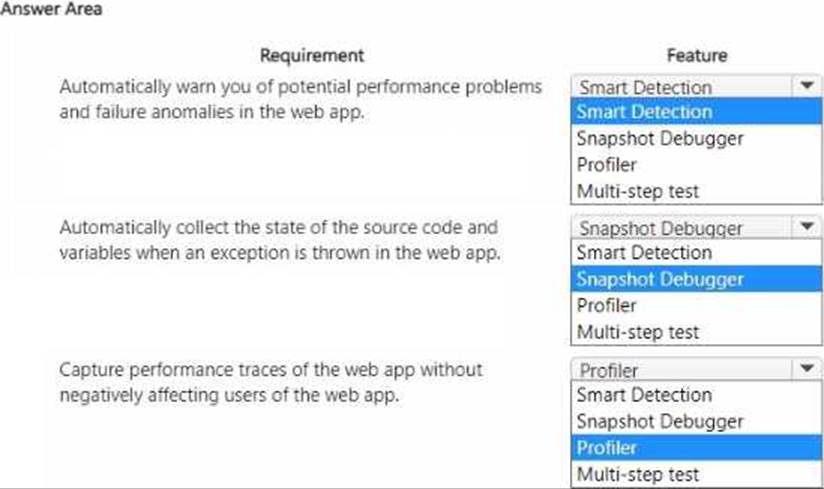
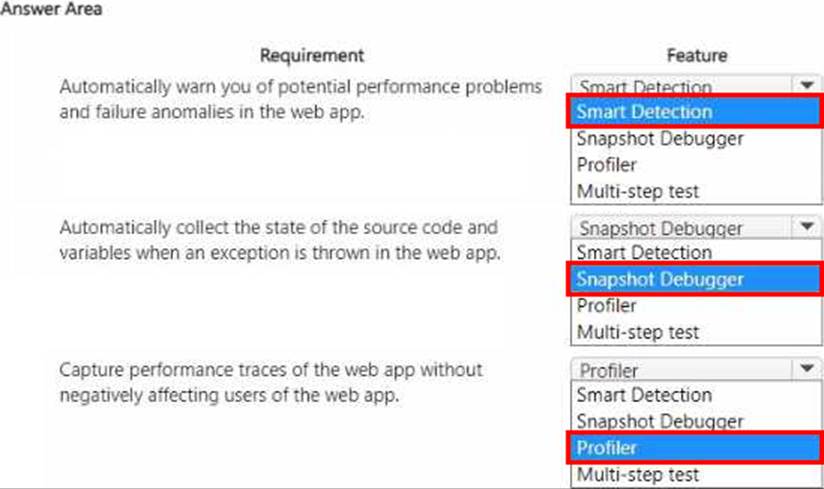
You must monitor the web app by using Application insights.
You need to configure Application Insights to meet the requirements.
Which feature should you use? To answer, select the appropriate options in the answer area. NOTE: Each correct selection is worth one point.
You are developing an application to manage shipping information for cargo ships. The application will use Azure Cosmos D8 for storage.
The application must run offline when ships are at sea The application must be connected to Azure when ships are in port.
Which Azure Cosmos D8 API should you use for the application?
- A . Core
- B . MongoDe
- C . Cassandra
- D . Gremlin
HOTSPOT
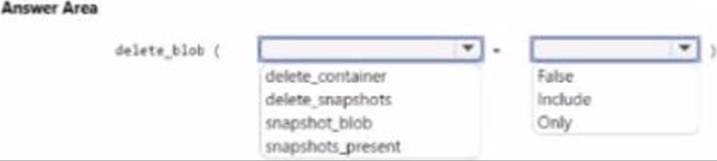
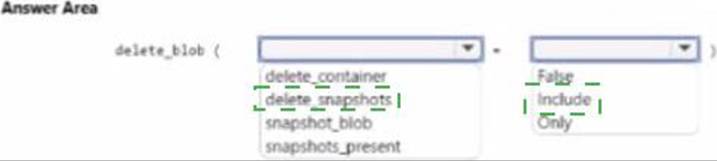
An organization deploys a Mob storage account. Users take multiple snapshots of the blob storage account over time.
You need to delete all snapshots or the blob storage account. You must not delete the blob storage account itself.
How should you complete the code segment? To answer select the appropriate options in the answer area. NOTE: Each correct selection is worth one point.
DRAG DROP
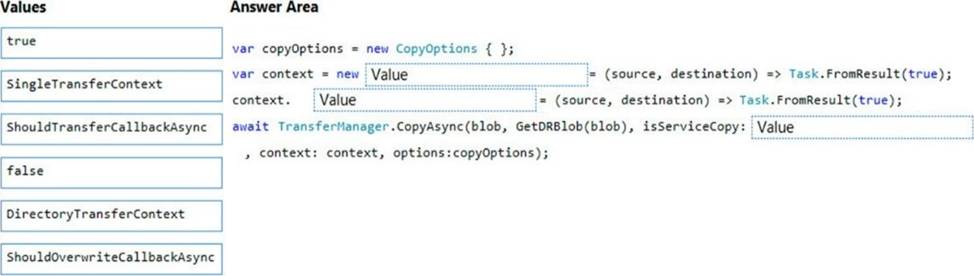
You need to ensure disaster recovery requirements are met.
What code should you add at line PC16? To answer, drag the appropriate code fragments to the correct locations. Each code fragment may be used once, more than once, or not at all. You may need to drag the split bar between panes or scroll to view content. NOTE: Each correct selection is worth one point.
Explanation:
Scenario: Disaster recovery. Regional outage must not impact application availability. All DR operations must not be dependent on application running and must ensure that data in the DR region is up to date.
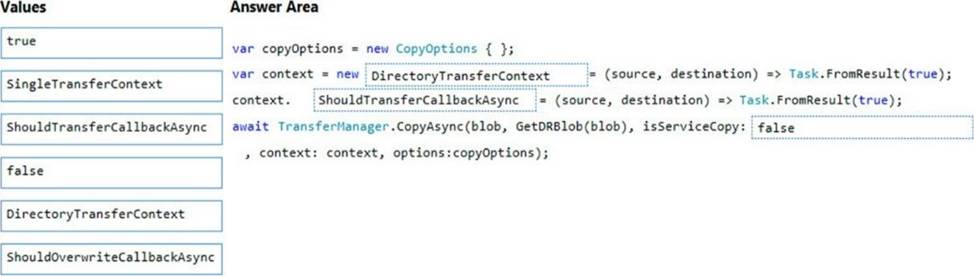
Box 1: DirectoryTransferContext
We transfer all files in the directory.
Note: The TransferContext object comes in two forms: SingleTransferContext and DirectoryTransferContext. The former is for transferring a single file and the latter is for transferring a directory of files.
Box 2: ShouldTransferCallbackAsync
The DirectoryTransferContext.ShouldTransferCallbackAsync delegate callback is invoked to tell whether a transfer should be done.
Box 3: False
If you want to use the retry policy in Copy, and want the copy can be resume if break in the middle, you can use SyncCopy (isServiceCopy = false).
Note that if you choose to use service side copy (‘isServiceCopy’ set to true), Azure (currently) doesn’t provide SLA for that. Setting ‘isServiceCopy’ to false will download the source blob loca
Reference:
https://docs.microsoft.com/en-us/azure/storage/common/storage-use-data-movement-library
https://docs.microsoft.com/en-us/dotnet/api/microsoft.windowsazure.storage.datamovement.directorytransfercontext.shouldtransfercallbackasync?view=azure-dotnet