
Microsoft AZ-204 Practice Exams
Last updated on Nov 16,2026- Exam Code: AZ-204
- Exam Name: Developing Solutions for Microsoft Azure
- Certification Provider: Microsoft
- Latest update: Nov 16,2026
You are developing a project management service by using ASP.NET. The service hosts conversations, files, to-do lists, and a calendar that users can interact with at any time.
The application uses Azure Search for allowing users to search for keywords in the project data.
You need to implement code that creates the object which is used to create indexes in the Azure Search service.
Which two objects should you use? Each correct answer presents part of the solution. NOTE: Each correct selection is worth one point.
- A . SearchService
- B . SearchlndexCIient
- C . SearchServiceClient
- D . SearchCredentials
BC
Explanation:
The various client libraries define classes like Index, Field, and Document, as well as operations like Indexes.Create and Documents.Search on the SearchServiceClient and SearchIndexClient classes.
Example:
The sample application we’ll be exploring creates a new index named "hotels", populates it with a few documents, then executes some search queries.
Here is the main program, showing the overall flow:
/ This sample shows how to delete, create, upload documents and query an index static void Main(string[] args)
{
IConfigurationBuilder builder = new ConfigurationBuilder().AddJsonFile("appsettings.json"); IConfigurationRoot configuration = builder.Build();
SearchServiceClient serviceClient = CreateSearchServiceClient(configuration);
Console.WriteLine("{0}", "Deleting index…n");
DeleteHotelsIndexIfExists(serviceClient);
Console.WriteLine("{0}", "Creating index…n");
CreateHotelsIndex(serviceClient);
ISearchIndexClient indexClient = serviceClient.Indexes.GetClient("hotels");
Reference: https://docs.microsoft.com/en-us/azure/search/search-howto-dotnet-sdk
HOTSPOT
You are implementing a software as a service (SaaS) ASP.NET Core web service that will run as an
Azure Web App. The web service will use an on-premises SQL Server database for storage. The web service also includes a WebJob that processes data updates.
Four customers will use the web service.
• Each instance of the WebJob processes data for a single customer and must run as a singleton instance.
• Each deployment must be tested by using deployment slots prior to serving production data.
• Azure costs must be minimized.
• Azure resources must be located in an isolated network.
You need to configure the App Service plan for the Web App.
How should you configure the App Service plan? To answer, select the appropriate settings in the answer area. NOTE: Each correct selection is worth one point.
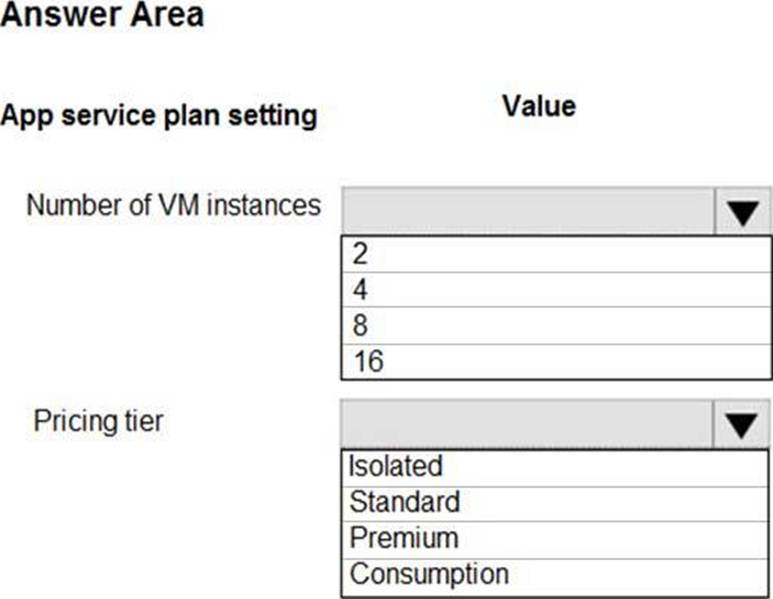
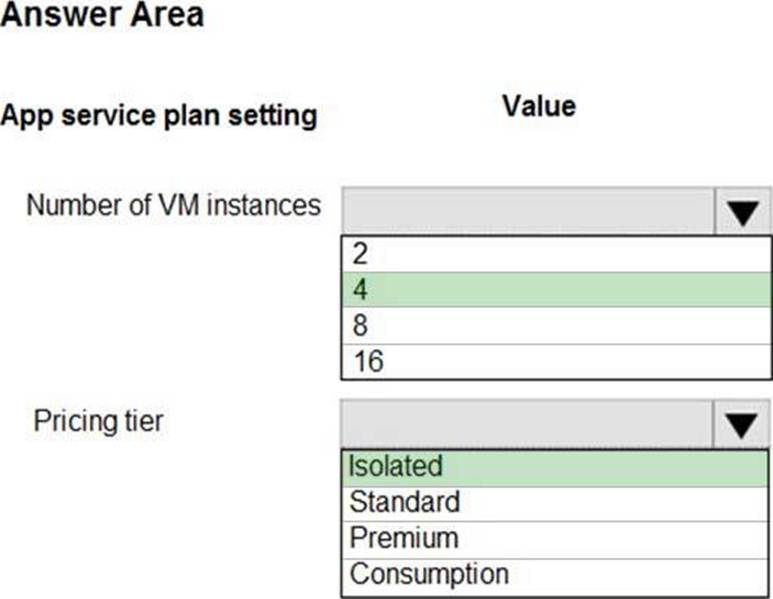
Explanation:
Number of VM instances: 4
You are not charged extra for deployment slots.
Pricing tier: Isolated
The App Service Environment (ASE) is a powerful feature offering of the Azure App Service that gives network isolation and improved scale capabilities. It is essentially a deployment of the Azure App Service into a subnet of a customer’s Azure Virtual Network (VNet).
Reference: https://azure.microsoft.com/sv-se/blog/announcing-app-service-isolated-more-power-scale-and-ease-of-use/
You are preparing to deploy an ASP.NET Core website to an Azure Web App from a GitHub repository.
The website includes static content generated by a script.
You plan to use the Azure Web App continuous deployment feature.
You need to run the static generation script before the website starts serving traffic.
What are two possible ways to achieve this goal? Each correct answer presents a complete solution. NOTE: Each correct selection is worth one point.
- A . Create a file named .deployment in the root of the repository that calls a script which generates the static content and deploys the website.
- B . Add a PreBuild target in the websites csproj project file that runs the static content generation script.
- C . Create a file named run.cmd in the folder /run that calls a script which generates the static content and deploys the website.
- D . Add the path to the static content generation tool to WEBSITE_RUN_FROM_PACKAGE setting in the host.json file.
AD
Explanation:
A: To customize your deployment, include a .deployment file in the repository root.
You just need to add a file to the root of your repository with the name .deployment and the content:
[config]
command = YOUR COMMAND TO RUN FOR DEPLOYMENT
this command can be just running a script (batch file) that has all that is required for your deployment, like copying files from the repository to the web root directory for example.
D: In Azure, you can run your functions directly from a deployment package file in your function app. The other option is to deploy your files in the d:homesitewwwroot directory of your function app (see A above).
To enable your function app to run from a package, you just add a WEBSITE_RUN_FROM_PACKAGE setting to your function app settings.
Note: The host.json metadata file contains global configuration options that affect all functions for a function app.
Reference: https://github.com/projectkudu/kudu/wiki/Custom-Deployment-Script
https://docs.microsoft.com/bs-latn-ba/azure/azure-functions/run-functions-from-deployment-package
You develop and deploy an Azure App Service web app named App1. You create a new Azure Key Vault named Vault 1. You import several API keys, passwords, certificates, and cryptographic keys into Vault1.
You need to grant App1 access to Vault1 and automatically rotate credentials Credentials must not be stored in code.
What should you do?
- A . Enable App Service authentication for Appt. Assign a custom RBAC role to Vault1.
- B . Add a TLS/SSL binding to App1.
- C . Assign a managed identity to App1.
- D . Upload a self-signed client certificate to Vault1. Update App1 to use the client certificate.
You are developing an Azure App Service REST API.
The API must be called by an Azure App Service web app. The API must retrieve and update user profile information stored in Azure Active Directory (Azure AD).
You need to configure the API to make the updates.
Which two tools should you use? Each correct answer presents part of the solution. NOTE: Each correct selection is worth one point.
- A . Microsoft Graph API
- B . Microsoft Authentication Library (MSAL)
- C . Azure API Management
- D . Microsoft Azure Security Center
- E . Microsoft Azure Key Vault SDK
AC
Explanation:
A: You can use the Azure AD REST APIs in Microsoft Graph to create unique workflows between Azure AD resources and third-party services.
Enterprise developers use Microsoft Graph to integrate Azure AD identity management and other services to automate administrative workflows, such as employee onboarding (and termination), profile maintenance, license deployment, and more.
C: API Management (APIM) is a way to create consistent and modern API gateways for existing back-end services.
API Management helps organizations publish APIs to external, partner, and internal developers to unlock the potential of their data and services.
Reference: https://docs.microsoft.com/en-us/graph/azuread-identity-access-management-concept-overview
HOTSPOT
A company is developing a Java web app. The web app code is hosted in a GitHub repository located at https://github.com/Contoso/webapp.
The web app must be evaluated before it is moved to production. You must deploy the initial code release to a deployment slot named staging.
You need to create the web app and deploy the code.
How should you complete the commands? To answer, select the appropriate options in the answer area. NOTE: Each correct selection is worth one point.
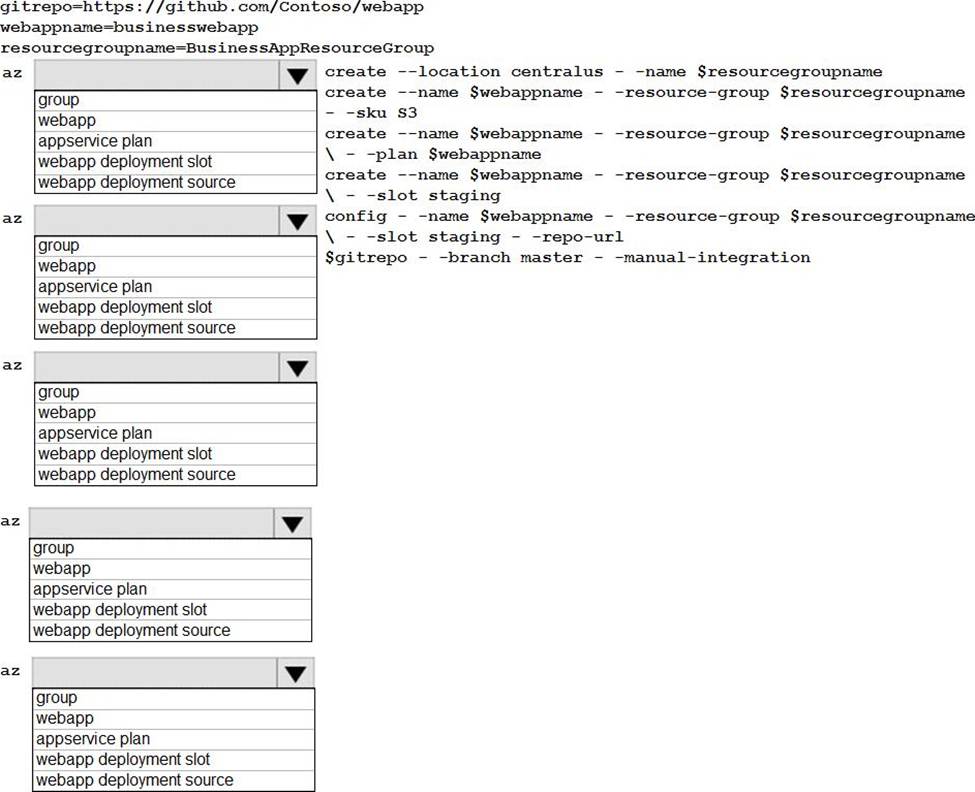
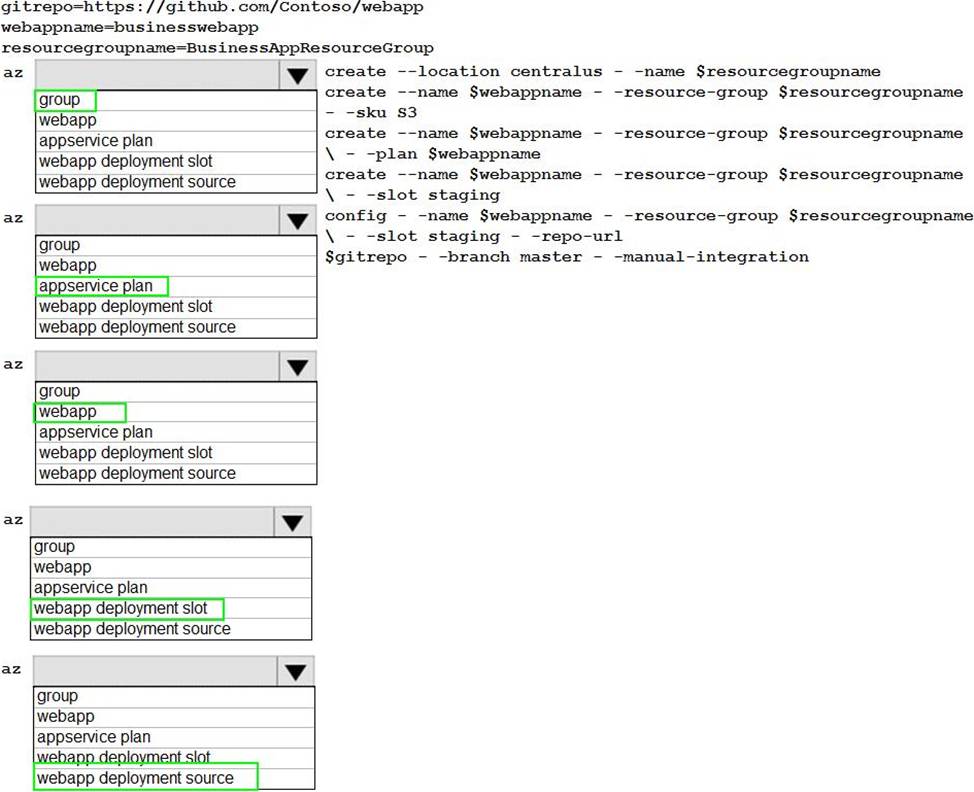
Explanation:
Box 1: group
# Create a resource group.
az group create –location westeurope –name myResourceGroup
Box 2: appservice plan
# Create an App Service plan in STANDARD tier (minimum required by deployment slots).
az appservice plan create –name $webappname –resource-group myResourceGroup –sku S1
Box 3: webapp
# Create a web app.
az webapp create –name $webappname –resource-group myResourceGroup –plan $webappname
Box 4: webapp deployment slot
#Create a deployment slot with the name "staging".
az webapp deployment slot create –name $webappname –resource-group myResourceGroup –slot staging
Box 5: webapp deployment source
# Deploy sample code to "staging" slot from GitHub.
az webapp deployment source config –name $webappname –resource-group myResourceGroup –slot staging –repo-url $gitrepo –branch master –manual-integration
Reference: https://docs.microsoft.com/en-us/azure/app-service/scripts/cli-deploy-staging-environment
You are developing several microservices to deploy to a Azure Service cluster. The microservices manage data stored in Azure Cosmos DB and Azure Blob storage. The data is secured by using customer-managed keys stored in Aue Key Vault.
You must automate key rotation for all Key Vault keys and allow for manual key rotation. Keys must rotate every three months. Notifications Of expiring keys must be sent before key expiry.
You need to configure key rotation and enable key expiry notifications.
Which two actions should you perform? Each correct answer presents part Of solution. NOTE: Each correct selection is worth
- A . Create and configure a new Azure Event Grid instance.
- B . Create configure a key rotation policy during key creation
- C . Create and assign an Azure Key Vault access
- D . Configure Azure Key Vault
A, C
Explanation:
https://learn.microsoft.com/en-us/azure/key-vault/keys/how-to-configure-key-rotation
You are developing a software solution for an autonomous transportation system. The solution uses large data sets and Azure Batch processing to simulate navigation sets for entire fleets of vehicles.
You need to create compute nodes for the solution on Azure Batch.
What should you do?
- A . In Python, implement the class: TaskAddParameter
- B . In Python, implement the class: JobAddParameter
- C . In the Azure portal, create a Batch account
- D . In a .NET method, call the method: BatchClient.PoolOperations.CreateJob
D
Explanation:
A Batch job is a logical grouping of one or more tasks. A job includes settings common to the tasks, such as priority and the pool to run tasks on. The app uses the BatchClient.JobOperations.CreateJob method to create a job on your pool.
Note:
Step 1: Create a pool of compute nodes. When you create a pool, you specify the number of compute nodes for the pool, their size, and the operating system. When each task in your job runs, it’s assigned to execute on one of the nodes in your pool.
Step 2: Create a job. A job manages a collection of tasks. You associate each job to a specific pool where that job’s tasks will run.
Step 3: Add tasks to the job. Each task runs the application or script that you uploaded to process the data files it downloads from your Storage account. As each task completes, it can upload its output to Azure Storage.
Incorrect Answers: C: To create a Batch pool in Python, the app uses the PoolAddParameter class to set the number of nodes, VM size, and a pool configuration.
Reference: https://docs.microsoft.com/en-us/azure/batch/quick-run-dotnet
HOTSPOT
You are developing a data storage solution for a social networking app.
The solution requires a mobile app that stores user information using Azure Table Storage.
You need to develop code that can insert multiple sets of user information.
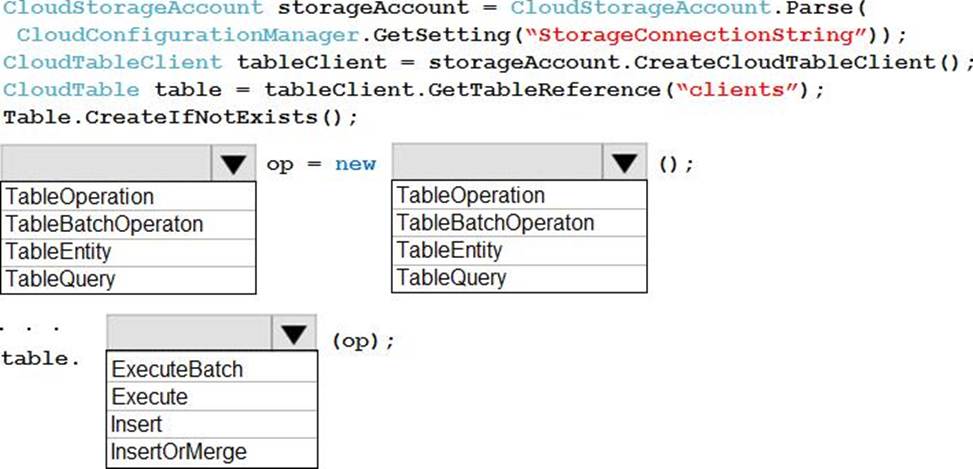
How should you complete the code? To answer, select the appropriate options in the answer area. NOTE: Each correct selection is worth one point.
Explanation:
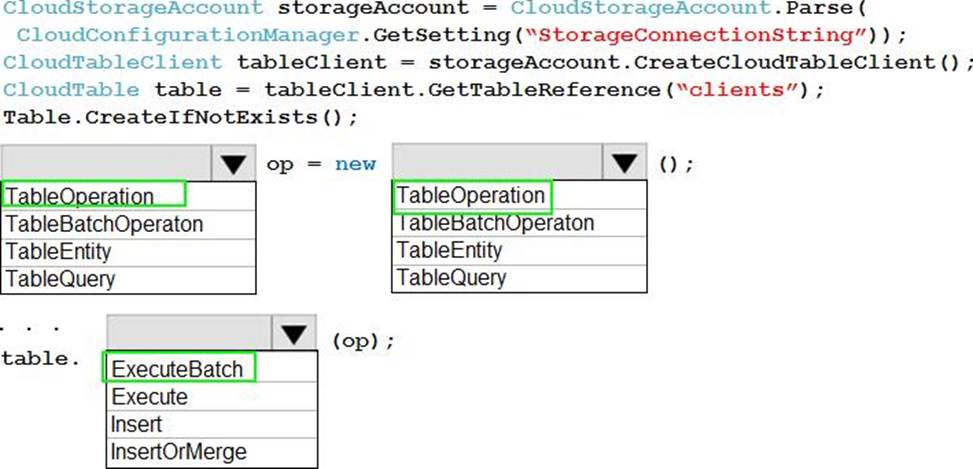
Box 1, Box 2: TableBatchOperation
Create the batch operation.
TableBatchOperation op = new TableBatchOperation();
Box 3: ExecuteBatch
/ Execute the batch operation. table.ExecuteBatch(op);
Note: You can insert a batch of entities into a table in one write operation. Some other notes on batch operations:
You can perform updates, deletes, and inserts in the same single batch operation.
A single batch operation can include up to 100 entities.
All entities in a single batch operation must have the same partition key.
While it is possible to perform a query as a batch operation, it must be the only operation in the batch.
Reference: https://docs.microsoft.com/en-us/azure/cosmos-db/table-storage-how-to-use-dotnet
DRAG DROP
You are preparing to deploy an application to an Azure Kubernetes Service (AKS) cluster.
The application must only be available from within the VNet that includes the cluster.
You need to deploy the application.
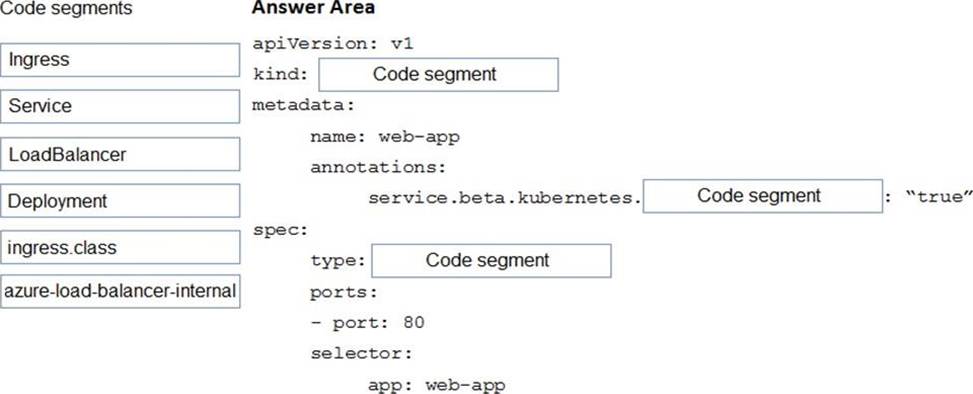
How should you complete the deployment YAML? To answer, drag the appropriate YAML segments to the correct locations. Each YAML segment may be used once, more than once, or not at all. You may need to drag the split bar between panes or scroll to view content. NOTE: Each correct selection is worth one point.
Explanation:
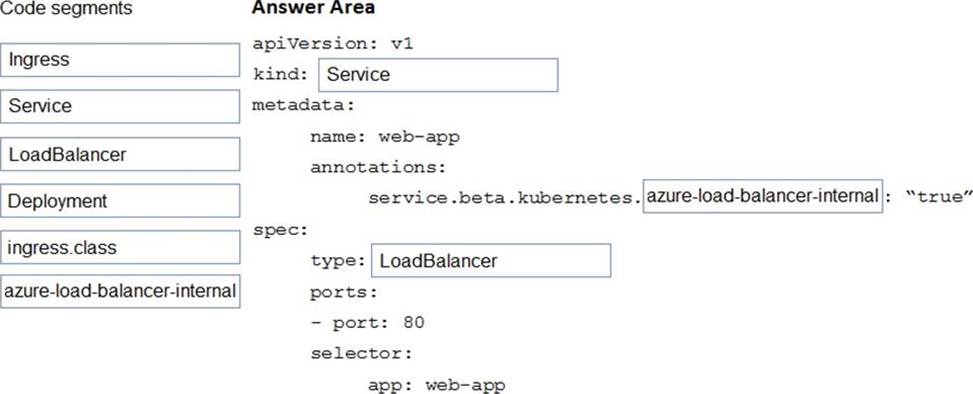
To create an internal load balancer, create a service manifest named internal-lb.yaml with the service type LoadBalancer and the azure-load-balancer-internal annotation as shown in the following example:
YAML:
apiVersion: v1
kind: Service
metadata:
name: internal-app
annotations:
service.beta.kubernetes.io/azure-load-balancer-internal: "true"
spec:
type: LoadBalancer
ports:
– port: 80 selector:
app: internal-app
Reference: https://docs.microsoft.com/en-us/azure/aks/internal-lb