
Microsoft AZ-204 Practice Exams
Last updated on Nov 16,2026- Exam Code: AZ-204
- Exam Name: Developing Solutions for Microsoft Azure
- Certification Provider: Microsoft
- Latest update: Nov 16,2026
DRAG DROP
You are developing a Docker/Go using Azure App Service Web App for Containers. You plan to run the container in an App Service on Linux. You identify a Docker container image to use.
None of your current resource groups reside in a location that supports Linux. You must minimize the number of resource groups required.
You need to create the application and perform an initial deployment.
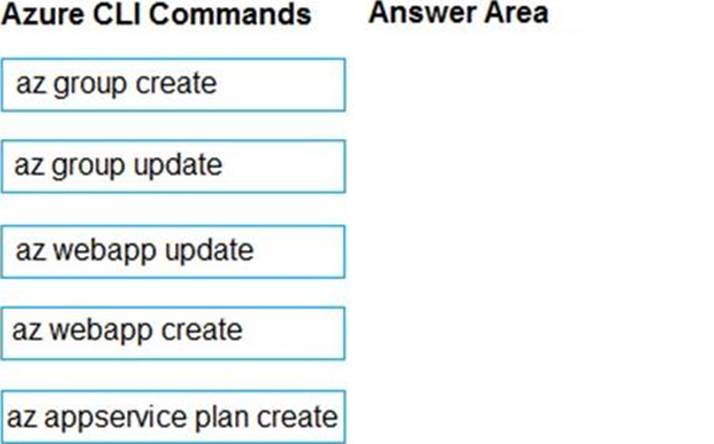
Which three Azure CLI commands should you use to develop the solution? To answer, move the appropriate commands from the list of commands to the answer area and arrange them in the correct order.
Explanation:
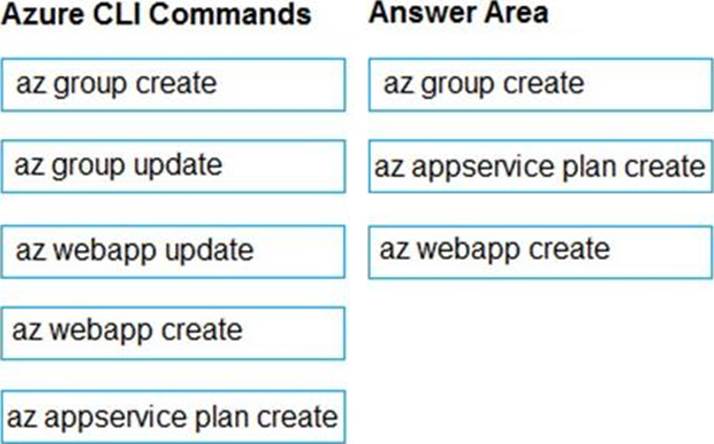
You can host native Linux applications in the cloud by using Azure Web Apps. To create a Web App for Containers, you must run Azure CLI commands that create a group, then a service plan, and finally the web app itself.
Step 1: az group create
In the Cloud Shell, create a resource group with the az group create command.
Step 2: az appservice plan create
In the Cloud Shell, create an App Service plan in the resource group with the az appservice plan create command.
Step 3: az webapp create
In the Cloud Shell, create a web app in the myAppServicePlan App Service plan with the az webapp create command. Don’t forget to replace with a unique app name, and <docker-ID> with your Docker ID.
Reference: https://docs.microsoft.com/mt-mt/azure/app-service/containers/quickstart-docker-go?view=sql-server-ver15
DRAG DROP
You are developing a Docker/Go using Azure App Service Web App for Containers. You plan to run the container in an App Service on Linux. You identify a Docker container image to use.
None of your current resource groups reside in a location that supports Linux. You must minimize the number of resource groups required.
You need to create the application and perform an initial deployment.
Which three Azure CLI commands should you use to develop the solution? To answer, move the appropriate commands from the list of commands to the answer area and arrange them in the correct order.
Explanation:
You can host native Linux applications in the cloud by using Azure Web Apps. To create a Web App for Containers, you must run Azure CLI commands that create a group, then a service plan, and finally the web app itself.
Step 1: az group create
In the Cloud Shell, create a resource group with the az group create command.
Step 2: az appservice plan create
In the Cloud Shell, create an App Service plan in the resource group with the az appservice plan create command.
Step 3: az webapp create
In the Cloud Shell, create a web app in the myAppServicePlan App Service plan with the az webapp create command. Don’t forget to replace with a unique app name, and <docker-ID> with your Docker ID.
Reference: https://docs.microsoft.com/mt-mt/azure/app-service/containers/quickstart-docker-go?view=sql-server-ver15
DRAG DROP
You are developing a Docker/Go using Azure App Service Web App for Containers. You plan to run the container in an App Service on Linux. You identify a Docker container image to use.
None of your current resource groups reside in a location that supports Linux. You must minimize the number of resource groups required.
You need to create the application and perform an initial deployment.
Which three Azure CLI commands should you use to develop the solution? To answer, move the appropriate commands from the list of commands to the answer area and arrange them in the correct order.
Explanation:
You can host native Linux applications in the cloud by using Azure Web Apps. To create a Web App for Containers, you must run Azure CLI commands that create a group, then a service plan, and finally the web app itself.
Step 1: az group create
In the Cloud Shell, create a resource group with the az group create command.
Step 2: az appservice plan create
In the Cloud Shell, create an App Service plan in the resource group with the az appservice plan create command.
Step 3: az webapp create
In the Cloud Shell, create a web app in the myAppServicePlan App Service plan with the az webapp create command. Don’t forget to replace with a unique app name, and <docker-ID> with your Docker ID.
Reference: https://docs.microsoft.com/mt-mt/azure/app-service/containers/quickstart-docker-go?view=sql-server-ver15
You develop and deploy a web app to Azure App Service. The Azure App Service uses a Basic plan in a region.
Users report that the web app is responding must capture the complete call stack to help performance issues in code. Call stack data must be correlated across app instances. You must minimize cost and impact to users on the web app.
You need to capture the telemetry.
Which three actions should you perform? Each answer presents part Of the solution. NOTE: Each correct selection is worth point
- A . Enable Application Insights site extensions.
- B . Enable Profiler.
- C . Restart all apps in the App Service plan.
- D . Enable Snapshot debugger.
- E . Enable remote debugging.
- F . Enable the Always On setting for the app service.
- G . Upgrade the Azure App Service plan to Premium
DRAG DROP
You are developing a REST web service. Customers will access the service by using an Azure API Management instance.
The web service does not correctly handle conflicts. Instead of returning an HTTP status code of 409, the service returns a status code of 500. The body of the status message contains only the word conflict.
You need to ensure that conflicts produce the correct response.
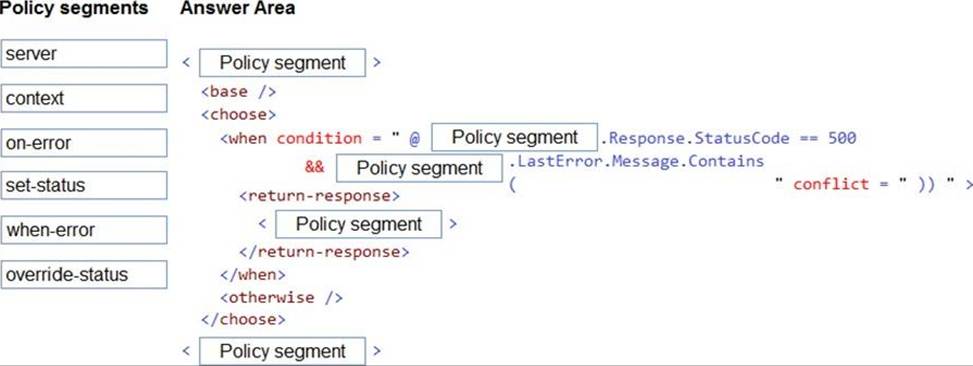
How should you complete the policy? To answer, drag the appropriate code segments to the correct locations. Each code segment may be used once, more than once, or not at all. You may need to drag the split bar between panes or scroll to view content. NOTE: Each correct selection is worth one point.
Explanation:
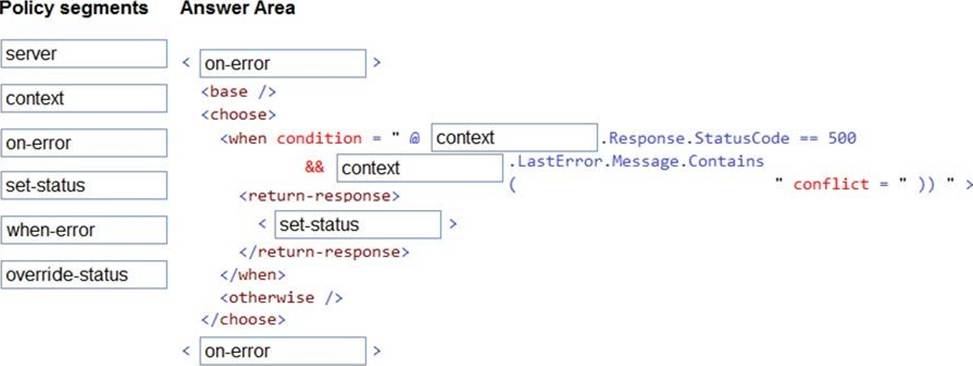
Box 1: on-error
Policies in Azure API Management are divided into inbound, backend, outbound, and on-error.
If there is no on-error section, callers will receive 400 or 500 HTTP response messages if an error condition occurs.
Box 2: context
Box 3: context
Box 4: set-status
The return-response policy aborts pipeline execution and returns either a default or custom response to the caller. Default response is 200 OK with no body.
Custom response can be specified via a context variable or policy statements.
Syntax:
<return-response response-variable-name="existing context variable"> <set-header/>
<set-body/>
<set-status/>
</return-response>
Box 5: on-error
Reference: https://docs.microsoft.com/en-us/azure/api-management/api-management-error-handling-policies
https://docs.microsoft.com/en-us/azure/api-management/api-management-transformation-policies
HOTSPOT
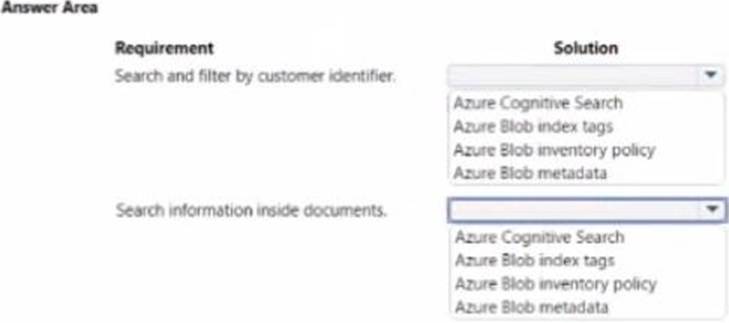
You are developing a solution to store documents in Azure Blob storage. Customers upload documents to multiple containers. Documents consist of PDF, CSV, Microsoft Office format, and plain text files.
The solution must process millions of documents across hundreds of containers.
The solution must meet the following requirements:
* Document must the categorized by a customer identifier as they are uploaded to the storage account.
* Allow filtering by the customer identifier.
* Allow searching of information contained within a document.
* Minimize costs.
You created and configure a standard general-purpose v2 storage account to support the solution.
You need to implement the solution. NOTE: Each correct selection is worth one point.
Explanation:
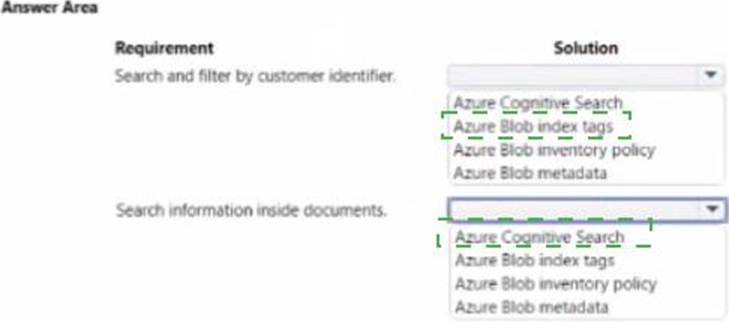
Azure Blob Index tags: https://docs.microsoft.com/en-us/azure/storage/blobs/storage-blob-index-how-to?tabs=azure-portal
Azure Cognitive Search: Search inside documents
You are creating a hazard notification system that has a single signaling server which triggers audio and visual alarms to start and stop.
You implement Azure Service Bus to publish alarms. Each alarm controller uses Azure Service Bus to receive alarm signals as part of a transaction. Alarm events must be recorded for audit purposes. Each transaction record must include information about the alarm type that was activated.
You need to implement a reply trail auditing solution.
Which two actions should you perform? Each correct answer presents part of the solution. NOTE: Each correct selection is worth one point.
- A . Assign the value of the hazard message SessionID property to the ReplyToSessionId property.
- B . Assign the value of the hazard message MessageId property to the DevileryCount property.
- C . Assign the value of the hazard message SessionID property to the SequenceNumber property.
- D . Assign the value of the hazard message MessageId property to the CorrelationId property.
- E . Assign the value of the hazard message SequenceNumber property to the DeliveryCount property.
- F . Assign the value of the hazard message MessageId property to the SequenceNumber property.
A, C
Explanation:
Reference: https://docs.microsoft.com/en-us/azure/service-bus-messaging/service-bus-messages-payloads
DRAG DROP
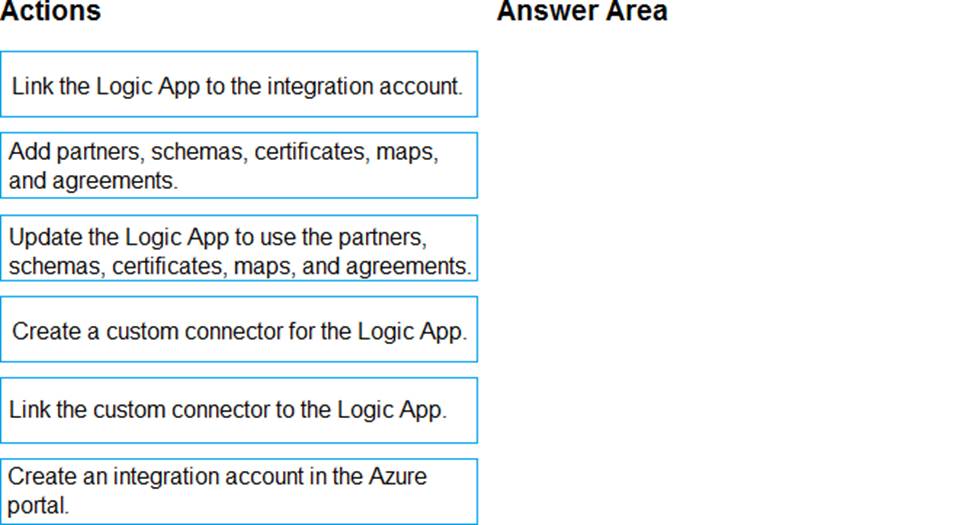
You need to support the message processing for the ocean transport workflow.
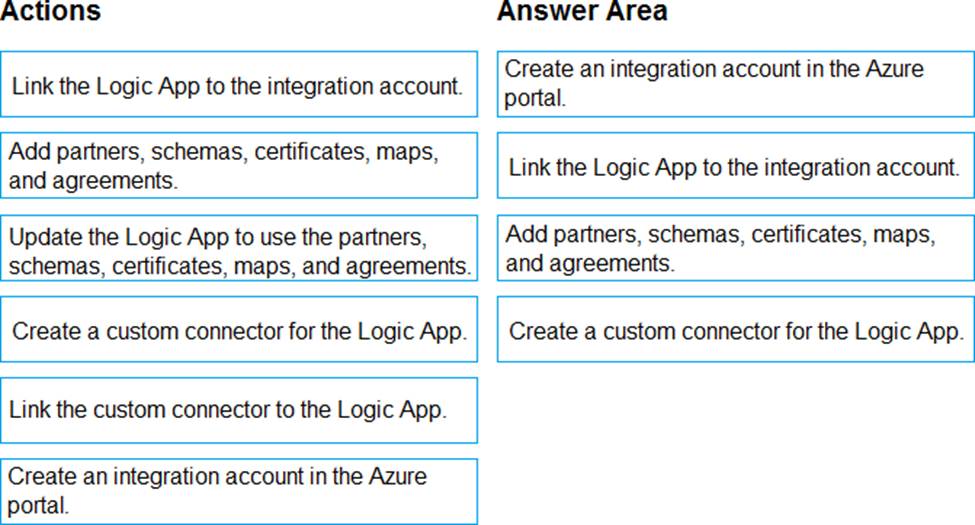
Which four actions should you perform in sequence? To answer, move the appropriate actions from the list of actions to the answer area and arrange them in the correct order.
Explanation:
Step 1: Create an integration account in the Azure portal
You can define custom metadata for artifacts in integration accounts and get that metadata during runtime for your logic app to use. For example, you can provide metadata for artifacts, such as partners, agreements, schemas, and maps – all store metadata using key-value pairs.
Step 2: Link the Logic App to the integration account
A logic app that’s linked to the integration account and artifact metadata you want to use.
Step 3: Add partners, schemas, certificates, maps, and agreements
Step 4: Create a custom connector for the Logic App.
Reference: https://docs.microsoft.com/bs-latn-ba/azure/logic-apps/logic-apps-enterprise-integration-metadata
DRAG DROP
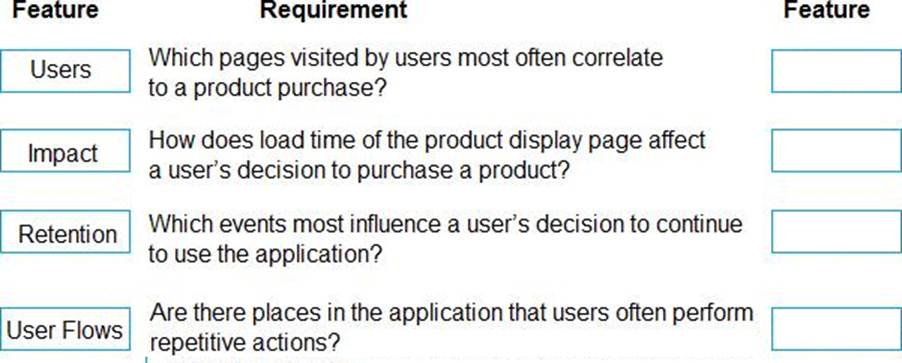
You develop an ASP.NET Core MVC application. You configure the application to track webpages and custom events.
You need to identify trends in application usage.
Which Azure Application Insights Usage Analysis features should you use? To answer, drag the appropriate features to the correct requirements. Each feature may be used once, more than once, or not at all. You may need to drag the split bar between panes or scroll to view content. NOTE: Each correct selection is worth one point.
Explanation:
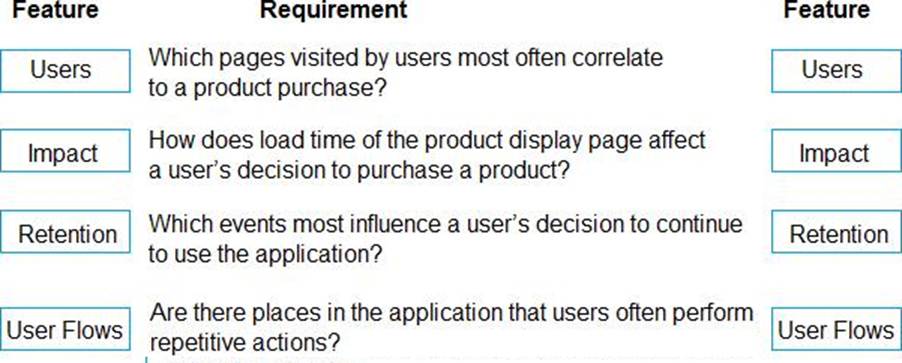
Box1: Users
Box 2: Impact
One way to think of Impact is as the ultimate tool for settling arguments with someone on your team about how slowness in some aspect of your site is affecting whether users stick around. While users may tolerate a certain amount of slowness, Impact gives you insight into how best to balance optimization and performance to maximize user conversion.
Box 3: Retention
The retention feature in Azure Application Insights helps you analyze how many users return to your app, and how often they perform particular tasks or achieve goals. For example, if you run a game site, you could compare the numbers of users who return to the site after losing a game with the number who return after winning. This knowledge can help you improve both your user experience and your business strategy.
Box 4: User flows
The User Flows tool visualizes how users navigate between the pages and features of your site. It’s great for answering questions like:
How do users navigate away from a page on your site?
What do users click on a page on your site?
Where are the places that users churn most from your site?
Are there places where users repeat the same action over and over?
Incorrect Answers:
Funnel: If your application involves multiple stages, you need to know if most customers are progressing through the entire process, or if they are ending the process at some point. The progression through a series of steps in a web application is known as a funnel. You can use Azure Application Insights Funnels to gain insights into your users, and monitor step-by-step conversion rates.
Reference: https://docs.microsoft.com/en-us/azure/azure-monitor/app/usage-impact
DRAG DROP
You develop an ASP.NET Core MVC application. You configure the application to track webpages and custom events.
You need to identify trends in application usage.
Which Azure Application Insights Usage Analysis features should you use? To answer, drag the appropriate features to the correct requirements. Each feature may be used once, more than once, or not at all. You may need to drag the split bar between panes or scroll to view content. NOTE: Each correct selection is worth one point.
Explanation:
Box1: Users
Box 2: Impact
One way to think of Impact is as the ultimate tool for settling arguments with someone on your team about how slowness in some aspect of your site is affecting whether users stick around. While users may tolerate a certain amount of slowness, Impact gives you insight into how best to balance optimization and performance to maximize user conversion.
Box 3: Retention
The retention feature in Azure Application Insights helps you analyze how many users return to your app, and how often they perform particular tasks or achieve goals. For example, if you run a game site, you could compare the numbers of users who return to the site after losing a game with the number who return after winning. This knowledge can help you improve both your user experience and your business strategy.
Box 4: User flows
The User Flows tool visualizes how users navigate between the pages and features of your site. It’s great for answering questions like:
How do users navigate away from a page on your site?
What do users click on a page on your site?
Where are the places that users churn most from your site?
Are there places where users repeat the same action over and over?
Incorrect Answers:
Funnel: If your application involves multiple stages, you need to know if most customers are progressing through the entire process, or if they are ending the process at some point. The progression through a series of steps in a web application is known as a funnel. You can use Azure Application Insights Funnels to gain insights into your users, and monitor step-by-step conversion rates.
Reference: https://docs.microsoft.com/en-us/azure/azure-monitor/app/usage-impact