
Microsoft AZ-204 Practice Exams
Last updated on Nov 16,2026- Exam Code: AZ-204
- Exam Name: Developing Solutions for Microsoft Azure
- Certification Provider: Microsoft
- Latest update: Nov 16,2026
DRAG DROP
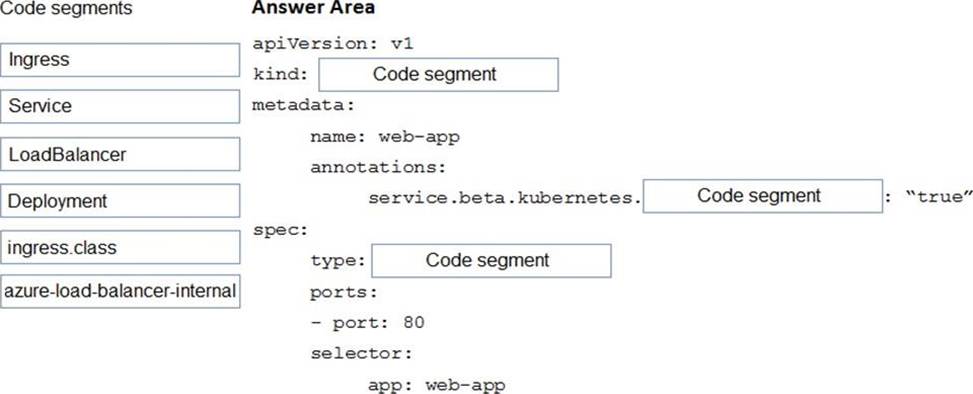
You are preparing to deploy an application to an Azure Kubernetes Service (AKS) cluster.
The application must only be available from within the VNet that includes the cluster.
You need to deploy the application.
How should you complete the deployment YAML? To answer, drag the appropriate YAML segments to the correct locations. Each YAML segment may be used once, more than once, or not at all. You may need to drag the split bar between panes or scroll to view content. NOTE: Each correct selection is worth one point.
Explanation:
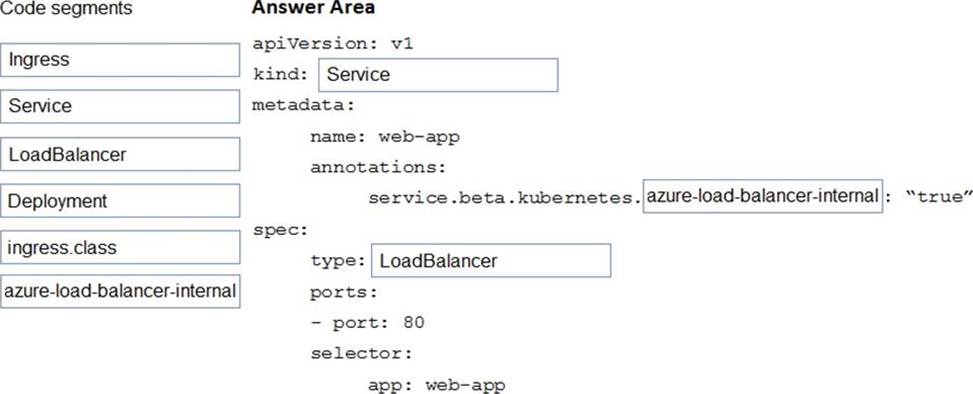
To create an internal load balancer, create a service manifest named internal-lb.yaml with the service type LoadBalancer and the azure-load-balancer-internal annotation as shown in the following example:
YAML:
apiVersion: v1
kind: Service
metadata:
name: internal-app
annotations:
service.beta.kubernetes.io/azure-load-balancer-internal: "true"
spec:
type: LoadBalancer
ports:
– port: 80 selector:
app: internal-app
Reference: https://docs.microsoft.com/en-us/azure/aks/internal-lb
You develop a serverless application using several Azure Functions. These functions connect to data
from within the code.
You want to configure tracing for an Azure Function App project.
You need to change configuration settings in the hostjson file.
Which tool should you use?
- A . Azure portal
- B . Azure PowerShell
- C . Azure Functions Core Tools (Azure CLI)
- D . Visual Studio
A
Explanation:
The function editor built into the Azure portal lets you update the function.json file and the code file for a function. The host.json file, which contains some runtime-specific configurations, is in the root folder of the function app.
Reference: https://docs.microsoft.com/en-us/azure/azure-functions/functions-reference#fileupdate
HOTSPOT
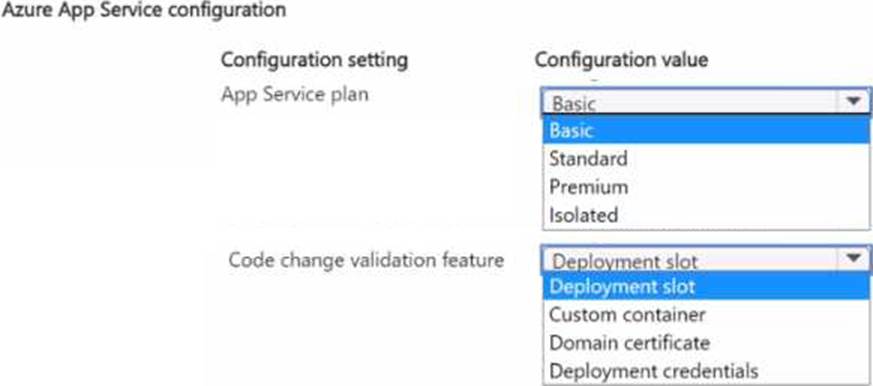
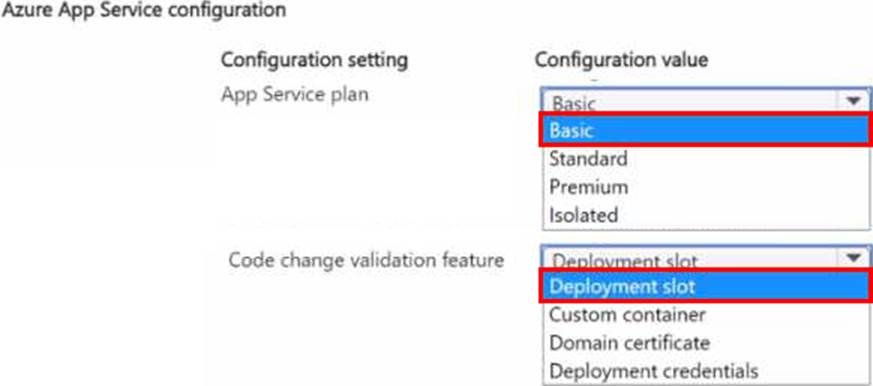
You need to configure App Service to support the corporate website migration.
Which configuration should you use? To answer, select the appropriate options in the answer area NOTE: Each correct selection is worth one point.
DRAG DROP
You are developing a solution for a hospital to support the following use cases:
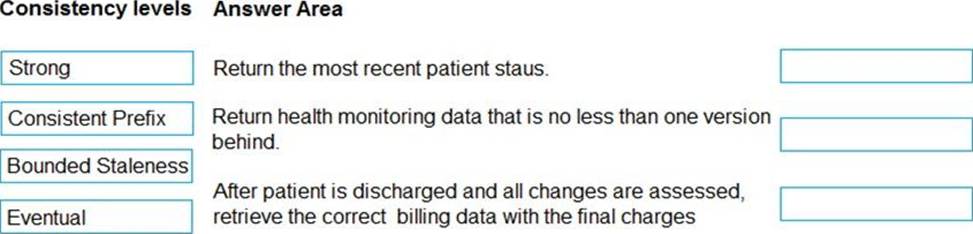
• The most recent patient status details must be retrieved even if multiple users in different locations have updated the patient record.
• Patient health monitoring data retrieved must be the current version or the prior version.
• After a patient is discharged and all charges have been assessed, the patient billing record contains the final charges.
You provision a Cosmos DB NoSQL database and set the default consistency level for the database account to Strong. You set the value for Indexing Mode to Consistent.
You need to minimize latency and any impact to the availability of the solution. You must override the default consistency level at the query level to meet the required consistency guarantees for the scenarios.
Which consistency levels should you implement? To answer, drag the appropriate consistency levels to the correct requirements. Each consistency level may be used once, more than once, or not at all.
You may need to drag the split bar between panes or scroll to view content. NOTE: Each correct selection is worth one point.
Explanation:
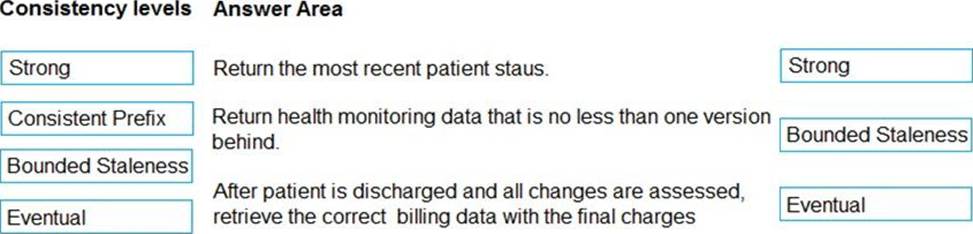
Box 1: Strong
Strong: Strong consistency offers a linearizability guarantee. The reads are guaranteed to return the most recent committed version of an item. A client never sees an uncommitted or partial write. Users are always guaranteed to read the latest committed write.
Box 2: Bounded staleness
Bounded staleness: The reads are guaranteed to honor the consistent-prefix guarantee. The reads might lag behind writes by at most "K" versions (that is "updates") of an item or by "t" time interval. When you choose bounded staleness, the "staleness" can be configured in two ways:
The number of versions (K) of the item
The time interval (t) by which the reads might lag behind the writes
Box 3: Eventual
Eventual: There’s no ordering guarantee for reads. In the absence of any further writes, the replicas eventually converge.
Incorrect Answers:
Consistent prefix: Updates that are returned contain some prefix of all the updates, with no gaps.
Consistent prefix guarantees that reads never see out-of-order writes.
Reference: https://docs.microsoft.com/en-us/azure/cosmos-db/consistency-levels
DRAG DROP
You are developing a solution for a hospital to support the following use cases:
• The most recent patient status details must be retrieved even if multiple users in different locations have updated the patient record.
• Patient health monitoring data retrieved must be the current version or the prior version.
• After a patient is discharged and all charges have been assessed, the patient billing record contains the final charges.
You provision a Cosmos DB NoSQL database and set the default consistency level for the database account to Strong. You set the value for Indexing Mode to Consistent.
You need to minimize latency and any impact to the availability of the solution. You must override the default consistency level at the query level to meet the required consistency guarantees for the scenarios.
Which consistency levels should you implement? To answer, drag the appropriate consistency levels to the correct requirements. Each consistency level may be used once, more than once, or not at all.
You may need to drag the split bar between panes or scroll to view content. NOTE: Each correct selection is worth one point.
Explanation:
Box 1: Strong
Strong: Strong consistency offers a linearizability guarantee. The reads are guaranteed to return the most recent committed version of an item. A client never sees an uncommitted or partial write. Users are always guaranteed to read the latest committed write.
Box 2: Bounded staleness
Bounded staleness: The reads are guaranteed to honor the consistent-prefix guarantee. The reads might lag behind writes by at most "K" versions (that is "updates") of an item or by "t" time interval. When you choose bounded staleness, the "staleness" can be configured in two ways:
The number of versions (K) of the item
The time interval (t) by which the reads might lag behind the writes
Box 3: Eventual
Eventual: There’s no ordering guarantee for reads. In the absence of any further writes, the replicas eventually converge.
Incorrect Answers:
Consistent prefix: Updates that are returned contain some prefix of all the updates, with no gaps.
Consistent prefix guarantees that reads never see out-of-order writes.
Reference: https://docs.microsoft.com/en-us/azure/cosmos-db/consistency-levels
DRAG DROP
You are developing a solution for a hospital to support the following use cases:
• The most recent patient status details must be retrieved even if multiple users in different locations have updated the patient record.
• Patient health monitoring data retrieved must be the current version or the prior version.
• After a patient is discharged and all charges have been assessed, the patient billing record contains the final charges.
You provision a Cosmos DB NoSQL database and set the default consistency level for the database account to Strong. You set the value for Indexing Mode to Consistent.
You need to minimize latency and any impact to the availability of the solution. You must override the default consistency level at the query level to meet the required consistency guarantees for the scenarios.
Which consistency levels should you implement? To answer, drag the appropriate consistency levels to the correct requirements. Each consistency level may be used once, more than once, or not at all.
You may need to drag the split bar between panes or scroll to view content. NOTE: Each correct selection is worth one point.
Explanation:
Box 1: Strong
Strong: Strong consistency offers a linearizability guarantee. The reads are guaranteed to return the most recent committed version of an item. A client never sees an uncommitted or partial write. Users are always guaranteed to read the latest committed write.
Box 2: Bounded staleness
Bounded staleness: The reads are guaranteed to honor the consistent-prefix guarantee. The reads might lag behind writes by at most "K" versions (that is "updates") of an item or by "t" time interval. When you choose bounded staleness, the "staleness" can be configured in two ways:
The number of versions (K) of the item
The time interval (t) by which the reads might lag behind the writes
Box 3: Eventual
Eventual: There’s no ordering guarantee for reads. In the absence of any further writes, the replicas eventually converge.
Incorrect Answers:
Consistent prefix: Updates that are returned contain some prefix of all the updates, with no gaps.
Consistent prefix guarantees that reads never see out-of-order writes.
Reference: https://docs.microsoft.com/en-us/azure/cosmos-db/consistency-levels
HOTSPOT
You need to correct the VM issues.
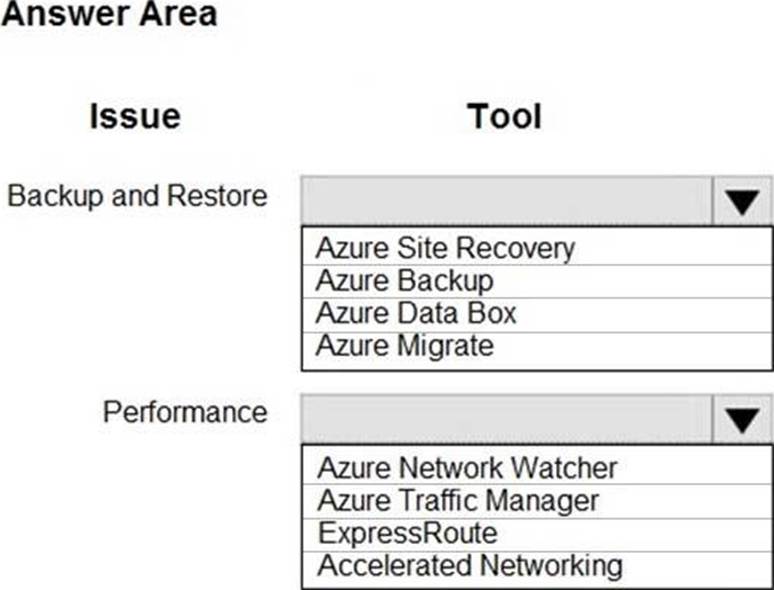
Which tools should you use? To answer, select the appropriate options in the answer area. NOTE: Each correct selection is worth one point.
Explanation:
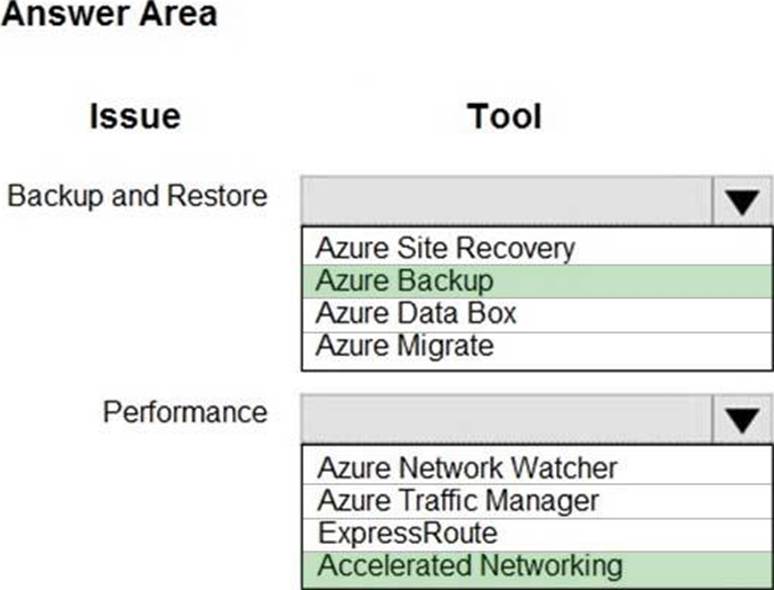
Backup and Restore: Azure Backup
Scenario: The VM is critical and has not been backed up in the past. The VM must enable a quick restore from a 7-day snapshot to include in-place restore of disks in case of failure.
In-Place restore of disks in IaaS VMs is a feature of Azure Backup.
Performance: Accelerated Networking
Scenario: The VM shows high network latency, jitter, and high CPU utilization.
Accelerated networking enables single root I/O virtualization (SR-IOV) to a VM, greatly improving its networking performance. This high-performance path bypasses the host from the datapath, reducing latency, jitter, and CPU utilization, for use with the most demanding network workloads on supported VM types.
Reference: https://azure.microsoft.com/en-us/blog/an-easy-way-to-bring-back-your-azure-vm-with-in-place-restore/
HOTSPOT
You need to correct the VM issues.
Which tools should you use? To answer, select the appropriate options in the answer area. NOTE: Each correct selection is worth one point.
Explanation:
Backup and Restore: Azure Backup
Scenario: The VM is critical and has not been backed up in the past. The VM must enable a quick restore from a 7-day snapshot to include in-place restore of disks in case of failure.
In-Place restore of disks in IaaS VMs is a feature of Azure Backup.
Performance: Accelerated Networking
Scenario: The VM shows high network latency, jitter, and high CPU utilization.
Accelerated networking enables single root I/O virtualization (SR-IOV) to a VM, greatly improving its networking performance. This high-performance path bypasses the host from the datapath, reducing latency, jitter, and CPU utilization, for use with the most demanding network workloads on supported VM types.
Reference: https://azure.microsoft.com/en-us/blog/an-easy-way-to-bring-back-your-azure-vm-with-in-place-restore/
You are developing a web application that runs as an Azure Web App. The web application stores data in Azure SQL Database and stores files in an Azure Storage account. The web application makes HTTP requests to external services as part of normal operations.
The web application is instrumented with Application Insights. The external services are OpenTelemetry compliant.
You need to ensure that the customer ID of the signed in user is associated with all operations throughout the overall system.
What should you do?
- A . Create a new SpanContext with the TraceRags value set to the customer ID for the signed in user.
- B . On the current SpanContext, set the Traceld to the customer ID for the signed in user.
- C . Add the customer ID for the signed in user to the CorrelationContext in the web application.
- D . Set the header Ocp-Apim-Trace to the customer ID for the signed in user.
C
Explanation:
Reference: https://docs.microsoft.com/en-us/azure/azure-monitor/app/correlation
HOTSPOT
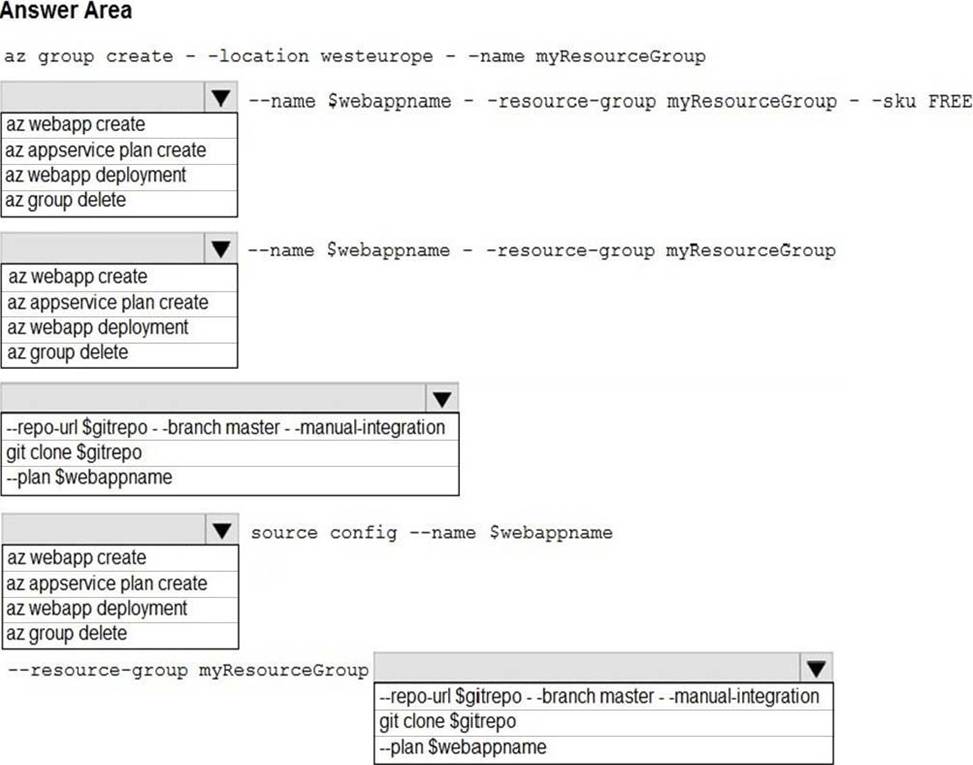
You are creating a CLI script that creates an Azure web app related services in Azure App Service.
The web app uses the following variables:

You need to automatically deploy code from GitHub to the newly created web app.
How should you complete the script? To answer, select the appropriate options in the answer area. NOTE: Each correct selection is worth one point.
Explanation:
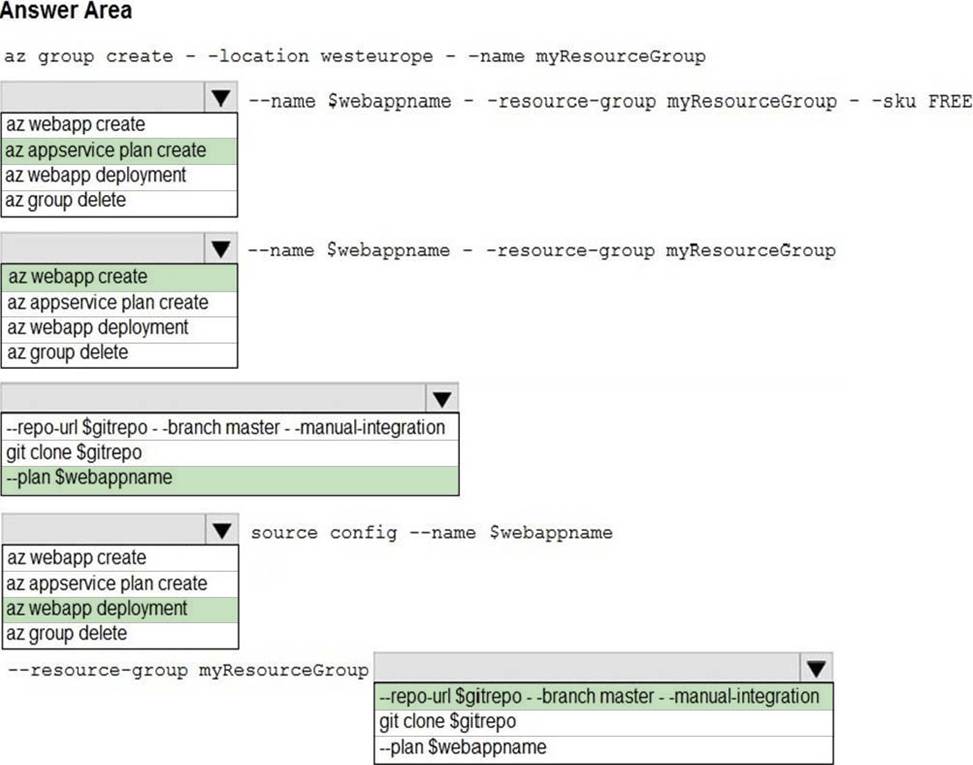
Box 1: az appservice plan create
The azure group creates command successfully returns JSON result. Now we can use resource group to create a azure app service plan
Box 2: az webapp create
Create a new web app..
Box 3: –plan $webappname
..with the serviceplan we created in step 1.
Box 4: az webapp deployment
Continuous Delivery with GitHub. Example:
az webapp deployment source config –name firstsamplewebsite1 –resource-group websites–repo-url $gitrepo –branch master –git-token $token
Box 5: –repo-url $gitrepo –branch master –manual-integration
Reference: https://medium.com/@satish1v/devops-your-way-to-azure-web-apps-with-azure-cli-206ed4b3e9b1