
Microsoft AZ-204 Practice Exams
Last updated on Nov 16,2026- Exam Code: AZ-204
- Exam Name: Developing Solutions for Microsoft Azure
- Certification Provider: Microsoft
- Latest update: Nov 16,2026
You are developing several Azure API Management (APIM) hosted APIs.
You must inspect request processing of the APIs in APIM. Requests to APIM by using a REST client must also be included.
The request inspection must include the following information:
• requests APIM sent to the API backend and the response it received
• policies applied to the response before sending back to the caller
• errors that occurred during the processing of the request and the policies applied to the errors
• original request APIM received from the caller and the policies applied to the request
You need to inspect the APIs.
Which three actions should you do? Each correct answer presents part of the solution. NOTE: Each correct selection is worth one point.
- A . Enable the Allow tracing setting for the subscription used to inspect the API.
- B . Add the Ocp-Apim-Trace header value to the API call with a value set to true
- C . Add the Ocp-Apim-Subscription-Key header value to the key for a subscription that allows access to the API.
- D . Create and configure a custom policy. Apply the policy to the outbound policy section with an API scope.
- E . Create and configure a custom policy. Apply the policy to the inbound policy section with a global scope.
ABD
Explanation:
The correct answer is A, B, and C.
To inspect request processing of the APIs in APIM, you need to do the following three actions:
Enable the Allow tracing setting for the subscription used to inspect the API. This setting allows you to trace request processing in APIM using the test console, a REST client, or a client app. You can enable this setting in the portal by selecting Subscriptions and then selecting the subscription you want to use for debugging1.
Add the Ocp-Apim-Trace header value to the API call with a value set to true. This header triggers tracing when making requests to APIM using a REST client or a client app. You also need to add the Ocp-Apim-Subscription-Key header value to the key for a subscription that allows access to the API1.
Add the Ocp-Apim-Subscription-Key header value to the key for a subscription that allows access to the API. This header authenticates your request and grants you access to the API. You can find the key for your subscription in the portal by selecting Subscriptions and then selecting Show/hide keys1.
You do not need to create and configure a custom policy for tracing request processing. The trace policy is used to add a custom trace into the request tracing output, Application Insights telemetries, and/or resource logs2. It is not required for inspecting the APIs.
DRAG DROP
You need to implement the Log policy.
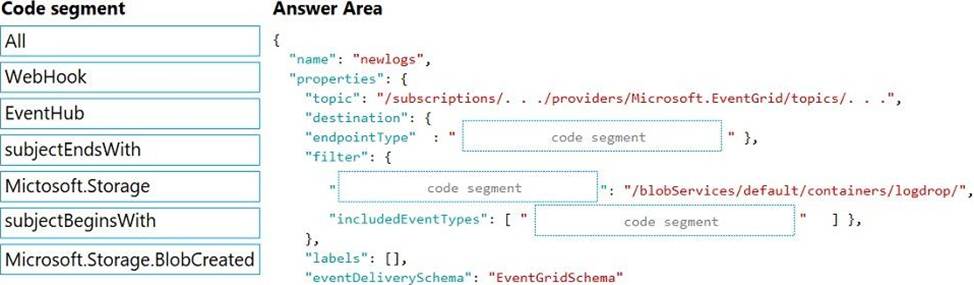
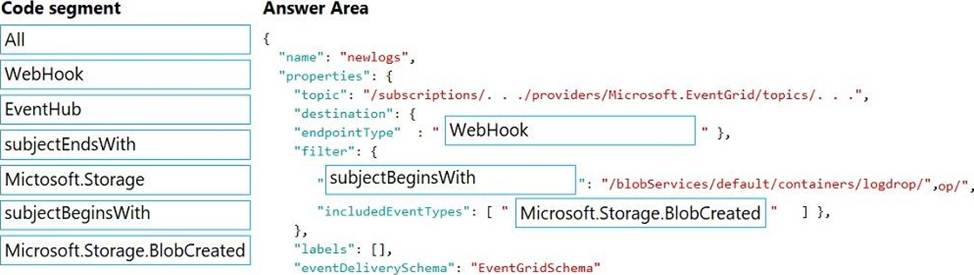
How should you complete the Azure Event Grid subscription? To answer, drag the appropriate JSON segments to the correct locations. Each JSON segment may be used once, more than once, or not at all. You may need to drag the split bar between panes to view content. NOTE: Each correct selection is worth one point.
Explanation:
Box 1: WebHook
Scenario: If an anomaly is detected, an Azure Function that emails administrators is called by using an HTTP WebHook.
endpointType: The type of endpoint for the subscription (webhook/HTTP, Event Hub, or queue).
Box 2: SubjectBeginsWith
Box 3: Microsoft.Storage.BlobCreated
Scenario: Log Policy
All Azure App Service Web Apps must write logs to Azure Blob storage. All log files should be saved to a container named logdrop. Logs must remain in the container for 15 days.
Example subscription schema
{
"properties": {
"destination": {
"endpointType": "webhook",
"properties": {
"endpointUrl":
"https://example.azurewebsites.net/api/HttpTriggerCSharp1?code=VXbGWce53l48Mt8wuotr0GPmy
J/nDT4hgdFj9DpBiRt38qqnnm5OFg=="
}
},
"filter": {
"includedEventTypes": [ "Microsoft.Storage.BlobCreated", "Microsoft.Storage.BlobDeleted" ],
"subjectBeginsWith": "blobServices/default/containers/mycontainer/log",
"subjectEndsWith": ".jpg",
"isSubjectCaseSensitive ": "true"
}
}
}
Reference: https://docs.microsoft.com/en-us/azure/event-grid/subscription-creation-schema
You are developing a .Net web application that stores data is Azure Consmos DB. The application must use the Core API and allow millions of reads and writes. The Azure Cosmos DII account has been created with multiple write region enabled. The application has been deployed to the East US2 and Central US region.
You need to update the application to support multi-region writes.
What are two possible ways to achieve this goal? Each correct answer presents parts of the solutions. NOTE: Each correct selection is worth one point.
- A . Update the ConnectionPolicy class for the Cosmos client and populate the PreferredLocations property based on the geo-proximity of the application.
- B . Update Azure Cosmos DB to use the Strong consistency level. Add indexed properties to the container to indicate region.
- C . Update the ConnectionPolicy class for the Cosmos client and set the UseMultipleWriteLocations property to true.
- D . Create and deploy a custom conflict resolution policy.
- E . Update Azure Cosmos DB to use the Session consistency level. Send the SessionToken property value from the FeedResponse object of the write action to the end-user by using a cookie.
You have an application that includes an Azure Web app and several Azure Function apps.
Application secrets including connection strings and certificates are stored in Azure Key Vault.
Secrets must not be stored in the application or application runtime environment. Changes to Azure Active Directory (Azure AD) must be minimized.
You need to design the approach to loading application secrets.
What should you do?
- A . Create a single user-assigned Managed Identity with permission to access Key Vault and configure each App Service to use that Managed Identity.
- B . Create a single Azure AD Service Principal with permission to access Key Vault and use a client secret from within the App Services to access Key Vault.
- C . Create a system assigned Managed Identity in each App Service with permission to access Key Vault.
- D . Create an Azure AD Service Principal with Permissions to access Key Vault for each App Service and use a certificate from within the App Services to access Key Vault.
C
Explanation:
Use Key Vault references for App Service and Azure Functions.
Key Vault references currently only support system-assigned managed identities. User-assigned identities cannot be used.
Reference: https://docs.microsoft.com/en-us/azure/app-service/app-service-key-vault-references
Note: This question is part of a series of questions that present the same scenario. Each question in the series contains a unique solution that might meet the stated goals. Some question sets might have more than one correct solution, while others might not have a correct solution.
After you answer a question in this section, you will NOT be able to return to it. As a result, these questions will not appear in the review screen.
You develop a software as a service (SaaS) offering to manage photographs. Users upload photos to a web service which then stores the photos in Azure Storage Blob storage. The storage account type is General-purpose V2.
When photos are uploaded, they must be processed to produce and save a mobile-friendly version of the image. The process to produce a mobile-friendly version of the image must start in less than one minute.
You need to design the process that starts the photo processing.
Solution: Create an Azure Function app that uses the Consumption hosting model and that is triggered from the blob upload.
Does the solution meet the goal?
- A . Yes
- B . No
A
Explanation:
In the Consumption hosting plan, resources are added dynamically as required by your functions.
Reference: https://docs.microsoft.com/en-us/azure/azure-functions/functions-create-storage-blob-triggered-function
DRAG DROP
You develop an Azure solution that uses Cosmos DB.
The current Cosmos DB container must be replicated and must use a partition key that is optimized for queries.
You need to implement a change feed processor solution.
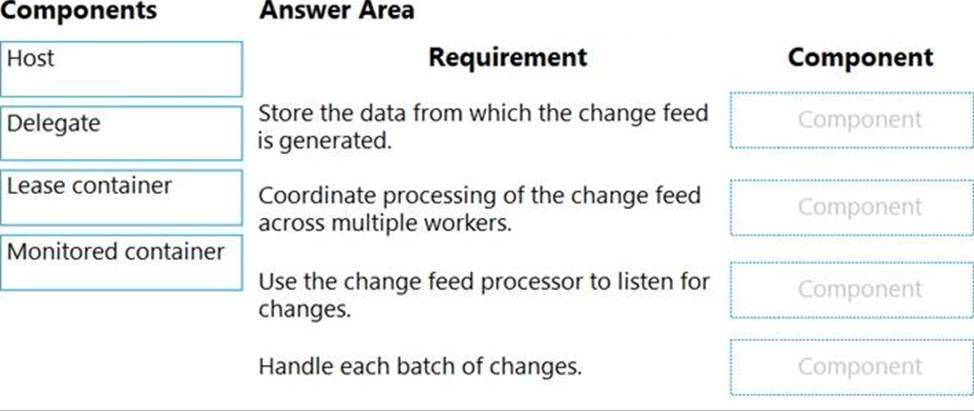
Which change feed processor components should you use? To answer, drag the appropriate components to the correct requirements. Each component may be used once, more than once, or not at all. You may need to drag the split bar between panes or scroll to view the content. NOTE: Each correct selection is worth one point.
Explanation:
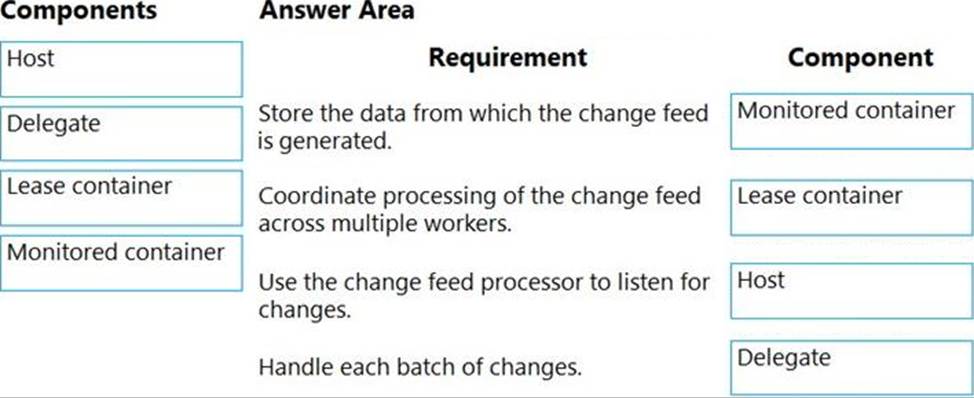
Box 1: The monitored container
The monitored container has the data from which the change feed is generated. Any inserts and updates to the monitored container are reflected in the change feed of the container.
Box 2: The lease container
The lease container acts as a state storage and coordinates processing the change feed across multiple workers. The lease container can be stored in the same account as the monitored container or in a separate account.
Box 3: The host: A host is an application instance that uses the change feed processor to listen for changes. Multiple instances with the same lease configuration can run in parallel, but each instance should have a different instance name.
Box 4: The delegate
The delegate is the code that defines what you, the developer, want to do with each batch of changes that the change feed processor reads.
Reference: https://docs.microsoft.com/en-us/azure/cosmos-db/change-feed-processor
You develop an Azure App Service web app and deploy to a production environment. You enable Application Insights for the web app.
The web app is throwing multiple exceptions in the environment.
You need to examine the state of the source code and variables when the exceptions are thrown.
Which Application Insights feature should you configure?
- A . Smart detection
- B . Snapshot Debugger
- C . Standard test
- D . Profiler
You have 100 Azure virtual machines (VMs) with the system-assigned managed identity enabled.
You need to identify the value of the object ID attribute for each of the identities.
Which command should you use?
- A . az resource show
- B . az ad signed-in-user list-owned-objects
- C . az ad user show
- D . Get-AzVM
DRAG DROP
A web service provides customer summary information for e-commerce partners. The web service is implemented as an Azure Function app with an HTTP trigger. Access to the API is provided by an Azure API Management instance. The API Management instance is configured in consumption plan mode. All API calls are authenticated by using OAuth.
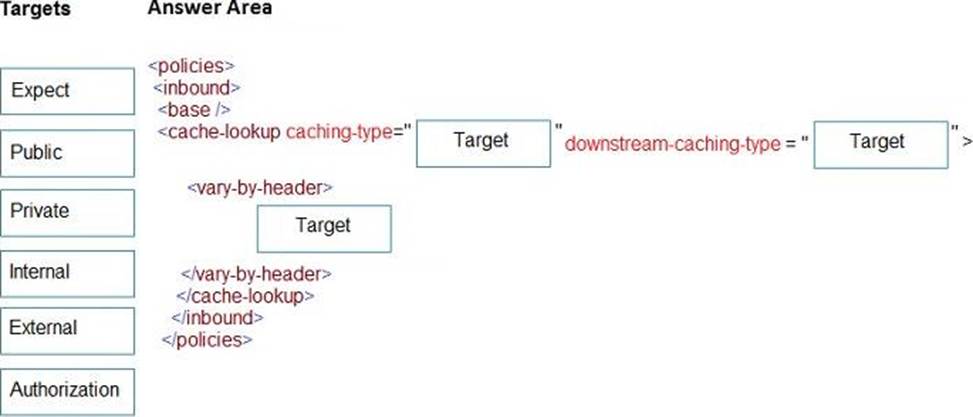
API calls must be cached. Customers must not be able to view cached data for other customers.
You need to configure API Management policies for caching.
How should you complete the policy statement?
Explanation:
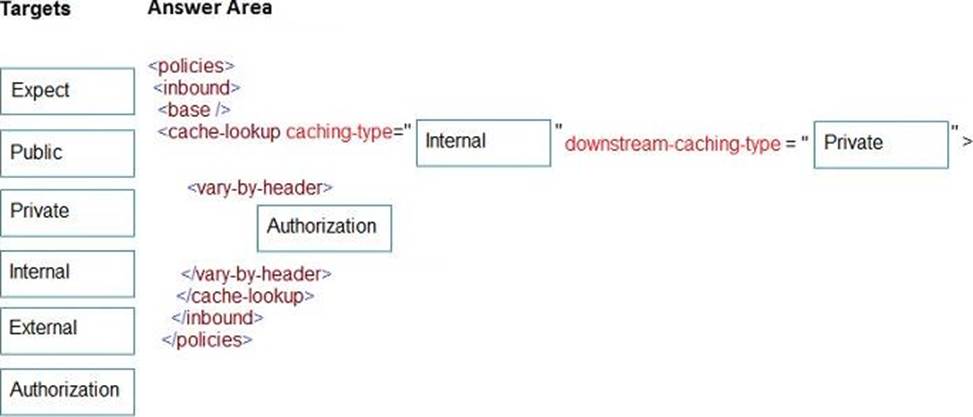
Box 1: internal
caching-type
Choose between the following values of the attribute: internal to use the built-in API Management cache, external to use the external cache as Azure Cache for Redis
prefer-external to use external cache if configured or internal cache otherwise.
Box 2: private
downstream-caching-type
This attribute must be set to one of the following values.
none – downstream caching is not allowed.
private – downstream private caching is allowed.
public – private and shared downstream caching is allowed.
Box 3: Authorization
<vary-by-header>Authorization</vary-by-header>
<!– should be present when allow-private-response-caching is "true"–>
Note: Start caching responses per value of specified header, such as Accept, Accept-Charset, Accept-Encoding, Accept-Language, Authorization, Expect, From, Host, If-Match
Reference: https://docs.microsoft.com/en-us/azure/api-management/api-management-caching-policies
DRAG DROP
A web service provides customer summary information for e-commerce partners. The web service is implemented as an Azure Function app with an HTTP trigger. Access to the API is provided by an Azure API Management instance. The API Management instance is configured in consumption plan mode. All API calls are authenticated by using OAuth.
API calls must be cached. Customers must not be able to view cached data for other customers.
You need to configure API Management policies for caching.
How should you complete the policy statement?
Explanation:
Box 1: internal
caching-type
Choose between the following values of the attribute: internal to use the built-in API Management cache, external to use the external cache as Azure Cache for Redis
prefer-external to use external cache if configured or internal cache otherwise.
Box 2: private
downstream-caching-type
This attribute must be set to one of the following values.
none – downstream caching is not allowed.
private – downstream private caching is allowed.
public – private and shared downstream caching is allowed.
Box 3: Authorization
<vary-by-header>Authorization</vary-by-header>
<!– should be present when allow-private-response-caching is "true"–>
Note: Start caching responses per value of specified header, such as Accept, Accept-Charset, Accept-Encoding, Accept-Language, Authorization, Expect, From, Host, If-Match
Reference: https://docs.microsoft.com/en-us/azure/api-management/api-management-caching-policies