
Microsoft AZ-204 Practice Exams
Last updated on Nov 16,2026- Exam Code: AZ-204
- Exam Name: Developing Solutions for Microsoft Azure
- Certification Provider: Microsoft
- Latest update: Nov 16,2026
You are developing an Azure messaging solution.
You need to ensure that the solution that meets the following requirements:
• Provide transactional support
• Provide duplicate detection.
• Store the messages for an unlimited period of time
Which two technologies will meet the requirements? Each correct answer presents a complete solution. NOTE Each correct selection is worth one point.
- A . Azure Service Bus Queue
- B . Azure Storage Queue
- C . Azure Service Bus Topic
D Azure Event Hub
AC
Explanation:
The Azure Service Bus Queue and Topic has duplicate detection.
Enabling duplicate detection helps keep track of the application-controlled MessageId of all messages sent into a queue or topic during a specified time window.
Reference: https://docs.microsoft.com/en-us/azure/service-bus-messaging/duplicate-detection
You develop a gateway solution for a public facing news API. The news API back end is implemented as a RESTful service and uses an OpenAPI specification.
You need to ensure that you can access the news API by using an Azure API Management service instance.
Which Azure PowerShell command should you run?
- A . Import-AzureRmApiManagementApi CContext $ApiMgmtContext CSpecificationFormat "Swagger" -SpecificationPath $SwaggerPath CPath $Path
- B . New-AzureRmApiManagementBackend -Context $ApiMgmtContext -Url $Url -Protocol
http - C . New-AzureRmApiManagement CResourceGroupName $ResourceGroup CName $Name C Location $Location COrganization $Org CAdminEmail $AdminEmail
- D . New-AzureRmApiManagementBackendProxy CUrl $ApiUrl
D
Explanation:
New-AzureRmApiManagementBackendProxy creates a new Backend Proxy Object which can be piped when creating a new Backend entity.
Example: Create a Backend Proxy In-Memory Object
PS C:>$secpassword = ConvertTo-SecureString "PlainTextPassword" -AsPlainText -Force
PS C:>$proxyCreds = New-Object System.Management.Automation.PSCredential ("foo", $secpassword)
PS C:>$credential = New-AzureRmApiManagementBackendProxy -Url "http://12.168.1.1:8080" – ProxyCredential $proxyCreds
PS C:>$apimContext = New-AzureRmApiManagementContext -ResourceGroupName "Api-Default-WestUS" -ServiceName "contoso"
PS C:>$backend = New-AzureRmApiManagementBackend -Context $apimContext -BackendId 123 – Url ‘https://contoso.com/awesomeapi’ -Protocol http -Title "first backend" – SkipCertificateChainValidation $true -Proxy $credential -Description "backend with proxy server"
Creates a Backend Proxy Object and sets up Backend
Incorrect Answers:
A: The Import-AzureRmApiManagementApi cmdlet imports an Azure API Management API from a
file or a URL in Web Application Description Language (WADL), Web Services Description Language (WSDL), or Swagger format.
B: New-AzureRmApiManagementBackend creates a new backend entity in Api Management.
C: The New-AzureRmApiManagement cmdlet creates an API Management deployment in Azure API Management.
Reference: https://docs.microsoft.com/en-us/powershell/module/azurerm.apimanagement/new-azurermapimanagementbackendproxy?view=azurermps-6.13.0
You are developing an ASP.NET Core website that uses Azure FrontDoor. The website is used to build custom weather data sets for researchers. Data sets are downloaded by users as Comma Separated Value (CSV) files. The data is refreshed every 10 hours.
Specific files must be purged from the FrontDoor cache based upon Response Header values.
You need to purge individual assets from the Front Door cache.
Which type of cache purge should you use?
- A . single path
- B . wildcard
- C . root domain
A
Explanation:
These formats are supported in the lists of paths to purge:
Single path purge: Purge individual assets by specifying the full path of the asset (without the protocol and domain), with the file extension, for example, /pictures/strasbourg.png;
Wildcard purge: Asterisk (*) may be used as a wildcard. Purge all folders, subfolders, and files under an endpoint with /* in the path or purge all subfolders and files under a specific folder by specifying the folder followed by /*, for example, /pictures/*.
Root domain purge: Purge the root of the endpoint with "/" in the path.
Reference: https://docs.microsoft.com/en-us/azure/frontdoor/front-door-caching
You are developing an ASP.NET Core website that uses Azure FrontDoor. The website is used to build custom weather data sets for researchers. Data sets are downloaded by users as Comma Separated Value (CSV) files. The data is refreshed every 10 hours.
Specific files must be purged from the FrontDoor cache based upon Response Header values.
You need to purge individual assets from the Front Door cache.
Which type of cache purge should you use?
- A . single path
- B . wildcard
- C . root domain
A
Explanation:
These formats are supported in the lists of paths to purge:
Single path purge: Purge individual assets by specifying the full path of the asset (without the protocol and domain), with the file extension, for example, /pictures/strasbourg.png;
Wildcard purge: Asterisk (*) may be used as a wildcard. Purge all folders, subfolders, and files under an endpoint with /* in the path or purge all subfolders and files under a specific folder by specifying the folder followed by /*, for example, /pictures/*.
Root domain purge: Purge the root of the endpoint with "/" in the path.
Reference: https://docs.microsoft.com/en-us/azure/frontdoor/front-door-caching
Note: This question is part of a series of questions that present the same scenario. Each question in the series contains a unique solution that might meet the stated goals. Some question sets might have more than one correct solution, while others might not have a correct solution.
After you answer a question in this section, you will NOT be able to return to it. As a result, these questions will not appear in the review screen.
You develop and deploy an Azure App Service API app to a Windows-hosted deployment slot named Development. You create additional deployment slots named Testing and Production. You enable auto swap on the Production deployment slot.
You need to ensure that scripts run and resources are available before a swap operation occurs.
Solution: Update the web.config file to include the applicationInitialization configuration element.
Specify custom initialization actions to run the scripts.
Does the solution meet the goal?
- A . Yes
- B . No
A
Explanation:
Specify custom warm-up.
Some apps might require custom warm-up actions before the swap. The applicationInitialization configuration element in web.config lets you specify custom initialization actions. The swap operation waits for this custom warm-up to finish before swapping with the target slot. Here’s a sample web.config fragment.
<system.webServer>
<applicationInitialization>
<add initializationPage="/" hostName="[app hostname]" />
<add initializationPage="/Home/About" hostName="[app hostname]" />
</applicationInitialization>
</system.webServer>
Reference: https://docs.microsoft.com/en-us/azure/app-service/deploy-staging-slots#troubleshoot-swaps
HOTSPOT
You are developing an application that needs access to an Azure virtual machine (VM). The access lifecycle for the application must be associated with the VM service instance. You need to enable managed identity for the VM.
How should you complete the PowerShell segment? To answer, select the appropriate options in the answer area. NOTE Each correct selection is worth one point.


Explanation:
$vm = Get-AzVM -ResourceGroupName myResourceGroup -Name myVM Update-AzVM -ResourceGroupName myResourceGroup -VM $vm -AssignIdentity:$SystemAssigned
https://docs.microsoft.com/en-us/azure/active-directory/managed-identities-azure-resources/qs-configure-powershell-windows-vm
You are developing several Azure API Management (APIM) hosted APIs.
You must transform the APIs to hide private backend information and obscure the technology stack used to implement the backend processing.
You need to protect all APIs.
What should you do?
- A . Configure and apply a new inbound policy scoped to a product.
- B . Configure and apply a new outbound policy scoped to the operation.
- C . Configure and apply a new outbound policy scoped to global.
- D . Configure and apply a new backend policy scoped to global.
You are developing several Azure API Management (APIM) hosted APIs.
You must transform the APIs to hide private backend information and obscure the technology stack used to implement the backend processing.
You need to protect all APIs.
What should you do?
- A . Configure and apply a new inbound policy scoped to a product.
- B . Configure and apply a new outbound policy scoped to the operation.
- C . Configure and apply a new outbound policy scoped to global.
- D . Configure and apply a new backend policy scoped to global.
HOTSPOT
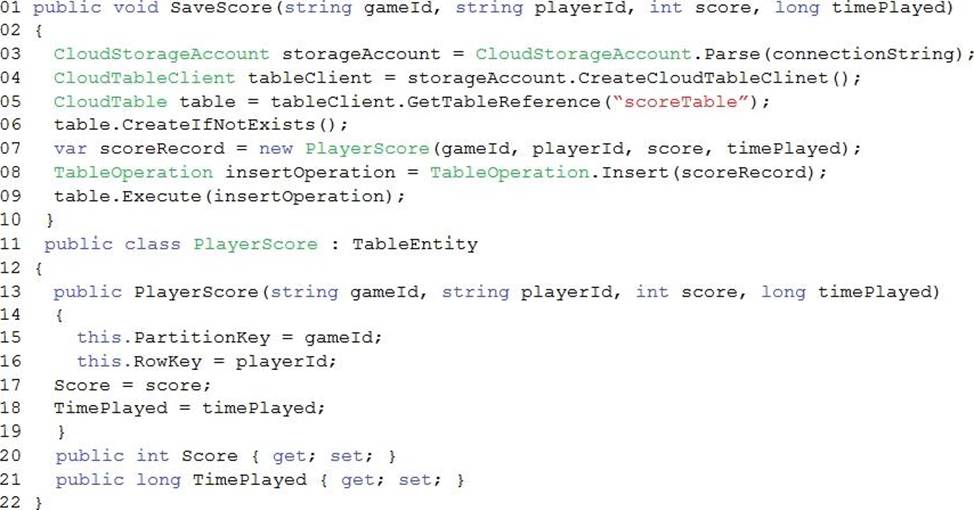
A company develops a series of mobile games. All games use a single leaderboard service.
You have the following requirements:
• Code should be scalable and allow for growth.
• Each record must consist of a playedId, gameId, score, and time played.
• When users reach a new high score, the system will save the new score using the SaveScore function below.
• Each game is assigned and Id based on the series title.
You have the following code. (Line numbers are included for reference only.)
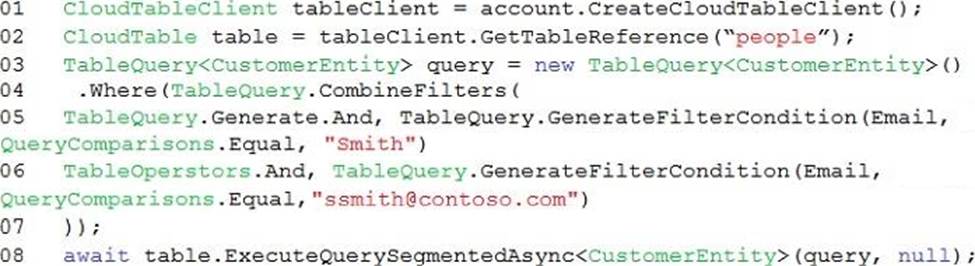
You store customer information in an Azure Cosmos database.
The following data already exists in the database:

You develop the following code. (Line numbers are included for reference only.)
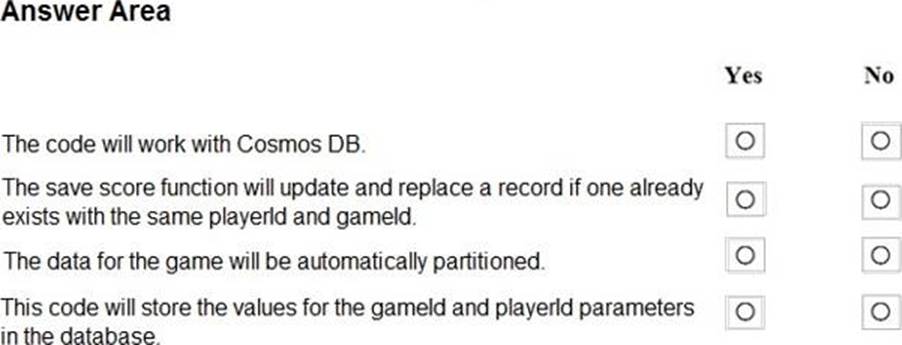
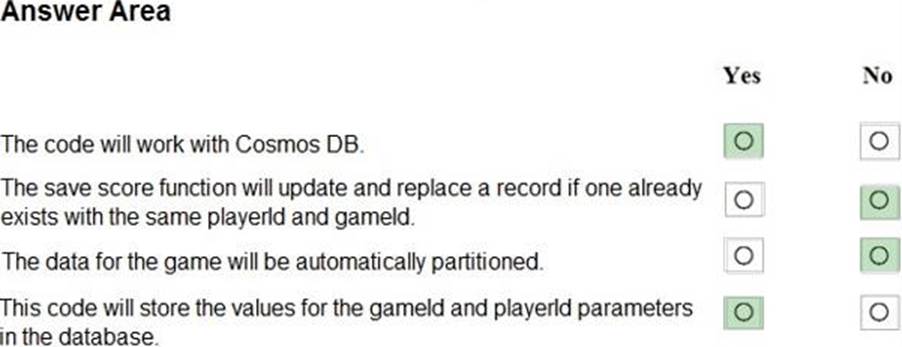
For each of the following statements, select Yes if the statement is true. Otherwise, select No. NOTE: Each correct selection is worth one point.
Explanation:
Box 1: Yes
Code for CosmosDB, example:
// Parse the connection string and return a reference to the storage account. CloudStorageAccount storageAccount = CloudStorageAccount.Parse(
CloudConfigurationManager.GetSetting("StorageConnectionString"));
// Create the table client.
CloudTableClient tableClient = storageAccount.CreateCloudTableClient(); // Retrieve a reference to the table.
CloudTable table = tableClient.GetTableReference("people");
// Create the TableOperation object that inserts the customer entity. TableOperation insertOperation = TableOperation.Insert(customer1);
Box 2: No
A new record will always be added as TableOperation.Insert is used, instead of TableOperation.InsertOrReplace.
Box 3: No
No partition key is used.
Box 4: Yes
Reference: https://docs.microsoft.com/en-us/azure/cosmos-db/table-storage-how-to-use-dotnet
Note: This question is part of a series of questions that present the same scenario. Each question in the series contains a unique solution that might meet the stated goals. Some question sets might have more than one correct solution, while others might not have a correct solution.
After you answer a question in this section, you will NOT be able to return to it As a result, these questions will not appear in the review screen.
You deploy an Azure Container Apps app and disable ingress on the container app.
Users report that they are unable to access the container app. You investigate and observe that the app has scaled to 0 instances.
You need to resolve the issue with the container app.
Solution: Enable ingress and configure the minimum replicas to 1 for the container app.
Does the solution meet the goal?
- A . Yes
- B . No