
Microsoft AZ-140 Practice Exams
Last updated on Nov 16,2026- Exam Code: AZ-140
- Exam Name: Configuring and Operating Microsoft Azure Virtual Desktop
- Certification Provider: Microsoft
- Latest update: Nov 16,2026
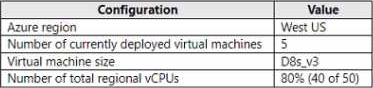
You have the Azure Virtual Desktop deployment shown in the following table.
You plan to deploy a new host pool as shown in the following table.
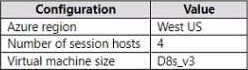
You need to ensure that you can deploy the host pool.
What should you do?
- A . Add a lock to the existing host pool.
- B . Change the proposed virtual machine size for the session hosts to D4s_v3.
- C . Stop and deallocate one of the currently deployed virtual machines.
- D . Submit a support request for service and subscription limits.
HOTSPOT
You have an Azure Virtual Desktop deployment that contains a host pool named HostPool1.
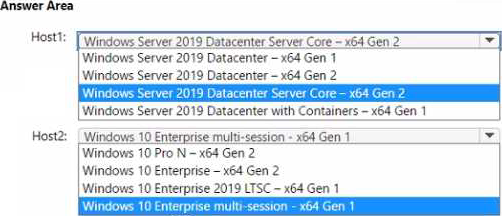
You plan to deploy session hosts to HostPool1 as shown in the following table.

Each session host must support up to 15 concurrent users.
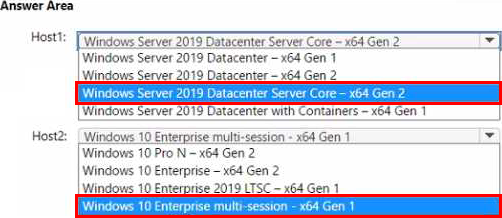
You need to recommend which operating system version to deploy from Azure Marketplace to the session hosts.
What should you recommend for each session host? To answer, select the appropriate options in the answer area.
HOTSPOT
You have an Azure Virtual Desktop deployment.
You are configuring the outbound firewall settings for the host pool.
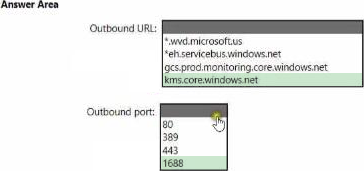
Which outbound URL and outbound port should you configure to ensure that the host machines maintain Windows activation? To answer, select the appropriate options In the answer area. NOTE: Each correct selection is worth one point.
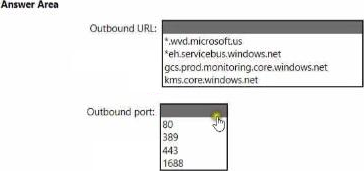
Explanation:
To ensure that the host machines maintain Windows activation, you need to allow outbound traffic to the Microsoft Key Management Services (KMS) server. The KMS service is used for activating Windows operating systems and is contacted periodically to renew the activation status.
The outbound URL for the KMS service typically includes "kms" in the hostname. Based on the provided URLs, the correct one would be:
kms.core.windows.net
For the outbound port, KMS uses the following port:
1688
So the correct options are:
Outbound URL: kms.core.windows.net
Outbound port: 1688
You plan to deploy Azure Virtual Desktop.
You are deploying Storage Spaces Direct to a cluster that will store FSLogix profile containers. The
cluster will NOT use Cloud witness.
What is the minimum number of virtual machines required for the cluster?
- A . 1
- B . 2
- C . 3
- D . 4
B
Explanation:
Storage Spaces Direct (S2D) is a feature of Windows Server that enables you to cluster servers with internal storage into a software-defined storage solution. S2D requires a minimum of two servers to form a cluster for high availability, as it uses local storage on each server to create a shared pool of storage resources.
Therefore, the minimum number of virtual machines required for an S2D cluster without using a Cloud Witness is:
B. 2
The Cloud Witness is a type of Failover Cluster quorum witness that uses Microsoft Azure as the arbitration point but would not affect the minimum number of nodes required to establish the cluster.
You have a Azure Virtual Desktop host pool named Pool1 that contains three session hosts. The
session hosts are configured to use FSLogtx profile containers. You need to configure Cloud Cache on the session hosts.
What should you do?
- A . Remove VHDlocations entries from the Windows registry.
- B . Configure FSLogtx Office Container.
- C . Add VHDlocations entries to the Windows registry.
- D . Uninstall the FSLogix agent
C
Explanation:
FSLogix Cloud Cache is a feature that allows your FSLogix profiles to be stored on multiple locations simultaneously, providing high availability and resiliency for user profiles. To configure Cloud Cache on the session hosts, you need to modify the FSLogix configuration, typically done through the Windows registry.
The specific action to take is:
C. Add VHDlocations entries to the Windows registry.
You would add the VHDLocations registry entry to specify the multiple locations where the FSLogix profile containers will be stored. The Cloud Cache feature will then replicate the profiles across these locations.
Here are the broad steps to configure Cloud Cache:
Ensure the FSLogix agent is installed on the session hosts.
Open the Windows Registry Editor on each session host.
Navigate to the key HKEY_LOCAL_MACHINESOFTWAREFSLogixProfiles.
Add or modify the VHDLocations multi-string value, listing each storage location (such as UNC paths to file shares) where you want the profile containers to be replicated.
Configure additional Cloud Cache-specific settings as required.
It’s important to note that all locations specified in the VHDLocations must be accessible from the session host for Cloud Cache to work correctly. Also, after making changes to the registry, a restart of the session host or the FSLogix service may be necessary for the changes to take effect.
HOTSPOT
You have an Azure virtual machine named VM1 that runs Windows 10 Enterprise multi-session.
You plan to add language packs to VM1 and create a custom image of VM1 for a Windows Virtual Desktop host pool.
You need to ensure that modern apps can use the additional language packs when you deploy session hosts by using the custom image.
Which command should you run first? To answer, select the appropriate options in the answer area. NOTE: Each correct selection is worth one point.


Explanation:
Reference:
https://docs.microsoft.com/en-us/troubleshoot/windows-server/deployment/issues-appx-cleanup-maintenance-task
https://docs.microsoft.com/en-us/powershell/module/scheduledtasks/disable-scheduledtask?view=windowsserver2019-ps
You have an Azure Virtual Desktop host pool named Pooll. All the session hosts in Pooll are assigned private IP addresses only.
You need to ensure that administrators can connect remotely to the session hosts. The solution must ensure that the administrators can connect to the session hosts by using Azure Command-Line Interface (CLI) and the Remote Desktop client for Windows.
What should you include in the solution?
- A . Azure Front Door Standard
- B . Azure Application Gateway Standard_v2
- C . Azure Application Gateway WAF_v2
- D . Azure Bastion Standard
HOTSPOT
You have an Azure Virtual Desktop deployment that has just-in-time (JIT) VM access enabled.
You need to request access to a session host by using JIT VM access.
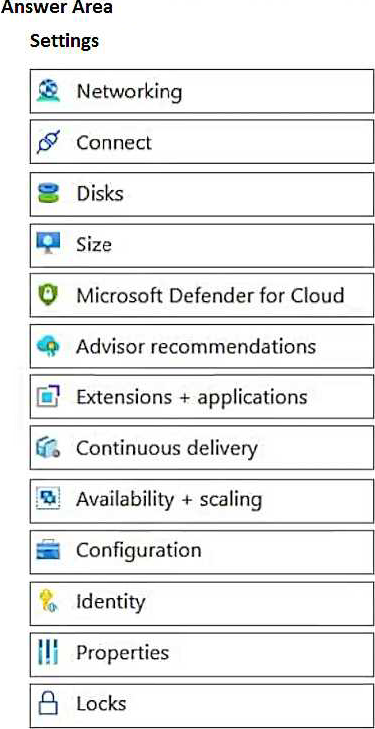
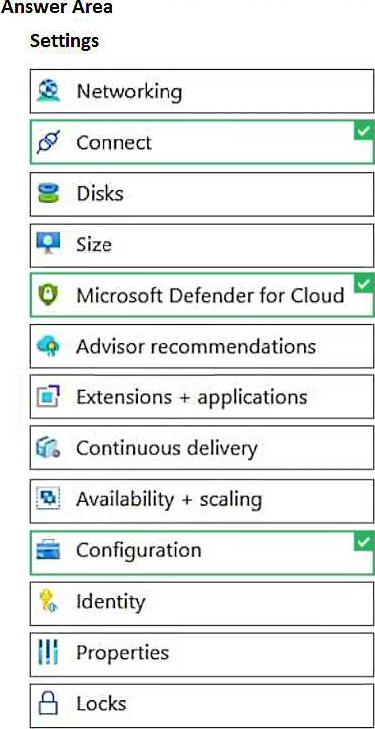
Which three virtual machine settings can you use to request access? To answer, select the appropriate settings in the answer area. NOTE: Each selection is worth one point.
Explanation:
Connect: https://learn.microsoft.com/en-us/azure/defender-for-cloud/just-in-time-access-usage#request-access-to-a-jit-enabled-vm-from-the-azure-virtual-machines-connect-page
Microsoft Defender for Cloud: https://learn.microsoft.com/en-us/azure/defender-for-cloud/just-in-time-access-usage#work-with-jit-vm-access-using-microsoft-defender-for-cloud
Configuration: https://learn.microsoft.com/en-us/azure/defender-for-cloud/just-in-time-access-usage#enable-jit-on-your-vms-from-azure-virtual-machines
Your on-premises network contains 20 Windows 10 devices.
You have an Azure Virtual Desktop deployment.
You need to deploy the Microsoft Remote Desktop client (MSRDC) to the devices. The MSRDC must be available to everyone who sign in to the devices.
What should you do?
- A . Install the MSRDC by using msiexec.exe and the ALLUSERS=1 command line option.
- B . Install the MSRDC by using msiexec.exe and the ALLUSERS=2 command line option.
- C . Install the MSRDC by using msiexec.exe and the MSIINSTALLPERUSER=1 command line option.
DRAG DROP
Your on-premises network contains an Active Directory domain named fabrikam.com that syncs with Azure Active Directory (Azure AD). The domain contains a global group named AVDusers.
You have an Azure subscription that contains the resources shown in the following table.
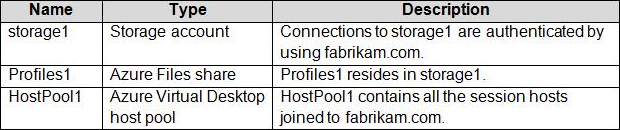
All Azure Virtual Desktop users are members of the AVDusers group.
You plan to create FSLogix profile containers in Profiles1.
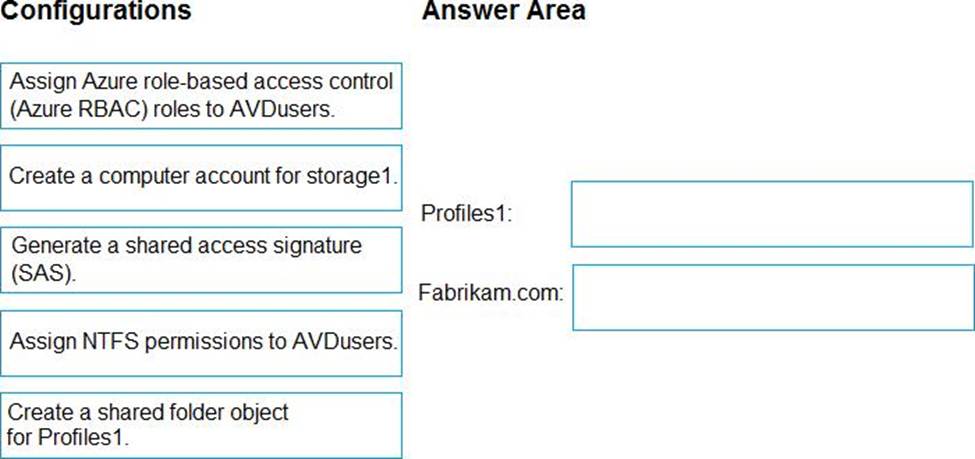
You need to configure Profiles1 and fabrikam.com to ensure that the HostPool1 sessions hosts can access the FSLogix profile containers.
What should you do? To answer, drag the appropriate configurations to the correct targets. Each configuration may be used once, more than once, or not at all. You may need to drag the split bar between panes or scroll to view content.
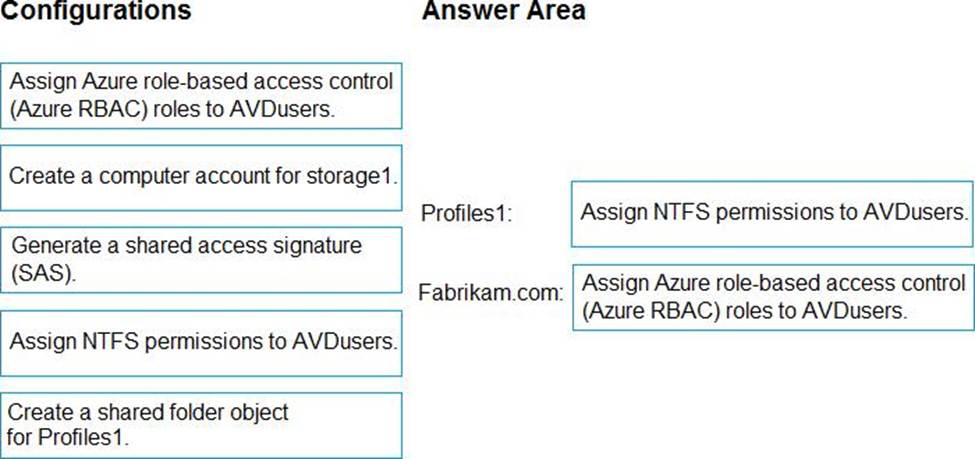
Explanation:
https://learn.microsoft.com/en-us/azure/virtual-desktop/fslogix-profile-container-configure-azure-files-active-directory?tabs=adds