
Microsoft AZ-140 Practice Exams
Last updated on Nov 16,2026- Exam Code: AZ-140
- Exam Name: Configuring and Operating Microsoft Azure Virtual Desktop
- Certification Provider: Microsoft
- Latest update: Nov 16,2026
Topic 1, Contoso. Ltd
Case study
This is a case study. Case studies are not timed separately. You can use as much exam time as you would like to complete each case. However, there may be additional case studies and sections on this exam. You must manage your time to ensure that you are able to complete all questions included on this exam in the time provided.
To answer the questions included in a case study, you will need to reference information that is provided in the case study. Case studies might contain exhibits and other resources that provide more information about the scenario that is described in the case study. Each question is independent of the other questions in this case study.
At the end of this case study, a review screen will appear. This screen allows you to review your answers and to make changes before you move to the next section of the exam. After you begin a new section, you cannot return to this section.
To start the case study
To display the first question in this case study, click the Next button. Use the buttons in the left pane to explore the content of the case study before you answer the questions. Clicking these buttons displays information such as business requirements, existing environment, and problem statements. If the case study has an All Information tab, note that the information displayed is identical to the information displayed on the subsequent tabs. When you are ready to answer a question, click the Question button to return to the question.
Overview
Contoso, Ltd. is a law firm that has a main office in Montreal and branch offices in Paris and Seattle. The Seattle branch office opened recently.
Contoso has an Azure subscription and uses Microsoft 365.
Existing Infrastructure. Active Directory
The network contains an on-premises Active Directory domain named contoso.com and an Azure Active Directory (Azure AD) tenant. One of the domain controllers runs as an Azure virtual machine and connects to a virtual network named VNET1. All internal name resolution is provided by DNS server that run on the domain controllers.
The on-premises Active Directory domain contains the organizational units (OUs) shown in the following table.
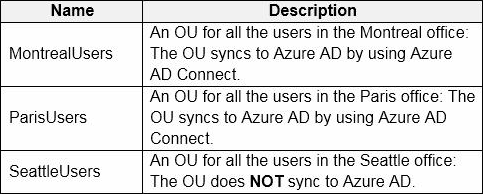
The on-premises Active Directory domain contains the users shown in the following table.
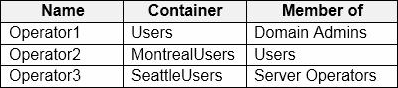
The Azure AD tenant contains the cloud-only users shown in the following table.
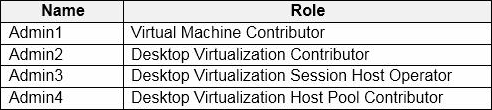
Existing Infrastructure. Network Infrastructure
All the Azure virtual networks are peered. The on-premises network connects to the virtual networks.
All servers run Windows Server 2019. All laptops and desktop computers run Windows 10 Enterprise.
Since users often work on confidential documents, all the users use their computer as a client for connecting to Remote Desktop Services (RDS).
In the West US Azure region, you have the storage accounts shown in the following table.
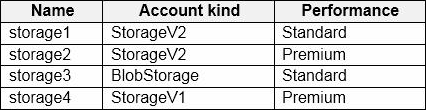
Existing Infrastructure. Remote Desktop Infrastructure
Contoso has a Remote Desktop infrastructure shown in the following table.
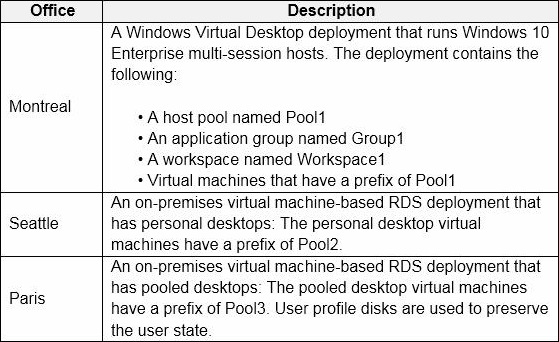
Requirements. Planned Changes
Contoso plans to implement the following changes:
– Implement FSLogix profile containers for the Paris offices.
– Deploy a Windows Virtual Desktop host pool named Pool4.
– Migrate the RDS deployment in the Seattle office to Windows Virtual Desktop in the West US Azure region.
Requirements. Pool4 Configuration
Pool4 will have the following settings:
– Host pool type: Pooled
– Max session limit: 7
– Load balancing algorithm: Depth-first
– mages: Windows 10 Enterprise multi-session
– Virtual machine size: Standard D2s v3
– Name prefix: Pool4
– Number of VMs: 5
– Virtual network: VNET4
Requirements. Technical Requirements
Contoso identifies the following technical requirements:
– Before migrating the RDS deployment in the Seattle office, obtain the recommended deployment configuration based on the current RDS utilization.
– For the Windows Virtual Desktop deployment in the Montreal office, disable audio output in the device redirection settings.
– For the Windows Virtual Desktop deployment in the Seattle office, store the FSLogix profile containers in Azure Storage.
– Enable Operator2 to modify the RDP Properties of the Windows Virtual Desktop deployment in the Montreal office.
– From a server named Server1, convert the user profile clicks to the FSLogix profile containers.
– Ensure that the Pool1 virtual machines only run during business hours.
– Use the principle of least privilege.
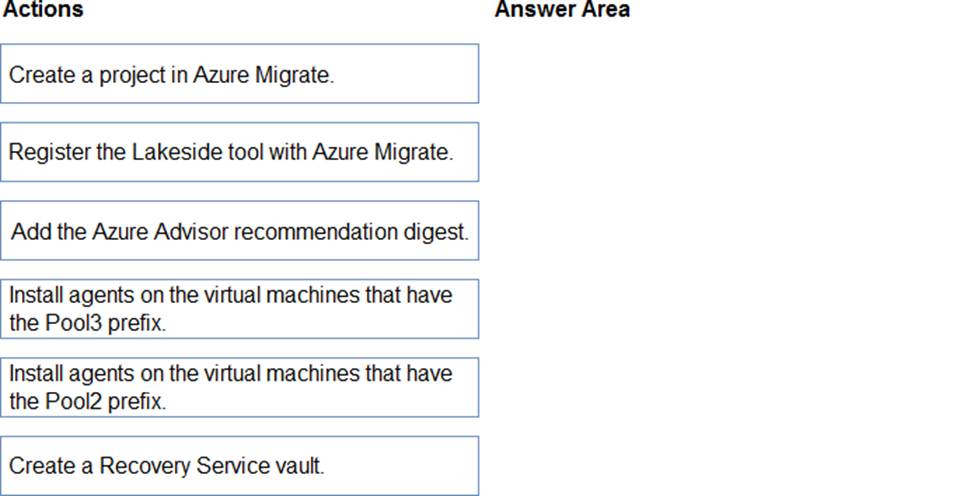
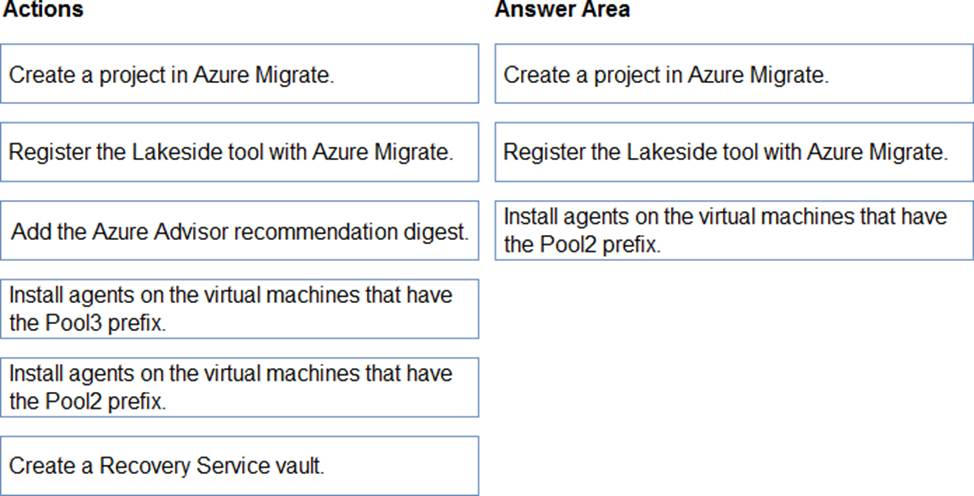
DRAG DROP
You need to evaluate the RDS deployment in the Seattle office. The solution must meet the technical requirements.
Which three actions should you perform in sequence? To answer, move the appropriate actions from the list of actions to the answer area and arrange them in the correct order.
Explanation:
Reference: https://docs.microsoft.com/en-us/azure/cloud-adoption-framework/migrate/azure-best-practices/contoso-migration-rds-to-wvd
Topic 1, Contoso. Ltd
Case study
This is a case study. Case studies are not timed separately. You can use as much exam time as you would like to complete each case. However, there may be additional case studies and sections on this exam. You must manage your time to ensure that you are able to complete all questions included on this exam in the time provided.
To answer the questions included in a case study, you will need to reference information that is provided in the case study. Case studies might contain exhibits and other resources that provide more information about the scenario that is described in the case study. Each question is independent of the other questions in this case study.
At the end of this case study, a review screen will appear. This screen allows you to review your answers and to make changes before you move to the next section of the exam. After you begin a new section, you cannot return to this section.
To start the case study
To display the first question in this case study, click the Next button. Use the buttons in the left pane to explore the content of the case study before you answer the questions. Clicking these buttons displays information such as business requirements, existing environment, and problem statements. If the case study has an All Information tab, note that the information displayed is identical to the information displayed on the subsequent tabs. When you are ready to answer a question, click the Question button to return to the question.
Overview
Contoso, Ltd. is a law firm that has a main office in Montreal and branch offices in Paris and Seattle. The Seattle branch office opened recently.
Contoso has an Azure subscription and uses Microsoft 365.
Existing Infrastructure. Active Directory
The network contains an on-premises Active Directory domain named contoso.com and an Azure Active Directory (Azure AD) tenant. One of the domain controllers runs as an Azure virtual machine and connects to a virtual network named VNET1. All internal name resolution is provided by DNS server that run on the domain controllers.
The on-premises Active Directory domain contains the organizational units (OUs) shown in the following table.
The on-premises Active Directory domain contains the users shown in the following table.
The Azure AD tenant contains the cloud-only users shown in the following table.
Existing Infrastructure. Network Infrastructure
All the Azure virtual networks are peered. The on-premises network connects to the virtual networks.
All servers run Windows Server 2019. All laptops and desktop computers run Windows 10 Enterprise.
Since users often work on confidential documents, all the users use their computer as a client for connecting to Remote Desktop Services (RDS).
In the West US Azure region, you have the storage accounts shown in the following table.
Existing Infrastructure. Remote Desktop Infrastructure
Contoso has a Remote Desktop infrastructure shown in the following table.
Requirements. Planned Changes
Contoso plans to implement the following changes:
– Implement FSLogix profile containers for the Paris offices.
– Deploy a Windows Virtual Desktop host pool named Pool4.
– Migrate the RDS deployment in the Seattle office to Windows Virtual Desktop in the West US Azure region.
Requirements. Pool4 Configuration
Pool4 will have the following settings:
– Host pool type: Pooled
– Max session limit: 7
– Load balancing algorithm: Depth-first
– mages: Windows 10 Enterprise multi-session
– Virtual machine size: Standard D2s v3
– Name prefix: Pool4
– Number of VMs: 5
– Virtual network: VNET4
Requirements. Technical Requirements
Contoso identifies the following technical requirements:
– Before migrating the RDS deployment in the Seattle office, obtain the recommended deployment configuration based on the current RDS utilization.
– For the Windows Virtual Desktop deployment in the Montreal office, disable audio output in the device redirection settings.
– For the Windows Virtual Desktop deployment in the Seattle office, store the FSLogix profile containers in Azure Storage.
– Enable Operator2 to modify the RDP Properties of the Windows Virtual Desktop deployment in the Montreal office.
– From a server named Server1, convert the user profile clicks to the FSLogix profile containers.
– Ensure that the Pool1 virtual machines only run during business hours.
– Use the principle of least privilege.
DRAG DROP
You need to evaluate the RDS deployment in the Seattle office. The solution must meet the technical requirements.
Which three actions should you perform in sequence? To answer, move the appropriate actions from the list of actions to the answer area and arrange them in the correct order.
Explanation:
Reference: https://docs.microsoft.com/en-us/azure/cloud-adoption-framework/migrate/azure-best-practices/contoso-migration-rds-to-wvd
You have an Azure subscription that contains the resources shown in the following table.

You need to ensure that users can restore files saved to their FSLogix profile.
What should you do?
- A . From the CPool1 blade in the Azure portal, create a new volume.
- B . From the Azure portal, create an Azure Backup vault and a backup policy.
- C . From the Volume1 blade in the Azure portal, create a snapshot policy.
- D . From the Azure portal, create a Recovery Services vault and a backup policy.
C
Explanation:
To ensure that users can restore files saved to their FSLogix profile, you need to implement a backup solution that allows for file-level recovery. FSLogix profiles are stored in VHD(x) files, which are essentially disk images. You would typically want to use snapshots or a backup service that can handle these types of files.
In this case, Azure NetApp Files is being used to store the FSLogix user profiles, and Azure NetApp Files supports snapshots, which can be used to restore files to a point in time.
Therefore, the correct action to take would be:
C. From the Volume1 blade in the Azure portal, create a snapshot policy.
Creating a snapshot policy will allow you to take point-in-time snapshots of the volume that stores the FSLogix profiles, which can then be used to restore user data if necessary.
The other options provided are not directly related to taking snapshots or backups of Azure NetApp Files volumes:
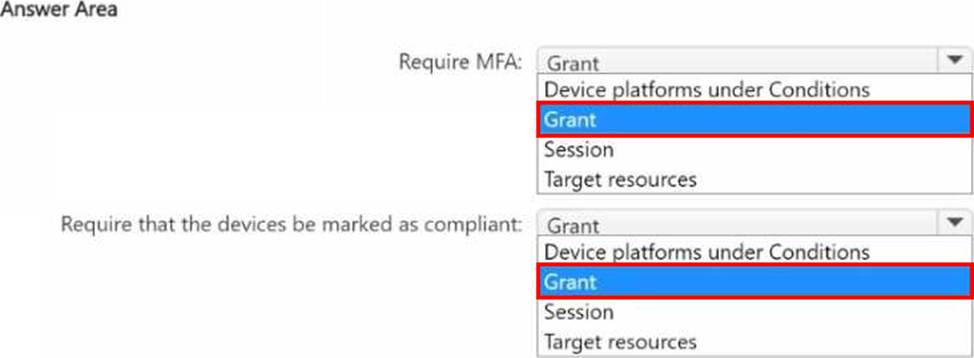
HOTSPOT
You have an Azure Virtual Desktop deployment.
Users connect to session hosts by using devices enrolled in Microsoft Intune.
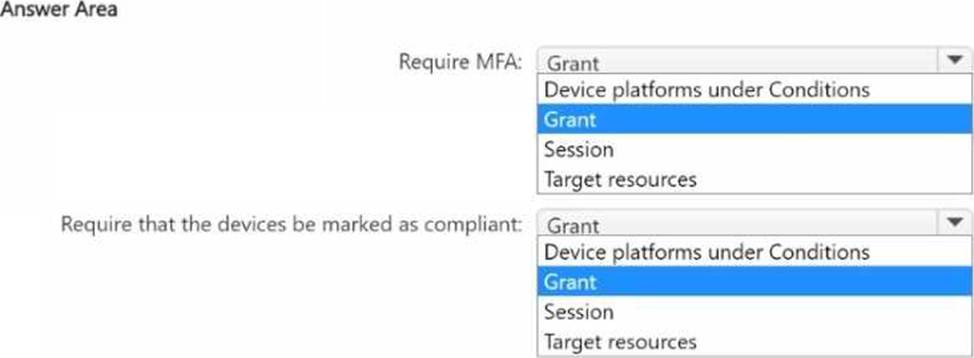
You need to create a Conditional Access policy named Policy1 to meet the following requirements:
• Require multifactor authentication (MFA).
• Require that the devices be marked as compliant.
Which settings of Policy1 should you configure for each requirement? To answer, select the appropriate options in the answer area. NOTE: Each correct selection is worth one point.
HOTSPOT
You have an A2ure subscription that contains the resources shown in the following table.
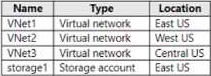
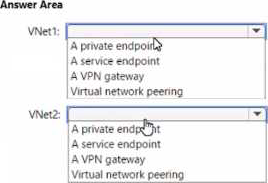
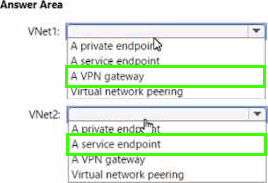
You have a virtual machine named Sever 1 that runs Windows Server and is connected to VNet3.
Which two roles should you assign to Admin2 to meet the security requirements? Each correct answer presents part of the solution. NOTE: Each correct selection is worth one point.
- A . Desktop Virtualization Host Pool Contributor
- B . Desktop Virtualization Application Group Contributor
- C . Desktop Virtualization Workspace Contributor
- D . Desktop Virtualization Application Group Reader
- E . User Access Administrator
BC
Explanation:
Note: This question is part of a series of questions that present the same scenario. Each question in the series contains a unique solution that might meet the stated goals. Some question sets might have more than one correct solution, while others might not have a correct solution.
After you answer a question in this section, you will NOT be able to return to it. As a result, these questions will not appear in the review screen.
You have an Azure Virtual Desktop deployment.
You need to ensure that users are signed out automatically when they disconnect from a session.
Solution: From the Local Group Policy Editor, you configure the Session Time Limits settings.
Does this meet the goal?
- A . Yes
- B . No
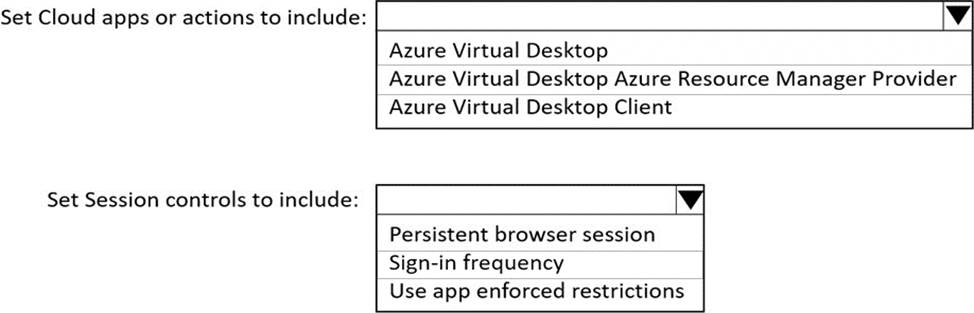
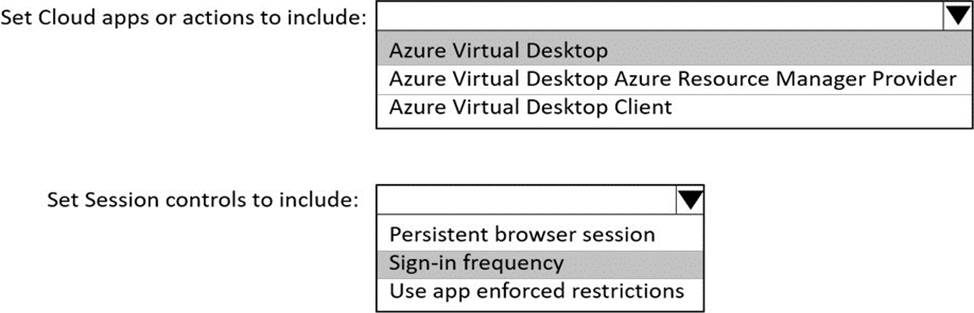
HOTSPOT
You need to configure a conditional access policy to meet the authentication requirements.
What should you include in the policy configuration? To answer, select the appropriate options in the answer area. NOTE Each correct selection is worth one point.
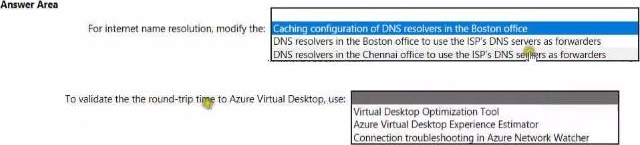
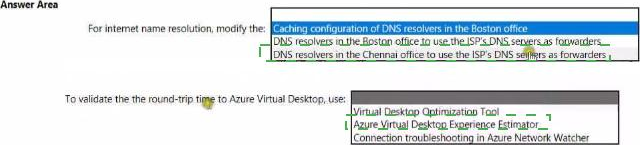
HOTSPOT
You need to recommend a DNS infrastructure that meet the performance requirements.
What should you recommend? To answer, select the appropriate options in the answer area. NOTE: Each correct selection is worth one point.
HOTSPOT
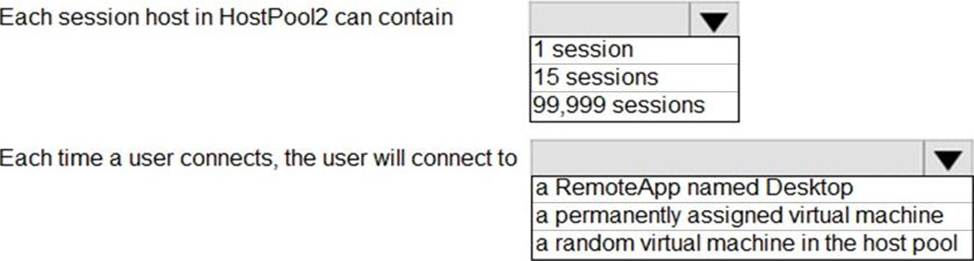
You are automating the deployment of an Azure Virtual Desktop host pool.
You deploy the Azure Resource Manager (ARM) template shown in the following exhibit.
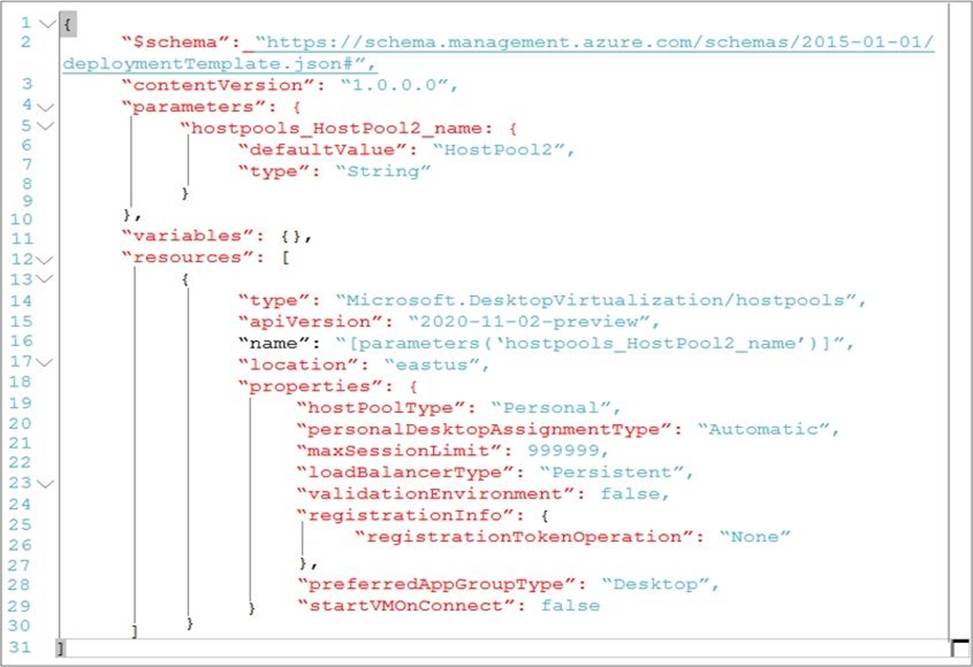
Use the drop-down menus to select the answer choice that completes each statement based on the information presented in the Dockerfile. NOTE: Each correct selection is worth one point.
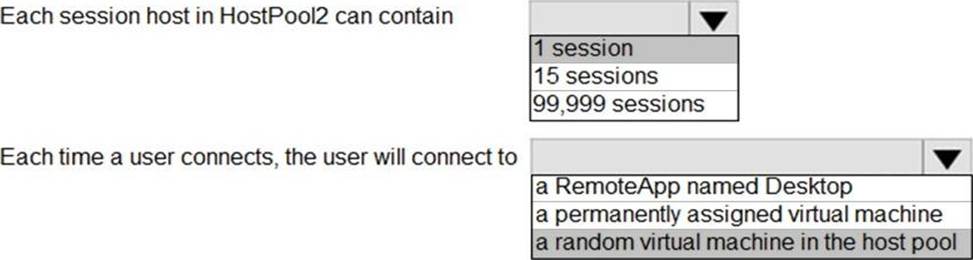
Explanation:
Reference: https://docs.microsoft.com/en-us/azure/virtual-desktop/virtual-desktop-fall-2019/configure-host-pool-personal-desktop-assignment-type-2019