
Microsoft AZ-140 Practice Exams
Last updated on Nov 16,2026- Exam Code: AZ-140
- Exam Name: Configuring and Operating Microsoft Azure Virtual Desktop
- Certification Provider: Microsoft
- Latest update: Nov 16,2026
HOTSPOT –
You have an Azure subscription.
You plan to deploy an Azure Virtual Desktop solution that will contain Windows 10 multi-session hosts in a single host pool.
The solution has the requirements shown in the following table.
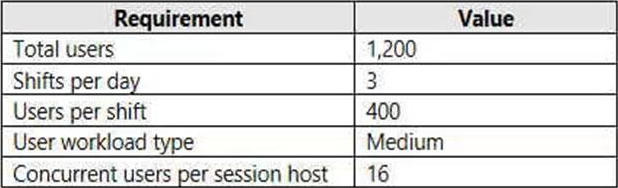
You need to configure the session host for the host pool. The solution must minimize costs.
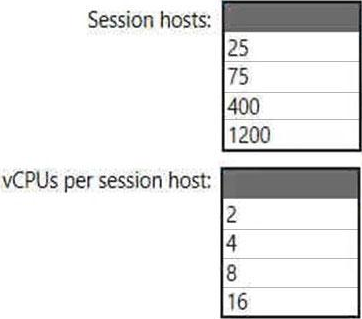
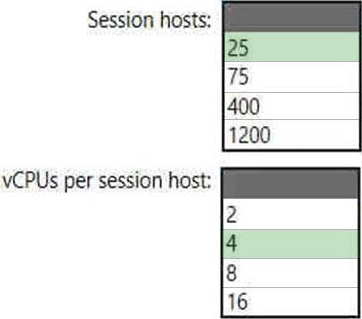
How many session hosts should the host pool contain, and how many vCPUs should each session host have? To answer, select the appropriate options in the answer area. NOTE: Each correct selection is worth one point.
HOTSPOT –
You have an Azure Virtual Desktop deployment that contains two users named User1 and User2 and the storage accounts shown in the following table.

The File share settings for storage1 are configured as shown in the following exhibit.
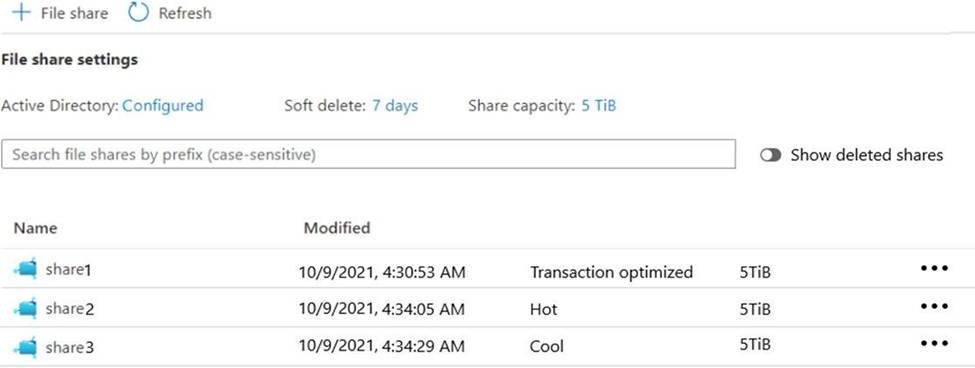
The File share settings for storage2 are configured as shown in the following exhibit.
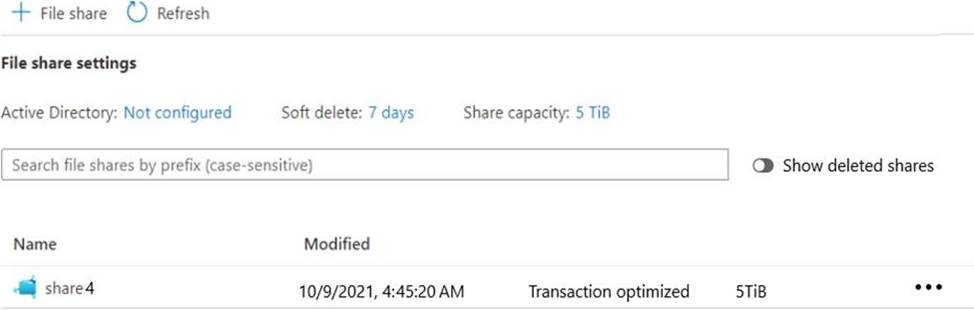
For each of the following statements, select Yes if the statement is true. Otherwise, select No. NOTE: Each correct selection is worth one point.
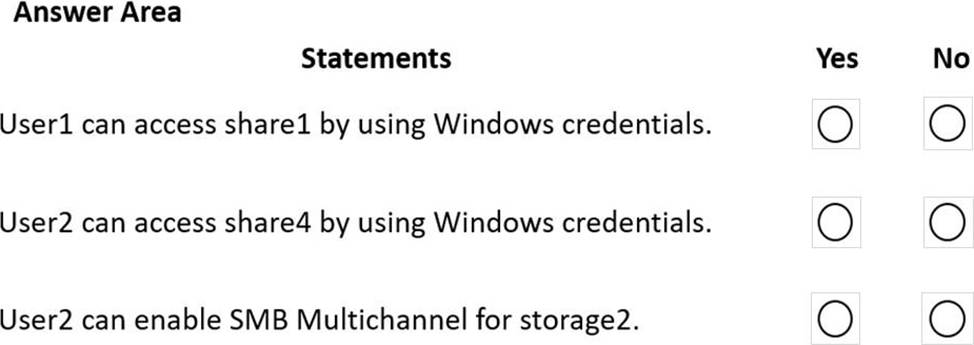
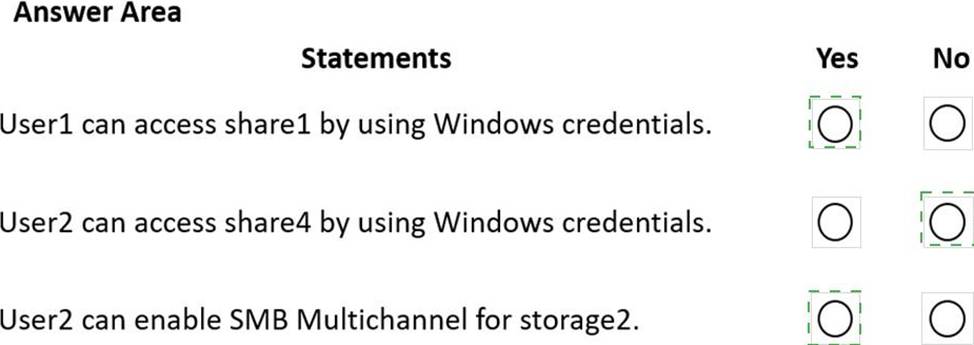
Explanation:
YES, NO, Yes
https://docs.microsoft.com/en-us/azure/storage/files/storage-files-identity-ad-ds-assign-permissions?tabs=azure-portal "Once you’ve enabled Active Directory Domain Services (AD DS) authentication on your storage account, you must configure share-level permissions in order to get access to your file shares. There are two ways you can assign share-level permissions. You can assign them to specific Azure AD users/user groups and you can assign them to all authenticated identities as a default share level permission."
You have an Azure Virtual Desktop deployment that contains a host pool named PoolL All the session hosts in Pool! are Microsoft Entra joined, You have 50 users that will access the deployment by using devices that run Linux. You need to ensure that the users can sign in to the deployment.
Which custom RDP property should you configure?
- A . securitymode
- B . Targetisaadjoined
- C . authentication level
- D . Enablecredsspsupport
You have a Windows Virtual Desktop deployment that contains the following:
✑ A host pool named Pool1
✑ Two session hosts named Host1 and Host2
✑ An application group named RemoteAppGroup1 that contains a RemoteApp named App1
You need to prevent users from copying and pasting between App1 and their local device.
What should you do?
- A . Create an AppLocker policy.
- B . Modify the locks of RemoteAppGroup1.
- C . Modify the locks of RemoteAppGroup1.
- D . Modify the RDP Properties of Pool1.
D
Explanation:
Reference: https://docs.microsoft.com/en-us/azure/virtual-desktop/customize-rdp-properties
HOTSPOT
You have an Azure Virtual Desktop host pool that contains 10 session hosts.
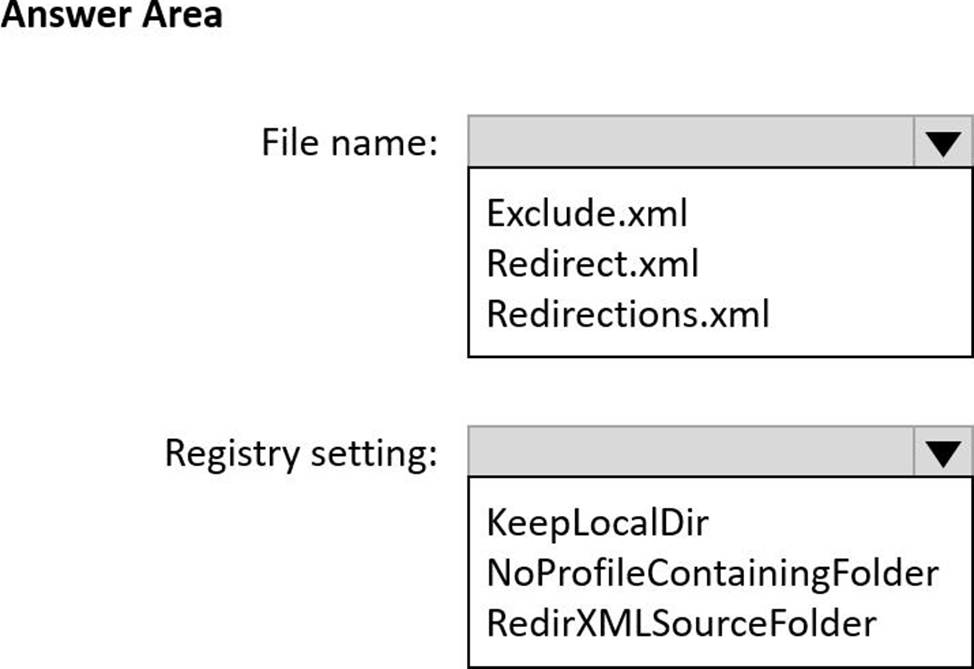
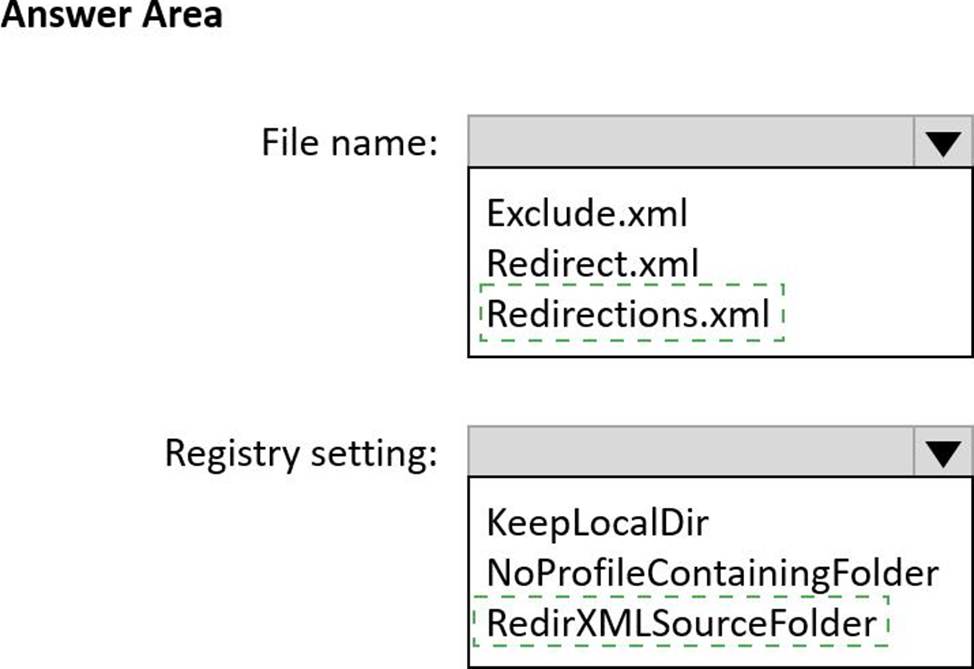
You plan to configure each session host to use an FSLogix profile container that will exclude specific folders in the user profile.
You need to perform the following configurations:
• Create a configuration file to list the excluded profile folders.
• Identify which registry setting will distribute the file to each session host automatically.
What should you name the configuration file, and which registry setting should you identify? To answer, select the appropriate options in the answer area. NOTE: Each correct selection is worth one point.
You have an Azure Virtual Desktop deployment that contains a host pool.
The pool has the following settings:
* Resource group: RG1
* Host pool name: Pool1
* Location: East US
* Host pool type: Pooled
The deployment contains the workspaces shown in the following table.
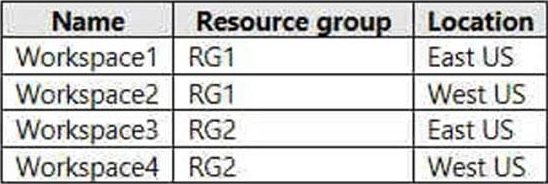
For Pool1, you plan to create a RemoteApp application group named AppGroup1.
In which workspaces can you register AppGroup1?
- A . Workspace1 and Workspace2 only
- B . Workspace1 and Workspace3 only
- C . Workspace1 only
- D . Workspace1, Workspace2, Workspace3, and Workspace4
You have an Azure subscription that contains the resources shown in the following table.
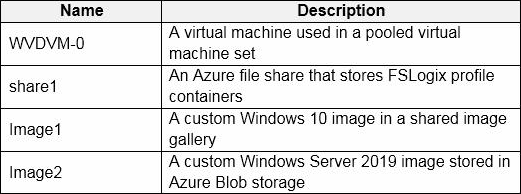
Which resources can you back up by using Azure Backup?
- A . WVDVM-0 and share1 only
- B . WVDVM-0 only
- C . WVDVM-0, Image1, and Image2 only
- D . WVDVM-0, share1, and Image1 only
- E . WVDVM-0, share1, Image1, and Image2
A
Explanation:
Reference:
https://docs.microsoft.com/en-us/azure/backup/backup-afs
https://docs.microsoft.com/en-us/azure/backup/backup-azure-vms-introduction
Note: This question is part of a series of questions that present the same scenario. Each question in the series contains a unique solution that might meet the stated goals. Some question sets might have more than one correct solution, while others might not have a correct solution.
After you answer a question in this section, you will NOT be able to return to it. As a result, these questions will not appear in the review screen.
You have an Azure Virtual Desktop deployment.
You need to ensure that users are signed out automatically when they disconnect from a session.
Solution: From the Local Group Policy Editor, you configure the Remote Session Environment settings.
Does this meet the goal?
- A . Yes
- B . No
DRAG DROP
You have a Windows Virtual Desktop deployment.
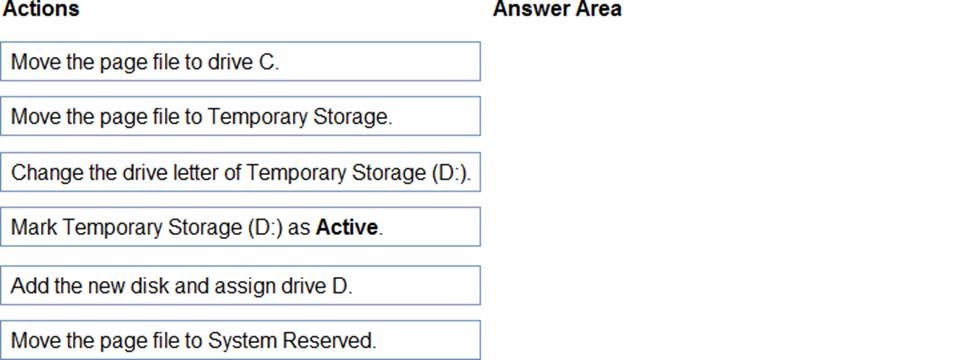
You have a session host named Host1 that has the disk layout shown in the exhibit. (Click the Exhibit tab.)
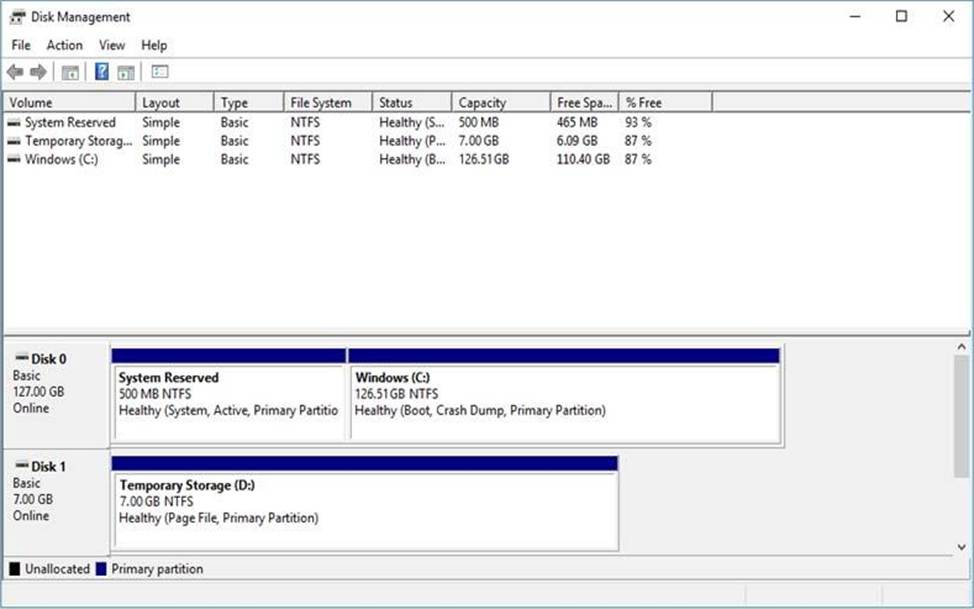
You plan to deploy an app that must be installed on D. The app requires 500 GB of disk space.
You need to add a new data disk that will be assigned the drive letter D. The solution must maintain the current performance of Host1.
Which four actions should you perform in sequence? To answer, move the appropriate actions from the list of actions to the answer area and arrange them in the correct order.
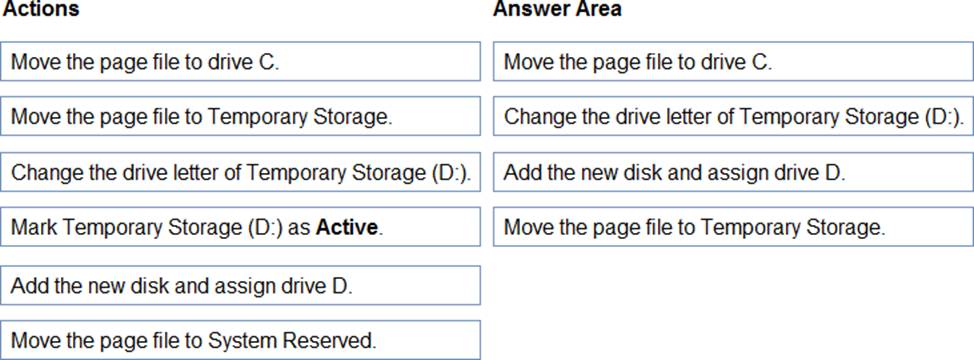
Explanation:
Reference: https://www.azurecorner.com/change-temporary-drive-azure-vm-use-d-persistent-data-disks/
You have a Azure Virtual Desktop deployment.
You Implement FSLogix profile container.
You need to ensure that the FSlogix profile containers are not used for specific users.
What should you do?
- A . Modify the RDP Properties of the host pool.
- B . Apply an Application Masking rule to each session host.
- C . Apply an AppLocker policy to each session host.
- D . Modify the local groups on each session host.
D
Explanation:
Reference: https://docs.microsoft.com/en-us/fslogix/configure-profile-container-tutorial