
Microsoft AZ-140 Practice Exams
Last updated on Nov 16,2026- Exam Code: AZ-140
- Exam Name: Configuring and Operating Microsoft Azure Virtual Desktop
- Certification Provider: Microsoft
- Latest update: Nov 16,2026
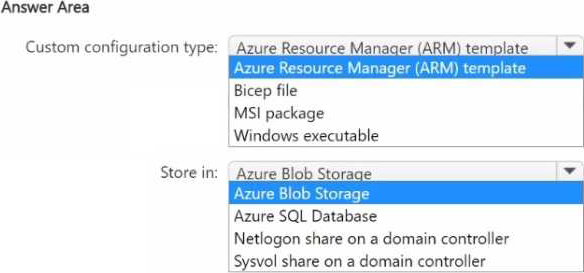
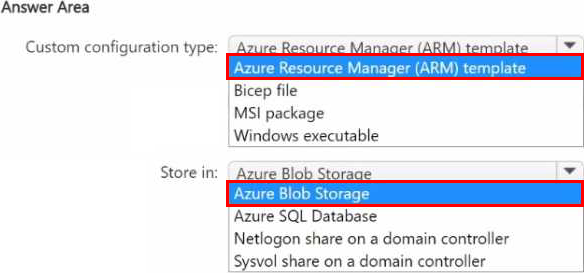
HOTSPOT
You have an Azure Virtual Desktop deployment that contains a host pool named Pooll.
Pool1 contains five session hosts joined to an Active Directory Domain Services {AD DS) domain. You plan to use the Azure portal to add additional session hosts and specify a custom configuration.
Which type of custom configuration should you use. and where should you store the custom configuration? To answer, select the appropriate options in the answer area. NOTE: Each correct selection is worth one point.
HOTSPOT
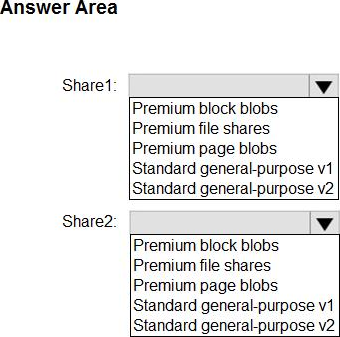
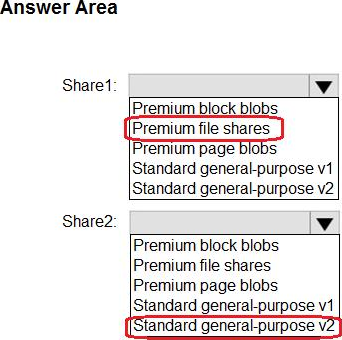
You plan to deploy two Azure file shares named Share1 and Share2 that will be used with Azure Virtual Desktop. Share1 will contain at least 100 GB of data and must be stored on SSDs. Share2 must be able to switch between Transaction optimized and Cool storage tiers and must be stored on HDDs.
You need to recommend which type of storage accounts to use for the shares. The solution must minimize costs.
What should you recommend for each share? To answer, select the appropriate options in the answer area. NOTE: Each correct selection is worth one point.
Explanation:
https://learn.microsoft.com/en-us/azure/storage/files/storage-how-to-create-file-share?tabs=azure-portal
Your network contains an on-premises Active Directory domain named contoso.com that syncs to an Azure Active Directory (Azure AD) tenant
You have an Azure Virtual Desktop host pool named Pool1 that has the following settings:
• Host pool name- Pool 1
• Host pool type: Personal
• Number of VMs: 3
The session hosts have the following configurations:
• Image used to create the virtual machines: Windows 10 Enterprise
• Virtual machines domain-Joined to: On-premises conroso.com domain
You need to ensure that you can use Microsoft EndPoint Manager to manage security updates on the session hosts.
What should you do?
- A . Create Windows 10 Enterprise multi-session images.
- B . Configure the session hosts as hybrid Azure AD-joined.
- C . Change Host pool type to Pooled and specify Load balancing algorithm as Depth-first
- D . Change Host pool type to Pooled and specify Load balancing algorithm as Breadth-first
You have an Azure Virtual Desktop deployment that uses Azure Active Directory Domain Services (Azure AD DS).
You have the following host pool:
• Name: Pool1
• Type: Personal
• Number of session hosts: 5
You plan to deploy two new session hosts to Pool1.
What should you do before you deploy the session hosts?
- A . Create a scaling plan.
- B . Precreate a computer account in Azure AD DS.
- C . Increase the maximum session limit.
- D . Create a registration key.
D
Explanation:
Before deploying new session hosts to a personal host pool in an Azure Virtual Desktop deployment that uses Azure Active Directory Domain Services (Azure AD DS), you would need to:
D. Create a registration key.
A registration key is used to register the session hosts with the host pool in Azure Virtual Desktop. When you create a registration key, the session hosts can use this key to join the pool automatically during their deployment process. This step is crucial regardless of whether the deployment uses Azure AD DS or on-premises Active Directory Domain Services.
The other options are not directly related to the initial deployment of new session hosts in the host pool:
You have an Azure subscription that contains 500 users. The users are assigned Microsoft Office 365 E1 licenses.
You deploy an Azure Virtual Desktop solution that contains Windows 10 multi-session hosts and streams a custom remote app named App1.
You need to ensure that the users are licensed to stream App1. The solution must minimize costs.
Which license should you use?
- A . Microsoft 365 E5
- B . Office 365 E3
- C . a Remote Desktop Services (RDS) client access license (CAL)
- D . Windows 10 Enterprise E3
D
Explanation:
https://azure.microsoft.com/en-us/pricing/details/virtual-desktop/
You have a hybrid Azure Active Directory (Azure AD) tenant.
You plan to deploy an Azure Virtual Desktop personal host pool. The host pool will contain 15 virtual machines that run Windows 10 Enterprise. The virtual machines will be joined to the on-premises Active Directory domain and used by the members of a domain group named Department1.
You need to ensure that each user is added automatically to the local Administrators group on the
virtual machine to which the user signs in.
What should you configure?
- A . a role assignment for the host pool
- B . a role assignment for each virtual machine
- C . a policy preference in a Group Policy Object (GPO)
- D . a device setting in Azure AD
C
Explanation:
To automatically add users to the local Administrators group on the virtual machine to which they sign in, you should configure a policy preference in a Group Policy Object (GPO). This GPO would be linked to the Organizational Unit (OU) in Active Directory that contains the virtual machines.
The policy preference can use item-level targeting to add only the user who signs in to the local Administrators group. You can also use security filtering to apply the GPO only to the members of the domain group named Department1.
The correct answer is:
C. a policy preference in a Group Policy Object (GPO)
You have an Azure Virtual Desktop deployment.
You need to recommend a solution to run containerized applications without installing the applications on the session hosts.
What should you include in the recommendation?
- A . EXE applications
- B . MSI packages
- C . APPX app packages
- D . MSIX app packages
D
Explanation:
Reference: https://docs.microsoft.com/en-us/windows/msix/msix-container
Note: This question is part of a series of questions that present the same scenario. Each question in the series contains a unique solution that might meet the stated goals. Some question sets might have more than one correct solution, while others might not have a correct solution.
After you answer a question in this section, you will NOT be able to return to it. As a result, these questions will not appear in the review screen.
You have an Azure Virtual Desktop host pool named Pool! that is integrated with a Microsoft Entra Domain Services managed domain. You need to configure idle session timeout settings for users that connect to the session hosts in Pool1.
Solution: From a Microsoft Entra joined computer, you modify the AADDC Users GPO settings.
Does this meet the goal?
- A . Yes
- B . No
HOTSPOT
Your network contains an on-premises Active Directory domain that syncs to a Microsoft Entra tenant.
The domain contains the users shown in the following table.

You have a Azure Virtual Desktop deployment that contains the application groups shown in the following table.
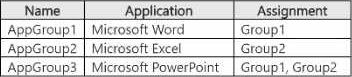
You have the workspaces shown in the following table.
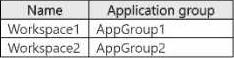
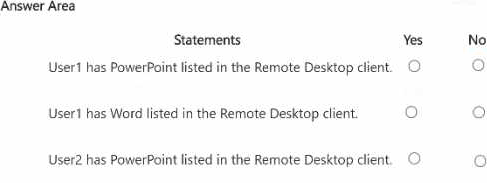
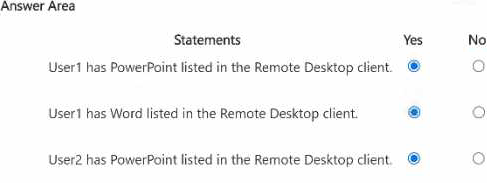
For each of the following statements, select Yes if the statement is true. Otherwise, select No. NOTE: Each correct selection is worth one point.
You have an Azure Virtual Desktop deployment that contains two host pools named Pool! and Pool2. Pool1 contains 10 session hosts and supports 100 concurrent users. Pool2 contains two session hosts and supports 20 concurrent users.
You need to recommend an Azure Virtual Desktop update solution that meets the following requirements:
• All service updates must be tested before reaching general availability.
• Testing must have a minimal impact on the organization.
• No new host pools can be created.
What should you include in the recommendation?
- A . From the properties of Pool2, enable the validation environment.
- B . From the properties of Pool2, assign a scaling plan.
- C . From the properties of Pool1, enable the validation environment.
- D . From the properties of Pool1, assign a scaling plan.