
Microsoft AZ-140 Practice Exams
Last updated on Nov 16,2026- Exam Code: AZ-140
- Exam Name: Configuring and Operating Microsoft Azure Virtual Desktop
- Certification Provider: Microsoft
- Latest update: Nov 16,2026
Note: This question is part of a series of questions that present the same scenario. Each question in the series contains a unique solution that might meet the stated goals. Some question sets might have more than one correct solution, while others might not have a correct solution.
After you answer a question in this section, you will NOT be able to return to it. As a result, these questions will not appear in the review screen.
You have an Azure Virtual Desktop deployment
You need to ensure that users are signed out automatically when they disconnect from a session.
Solution: From the Local Group Policy Editor, you configure the Connections settings.
Does this meet the goal?
- A . Yes
- B . No
Your on-premises network contains an Active Directory domain that syncs with a Microsoft Entra tenant.
You have a new Azure virtual network named VNet1.
You plan to implement an Azure Virtual Desktop host pool named Pool1. The session hosts in Pool! will be joined to the Active Directory domain.
You need to recommend a networking solution for connectivity between Azure Virtual Desktop and the on-premises network.
Which three resources should you include in the recommendation? Each correct answer presents part of the solution. NOTE: Each correct selection is worth one point.
- A . a public load balancer
- B . a local network gateway
- C . a VNet-to-VNet connection type
- D . a Site-to-site (IPSec) connection type
- E . a virtual network gateway
- F . a public IP address for every session host
DRAG DROP
You have an Azure Virtual Desktop host pool named Pool1.
You need to ensure that you can create an Azure NetApp Files volume that will host user profiles for Pool1.
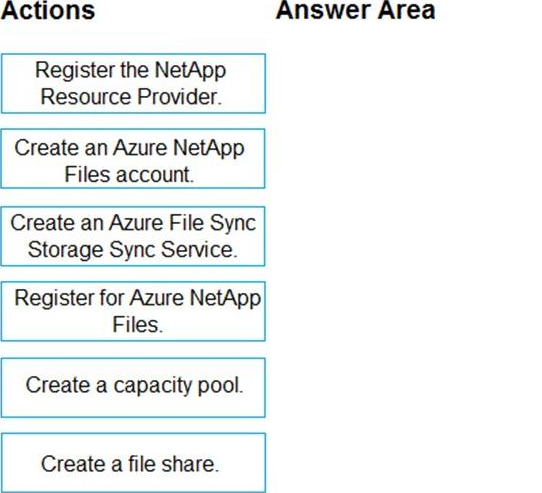
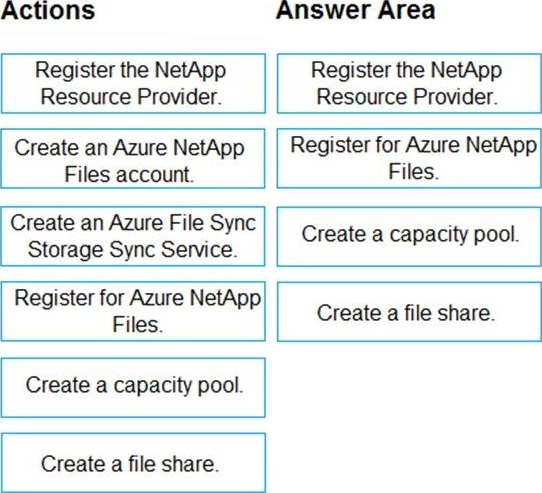
Which four actions should you perform in sequence? To answer, move the appropriate actions from the list of actions to the answer area and arrange them in the correct order. NOTE: More than one order of answer choices is correct. You will receive credit for any of the correct orders you select.
Explanation:
To create an Azure NetApp Files volume that will host user profiles for an Azure Virtual Desktop host pool, follow these steps in sequence:
Register the NetApp Resource Provider – You must first ensure that the NetApp Resource Provider is registered with your Azure subscription to use the Azure NetApp Files service.
Create an Azure NetApp Files account – An account is required to manage and contain your NetApp volumes.
Create a capacity pool – Before creating a volume, you need a capacity pool, which is a collection of space within the Azure NetApp Files service that volumes can be allocated from.
Create a file share – Finally, within the NetApp account and the capacity pool, you create a file share, which will be the volume that hosts the user profiles.
The action "Create an Azure File Sync Storage Sync Service" is not relevant to the process of setting up Azure NetApp Files volumes. Azure File Sync is a separate service that enables syncing of on-premises file servers with Azure Files.
So, the correct sequence is:
Register the NetApp Resource Provider.
Create an Azure NetApp Files account.
Create a capacity pool.
Create a file share (volume).
You have an Azure Active Directory (Azure AD) tenant named contoso.com and an Azure virtual network named VNET1.
To VNET1, you deploy an Azure Active Directory Domain Services (Azure AD DS) managed domain named litwareinc.com.
To VNET1, you plan to deploy a Windows Virtual Desktop host pool named Pool1. You need to ensure that you can deploy Windows 10 Enterprise host pools to Pool1.
What should you do first?
- A . Modify the settings of the litwareinc.com DNS zone.
- B . Modify the DNS settings of VNET1.
- C . Add a custom domain name to contoso.com.
- D . Implement Azure AD Connect cloud sync.
B
Explanation:
To deploy a Windows Virtual Desktop (WVD) host pool and ensure that you can deploy Windows 10 Enterprise multi-session hosts, you need to have proper domain services and networking in place. Given the deployment of Azure Active Directory Domain Services (Azure AD DS) managed domain and the need for the virtual machines in the host pool to join this domain, the virtual network settings must allow these VMs to locate and join the managed domain.
Here are the steps you would typically take:
Note: This question is part of a series of questions that present the same scenario. Each question in the series contains a unique solution that might meet the stated goals. Some question sets might have more than one correct solution, while others might not have a correct solution.
After you answer a question in this section, you will NOT be able to return to it. As a result, these questions will not appear in the review screen.
You have a Windows Virtual Desktop host pool that contains five session hosts. The session hosts run Windows 10 Enterprise multi-session.
You need to prevent users from accessing the internet from Windows Virtual Desktop sessions. The session hosts must be allowed to access all the required Microsoft services. Solution: You modify the IP configuration of each session host.
Does that meet the goal?
- A . Yes
- B . No
You deploy multiple Windows Virtual Desktop session hosts that have only private IP addresses. You need to ensure that administrators can initiate an RDP session to the session hosts by using the Azure portal.
What should you implement?
- A . Remote Desktop Connection Broker (RD Connection Broker)
- B . Azure Application Gateway
- C . Azure Bastion
- D . Remote Desktop Session Host (RD Session Host)
Note: This question is part of a series of questions that present the same scenario. Each question in the series contains a unique solution that might meet the stated goals. Some question sets might have more than one correct solution, while others might not have a correct solution.
After you answer a question in this section, you will NOT be able to return to it. As a result, these questions will not appear in the review screen.
You have a Windows Virtual Desktop host pool named Pool1 that is integrated with an Azure Active Directory Domain Services (Azure AD DS) managed domain.
You need to configure idle session timeout settings for users that connect to the session hosts in Pool1.
Solution: From an Azure AD DS-joined computer, you modify the AADDC Computers GPO settings.
Does that meet the goal?
- A . Yes
- B . No
HOTSPOT
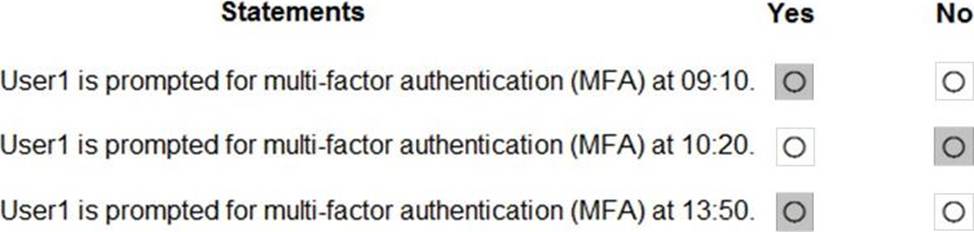
You have an Azure Virtual Desktop Deployment that contains a workspace named Workspace1 and a user named User1. Workspace1 contains a Desktop application group named Pool1Desktop.
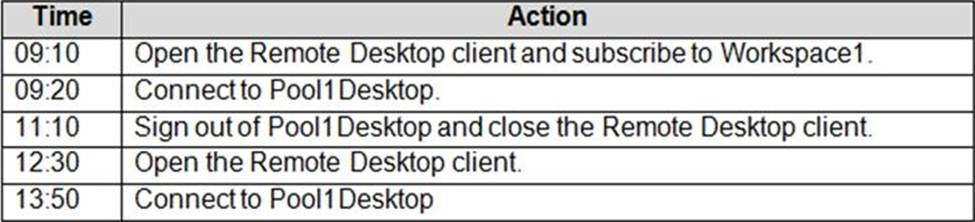
At 09:00, you create a conditional access policy that has the following settings:
✑ Assignments:
– Users and groups: User1
– Cloud apps or actions: Azure Virtual Desktop
– Conditions: 0 conditions selected
✑ Access controls
– Grant: Grant access, Require multi-factor authentication
– Sessions: Sign-in frequency 1 hour
User1 performs the actions shown in the following table.
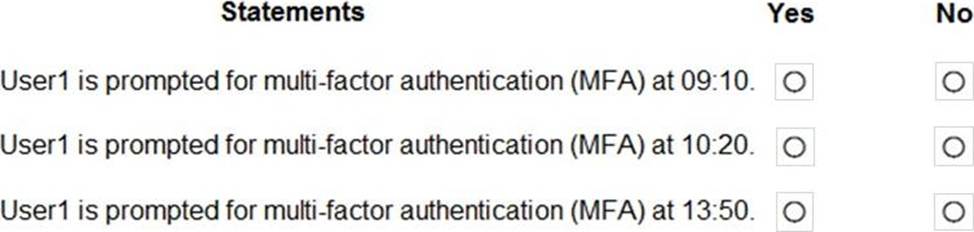
For each of the following statements, select Yes if the statement is true. Otherwise, select No. NOTE: Each correct selection is worth one point.
Explanation:
Reference: https://docs.microsoft.com/en-us/azure/virtual-desktop/set-up-mfa
Your company has a single office and has 40 employees.
You ate planning a Azure Virtual Desktop deployment.
The estimated user workloads are shown in the following table.
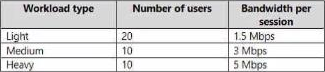
Half the users of each workload type work from home. All the users who work from home do NOT establish a VPN connection to the office.
Approximately how much bandwidth is needed between the office and Azure lo support the planned workloads?
- A . 9.5 Mbps
- B . 55 Mbps
- C . 110 Mbps
- D . 220 Mbps
You need to implement network security to meet the security requirements and the performance requirements.
Which two actions should you perform? Each correct answer presents a complete solution. NOTE: Each correct selection is worth one point.
- A . Deploy two Azure Firewall instances and Azure Firewall Manager.
- B . Filter traffic by using outbound rules.
- C . Filter traffic by using infrastructure rules.
- D . Filter traffic by using inbound rules.
- E . Deploy a network security group (NSG) and two application security groups.
- F . Deploy an Azure Firewall instance and Azure Firewall Manager.
EF
Explanation:
The security requirements outlined in the case study specify the need to explicitly allow traffic between the Windows Virtual Desktop session hosts and Microsoft 365, as well as between the Windows Virtual Desktop session hosts and the Windows Virtual Desktop infrastructure. The performance requirements emphasize minimizing administrative effort to manage network security and employing the principle of least privilege.
Considering these requirements, the two actions that should be performed are:
E. Deploy a network security group (NSG) and two application security groups.
F. Deploy an Azure Firewall instance and Azure Firewall Manager.
Here’s the rationale for each option: