
Microsoft AZ-140 Practice Exams
Last updated on Nov 16,2026- Exam Code: AZ-140
- Exam Name: Configuring and Operating Microsoft Azure Virtual Desktop
- Certification Provider: Microsoft
- Latest update: Nov 16,2026
Note: This question is part of a series of questions that present the same scenario. Each question in the series contains a unique solution that might meet the stated goals. Some question sets might have more than one correct solution, while others might not have a correct solution.
After you answer a question in this section, you will NOT be able to return to it. As a result, these questions will not appear in the review screen.
You have an Azure Virtual Desktop host pool that runs Windows 10 Enterprise multi-session.
User sessions are load-balanced between the session hosts. Idle session timeout is 30 minutes.
You plan to shut down a session host named Host1 to perform routine maintenance.
You need to prevent new user sessions to Host1 without disconnecting active user sessions.
Solution: From the properties of the virtual machine of Host1, you enable just-in-time (JIT) VM access.
Does this meet the goal?
- A . Yes
- B . No
B
Explanation:
Reference: https://docs.microsoft.com/en-us/azure/virtual-desktop/drain-mode
You have an Azure Virtual Desktop deployment.
You deploy and configure Azure Virtual Desktop in a secondary location.
You plan to perform a test failover to the secondary location, but discover existing user sessions to the primary location.
You need to sign out users from the session hosts in the primary location.
Which PowerShell cmdlet should you run?
- A . Invoke-RdsUserSessionLogoff
- B . Remove-AzWvdUserSession
- C . Invoke-RestMethod
- D . Remove-Alias
A
Explanation:
To sign out users from the session hosts in an Azure Virtual Desktop environment, you would use the cmdlet that is designed to log off user sessions from the session hosts.
The cmdlet that fits this description is:
You have a Azure Virtual Desktop deployment.
You plan to implement the Start/Stop VMs during off-hours feature.
You need to ensure that you can stop the session hosts automatically based on the CPU utilization.
What should you do on the session hosts?
- A . Enable change tracking.
- B . Configure the Power Management settings.
- C . Configure the Diagnostic settings.
- D . Install the Azure Virtual Desktop Agent
C
Explanation:
Reference: https://docs.microsoft.com/en-us/azure/virtual-desktop/azure-monitor
You have an Azure subscription named Sub1 that contains a virtual network named VNet1.
Sub1 has an Azure Virtual Desktop deployment that contains a host pool named Pool1. Pool! contains 10 session hosts that are connected to VNet1.
You need to add a private endpoint connection to Pool1.
What should you do first?
- A . Add a service endpoint to VNet1.
- B . Reregister the Microsoft DesktopVirtualization resource provider on Sub1.
- C . Disable public access on Pool1.
- D . Enable RDP Shortpath for each session host.
You have an Azure Virtual Desktop deployment that contains the resources shown in the following table.
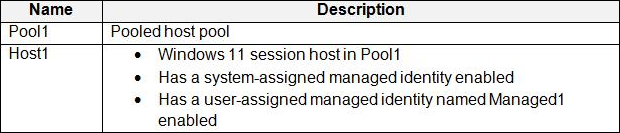
You plan to enable Start VM on connect for Pool1.
You create a custom Azure role named Role1 that has sufficient permissions to start virtual machines on demand.
You need to ensure that the session hosts in Pool1 can start on demand.
To which service principal should you assign Role1?
- A . Managed1
- B . Azure Virtual Desktop
- C . Azure Automation
- D . Host1
- E . Azure Compute
You have a Windows Virtual Desktop host pool that contains 20 Windows 10 Enterprise multi-session hosts.
Users connect to the Windows Virtual Desktop deployment from computers that run Windows 10.
You plan to implement FSLogix Application Masking.
You need to deploy Application Masking rule sets. The solution must minimize administrative effort. To where should you copy the rule sets?
- A . the FSLogix profile container of each user
- B . C:Program FilesFSLogixAppsRules on every Windows 10 computer
- C . C:Program FilesFSLogixAppsRules on every session host
C
Explanation:
Reference: https://docs.microsoft.com/en-us/azure/virtual-desktop/fslogix-office-app-rule-editor
You have a Windows Virtual Desktop host pool that contains 20 Windows 10 Enterprise multi-session hosts.
Users connect to the Windows Virtual Desktop deployment from computers that run Windows 10.
You plan to implement FSLogix Application Masking.
You need to deploy Application Masking rule sets. The solution must minimize administrative effort. To where should you copy the rule sets?
- A . the FSLogix profile container of each user
- B . C:Program FilesFSLogixAppsRules on every Windows 10 computer
- C . C:Program FilesFSLogixAppsRules on every session host
C
Explanation:
Reference: https://docs.microsoft.com/en-us/azure/virtual-desktop/fslogix-office-app-rule-editor
Note: This question is part of a series of questions that present the same scenario. Each question in the series contains a unique solution that might meet the stated goals. Some question sets might have more than one correct solution, while others might not have a correct solution.
After you answer a question in this section, you will NOT be able to return to it. As a result, these questions will not appear in the review screen.
You have the following:
✑ A Microsoft 365 E5 tenant
✑ An on-premises Active Directory domain
✑ A hybrid Azure Active Directory (Azure AD) tenant
✑ An Azure Active Directory Domain Services (Azure AD DS) managed domain
✑ An Azure Virtual Desktop deployment
The Azure Virtual Desktop deployment contains personal desktops that are hybrid joined to the on-premises domain and enrolled in Microsoft Intune.
You need to configure the security settings for the Microsoft Edge browsers on the personal desktops.
Solution: You configure a Group Policy Object (GPO) in the Azure AD DS managed domain.
Does this meet the goal?
- A . Yes
- B . No
B
Explanation:
Azure Active Directory Domain Services (Azure AD DS) does not support Group Policy in the same way that an on-premises Active Directory domain does. Azure AD DS provides a subset of fully compatible traditional AD DS features, and while it allows for the use of some Group Policy Objects (GPOs), it has limitations compared to an on-premises AD DS environment, particularly regarding computer-based policies.
To configure security settings for Microsoft Edge browsers on the personal desktops that are hybrid joined and enrolled in Microsoft Intune, you would typically use Microsoft Endpoint Manager (which includes Intune) for policy configuration rather than a GPO in Azure AD DS. Intune allows for the configuration of settings on devices that are Azure AD joined, hybrid Azure AD joined, and even registered.
Therefore, the recommended approach would be to use administrative templates or endpoint security policies within Microsoft Intune to manage the security settings for Microsoft Edge browsers on the Azure Virtual Desktop deployment.
You have an Azure Virtual Desktop deployment.
You plan to use just-in-time (JIT) VM access to manage session host virtual machines.
You need to recommend license requirements for JIT VM access. Your solution must minimize costs.
Which license should you recommend?
- A . Microsoft Defender for Servers Plan 2
- B . Microsoft 365 E5
- C . Enterprise Mobility + Security E5
- D . Microsoft Defender for Servers Plan 1
You have an Azure Virtual Desktop deployment.
You need to create a host pool. The solution must ensure that during periods of tow CPU usage, credits can be accumulated, and then used to raise performance above the purchased baseline during periods of high CPU usage.
Which virtual machine series should you specify when you create the pool?
- A . A-series
- B . D-series
- C . H-series
- D . B-series
D
Explanation:
Reference: https://docs.microsoft.com/en-us/azure/virtual-machines/sizes-b-series-burstable