
Microsoft AZ-140 Practice Exams
Last updated on Nov 16,2026- Exam Code: AZ-140
- Exam Name: Configuring and Operating Microsoft Azure Virtual Desktop
- Certification Provider: Microsoft
- Latest update: Nov 16,2026
You have an Azure Virtual Desktop deployment and the users shown in the following table.

All the users plan to use a web browser to access Azure Virtual Desktop resources.
Which users can connect to Azure Virtual Desktop by using their preferred browser?
- A . User2 only
- B . User1 only
- C . User1, User2, and User3
- D . User2 and User3 only
- E . User1 and User2 only
C
Explanation:
https://learn.microsoft.com/en-us/azure/virtual-desktop/users/connect-web
HOTSPOT
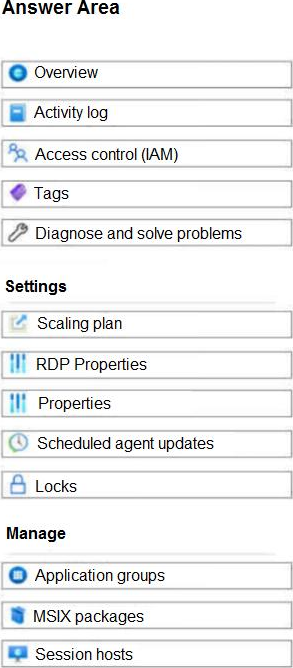
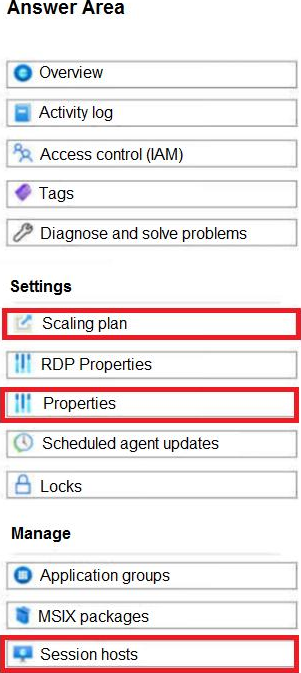
You have an Azure Virtual Desktop deployment that contains a host pool named HostPool1.
You need to perform the following configurations for HostPool1:
• Set the scale factor of the remote session to 125 percent.
• Generate a registration key that expires after five days.
• Enable Start VM on connect.
Which three settings should you modify? To answer, select the appropriate settings in the answer area. NOTE: Each correct selection is worth one point.
HOTSPOT
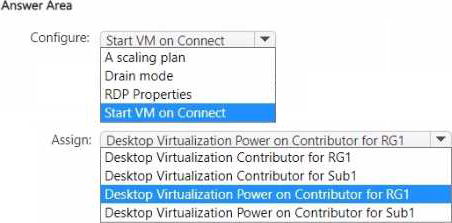
You have an Azure subscription named Sub1 that contains a resource group named RG1. RG1 contains an Azure Virtual Desktop deployment. The deployment contains a host pool named Pool1.
You plan to configure Pool1 to meet the following requirements:
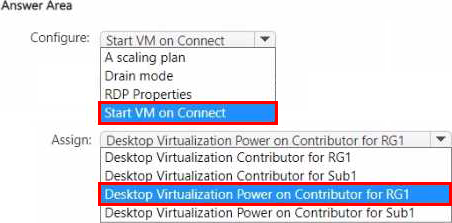
• Session hosts must start automatically as user demand increases.
• Azure Virtual Desktop must have permission to turn on session host virtual machines.
What should you configure, and which role should you assign to the Azure Virtual Desktop service principal? To answer, select the appropriate options in the answer area. NOTE: Each correct selection is worth one point.
DRAG DROP
You plan to deploy Windows Virtual Desktop.
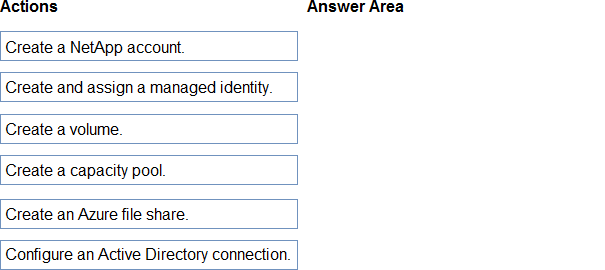
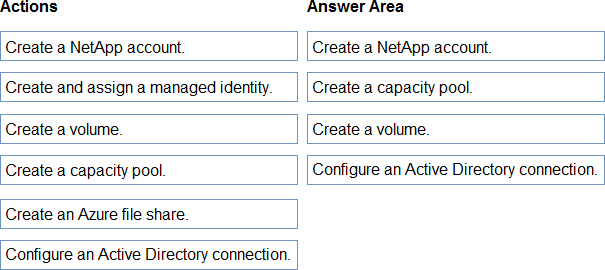
You need to create Azure NetApp Files storage to store FSLogix profile containers.
Which four actions should you perform in sequence after you register the NetApp Resource Provider? To answer, move the appropriate actions from the list of actions to the answer area and arrange them in the correct order. NOTE: More than one order of answer choices is correct. You will receive credit for any of the correct orders you select.
Explanation:
To set up Azure NetApp Files storage for FSLogix profile containers in Windows Virtual Desktop, you typically follow these steps:
Create a NetApp account.
Create a capacity pool.
Create a volume within the capacity pool.
Configure an Active Directory connection for the volume if necessary (this is only required if you are going to use SMB and need Kerberos for authentication).
A managed identity is not typically required specifically for the NetApp Files setup, and creating an Azure file share is not related to Azure NetApp Files ― this is a separate service within Azure storage options.
Here’s the sequence of actions in order:
Create a NetApp account.
Create a capacity pool.
Create a volume.
Configure an Active Directory connection. (This is assuming that FSLogix requires SMB access which would require AD authentication; if NFS is used instead, this step might not be necessary).
Azure NetApp Files requires these steps to set up a new environment, particularly when you are dealing with file shares that will be accessed by multiple users and devices, as is the case with FSLogix profile containers.
HOTSPOT
Your network contains an on-premises Active Directory domain named contoso.com that syncs to an Azure Active Directory (Azure AD) tenant.
You have an Azure subscription that contains an Azure Virtual Desktop host pool.
You create an Azure Storage account named storage1.
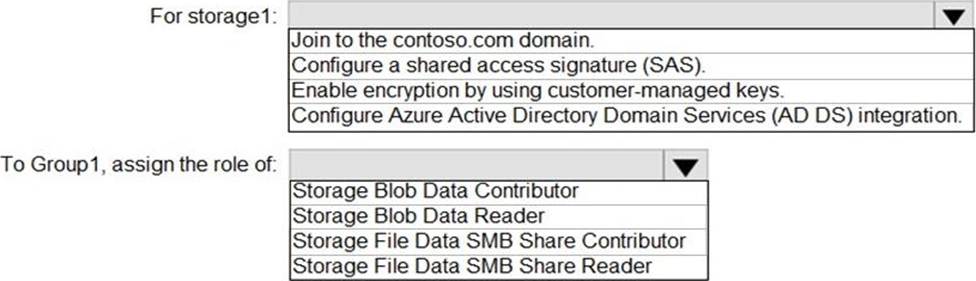
You need to use FSLogix profile containers in storage1 to store user profiles for a group named
Group1. The solution must use the principle of least privilege.
What should you include in the solution? To answer, select the appropriate options in the answer area.
Explanation:
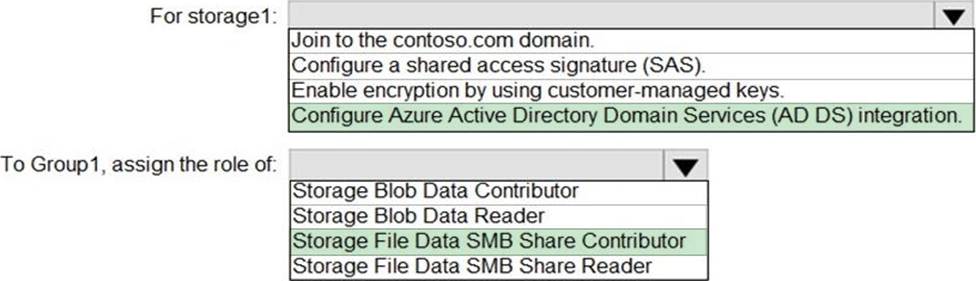
Configure Azure Active Directory Domain Services (AD DS) integration./To use FSLogix profile containers in an Azure Storage account to store user profiles, you need to configure the storage account for Azure Active Directory Domain Services (AD DS) authentication. FSLogix uses SMB shares, which require proper permissions for the users to read, write, and create profiles within the file share.
Here’s what should be included in the solution:
For storage1:
Join to the contoso.com domain: This is not applicable for Azure Storage as Azure Storage accounts do not join traditional Active Directory domains.
Configure a shared access signature (SAS): This is typically used for granting limited access to objects in your storage account to other clients, without exposing your account key. This is not typically used for FSLogix profiles.
Enable encryption by using customer-managed keys: This is an optional security enhancement that allows you to manage your own encryption keys, but it is not specifically required for FSLogix.
Configure Azure Active Directory Domain Services (AD DS) integration: This is required for FSLogix because it allows you to use Azure AD credentials with SMB access, which FSLogix requires to connect to the file share.
To Group1, assign the role of:
Storage Blob Data Contributor: This role is for blob data in the storage account and is not relevant for FSLogix, which uses file shares.
Storage Blob Data Reader: Similar to the above, this role is for blob storage and not relevant for FSLogix file shares.
Storage File Data SMB Share Contributor: This role allows for reading, writing, and managing SMB file shares, which is what FSLogix requires.
Storage File Data SMB Share Reader: This role only allows for reading SMB file shares, which would not be sufficient for FSLogix profiles that need to write and manage data on the file share.
The correct answers based on the principle of least privilege are:
For storage1: Configure Azure Active Directory Domain Services (AD DS) integration.
To Group1, assign the role of: Storage File Data SMB Share Contributor.
Storage File Data SMB Share Contributor.
HOTSPOT
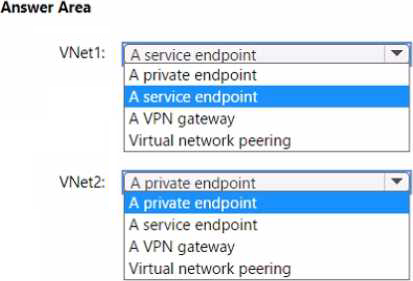
You have an Azure subscription that contains the resources shown in the following table.
You have a virtual machine named Server1 that runs Windows Server and is connected to VNet3.
You need to deploy the Azure Virtual Desktop host pools shown in the following table.
The solution must meet the following requirements:
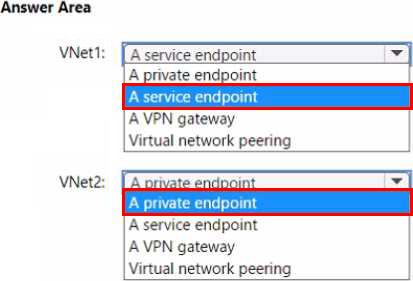
• The session hosts in Pool1 must access Server1 via the Microsoft backbone network.
• The session hosts in Pool2 must access storage1 via the Microsoft backbone network.
What should you configure on the virtual networks? To answer, select the appropriate options in the answer area. NOTE: Each correct selection is worth one point.
Note: This question is part of a series of questions that present the same scenario. Each question in the series contains a unique solution that might meet the stated goals. Some question sets might have more than one correct solution, while others might not have a correct solution.
After you answer a question in this section, you will NOT be able to return to it. As a result, these questions will not appear in the review screen.
You have the following:
✑ A Microsoft 365 E5 tenant
✑ An on-premises Active Directory domain
✑ A hybrid Azure Active Directory (Azure AD) tenant
✑ An Azure Active Directory Domain Services (Azure AD DS) managed domain
✑ An Azure Virtual Desktop deployment
The Azure Virtual Desktop deployment contains personal desktops that are hybrid joined to the on-premises domain and enrolled in Microsoft Intune.
You need to configure the security settings for the Microsoft Edge browsers on the personal desktops.
Solution: You create and configure a Group Policy Object (GPO) in the on-premises domain.
Does this meet the goal?
- A . Yes
- B . No
A
Explanation:
Reference: https://www.compete366.com/blog-posts/eight-tips-on-how-to-manage-azure-virtual-desktop-avd/
HOTSPOT –
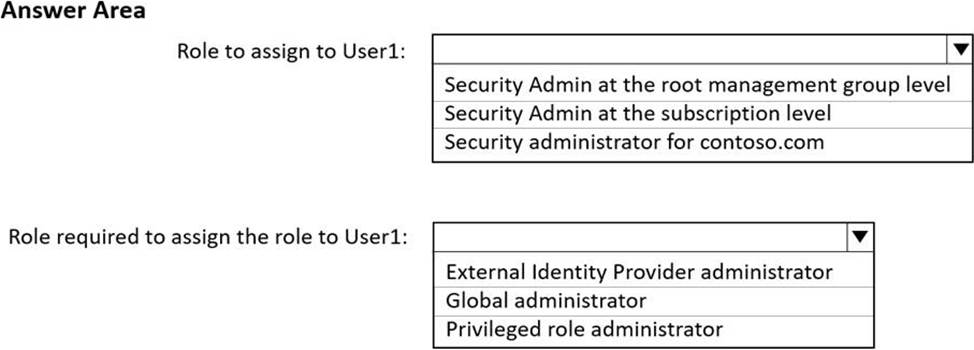
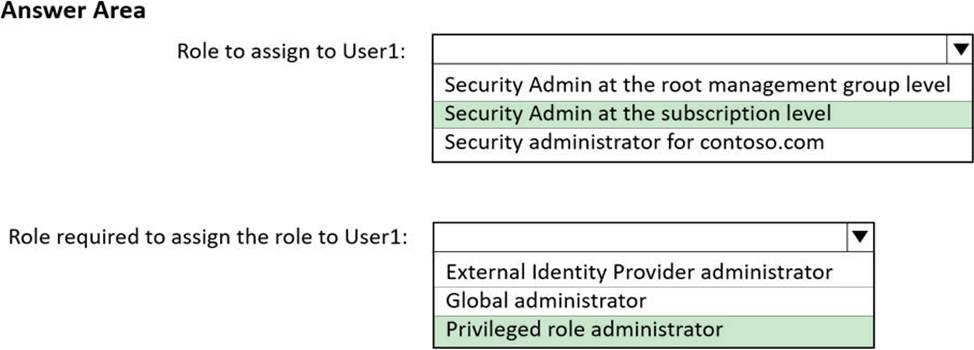
You have two Azure subscriptions that are linked to an Azure Active Directory (Azure AD) tenant named contoso.com and contain an Azure Virtual Desktop deployment. The tenant contains a user named User1.
When User1 signs in to Azure Security Center, the user receives the message shown in the following exhibit.

You need to ensure that User1 can manage security information for the tenant. The solution must use the principle of least privilege.
What should you do? To answer, select the appropriate options in the answer area. NOTE: Each correct selection is worth one point.
You are designing an Azure Virtual Desktop deployment.
You identify the network latency between the locations where users reside and the planned deployment.
What should you use to identify the best Azure region to deploy the host pool?
- A . Azure Traffic Manager
- B . Azure Virtual Desktop Experience Estimator
- C . Azure Monitor for Azure Virtual Desktop
- D . Azure Advisor
B
Explanation:
Reference: https://azure.microsoft.com/en-gb/services/virtual-desktop/assessment/
You need to configure the virtual machines that have the Pool1 prefix. The solution must meet the
technical requirements.
What should you use?
- A . a Windows Virtual Desktop automation task
- B . Virtual machine auto-shutdown
- C . Service Health in Azure Monitor
- D . Azure Automation
D
Explanation:
Azure Automation can be used to create a schedule that starts and stops the Pool1 virtual machines to ensure they are only running during business hours, thus meeting the technical requirement of operating within a specific time window and adhering to the principle of least privilege by not running resources when they are not needed.