
Microsoft AZ-140 Practice Exams
Last updated on Nov 16,2026- Exam Code: AZ-140
- Exam Name: Configuring and Operating Microsoft Azure Virtual Desktop
- Certification Provider: Microsoft
- Latest update: Nov 16,2026
You have an Azure Virtual Desktop pooled host pool named HostPool1.
You need to dynamically allocate resources to HostPool1 based on the number of sessions for each
host.
What should you create?
- A . a load balancer rule
- B . a scaling plan
- C . a virtual machine scale set
- D . an availability set
DRAG DROP
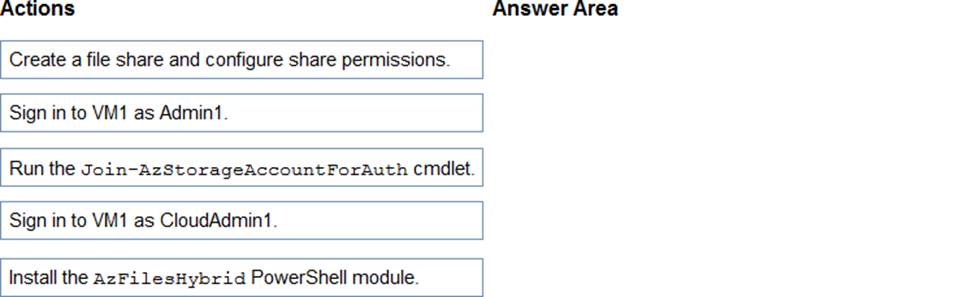
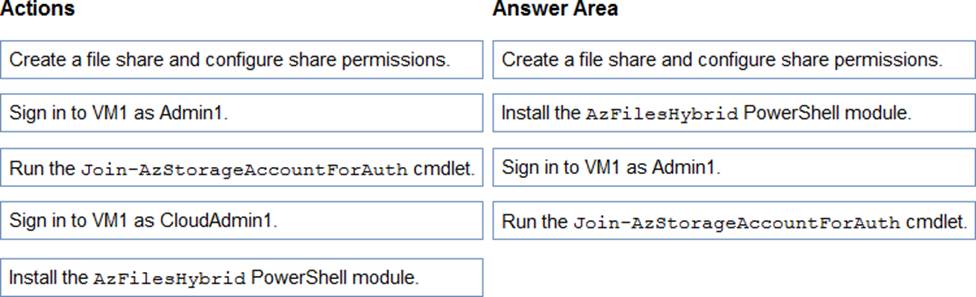
You need to ensure that you can implement user profile shares for the Boston office users. The solution must meet the user profile requirements.
Which four actions should you perform in sequence? To answer, move the appropriate actions from the list of actions to the answer area and arrange them in the correct order.
Explanation:
This sequence assumes that Admin1 has the necessary permissions to perform actions on the VM that will house the user profile shares, which would be the case if Admin1 is a domain admin or has equivalent permissions. The sequence of actions focuses on setting up the storage account, enabling Azure AD authentication, and then moving on to the VM to perform any final steps.
You have an Azure Virtual Desktop deployment.
You need to monitor the deployment by using the Azure Virtual Desktop Insights solution in Azure Monitor.
What should you use as the Diagnostic settings destination for the host pool?
- A . Event hub
- B . Log Analytics workspace
- C . Storage account
You have an Azure Virtual Desktop deployment.
You plan to create a new host pool named Pool1 that will contain five Windows 11 session hosts.
You need to enable secure boot and vTPM on the session hosts.
How should you configure the Virtual Machines settings?
- A . Enable encryption at rest and a platform-managed key.
- B . Set Security type to Trusted launch virtual machines.
- C . Enable a system-assigned managed identity.
- D . Set Network security group to Advanced.
You have an Azure Virtual Desktop deployment that contains a host pool. The host pool contains 15 session hosts. All the sessions hosts have FSLogix installed.
You need to configure the path to where the user profiles are stored. The solution must minimize administrative effort.
Which registry setting should you use?
- A . VHDLocations
- B . CCDLocations
- C . ProfileDirSDDL
- D . FlipFlopProfileDirectoryName
You have an Azure Virtual Desktop deployment that contains a host pool. The host pool contains 15 session hosts. All the sessions hosts have FSLogix installed.
You need to configure the path to where the user profiles are stored. The solution must minimize administrative effort.
Which registry setting should you use?
- A . VHDLocations
- B . CCDLocations
- C . ProfileDirSDDL
- D . FlipFlopProfileDirectoryName
You have an Azure Virtual Desktop deployment.
The session hosts are joined to an on-premises Active Directory domain named contoso.com.
You need to limit user sessions to three hours.
What should you configure?
- A . a Group Policy Object (GPO) in contoso.com.
- B . the properties of the workspace
- C . the RDP Properties of a host pool
- D . just-in-time (JIT) VM access
You have an Azure Virtual Desktop deployment that contains the resources shown in the following table.
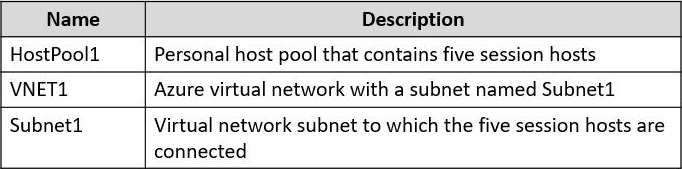
You need to enable just-in-time (JIT) VM access for all the session hosts.
What should you do first?
- A . Deploy Azure Bastion to VNET1.
- B . Assign network security groups (NSGs) to the network interfaces of the five session hosts.
- C . Configure Access control (IAM) for HostPool1.
- D . Assign a network security group (NSG) to Subnet1.
DRAG DROP
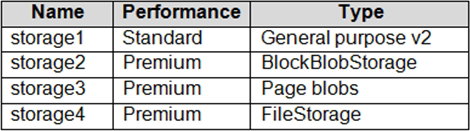
You have an Azure subscription that contains the storage accounts shown in the following table.
You have a custom generalized Windows 10 image.
You plan to deploy an Azure Virtual Desktop host pool that will use the custom image and FSLogix profile containers.
You need to recommend which storage accounts to use for the custom image and the profile containers.
The solution must meet the following requirements:
✑ Minimize costs to store the image.
✑ Maximize performance of the profile containers.
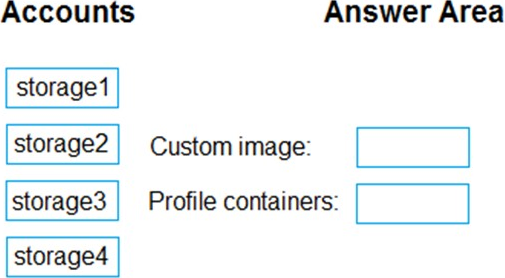
Which account should you recommend for each type of content? To answer, drag the appropriate accounts to the correct content type. Each account may be used once, more than once, or not at all. You many need to drag the split bar between panes or scroll to view content. NOTE: Each correct selection is worth one point.
Explanation:
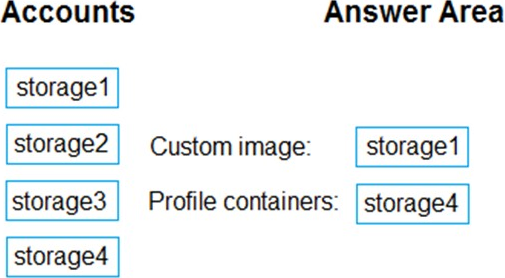
For the custom generalized Windows 10 image used in an Azure Virtual Desktop host pool, you should use a storage account that minimizes costs. The Standard performance tier is generally less expensive than the Premium tier, making it a cost-effective choice for storing images that do not require high-performance access. General-purpose v2 accounts support all types of Azure Storage data (blobs, files, queues, and tables), making them versatile and cost-effective for a variety of scenarios, including storing custom images.
For FSLogix profile containers, which require fast access to improve the user experience, you should use a storage account that maximizes performance. Among the premium options, FileStorage type accounts are designed to provide high throughput and low latency, ideal for performance-sensitive scenarios like FSLogix profile containers.
Based on these requirements:
The custom image should be stored in storage1, the Standard/General purpose v2 storage account, to minimize costs.
The FSLogix profile containers should be stored in storage4, the Premium/FileStorage account, to maximize performance.
You have an Azure Active Directory Domain Services (Azure AD D5) domain named contoso.com. You have an Azure Storage account named storage1. Storage1 hosts a file share named share1 that has share and file system permissions configured. Share1 is configured to use contoso.com for authentication,
You create an Azure Virtual Desktop host pool named Pool1. Pool1 contains two session hosts that use the Windows 10 multi-session + Microsoft 365 Apps image. You need to configure an FSLogix profile container for Pool1.
What should you do next?
- A . Generate a shared access signature (SAS) key for storage1.
- B . Install the FSLogix agent on the session hosts of Pool1.
- C . From storage1, set Allow shared key access to Disabled.
- D . Configure the Profiles setting for the session hosts of Pool1.
B,D
Explanation:
To configure FSLogix profile containers for an Azure Virtual Desktop host pool, you need to:
B. Install the FSLogix agent on the session hosts of Pool1: The FSLogix agent is responsible for managing the FSLogix profile containers. It needs to be installed on each session host within the host pool.
D. Configure the Profiles setting for the session hosts of Pool1: After installing the FSLogix agent, you need to configure the Profile Container settings, typically through group policy or by directly editing the registry on the session hosts. This configuration includes setting the path to the profile containers, which would be the file share (share1) on the storage account (storage1).
The other options are not the next steps in setting up FSLogix profile containers: