
Microsoft AZ-140 Practice Exams
Last updated on Nov 16,2026- Exam Code: AZ-140
- Exam Name: Configuring and Operating Microsoft Azure Virtual Desktop
- Certification Provider: Microsoft
- Latest update: Nov 16,2026
HOTSPOT
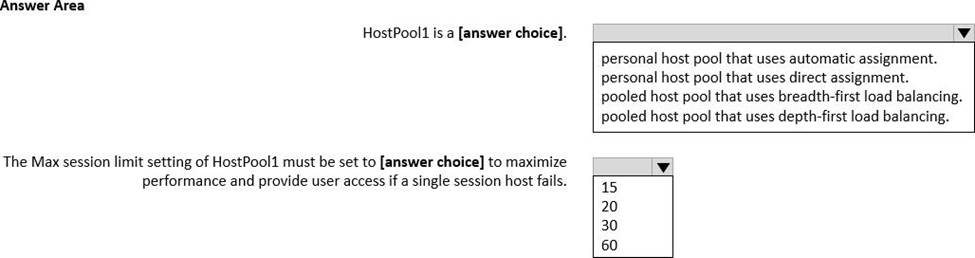
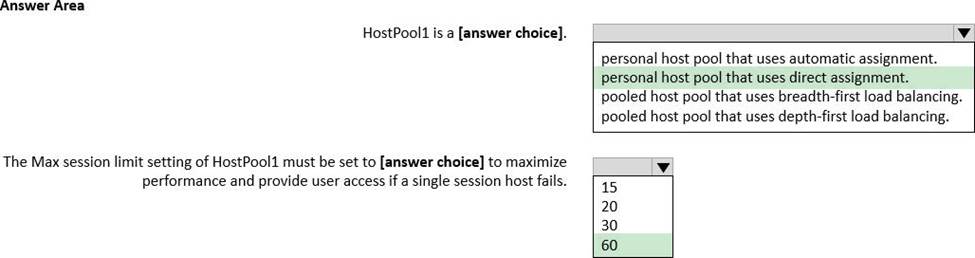
You have an Azure Virtual Desktop host pool named HostPool1 that must support 60 sessions.
The session hosts for HostPool1 are configured as shown in the following exhibit.
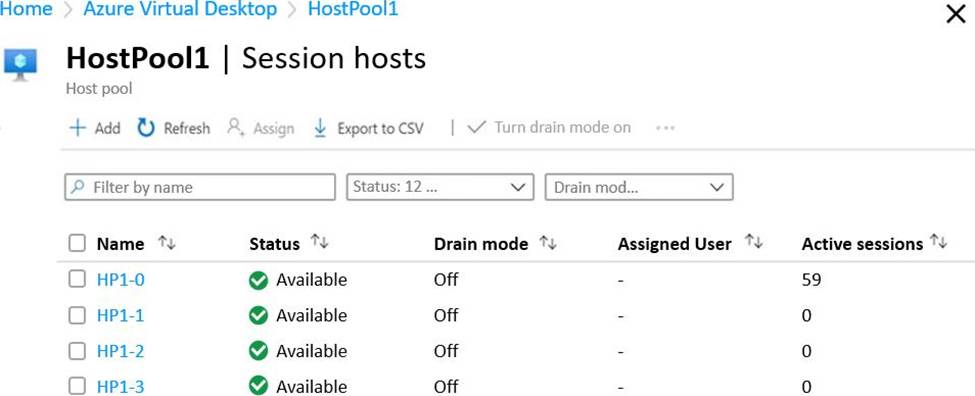
Use the drop-down menus to select the answer choice that completes each statement based on the information presented in the graphic. NOTE: Each correct selection is worth one point.
You need to modify the custom virtual machine images to meet the deployment requirements.
What should you install?
- A . the RSAT: Remote Desktop Services Tools optional feature
- B . the Azure Virtual Desktop Agent
- C . the Microsoft Monitoring Agent
- D . the FSLogix agent
B,D
Explanation:
Both of these agents are essential for a functioning WVD environment and would need to be installed on the custom virtual machine images.
You have an Azure Virtual Desktop deployment that contains a host pool named Pool1. You plan to create a Windows 10 image named Image1 to deploy new session hosts to Pool1.
You need to ensure that all the new session hosts deployed by using Image1 are onboarded to Microsoft Defender for Endpoint.
What should you do?
- A . Add a Defender for Endpoint onboarding script to image1, and then run the script at first start.
- B . Create an MSIX package for Pool1.
- C . Run a Defender for Endpoint onboarding script on Image1. and then run sysprep.
- D . Create an automation task for Pool1.
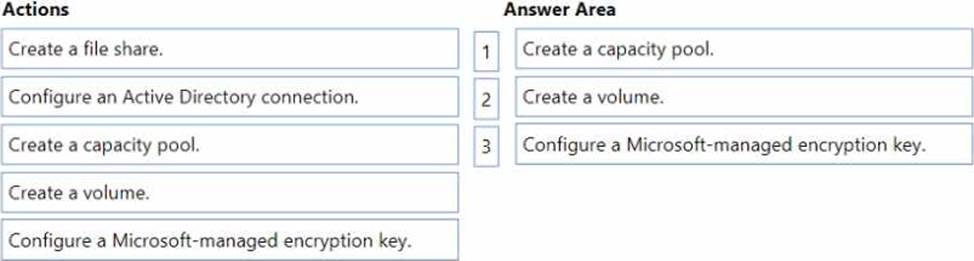
DRAG DROP
You have an Azure Virtual Desktop deployment.
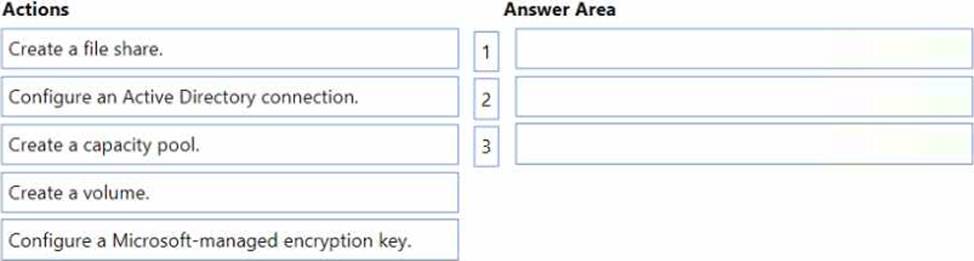
You plan to use Azure NetApp Files to store FSLogix profile containers.
You need to configure an Azure Azure NetApp Files account.
Which three actions should you perform in sequence? To answer, move the appropriate actions from the list of actions to the answer area and arrange them in the correct order.
You have a Windows Virtual Desktop deployment.
You publish a RemoteApp named AppVersion1.
You need AppVersion1 to appear in the Remote Desktop client as Sales Contact Application.
Which PowerShell cmdlet should you use?
- A . New-AzADApplication
- B . Update-AzWvdApplicationGroup
- C . Register-AzWvdApplicationGroup
- D . Update-AzWvdApplication
D
Explanation:
Reference:
https://docs.microsoft.com/en-us/azure/virtual-desktop/customize-feed-for-virtual-desktop-users
https://docs.microsoft.com/en-us/powershell/module/az.desktopvirtualization/update-azwvdapplication?view=azps-5.7.0
Which role should you assign to Operator2 to meet the technical requirements?
- A . Desktop Virtualization Session Host Operator
- B . Desktop Virtualization Host Pool Contributor
- C . Desktop Virtualization User Session Operator
- D . Desktop Virtualization Contributor
B
Explanation:
Considering the principle of least privilege, which is a technical requirement, you would not want to give Operator2 more permissions than necessary to complete their tasks. The most appropriate role that would allow Operator2 to modify the RDP Properties of the host pool without providing excessive permissions would be:
B. Desktop Virtualization Host Pool Contributor
This role should allow Operator2 to perform the necessary modifications on the Windows Virtual Desktop deployment in the Montreal office according to the case study details and technical requirements.
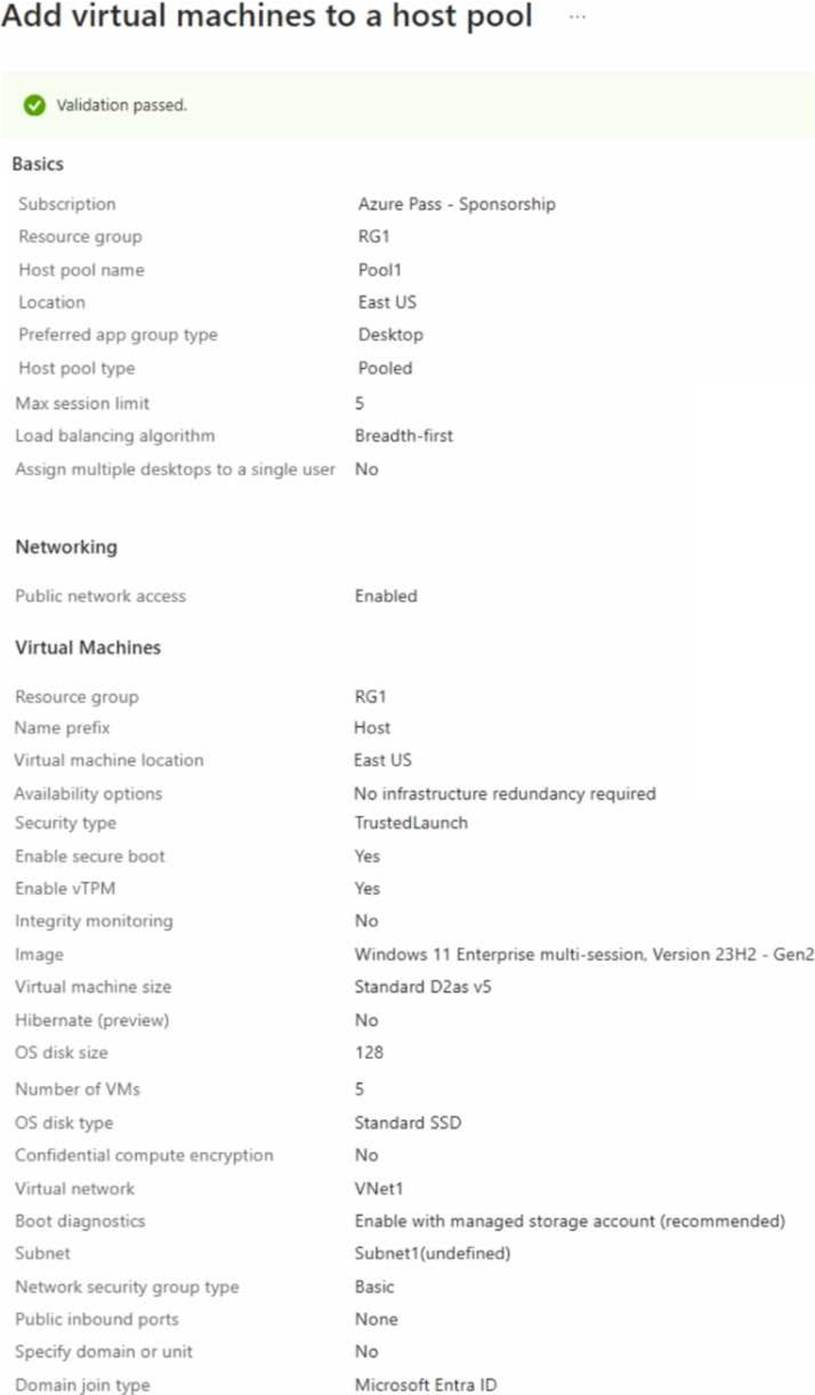
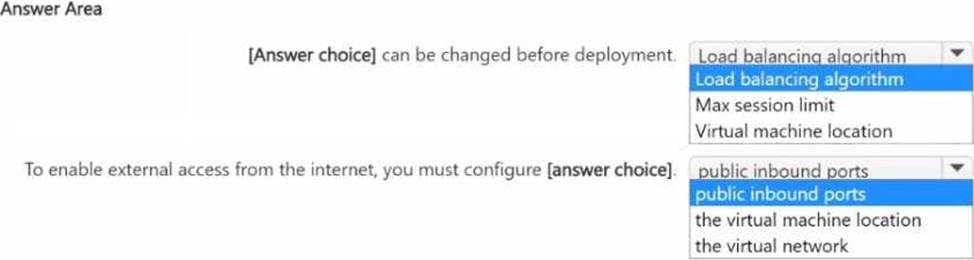
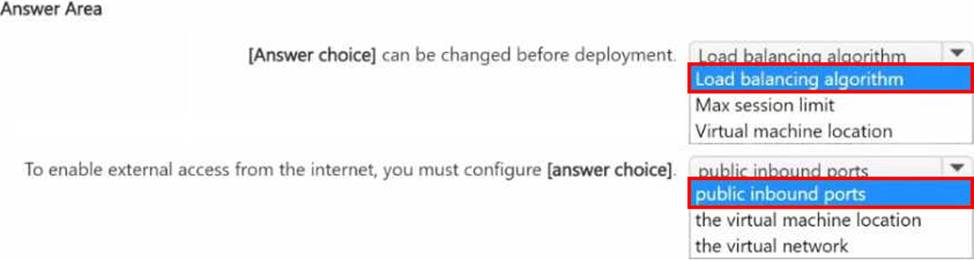
HOTSPOT
You have an Azure Virtual Desktop deployment that contains a host pool named Pool1.
You are adding Microsoft Entra joined session hosts to Pool1 as shown in the following exhibit.
You have an Azure Virtual Desktop deployment that contains a host pool named Pooll Pool1 contains two session hosts.
You create a new virtual machine named Host3 that runs Windows 11.
You need to add Host3 as a third session host to Pool1.
What should you do first?
- A . Generate a registration key.
- B . Assign a scaling plan to Pool1.
- C . Deallocate the existing session hosts.
- D . Generate a certificate for Host3.
Which three PowerShell modules should you install on Server1 to meet the technical requirements? Each correct answer presents part of the solution. NOTE: Each correct selection is worth one point.
- A . Pester
- B . RemoteDesktop
- C . ServerManager
- D . ActiveDirectory
- E . Hyper-V
BDE
Explanation:
Given that we are looking for three PowerShell modules necessary for managing an Azure Virtual Desktop (AVD) environment and converting user profile disks to FSLogix profile containers, we should consider modules that are related to these tasks. Based on the options provided and the typical requirements for these tasks, here are the considerations:
RemoteDesktop: This module is used to configure and manage a Remote Desktop environment, which is necessary for tasks such as configuring RDP properties on a Windows Virtual Desktop host.
ActiveDirectory: Since Azure Virtual Desktop integrates with Azure AD and may require synchronization or management of user entities, the ActiveDirectory module could be useful for scripting tasks related to domain services.
Hyper-V: While the Azure Virtual Desktop environment operates in the cloud, the Hyper-V module could potentially be used if there is a need to manage local VMs or if Server1 is also being used to configure or convert virtual machines that are being prepared for Azure.
Given that the FSLogix profile containers are related to user profiles and the conversion process might involve actions related to Active Directory and virtual machines, the three PowerShell modules that should be installed on Server1 to meet the technical requirements are likely:
B. RemoteDesktop: To manage RDP properties and sessions within the AVD environment.
D. ActiveDirectory: To handle any user profile and directory services-related tasks.
E. Hyper-V: To manage virtual machines, especially if the conversion process involves local VMs before they are migrated to Azure.
These modules would provide the necessary tools to administer the AVD environment and handle the conversion of user profiles to FSLogix containers as per the requirements of the case study.
HOTSPOT
You have an Azure subscription.
You plan to deploy an Azure Virtual Desktop solution to the East US Azure region.
The solution will contain the resources shown in the following table.

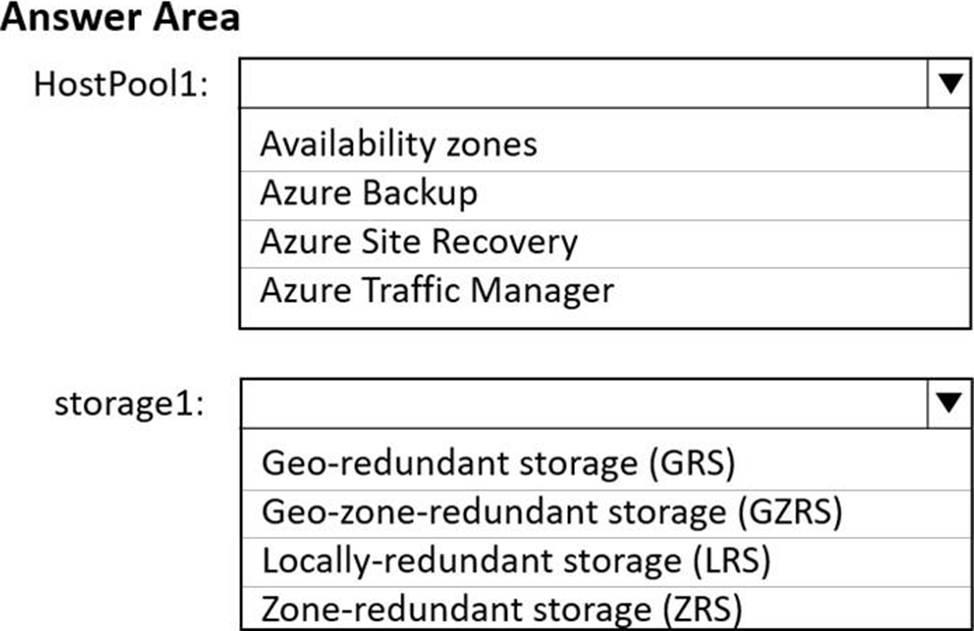
You need to recommend a business continuity solution that meets the following requirements:
* Users must be able to connect to HostPool1 if a datacenter in the East US region fails.
* Costs must be minimized.
What should you include in the recommendation for each resource? To answer, select the appropriate options in the answer area. NOTE: Each correct selection is worth one point.
Explanation:
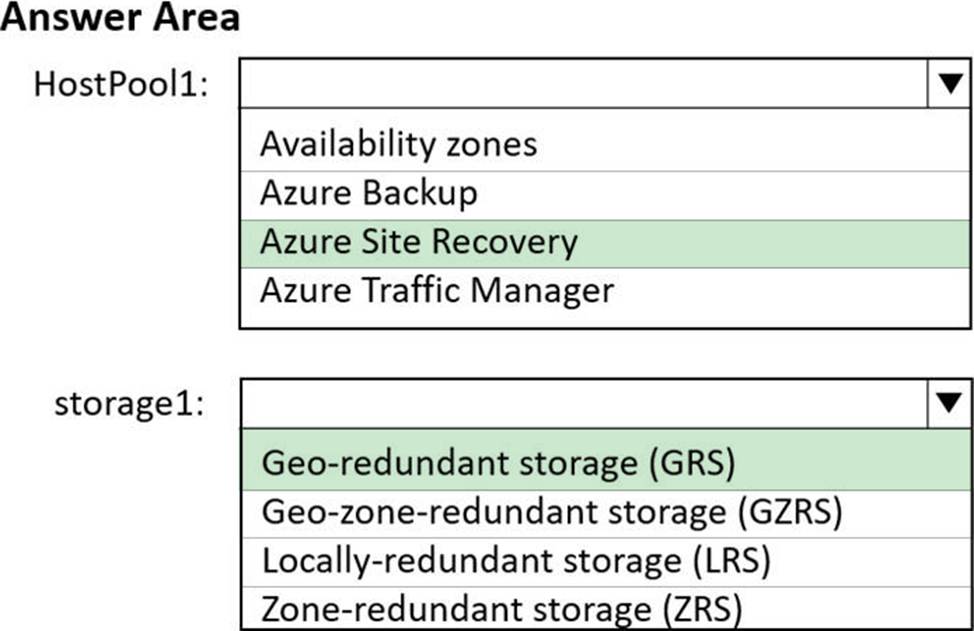
For HostPool1, which is part of an Azure Virtual Desktop solution, the best option to ensure users can connect even if a datacenter fails is to deploy across Availability Zones if available in the East US region. This would ensure that even if one zone goes down, the other zones can continue serving users. However, if Availability Zones are not available or if you want to minimize costs, Azure Site Recovery would be a suitable alternative to replicate VMs to a secondary region, ensuring business continuity in the event of a primary region failure.
For the storage1 account that contains the user profile share, you would want a redundancy option that provides failover capabilities across regions. The Geo-redundant storage (GRS) option provides that by replicating data to a secondary region hundreds of miles away from the primary region, ensuring data is durable even in the case of a complete regional outage or disaster. Geo-zone-redundant storage (GZRS) adds additional high availability by also replicating across Availability Zones in the primary region, but it may be more costly than GRS.
Based on the requirements to enable users to connect to HostPool1 even if a datacenter in the East US region fails and to minimize costs, the recommendations would be:
For HostPool1: Azure Site Recovery
For storage1: Geo-redundant storage (GRS)
These options will ensure business continuity while also considering cost minimization.