
Microsoft AZ-140 Practice Exams
Last updated on Nov 16,2026- Exam Code: AZ-140
- Exam Name: Configuring and Operating Microsoft Azure Virtual Desktop
- Certification Provider: Microsoft
- Latest update: Nov 16,2026
You have a Windows Virtual Desktop host pool named Pool1 and an Azure Automation account named account1. Pool1 is integrated with an Azure Active Directory Domain Services (Azure AD DS) managed domain named contoso.com.
You plan to configure scaling for Pool1 by using Azure Automation runbooks.
You need to authorize the runbooks to manage the scaling of Pool1. The solution must minimize administrative effort.
What should you configure?
- A . a managed identity in Azure Active Directory (Azure AD)
- B . a group Managed Service Account (gMSA) in Azure AD DS
- C . a Connections shared resource in Azure Automation
- D . a Run As account in Azure Automation
D
Explanation:
Reference: https://docs.microsoft.com/en-us/azure/virtual-desktop/set-up-scaling-script
You have an Azure Virtual Desktop deployment.
You plan to use FSLogix profile containers.
You need to recommend a solution that will be used to store the containers.
The solution must meet the following requirements:
* The containers must be stored on solid-state drives (SSDs)
* Minimize administrative effort
* Minimize cost
the What should you recommend?
- A . Azure NetApp Files
- B . Azure Files Standard
- C . Azure Blob Storage Premium
- D . Azure Files Premium
D
Explanation:
"Use Azure Files for FSLogix user profile data with Azure Virtual Desktop Azure Files provides multiple tiers that you can select based on your cost and performance needs."
– https://azure.microsoft.com/en-us/services/storage/files/#security
"Premium file shares enable highly I/O-intensive workloads, with high throughput and low latency. Premium file shares are offered on high-performance solid-state drive (SSD) based storage."
– https://azure.microsoft.com/en-us/pricing/details/storage/files/
You have a Azure Virtual Desktop deployment that uses Microsoft 355 cloud services including Microsoft Teams.
Users use the Remote Desktop client to connect to the deployment from computers that run Windows 10
You need to support audio and video in Azure Virtual Desktop and provide the users with access to Microsoft Teams calling and meeting features.
Which three actions should you perform? Each correct answer presents part of the solution. NOTE: Each correct selection is worth one point.
- A . Install the Microsoft Teams WebSocket Service on the Windows 10 computers
- B . Configure the IsVWDEnvironment registry key on the Windows 10 computers
- C . Configure the isWVDEnvironment registry key on the virtual machines
- D . Install the Microsoft Teams desktop app on the Windows 10 computers
- E . Install the Microsoft Teams WebSocket Service on the virtual machines
- F . Install the Microsoft Teams desktop app on the virtual machines
CEF
Explanation:
To support audio and video in Azure Virtual Desktop and provide users with access to Microsoft Teams calling and meeting features, you need to set up the environment to use the Teams optimizations available for Azure Virtual Desktop. Here are the actions you should perform:
C. Configure the isWVDEnvironment registry key on the virtual machines: This registry key is used to enable optimizations for running Microsoft Teams in an Azure Virtual Desktop environment.
E. Install the Microsoft Teams WebSocket Service on the virtual machines: This service is part of the optimizations for Microsoft Teams in Azure Virtual Desktop, which allows redirection of audio and video calls to the local endpoint for better performance.
F. Install the Microsoft Teams desktop app on the virtual machines: The Teams desktop app should be installed on the virtual machines within the Azure Virtual Desktop host pool with optimizations for virtualized environments.
The Microsoft Teams WebSocket Service does not need to be installed on the local Windows 10 computers (A) as it is meant for the session hosts in the Azure Virtual Desktop environment. The registry key isWVDEnvironment is also specific to the virtual machines in Azure Virtual Desktop (B) and should not be configured on the local Windows 10 computers. Finally, while the Microsoft Teams desktop app needs to be installed on the virtual machines (F), it does not need to be installed on the local Windows 10 computers (D) for this particular scenario since the Azure Virtual Desktop session will be used to run Teams.
You deploy an Azure Virtual Desktop session host pool.
You need to provide a group of pilot users access to the virtual machines in the pool.
What should you do?
- A . Create a role definition.
- B . Add the users to a Remote Desktop Users group on the virtual machines.
- C . Add the users to the local Administrators group on the virtual machines.
- D . Create a role assignment.
B
Explanation:
To provide a group of pilot users access to the virtual machines in an Azure Virtual Desktop session host pool, you should add them to the Remote Desktop Users group on the virtual machines. This group is specifically intended to grant users the necessary permissions to log on through Remote Desktop Services without providing administrative privileges.
After you answer a question in this section, you will NOT be able to return to it. As a result, these questions will not appear in the review screen.
You have an Azure Virtual Desktop host pool that runs Windows 10 Enterprise multi-session.
User sessions are load-balanced between the session hosts. Idle session timeout is 30 minutes.
You plan to shut down a session host named Host1 to perform routine maintenance.
You need to prevent new user sessions to Host1 without disconnecting active user sessions.
Solution: From the properties of the virtual machine of Host1, you configure the Auto-shutdown settings.
Does this meet the goal?
- A . Yes
- B . No
B
Explanation:
Reference: https://docs.microsoft.com/en-us/azure/virtual-desktop/drain-mode
DRAG DROP –
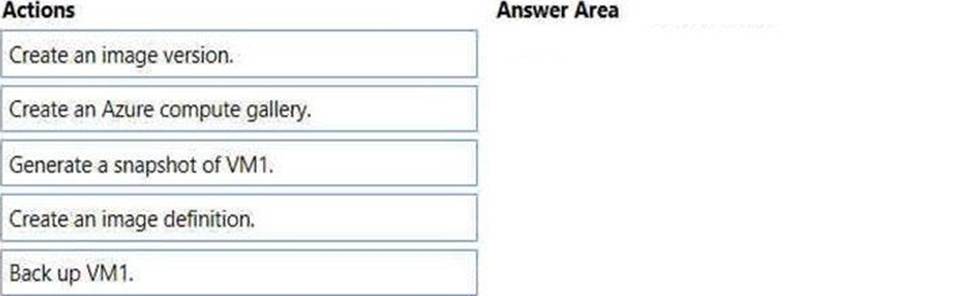
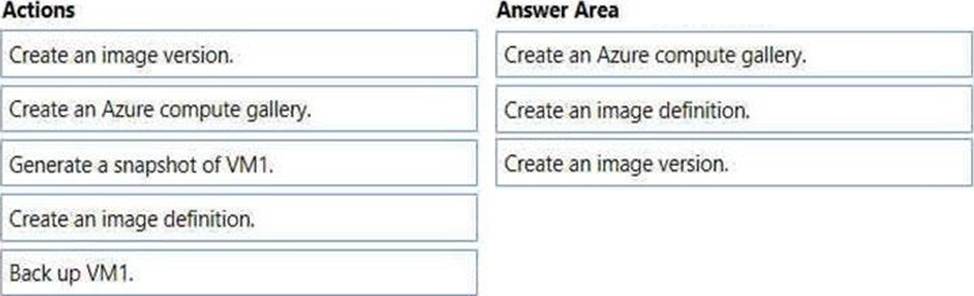
You have an Azure subscription that contains a virtual machine named VM1. VM1 runs a customized version of Windows 10 Enterprise.
You generalize the operating system on VM1 and shut down the virtual machine.
You need to deploy additional virtual machines based on an image of VM1 by using the Azure portal.
Which three actions should you perform in sequence? To answer, move the appropriate actions from the list of actions to the answer area and arrange them in the correct order. Select and Place:
You have an Azure storage account that contains the generalized Windows 10 disk images shown in the following table.
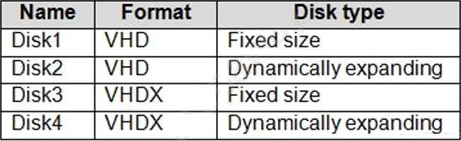
You need to create an image that will be used to deploy an Azure Virtual Desktop session host.
Which disk should you use?
- A . Disk1
- B . Disk2
- C . Disk3
- D . Disk4
A
Explanation:
Reference: https://docs.microsoft.com/en-us/azure/virtual-desktop/set-up-customize-master-image
HOTSPOT
You have an Azure subscription that contains a user named User1.
The subscription uses the Azure Virtual Desktop host pools shown in the following table.

You need to ensure that User1 can create RemoteApp app groups that will be used to stream a suite of custom apps from the host pools.
The solution must meet the following requirements:
• The apps must be available to the users in all the pools.
• The principle of least privilege must be followed.
• Administrative effort must be minimized.
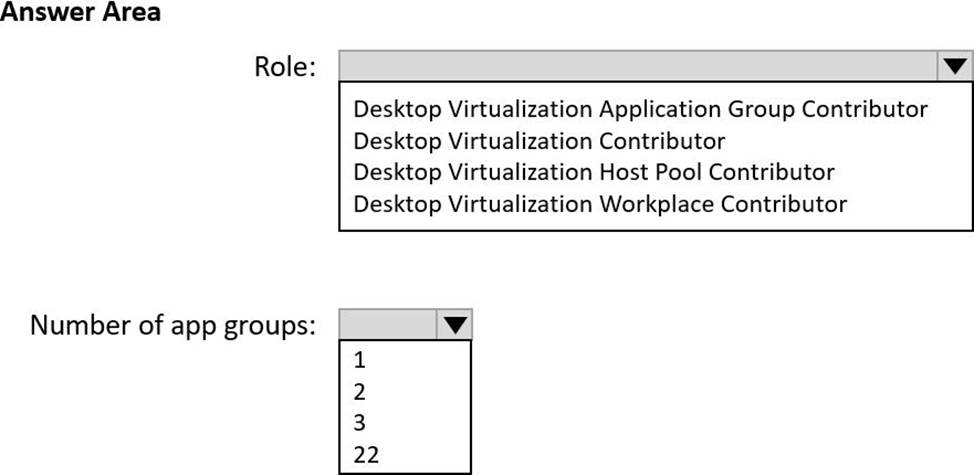
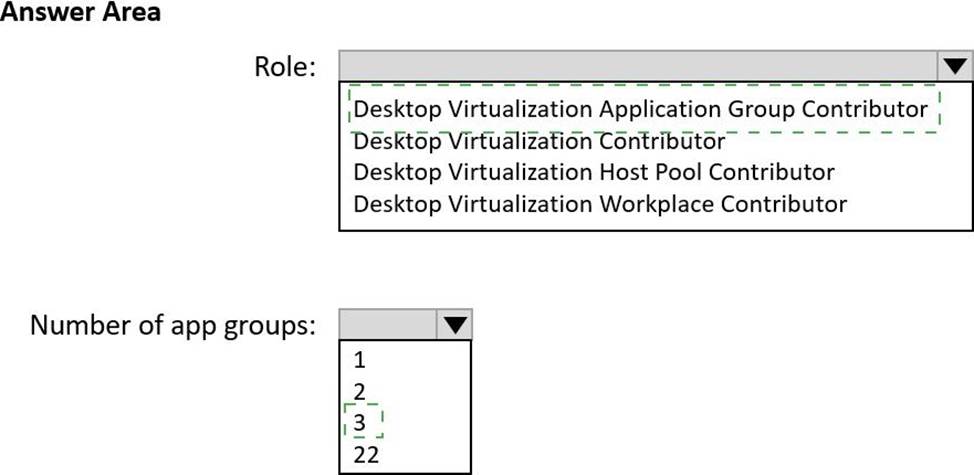
Which role should you assign to User1, and what is the minimum number of app groups that User1 should create? To answer, select the appropriate options in the answer area. NOTE: Each correct selection is worth one point.
Explanation:
To ensure that User1 can create RemoteApp app groups that will be used to stream a suite of custom apps from the host pools, while adhering to the principle of least privilege and minimizing administrative effort, the following should be considered:
Role: User1 needs to have the ability to create and manage app groups. The "Desktop Virtualization Application Group Contributor" role would allow User1 to create and manage application groups within Azure Virtual Desktop. This role is specific enough to adhere to the principle of least privilege while allowing User1 to perform the necessary tasks.
Number of app groups: Since the apps must be available to users in all pools, and to minimize administrative effort, User1 should create a single app group that contains the suite of custom apps. This app group can then be associated with each host pool. This way, there is only one set of apps to manage across all host pools, which simplifies administration.
Therefore, the correct answers are:
Role: Desktop Virtualization Application Group Contributor
Number of app groups: 1
You deploy a Windows Virtual Desktop host pool named Pool1.
You have an Azure Storage account named store1 that stores FSLogix profile containers in a share named profiles.
You need to configure the path to the storage containers for the session hosts.
Which path should you use?
- A . \store1.blob.core.windows.netprofiles
- B . https://store1.file.core.windows.net/profiles
- C . \store1.file.core.windows.netprofiles
- D . https://store1.blob.core.windows.net/profiles
C
Explanation:
https://docs.microsoft.com/en-us/azure/virtual-desktop/store-fslogix-profile
Azure offers multiple storage solutions that you can use to store your FSLogix profile container. We recommend storing FSLogix profile containers on Azure Files for most of our customers.
You plan to deploy Windows Virtual Desktop session host virtual machines based on a preconfigured master image. The master image will be stored in a shared image.
You create a virtual machine named Image1 to use as the master image. You install applications and apply configuration changes to Image1.
You need to ensure that the new session host virtual machines created based on Image1 have unique names and security identifiers.
What should you do on Image1 before you add the image to the shared image gallery?
- A . At a command prompt, run the set computername command.
- B . At a command prompt, run the sysprep command.
- C . From PowerShell, run the rename-computer cmdlet.
- D . From the lock screen of the Windows device, perform a Windows Autopilot Reset.
B
Explanation:
Reference: https://docs.microsoft.com/en-us/azure/virtual-machines/windows/prepare-for-upload-vhd-image#determinewhen-to-use-sysprep