
Microsoft AZ-140 Practice Exams
Last updated on Nov 16,2026- Exam Code: AZ-140
- Exam Name: Configuring and Operating Microsoft Azure Virtual Desktop
- Certification Provider: Microsoft
- Latest update: Nov 16,2026
HOTSPOT
You have an Azure subscription that contains the virtual machines shown in the following table.

You create an Azure Compute Gallery as shown in the Azure compute gallery exhibit. (Click the Azure
compute gallery tab.)
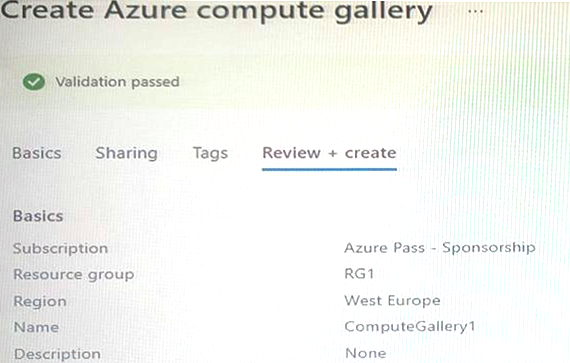
You create a virtual machine image definition as shown in the VM image definition exhibit. (Click the VM image definition tab.)
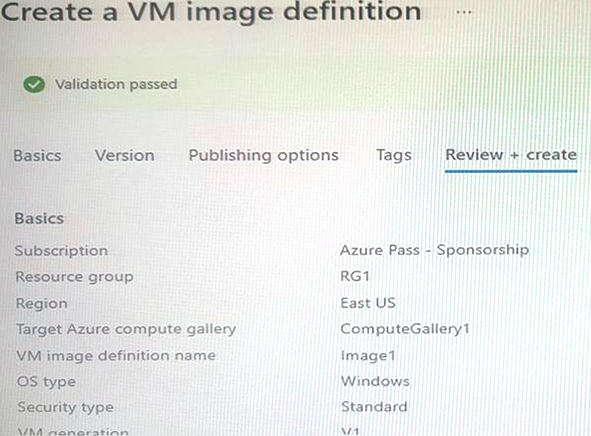
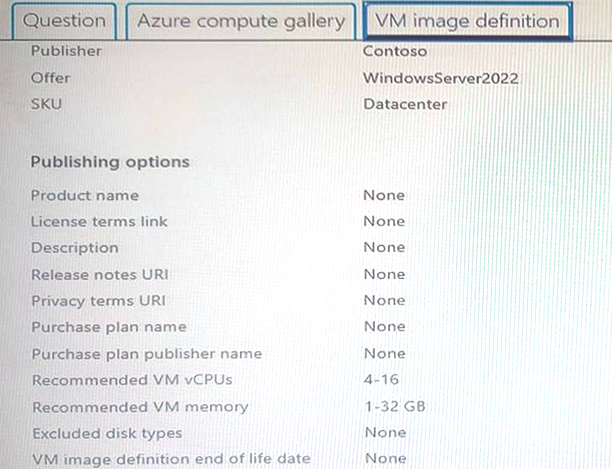
For each of the following statements, select Yes if the statement is true. Otherwise, select No.


HOTSPOT
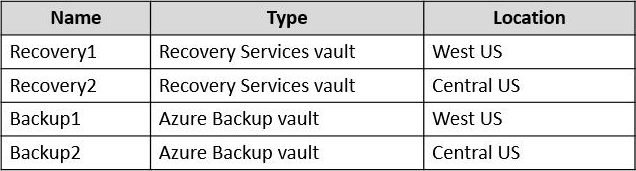
You have an Azure Virtual Desktop deployment that contains the resources shown in the following table.
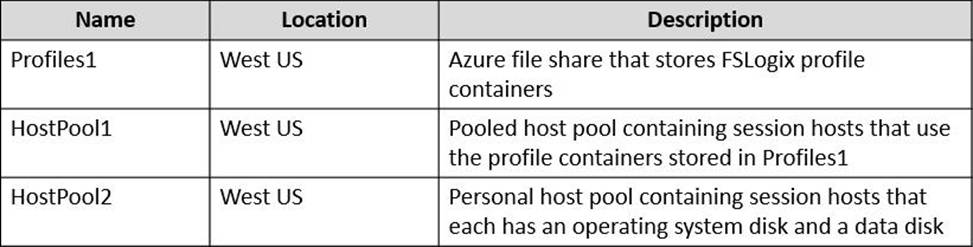
You create the resources shown in the following table.
You need to meet following requirements:
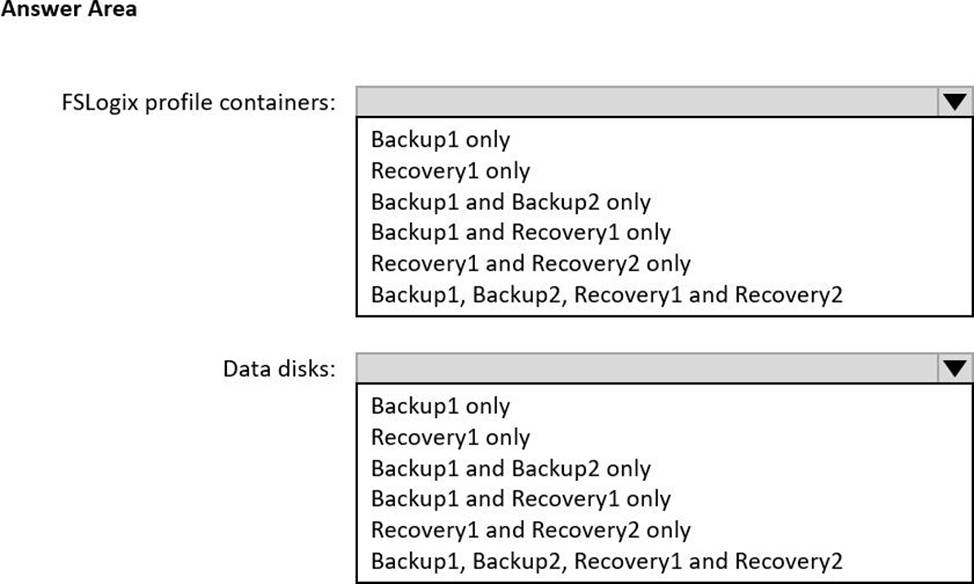
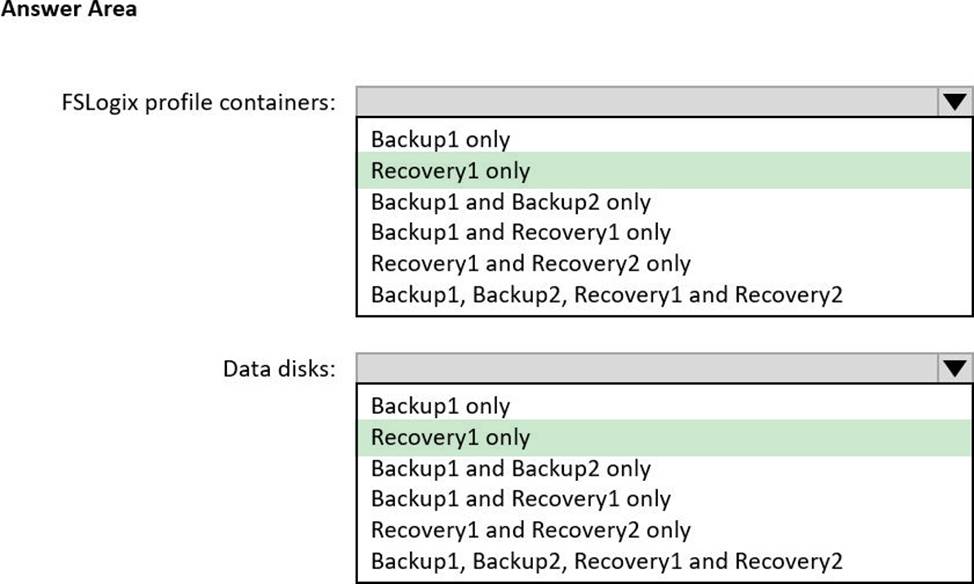
• Back up the FSLogix profile containers used by HostPool1.
• Backup the data disks in HostPool2.
To which resources can you back up the profile containers and the data disks? To answer, select the appropriate options in the answer area. NOTE: Each correct selection is worth one point.
Your company has a main office and two branch offices. Each office connects directly to the internet.
The router in each branch office is configured as an endpoint for the following VPNs:
✑ A VPN connection to the main office
✑ A site-to-site VPN to Azure
The routers in each branch office have the Quality of Service (QoS) rules shown in the following table.
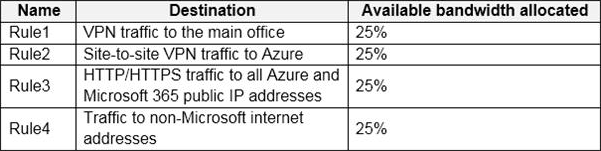
Users in the branch office report slow responses and connection errors when they attempt to connect to Windows Virtual Desktop resources.
You need to modify the QoS rules on the branch office routers to improve Windows Virtual Desktop performance.
For which rule should you increase the bandwidth allocation?
- A . Rule2
- B . Rule3
- C . Rule4
- D . Rule1
B
Explanation:
https://docs.microsoft.com/en-us/azure/virtual-desktop/safe-url-list
Any Remote Desktop clients you use must have access to the following URLs:
Remote Desktop clients
Address Outbound TCP port
*.wvd.microsoft.com 443
*.servicebus.windows.net 443
go.microsoft.com 443
aka.ms 443
docs.microsoft.com 443
privacy.microsoft.com 443
query.prod.cms.rt.microsoft.com 443
You have an Azure Virtual Desktop host pool.
You add a French language pack to each session host in the host pool.
Several days later, users report that English displays when they connect to Azure Virtual Desktop. After an investigation, you discover that the French language pack was removed, and the session hosts reverted to English.
You need to ensure that the French language pack is always available on the session hosts.
What should you do?
- A . Apply a Group Policy setting that blocks the cleanup of unused language packs.
- B . Apply a Group Policy setting to disable the Time & language settings.
- C . Configure the international settings on each host.
- D . Assign a default time zone on each host.
A
Explanation:
To ensure that the French language pack is always available on the session hosts in Azure Virtual Desktop, and to prevent it from being removed, you should:
Note: This question is part of a series of questions that present the same scenario. Each question in the series contains a unique solution that might meet the stated goals. Some question sets might have more than one correct solution, while others might not have a correct solution.
After you answer a question in this section, you will NOT be able to return to it. As a result, these questions will not appear in the review screen.
You have a Windows Virtual Desktop host pool that contains five session hosts. The session hosts run Windows 10 Enterprise multi-session.
You need to prevent users from accessing the internet from Windows Virtual Desktop sessions. The session hosts must be allowed to access all the required Microsoft services.
Solution: You configure the Address space settings of the virtual network that contains the session hosts.
Does that meet the goal?
- A . Yes
- B . No
You have an Azure Virtual Desktop host pool named Pool1 in the East US region.
You have a storage account named storage1 that contains FSLogix profile containers. In the East US region, you have a shared image gallery named SIG1 that contains a virtual machine image named Image1. Image1 is used to create new session hosts in Pool1.
You plan to deploy a new Azure Virtual Desktop host pool named Pool2 to the South India region.
You need to implement a session host deployment solution for Pool2 that meets the following requirements:
✑ Image1 must replicate in the South India region.
✑ The session hosts in Pool2 must be based on Image1.
✑ Changes to Image1 must be available in the South India and East US regions.
What should you include in the solution?
- A . Create a new shared image gallery named SIG2 in the South India region. Upload a copy of Image1 to SIG2.
- B . Create a new Azure Storage account named storage2 in the South India region. Copy Image1 to a shared folder in storage2.
- C . From SIG1, update the replication for the latest image version of Image1.
- D . Configure geo-redundant storage (GRS) replication for storage1. Copy the VHD file of Image1 to the FSLogix profile container.
C
Explanation:
Reference: https://docs.microsoft.com/en-us/azure/virtual-machines/shared-image-galleries
You have a shared image gallery that contains the Windows 10 images shown in the following table.
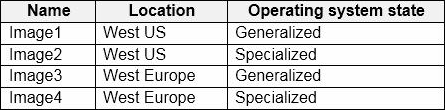
You create a Windows Virtual Desktop deployment that has the following settings:
✑ Host pool name: Pool1
✑ Location: West US
✑ Host pool type: Personal
Which images can you use for the session hosts?
- A . Image1 only
- B . Image1, Image2, Image3, and Image4
- C . Image2 only
- D . Image1 and Image2 only
- E . Image1 and Image3 only
D
Explanation:
For a Windows Virtual Desktop (WVD) personal host pool, you can use either generalized or specialized images. The key factors to consider when choosing an image are:
The operating system state (generalized or specialized).
The location of the image relative to the location of the host pool to minimize latency and data transfer costs.
Given the host pool is of type "Personal" and located in "West US", you would ideally want to choose an image that is in the same region to optimize performance and possibly reduce costs. However, since it’s a personal host pool, it can use both generalized and specialized images. The difference is:
A generalized image is a clean image used to deploy a new virtual machine that doesn’t retain any previous personalization or system state. This is often done using Sysprep to generalize an image in Windows.
A specialized image is one that has been configured with a specific system state and applications, and retains its unique system identity.
Considering the above, the images you can use for the session hosts in the West US location are:
Note: This question is part of a series of questions that present the same scenario. Each question in the series contains a unique solution that might meet the stated goals. Some question sets might have more than one correct solution, while others might not have a correct solution.
After you answer a question in this section, you will NOT be able to return to it. As a result, these questions will not appear in the review screen.
You have an Azure Virtual Desktop host pool that runs Windows 10 Enterprise multi-session.
User sessions are load-balanced between the session hosts. Idle session timeout is 30 minutes.
You plan to shut down a session host named Host1 to perform routine maintenance.
You need to prevent new user sessions to Host1 without disconnecting active user sessions.
Solution: you change the Drain mode of Host1.
Does this meet the goal?
- A . Yes
- B . No
A
Explanation:
Reference: https://docs.microsoft.com/en-us/azure/virtual-desktop/drain-mode
You have an Azure Virtual Desktop host pool in the US East Azure region.
You need to ensure that the host pool can fail over to the US West Azure region.
What should you do first?
- A . Create a Recovery Services vault.
- B . Create a virtual machine snapshot of each session host.
- C . Create an Azure Storage account that uses geo-redundant storage (GRS).
- D . Create a new host pool.
D
Explanation:
Ensuring that an Azure Virtual Desktop (AVD) host pool can fail over to another region is a multi-step process. The first step in creating a disaster recovery plan for AVD involves setting up infrastructure in the secondary region that can support the AVD deployment when the primary region is not available. This typically includes creating a new host pool in the secondary region.
Here’s why creating a new host pool is the first step:
You have the devices shown in the following table.
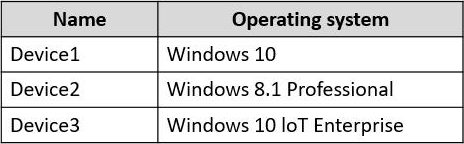
You plan to deploy Azure Virtual Desktop for client access to remote virtualized apps.
Which devices support the Remote Desktop client?
- A . Device1 only
- B . Device1 and Device2 only
- C . Device1 and Device3 only
- D . Device1, Device2, and Device3