
Microsoft AZ-140 Practice Exams
Last updated on Nov 16,2026- Exam Code: AZ-140
- Exam Name: Configuring and Operating Microsoft Azure Virtual Desktop
- Certification Provider: Microsoft
- Latest update: Nov 16,2026
HOTSPOT
You plan to deploy Windows Virtual Desktop.
Users have the devices shown in the following table.
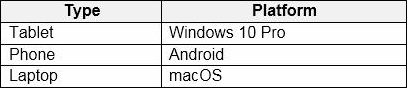
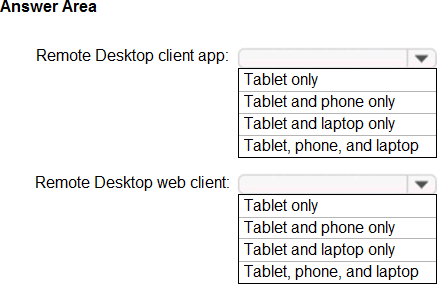
From which device types can the users connect to Windows Virtual Desktop resources by using the Remote Desktop client app and the Remote Desktop web client? To answer, select the appropriate options in the answer area. NOTE: Each correct selection is worth one point.
Explanation:
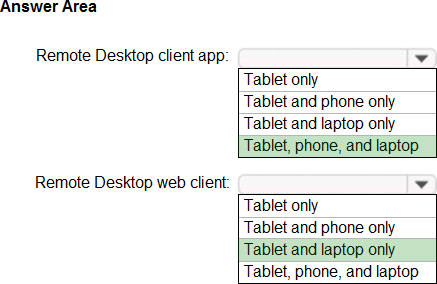
The Remote Desktop client app is available for a variety of platforms, including Windows, Android, and macOS. This means users can connect to Windows Virtual Desktop resources using the Remote Desktop client app from a wide range of devices.
Based on the platforms listed:
A Tablet with Windows 10 Pro can use the Remote Desktop client app.
A Phone with Android can use the Remote Desktop client app.
A Laptop with macOS can also use the Remote Desktop client app.
For the Remote Desktop web client, it is accessible from any device with a web browser that supports modern web standards, which includes tablets, phones, and laptops regardless of the operating system.
Therefore, the correct answers are:
For the Remote Desktop client app: Tablet, phone, and laptop.
For the Remote Desktop web client: Tablet, phone, and laptop.
You have an Azure Virtual Desktop host pool named Pool1 that contains three session hosts. The session hosts are configured to use FSLogix profiles.
On a management computer, you create an Application Masking rule and assignment files.
You need to apply Application Masking to the session hosts in Pool1.
What should you do?
- A . Generate a registration token.
- B . Install the FSLogix agent on the session hosts in Pool1.
- C . Compile the rule and assignment files.
- D . Copy the files to the session hosts in Pool1.
CD
Explanation:
FSLogix Application Masking is a feature that allows administrators to hide applications based on user assignments. To apply Application Masking to the session hosts in an Azure Virtual Desktop host pool, you first create the rule and assignment files on a management computer. After these files are created, you need to make them available to the session hosts.
Here’s what you should do with the rule and assignment files:
C. Compile the rule and assignment files: Before deploying FSLogix Application Masking rules, they need to be compiled into a format that the FSLogix agent can interpret. This is typically done using the FSLogix Rule Editor, which compiles the rules into an .fxr (rule file) and .fxa (assignment file) format.
D. Copy the files to the session hosts in Pool1: After the rule and assignment files are compiled, you need to place them in the correct location on each session host within the host pool where the FSLogix agent can apply them.
The other options are not directly related to the process of applying Application Masking rules:
Your network contains an on-premises Active Directory domain that syncs to an Azure Active Directory (Azure AD) tenant.
The domain contains the domain controllers shown in the following table.

The DNS servers are configured to forward requests to an external DNS service.
You create a new virtual network named VNET2 that is peered to VNET1 and has gateway transit enabled.
You plan to implement an Azure Virtual Desktop host pool in VNET2. The session hosts will be joined to the Active Directory domain.
You need to configure DNS to meet the following requirements:
✑ Ensure that Azure Virtual Desktop users can resolve on-premises servers and Azure resources.
✑ Ensure that azure Virtual Desktop remains operational if a DNS server fails.
✑ Minimize administrative effort.
What should you configure?
- A . the DNS settings of VNET2 to use Server2 and Served
- B . the DNS settings of VNET2 to use the Azure DNS service
- C . the DNS settings of the virtual machines to use Server2 and Server1
- D . the DNS settings of the virtual machines to use the Azure DNS service
A
Explanation:
To ensure that Azure Virtual Desktop users can resolve on-premises servers and Azure resources, while also ensuring high availability of DNS resolution and minimizing administrative effort, you should configure:
You need to deploy the session hosts to meet the deployment requirements.
Which PowerShell cmdlel should you run first?
- A . New-AzwvdRegistratrationinfo
- B . Get-AzApiManagementSsoToken
- C . Set-AzWMADDomainExtension
- D . Update-AZwvdSessionHost
A
Explanation:
This cmdlet generates a registration token that you use when deploying new session hosts to ensure they register with the correct host pool in AVD.
You have an Azure subscription. The subscription contains a virtual machine named Server1 that runs Windows Server and is deployed to the West US Azure region.
You deploy a new Azure Virtual Desktop host pool named HostPool1 to the East US Azure region.
You need to ensure that all the traffic between HostPool1 and Server1 is routed via the Microsoft backbone network.
What should you use?
- A . service endpoints
- B . virtual network peering
- C . routing tables
- D . Azure Traffic Manager
B
Explanation:
To ensure that all traffic between an Azure Virtual Desktop host pool and a virtual machine in Azure is routed via the Microsoft backbone network, you would typically use virtual network peering. Peering enables you to connect two Azure virtual networks seamlessly. Once peered, the virtual networks appear as one for connectivity purposes and all traffic between the peered virtual networks is routed through the Microsoft backbone infrastructure.
Here ’ s why the other options are less suitable:
You have a Azure Virtual Desktop host pool named Pool1 that is integrated with an Azure Active Directory Domain Services (Azure AD DS) managed domain.
You need to configure idle session timeout settings for users that connect to the session hosts in Pool 1.
Solution: From the Azure portal you modify the Advanced settings in the RDP Properties of Pool1.
Does This meet the goal?
- A . Yes
- B . No
You have a Azure Virtual Desktop deployment.
You need to monitor the deployment of using the Azure Virtual Desktop Insights solution in Azure Monitor.
What should you use as the Diagnostic settings destination for the host pool?
- A . Event hub
- B . Log Analytics workspace
- C . Storage account
B
Explanation:
Reference: https://docs.microsoft.com/en-us/azure/virtual-desktop/azure-monitor
You network contains an on-premises Active Directory domain. The domain contains a universal security group named WVDusers.
You have a hybrid Azure Active Directory (Azure AD) tenant. WVDusers syncs to Azure AD.
You have a Windows Virtual Desktop host pool that contains four Windows 10 Enterprise multi-session hosts.
You need to ensure that only the members of WVDusers can establish Windows Virtual Desktop sessions to the host pool.
What should you do?
- A . Assign WVDusers to an Azure role scoped to each host pool.
- B . On each session host, add WVDusers to the local Remote Desktop Users group.
- C . Assign WVDusers to an Azure role scoped to the session hosts.
- D . Assign WVDusers to an application group.
D
Explanation:
Reference: https://docs.microsoft.com/en-us/azure/virtual-desktop/manage-app-groups
You network contains an on-premises Active Directory domain. The domain contains a universal security group named WVDusers.
You have a hybrid Azure Active Directory (Azure AD) tenant. WVDusers syncs to Azure AD.
You have a Windows Virtual Desktop host pool that contains four Windows 10 Enterprise multi-session hosts.
You need to ensure that only the members of WVDusers can establish Windows Virtual Desktop sessions to the host pool.
What should you do?
- A . Assign WVDusers to an Azure role scoped to each host pool.
- B . On each session host, add WVDusers to the local Remote Desktop Users group.
- C . Assign WVDusers to an Azure role scoped to the session hosts.
- D . Assign WVDusers to an application group.
D
Explanation:
Reference: https://docs.microsoft.com/en-us/azure/virtual-desktop/manage-app-groups
Note: This question is part of a series of questions that present the same scenario. Each question in the series contains a unique solution that might meet the stated goals. Some question sets might have more than one correct solution, while others might not have a correct solution.
After you answer a question in this section, you will NOT be able to return to it. As a result, these questions will not appear in the review screen.
You have the following:
✑ A Microsoft 365 E5 tenant
✑ An on-premises Active Directory domain
✑ A hybrid Azure Active Directory (Azure AD) tenant
✑ An Azure Active Directory Domain Services (Azure AD DS) managed domain
✑ An Azure Virtual Desktop deployment
The Azure Virtual Desktop deployment contains personal desktops that are hybrid joined to the on-premises domain and enrolled in Microsoft Intune.
You need to configure the security settings for the Microsoft Edge browsers on the personal desktops.
Solution: You configure a configuration profile in Intune.
Does this meet the goal?
- A . Yes
- B . No
A
Explanation:
Reference: https://docs.microsoft.com/en-us/mem/intune/fundamentals/azure-virtual-desktop