
Microsoft AZ-140 Practice Exams
Last updated on Nov 16,2026- Exam Code: AZ-140
- Exam Name: Configuring and Operating Microsoft Azure Virtual Desktop
- Certification Provider: Microsoft
- Latest update: Nov 16,2026
HOTSPOT
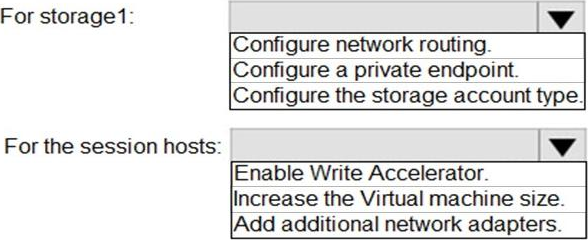
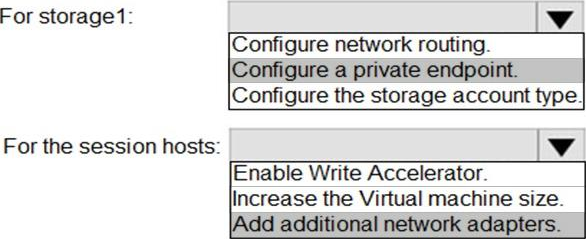
You have an Azure Virtual Desktop host pool named Pool1 and an Azure Storage account named storage1. Pool1 and storage1 are in the same Azure region.
The current network utilization of the session hosts during peak hours is 95%.
You plan to use FSLogix profile containers stored in storage1 for users that connect to Pool1.
You need to configure the session hosts and storage1 to minimize network latency when loading and updating profiles.
What should you do? To answer, select the appropriate options in the answer area. NOTE: Each correct selection is worth one point.
Explanation:
Reference: https://docs.microsoft.com/en-us/azure/architecture/example-scenario/wvd/windows-virtual-desktop-fslogix
DRAG DROP
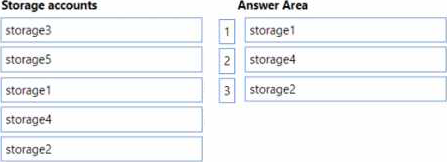
You have an Azure Virtual Desktop deployment and the Azure Storage accounts shown in the following table.
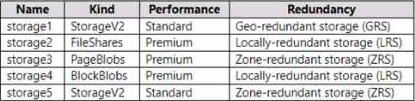
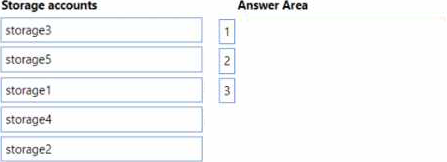
You plan to create FSLogix profile containers and store the containers in the storage accounts. You need to identify which storage accounts support the FSlogix profile containers, and then order the accounts from highest to lowest redundancy.
Which three storage accounts should you identify in sequence? To answer, move the appropriate accounts from the list of accounts to the answer area and arrange them in the correct order.
You have a Windows Virtual Desktop host pool that contains two session hosts. The Microsoft Teams client is installed on each session host.
You discover that only the Microsoft Teams chat and collaboration features work. The calling and meeting features are disabled.
You need to ensure that users can set the calling and meeting features from within Microsoft Teams.
What should you do?
- A . Install the Remote Desktop WebRTC Redirector Service.
- B . Configure Remote audio mode in the RDP Properties.
- C . Install the Teams Meeting add-in for Outlook.
- D . Configure audio input redirection.
A
Explanation:
Reference: https://docs.microsoft.com/en-us/azure/virtual-desktop/teams-on-wvd
Your network contains an on-premises Active Directory domain and a Windows Virtual Desktop deployment.
The computer accounts for all the session hosts are in an organizational unit (OU) named WVDHostsOU. All user accounts are in an OU named CorpUsers.
A domain administrator creates a Group Policy Object (GPO) named Policy1 that only contains user settings.
The administrator links Policy1 to WVDHostsOU.
You discover that when users sign in to the session hosts, none of the settings from Policy1 are applied.
What should you configure to apply GPO settings to the users when they sign in to the session hosts?
- A . loopback processing
- B . FSLogix profiles
- C . mandatory Roaming User Profiles
- D . restricted groups
A
Explanation:
Reference: https://www.linkedin.com/pulse/windows-virtual-desktop-remoteapps-jason-byway
HOTSPOT
You have an Azure subscription that is linked to a hybrid Microsoft Entra tenant.
You have the user accounts shown in the following table.

You have an Azure Virtual Desktop deployment that uses FSLogix profiles and contains the host pools shown in the following table.

The host pools contain the session hosts shown in the following table.
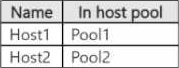
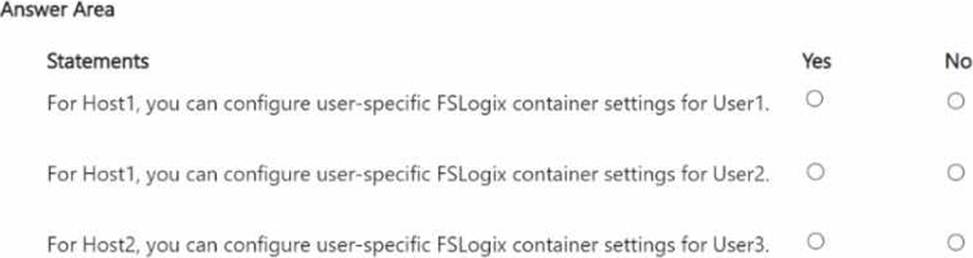
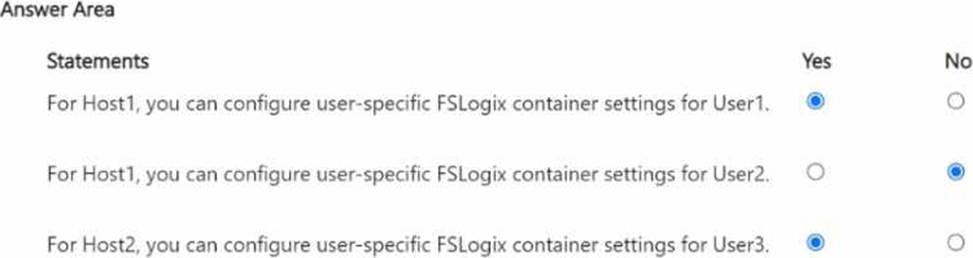
For each of the following statements, select Yes if the statement is true. Otherwise, select No. NOTE: Each correct selection is worth one point.
You have an on-premises network and an Azure subscription.
The subscription contains the following:
• A virtual network
• An Azure Firewall instance
• A Azure Virtual Desktop host pool
The virtual network connects to the on-premises network by using a site-to-site VPN.
You need to ensure that only users from the on-premises network can connect to the Azure Virtual Desktop managed resources in the host pool. The solution must minimize administrator effort.
What should you configure?
- A . an Azure Firewall rule
- B . a conditional access policy
- C . a network security group (NSG) rule
- D . a user-defined route
You have an Azure Virtual Desktop deployment that contains a host pool named Pool1 Pool1 contains two session hosts that are Microsoft Entra joined.
You need to configure single sign-on (SSO) to connect to the session hosts. The solution must enable
Microsoft Entra authentication for Remote Desktop Protocol (RDP) in the Microsoft Entra tenant.
Which application requires that you modify the remoteDesktopSecurityConfiguration object?
- A . Windows 365
- B . Azure Virtual Desktop
- C . Windows Cloud Login
- D . Microsoft Azure Windows Virtual Machine Sign-in
You have an Azure subscription that contains the resources shown in the following table.
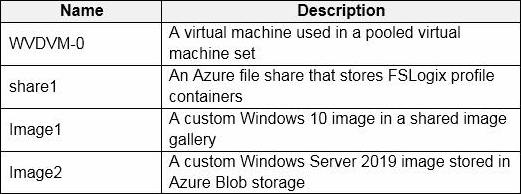
You create a recovery services vault named Vault1.
Which resources can you back up using Azure Backup to Vault1?
- A . AVDVM-0 only
- B . AVDVM-0 and share1 only
- C . AVDVM-0, Image1 and Image2 only
- D . AVDVM-0. share1 and Image1 only
- E . AVDVM-0. share1. Image1 and Image2
B
Explanation:
https://docs.microsoft.com/en-us/azure/backup/backup-overview#what-can-i-back-up Operational backup of blobs is a local backup solution. So the backup data isn’t transferred to the Backup vault
HOTSPOT
You have a Windows Virtual Desktop deployment.
You need to ensure that all the connections to the managed resources in the host pool require multi-factor authentication (MFA).
Which two settings should you modify in a conditional access policy? To answer, select the appropriate options in the answer area. NOTE: Each correct selection is worth one point.
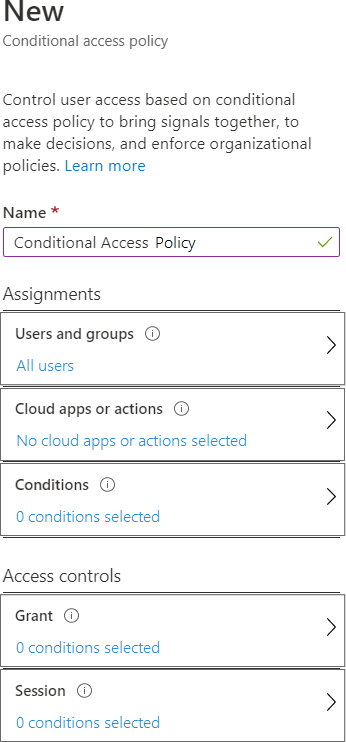
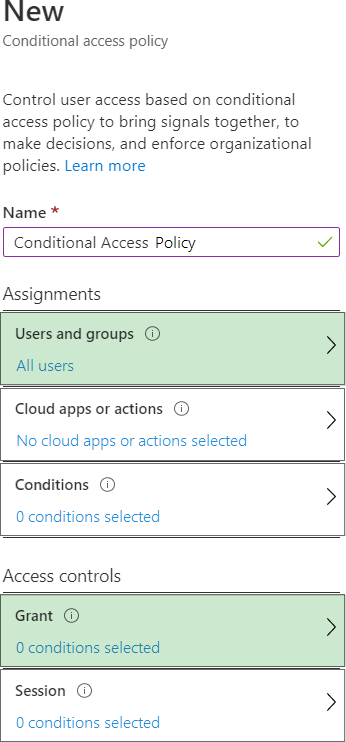
Explanation:
In order to enforce Multi-Factor Authentication (MFA) for all connections to managed resources in a Windows Virtual Desktop host pool, you need to configure a Conditional Access Policy in Azure AD.
The two settings that should be modified in a Conditional Access Policy to accomplish this are:
Assignments -> Users and groups: You would choose ‘All users’ or a specific group of users that you want to enforce MFA on.
Access controls -> Grant: In this section, you would configure the control to ‘Grant access’ and require ‘Multi-Factor Authentication’.
You would not necessarily need to alter the ‘Cloud apps or actions’ or ‘Conditions’ unless you want to specify particular apps or conditions under which the policy applies. If you want the policy to apply to all cloud apps, you can leave it as ‘No cloud apps or actions selected’, which will enforce the policy for all apps by default. However, if you only want to apply MFA to the Windows Virtual Desktop app, you would select that specific app under the ‘Cloud apps or actions’ section.
In ‘Conditions’, you could specify certain conditions like location or device state, but this is not required just to enforce MFA; it’s more about refining the policy.
Please note that you would also need to ensure that the ‘Enable policy’ switch at the end of the configuration is set to ‘On’ for the policy to be active.
DRAG DROP
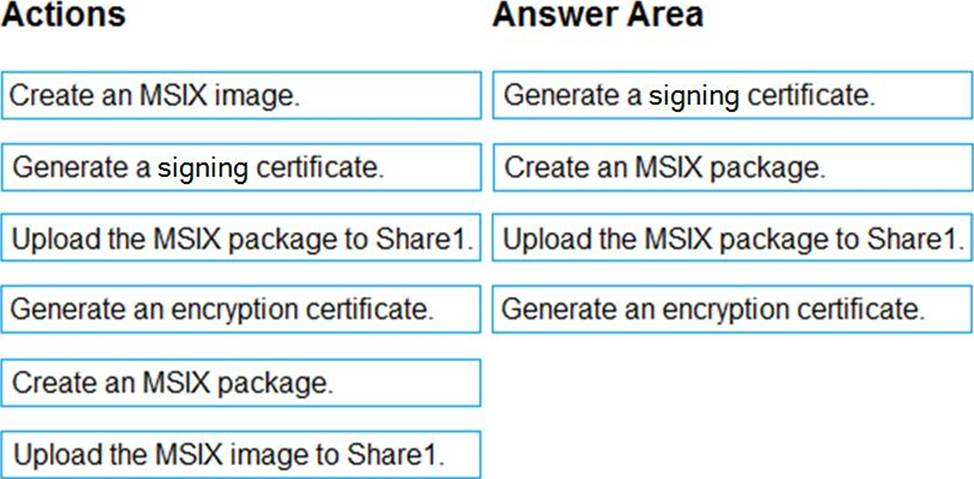
You have an Azure Virtual Desktop host pool named Pool1, an application named App1, and an Azure file share named Share1.
You need to ensure that you can publish App1 to Pool1 by using MSIX app attach.
Which four actions should you perform in sequence before you publish App1? To answer, move the appropriate actions from the list of actions to the answer area and arrange them in the correct order.
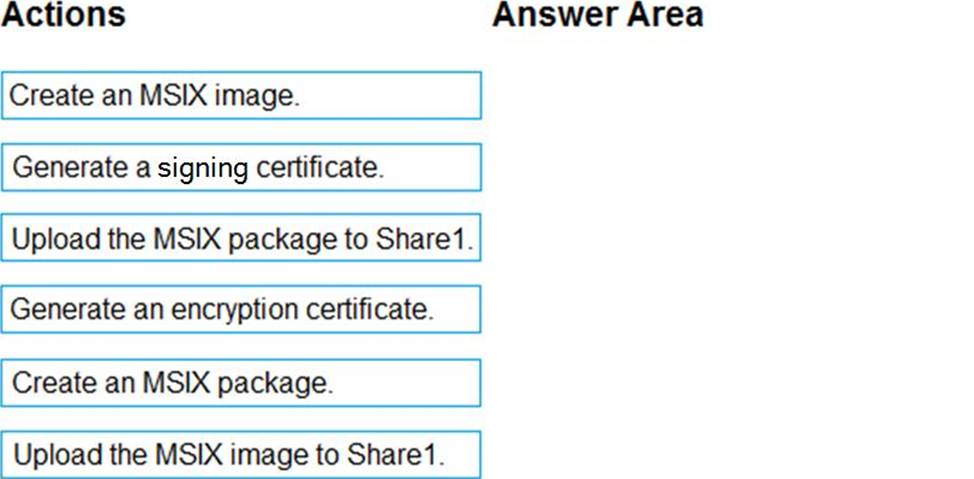
Explanation:
To publish an application to an Azure Virtual Desktop host pool using MSIX app attach, you need to create the MSIX package, ensure it’s signed, and then upload it to a location accessible by the AVD session hosts. Here are the steps you would typically follow:
Generate a signing certificate: Before you can use an MSIX package, it must be signed with a certificate that the target machines trust. This certificate is used to sign the MSIX package.
Create an MSIX package: You package the application in the MSIX format. This process converts your application into a containerized package.
Upload the MSIX package to Share1: After creating the MSIX package, you upload it to the Azure file share (Share1). This location is where the AVD session hosts will access the package for MSIX app attach.
Generate an encryption certificate: If required by the environment for added security, generate an encryption certificate. However, encryption is optional and not a mandatory step for MSIX app attach.
Creating an MSIX image is not a step in the process of preparing an MSIX package for app attach. An MSIX image is typically used when you have a virtualized version of the OS, not an application.
Based on these options, the sequence of steps should be:
Generate a signing certificate.
Create an MSIX package.
Upload the MSIX package to Share1.
(Optional, based on the environment requirements) Generate an encryption certificate.
Since the "Generate an encryption certificate" step is optional and not typically a part of the standard process for MSIX app attach, it would be included as the last step if it is necessary for your specific environment. Otherwise, the first three steps are sufficient to prepare for publishing the app using MSIX app attach.