
Juniper JN0-281 Practice Exams
Last updated on Oct 22,2026- Exam Code: JN0-281
- Exam Name: Data Center, Associate (JNCIA-DC)
- Certification Provider: Juniper
- Latest update: Oct 22,2026
When troubleshooting an OSPF neighborship, you notice that the router stopped at the ExStart state.
What is the cause of this result?
- A . The priority is set to 255.
- B . There is an interval timing mismatch.
- C . There is an area ID mismatch.
- D . There is an MTU mismatch.
D
Explanation:
When an OSPF (Open Shortest Path First) neighborship is stuck in the ExStart state, it usually points
to a mismatch in Maximum Transmission Unit (MTU) settings between two routers trying to establish
the adjacency. The ExStart state is where OSPF routers negotiate the master-slave relationship and
exchange DBD (Database Description) packets.
Step-by-Step Breakdown:
OSPF Neighbor States: OSPF goes through several states to establish an adjacency with a neighbor:
Down: No hello packets have been received.
Init: Hello packets are received, but bidirectional communication isn’t confirmed.
2-Way: Bidirectional communication is established.
ExStart: The routers are negotiating who will be the master and who will be the slave, and begin to exchange DBD packets.
Exchange: The routers start exchanging the database information.
Loading: The routers process the Link-State Advertisements (LSAs).
Full: The adjacency is fully established.
MTU Mismatch Issue:
During the ExStart state, both OSPF routers must agree on their MTU values. If there is an MTU mismatch between the two routers, OSPF neighbors will fail to move from the ExStart to the Exchange state. The router with the larger MTU setting will not accept DBD packets from the router with a smaller MTU because the packets may exceed the smaller MTU size.
In Juniper devices, this behavior can be identified by examining the MTU settings using the show interfaces command and ensuring both routers have matching MTU configurations. To resolve this issue, either match the MTU settings on both routers or configure OSPF to ignore MTU mismatches using the command set protocols ospf ignore-mtu.
Juniper
Reference: Junos Command: show ospf neighbor helps diagnose neighbor states.
MTU Adjustment: set interfaces <interface-name> mtu <size> can be used to set the MTU values correctly.
When a MAC limiting violation occurs, the switch performs which two actions by default? (Choose two.)
- A . No logging takes place.
- B . It causes Layer 2 loops.
- C . The port is disabled.
- D . It drops the packet.
C, D
Explanation:
When a MAC limiting violation occurs on a Juniper switch, the switch will perform the following actions by default:
Step-by-Step Breakdown:
Port Disabled:
When the number of MAC addresses on an interface exceeds the configured limit, the port is automatically disabled to prevent further violations. This is a protective mechanism to prevent MAC address flooding.
Packet Dropped:
Additionally, packets from the violating MAC address are dropped to prevent any further communication from that address. This ensures that only valid MAC addresses are allowed to communicate through the interface.
Example Configuration:
set ethernet-switching-options secure-access-port interface <interface-name> mac-limit 5
If more than five MAC addresses are learned, the port is disabled, and excess packets are dropped.
Juniper
Reference: MAC Limiting: When the switch detects a MAC limiting violation, it disables the port and drops further packets from the violating MAC addresses to maintain network security.
Which statement is correct about the BGP AS path when advertising routes?
- A . The order of the AS path is not significant.
- B . The local AS number is added to the end of the AS path.
- C . The order of the AS path is only significant in IBGP.
- D . The local AS number is added to the beginning of the AS path.
D
Explanation:
The BGP AS (Autonomous System) path attribute is crucial in path selection and loop prevention.
Each BGP router appends its local AS number to the beginning of the AS path when it advertises a route to an external BGP (eBGP) peer.
Step-by-Step Breakdown:
AS Path Attribute:
The AS path is a sequence of AS numbers that a route has traversed to reach a destination. Each AS adds its number to the front of the path, allowing BGP to track the route’s history.
Why the Local AS is Added at the Beginning:
When advertising a route to an eBGP neighbor, a BGP router adds its own AS number to the beginning of the AS path. This ensures that the AS path reflects the route’s journey accurately from the origin to the destination, and prevents loops in BGP. If the route returns to the same AS, the router will detect its AS number in the path and reject the route, preventing routing loops.
Order of the AS Path:
The order is significant because BGP uses it to select the best path. A shorter AS path is preferred, as it indicates fewer hops between the source and destination. Juniper
Reference: AS Path Attribute: Junos devices append the local AS at the start of the AS path before advertising the route to an external peer.
Which two statements are true about how switches handle Layer 2 traffic? (Choose two.)
- A . The MAC address is learned based on the destination MAC address.
- B . The MAC address is learned based on the source MAC address.
- C . Traffic is forwarded based on the source MAC address.
- D . Traffic is forwarded based on the destination MAC address.
B, D
Explanation:
In Layer 2 switching, switches learn MAC addresses based on the source MAC address of incoming frames and forward frames based on the destination MAC address.
Step-by-Step Breakdown:
MAC Learning:
When a switch receives a frame, it records the source MAC address and the port on which it arrived.
This allows the switch to know where to send traffic destined for that MAC address.
Forwarding Based on Destination:
The switch then looks at the destination MAC address and forwards the frame out of the port associated with that MAC address. If the MAC is unknown, the switch floods the frame to all ports. Juniper
Reference: Layer 2 Switching: Juniper switches use source MAC addresses to build MAC tables and forward traffic based on the destination MAC address.
Which statement is correct about aggregate routes?
- A . The default next hop is discard.
- B . The default next hop is readvertise.
- C . The default next hop is resolve.
- D . The default next hop is reject.
D
Explanation:
An aggregate route is a summarized route that is created by combining multiple specific routes into a single, broader route. In Junos OS, when an aggregate route is configured, its default next hop is set to reject.
Step-by-Step Explanation
Aggregate Route:
Aggregate routes are used to reduce the size of routing tables by representing a collection of more
specific routes with a single summary route. They help improve routing efficiency and scalability,
especially in large networks.
Default Next Hop Behavior:
When you configure an aggregate route in Junos OS, it has a reject next hop by default.
The reject next hop means that if a packet matches the aggregate route but there is no more specific route in the routing table for that destination, the packet will be discarded, and an ICMP "destination unreachable" message is sent to the source.
This behavior helps to prevent routing loops and ensures that traffic isn’t forwarded to destinations
for which there is no valid route.
Modifying Next Hop:
If needed, the next hop behavior of an aggregate route can be changed to discard (which silently drops the packet) or to another specific next hop. However, by default, the next hop is set to reject. Juniper
Reference: Junos Command: set routing-options aggregate route <route> reject to configure an aggregate route with a reject next hop.
Verification: Use show route to verify the presence and behavior of aggregate routes.
Which statement is correct about per-flow load balancing?
- A . Packets associated with the same flow are sent through different egress ports.
- B . The packets are guaranteed to arrive at their destination in a different order in which they were sent.
- C . Packets associated with the same flow are sent through the same egress port.
- D . The packets are guaranteed to arrive at their destination in the same order in which they were sent.
C
Explanation:
Per-flow load balancing ensures that packets within the same flow are always forwarded over the same path, ensuring that packet order is preserved.
Step-by-Step Breakdown:
Flow Definition:
A flow is typically defined by a combination of packet attributes like source/destination IP, source/destination port, and protocol type. Packets that belong to the same flow are routed over the same path to avoid reordering.
Per-Flow Behavior:
In per-flow load balancing, the hashing algorithm ensures that all packets in a particular flow use the same egress port, maintaining order across the network. Juniper
Reference: Load Balancing in Juniper: This method ensures that flows are balanced across multiple paths while preventing packet reordering within a single flow.
When considering bidirectional forwarding detection, which two statements are correct? (Choose two.)
- A . The BFD default minimum interval is 3.
- B . You can configure BFD per interface within the protocol stanza.
- C . The BFD operation always consists of minimum intervals and multipliers.
- D . The BFD default multiplier is 5.
B, C
Explanation:
Bidirectional Forwarding Detection (BFD) is a protocol used to detect faults in the forwarding path between two routers. It provides rapid failure detection, enhancing the performance of routing protocols like OSPF, BGP, and IS-IS.
Step-by-Step Breakdown:
Per Interface Configuration:
BFD can be configured on a per-interface basis within the protocol stanza (e.g., OSPF, BGP). This allows granular control over where BFD is enabled and the failure detection intervals for specific interfaces.
Minimum Interval and Multiplier:
BFD uses a minimum interval (the time between BFD control packets) and a multiplier (the number of missed packets before the path is declared down). The combination of these two defines the detection time for failures.
Juniper
Reference: BFD Configuration: In Juniper, BFD is configurable within routing protocol stanzas, with the failure detection mechanism always based on minimum intervals and multipliers.
Which Junos OS routing table stores IPv6 addresses?
- A . inet.0
- B . inet0.6
- C . inet.6
- D . inet6.0
D
Explanation:
In Junos OS, routing information is stored in different routing tables depending on the protocol and address family. For IPv6 addresses, the routing table used is inet6.0.
Step-by-Step Explanation
Routing Tables in Junos:
inet.0: This is the primary routing table for IPv4 unicast routes.
inet6.0: This is the primary routing table for IPv6 unicast routes.
inet.3: This routing table is used for MPLS-related routing.
Other routing tables, like inet.1, inet.2, are used for multicast and other specific purposes.
inet6.0 Routing Table:
When IPv6 is enabled on a Juniper router, all the IPv6 routes are stored in the inet6.0 table. This includes both direct routes (connected networks) and learned routes (from dynamic routing protocols like OSPFv3, BGP, etc.).
Verification:
To view IPv6 routes, the command show route table inet6.0 is used. This will display the contents of the IPv6 routing table, showing the network prefixes, next-hop addresses, and protocol information for each route.
Juniper
Reference: Junos Command: Use show route table inet6.0 to check IPv6 routing entries.
IPv6 Routing: Ensure that the IPv6 protocol is enabled on interfaces and that routing protocols like OSPFv3 or BGP are properly configured for IPv6 traffic handling.
Exhibit:
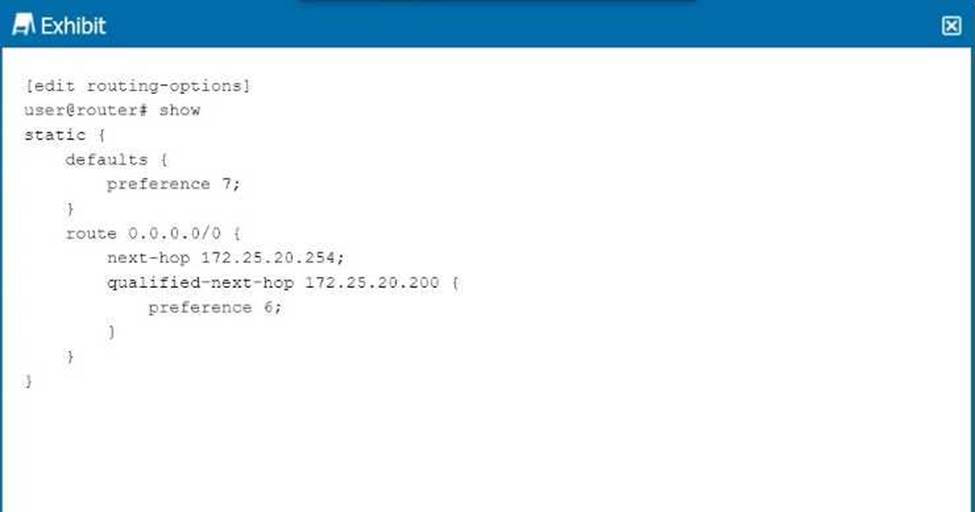
Referring to the exhibit, which next hop will be preferred in the routing table?
- A . Next hop IP address 172.25.20.254 will be preferred.
- B . Neither next hop will be preferred.
- C . Next hop IP address 172.25.20.200 will be preferred.
- D . Both next hops will be preferred.
C
Explanation:
In the exhibit, we see a static route configuration with two possible next hops for the default route (0.0.0.0/0):
next-hop 172.25.20.254 with the default preference of 7.
qualified-next-hop 172.25.20.200 with a preference of 6.
Step-by-Step Breakdown:
Preference Value:
In Junos OS, the preference value is used to determine which route should be preferred in the routing table. The lower the preference value, the higher the priority for the route.
Comparison:
In this case:
The next hop 172.25.20.254 has a preference of 7.
The qualified-next-hop 172.25.20.200 has a preference of 6.
Preferred Next Hop:
Since 172.25.20.200 has a lower preference (6) compared to 172.25.20.254 (7), it will be the preferred next hop in the routing table, assuming both next hops are reachable. Juniper
Reference: Qualified Next Hop: In Junos, static routes with multiple next-hop options are selected based on the preference value, with the lower value being preferred.
What are three correct layer names used in legacy hierarchical network design? (Choose three.)
- A . Access layer
- B . Modular layer
- C . Aggregation layer
- D . Core layer
- E . Function layer
A, C, D
Explanation:
In legacy hierarchical network design, three key layers are used to create a scalable and structured network:
Step-by-Step Breakdown:
Access Layer:
The access layer is where end devices, such as computers and IP phones, connect to the network. It typically involves switches that provide connectivity for devices at the edge of the network.
Aggregation Layer (Distribution Layer):
The aggregation layer (also called the distribution layer) aggregates traffic from multiple access layer devices and applies policies such as filtering and QoS. It also provides redundancy and load balancing.
Core Layer:
The core layer provides high-speed connectivity between aggregation layer devices and facilitates traffic within the data center or between different network segments. Juniper
Reference: Legacy Hierarchical Design: Juniper networks often follow the traditional three-layer design (Access, Aggregation, and Core) to ensure scalability and high performance.