
Juniper JN0-281 Practice Exams
Last updated on Oct 21,2026- Exam Code: JN0-281
- Exam Name: Data Center, Associate (JNCIA-DC)
- Certification Provider: Juniper
- Latest update: Oct 21,2026
When using spine and leaf fabric architectures, what is the role of each device? (Choose two.)
- A . Spine nodes are used for host connectivity.
- B . Spine nodes are used for transit to other leaf nodes.
- C . Leaf nodes are used for traffic to other leafs.
- D . Leaf nodes are used for host connectivity.
B, D
Explanation:
In a spine-leaf fabric architecture, which is commonly used in data center designs, each device has a distinct role to ensure efficient and scalable network traffic flow. Step-by-Step Breakdown:
Spine Nodes:
The spine nodes form the backbone of the fabric and are responsible for transit traffic between leaf
nodes. They connect to every leaf switch and provide multiple paths for traffic between leaf nodes,
ensuring redundancy and load balancing.
Leaf Nodes:
The leaf nodes are used for host connectivity. These switches connect to servers, storage, or edge routers. They also connect to the spine switches to reach other leaf switches. Juniper
Reference: Spine-Leaf Architecture: In Juniper’s IP fabric designs, spine switches handle inter-leaf communication, while leaf switches manage host and endpoint connectivity.
Which two statements are correct about VLAN tags? (Choose two.)
- A . VLAN tags carry a VLAN ID and priority.
- B . VLAN tags are required on access ports.
- C . VLAN tags require multiple forwarding tables.
- D . VLAN tags can be inserted or removed by trunk interfaces.
A, D
Explanation:
VLAN tags are used in Ethernet frames to identify and differentiate traffic between multiple VLANs.
They are especially important for devices like switches that handle multiple VLANs on the same physical link.
Step-by-Step Breakdown:
VLAN Tag Contents:
VLAN ID: The tag contains a 12-bit VLAN ID field that identifies the VLAN to which the frame belongs.
Priority: The tag also includes a 3-bit priority field (also known as 802.1p priority) used for QoS (Quality of Service) to prioritize traffic.
Trunk Ports and VLAN Tagging:
Trunk Ports are used to carry traffic for multiple VLANs across a single link. These interfaces insert (tag) VLAN identifiers into frames when they leave the switch and remove (untag) them when frames enter the switch.
Access Ports:
VLAN tags are typically not used on access ports (ports that connect to end devices) since those ports are configured to be part of a single VLAN, and the traffic doesn’t need VLAN tags. Juniper
Reference: VLAN Tagging: Juniper switches support VLAN tagging and ensure that frames are tagged or untagged as they traverse trunk or access ports, respectively.
What are two reasons why you would deploy an IP fabric instead of a traditional Layer 2 network in a
data center? (Choose two.)
- A . Layer 2 networks only support a single broadcast domain.
- B . IP fabrics are better suited to smaller networks where scale is less important.
- C . Layer 3 networks support load balancing.
- D . Layer 2 networks are susceptible to loops.
C, D
Explanation:
IP fabrics are Layer 3-centric network designs often used in data centers due to their scalability,
efficient routing, and loop-free architecture.
Step-by-Step Breakdown:
Layer 3 Load Balancing:
IP fabrics use Equal-Cost Multipath (ECMP) to distribute traffic across multiple paths, providing effective load balancing and improving bandwidth utilization. This capability is absent in traditional Layer 2 networks, which do not support ECMP for routing decisions.
Layer 2 Loops:
Layer 2 networks are prone to loops because of the lack of TTL (Time-to-Live) mechanisms. Spanning Tree Protocol (STP) is required to prevent loops, but it can introduce inefficiencies by blocking links. In contrast, IP fabrics based on Layer 3 protocols are loop-free and do not need STP. Juniper
Reference: IP Fabric: Juniper’s IP fabric solutions offer efficient Layer 3 routing with built-in load balancing and loop prevention, making them ideal for modern data center architectures.
What is the main purpose of Bidirectional Forwarding Detection (BFD)?
- A . to detect network path failures
- B . to determine if the forwarding routes are correct
- C . to detect the forwarding protocol
- D . to determine packet round-trip latency
A
Explanation:
Bidirectional Forwarding Detection (BFD) is a network protocol used to detect failures in the network path between two devices quickly.
Step-by-Step Breakdown:
Path Failure Detection:
BFD provides a low-overhead mechanism for detecting failures in forwarding paths across Layer 3 networks. It is much faster than traditional routing protocol timers and can detect failures within milliseconds.
BFD in Routing:
BFD can be integrated with routing protocols like OSPF, BGP, or IS-IS to trigger a faster convergence when a network path goes down.
Juniper
Reference: BFD Configuration: Juniper devices use BFD to monitor network paths and ensure fast failure detection, enhancing network resilience.
What is the main purpose of Bidirectional Forwarding Detection (BFD)?
- A . to detect network path failures
- B . to determine if the forwarding routes are correct
- C . to detect the forwarding protocol
- D . to determine packet round-trip latency
A
Explanation:
Bidirectional Forwarding Detection (BFD) is a network protocol used to detect failures in the network path between two devices quickly.
Step-by-Step Breakdown:
Path Failure Detection:
BFD provides a low-overhead mechanism for detecting failures in forwarding paths across Layer 3 networks. It is much faster than traditional routing protocol timers and can detect failures within milliseconds.
BFD in Routing:
BFD can be integrated with routing protocols like OSPF, BGP, or IS-IS to trigger a faster convergence when a network path goes down.
Juniper
Reference: BFD Configuration: Juniper devices use BFD to monitor network paths and ensure fast failure detection, enhancing network resilience.
In the Junos OS, which feature is used to create an alternate next hop with a unique preference for a static route?
- A . Preference
- B . Resolve
- C . Next-hop
- D . Qualified-next-hop
D
Explanation:
In Junos OS, the qualified-next-hop feature is used to specify an alternate next hop for a static route,
along with a unique preference value.
Step-by-Step Breakdown:
Qualified-Next-Hop:
A qualified-next-hop allows you to define multiple next hops for a static route, each with its own preference. This provides flexibility by allowing the router to choose the best available next hop based on reachability and preference.
Use Case:
If the primary next hop becomes unreachable, the router can automatically switch to the alternate next hop defined by the qualified-next-hop with a higher preference value.
Command Example:
set routing-options static route 10.10.10.0/24 qualified-next-hop 192.168.1.1 preference 5 set routing-options static route 10.10.10.0/24 qualified-next-hop 192.168.1.2 preference 10
Preference:
The next hop with the lowest preference is chosen first. If it becomes unavailable, the router will use
the higher preference next hop.
Juniper
Reference: Qualified-Next-Hop: This feature is used to configure backup or alternate next hops for static routes in Juniper devices.
What is the default route preference of a static route in the Junos OS?
- A . 0
- B . 10
- C . 1
- D . 5
D
Explanation:
In Junos OS, the default route preference for a static route is 5. Route preference values are used to determine which route should be installed in the routing table when multiple routes to the same destination are available.
Step-by-Step Breakdown:
Static Route Preference:
A static route, by default, has a preference of 5, making it a highly preferred route. Lower preference values are more preferred in Junos, meaning static routes take precedence over most dynamic routing protocol routes, such as OSPF (preference 10) or BGP (preference 170).
Route Preference:
Route preference is a key factor in the Junos routing decision process. Routes with lower preference values are preferred and installed in the forwarding table.
Juniper
Reference: Static Routes: In Junos, the default preference for static routes is 5, making them more preferred than most dynamic routes.
Exhibit:
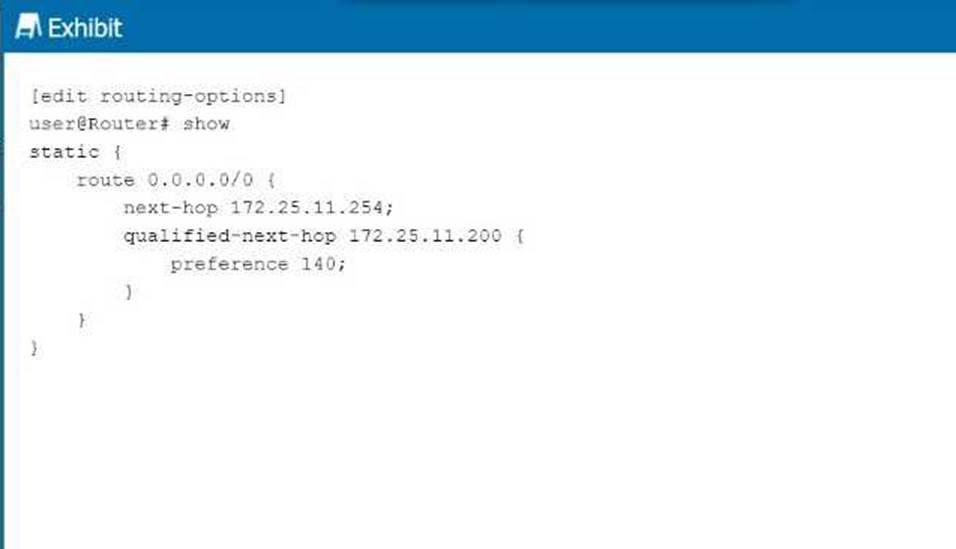
Referring to the exhibit, what is the route preference of the 172.25.11.254 next hop?
- A . 5
- B . 10
- C . 130
- D . 140
A
Explanation:
In the exhibit, we see two next-hop addresses for the default static route (0.0.0.0/0):
The first next hop is 172.25.11.254, with no specified preference.
The second next hop is 172.25.11.200, with a specified preference of 140.
Step-by-Step Breakdown:
Default Static Route Preference:
If no preference is explicitly set for a next hop in Junos, it defaults to 5 for static routes.
Determining Preference:
In this case, the next hop 172.25.11.254 does not have an explicit preference defined, so it will use the default value of 5. The second next hop has a preference of 140, which is higher, meaning it will only be used if the primary next hop is unavailable. Juniper
Reference: Static Route Preference: In Junos, the default preference for static routes is 5, and this value is applied unless overridden by the preference parameter.
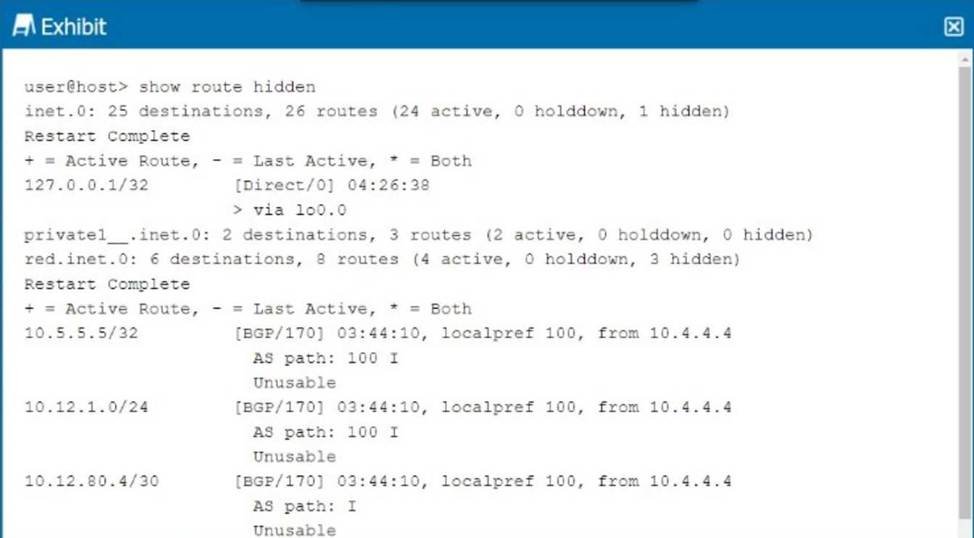
Referring to the exhibit, why are the BGP routes hidden?
- A . Load balancing is not enabled.
- B . There are too many hops to the destination.
- C . The BGP next hop is unreachable.
- D . Other routes are selected because of better metrics.
C
Explanation:
In the exhibit, the BGP routes are marked as hidden. This typically happens when the routes are not considered valid for use, but they remain in the routing table for reference. One common reason for BGP routes being hidden is that the next hop for these routes is unreachable.
Step-by-Step Breakdown:
BGP Next Hop:
In BGP, when a route is received from a neighbor, the next hop is the IP address that must be reachable for the route to be used. If the next hop is unreachable (i.e., the router cannot find a path to the next-hop IP), the route is marked as hidden.
Analyzing the Exhibit:
The exhibit shows that the BGP next hop for all hidden routes is 10.4.4.4. If this IP is unreachable, the BGP routes from that neighbor will not be considered valid, even though they appear in the routing table.
Verification:
Use the command show route 10.4.4.4 to check if the next-hop IP is reachable.
If the next-hop is not reachable, the BGP routes will be hidden. Resolving the next-hop reachability issue (e.g., fixing an IGP route or an interface) will allow the BGP routes to become active. Juniper
Reference: Junos Command: show route hidden displays routes that are not considered for forwarding. Troubleshooting: Check the next hop reachability for hidden BGP routes using show route <next-hop>.
What information in the Ethernet header is used to populate the bridging table?
- A . destination address
- B . source address
- C . type
- D . protocol
B
Explanation:
The source MAC address in the Ethernet header is used to populate the bridging table (also called the MAC address table) on a switch. When a frame arrives at a switch, the switch examines the source MAC address and records it along with the ingress port in its MAC address table.
Step-by-Step Breakdown:
Learning Process:
When an Ethernet frame arrives on a switch port, the switch looks at the source MAC address and adds this MAC address to the MAC table along with the port it was received on. This process is called MAC learning.
Purpose:
The switch uses this information to determine the correct port to send frames destined for that MAC address in future transmissions, thus ensuring efficient Layer 2 forwarding. Juniper
Reference: Ethernet Switching: Juniper switches use source MAC addresses to build and maintain the MAC address table, which is essential for Layer 2 switching.