
Juniper JN0-281 Practice Exams
Last updated on Oct 21,2026- Exam Code: JN0-281
- Exam Name: Data Center, Associate (JNCIA-DC)
- Certification Provider: Juniper
- Latest update: Oct 21,2026
Question #1
When evaluating BGP routes, what will be evaluated first?
- A . The local preference value
- B . The AS path
- C . The MED value
- D . The origin value
Correct Answer: A
A
Explanation:
In BGP (Border Gateway Protocol), when evaluating multiple routes to the same destination, the first attribute that is considered is the local preference value. The local preference is a BGP attribute used to influence outbound routing decisions within an Autonomous System (AS).
Step-by-Step Breakdown:
Local Preference:
The local preference attribute is used to determine which path is preferred for traffic leaving the AS.
The higher the local preference value, the more preferred the route.
BGP Path Selection:
The BGP path selection process evaluates the following attributes in this order:
Local Preference (higher is preferred)
AS Path (shorter is preferred)
Origin (IGP > EGP > incomplete)
MED (Multi-Exit Discriminator) (lower is preferred)
Juniper
Reference: BGP Path Selection: In Junos, the local preference attribute is the first to be evaluated when determining the best path for outbound traffic.
A
Explanation:
In BGP (Border Gateway Protocol), when evaluating multiple routes to the same destination, the first attribute that is considered is the local preference value. The local preference is a BGP attribute used to influence outbound routing decisions within an Autonomous System (AS).
Step-by-Step Breakdown:
Local Preference:
The local preference attribute is used to determine which path is preferred for traffic leaving the AS.
The higher the local preference value, the more preferred the route.
BGP Path Selection:
The BGP path selection process evaluates the following attributes in this order:
Local Preference (higher is preferred)
AS Path (shorter is preferred)
Origin (IGP > EGP > incomplete)
MED (Multi-Exit Discriminator) (lower is preferred)
Juniper
Reference: BGP Path Selection: In Junos, the local preference attribute is the first to be evaluated when determining the best path for outbound traffic.
Question #2
Leaf and spine data centers are used to better accommodate which type of traffic?
- A . north-east
- B . east-west
- C . north-west
- D . south-east
Correct Answer: B
B
Explanation:
In modern data centers, the shift toward leaf-spine architectures is driven by the need to handle increased east-west traffic, which is traffic between servers within the same data center. Unlike traditional hierarchical data center designs, where most traffic was "north-south" (between users and servers), modern applications often involve server-to-server communication (east-west) to enable services like distributed databases, microservices, and virtualized workloads.
Leaf-Spine Architecture:
Leaf Layer: This layer consists of switches that connect directly to servers or end-host devices. These switches serve as the access layer.
Spine Layer: The spine layer comprises high-performance switches that provide interconnectivity between leaf switches. Each leaf switch connects to every spine switch, creating a non-blocking fabric that optimizes traffic flow within the data center. East-West Traffic Accommodation:
In traditional three-tier architectures (core, aggregation, access), traffic had to traverse multiple layers, leading to bottlenecks when servers communicated with each other. Leaf-spine architectures address this by creating multiple equal-cost paths between leaf switches and the spine. Since each leaf switch connects directly to every spine switch, the architecture facilitates quick, low-latency communication between servers, which is essential for east-west traffic flows. Juniper’s Role:
Juniper Networks provides a range of solutions that optimize for east-west traffic in a leaf-spine architecture, notably through:
QFX Series Switches: Juniper’s QFX series switches are designed for the leaf and spine architecture, delivering high throughput, low latency, and scalability to accommodate the traffic demands of modern data centers.
EVPN-VXLAN: Juniper uses EVPN-VXLAN to create a scalable Layer 2 and Layer 3 overlay network across the data center. This overlay helps enhance east-west traffic performance by enabling network
segmentation and workload mobility across the entire fabric.
Key Features That Support East-West Traffic:
Equal-Cost Multipath (ECMP): ECMP enables the use of multiple paths between leaf and spine
switches, balancing the traffic and preventing any one path from becoming a bottleneck. This is
crucial in handling the high volume of east-west traffic.
Low Latency: Spine switches are typically high-performance devices that minimize the delay between leaf switches, which improves the efficiency of server-to-server communications.
Scalability: As the demand for east-west traffic grows, adding more leaf and spine switches is straightforward, maintaining consistent performance without redesigning the entire network. In summary, the leaf-spine architecture is primarily designed to handle the increase in east-west traffic within data centers, and Juniper provides robust solutions to enable this architecture through its switch platforms and software solutions like EVPN-VXLAN.
B
Explanation:
In modern data centers, the shift toward leaf-spine architectures is driven by the need to handle increased east-west traffic, which is traffic between servers within the same data center. Unlike traditional hierarchical data center designs, where most traffic was "north-south" (between users and servers), modern applications often involve server-to-server communication (east-west) to enable services like distributed databases, microservices, and virtualized workloads.
Leaf-Spine Architecture:
Leaf Layer: This layer consists of switches that connect directly to servers or end-host devices. These switches serve as the access layer.
Spine Layer: The spine layer comprises high-performance switches that provide interconnectivity between leaf switches. Each leaf switch connects to every spine switch, creating a non-blocking fabric that optimizes traffic flow within the data center. East-West Traffic Accommodation:
In traditional three-tier architectures (core, aggregation, access), traffic had to traverse multiple layers, leading to bottlenecks when servers communicated with each other. Leaf-spine architectures address this by creating multiple equal-cost paths between leaf switches and the spine. Since each leaf switch connects directly to every spine switch, the architecture facilitates quick, low-latency communication between servers, which is essential for east-west traffic flows. Juniper’s Role:
Juniper Networks provides a range of solutions that optimize for east-west traffic in a leaf-spine architecture, notably through:
QFX Series Switches: Juniper’s QFX series switches are designed for the leaf and spine architecture, delivering high throughput, low latency, and scalability to accommodate the traffic demands of modern data centers.
EVPN-VXLAN: Juniper uses EVPN-VXLAN to create a scalable Layer 2 and Layer 3 overlay network across the data center. This overlay helps enhance east-west traffic performance by enabling network
segmentation and workload mobility across the entire fabric.
Key Features That Support East-West Traffic:
Equal-Cost Multipath (ECMP): ECMP enables the use of multiple paths between leaf and spine
switches, balancing the traffic and preventing any one path from becoming a bottleneck. This is
crucial in handling the high volume of east-west traffic.
Low Latency: Spine switches are typically high-performance devices that minimize the delay between leaf switches, which improves the efficiency of server-to-server communications.
Scalability: As the demand for east-west traffic grows, adding more leaf and spine switches is straightforward, maintaining consistent performance without redesigning the entire network. In summary, the leaf-spine architecture is primarily designed to handle the increase in east-west traffic within data centers, and Juniper provides robust solutions to enable this architecture through its switch platforms and software solutions like EVPN-VXLAN.
Question #3
Which statement is correct about areas in OSPF?
- A . An OSPF area is used to segment Layer 2 broadcast domains.
- B . OSPF areas are used to isolate the effects of a broadcast storm.
- C . OSPF areas are used to reduce the size of the link-state database.
- D . An OSPF area is used to signify the autonomous system to which each device belongs.
Correct Answer: C
C
Explanation:
In OSPF (Open Shortest Path First), areas are used to segment a network into smaller, more manageable pieces to improve scalability. By dividing a network into areas, OSPF can reduce the size of the link-state database (LSDB), which helps routers process updates more efficiently.
Step-by-Step Breakdown:
Purpose of OSPF Areas:
OSPF areas allow for hierarchical routing within the OSPF domain. Routers in the same area have identical LSDBs, but routers in different areas do not exchange full link-state information. Instead, they exchange summarized routes, which reduces the LSDB size and CPU/memory usage.
Benefits:
Reducing the LSDB size improves scalability and ensures faster convergence in larger networks. Area 0 is the backbone area, and all other areas must connect to it, forming a hierarchical structure. Juniper
Reference: OSPF Configuration: Areas in OSPF are configured to optimize network performance by limiting the scope of link-state advertisements (LSAs) to within an area.
C
Explanation:
In OSPF (Open Shortest Path First), areas are used to segment a network into smaller, more manageable pieces to improve scalability. By dividing a network into areas, OSPF can reduce the size of the link-state database (LSDB), which helps routers process updates more efficiently.
Step-by-Step Breakdown:
Purpose of OSPF Areas:
OSPF areas allow for hierarchical routing within the OSPF domain. Routers in the same area have identical LSDBs, but routers in different areas do not exchange full link-state information. Instead, they exchange summarized routes, which reduces the LSDB size and CPU/memory usage.
Benefits:
Reducing the LSDB size improves scalability and ensures faster convergence in larger networks. Area 0 is the backbone area, and all other areas must connect to it, forming a hierarchical structure. Juniper
Reference: OSPF Configuration: Areas in OSPF are configured to optimize network performance by limiting the scope of link-state advertisements (LSAs) to within an area.
Question #4
What are two device roles in a five-member Virtual Chassis? (Choose two.)
- A . PFE
- B . Control-board
- C . Line card
- D . Routing-engine
Correct Answer: C, D
C, D
Explanation:
In a Virtual Chassis (VC) configuration, multiple Juniper switches are interconnected to form a single logical device. Each member switch in the Virtual Chassis plays a specific role.
Step-by-Step Breakdown:
Line Card Role:
Member switches acting as line cards provide additional ports for traffic forwarding but do not perform control or routing functions. These switches depend on the routing engine to handle control-plane tasks.
Routing Engine Role:
A switch in the routing-engine role is responsible for control-plane operations such as routing protocol management and control of the Virtual Chassis.
Virtual Chassis Roles:
Master Routing Engine: Handles control-plane functions and manages the entire Virtual Chassis.
Backup Routing Engine: Takes over if the master fails.
Line Card: Provides additional ports and handles data-plane operations. Juniper
Reference: Virtual Chassis: In a five-member Virtual Chassis, multiple switches act as line cards, while one or more switches are designated as the routing engines (master and backup).
C, D
Explanation:
In a Virtual Chassis (VC) configuration, multiple Juniper switches are interconnected to form a single logical device. Each member switch in the Virtual Chassis plays a specific role.
Step-by-Step Breakdown:
Line Card Role:
Member switches acting as line cards provide additional ports for traffic forwarding but do not perform control or routing functions. These switches depend on the routing engine to handle control-plane tasks.
Routing Engine Role:
A switch in the routing-engine role is responsible for control-plane operations such as routing protocol management and control of the Virtual Chassis.
Virtual Chassis Roles:
Master Routing Engine: Handles control-plane functions and manages the entire Virtual Chassis.
Backup Routing Engine: Takes over if the master fails.
Line Card: Provides additional ports and handles data-plane operations. Juniper
Reference: Virtual Chassis: In a five-member Virtual Chassis, multiple switches act as line cards, while one or more switches are designated as the routing engines (master and backup).
Question #5
By default, which two statements are correct about BGP advertisements? (Choose two.)
- A . BGP peers advertise routes received from EBGP peers to other IBGP peers.
- B . BGP peers advertise routes received from IBGP peers to other IBGP peers.
- C . BGP peers advertise routes from EBGP peers to other IBGP peers using its own address as the next hop.
- D . BGP peers advertise routes from IBGP peers to EBGP peers using its own address as the next hop.
Correct Answer: A, D
A, D
Explanation:
BGP (Border Gateway Protocol) has specific rules for route advertisement between peers.
Step-by-Step Breakdown:
EBGP to IBGP Route Propagation:
BGP peers advertise routes learned from EBGP peers to IBGP peers within the same AS. This ensures that routes learned from external networks are propagated internally within the AS. IBGP to EBGP Route Propagation:
Routes learned from IBGP peers can be advertised to EBGP peers, but when advertising these routes, the router uses its own IP address as the next hop.
IBGP Split Horizon:
By default, IBGP peers do not advertise routes learned from one IBGP peer to another IBGP peer.
This rule (IBGP split horizon) prevents routing loops within an AS.
Juniper
Reference: BGP Advertisement Rules: Junos adheres to BGP standards, where IBGP peers do not propagate routes to other IBGP peers, but EBGP peers receive IBGP routes with the advertising router as the
next hop.
A, D
Explanation:
BGP (Border Gateway Protocol) has specific rules for route advertisement between peers.
Step-by-Step Breakdown:
EBGP to IBGP Route Propagation:
BGP peers advertise routes learned from EBGP peers to IBGP peers within the same AS. This ensures that routes learned from external networks are propagated internally within the AS. IBGP to EBGP Route Propagation:
Routes learned from IBGP peers can be advertised to EBGP peers, but when advertising these routes, the router uses its own IP address as the next hop.
IBGP Split Horizon:
By default, IBGP peers do not advertise routes learned from one IBGP peer to another IBGP peer.
This rule (IBGP split horizon) prevents routing loops within an AS.
Juniper
Reference: BGP Advertisement Rules: Junos adheres to BGP standards, where IBGP peers do not propagate routes to other IBGP peers, but EBGP peers receive IBGP routes with the advertising router as the
next hop.
Question #6
What are two requirements for an IP fabric? (Choose two.)
- A . a Layer 3 routing protocol
- B . a single connection between each spine and leaf
- C . a single connection between each leaf
- D . a Layer 2 switching protocol
Correct Answer: A, B
A, B
Explanation:
An IP fabric is a network architecture commonly used in data centers to provide scalable, high-throughput connectivity using a spine-leaf topology.
Step-by-Step Breakdown:
Layer 3 Routing Protocol:
An IP fabric relies on a Layer 3 routing protocol, typically BGP or OSPF, to provide routing between the leaf and spine switches. This ensures efficient traffic forwarding across the network. Single Connection Between Spine and Leaf:
In an IP fabric, each leaf switch connects to every spine switch with a single connection. This ensures that traffic between any two leaf switches can travel through the spine layer in just two hops.
Juniper
Reference: Spine-Leaf Design: Juniper’s IP fabric implementations are designed for scalability and low-latency
routing, often using protocols like BGP for Layer 3 control.
A, B
Explanation:
An IP fabric is a network architecture commonly used in data centers to provide scalable, high-throughput connectivity using a spine-leaf topology.
Step-by-Step Breakdown:
Layer 3 Routing Protocol:
An IP fabric relies on a Layer 3 routing protocol, typically BGP or OSPF, to provide routing between the leaf and spine switches. This ensures efficient traffic forwarding across the network. Single Connection Between Spine and Leaf:
In an IP fabric, each leaf switch connects to every spine switch with a single connection. This ensures that traffic between any two leaf switches can travel through the spine layer in just two hops.
Juniper
Reference: Spine-Leaf Design: Juniper’s IP fabric implementations are designed for scalability and low-latency
routing, often using protocols like BGP for Layer 3 control.
Question #7
Which statement is correct about IBGP?
- A . It requires a physical full mesh.
- B . It requires a logical full mesh.
- C . It ensures that the local and remote peers use different AS numbers.
- D . It ensures that duplicate AS numbers are not present in the AS path.
Correct Answer: B
B
Explanation:
In IBGP (Internal Border Gateway Protocol), all routers within the same AS (Autonomous System) must have a logical full-mesh topology. This means that every IBGP router must be able to communicate with every other IBGP router directly or indirectly to ensure proper route propagation.
Step-by-Step Breakdown:
Logical Full Mesh:
In an IBGP setup, routers do not re-advertise routes learned from one IBGP peer to another IBGP peer. This rule is in place to prevent routing loops within the AS.
To ensure full route propagation, a logical full mesh is required, meaning every IBGP router must peer with every other IBGP router in the AS. This can be done either directly or via route reflection or confederation.
Physical Full Mesh Not Required:
The physical topology does not need to be a full mesh, but the BGP peering relationships must form
a logical full mesh. Techniques like route reflectors or BGP confederations can reduce the need for
manual full-mesh peering.
Juniper
Reference: IBGP Configuration: IBGP logical full mesh requirements can be simplified using route reflectors to avoid the complexity of manually configuring many IBGP peers.
B
Explanation:
In IBGP (Internal Border Gateway Protocol), all routers within the same AS (Autonomous System) must have a logical full-mesh topology. This means that every IBGP router must be able to communicate with every other IBGP router directly or indirectly to ensure proper route propagation.
Step-by-Step Breakdown:
Logical Full Mesh:
In an IBGP setup, routers do not re-advertise routes learned from one IBGP peer to another IBGP peer. This rule is in place to prevent routing loops within the AS.
To ensure full route propagation, a logical full mesh is required, meaning every IBGP router must peer with every other IBGP router in the AS. This can be done either directly or via route reflection or confederation.
Physical Full Mesh Not Required:
The physical topology does not need to be a full mesh, but the BGP peering relationships must form
a logical full mesh. Techniques like route reflectors or BGP confederations can reduce the need for
manual full-mesh peering.
Juniper
Reference: IBGP Configuration: IBGP logical full mesh requirements can be simplified using route reflectors to avoid the complexity of manually configuring many IBGP peers.
Question #8
Which route is preferred by the Junos OS software routing tables?
- A . Static
- B . Aggregate
- C . Direct
- D . BGP
Correct Answer: C
C
Explanation:
In Junos OS, direct routes are the most preferred routes in the routing table, having the highest priority.
Step-by-Step Breakdown:
Direct Routes:
Direct routes represent networks that are directly connected to the router’s interfaces. Since these
routes are directly accessible, they are assigned the highest priority and always take precedence over
other types of routes.
Preference Values:
Direct routes have a preference of 0, which is the most preferred in Junos. Static routes, OSPF routes, and BGP routes have higher preference values and will only be used if there are no direct routes to the destination.
Juniper
Reference: Direct Route Preference: In Junos, direct routes are always preferred over other routes, ensuring that the router forwards traffic through locally connected networks.
C
Explanation:
In Junos OS, direct routes are the most preferred routes in the routing table, having the highest priority.
Step-by-Step Breakdown:
Direct Routes:
Direct routes represent networks that are directly connected to the router’s interfaces. Since these
routes are directly accessible, they are assigned the highest priority and always take precedence over
other types of routes.
Preference Values:
Direct routes have a preference of 0, which is the most preferred in Junos. Static routes, OSPF routes, and BGP routes have higher preference values and will only be used if there are no direct routes to the destination.
Juniper
Reference: Direct Route Preference: In Junos, direct routes are always preferred over other routes, ensuring that the router forwards traffic through locally connected networks.
Question #9
Which statement is correct about member interfaces when creating a LAG?
- A . The interface’s MTU settings must match on all member interfaces.
- B . The interface’s duplex settings and link speed must be the same on all member interfaces.
- C . Member interfaces must all be allocated on the same chassis when using a Virtual Chassis.
- D . Member interfaces must all be allocated on the same PFE.
Correct Answer: B
B
Explanation:
When creating a LAG (Link Aggregation Group) in Junos, the duplex settings and link speed must be the same across all member interfaces.
Step-by-Step Breakdown:
LAG Overview:
A LAG combines multiple physical interfaces into a single logical interface to increase bandwidth and provide redundancy. All member links must act as a single cohesive unit.
Interface Requirements:
Duplex: All member interfaces must operate in the same duplex mode (either full-duplex or half-duplex). Mismatched duplex settings can cause performance issues, packet drops, or interface errors. Link Speed: All interfaces in the LAG must have the same link speed (e.g., all interfaces must be 1 Gbps or 10 Gbps). Mismatched speeds would prevent the interfaces from functioning correctly within the LAG.
Configuration and Validation: Ensure that all member interfaces have identical settings before adding them to the LAG. These settings can be checked using the show interfaces command, and the LAG can be configured using:
set interfaces ae0 aggregated-ether-options link-speed 10g set interfaces ge-0/0/1 ether-options 802.3ad ae0 Juniper
Reference: LAG Configuration: Duplex and link speed must be consistent across member interfaces to ensure proper LAG operation in Juniper devices.
B
Explanation:
When creating a LAG (Link Aggregation Group) in Junos, the duplex settings and link speed must be the same across all member interfaces.
Step-by-Step Breakdown:
LAG Overview:
A LAG combines multiple physical interfaces into a single logical interface to increase bandwidth and provide redundancy. All member links must act as a single cohesive unit.
Interface Requirements:
Duplex: All member interfaces must operate in the same duplex mode (either full-duplex or half-duplex). Mismatched duplex settings can cause performance issues, packet drops, or interface errors. Link Speed: All interfaces in the LAG must have the same link speed (e.g., all interfaces must be 1 Gbps or 10 Gbps). Mismatched speeds would prevent the interfaces from functioning correctly within the LAG.
Configuration and Validation: Ensure that all member interfaces have identical settings before adding them to the LAG. These settings can be checked using the show interfaces command, and the LAG can be configured using:
set interfaces ae0 aggregated-ether-options link-speed 10g set interfaces ge-0/0/1 ether-options 802.3ad ae0 Juniper
Reference: LAG Configuration: Duplex and link speed must be consistent across member interfaces to ensure proper LAG operation in Juniper devices.
Question #10
Exhibit:
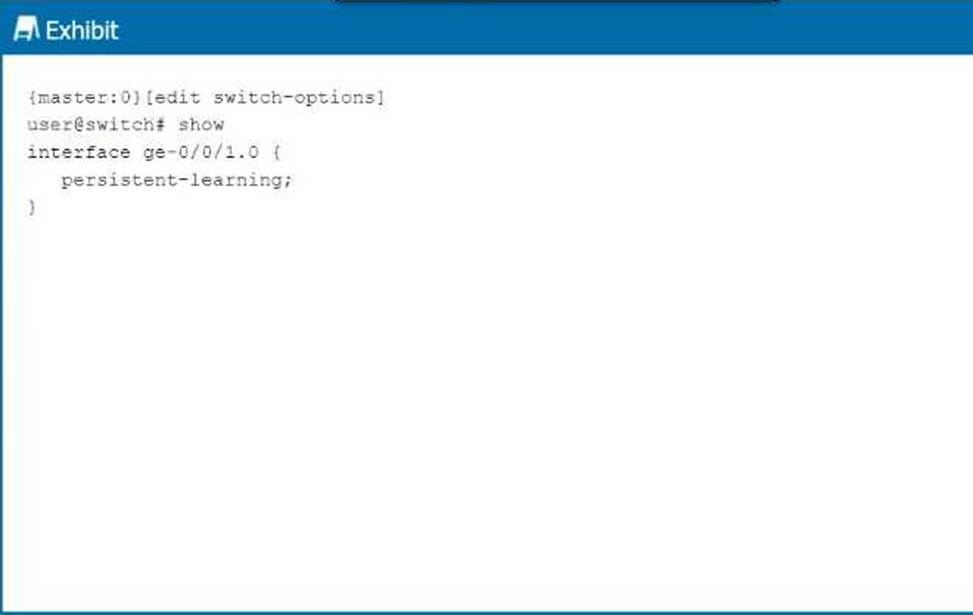
Referring to the exhibit, which behavior does this configuration enable on the ge-0/0/1.0 interface?
- A . This configuration enables a MAC address learned on the interface to be persistently retained in the Ethernet-switching table, even after a reboot.
- B . This configuration enables the device to place a MAC address that persistently causes network errors into a special protected VLAN.
- C . This configuration enables the device to shut down the interface when a particular MAC address persistently sends broadcast traffic.
- D . This configuration enables the interface to learn and remember MAC addresses, until the device is rebooted.
Correct Answer: A
A
Explanation:
The configuration in the exhibit shows the persistent-learning feature enabled on interface ge-0/0/1.0.
Step-by-Step Breakdown:
Persistent Learning:
Persistent-learning ensures that the MAC addresses learned on the interface are retained in the Ethernet-switching table, even after a device reboot. This prevents the need to re-learn MAC addresses after the device restarts, improving stability and reducing downtime.
Use Case:
This feature is particularly useful in environments where the re-learning of MAC addresses could cause temporary disruptions or delays in communication, such as in critical Layer 2 network segments.
Command Example:
set switch-options interface ge-0/0/1.0 persistent-learning
Juniper
Reference: Persistent MAC Learning: In Junos, enabling persistent-learning ensures that learned MAC addresses are not lost during reboots, contributing to smoother network operations in environments where stability is crucial.
A
Explanation:
The configuration in the exhibit shows the persistent-learning feature enabled on interface ge-0/0/1.0.
Step-by-Step Breakdown:
Persistent Learning:
Persistent-learning ensures that the MAC addresses learned on the interface are retained in the Ethernet-switching table, even after a device reboot. This prevents the need to re-learn MAC addresses after the device restarts, improving stability and reducing downtime.
Use Case:
This feature is particularly useful in environments where the re-learning of MAC addresses could cause temporary disruptions or delays in communication, such as in critical Layer 2 network segments.
Command Example:
set switch-options interface ge-0/0/1.0 persistent-learning
Juniper
Reference: Persistent MAC Learning: In Junos, enabling persistent-learning ensures that learned MAC addresses are not lost during reboots, contributing to smoother network operations in environments where stability is crucial.