
HP HPE7-A02 Practice Exams
Last updated on Oct 22,2026- Exam Code: HPE7-A02
- Exam Name: HPE Network Security Professional Exam
- Certification Provider: HP
- Latest update: Oct 22,2026
The following firewall role is configured on HPE Aruba Networking Central-managed APs:
wlan access-rule employees
index 3
rule any any match 17 67 67 permit
rule any any match any 53 53 permit
rule 10 5 5.0 255.255 255.0 match any any any deny
rule 10.5 0.0 255.255 0.0 match 6 80 80 permit
rule 10.5 0.0 255.255.0.0 match 6 443 443 permit
rule 10.5.0.0 255.255.0.0 match any any any deny
rule any any match any any any permit
A client has authenticated and been assigned to the employees role. The client has IP address 10.2.2.2.
Which correctly describes behavior in this policy?
- A . HTTPS traffic from 10.2.2.2 to 10.5.5.5 is denied.
- B . HTTPS traffic from 10.2.2.2 to 203.0.113.12 is denied.
- C . Traffic from 10.5.3.3 in an active HTTPS session between 10.2.2.2 and 10.5.3.3 is permitted.
- D . Traffic from 198.51.100.12 in an active HTTP session between 10.2.2.2 and 198.51.100.12 is denied.
A
Explanation:
Policy Analysis:
Rule Evaluation Order: Rules are applied in sequential order until a match is found.
Key Points:
DHCP traffic (UDP 67) is permitted.
DNS traffic (UDP 53) is permitted.
Traffic to 10.5.5.0/24 is explicitly denied.
HTTP traffic (TCP 80) is allowed only to 10.5.0.0/16.
HTTPS traffic (TCP 443) is allowed only to 10.5.0.0/16.
All other traffic to 10.5.0.0/16 is denied.
Any other traffic not matching the above rules is permitted.
Scenario Analysis:
The client IP 10.2.2.2 does not fall within the 10.5.0.0/16 subnet.
Rule 3 denies traffic to 10.5.5.5, regardless of the source IP.
Option A: Correct. HTTPS traffic to 10.5.5.5 is explicitly denied by Rule 3.
Option B: Incorrect. Traffic to 203.0.113.12 is permitted due to the final "permit any" rule. Option C: Incorrect. The client (10.2.2.2) does not belong to the subnet 10.5.0.0/16, so traffic to 10.5.3.3 is not permitted by Rule 5.
Option D: Incorrect. HTTP traffic to 198.51.100.12 is allowed by the last "permit any" rule.
Refer to Exhibit:
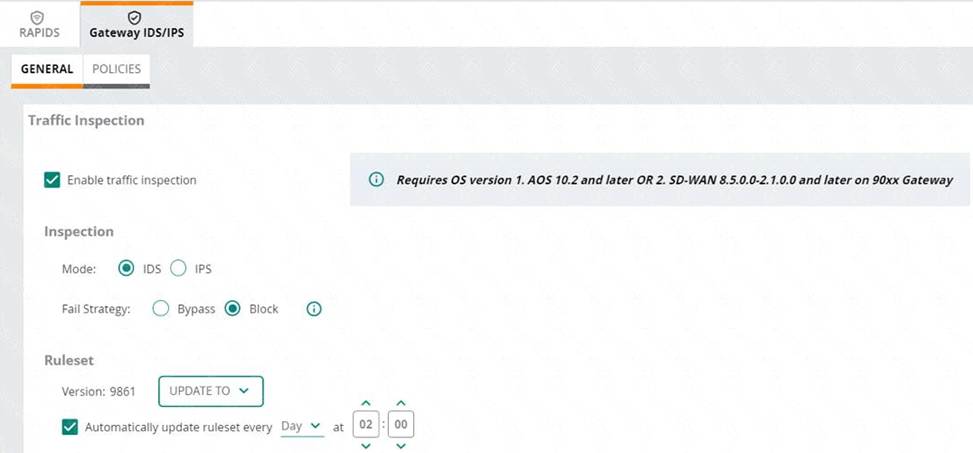
An HPE Aruba Networking 9×00 gateway is part of an HPE Aruba Networking Central group that has the settings shown in the exhibit.
What would cause the gateway to drop traffic as part of its IDPS settings?
- A . Its site-to-site VPN connections failing
- B . Traffic matching a rule in the active ruleset
- C . Its IDPS engine failing
- D . Traffic showing anomalous behavior
B
Explanation:
A company is using HPE Aruba Networking Central SD-WAN Orchestrator to establish a hub-spoke VPN between branch gateways (BGWs) at 1444 site and
VPNCs at multiple data centers.
What is part of the configuration that admins need to complete?
- A . At the global level, create default IPsec policies for the SD-WAN Orchestrator to use.
- B . In BGWs’ groups, select the VPNCs to which to connect in a DC preference list.
- C . In VPNCs’ groups, establish VPN pools to control which branches connect to which VPNCs.
- D . In BGWs’ and VPNCs’ groups, create default IKE policies for the SD-WAN Orchestrator to use.
B
Explanation:
When using HPE Aruba Networking Central SD-WAN Orchestrator to establish a hub-spoke VPN between branch gateways (BGWs) and VPN concentrators (VPNCs) at multiple data centers, admins need to configure the BGWs’ groups by selecting the VPNCs to which they should connect in a Data Center (DC) preference list. This configuration ensures that branch gateways are properly directed to the preferred VPN concentrators, optimizing the hub-spoke VPN topology.
You have configured an AOS-CX switch to implement 802.1X on edge ports. Assume ports operate in the default auth-mode. VolP phones are assigned to the "voice" role and need to send traffic that is tagged for VLAN 12.
Where should you configure VLAN 12?
- A . As the trunk native VLAN on edge ports and the trunk native VLAN on the "voice" role
- B . As a trunk allowed VLAN on edge ports and the trunk native VLAN in the "voice" role
- C . As the trunk native VLAN in the "voice" role (and not in the edge port settings)
- D . As the allowed trunk VLAN in the "voice" role (and not in the edge port settings)
D
Explanation:
When configuring 802.1X authentication on edge ports of an AOS-CX switch and assigning VoIP phones to a "voice" role, the correct approach is to configure VLAN 12 as the allowed trunk VLAN in the "voice" role. This setup ensures that traffic tagged for VLAN 12 is appropriately managed by the role applied to the VoIP phones. In AOS-CX switches, the role-based VLAN configuration allows for more granular control and ensures that the VoIP phones’ traffic is handled correctly without altering the edge port settings, which typically operate with default settings for authentication.
Reference: Detailed configuration and role assignment practices for AOS-CX switches can be found in Aruba’s configuration guides and documentation related to AOS-CX switch deployments.
You have configured an AOS-CX switch to implement 802.1X on edge ports. Assume ports operate in the default auth-mode. VolP phones are assigned to the "voice" role and need to send traffic that is tagged for VLAN 12.
Where should you configure VLAN 12?
- A . As the trunk native VLAN on edge ports and the trunk native VLAN on the "voice" role
- B . As a trunk allowed VLAN on edge ports and the trunk native VLAN in the "voice" role
- C . As the trunk native VLAN in the "voice" role (and not in the edge port settings)
- D . As the allowed trunk VLAN in the "voice" role (and not in the edge port settings)
D
Explanation:
When configuring 802.1X authentication on edge ports of an AOS-CX switch and assigning VoIP phones to a "voice" role, the correct approach is to configure VLAN 12 as the allowed trunk VLAN in the "voice" role. This setup ensures that traffic tagged for VLAN 12 is appropriately managed by the role applied to the VoIP phones. In AOS-CX switches, the role-based VLAN configuration allows for more granular control and ensures that the VoIP phones’ traffic is handled correctly without altering the edge port settings, which typically operate with default settings for authentication.
Reference: Detailed configuration and role assignment practices for AOS-CX switches can be found in Aruba’s configuration guides and documentation related to AOS-CX switch deployments.
You have configured an AOS-CX switch to implement 802.1X on edge ports. Assume ports operate in the default auth-mode. VolP phones are assigned to the "voice" role and need to send traffic that is tagged for VLAN 12.
Where should you configure VLAN 12?
- A . As the trunk native VLAN on edge ports and the trunk native VLAN on the "voice" role
- B . As a trunk allowed VLAN on edge ports and the trunk native VLAN in the "voice" role
- C . As the trunk native VLAN in the "voice" role (and not in the edge port settings)
- D . As the allowed trunk VLAN in the "voice" role (and not in the edge port settings)
D
Explanation:
When configuring 802.1X authentication on edge ports of an AOS-CX switch and assigning VoIP phones to a "voice" role, the correct approach is to configure VLAN 12 as the allowed trunk VLAN in the "voice" role. This setup ensures that traffic tagged for VLAN 12 is appropriately managed by the role applied to the VoIP phones. In AOS-CX switches, the role-based VLAN configuration allows for more granular control and ensures that the VoIP phones’ traffic is handled correctly without altering the edge port settings, which typically operate with default settings for authentication.
Reference: Detailed configuration and role assignment practices for AOS-CX switches can be found in Aruba’s configuration guides and documentation related to AOS-CX switch deployments.
A company assigns a different block of VLAN IDs to each of its access layer AOS-CX switches. The switches run version 10.07. The IDs are used for standard purposes, such as for employees, VolP phones, and cameras. The company wants to apply 802.1X authentication to HPE Aruba Networking ClearPass Policy Manager (CPPM) and then steer clients to the correct VLANs for local forwarding.
What can you do to simplify setting up this solution?
- A . Assign consistent names to VLANs of the same type across the AOS-CX switches and have user-roles reference names.
- B . Use the trunk allowed VLAN setting to assign multiple VLAN IDs to the same role.
- C . Change the VLAN IDs across the AOS-CX switches so that they are consistent.
- D . Avoid configuring the VLAN in the role; use trunk VLANs to assign multiple VLANs to the port instead.
A
Explanation:
To simplify the setup of 802.1X authentication with HPE Aruba Networking ClearPass Policy Manager (CPPM) and ensure clients are steered to the correct VLANs for local forwarding, you should assign consistent names to VLANs of the same type across the AOS-CX switches and have user-roles reference these names. This approach allows for a more straightforward configuration and management process, as the user roles can apply consistent policies based on VLAN names rather than specific IDs. It also helps in maintaining clarity and reducing errors in VLAN assignments across different switches.
Reference: Aruba’s AOS-CX configuration guides and ClearPass integration documentation emphasize the importance of using consistent naming conventions and user-role configurations for efficient network management and security enforcement.
A company assigns a different block of VLAN IDs to each of its access layer AOS-CX switches. The switches run version 10.07. The IDs are used for standard purposes, such as for employees, VolP phones, and cameras. The company wants to apply 802.1X authentication to HPE Aruba Networking ClearPass Policy Manager (CPPM) and then steer clients to the correct VLANs for local forwarding.
What can you do to simplify setting up this solution?
- A . Assign consistent names to VLANs of the same type across the AOS-CX switches and have user-roles reference names.
- B . Use the trunk allowed VLAN setting to assign multiple VLAN IDs to the same role.
- C . Change the VLAN IDs across the AOS-CX switches so that they are consistent.
- D . Avoid configuring the VLAN in the role; use trunk VLANs to assign multiple VLANs to the port instead.
A
Explanation:
To simplify the setup of 802.1X authentication with HPE Aruba Networking ClearPass Policy Manager (CPPM) and ensure clients are steered to the correct VLANs for local forwarding, you should assign consistent names to VLANs of the same type across the AOS-CX switches and have user-roles reference these names. This approach allows for a more straightforward configuration and management process, as the user roles can apply consistent policies based on VLAN names rather than specific IDs. It also helps in maintaining clarity and reducing errors in VLAN assignments across different switches.
Reference: Aruba’s AOS-CX configuration guides and ClearPass integration documentation emphasize the importance of using consistent naming conventions and user-role configurations for efficient network management and security enforcement.
A company assigns a different block of VLAN IDs to each of its access layer AOS-CX switches. The switches run version 10.07. The IDs are used for standard purposes, such as for employees, VolP phones, and cameras. The company wants to apply 802.1X authentication to HPE Aruba Networking ClearPass Policy Manager (CPPM) and then steer clients to the correct VLANs for local forwarding.
What can you do to simplify setting up this solution?
- A . Assign consistent names to VLANs of the same type across the AOS-CX switches and have user-roles reference names.
- B . Use the trunk allowed VLAN setting to assign multiple VLAN IDs to the same role.
- C . Change the VLAN IDs across the AOS-CX switches so that they are consistent.
- D . Avoid configuring the VLAN in the role; use trunk VLANs to assign multiple VLANs to the port instead.
A
Explanation:
To simplify the setup of 802.1X authentication with HPE Aruba Networking ClearPass Policy Manager (CPPM) and ensure clients are steered to the correct VLANs for local forwarding, you should assign consistent names to VLANs of the same type across the AOS-CX switches and have user-roles reference these names. This approach allows for a more straightforward configuration and management process, as the user roles can apply consistent policies based on VLAN names rather than specific IDs. It also helps in maintaining clarity and reducing errors in VLAN assignments across different switches.
Reference: Aruba’s AOS-CX configuration guides and ClearPass integration documentation emphasize the importance of using consistent naming conventions and user-role configurations for efficient network management and security enforcement.
A company is using HPE Aruba Networking Central SD-WAN Orchestrator to establish a hub-spoke VPN between branch gateways (BGWs) at 1164 site and VPNCs at multiple data centers.
What is part of the configuration that admins need to complete?
- A . In VPNCs’ groups, establish VPN pools to control which branches connect to which VPNCs.
- B . In BGWs’ and VPNCs’ groups, create default IKE policies for the SD-WAN Orchestrator to use.
- C . In BGWs’ groups, select the VPNCs to which to connect in a DC preference list.
- D . At the global level, create default IPsec policies for the SD-WAN Orchestrator to use.
C
Explanation:
Hub-Spoke VPN Configuration:
HPE Aruba Central SD-WAN Orchestrator enables hub-spoke topology where branch gateways (BGWs) connect to VPN concentrators (VPNCs) located at data centers.
A key step in configuring this is defining which VPNCs the BGWs will prefer for connectivity.
The DC Preference List is configured in the BGW groups to prioritize the data centers to which BGWs
connect.
Option Analysis:
Option A: Incorrect. VPN pools control IP allocation, not which branches connect to VPNCs.
Option B: Incorrect. IKE policies define key exchange mechanisms but are not part of the connection preference process.
Option C: Correct. Admins configure a DC preference list in BGW groups to determine connectivity priorities with VPNCs.
Option D: Incorrect. IPsec policies define encryption parameters at a global level, but this is not specific to the hub-spoke connection configuration.