
HP HPE7-A02 Practice Exams
Last updated on Oct 23,2026- Exam Code: HPE7-A02
- Exam Name: HPE Network Security Professional Exam
- Certification Provider: HP
- Latest update: Oct 23,2026
A company lacks visibility into the many different types of user and loT devices deployed in its internal network, making it hard for the security team to address those devices.
Which HPE Aruba Networking solution should you recommend to resolve this issue?
- A . HPE Aruba Networking ClearPass Device Insight (CPDI)
- B . HPE Aruba Networking Network Analytics Engine (NAE)
- C . HPE Aruba Networking Mobility Conductor
- D . HPE Aruba Networking ClearPass OnBoard
A
Explanation:
For a company that lacks visibility into various types of user and IoT devices on its internal network, HPE Aruba Networking ClearPass Device Insight (CPDI) is the recommended solution. CPDI provides comprehensive visibility and profiling of all devices connected to the network. It uses machine learning and AI to identify and classify devices, offering detailed insights into their behavior and characteristics. This enhanced visibility enables the security team to effectively monitor and manage network devices, improving overall network security and compliance.
Reference: Aruba’s documentation on ClearPass Device Insight outlines its capabilities in device discovery, profiling, and security posture assessment, making it ideal for environments with diverse and numerous network-connected devices.
A company lacks visibility into the many different types of user and loT devices deployed in its internal network, making it hard for the security team to address those devices.
Which HPE Aruba Networking solution should you recommend to resolve this issue?
- A . HPE Aruba Networking ClearPass Device Insight (CPDI)
- B . HPE Aruba Networking Network Analytics Engine (NAE)
- C . HPE Aruba Networking Mobility Conductor
- D . HPE Aruba Networking ClearPass OnBoard
A
Explanation:
For a company that lacks visibility into various types of user and IoT devices on its internal network, HPE Aruba Networking ClearPass Device Insight (CPDI) is the recommended solution. CPDI provides comprehensive visibility and profiling of all devices connected to the network. It uses machine learning and AI to identify and classify devices, offering detailed insights into their behavior and characteristics. This enhanced visibility enables the security team to effectively monitor and manage network devices, improving overall network security and compliance.
Reference: Aruba’s documentation on ClearPass Device Insight outlines its capabilities in device discovery, profiling, and security posture assessment, making it ideal for environments with diverse and numerous network-connected devices.
An AOS-CX switch has this admin user account configured on it:
netadmin in the operators group.
You have configured these commands on an AOS-CX switch:
tacacs-server host cp.example.com key plaintext &12xl,powmay7855
aaa authentication login ssh group tacacs local aaa authentication allow-fail-through
A user accesses the switch with SSH and logs in as netadmin with the correct password. When the switch sends a TACACS+ request to the ClearPass server at cp.example.com, the server does not send a response. Authentication times out.
What happens?
- A . The user is logged in and granted operator access.
- B . The user is logged in and allowed to enter auditor commands only.
- C . The user is logged in and granted administrators access.
- D . The user is not allowed to log in.
A
Explanation:
Comprehensive Detailed Explanation
The configuration includes the command aaa authentication allow-fail-through, which specifies that if the TACACS+ server fails to respond (e.g., times out), the switch will proceed to the next authentication method in the sequence, which is local. In this scenario:
The switch first attempts to authenticate the user against the TACACS+ server.
When the TACACS+ server fails to respond, the switch falls back to local authentication.
The user netadmin is a local account configured on the switch and belongs to the operators group.
As a result, the user is successfully authenticated locally and is granted operator level access.
Reference
Aruba AOS-CX User Guide: Authentication fallback mechanisms.
TACACS+ fallback behavior for HPE Aruba switches.
A company has HPE Aruba Networking APs running AOS-10 that connect to AOS-CX switches.
The APs will:
Authenticate as 802.1X supplicants to HPE Aruba Networking ClearPass Policy Manager (CPPM) Be assigned to the "APs" role on the switches
Have their traffic forwarded locally
What information do you need to help you determine the VLAN settings for the "APs" role?
- A . Whether the switches are using local user-roles (LURs) or downloadable user-roles (DURs).
- B . Whether the APs bridge or tunnel traffic on their SSIDs.
- C . Whether the switches have established tunnels with an HPE Aruba Networking gateway.
- D . Whether the APs have static or DHCP-assigned IP addresses.
B
Explanation:
Traffic Forwarding for APs:
In AOS-10, AP traffic forwarding can happen locally (bridged) or through tunnels to a gateway. The VLAN settings on the "APs" role depend on whether the APs bridge the SSID traffic locally or forward it through a tunnel.
Option B: Correct. You need to know whether the traffic is bridged or tunneled to determine the VLAN assignments.
Option A: Incorrect. LURs/DURs affect role assignment but not VLAN settings for traffic forwarding.
Option C: Incorrect. Establishing tunnels with gateways is relevant to centralized traffic forwarding, not VLANs for bridged traffic.
Option D: Incorrect. AP IP addressing (static or DHCP) does not impact the VLAN for forwarded SSID traffic.
The exhibit shows the 802.1X-related settings for Windows domain clients.
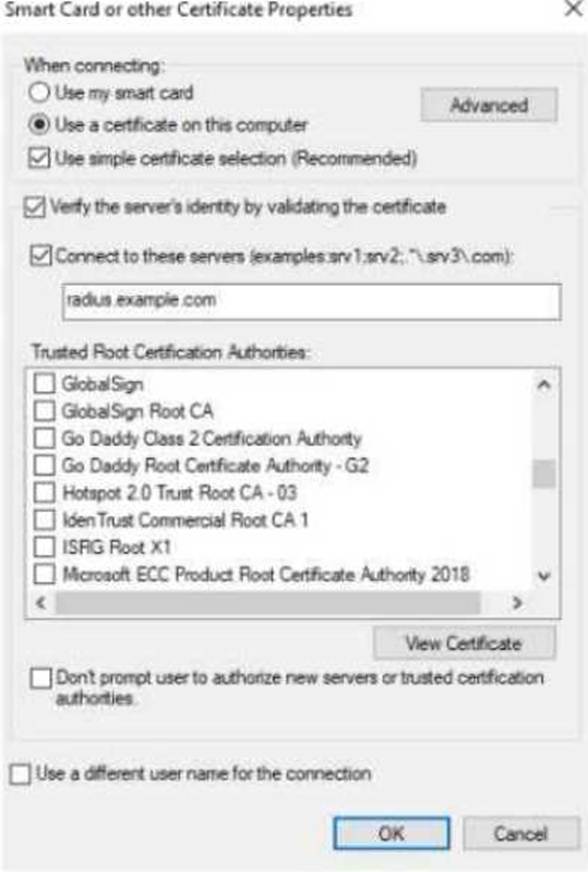
What should admins change to make the settings follow best security practices?
- A . Specify at least two server names under the "Connect to these servers" field.
- B . Select the desired Trusted Root Certificate Authority and select the check box next to "Don’t prompt users."
- C . Under the "Connect to these servers" field, use a wildcard in the server name.
- D . Clear the check box for using simple certificate selection and select the desired certificate manually.
A
Explanation:
To follow best security practices for 802.1X authentication settings in Windows domain clients:
Specify at least two server names under "Connect to these servers":
Admins should explicitly list trusted RADIUS server names (e.g., radius.example.com) to prevent the client from connecting to unauthorized or rogue servers.
This mitigates man-in-the-middle (MITM) attacks where an attacker attempts to present their own RADIUS server.
Select the desired Trusted Root Certificate Authority and "Don’t prompt users":
Select the Trusted Root CA that issued the RADIUS server’s certificate. This ensures clients validate the correct server certificate during the EAP-TLS/PEAP authentication process.
Enabling "Don’t prompt users" ensures end users are not confused or tricked into accepting
certificates from untrusted servers.
Why the other options are incorrect:
Option C: Incorrect. Wildcards in server names (e.g., *.example.com) weaken security and allow broader matching, increasing the risk of rogue servers.
Option D: Incorrect. Clearing "Use simple certificate selection" requires users to select certificates manually, which can lead to errors and usability issues. Simple certificate selection is recommended when properly configured.
Recommended Settings for Best Security Practices:
Server Validation: Specify the exact RADIUS server names in the "Connect to these servers" field.
Root CA Validation: Ensure only the correct Trusted Root Certificate Authority is selected.
User Prompts: Enable "Don’t prompt users" to enforce automatic and secure authentication without user intervention.
The exhibit shows the 802.1X-related settings for Windows domain clients.
What should admins change to make the settings follow best security practices?
- A . Specify at least two server names under the "Connect to these servers" field.
- B . Select the desired Trusted Root Certificate Authority and select the check box next to "Don’t prompt users."
- C . Under the "Connect to these servers" field, use a wildcard in the server name.
- D . Clear the check box for using simple certificate selection and select the desired certificate manually.
A
Explanation:
To follow best security practices for 802.1X authentication settings in Windows domain clients:
Specify at least two server names under "Connect to these servers":
Admins should explicitly list trusted RADIUS server names (e.g., radius.example.com) to prevent the client from connecting to unauthorized or rogue servers.
This mitigates man-in-the-middle (MITM) attacks where an attacker attempts to present their own RADIUS server.
Select the desired Trusted Root Certificate Authority and "Don’t prompt users":
Select the Trusted Root CA that issued the RADIUS server’s certificate. This ensures clients validate the correct server certificate during the EAP-TLS/PEAP authentication process.
Enabling "Don’t prompt users" ensures end users are not confused or tricked into accepting
certificates from untrusted servers.
Why the other options are incorrect:
Option C: Incorrect. Wildcards in server names (e.g., *.example.com) weaken security and allow broader matching, increasing the risk of rogue servers.
Option D: Incorrect. Clearing "Use simple certificate selection" requires users to select certificates manually, which can lead to errors and usability issues. Simple certificate selection is recommended when properly configured.
Recommended Settings for Best Security Practices:
Server Validation: Specify the exact RADIUS server names in the "Connect to these servers" field.
Root CA Validation: Ensure only the correct Trusted Root Certificate Authority is selected.
User Prompts: Enable "Don’t prompt users" to enforce automatic and secure authentication without user intervention.
A company has AOS-CX switches. The company wants to make it simpler and faster for admins to detect denial of service (DoS) attacks, such as ping or ARP floods, launched against the switches.
What can you do to support this use case?
- A . Deploy an NAE agent on the switches to monitor control plane policing (CoPP).
- B . Implement ARP inspection on all VLANs that support end-user devices.
- C . Configure the switches to implement RADIUS accounting to HPE Aruba Networking ClearPass and enable HPE Aruba Networking ClearPass Insight.
- D . Enabling debugging of security functions on the switches.
A
Explanation:
To support the detection of denial of service (DoS) attacks on AOS-CX switches, deploying an NAE (Network Analytics Engine) agent to monitor control plane policing (CoPP) is the best approach. NAE agents provide real-time analytics and monitoring capabilities, allowing administrators to detect anomalies and potential DoS attacks, such as ping or ARP floods, more quickly and efficiently. Control plane policing helps protect the switch’s CPU from unnecessary or malicious traffic, and the NAE agent can alert administrators when thresholds are exceeded, providing a proactive measure to detect and mitigate DoS attacks.
Reference: Aruba’s documentation on AOS-CX and NAE agents provides detailed information on configuring and deploying NAE for network monitoring and security purposes.
You need to use "Tips:Posture" conditions within an 802.1X service’s enforcement policy.
Which guideline should you follow?
- A . Enable caching roles and posture attributes from previous sessions in the service’s enforcement settings.
- B . Create rules that assign postures in the service’s role mapping policy.
- C . Enable profiling in the service’s general settings.
- D . Select the Posture Policy type for the service’s enforcement policy.
A
Explanation:
When using "Tips
" conditions within an 802.1X service’s enforcement policy, you should enable caching roles and posture attributes from previous sessions in the service’s enforcement settings. This ensures that ClearPass retains posture information from previous authentications, which is necessary for making decisions based on the current posture state of an endpoint. By caching these attributes, ClearPass can apply appropriate enforcement actions based on the device’s posture status.
Reference: Aruba ClearPass documentation provides guidelines on configuring enforcement policies and using posture attributes effectively, including the importance of caching for maintaining posture information across sessions.
A company wants to apply a standard configuration to all AOS-CX switch ports and have the ports dynamically adjust their configuration based on the identity of the user or device that connects. They want to centralize configuration of the identity-based settings as much as possible.
What should you recommend?
- A . Having HPE Aruba Networking ClearPass Policy Manager (CPPM) send standard RADIUS AVPs to customize port settings
- B . Having switches pull port configurations dynamically from HPE Aruba Networking Activate
- C . Having switches download user-roles from HPE Aruba Networking gateways
- D . Having switches download user-roles from HPE Aruba Networking ClearPass Policy Manager (CPPM)
D
Explanation:
For a company that wants to apply a standard configuration to all AOS-CX switch ports and dynamically adjust their configuration based on the identity of the user or device that connects, the best approach is to have the switches download user-roles from HPE Aruba Networking ClearPass Policy Manager (CPPM). This method centralizes the configuration of identity-based settings in CPPM, allowing it to dynamically assign roles and policies to switch ports based on authentication and authorization results. This ensures consistent and secure network access control tailored to each user or device.
Reference: Aruba ClearPass and AOS-CX documentation provide comprehensive details on configuring user-roles, dynamic port configuration, and integrating ClearPass for centralized identity-based network management.
What correctly describes an HPE Aruba Networking AP’s Device (TPM) certificate?
- A . It is signed by an HPE Aruba Networking CA and is trusted by many HPE Aruba Networking solutions.
- B . It works well as a captive portal certificate for guest SSIDs.
- C . It is a self-signed certificate that should not be used in production.
- D . It is installed on APs after they connect to and are provisioned by HPE Aruba Networking Central.
A
Explanation:
An HPE Aruba Networking AP’s Device (TPM) certificate is signed by an HPE Aruba Networking Certificate Authority (CA) and is trusted by many HPE Aruba Networking solutions. This certificate is used for secure communications and device authentication within the Aruba network ecosystem.