
HP HPE7-A02 Practice Exams
Last updated on Oct 23,2026- Exam Code: HPE7-A02
- Exam Name: HPE Network Security Professional Exam
- Certification Provider: HP
- Latest update: Oct 23,2026
You need to set up an HPE Aruba Networking VIA solution for a customer who needs to support 2100 remote employees. The customer wants employees to download their VIA connection profile from the VPNC. Only employees who authenticate with their domain credentials to HPE Aruba Networking ClearPass Policy
Manager (CPPM) should be able to download the profile. (A RADIUS server group for CPPM is already set up on the VPNC.)
How do you configure the VPNC to enforce that requirement?
- A . Set up a VIA Authentication Profile that uses CPPM’s server group; reference that profile in the VIA Web Authentication Profile.
- B . Reference CPPM’s server group in an AAA profile; then, apply that profile to the VPNC’s Internet-facing ports.
- C . Create a new VPN Authentication Profile and then reference CPPM’s default server group in that profile.
- D . Set up a VIA Authentication Profile that uses CPPM’s server group; reference that profile in the VIA Connection Profile.
A
Explanation:
To configure the HPE Aruba Networking VIA solution for remote employees who need to download their VIA connection profile from the VPN Concentrator (VPNC) and ensure that only those who authenticate with their domain credentials through ClearPass Policy Manager (CPPM) can do so, you need to set up a VIA Authentication Profile. This profile should use the CPPM’s RADIUS server group. Once the VIA Authentication Profile is created, you need to reference this profile in the VIA Web Authentication Profile. This configuration ensures that the authentication process requires employees to validate their credentials via CPPM before they can download the VIA connection profile.
Reference: Aruba’s VIA deployment and configuration guides provide detailed steps on setting up authentication profiles and integrating ClearPass for secure profile distribution.
Refer to the exhibit.
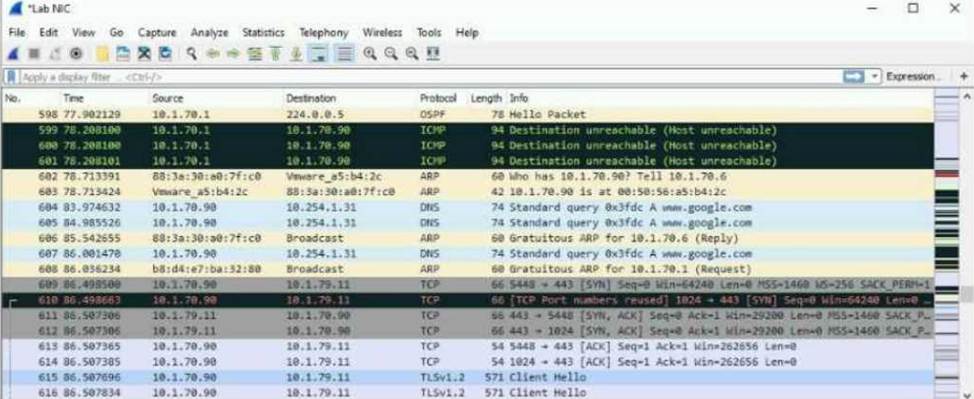
The exhibit shows a saved packet capture, which you have opened in Wireshark. You want to focus on the complete conversation between 10.1.70.90 and 10.1.79.11 that uses source port 5448.
What is a simple way to do this in Wireshark?
- A . Apply a capture filter that selects for both the 10.1.70.90 and 10.1.79.11 IP addresses.
- B . Click the Source column and then the Destination column to sort the packets into the desired order.
- C . Apply a capture filter that selects for TCP port 5448.
- D . Right-click one of the packets between those addresses and choose to follow the stream.
D
Explanation:
Wireshark: Follow TCP Stream:
Wireshark provides an intuitive feature to filter and display a complete TCP conversation.
By right-clicking any packet within the conversation and selecting "Follow → TCP Stream", Wireshark isolates and displays the entire conversation.
This feature allows you to view the communication in a simplified, sequential manner, including
requests and responses.
Option Analysis:
Option A: Incorrect. Capture filters only apply during packet capturing, not for analyzing already saved packet captures.
Option B: Incorrect. Sorting packets helps with organizing data but does not isolate a complete conversation.
Option C: Incorrect. A capture filter for TCP port 5448 would have to be applied before capturing; it does not work for saved data.
Option D: Correct. Right-clicking a packet and choosing "Follow TCP Stream" is the simplest way to display the full conversation between 10.1.70.90 and 10.1.79.11 on port 5448.
Steps in Wireshark to Follow a TCP Stream:
Locate any packet within the desired conversation (e.g., between 10.1.70.90 and 10.1.79.11 on TCP
port 5448).
Right-click on the packet.
Choose "Follow" → "TCP Stream".
Wireshark will display the entire TCP conversation, including both directions of communication. This feature is especially useful when troubleshooting or analyzing detailed interactions between hosts.
A company already uses HPE Aruba Networking ClearPass Policy Manager (CPPM) as the RADIUS server for authenticating wireless clients with 802.1X. Now you are setting up 802.1X on AOS-CX switches to authenticate many of those same clients on wired connections. You decide to copy CPPM’s wireless 802.1X service and then edit it with a new name and enforcement policy.
What else must you change for authentication to work properly?
- A . Role mapping policy
- B . Authentication methods
- C . Authentication source
- D . Service rules
D
Explanation:
A company already uses HPE Aruba Networking ClearPass Policy Manager (CPPM) as the RADIUS server for authenticating wireless clients with 802.1X. Now you are setting up 802.1X on AOS-CX switches to authenticate many of those same clients on wired connections. You decide to copy CPPM’s wireless 802.1X service and then edit it with a new name and enforcement policy.
What else must you change for authentication to work properly?
- A . Role mapping policy
- B . Authentication methods
- C . Authentication source
- D . Service rules
D
Explanation:
A company already uses HPE Aruba Networking ClearPass Policy Manager (CPPM) as the RADIUS server for authenticating wireless clients with 802.1X. Now you are setting up 802.1X on AOS-CX switches to authenticate many of those same clients on wired connections. You decide to copy CPPM’s wireless 802.1X service and then edit it with a new name and enforcement policy.
What else must you change for authentication to work properly?
- A . Role mapping policy
- B . Authentication methods
- C . Authentication source
- D . Service rules
D
Explanation:
The security team needs you to show them information about MAC spoofing attempts detected by HPE Aruba Networking ClearPass Policy Manager (CPPM).
What should you do?
- A . Export the Access Tracker records on CPPM as an XML file.
- B . Use ClearPass Insight to run an Active Endpoint Security report.
- C . Integrate CPPM with ClearPass Device Insight (CPDI) and run a security report on CPDI.
- D . Show the security team the CPPM Endpoint Profiler dashboard.
B
Explanation:
To show the security team information about MAC spoofing attempts detected by HPE Aruba Networking ClearPass Policy Manager (CPPM), you should use ClearPass Insight to run an Active Endpoint Security report. ClearPass Insight provides comprehensive reporting capabilities that include detailed information on security incidents, such as MAC spoofing attempts. By generating this report, you can provide the security team with a clear overview of the detected spoofing activities, including the endpoints involved and the context of the events.
Reference: The ClearPass documentation and Insight reporting guide offer detailed instructions on generating and interpreting Active Endpoint Security reports, which include data on MAC spoofing and other security incidents.
The security team needs you to show them information about MAC spoofing attempts detected by HPE Aruba Networking ClearPass Policy Manager (CPPM).
What should you do?
- A . Export the Access Tracker records on CPPM as an XML file.
- B . Use ClearPass Insight to run an Active Endpoint Security report.
- C . Integrate CPPM with ClearPass Device Insight (CPDI) and run a security report on CPDI.
- D . Show the security team the CPPM Endpoint Profiler dashboard.
B
Explanation:
To show the security team information about MAC spoofing attempts detected by HPE Aruba Networking ClearPass Policy Manager (CPPM), you should use ClearPass Insight to run an Active Endpoint Security report. ClearPass Insight provides comprehensive reporting capabilities that include detailed information on security incidents, such as MAC spoofing attempts. By generating this report, you can provide the security team with a clear overview of the detected spoofing activities, including the endpoints involved and the context of the events.
Reference: The ClearPass documentation and Insight reporting guide offer detailed instructions on generating and interpreting Active Endpoint Security reports, which include data on MAC spoofing and other security incidents.
The security team needs you to show them information about MAC spoofing attempts detected by HPE Aruba Networking ClearPass Policy Manager (CPPM).
What should you do?
- A . Export the Access Tracker records on CPPM as an XML file.
- B . Use ClearPass Insight to run an Active Endpoint Security report.
- C . Integrate CPPM with ClearPass Device Insight (CPDI) and run a security report on CPDI.
- D . Show the security team the CPPM Endpoint Profiler dashboard.
B
Explanation:
To show the security team information about MAC spoofing attempts detected by HPE Aruba Networking ClearPass Policy Manager (CPPM), you should use ClearPass Insight to run an Active Endpoint Security report. ClearPass Insight provides comprehensive reporting capabilities that include detailed information on security incidents, such as MAC spoofing attempts. By generating this report, you can provide the security team with a clear overview of the detected spoofing activities, including the endpoints involved and the context of the events.
Reference: The ClearPass documentation and Insight reporting guide offer detailed instructions on generating and interpreting Active Endpoint Security reports, which include data on MAC spoofing and other security incidents.
The security team needs you to show them information about MAC spoofing attempts detected by HPE Aruba Networking ClearPass Policy Manager (CPPM).
What should you do?
- A . Export the Access Tracker records on CPPM as an XML file.
- B . Use ClearPass Insight to run an Active Endpoint Security report.
- C . Integrate CPPM with ClearPass Device Insight (CPDI) and run a security report on CPDI.
- D . Show the security team the CPPM Endpoint Profiler dashboard.
B
Explanation:
To show the security team information about MAC spoofing attempts detected by HPE Aruba Networking ClearPass Policy Manager (CPPM), you should use ClearPass Insight to run an Active Endpoint Security report. ClearPass Insight provides comprehensive reporting capabilities that include detailed information on security incidents, such as MAC spoofing attempts. By generating this report, you can provide the security team with a clear overview of the detected spoofing activities, including the endpoints involved and the context of the events.
Reference: The ClearPass documentation and Insight reporting guide offer detailed instructions on generating and interpreting Active Endpoint Security reports, which include data on MAC spoofing and other security incidents.
A ClearPass Policy Manager (CPPM) service includes these settings:
Role Mapping Policy:
Evaluate: Select first
Rule 1 conditions:
Authorization: AD: Groups EQUALS Managers
Authentication: TEAP-Method-1-Status EQUALS Success
Rule 1 role: manager
Rule 2 conditions:
Authentication: TEAP-Method-1-Status EQUALS Success
Rule 2 role: domain-comp
Default role: [Other]
Enforcement Policy:
Evaluate: Select first
Rule 1 conditions:
Tips Role EQUALS manager AND Tips Role EQUALS domain-comp
Rule 1 profile list: domain-manager
Rule 2 conditions:
Tips Role EQUALS manager
Rule 2 profile list: manager-only
Rule 3 conditions:
Tips Role EQUALS domain-comp
Rule 3 profile list: domain-only
Default profile: [Deny access]
A client is authenticated by the service. CPPM collects attributes indicating that the user is in the Contractors group, and the client passed both TEAP methods.
Which enforcement policy will be applied?
- A . [Deny Access Profile]
- B . manager-only
- C . domain-manager
- D . domain-only
A
Explanation: